नमस्ते दोस्तों! स्वागत है The Easy Master पर।
आज मैं एक ऐसा topic लेकर आया हूँ जो शायद आपको थोड़ा intimidating लगेगा। जब मैंने खुद coding सीखनी शुरू की थी, तो JavaScript के बाद “TypeScript” सुनके मेरा भी मन डर जाता था। “यार, नया language क्यों सीखूँ? JavaScript तो चल रहा है ठीक से।”
लेकिन दोस्तों, ये वो mistake है जो 90% students करते हैं। और बाद में उन्हें लगता है – “काश मैंने पहले TypeScript सीख लिया होता!”
आज के time में (2026), अगर आप modern web development में career बनाना चाहते हो – चाहे वो React हो, Angular हो, या backend Node.js – TypeScript mastery for students उतना ही ज़रूरी हो गया है जितना mobile में charger। Seriously।
इस article में मैं आपको bilkul zero से TypeScript सिखाने वाला हूँ। Step-by-step। बिना किसी डर के। मैं guarantee देता हूँ – article के end तक आपका mindset change हो जाएगा। आप TypeScript को अपना best friend मानने लगोगे।
Is article में क्या मिलेगा?
- TypeScript क्या है और क्यों 2026 में ये skill most demanding है
- Real-world examples जो आपके college projects और interviews में काम आएंगे
- JavaScript vs TypeScript – real difference with code examples
- Step-by-step installation और first program
- Practical cheatsheet जो आप हमेशा use कर सकते हो
- Common mistakes जो beginners करते हैं (मैंने खुद किए थे, अब आप मत करना)
तो दोस्तों, belt tight कर लो। चालू करते हैं!
Table of Contents
1. TypeScript क्या है? (Simple Definition)
देखो, TypeScript mastery for students का पहला step ये समझना है कि TypeScript क्या चीज़ है।
Simple words में: TypeScript JavaScript का “superhero version” है। मतलब, जो भी JavaScript में लिख सकते हो, वो सब TypeScript में भी लिख सकते हो। सिर्फ एक चीज़ extra है – Types (data types का strict rule)।
Example से समझता हूँ:
JavaScript में आप लिखते हो:
let name = "Rahul";
name = 10;  // ❌ ये allowed है JavaScript में! (लेकिन problem create करेगा)
TypeScript में:
let name: string = "Rahul";
name = 10;  // ❌ ERROR! TypeScript बोलता है – "string में number नहीं डाल सकते"
मज़ा आया ना? TypeScript आपको पहले ही बता देता है कि गलती हो रही है। Runtime (browser में) जाने से पहले ही।
Microsoft ने बनाया है TypeScript को। और आजकल almost सभी बड़ी companies – Google, Facebook, Amazon, Flipkart – TypeScript use कर रही हैं।
2. क्यों TypeScript सीखना ज़रूरी है 2026 में?
मैंने खुद try किया है बिना TypeScript के बड़े projects बनाने। और trust me, 500 lines के बाद लगता है – “भगवान बचाए!” Variables का कुछ पता नहीं, functions क्या return कर रहे हैं समझ नहीं आता।
ये 5 reasons देखो क्यों TypeScript mastery for students अब non-negotiable है:
2.1 90% Companies TypeScript Demand कर रही हैं
- Amazon, Google, Microsoft, Uber, Swiggy, Razorpay – सब TypeScript use कर रहे हैं
- Internship और fresher roles में TypeScript का knowledge extra edge देता है
2.2 Bugs 50% कम हो जाते हैं
- Research कहती है – TypeScript use करने से runtime errors 50%+ कम हो जाते हैं
- आपका code production में जाने से पहले ही errors catch हो जाते हैं
2.3 Code समझना आसान हो जाता है
- Team में काम करते हो तो किसी और का code पढ़ना मुश्किल नहीं होता
- Types देख के पता चल जाता है कि function क्या lega और क्या return करेगा
2.4 AI Tools (Cursor, Copilot) TypeScript के साथ Best काम करते हैं
- 2026 में AI से code generate करवाना common हो गया है
- TypeScript के साथ AI tools ज़्यादा accurate suggestions देते हैं
2.5 Salary भी ज़्यादा मिलती है
- Indeed और LinkedIn के data के हिसाब से TypeScript वाले developers 15-20% ज़्यादा कमा रहे हैं
मेरा personal experience: जब मैंने अपने एक project में JavaScript से TypeScript switch किया, तो debugging time 40% कम हो गया। Seriously।
3. JavaScript vs TypeScript – Real Comparison
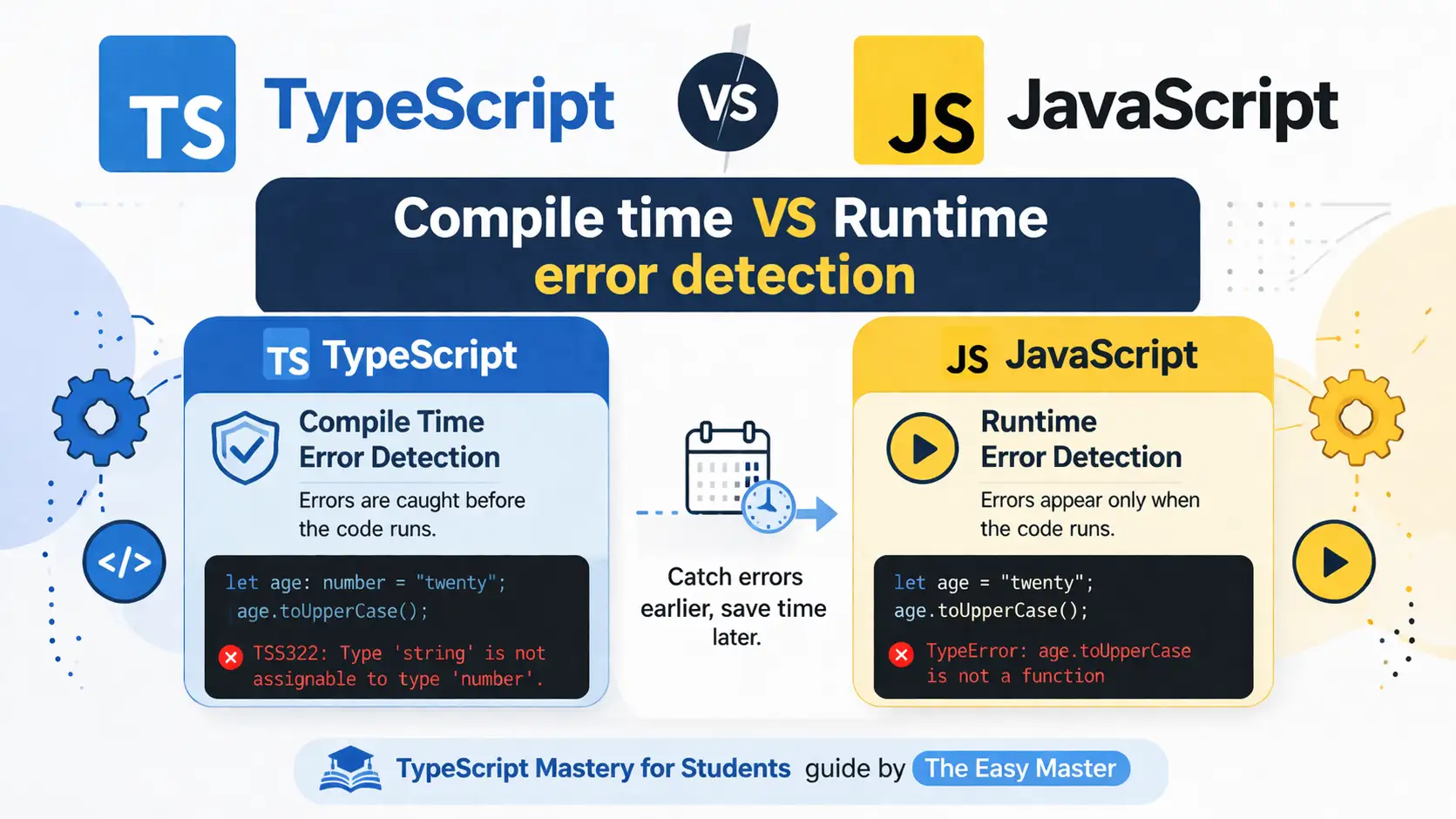
चलो एक table में compare करते हैं। ये table आप interview में भी use कर सकते हो:
| Feature | JavaScript | TypeScript |
|---|---|---|
| Type System | Dynamic (runtime पता चलता है) | Static (लिखते time पता चलता है) |
| Error Detection | Runtime में पता चलता है | Compile time में ही पता चल जाता है |
| Tooling Support | Limited (autocomplete कम) | Excellent (IntelliSense, autocomplete) |
| Learning Curve | आसान | थोड़ा steep (लेकिन worth it है) |
| Compilation | नहीं होता (interpreted) | JavaScript में compile होता है |
| Use Case | Small scripts, DOM manipulation | Large applications, enterprise projects |
| Community | बहुत बड़ा (सबसे ज़्यादा) | Fast growing (Microsoft backed) |
Example से समझो:
JavaScript:
function add(a, b) {
  return a + b;
}
add(5, "10");  // "510" (string concatenation) – ये expected नहीं था ना?
TypeScript:
function add(a: number, b: number): number {
  return a + b;
}
add(5, "10");  // ❌ ERROR – "string" को number में नहीं डाल सकते
Bottom line: JavaScript छोटे project के लिए ठीक है। लेकिन TypeScript mastery for students career के लिए game-changer है।
4. TypeScript कैसे Install करें (Step-by-Step)
दोस्तों, अब practical में आते हैं। बहुत simple है। मन में डर मत रखो।
Step 1: Node.js Install करो
- जाओ nodejs.org पे
- LTS version download करो और install करो
- Verify करने के लिए terminal में लिखो:
node -v
Step 2: TypeScript Install करो (Globally)
Terminal / Command Prompt खोलो और लिखो:
npm install -g typescriptStep 3: Verify Installation
tsc --versionVersion 5.x या 6.x आना चाहिए (2026 में latest stable)
Step 4: VS Code Install करो (Recommended)
VS Code में TypeScript का best support है। code.visualstudio.com से download करो।
Pro tip: VS Code में TypeScript automatically detect हो जाता है। कुछ extra setup नहीं चाहिए।
5. आपका पहला TypeScript Program
चलो “Hello World” से शुरू करते हैं – लेकिन TypeScript style में।
Step 1: एक folder बनाओ – first-typescript-project
Step 2: VS Code में folder खोलो
Step 3: नया file बनाओ hello.ts (.ts extension ज़रूरी है)
Step 4: ये code लिखो:
// ये आपका पहला TypeScript program है
let message: string = "Namaste Doston! The Easy Master se";

// Function with type annotations
function greet(name: string): string {
  return `${message}, ${name}!`;
}

let userName: string = "Rahul";
console.log(greet(userName));
Step 5: Compile करो (TypeScript → JavaScript)
Terminal में लिखो:
tsc hello.tsStep 6: Run करो
अब एक hello.js file बन गई होगी। Use run करो:
node hello.jsOutput आएगा: Namaste Doston! The Easy Master se, Rahul!
मज़ा आया? Itna simple है यार। बस थोड़ा syntax different है।
6. Basic Types – जो रोज़ काम आएंगे
TypeScript mastery for students में ये 7 types आपको रोज़ use करने पड़ेंगे। इन्हें याद कर लो:
6.1 String
let collegeName: string = "IIT Bombay";
let branch: string = 'Computer Science';
6.2 Number
let age: number = 20;
let cgpa: number = 8.5;
let negativeExample: number = -10;
6.3 Boolean
let isPlaced: boolean = true;
let hasBacklog: boolean = false;
6.4 Array
// Do तरीके से लिख सकते हो
let subjects: string[] = ["Maths", "DSA", "OS"];
let marks: Array<number> = [85, 92, 78];
6.5 Tuple (Fixed length array)
let student: [string, number, boolean] = ["Rahul", 21, true];
// Index 0: string, Index 1: number, Index 2: boolean
6.6 Any (जब type पता नहीं – कम use करो)
let something: any = "Hello";
something = 42;  // Allowed है, लेकिन avoid करो
6.7 Void (Function कुछ return नहीं करता)
function printMessage(msg: string): void {
  console.log(msg);
  // कुछ return नहीं करता
}
मेरी सलाह:
anytype का use कम से कम करो। TypeScript का पूरा फ़ायदा तभी आएगा जब आप strict types use करोगे।
7. Functions & Type Annotations
Functions ही real power है TypeScript में। देखो कैसे लिखते हैं:
7.1 Basic Function with Types
// Parameter types और return type दोनों बताना ज़रूरी नहीं (लेकिन अच्छा practice है)
function calculatePercentage(obtained: number, total: number): number {
  return (obtained / total) * 100;
}

let result: number = calculatePercentage(450, 500);
console.log(result); // 90
7.2 Optional Parameters (?)
// ? लगाने से parameter optional हो जाता है
function greetStudent(name: string, branch?: string): string {
  if (branch) {
    return `Hello ${name} from ${branch} branch`;
  }
  return `Hello ${name}`;
}

console.log(greetStudent("Priya"));  // Hello Priya
console.log(greetStudent("Priya", "CSE"));  // Hello Priya from CSE branch
7.3 Default Parameters
function applyDiscount(price: number, discount: number = 10): number {
  return price - (price * discount / 100);
}

console.log(applyDiscount(1000));  // 900 (10% discount default)
console.log(applyDiscount(1000, 20));  // 800 (20% discount)
7.4 Arrow Functions (Modern way)
// TypeScript में arrow function भी same है, बस types add करो
const addNumbers = (a: number, b: number): number => a + b;

const isEven = (num: number): boolean => num % 2 === 0;
8. Interfaces और Types – Real Power
ये section थोड़ा important है। ध्यान से पढ़ो। Interfaces TypeScript की superpower है।
8.1 Interface क्या है?
Interface एक “contract” है जो बताता है कि object की shape कैसी होनी चाहिए।
Real-life example: मान लो आप एक student का data store करना चाहते हो। JavaScript में कोई check नहीं है कि name, age, course होना चाहिए। TypeScript interface use करो:
interface Student {
  name: string;
  age: number;
  course: string;
  isActive?: boolean;  // ? optional है
}

// Ab ये object interface को follow करेगा
let student1: Student = {
  name: "Amit",
  age: 21,
  course: "BCA",
  isActive: true
};

let student2: Student = {
  name: "Neha",
  age: 20,
  course: "B.Tech CSE"
  // isActive optional है, तो चलता है
};

// ❌ ये error देगा क्योंकि age missing है
let student3: Student = {
  name: "Raj",
  course: "B.Sc"
};  // ERROR!
8.2 Interface with Functions
interface CollegeProject {
  title: string;
  duration: number;  // months में
  getDetails(): string;  // function जो string return करेगा
}

let myProject: CollegeProject = {
  title: "AI Attendance System",
  duration: 6,
  getDetails: function() {
    return `${this.title} - ${this.duration} months project`;
  }
};

console.log(myProject.getDetails());
8.3 Type Aliases (type vs interface)
कई बार confusion होता है। Simple rule:
Use interface when | Use type when |
|---|---|
| Object की shape define करनी हो | Union types (OR) बनाने हो |
| Class implement करे | Primitive types का alias चाहिए |
| Extend करना हो (inheritance) | Tuple type define करनी हो |
// type का use – union types के लिए
type Status = "pass" | "fail" | "pending";
type StudentID = string | number;

let myStatus: Status = "pass";
let rollNo: StudentID = "CS2024";  // या 101
9. Classes – Object-Oriented Programming
अगर आप OOPs जानते हो (Java, C++ से), तो TypeScript classes बहुत easy लगेगी।
9.1 Basic Class
class StudentRecord {
  name: string;
  rollNo: number;

  constructor(name: string, rollNo: number) {
    this.name = name;
    this.rollNo = rollNo;
  }

  getInfo(): string {
    return `${this.name} (Roll No: ${this.rollNo})`;
  }
}

let student = new StudentRecord("Kavya", 42);
console.log(student.getInfo());
9.2 Access Modifiers (public, private, protected)
ये चीज़ JavaScript में नहीं है – TypeScript special feature है।
class BankAccount {
  public accountHolder: string;  // सब जगह accessible
  private balance: number;       // सिर्फ class के अंदर
  protected bankCode: string;    // class और child classes में


  constructor(holder: string, initialBalance: number) {
    this.accountHolder = holder;
    this.balance = initialBalance;
    this.bankCode = "SBIN001";
  }

  public deposit(amount: number): void {
    this.balance += amount;
  }

  private calculateInterest(): number {
    return this.balance * 0.04;
  }

  public getBalance(): number {
    return this.balance;
  }
}

let myAccount = new BankAccount("Rahul", 5000);
myAccount.deposit(1000);
console.log(myAccount.getBalance()); // 6000
// myAccount.balance ❌ error (private है)
10. Advanced Types (थोड़ा Hatke)
TypeScript mastery for students के लिए ये advanced concepts का basic idea होना चाहिए। Interview में पूछ सकते हैं।
10.1 Union Types (OR)
let id: string | number;
id = "ABC123";   // ✅
id = 456;        // ✅
id = true;       // ❌ error (boolean allowed नहीं है)
10.2 Intersection Types (AND)
interface Person {
  name: string;
  age: number;
}

interface Employee {
  empId: number;
  salary: number;
}

type EmployeePerson = Person & Employee;

let emp: EmployeePerson = {
  name: "Neha",
  age: 25,
  empId: 101,
  salary: 50000
};
10.3 Generics (Reusable Code)
Generics थोड़ा advanced है, लेकिन powerful है।
// Generic function जो किसी भी type के array को reverse करेगा
function reverseArray<T>(items: T[]): T[] {
  return items.reverse();
}

let numbers = reverseArray<number>([1, 2, 3, 4]);  // [4,3,2,1]
let names = reverseArray<string>(["Amit", "Priya", "Raj"]);  // ["Raj","Priya","Amit"]
मेरी advice: पहले basic types, interfaces और classes अच्छे से सीखो। Generics बाद में आएगा automatically।
11. React + TypeScript – Modern Project Setup
2026 में अगर React सीख रहे हो तो TypeScript के साथ सीखो। Placement में यही पूछते हैं।
11.1 New React + TypeScript Project
# Vite (fastest way)
npm create vite@latest my-app -- --template react-ts

# या फिर Next.js (production grade)
npx create-next-app@latest my-app --typescript
11.2 Functional Component with TypeScript
// StudentCard.tsx
interface StudentCardProps {
  name: string;
  age: number;
  branch: string;
  onMarkAttendance?: () => void;  // optional function
}

const StudentCard: React.FC<StudentCardProps> = ({ name, age, branch, onMarkAttendance }) => {
  return (
    <div className="card">
      <h2>{name}</h2>
      <p>Age: {age} | Branch: {branch}</p>
      {onMarkAttendance && (
        <button onClick={onMarkAttendance}>Mark Attendance</button>
      )}
    </div>
  );
};

export default StudentCard;
11.3 useState with TypeScript
import { useState } from 'react';

interface Task {
  id: number;
  title: string;
  completed: boolean;
}

const TaskManager = () => {
  const [tasks, setTasks] = useState<Task[]>([]);
  const [newTask, setNewTask] = useState<string>("");

  const addTask = () => {
    const task: Task = {
      id: Date.now(),
      title: newTask,
      completed: false
    };
    setTasks([...tasks, task]);
    setNewTask("");
  };

  return (
    <div>
      <input
        value={newTask}
        onChange={(e) => setNewTask(e.target.value)}
      />
      <button onClick={addTask}>Add Task</button>
    </div>
  );
};
12. Common Mistakes + Solutions (मेरा Experience)
मैंने खुद ये सब mistakes की हैं। आप मत करना।
Mistake 1: any type का overuse
// ❌ गलत
let data: any = fetchData();

// ✅ सही
interface APIResponse {
  userId: number;
  name: string;
}
let data: APIResponse = fetchData();
Mistake 2: Null/Undefined handle नहीं करना
// ❌ गलत
function getLength(str: string | null): number {
  return str.length;  // अगर str null हुआ तो error
}

// ✅ सही (optional chaining)
function getLength(str: string | null): number {
  return str?.length ?? 0;
}
Mistake 3: Type assertions का गलत use
// ❌ गलत (forcing type)
let value: unknown = "hello";
let length = (value as string).length;  // ठीक है लेकिन...

// ✅ सही (type guard)
if (typeof value === "string") {
  let length = value.length;
}
Mistake 4: Compiler strict mode बंद करना
tsconfig.json में ये रखो:
{
  "compilerOptions": {
    "strict": true,  // ये ON रखो
    "noImplicitAny": true,
    "strictNullChecks": true
  }
}
मेरी guarantee: अगर आप
strict: trueरखते हो, तो 90% common bugs compile time में ही catch हो जाएंगे।
13. Practical Resources + Cheatsheet
TypeScript mastery for students के लिए ये resources bookmarks कर लो:
Official Resources
- TypeScript Official Handbook – Best documentation
- TypeScript Playground – बिना install किए try करो
- FreeCodeCamp TypeScript Course – Free 5 hour course
- Total TypeScript – Matt Pocock का free resources
Additional Resources
- Master ES6: A Complete Feature Guide with Examples
- Top 10 React Libraries and Tools Every Developer Must Know in 2025
- Top 10 Free APIs for Practice in 2026
- JavaScript Deep Dive 2026: Closures, Promises & Event Loop
Quick Cheatsheet (Copy-paste ready)
// ========== BASIC TYPES ==========
let name: string = "Raj";
let age: number = 20;
let isStudent: boolean = true;
let hobbies: string[] = ["coding", "gaming"];
let person: [string, number] = ["Raj", 20]; // tuple

// ========== INTERFACE ==========
interface User {
  id: number;
  name: string;
  email?: string; // optional
}

// ========== FUNCTION ==========
const greet = (name: string): string => {
  return `Hello ${name}`;
};

// ========== UNION TYPE ==========
let response: string | number = "success";

// ========== GENERIC ==========
function identity<T>(arg: T): T {
  return arg;
}

// ========== TYPE GUARD ==========
if (typeof variable === "string") {
  // variable is string here
}
AI Prompts for TypeScript Practice
Copy-paste करो ChatGPT / Claude में:
“Act as a TypeScript tutor. Give me 5 beginner-friendly coding exercises for TypeScript interfaces and functions. Each exercise should have a problem statement and expected output. I’m an Indian B.Tech student.”
“Convert this JavaScript code to TypeScript with proper types: [paste your JS code]”
14. FAQ (10 सबसे Common Questions)
Q1: क्या मुझे पहले JavaScript सीखना ज़रूरी है?
हाँ, बिल्कुल। TypeScript JavaScript का superset है। पहले JavaScript basics (variables, loops, functions, arrays, objects) अच्छे से सीखो। 2-3 हफ्ते लगेंगे। फिर TypeScript सीखना 1 हफ्ते में हो जाएगा।
Q2: क्या TypeScript placement interviews में पूछते हैं?
अब हाँ, especially mid-size और large companies में। React + TypeScript का combination बहुत पूछा जाता है। Expect करो कि interview में basic TypeScript questions आएंगे – interfaces, types, generics basics.
Q3: TypeScript slow है क्या?
नहीं। TypeScript compile होता है JavaScript में। Runtime performance same है। सिर्फ compile time में थोड़ा extra time लगता है (milliseconds), जो worth it है।
Q4: Mobile apps में TypeScript use कर सकते हैं?
हाँ। React Native (mobile apps) TypeScript support करता है। Ionic framework भी TypeScript use करता है।
Q5: क्या backend में TypeScript use होता है?
बिल्कुल। Node.js + Express के साथ TypeScript common हो रहा है। NestJS (backend framework) तो complete TypeScript में लिखा है।
Q6: TypeScript सीखने में कितना time लगेगा?
अगर daily 1-2 घंटे दो, तो 2-3 हफ्ते में comfortable हो जाओगे। Mastery के लिए 2-3 महीने लगते हैं real projects में use करके।
Q7: क्या TypeScript के लिए extra package.json setup चाहिए?
हाँ, थोड़ा setup है। लेकिन modern tools (Vite, Next.js, Create React App) “typescript” template provide करते हैं – सब automatic हो जाता है।
Q8: TypeScript और JavaScript एक साथ लिख सकते हैं?
हाँ। TypeScript JavaScript को accept करता है। आप slowly migrate कर सकते हो existing JS project को TS में।
Q9: क्या fresher के लिए TypeScript necessary है?
Necessary नहीं, लेकिन advantage ज़रूर है। अगर दो candidates same हैं और एक को TypeScript आता है – company वही choose करेगी।
Q10: TypeScript के लिए कौनसा editor best है?
VS Code (Microsoft का editor) – क्योंकि Microsoft ने TypeScript बनाया है। VS Code में built-in TypeScript support है।
15. Conclusion – अब आगे क्या?
दोस्तों, इस article में हमने cover किया:
✅ TypeScript क्या है और क्यों 2026 में सीखना ज़रूरी है
✅ JavaScript vs TypeScript – real differences with examples
✅ Installation और first program
✅ Basic types, functions, interfaces, classes
✅ React के साथ TypeScript कैसे use करें
✅ Common mistakes (मैंने जो किए) और उनके solutions
✅ Ready-to-use cheatsheet और resources
मेरा personal advice: आज ही अपने एक छोटे JavaScript project को लो (todo list, calculator, weather app) और use TypeScript में convert करो। Practice से ही mastery आएगी।
TypeScript mastery for students कोई rocket science नहीं है। बस एक week consistent रहो। पहले 2-3 दिन थोड़ा awkward लगेगा – types लिखना, errors देखना। लेकिन उसके बाद पता चलेगा – “यार, ये तो JavaScript से भी आसान है!”
अब आपकी बारी है: Comment में बताओ – आपने TypeScript try किया? कौनसा concept सबसे helpful लगा? या फिर कोई doubt हो तो पूछो।
The Easy Master के साथ, coding बनी easy!