नमस्ते दोस्तों! 🙏
स्वागत है The Easy Master पर!
क्या तुमने कभी सोचा है – जब project बड़ा हो जाता है, तो सारा code एक file में कैसे manage होगा?
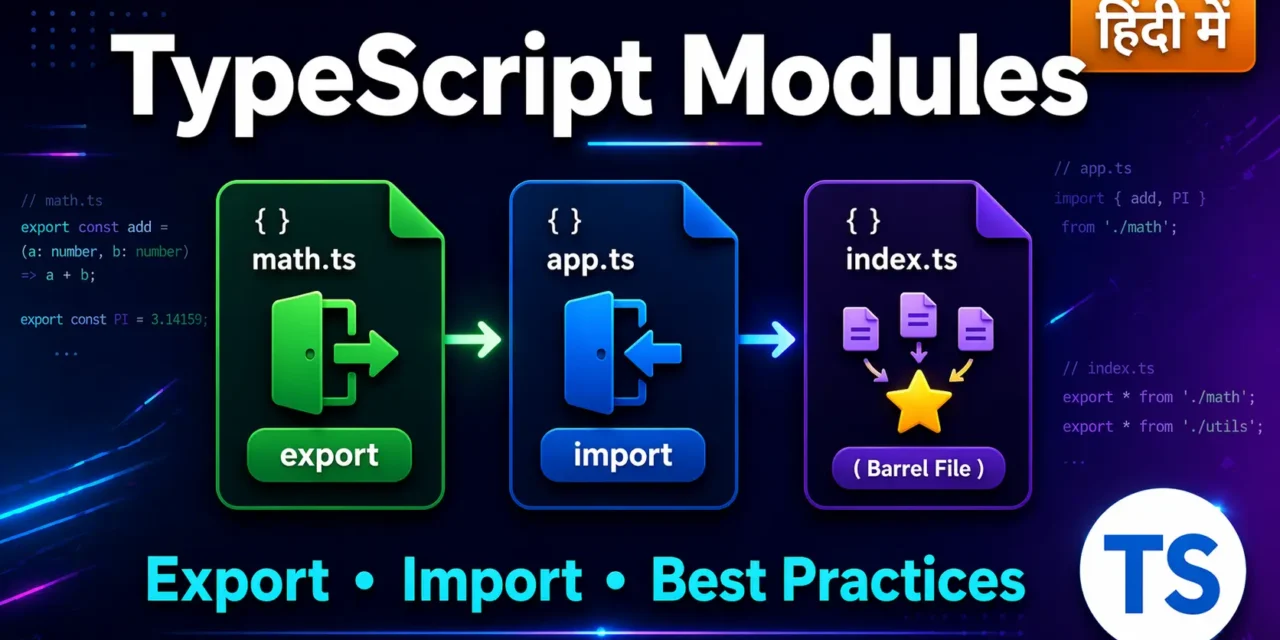
TypeScript Modules Export Import Best Practices तुम्हें सिखाएगा:
- Code को multiple files में कैसे organize करें
- एक file की चीज़ें दूसरी file में कैसे use करें
exportऔरimportके सभी तरीके- Namespaces क्या होते हैं और कब use करें
- Best practices jo real projects में follow होती हैं
Real-world scenario:
जब तुम Angular, React, ya Node.js project बनाते हो, तो हर component, service, utility – सब अलग-अलग files में होता है। उन्हें आपस में जोड़ने के लिए modules का use होता है।
तो चलिए शुरू करते हैं – TypeScript Modules Export Import Best Practices सीखने का सफर! 🚀
Table of Contents
1. TypeScript Modules Export Import Best Practices – Introduction
Module का मतलब है – code का एक independent block जो अपनी file में रहता है।
JavaScript/TypeScript में हर file एक module होती है (जब तक तुम module system use nahi kar rahe).
Kyun use karein modules?
| Benefit | Explanation |
|---|---|
| Organization | Code अलग-अलग files में बंट जाता है |
| Reusability | एक module को multiple jagah use kar sakte ho |
| Maintainability | Bug fix sirf एक file में करो – सब jagah automatically fix |
| Namespace pollution | Variables global scope में नहीं जाते |
| Collaboration | Multiple developers एक साथ अलग-अलग files पर काम कर सकते हैं |
TypeScript Modules Export Import Best Practices में आज हम यही सब सीखेंगे।
2. Modules क्या होते हैं?
TypeScript में दो तरह के modules होते हैं:
2.1 Internal Modules (Namespaces) – पुराना तरीका
पहले TypeScript में namespace use होता था। अब less preferred है।
// old-style.ts
namespace Validation {
  export interface StringValidator {
    isValid(s: string): boolean;
  }

  export class EmailValidator implements StringValidator {
    isValid(s: string): boolean {
      return s.includes("@");
    }
  }
}
2.2 External Modules (ES Modules) – आधुनिक तरीका (Recommended)
आजकल ES Modules use होते हैं – export और import के साथ।
// math.ts (Module 1)
export function add(a: number, b: number): number {
  return a + b;
}

export const PI = 3.14159;

// app.ts (Module 2)
import { add, PI } from "./math.js";
console.log(add(5, 3)); // 8
console.log(PI);        // 3.14159
TypeScript Modules Export Import Best Practices में हम सिर्फ ES Modules पर focus करेंगे।
3. Export के सभी तरीके
3.1 Individual Named Exports
Har चीज़ को अलग से export लगाओ:
// utils.ts
export function capitalize(str: string): string {
  return str.charAt(0).toUpperCase() + str.slice(1);
}

export const MAX_SIZE = 1024;

export interface User {
  id: number;
  name: string;
}

export class Logger {
  log(message: string): void {
    console.log(`[LOG]: ${message}`);
  }
}
3.2 Single Export Statement – एक साथ सब export
// shapes.ts
function circleArea(r: number): number {
  return Math.PI * r ** 2;
}

function rectangleArea(l: number, b: number): number {
  return l * b;
}

const VERSION = "1.0.0";

export { circleArea, rectangleArea, VERSION };
3.3 Export with Alias – नाम बदलकर export
// api.ts
function fetchUsers() { }
function fetchProducts() { }

export {
  fetchUsers as getUsers,
  fetchProducts as getProducts
};
3.4 Default Export – एक module से एक main चीज़
Default export – एक module में सिर्फ एक default export हो सकता है।
// calculator.ts
export default class Calculator {
  add(a: number, b: number): number {
    return a + b;
  }

  subtract(a: number, b: number): number {
    return a - b;
  }
}

// Normal export bhi saath mein kar sakte ho
export const VERSION = "2.0.0";
3.5 Re-exporting – दूसरे module की चीज़ें फिर से export
// components/index.ts
export { Button } from "./Button.js";
export { Card } from "./Card.js";
export { Modal } from "./Modal.js";

// Ya ek saath
export * from "./Button.js";
export * from "./Card.js";
4. Import के सभी तरीके
4.1 Named Import – Specific चीज़ें import
// app.ts
import { capitalize, MAX_SIZE, User, Logger } from "./utils.js";

const name = capitalize("rahul"); // "Rahul"
console.log(MAX_SIZE); // 1024
4.2 Import with Alias – नाम बदलकर import
import { capitalize as toTitleCase, MAX_SIZE as LIMIT } from "./utils.js";

console.log(toTitleCase("hello")); // "Hello"
console.log(LIMIT); // 1024
4.3 Import Everything – सब कुछ एक object में
import * as Utils from "./utils.js";

console.log(Utils.capitalize("rahul"));
console.log(Utils.MAX_SIZE);
const logger = new Utils.Logger();
4.4 Default Import – Default export को import
import Calculator, { VERSION } from "./calculator.js";

const calc = new Calculator();
console.log(calc.add(5, 3)); // 8
console.log(VERSION);        // "2.0.0"
4.5 Side-effects only import – सिर्फ code execute करने के लिए
// Kuch export nahi hai, sirf code run karna hai
import "./init.js";
import "some-library/polyfill";
5. Default Export vs Named Export – कब क्या use करें?
| Feature | Default Export | Named Export |
|---|---|---|
| Syntax | export default X | export const X |
| Import | import X from "./file" | import { X } from "./file" |
| Per module | Sirf 1 default | Unlimited named |
| Auto-complete | IDE में कम help | Better auto-complete |
| Renaming on import | Kuch bhi naam de sakte ho | Alias with as keyword |
| Tree shaking | Sometimes tricky | Better support |
| Recommended for | Main thing of module (class, main function) | Utilities, helpers, multiple exports |
Best Practice Recommendation:
// ✅ Recommended – Named exports for most cases
// math.ts
export function add(a: number, b: number) { return a + b; }
export function subtract(a: number, b: number) { return a - b; }
export const PI = 3.14;

// ✅ Default export – sirf jab ek hi main cheez ho
// logger.ts
export default class Logger { }
export const LOG_LEVEL = "info"; // Extra exports bhi ho sakte hain
6. Namespaces – पुराना तरीका (कब use करें?)
Namespaces TypeScript का old module system है। अब ES Modules better हैं।
Namespace syntax:
// geometry.ts
namespace Geometry {
  export interface Point {
    x: number;
    y: number;
  }

  export function distance(a: Point, b: Point): number {
    return Math.hypot(a.x - b.x, a.y - b.y);
  }

  // Without export – private hai
  function helper() { }
}

// Use karna
const p1: Geometry.Point = { x: 0, y: 0 };
const p2: Geometry.Point = { x: 3, y: 4 };
console.log(Geometry.distance(p1, p2)); // 5
Namespace kab use karein?
- ❌ Avoid in new projects – ES Modules use करो
- ✅ Only use when: Old codebase maintain kar rahe ho, ya global script environment mein kaam kar rahe ho (no module bundler)
Namespace vs Module – Comparison:
// ❌ Old way – Namespace
namespace Utils {
  export function helper() { }
}

// ✅ New way – ES Module (export/import)
// utils.ts
export function helper() { }

// app.ts
import { helper } from "./utils.js";
7. Module Resolution Strategies
TypeScript two module resolution strategies:
7.1 Classic (पुराना)
Only for backward compatibility. Use नहीं करना।
7.2 Node (Recommended)
Modern approach – Node.js style resolution.
tsconfig.json mein set karo:
{
  "compilerOptions": {
    "module": "ESNext",
    "moduleResolution": "node",
    "baseUrl": "./src",
    "paths": {
      "@utils/*": ["utils/*"],
      "@components/*": ["components/*"]
    }
  }
}
Path Mapping – Import को clean बनाओ:
// Without path mapping – ugly
import { helper } from "../../../utils/helper.js";

// With path mapping – clean
import { helper } from "@utils/helper.js";
8. Best Practices (Most Important) ⭐
TypeScript Modules Export Import Best Practices में ये rules follow करो:
✅ DO THIS:
// 1. Named exports prefer करो (default se zyada)
// user.service.ts
export function getUser() { }
export function createUser() { }
export interface User { }

// 2. Barrel files (index.ts) use करो
// features/user/index.ts
export * from "./user.service.js";
export * from "./user.types.js";
export * from "./user.utils.js";

// 3. Import at top of file
import { something } from "./module.js";
// then code...

// 4. Type imports ke liye 'import type' use करो
import type { User } from "./types.js";
import { getUser } from "./api.js"; // Value import

// 5. Relative imports only for same package
import { helper } from "./utils/helper.js"; // ✅
import { something } from "../other.js";     // ✅

// 6. Absolute imports for external packages
import React from "react";        // ✅
import lodash from "lodash";      // ✅
❌ AVOID THIS:
// 1. Namespaces mat use karo new projects mein
namespace Utils { } // ❌

// 2. Default export with any random name – confusion
import MyComponent from "./Component"; // ❌ (Kya hai ye?)

// 3. Deep relative imports (../../../..)
import { x } from "../../../../../../utils/x.js"; // ❌

// 4. Importing everything unnecessarily
import * as Everything from "./huge-module.js"; // ❌

// 5. Circular dependencies
// fileA.ts imports from fileB.ts
// fileB.ts imports from fileA.ts – ❌
Project Structure Example:
text
src/
├── index.ts                 # Main entry
├── features/
│   ├── auth/
│   │   ├── index.ts        # Barrel export
│   │   ├── auth.service.ts
│   │   ├── auth.types.ts
│   │   └── auth.utils.ts
│   └── user/
│       ├── index.ts
│       ├── user.service.ts
│       └── user.types.ts
├── shared/
│   ├── index.ts
│   ├── utils/
│   └── constants/
└── types/
    └── global.d.ts
9. Real-world Project Structure
Example: E-commerce API with Modules
// src/types/common.types.ts
export interface ApiResponse<T> {
  success: boolean;
  data?: T;
  error?: string;
}

export type ID = string | number;

// src/features/product/product.types.ts
import type { ID, ApiResponse } from "../../types/common.types.js";

export interface Product {
  id: ID;
  name: string;
  price: number;
}

export type ProductResponse = ApiResponse<Product>;

// src/features/product/product.service.ts
import type { Product, ProductResponse } from "./product.types.js";
import { apiClient } from "../../shared/api/client.js";

export async function getProduct(id: ID): Promise<ProductResponse> {
  return apiClient.get(`/products/${id}`);
}

export function calculateDiscount(price: number, percent: number): number {
  return price - (price * percent / 100);
}

// src/features/product/index.ts (Barrel file)
export * from "./product.types.js";
export * from "./product.service.js";

// src/app.ts (Main file)
import { getProduct, calculateDiscount, type Product } from "./features/product/index.js";

async function main() {
  const response = await getProduct(101);
  if (response.success && response.data) {
    const discounted = calculateDiscount(response.data.price, 10);
    console.log(`Discounted price: ${discounted}`);
  }
}
10. Common Mistakes + Solutions
Mistake 1: .ts extension ke saath import
// ❌ Wrong
import { x } from "./file.ts";

// ✅ Correct – JavaScript extension use करो (compiled output)
import { x } from "./file.js";
Mistake 2: Circular Dependencies
// a.ts
import { b } from "./b.js";
export const a = "A";

// b.ts
import { a } from "./a.js"; // ❌ Circular!
export const b = "B";
Solution: Shared logic को तीसरी file में निकालो।
// shared.ts
export const shared = "shared";

// a.ts
import { shared } from "./shared.js";

// b.ts
import { shared } from "./shared.js";
Mistake 3: Default export का गलत नाम देना
// component.tsx
export default function Button() { }

// app.tsx
import MyButton from "./component.js"; // Works but confusing

// ✅ Better – same name use करो
import Button from "./component.js";
Mistake 4: import type भूलना
// ❌ Type import as value – runtime error nahi but waste
import { User, getUsers } from "./user.js";

// ✅ Separate type and value imports
import type { User } from "./user.js";
import { getUsers } from "./user.js";
11. Quick Cheat Sheet
| Export Type | Syntax | Import Syntax |
|---|---|---|
| Named | export function fn() | import { fn } |
| Named (alias) | export { x as y } | import { y } or import { x as y } |
| Default | export default class C | import C (any name) |
| Mixed | export default C; export const x | import C, { x } |
| Re-export | export * from "./m" | import { x } from "./index" |
| Type only | export type T | import type { T } |
| Namespace | namespace N { export fn } | import { N } or /// <reference /> |
12. FAQ (8 Questions)
Q1: TypeScript Modules Export Import Best Practices में सबसे जरूरी rule क्या है?
Named exports prefer करो, default exports sirf तभी जब module में सच में एक ही main cheez हो। Barrel files (index.ts) use करो।
Q2: import type क्यों use करें?import type compile time पर हट जाता है – bundle size kam hota है और runtime performance better।
Q3: Namespaces vs Modules – क्या अब भी Namespaces use करना चाहिए?
New projects में NO। Sirf old code maintain करते time। ES Modules (export/import) is the standard.
Q4: Circular dependency कैसे detect करें?
Tools like madge (npx madge --circular src/) use करो। Ya TypeScript compiler sometimes error dega।
Q5: Barrel files (index.ts) के कोई drawbacks हैं?
Haan – सब कुछ एक साथ import हो सकता है, जिससे bundle size बढ़ सकता है। Large projects में selective exports better हैं।
Q6: export * from और export { x } from में क्या अंतर है?export * from – sab kuch re-export (except default). export { x } – sirf specific cheezein re-export।
Q7: Path mappings (@utils/*) kaise setup karein?tsconfig.json में paths option use करो और bundler (Webpack/Vite) में भी configure करो।
Q8: Node.js mein ES Modules vs CommonJS – TypeScript mein kya use karein?
TypeScript mein "module": "ESNext" use करो और package.json में "type": "module" set करो। CommonJS (require) पुराना तरीका है।
13. Conclusion + Call to Action
बहुत बढ़िया दोस्तों! आज हमने TypeScript Modules Export Import Best Practices को पूरी detail में समझा।
Quick Recap:
- Modules – code को multiple files में organize करना
- Named Export – most preferred –
export function fn() - Default Export – sirf 1 per module –
export default class - Barrel files –
index.tsसे multiple exports को group करना - Namespaces – पुराना तरीका, new projects में avoid करो
- Best practices –
import typeuse करो, circular dependencies avoid करो, clean import paths रखो
Mera personal experience:
जब मैंने पहली बार TypeScript Modules Export Import Best Practices follow करना शुरू किया, तो मेरा code 70% cleaner हो गया। पहले मैं सब कुछ एक file में लिखता था – अब 50-60 छोटी files हैं, हर file का एक clear purpose है।
अब तुम्हारी बारी है!
नीचे comment में बताओ:
- तुम named export prefer करोगे या default export? क्यों?
- क्या तुमने कभी barrel files (
index.ts) use की हैं? - अगला topic क्या चाहिए? (Conditional Types? Mapped Types? Template Literal Types?)
The Easy Master पर बने रहो। Happy Coding! 💻🚀
Resources
- TypeScript Modules Official Documentation
- ES Modules – MDN Web Docs
- TypeScript Module Resolution Guide
Additional Resources
- Master ES6: A Complete Feature Guide with Examples
- Top 10 React Libraries and Tools Every Developer Must Know in 2025
- Top 10 Free APIs for Practice in 2026
- JavaScript Deep Dive 2026: Closures, Promises & Event Loop
- TypeScript Mastery in Hindi | Web Development 2026 Guide
- TypeScript Interfaces vs Type Alias in Hindi – Advanced Examples के साथ 2026
- TypeScript Generics in Hindi – बिना डर के लिखो Flexible Code