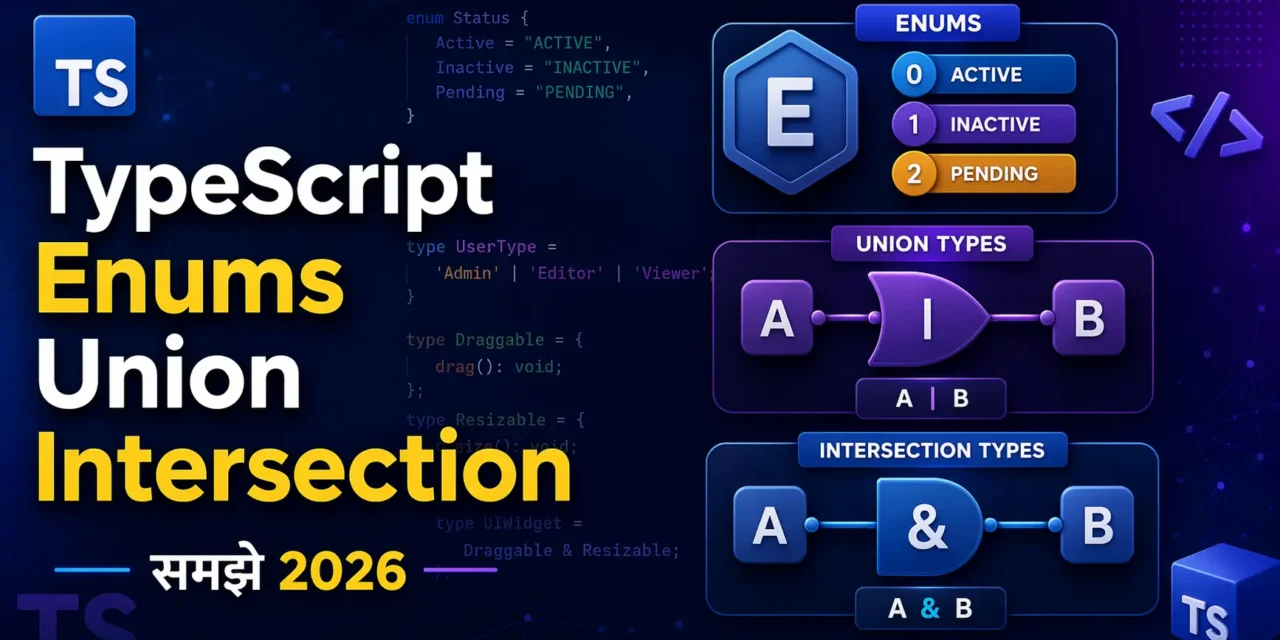
नमस्ते दोस्तों! 🙏
स्वागत है The Easy Master पर!
aj ki TypeScript enums union intersection guide mein hum teen powerful concepts ko detail mein samjhenge. TypeScript enums union intersection mein seekhne ke liye ye article bilkul perfect hai
क्या तुमने कभी TypeScript में ऐसा code देखा है:
type Status = "loading" | "success" | "error";
enum Color { Red, Green, Blue }
type ApiResponse = { data: string } | { error: string };
और सोचा है – “ये | और & क्या करते हैं? Enums क्यों use करते हैं?”
चिंता मत करो दोस्तों!
आज हम TypeScript के तीन सबसे important topics को detail में समझेंगे:
- Union Types –
|से multiple types को combine करना - Intersection Types –
&से types को merge करना - Enums – named constants का group बनाना
ये तीनों concepts real-world projects में रोज़ काम आते हैं। चाहे तुम API response handle कर रहे हो, या फिर game development कर रहे हो – ये topics हर जगह useful हैं।
क्या सीखोगे इस article में?
- Union Types से type-safe flexible code लिखना
- Intersection Types से objects को merge करना
- Enums के सभी types (numeric, string, const, ambient)
- Real-world examples के साथ practice
- Common mistakes aur unke solutions
तो चलिए शुरू करते हैं – Enums, Union और Intersection Types का मास्टर बनने का सफर! 🚀
Table of Contents
1. Union Types – | का जादू
Union Type का मतलब है – “या तो ये type हो सकता है, या वो”।
Syntax: type A = string | number;
यानी A type की value string हो सकती है, या number – दोनों allowed हैं।
Basic Examples
// 1. String ya Number
type ID = string | number;
let userId: ID;

userId = "abc123";   // ✅ allowed
userId = 101;        // ✅ allowed
// userId = true;    // ❌ Error – boolean allowed nahi hai

// 2. Multiple types
type Status = "loading" | "success" | "error";
let currentStatus: Status;

currentStatus = "loading";  // ✅
currentStatus = "success";  // ✅
currentStatus = "error";    // ✅
// currentStatus = "idle";  // ❌ Error – "idle" allowed nahi

// 3. Function parameters mein use
function printId(id: number | string) {
  console.log("Your ID is:", id);
}

printId(101);      // ✅
printId("abc123"); // ✅
Type Narrowing – TypeScript को सही type बताना
Jab tum union type use karte ho, to TypeScript automatically narrow nahi kar sakta ki actual value kaunsi type ki hai. Tumhe check karna padta hai.
function processValue(value: string | number) {
  // ❌ Error – toUpperCase sirf string mein hota hai
  // console.log(value.toUpperCase());

  // ✅ Solution – typeof check karo
  if (typeof value === "string") {
    console.log(value.toUpperCase()); // Ab allowed hai
  } else {
    console.log(value * 2); // number wala case
  }
}
Array के साथ Union Types
// Array जिसमें strings और numbers दोनों हो सकते हैं
let mixedArray: (string | number)[] = ["hello", 42, "world", 100];

// Union type का array
type StringOrNumberArray = (string | number)[];
const data: StringOrNumberArray = [1, "two", 3, "four"];
Literal Union Types (Most Useful)
Literal types का मतलब है – specific values (jaise "loading" या true) को type बनाना।
// 1. String literals
type Direction = "north" | "south" | "east" | "west";
let move: Direction = "north"; // ✅
// move = "up"; // ❌ Error

// 2. Number literals
type DiceRoll = 1 | 2 | 3 | 4 | 5 | 6;
let roll: DiceRoll = 4; // ✅
// roll = 7; // ❌ Error

// 3. Boolean literals
type IsActive = true; // Sirf true hi value ho sakti hai
let active: IsActive = true; // ✅
// active = false; // ❌ Error
Real use case: API response status
type ApiStatus = "idle" | "loading" | "success" | "error";

class ApiHandler {
  status: ApiStatus = "idle";

  fetchData() {
    this.status = "loading";
    // API call...
    this.status = "success";
  }
}
2. Intersection Types – & से merge करो
Intersection Type का मतलब है – “दोनों types को combine करो”।
Syntax: type C = A & B;
यानी C type की value में A की सभी properties और B की सभी properties होनी चाहिए।
Basic Examples
// 1. दो interfaces को merge करना
interface Person {
  name: string;
  age: number;
}

interface Employee {
  employeeId: number;
  department: string;
}

type EmployeePerson = Person & Employee;

const emp: EmployeePerson = {
  name: "Rahul",
  age: 25,
  employeeId: 101,
  department: "Engineering"
}; // ✅ सभी properties mandatory हैं
Object merge करना
interface Address {
  city: string;
  pincode: number;
}

interface User {
  username: string;
  email: string;
}

type UserWithAddress = User & Address;

const user: UserWithAddress = {
  username: "rahul_k",
  email: "rahul@example.com",
  city: "Mumbai",
  pincode: 400001
};
Conflicting properties handle करना
Agar dono types mein same name ki property hai lekin type alag hai, to intersection never type ban jayega.
interface A {
  value: string;
}

interface B {
  value: number;
}

type C = A & B; // value: string & number – impossible!
// const obj: C = { value: "hello" }; // ❌ Error
Solution: Conflicting properties se bachna hai. Agar same name hai to ensure karo ki type compatible ho.
Real use case: Extending types without extends
interface BaseConfig {
  apiUrl: string;
  timeout: number;
}

interface FeatureFlags {
  enableLogging: boolean;
  enableCache: boolean;
}

type AppConfig = BaseConfig & FeatureFlags;

const config: AppConfig = {
  apiUrl: "https://api.example.com",
  timeout: 5000,
  enableLogging: true,
  enableCache: false
};
3. Enums – Constants का Group
Enum (Enumeration) का मतलब है – named constants का एक set।
जब तुम्हें related constants (जैसे days, colors, status) की जरूरत हो, तो Enum use करो।
3.1 Numeric Enums (Default)
TypeScript में default enum numeric होता है। पहली value 0 से start होती है।
enum Direction {
  North,   // 0
  South,   // 1
  East,    // 2
  West     // 3
}

let dir: Direction = Direction.North;
console.log(dir); // Output: 0
console.log(Direction[0]); // Output: "North" – reverse mapping
Custom numeric values:
enum StatusCode {
  OK = 200,
  BadRequest = 400,
  Unauthorized = 401,
  NotFound = 404
}

console.log(StatusCode.OK);        // 200
console.log(StatusCode[200]);      // "OK"
Auto-increment from custom value:
enum FileSize {
  KB = 1024,     // 1024
  MB = 1024 * 1024,  // 1048576
  GB = MB * 1024     // 1073741824 (auto-calculated)
}
3.2 String Enums (Most Recommended)
String enums में हर member को string value assign करनी पड़ती है। ये debugging में easy होते हैं।
enum UserRole {
  Admin = "ADMIN",
  User = "USER",
  Guest = "GUEST"
}

function checkPermission(role: UserRole) {
  if (role === UserRole.Admin) {
    console.log("Full access");
  }
}

checkPermission(UserRole.Admin); // ✅
// checkPermission("ADMIN"); // ❌ Error – string allowed nahi
Why String Enums?
- Readable logs (
UserRole.Admin→ “ADMIN”) - Serialization easy (JSON mein direct store kar sakte ho)
- Type-safe (random strings pass nahi kar sakte)
3.3 Heterogeneous Enums (Mix Numeric + String)
Technical possible hai, but avoid karo – confusion hoti hai.
enum Mixed {
  Yes = "YES",
  No = 0
}
// 🚫 Avoid – recommended nahi hai
3.4 Const Enums (Performance Optimized)
Const enum compile time par remove ho jata hai – uski jagah direct value insert ho jati hai.
const enum Color {
  Red = "RED",
  Green = "GREEN",
  Blue = "BLUE"
}

let myColor = Color.Red;
// Compiled JavaScript:
// var myColor = "RED";   // Direct value, enum ka koi trace nahi
Benefit: Bundle size kam hota hai, performance better hai.
Drawback: Isolated .d.ts files mein kaam nahi karta (library banane mein problem).
Enum Real-world Example
enum OrderStatus {
  Pending = "PENDING",
  Processing = "PROCESSING",
  Shipped = "SHIPPED",
  Delivered = "DELIVERED",
  Cancelled = "CANCELLED"
}

class Order {
  constructor(
    public id: number,
    public status: OrderStatus
  ) {}

  updateStatus(newStatus: OrderStatus) {
    this.status = newStatus;
    console.log(`Order ${this.id} status updated to ${newStatus}`);
  }
}

const order = new Order(1001, OrderStatus.Pending);
order.updateStatus(OrderStatus.Shipped); // ✅ Type-safe
// order.updateStatus("SHIPPED"); // ❌ Error
4. Union vs Intersection – कब क्या use करें?
| Situation | Use | Example |
|---|---|---|
| Value या तो Type A या Type B हो सकती है | Union (|) | string | number |
| Object में दोनों Types की सभी properties होनी चाहिए | Intersection (&) | Person & Employee |
| Function parameter multiple types accept करे | Union | function(id: string | number) |
| दो objects को merge करना हो | Intersection | type Full = A & B |
| API response success या error हो सकता है | Union | { data } | { error } |
| Config object को extend करना हो | Intersection | BaseConfig & ExtraConfig |
Visual Example:
// Union – "OR"
type StringOrNumber = string | number;
// Value: "hello" ✅  OR  42 ✅

// Intersection – "AND"
type NameAndAge = { name: string } & { age: number };
// Value: { name: "Rahul", age: 25 } ✅  (dono mandatory)
5. Real-world Project Examples
Example 1: API Response Handler (Union + Enums)
enum ApiState {
  Idle = "IDLE",
  Loading = "LOADING",
  Success = "SUCCESS",
  Error = "ERROR"
}

// Union type for different response shapes
type ApiResponse =
  | { state: ApiState.Idle | ApiState.Loading }
  | { state: ApiState.Success; data: any }
  | { state: ApiState.Error; error: string };

class ApiClient {
  private response: ApiResponse = { state: ApiState.Idle };

  async fetch(url: string) {
    this.response = { state: ApiState.Loading };

    try {
      const data = await fetch(url).then(r => r.json());
      this.response = { state: ApiState.Success, data };
    } catch (err) {
      this.response = { state: ApiState.Error, error: err.message };
    }
  }

  getData() {
    if (this.response.state === ApiState.Success) {
      return this.response.data; // ✅ type-safe
    }
    return null;
  }
}
Example 2: Shape System (Intersection + Union)
interface Position {
  x: number;
  y: number;
}

interface Color {
  color: string;
}

type Drawable = Position & Color; // Dono honi chahiye

// Union of different shapes
type Shape =
  | { kind: "circle"; radius: number }
  | { kind: "rectangle"; width: number; height: number }
  | { kind: "triangle"; base: number; height: number };

function area(shape: Shape): number {
  switch (shape.kind) {
    case "circle":
      return Math.PI * shape.radius ** 2;
    case "rectangle":
      return shape.width * shape.height;
    case "triangle":
      return (shape.base * shape.height) / 2;
  }
}
Example 3: Game Character System
enum CharacterClass {
  Warrior = "WARRIOR",
  Mage = "MAGE",
  Archer = "ARCHER"
}

enum Element {
  Fire = "FIRE",
  Ice = "ICE",
  Lightning = "LIGHTNING"
}

// Base stats
type BaseStats = {
  health: number;
  mana: number;
  strength: number;
};

// Class-specific stats
type WarriorStats = BaseStats & { armor: number };
type MageStats = BaseStats & { spellPower: number; element: Element };
type ArcherStats = BaseStats & { dexterity: number };

// Union of all classes
type Character =
  | { class: CharacterClass.Warrior; stats: WarriorStats }
  | { class: CharacterClass.Mage; stats: MageStats }
  | { class: CharacterClass.Archer; stats: ArcherStats };

function createWarrior(): Character {
  return {
    class: CharacterClass.Warrior,
    stats: {
      health: 150,
      mana: 50,
      strength: 20,
      armor: 15
    }
  };
}
6. Common Mistakes + Solutions
Mistake 1: Union type पर direct property access
type User = { name: string } | { id: number };
function process(u: User) {
  // console.log(u.name); // ❌ Error – id wale case mein name nahi hai
}
Solution: Type guard use करो
function process(u: User) {
  if ("name" in u) {
    console.log(u.name); // ✅
  } else {
    console.log(u.id);   // ✅
  }
}
Mistake 2: Intersection में conflicting types
type A = { value: string };
type B = { value: number };
type C = A & B; // value: never (impossible)
Solution: Property names unique rakho
type A = { stringValue: string };
type B = { numberValue: number };
type C = A & B; // ✅ अब working
Mistake 3: Enum में reverse mapping से confusion
enum Status { Active, Inactive }
// Status.Active = 0, Status[0] = "Active" – both exist
Solution: String enums use करो – inme reverse mapping nahi hoti
enum Status { Active = "ACTIVE", Inactive = "INACTIVE" }
// Sirf Status.Active hai, Status["ACTIVE"] नहीं
Mistake 4: Enum values को direct string compare करना
enum Role { Admin = "ADMIN" }
let userRole = "ADMIN";
// if (userRole === Role.Admin) // ❌ Error – string vs enum
Solution: Enum value extract करो या string enum hi use करो
if (userRole === Role.Admin) // ✅ jab userRole bhi enum type ka ho7. Quick Cheat Sheet (Table)
| Concept | Syntax | Example | Use Case |
|---|---|---|---|
| Union Type | A | B | string | number | Value multiple types ki ho sakti hai |
| Intersection | A & B | Person & Employee | Object में dono ki properties honi chahiye |
| Numeric Enum | enum X { A, B } | enum Status { Active, Inactive } | Auto-increment constants |
| String Enum | enum X { A = "a" } | enum Role { Admin = "ADMIN" } | Readable, debug-friendly |
| Const Enum | const enum X {} | const enum Color { Red = "RED" } | Performance, small bundle |
| Literal Union | type T = "a" | "b" | type Status = "load" | "done" | Specific string/number values |
| Type Guard | typeof / in | if ("name" in obj) | Narrow union types |
8. FAQ (10 Questions)
Q1: Enum vs Union – कब क्या use करूं?
Enum use करो जब constants का defined set ho (जैसे days, colors). Union use करो जब 2-3 possible types ho (जैसे string | number). Enum runtime mein exist karta hai, union sirf compile-time.
Q2: Kya Enum ki value dynamic assign kar sakte hain?
Numeric enum mein computed values allowed hain: enum X { A = 1 + 2, B = A * 2 }
String enum mein dynamic assign nahi kar sakte.
Q3: Intersection type को class implement kar sakti hai?
Haan: class Emp implements Person & Employee { } – lekin saari properties provide karni padengi.
Q4: Union type mein null aur undefined kaise handle karein?type MaybeString = string | null | undefined; – fir type guard use karo.
Q5: Kya Enum const hota hai by default?
Nahi, normal enum hai. const enum explicit likhna padta hai.
Q6: Union type ke saath type assertion safe hai?
Haan, jab tumhe pata ho ki actual value kaunsi type ki hai: (value as string).toUpperCase()
Q7: Kya Enums object keys ke taur par use ho sakte hain?
Haan: const obj = { [Role.Admin]: "full access" }
Q8: Intersection types performance affect karte hain?
Nahi, compile-time feature hai. Runtime par koi effect nahi.
Q9: TypeScript 5.x mein enums mein koi change aaya hai?
TypeScript 5.0 onwards const enum resolution better hua hai, aur --isolatedDeclarations mein improvements aaye hain.
Q10: Kya main union type ko function return type bana sakta hoon?
Haan: function parse(input: string): number | null { } – bohot common pattern hai.
9. Conclusion
बहुत बढ़िया दोस्तों! आज हमने TypeScript के तीन powerful concepts को detail में समझा:
Quick Recap:
- Union Types (
|) – जब value या तो ये हो सकती है या वो। API responses, function parameters के लिए perfect। - Intersection Types (
&) – जब object में दोनों types की properties जरूर होनी चाहिए। Object merge करने के लिए। - Enums – Named constants का group। Numeric (default), String (recommended), Const (performance)।
Mera personal experience:
जब मैंने पहली बार Enums और Union types use kiye, तो मेरे code type-safe ho gaye. पहले मैं "loading" jaise strings directly use karta tha – typo ho jata tha "loadng"। Enums से ab autocomplete milti hai aur refactoring easy hai।
Union types से मैं एक ही function में string | string[] accept kar sakta hoon – user dono tarah se data bhej sakta hai।
अब तुम्हारी बारी है!
नीचे comment में बताओ:
- तुम्हें कौन सा concept सबसे useful लगा – Union, Intersection, या Enums?
- क्या तुमने कभी const enum use kiya है?
- अगला topic क्या चाहिए? (Conditional Types? Mapped Types? Type Guards?)
The Easy Master पर बने रहो। Happy Coding! 💻🚀
Resources
Additional Resources
- Master ES6: A Complete Feature Guide with Examples
- Top 10 React Libraries and Tools Every Developer Must Know in 2025
- Top 10 Free APIs for Practice in 2026
- JavaScript Deep Dive 2026: Closures, Promises & Event Loop
- TypeScript Mastery in Hindi | Web Development 2026 Guide
- TypeScript Interfaces vs Type Alias in Hindi – Advanced Examples के साथ 2026
- TypeScript Generics in Hindi – बिना डर के लिखो Flexible Code