नमस्ते दोस्तों! 🙏
स्वागत है The Easy Master पर!
क्या तुमने कभी सोचा है – JavaScript में class और constructor तो देखा है, लेकिन TypeScript में OOP कैसे काम करता है?
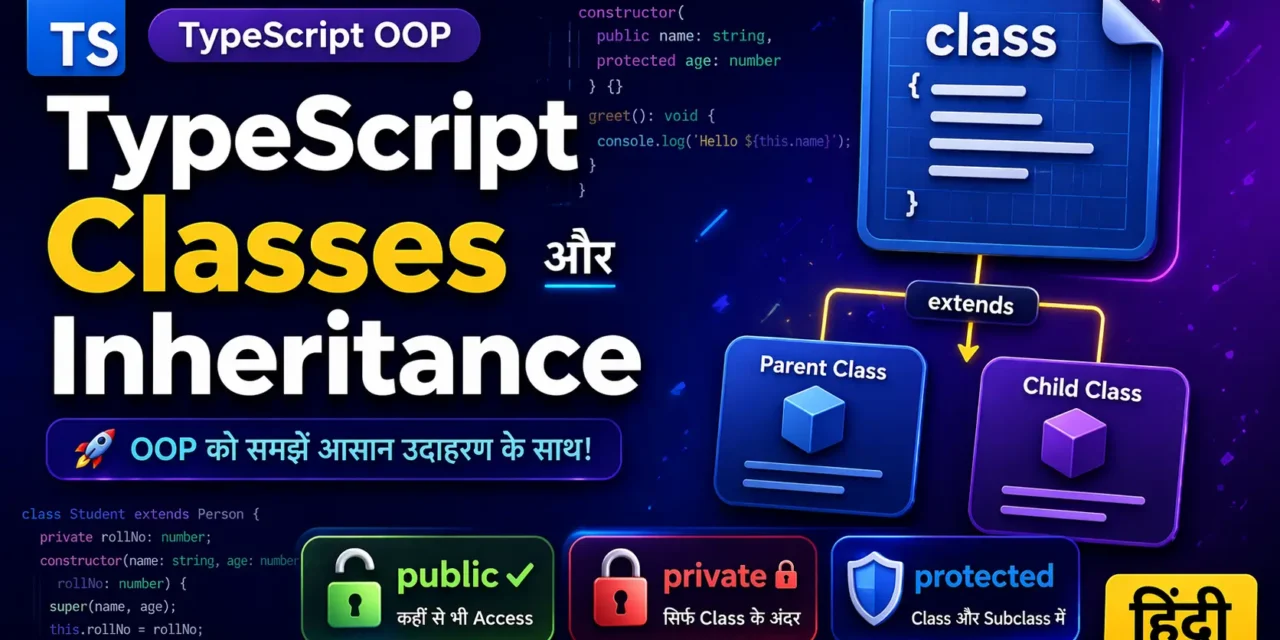
TypeScript OOP Classes Inheritance Hindi में समझना बहुत जरूरी है क्योंकि:
- 90% से ज्यादा real-world projects OOP concepts use करते हैं
- Angular, NestJS, Next.js jaise frameworks classes par based हैं
- Interview में OOP questions पक्का पूछे जाते हैं
आज हम TypeScript OOP Classes Inheritance Hindi में इन सब topics को cover करेंगे:
- Classes – object ka blueprint कैसे बनाएं
- Constructors – objects को initialize करना
- Access Modifiers –
public,private,protected,readonly - Inheritance –
extendsसे code reuse करना - Method Overriding – parent method को modify करना
- Abstract Classes – incomplete templates
- Getters & Setters – controlled access
तो चलिए शुरू करते हैं – TypeScript OOP Classes Inheritance Hindi का मास्टर बनने का सफर! 🚀
Table of Contents
1. TypeScript OOP Classes Inheritance Hindi – Introduction
Class ek blueprint (template) hai – jisse tum multiple objects bana sakte ho।
Object class ka real instance hai – jo memory mein space leta hai।
// Class – Blueprint
class Student {
  name: string;
  age: number;

  study() {
    console.log(`${this.name} पढ़ रहा है`);
  }
}

// Object – Real instance
const student1 = new Student();
student1.name = "Rahul";
student1.study(); // Output: Rahul पढ़ रहा है
TypeScript OOP Classes Inheritance Hindi में आज हम इन्हीं concepts को detail में समझेंगे।
2. Classes and Objects – Blueprint से Real Object तक
Basic Class Syntax
class Product {
  // Properties
  id: number;
  name: string;
  price: number;

  // Method
  getDiscount(percent: number): number {
    return this.price - (this.price * percent / 100);
  }
}

// Objects create करना
const laptop = new Product();
laptop.id = 101;
laptop.name = "Dell XPS";
laptop.price = 85000;
console.log(laptop.getDiscount(10)); // 76500

const mobile = new Product();
mobile.id = 102;
mobile.name = "iPhone 15";
mobile.price = 75000;
this keyword kya hai?
this current object ko refer karta hai – jis object ne method call kiya hai।
3. Constructors – Object Initialization
Constructor ek special method hai jo new keyword ke saath automatically call hota hai।
class Car {
  brand: string;
  year: number;

  // Constructor
  constructor(brand: string, year: number) {
    this.brand = brand;
    this.year = year;
  }

  start() {
    console.log(`${this.brand} ${this.year} start ho gayi`);
  }
}

// Constructor ke saath object create karna
const myCar = new Car("Toyota", 2024);
myCar.start(); // Toyota 2024 start ho gayi
Constructor Shortcut (Parameter Properties)
TypeScript में shorthand syntax hai – ek line mein property declare + initialize:
class Employee {
  // Shorthand – public/private + property name + constructor parameter
  constructor(
    public id: number,
    public name: string,
    private salary: number
  ) {}

  getInfo() {
    return `${this.name} (ID: ${this.id})`;
  }
}

const emp = new Employee(101, "Priya", 50000);
console.log(emp.name);     // ✅ public – accessible
console.log(emp.id);       // ✅ public – accessible
// console.log(emp.salary); // ❌ private – accessible nahi
4. Access Modifiers – Data Hiding
Access Modifiers control karte hain ki kaun class ki properties/methods ko access kar sakta hai।
| Modifier | Access Level |
|---|---|
public (default) | Kahi bhi – class ke andar, bahar, child class mein |
private | Sirf usi class ke andar – bahar ya child mein nahi |
protected | Usi class aur child class mein – bahar nahi |
readonly | Sirf ek baar assign ho sakti hai (initialize ke time) |
Examples:
class BankAccount {
  public accountHolder: string;      // सबको दिखेगा
  private balance: number;           // छुपा हुआ
  protected accountNumber: string;   // सिर्फ child classes को
  readonly bankName: string;         // change nahi kar sakte

  constructor(holder: string, initialBalance: number, accNo: string) {
    this.accountHolder = holder;
    this.balance = initialBalance;
    this.accountNumber = accNo;
    this.bankName = "SBI";
  }

  // Public method – बाहर से use कर सकते हैं
  getBalance(): number {
    return this.balance; // private access allowed (same class)
  }

  // Private method – सिर्फ class ke andar
  private validateTransaction(amount: number): boolean {
    return amount > 0 && amount <= this.balance;
  }

  withdraw(amount: number): boolean {
    if (this.validateTransaction(amount)) {
      this.balance -= amount;
      return true;
    }
    return false;
  }
}

class SavingsAccount extends BankAccount {
  getAccountNumber() {
    return this.accountNumber; // ✅ protected – allowed in child
    // return this.balance;    // ❌ private – not allowed
  }
}

const account = new BankAccount("Rahul", 10000, "SB123456");
account.accountHolder = "Rahul Sharma"; // ✅ public
// account.balance = 5000;              // ❌ private
// account.accountNumber = "NEW";       // ❌ protected
// account.bankName = "HDFC";           // ❌ readonly
console.log(account.getBalance());       // ✅ public method
5. Inheritance – Code Reuse
Inheritance ka matlab hai – ek class parent class ki saari properties aur methods inherit (grab) kar sakti hai।
Syntax: class Child extends Parent
// Parent Class (Base Class)
class Animal {
  name: string;

  constructor(name: string) {
    this.name = name;
  }

  eat() {
    console.log(`${this.name} खाना खा रहा है`);
  }
}

// Child Class (Derived Class)
class Dog extends Animal {
  breed: string;

  constructor(name: string, breed: string) {
    super(name); // Parent constructor call करना जरूरी है
    this.breed = breed;
  }

  bark() {
    console.log(`${this.name} भौंक रहा है: Woof! Woof!`);
  }
}

const myDog = new Dog("Tommy", "Labrador");
myDog.eat();   // ✅ Inherited from Animal
myDog.bark();  // ✅ Dog ki apni method
super() kyun zaroori hai?
super()parent class ka constructor call karta है- Agar parent constructor में parameters hain, to
super(parameters)likhna mandatory hai thisuse karne se pehलेsuper()call होना चाहिए
6. Method Overriding – Parent Method को Modify करो
Child class parent ki method ko override (rewrite) kar sakti hai।
class Vehicle {
  start(): void {
    console.log("Vehicle start ho raha hai");
  }
}

class Bike extends Vehicle {
  // Override
  start(): void {
    console.log("Bike kick se start ho rahi hai");
  }

  // Parent method ko call bhi kar sakte ho
  startWithParent(): void {
    super.start(); // Parent method call
    console.log("Phir bike ka kick...");
  }
}

const bike = new Bike();
bike.start();           // Output: Bike kick se start ho rahi hai
bike.startWithParent(); // Output: Vehicle start... Phir bike ka kick...
7. Abstract Classes – Incomplete Templates
Abstract class wo class hai jiska object directly create nahi kar sakte। यह एक template है – जिसे child classes complete karti हैं।
abstract class Shape {
  abstract getArea(): number; // Abstract method – no body

  // Normal method bhi ho sakta hai
  display(): void {
    console.log(`Area: ${this.getArea()}`);
  }
}

class Circle extends Shape {
  constructor(private radius: number) {
    super();
  }

  // Abstract method ko implement karna mandatory hai
  getArea(): number {
    return Math.PI * this.radius ** 2;
  }
}

class Rectangle extends Shape {
  constructor(private width: number, private height: number) {
    super();
  }

  getArea(): number {
    return this.width * this.height;
  }
}

// const shape = new Shape(); // ❌ Error – abstract class ka object nahi bana sakte
const circle = new Circle(5);
circle.display(); // Area: 78.54

const rect = new Rectangle(10, 20);
rect.display(); // Area: 200
8. Getters and Setters – Controlled Access
Getters (get) – property ki value read करने के लिए
Setters (set) – property ki value modify करने के लिए (validation ke saath)
class User {
  private _email: string;

  constructor(email: string) {
    this._email = email;
  }

  // Getter
  get email(): string {
    return this._email.toLowerCase();
  }

  // Setter – validation ke saath
  set email(newEmail: string) {
    if (newEmail.includes("@") && newEmail.includes(".")) {
      this._email = newEmail;
    } else {
      throw new Error("Invalid email format");
    }
  }
}

const user = new User("Rahul@GMAIL.com");
console.log(user.email); // rahul@gmail.com (getter ne lowercase kar diya)

user.email = "new@example.com"; // ✅ valid
// user.email = "invalid";      // ❌ Error – setter validation fail
9. Real-world Project Examples
Example 1: E-commerce Product System
abstract class Product {
  constructor(
    public id: number,
    public name: string,
    protected price: number
  ) {}

  abstract getDiscountedPrice(): number;

  getInfo(): string {
    return `${this.name} (₹${this.price})`;
  }
}

class Electronics extends Product {
  constructor(id: number, name: string, price: number, private warranty: number) {
    super(id, name, price);
  }

  getDiscountedPrice(): number {
    return this.price * 0.9; // 10% discount
  }
}

class Clothing extends Product {
  constructor(id: number, name: string, price: number, private size: string) {
    super(id, name, price);
  }

  getDiscountedPrice(): number {
    return this.price * 0.7; // 30% discount
  }
}

const laptop = new Electronics(1, "Laptop", 50000, 2);
console.log(laptop.getDiscountedPrice()); // 45000
Example 2: Banking System
class Transaction {
  private static transactionCount = 0;

  constructor(
    public amount: number,
    public type: "CREDIT" | "DEBIT"
  ) {
    Transaction.transactionCount++;
  }

  static getTotalTransactions(): number {
    return Transaction.transactionCount;
  }
}

class BankAccount {
  private transactions: Transaction[] = [];

  constructor(
    public accountHolder: string,
    private balance: number
  ) {}

  deposit(amount: number): void {
    this.balance += amount;
    this.transactions.push(new Transaction(amount, "CREDIT"));
  }

  withdraw(amount: number): boolean {
    if (amount <= this.balance) {
      this.balance -= amount;
      this.transactions.push(new Transaction(amount, "DEBIT"));
      return true;
    }
    return false;
  }

  getBalance(): number {
    return this.balance;
  }
}
10. Common Mistakes + Solutions
Mistake 1: super() call karna bhoolna
class Parent {
  constructor(public name: string) {}
}

class Child extends Parent {
  constructor() {
    // ❌ Error – super() call missing
    this.name = "test";
  }
}
Solution: super() call karo before using this
class Child extends Parent {
  constructor() {
    super("default"); // ✅
    this.name = "test";
  }
}
Mistake 2: Private method ko child में access करना
class A {
  private secret() {}
}
class B extends A {
  test() {
    // this.secret(); // ❌ Error – private not accessible
  }
}
Solution: protected use करो agar child ko access chahiye।
Mistake 3: Abstract method में body denा
abstract class Shape {
  abstract getArea(): number { // ❌ Error – abstract method cannot have body
    return 0;
  }
}
Solution: Abstract method की body नहीं होती – सिर्फ signature।
11. Quick Cheat Sheet
| Concept | Syntax | Use Case |
|---|---|---|
| Class | class X { } | Object ka blueprint |
| Constructor | constructor() {} | Object initialize |
public | public name: string | Default – kahi bhi access |
private | private balance: number | Sirf class ke andar |
protected | protected accNo: string | Class + child classes |
readonly | readonly BANK: string | Sirf ek baar assign |
| Inheritance | class B extends A | Parent ki properties child ko |
super() | super(params) | Parent constructor call |
| Abstract | abstract class X | Incomplete template |
| Getter/Setter | get name() / set name() | Controlled access |
12. FAQ (8 Questions)
Q1: TypeScript OOP Classes Inheritance Hindi में क्यों जरूरी है?
Real-world apps OOP par based हैं। Code reusability, maintainability, aur scalability के लिए OOP must है।
Q2: private और protected में क्या अंतर है?private सिर्फ उसी class में accessible है। protected उस class और उसकी child classes में accessible है।
Q3: क्या एक class multiple classes से inherit कर सकती है?
Nahi, TypeScript (aur JavaScript) multiple inheritance support नहीं करता। लेकिन interfaces से multiple implements कर सकते हो।
Q4: Abstract class vs Interface – कब क्या use करें?
Abstract class use करो जब common code (methods with body) share करना हो। Interface use करो जब सिर्फ contract define करना हो।
Q5: super keyword के बिना parent method call कर सकते हैं?
Nahi। super.methodName() ही唯一 तरीका है child से parent method call करने का।
Q6: Getter/Setter kyun use karein?
Validation, logging, computed properties के लिए। Direct property access से ज्यादा safe है।
Q7: Kya readonly property constructor ke baad change ho sakti hai?
Nahi। readonly property sirf declare या constructor में assign हो सकती है। Baad mein change nahi kar sakte।
Q8: Static members (static) kya होते हैं?
Static members class ke instances से关联 नहीं होते। सीधे class पर call होते हैं: MyClass.method()।
13. Conclusion
बहुत बढ़िया दोस्तों! आज हमने TypeScript OOP Classes Inheritance Hindi को पूरी detail में समझा।
Quick Recap:
- Classes – object ka blueprint
- Access Modifiers –
public,private,protected,readonly - Inheritance –
extendsसे code reuse - Abstract Classes – incomplete templates
- Getters/Setters – controlled access
The Easy Master पर बने रहो। Happy Coding! 💻🚀
Resources
- TypeScript Classes Official Docs
- TypeScript Access Modifiers Guide
- MDN – Object Oriented Programming
Additional Resources
- Master ES6: A Complete Feature Guide with Examples
- Top 10 React Libraries and Tools Every Developer Must Know in 2025
- Top 10 Free APIs for Practice in 2026
- JavaScript Deep Dive 2026: Closures, Promises & Event Loop
- TypeScript Mastery in Hindi | Web Development 2026 Guide
- TypeScript Interfaces vs Type Alias in Hindi – Advanced Examples के साथ 2026
- TypeScript Generics in Hindi – बिना डर के लिखो Flexible Code