नमस्ते दोस्तों! 🙏
स्वागत है The Easy Master पर!
क्या तुमने कभी सोचा है – REST API kya hoti hai aur Node.js mein kaise banate hain?
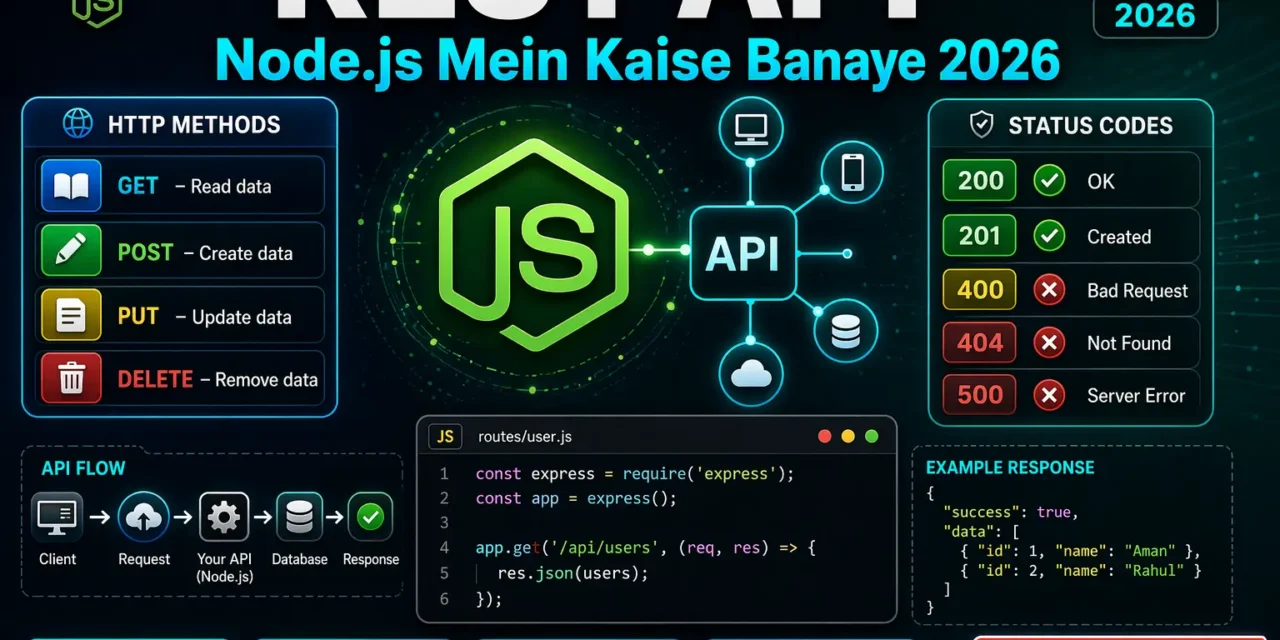
Jab tum frontend (React) aur backend (Node.js) ko connect karte ho, toh tum API use karte ho। API ek bridge hai jo frontend aur backend ke beech data transfer karta hai।
REST API Node.js Hindi में समझना बहुत जरूरी है क्योंकि:
- 99% modern apps REST API use karti hain
- Job interviews mein REST API questions pakka puche jate hain
- Mobile apps, web apps, IoT devices – sab REST API use karte hain
- Freelancing projects mein sabse zyada demand REST API ki hai
Aaj kya seekhoge?
| Topic | Kya Seekhega? |
|---|---|
| REST API Kya Hai? | Architecture, principles |
| HTTP Methods | GET, POST, PUT, PATCH, DELETE |
| Status Codes | 200, 201, 400, 401, 404, 500 |
| Express.js Setup | Server create karna |
| CRUD Operations | Complete API banayenge |
| Postman Testing | API test kaise karein |
| API Security | Validation, rate limiting |
| Documentation | Swagger/OpenAPI |
| Best Practices | Professional API design |
Kya tumhe pata hai?
REST ka full form REpresentational State Transfer hai – ye ek architecture style hai, protocol nahi। Yeh 2000 में Roy Fielding ne PhD thesis में propose kiya tha!
तो चलिए शुरू करते हैं – REST API Node.js Hindi सीखने का सफर! 🚀
Table of Contents
1. REST API क्या Hai? – Introduction
REST API ek communication standard hai jo client (frontend) aur server (backend) ke beech data transfer karta hai।
Real-world Analogy:
🍕 Restaurant Analogy:

Client (Customer) → Request (Menu Order) → Server (Kitchen)
                                              ↓
Client ← Response (Food) ← Server (Food Ready)

API = Waiter jo order leta hai aur food laata hai
REST API Components:
┌─────────────────────────────────────────────────────────┐
│                     REST API                            │
├─────────────────────────────────────────────────────────┤
│  Client (Frontend)    ↔    Server (Backend)             │
│  • React              ↔    • Node.js + Express          │
│  • Angular            ↔    • Database                   │
│  • Vue.js             ↔    • Authentication             │
│  • Mobile App         ↔    • Business Logic             │
└─────────────────────────────────────────────────────────┘
REST API Node.js Hindi mein hum ek production-ready API banayenge।
2. REST API Principles – 6 Golden Rules
REST API ke 6 principles hain:
1. Client-Server Architecture
Client (Frontend) ←── Request/Response ──→ Server (Backend)
                     (Separation of concerns)
2. Stateless
Har request independent hoti hai – server previous requests nahi remember karta।
// ❌ Stateful (wrong for REST)
app.post('/login', (req, res) => {
  req.session.user = user; // Server stores state
});

// ✅ Stateless (correct)
app.post('/login', (req, res) => {
  const token = jwt.sign(user, SECRET); // Client stores token
  res.json({ token }); // Send token to client
});
3. Cacheable
Responses cache ki ja sakti hain – performance improve hoti hai।
// Cache control headers
app.get('/api/products', (req, res) => {
  res.set('Cache-Control', 'public, max-age=300'); // 5 minutes cache
  res.json(products);
});
4. Uniform Interface
Consistent naming conventions – resources ke saath standard operations।
GET    /users        → List users
GET    /users/1      → Get user with id 1
POST   /users        → Create user
PUT    /users/1      → Update user with id 1
DELETE /users/1      → Delete user with id 1
5. Layered System
API multiple layers (load balancers, caches, gateways) ke through जा सकता है।
6. Code on Demand (Optional)
Server client ko code bhej sakta hai (JavaScript, applets) – optional principle।
3. HTTP Methods – GET, POST, PUT, PATCH, DELETE
Complete Method Reference:
| Method | Purpose | Idempotent? | Safe? | Request Body |
|---|---|---|---|---|
| GET | Read data | ✅ Yes | ✅ Yes | ❌ No |
| POST | Create data | ❌ No | ❌ No | ✅ Yes |
| PUT | Full update | ✅ Yes | ❌ No | ✅ Yes |
| PATCH | Partial update | ❌ No | ❌ No | ✅ Yes |
| DELETE | Delete data | ✅ Yes | ❌ No | ❌ No |
GET – Read Data:
// Get all users
app.get('/api/users', (req, res) => {
  res.json(users);
});

// Get single user
app.get('/api/users/:id', (req, res) => {
  const user = users.find(u => u.id === parseInt(req.params.id));
  if (!user) return res.status(404).json({ error: 'User not found' });
  res.json(user);
});

// Get with filters
app.get('/api/users', (req, res) => {
  const { page = 1, limit = 10, search } = req.query;
  // Filter, paginate, return
  res.json({ page, limit, data: filteredUsers });
});
POST – Create Data:
app.post('/api/users', (req, res) => {
  const { name, email, password } = req.body;

  // Validation
  if (!name || !email || !password) {
    return res.status(400).json({
      error: 'Name, email, and password are required'
    });
  }

  // Create user
  const newUser = {
    id: users.length + 1,
    name,
    email,
    password: hash(password),
    createdAt: new Date()
  };

  users.push(newUser);

  // 201 Created
  res.status(201).json({
    message: 'User created successfully',
    user: { id: newUser.id, name, email }
  });
});
PUT – Full Update:
app.put('/api/users/:id', (req, res) => {
  const id = parseInt(req.params.id);
  const { name, email, password } = req.body;

  const userIndex = users.findIndex(u => u.id === id);

  if (userIndex === -1) {
    return res.status(404).json({ error: 'User not found' });
  }

  // Complete replacement
  users[userIndex] = {
    id,
    name: name || users[userIndex].name,
    email: email || users[userIndex].email,
    password: password ? hash(password) : users[userIndex].password,
    updatedAt: new Date()
  };

  res.json({
    message: 'User updated successfully',
    user: users[userIndex]
  });
});
PATCH – Partial Update:
app.patch('/api/users/:id', (req, res) => {
  const id = parseInt(req.params.id);
  const updates = req.body;

  const userIndex = users.findIndex(u => u.id === id);

  if (userIndex === -1) {
    return res.status(404).json({ error: 'User not found' });
  }

  // Partial update – only provided fields
  users[userIndex] = {
    ...users[userIndex],
    ...updates,
    password: updates.password ? hash(updates.password) : users[userIndex].password,
    updatedAt: new Date()
  };

  res.json({
    message: 'User updated successfully',
    user: users[userIndex]
  });
});
DELETE – Remove Data:
app.delete('/api/users/:id', (req, res) => {
  const id = parseInt(req.params.id);

  const userIndex = users.findIndex(u => u.id === id);

  if (userIndex === -1) {
    return res.status(404).json({ error: 'User not found' });
  }

  users.splice(userIndex, 1);

  // 204 No Content (or 200 with message)
  res.status(204).send();
  // OR
  // res.json({ message: 'User deleted successfully' });
});
4. HTTP Status Codes – Complete Guide
Success Codes (2xx):
| Code | Name | When to Use |
|---|---|---|
| 200 | OK | GET, PUT, PATCH success |
| 201 | Created | POST success (new resource) |
| 202 | Accepted | Async operation accepted |
| 204 | No Content | DELETE success (no response body) |
Client Error Codes (4xx):
| Code | Name | When to Use |
|---|---|---|
| 400 | Bad Request | Validation failed, malformed request |
| 401 | Unauthorized | No authentication token |
| 403 | Forbidden | Authenticated but not authorized |
| 404 | Not Found | Resource doesn’t exist |
| 409 | Conflict | Resource already exists (duplicate email) |
| 422 | Unprocessable Entity | Validation rules failed |
| 429 | Too Many Requests | Rate limit exceeded |
Server Error Codes (5xx):
| Code | Name | When to Use |
|---|---|---|
| 500 | Internal Server Error | Generic server error |
| 502 | Bad Gateway | Upstream server error |
| 503 | Service Unavailable | Server overloaded/maintenance |
| 504 | Gateway Timeout | Upstream server timeout |
Using Status Codes:
// 200 OK
app.get('/api/users', (req, res) => {
  res.status(200).json(users);
});

// 201 Created
app.post('/api/users', (req, res) => {
  res.status(201).json({ message: 'User created', user: newUser });
});

// 400 Bad Request
app.post('/api/users', (req, res) => {
  if (!req.body.name) {
    return res.status(400).json({ error: 'Name is required' });
  }
});

// 401 Unauthorized
app.get('/api/admin', (req, res) => {
  if (!req.headers.authorization) {
    return res.status(401).json({ error: 'Authentication required' });
  }
});

// 404 Not Found
app.get('/api/users/:id', (req, res) => {
  const user = users.find(u => u.id === parseInt(req.params.id));
  if (!user) {
    return res.status(404).json({ error: 'User not found' });
  }
});

// 500 Internal Server Error
app.get('/api/data', async (req, res, next) => {
  try {
    const data = await fetchData();
    res.json(data);
  } catch (error) {
    next(error); // Will return 500
  }
});
5. Project Setup – Express.js Installation
Step 1: Create Project
mkdir rest-api-tutorial
cd rest-api-tutorial
npm init -y
Step 2: Install Dependencies
# Core dependencies
npm install express

# Dev dependencies
npm install -D nodemon

# Optional (security & utilities)
npm install cors helmet morgan dotenv
Step 3: Basic Server Setup
// server.js
const express = require('express');
const cors = require('cors');
const helmet = require('helmet');
const morgan = require('morgan');
require('dotenv').config();

const app = express();
const PORT = process.env.PORT || 3000;

// Middleware
app.use(helmet());           // Security headers
app.use(cors());              // CORS enable
app.use(morgan('dev'));       // Logging
app.use(express.json());      // Parse JSON
app.use(express.urlencoded({ extended: true })); // Parse form data

// Health check endpoint
app.get('/health', (req, res) => {
  res.status(200).json({
    status: 'OK',
    timestamp: new Date().toISOString(),
    uptime: process.uptime()
  });
});

// Routes (will add later)
app.use('/api/users', require('./routes/users'));
app.use('/api/products', require('./routes/products'));

// 404 handler
app.use('*', (req, res) => {
  res.status(404).json({
    error: `Cannot ${req.method} ${req.url}`
  });
});

// Global error handler
app.use((err, req, res, next) => {
  console.error(err.stack);
  res.status(err.status || 500).json({
    error: err.message || 'Internal server error'
  });
});

app.listen(PORT, () => {
  console.log(`🚀 Server running on http://localhost:${PORT}`);
  console.log(`📝 API Documentation: http://localhost:${PORT}/api-docs`);
});
Step 4: package.json Scripts
{
  "scripts": {
    "start": "node server.js",
    "dev": "nodemon server.js"
  }
}
6. GET Request – Data Fetch Karna
Complete GET Endpoints Example:
// routes/users.js
const express = require('express');
const router = express.Router();

// In-memory database
let users = [
  { id: 1, name: 'Rahul Sharma', email: 'rahul@example.com', role: 'admin', createdAt: '2024-01-01' },
  { id: 2, name: 'Priya Patel', email: 'priya@example.com', role: 'user', createdAt: '2024-01-02' },
  { id: 3, name: 'Amit Kumar', email: 'amit@example.com', role: 'user', createdAt: '2024-01-03' }
];

// GET /api/users - Get all users with filtering & pagination
router.get('/', (req, res) => {
  let { page = 1, limit = 10, role, search, sortBy = 'id', order = 'asc' } = req.query;

  let result = [...users];

  // Filter by role
  if (role) {
    result = result.filter(u => u.role === role);
  }

  // Search by name or email
  if (search) {
    const searchLower = search.toLowerCase();
    result = result.filter(u =>
      u.name.toLowerCase().includes(searchLower) ||
      u.email.toLowerCase().includes(searchLower)
    );
  }

  // Sorting
  result.sort((a, b) => {
    if (order === 'asc') {
      return a[sortBy] > b[sortBy] ? 1 : -1;
    } else {
      return a[sortBy] < b[sortBy] ? 1 : -1;
    }
  });

  // Pagination
  const total = result.length;
  const startIndex = (parseInt(page) - 1) * parseInt(limit);
  const endIndex = startIndex + parseInt(limit);
  const paginatedResult = result.slice(startIndex, endIndex);

  res.json({
    success: true,
    data: paginatedResult,
    pagination: {
      page: parseInt(page),
      limit: parseInt(limit),
      total,
      totalPages: Math.ceil(total / parseInt(limit)),
      hasNext: endIndex < total,
      hasPrev: startIndex > 0
    }
  });
});

// GET /api/users/:id - Get single user
router.get('/:id', (req, res) => {
  const id = parseInt(req.params.id);
  const user = users.find(u => u.id === id);

  if (!user) {
    return res.status(404).json({
      success: false,
      error: `User with id ${id} not found`
    });
  }

  res.json({
    success: true,
    data: user
  });
});

// GET /api/users/stats/summary - Get statistics
router.get('/stats/summary', (req, res) => {
  const stats = {
    totalUsers: users.length,
    adminCount: users.filter(u => u.role === 'admin').length,
    userCount: users.filter(u => u.role === 'user').length,
    recentUsers: users.slice(-5)
  };

  res.json({ success: true, data: stats });
});

module.exports = router;
7. POST Request – Data Create Karna
Complete POST Endpoints:
// routes/users.js (continued)
const bcrypt = require('bcrypt');
const { body, validationResult } = require('express-validator');

// POST /api/users - Create new user
router.post('/', [
  // Validation rules
  body('name').notEmpty().withMessage('Name is required').isLength({ min: 2 }).withMessage('Name must be at least 2 characters'),
  body('email').isEmail().withMessage('Valid email is required'),
  body('password').isLength({ min: 6 }).withMessage('Password must be at least 6 characters'),
  body('role').optional().isIn(['admin', 'user']).withMessage('Role must be admin or user')
], async (req, res) => {
  // Check validation errors
  const errors = validationResult(req);
  if (!errors.isEmpty()) {
    return res.status(400).json({
      success: false,
      errors: errors.array()
    });
  }

  const { name, email, password, role = 'user' } = req.body;

  // Check if user already exists
  const existingUser = users.find(u => u.email === email);
  if (existingUser) {
    return res.status(409).json({
      success: false,
      error: 'User with this email already exists'
    });
  }

  // Hash password
  const salt = await bcrypt.genSalt(10);
  const hashedPassword = await bcrypt.hash(password, salt);

  // Create new user
  const newUser = {
    id: users.length + 1,
    name,
    email,
    password: hashedPassword,
    role,
    createdAt: new Date().toISOString()
  };

  users.push(newUser);

  // Return user without password
  const { password: _, ...userWithoutPassword } = newUser;

  res.status(201).json({
    success: true,
    message: 'User created successfully',
    data: userWithoutPassword
  });
});

// POST /api/users/bulk - Bulk create users
router.post('/bulk', (req, res) => {
  const { users: newUsers } = req.body;

  if (!Array.isArray(newUsers) || newUsers.length === 0) {
    return res.status(400).json({
      success: false,
      error: 'Users array is required'
    });
  }

  const createdUsers = [];
  const errors = [];

  for (const userData of newUsers) {
    if (!userData.name || !userData.email) {
      errors.push({ email: userData.email, error: 'Name and email required' });
      continue;
    }

    const existingUser = users.find(u => u.email === userData.email);
    if (existingUser) {
      errors.push({ email: userData.email, error: 'Email already exists' });
      continue;
    }

    const newUser = {
      id: users.length + 1,
      name: userData.name,
      email: userData.email,
      role: userData.role || 'user',
      createdAt: new Date().toISOString()
    };

    users.push(newUser);
    createdUsers.push(newUser);
  }

  res.status(201).json({
    success: true,
    message: `${createdUsers.length} users created`,
    data: { created: createdUsers, errors }
  });
});
8. PUT vs PATCH – Update Operations
PUT (Full Update) vs PATCH (Partial Update):
// routes/users.js (continued)

// PUT /api/users/:id - Full update (replace entire resource)
router.put('/:id', [
  body('name').optional().isLength({ min: 2 }),
  body('email').optional().isEmail(),
  body('role').optional().isIn(['admin', 'user'])
], (req, res) => {
  const id = parseInt(req.params.id);
  const { name, email, role } = req.body;

  const userIndex = users.findIndex(u => u.id === id);

  if (userIndex === -1) {
    return res.status(404).json({
      success: false,
      error: 'User not found'
    });
  }

  // Complete replacement (PUT)
  users[userIndex] = {
    id,
    name: name || users[userIndex].name,
    email: email || users[userIndex].email,
    role: role || users[userIndex].role,
    password: users[userIndex].password, // Preserve password
    createdAt: users[userIndex].createdAt,
    updatedAt: new Date().toISOString()
  };

  const { password: _, ...userWithoutPassword } = users[userIndex];

  res.json({
    success: true,
    message: 'User fully updated',
    data: userWithoutPassword
  });
});

// PATCH /api/users/:id - Partial update (only provided fields)
router.patch('/:id', (req, res) => {
  const id = parseInt(req.params.id);
  const updates = req.body;

  const userIndex = users.findIndex(u => u.id === id);

  if (userIndex === -1) {
    return res.status(404).json({
      success: false,
      error: 'User not found'
    });
  }

  // Partial update – only update provided fields
  const allowedUpdates = ['name', 'email', 'role'];
  const filteredUpdates = {};

  for (const key of allowedUpdates) {
    if (updates[key] !== undefined) {
      filteredUpdates[key] = updates[key];
    }
  }

  users[userIndex] = {
    ...users[userIndex],
    ...filteredUpdates,
    updatedAt: new Date().toISOString()
  };

  const { password: _, ...userWithoutPassword } = users[userIndex];

  res.json({
    success: true,
    message: 'User partially updated',
    data: userWithoutPassword
  });
});
PUT vs PATCH Comparison Table:
| Feature | PUT | PATCH |
|---|---|---|
| Update type | Full replacement | Partial update |
| Missing fields | Set to null/default | Preserve original |
| Idempotent | ✅ Yes | ❌ No |
| Use case | Complete form submission | Single field edit |
| Request body | Entire resource | Only changed fields |
9. DELETE Request – Data Remove Karna
// routes/users.js (continued)

// DELETE /api/users/:id - Delete single user
router.delete('/:id', (req, res) => {
  const id = parseInt(req.params.id);

  const userIndex = users.findIndex(u => u.id === id);

  if (userIndex === -1) {
    return res.status(404).json({
      success: false,
      error: 'User not found'
    });
  }

  const deletedUser = users[userIndex];
  users.splice(userIndex, 1);

  res.json({
    success: true,
    message: 'User deleted successfully',
    data: { id: deletedUser.id, name: deletedUser.name }
  });
});

// DELETE /api/users - Bulk delete
router.delete('/', (req, res) => {
  const { ids } = req.body;

  if (!Array.isArray(ids) || ids.length === 0) {
    return res.status(400).json({
      success: false,
      error: 'Ids array is required'
    });
  }

  const deletedUsers = [];
  const notFoundIds = [];

  for (const id of ids) {
    const userIndex = users.findIndex(u => u.id === parseInt(id));

    if (userIndex === -1) {
      notFoundIds.push(id);
    } else {
      deletedUsers.push(users[userIndex]);
      users.splice(userIndex, 1);
    }
  }

  res.json({
    success: true,
    message: `${deletedUsers.length} users deleted`,
    data: { deleted: deletedUsers.length, notFound: notFoundIds }
  });
});

// Soft delete (add deleted flag instead of removing)
router.delete('/soft/:id', (req, res) => {
  const id = parseInt(req.params.id);

  const userIndex = users.findIndex(u => u.id === id);

  if (userIndex === -1) {
    return res.status(404).json({
      success: false,
      error: 'User not found'
    });
  }

  // Soft delete – just mark as deleted
  users[userIndex] = {
    ...users[userIndex],
    deleted: true,
    deletedAt: new Date().toISOString()
  };

  res.json({
    success: true,
    message: 'User soft deleted (can be restored)'
  });
});
10. API Testing with Postman
Postman Setup:
- Download Postman from postman.com
- Create Collection for your API
- Add Requests for each endpoint
Test Cases:
# 1. GET all users
GET http://localhost:3000/api/users
GET http://localhost:3000/api/users?page=1&limit=5
GET http://localhost:3000/api/users?role=admin
GET http://localhost:3000/api/users?search=Rahul

# 2. GET single user
GET http://localhost:3000/api/users/1

# 3. POST create user
POST http://localhost:3000/api/users
Content-Type: application/json

{
  "name": "Neha Gupta",
  "email": "neha@example.com",
  "password": "password123",
  "role": "user"
}

# 4. PUT update user
PUT http://localhost:3000/api/users/1
Content-Type: application/json

{
  "name": "Rahul Sharma Updated",
  "email": "rahul.updated@example.com"
}

# 5. PATCH partial update
PATCH http://localhost:3000/api/users/1
Content-Type: application/json

{
  "role": "admin"
}

# 6. DELETE user
DELETE http://localhost:3000/api/users/3
Postman Collection Export:
{
  "info": {
    "name": "User API",
    "schema": "https://schema.getpostman.com/json/collection/v2.1.0/collection.json"
  },
  "item": [
    {
      "name": "Get All Users",
      "request": {
        "method": "GET",
        "url": "http://localhost:3000/api/users"
      }
    },
    {
      "name": "Create User",
      "request": {
        "method": "POST",
        "url": "http://localhost:3000/api/users",
        "body": {
          "mode": "raw",
          "raw": "{\"name\":\"Test User\",\"email\":\"test@example.com\",\"password\":\"123456\"}"
        }
      }
    }
  ]
}
11. API Security – Validation aur Rate Limiting
Request Validation Middleware:
// middleware/validate.js
const { body, param, query, validationResult } = require('express-validator');

const validate = (validations) => {
  return async (req, res, next) => {
    await Promise.all(validations.map(validation => validation.run(req)));

    const errors = validationResult(req);
    if (errors.isEmpty()) {
      return next();
    }

    res.status(400).json({
      success: false,
      errors: errors.array()
    });
  };
};

// Validation rules
const userValidation = {
  create: [
    body('name').notEmpty().withMessage('Name required').isLength({ min: 2, max: 50 }),
    body('email').isEmail().withMessage('Valid email required').normalizeEmail(),
    body('password').isLength({ min: 6 }).withMessage('Password min 6 characters'),
    body('role').optional().isIn(['admin', 'user'])
  ],
  update: [
    param('id').isInt().withMessage('ID must be integer'),
    body('name').optional().isLength({ min: 2, max: 50 }),
    body('email').optional().isEmail().normalizeEmail(),
    body('role').optional().isIn(['admin', 'user'])
  ],
  id: [
    param('id').isInt().withMessage('ID must be integer')
  ]
};

module.exports = { validate, userValidation };
Rate Limiting Middleware:
// middleware/rateLimit.js
const rateLimit = require('express-rate-limit');

// General rate limit (100 requests per 15 minutes)
const generalLimiter = rateLimit({
  windowMs: 15 * 60 * 1000, // 15 minutes
  max: 100,
  message: { error: 'Too many requests, please try again later.' },
  standardHeaders: true,
  legacyHeaders: false
});

// Strict rate limit for auth endpoints (5 requests per minute)
const authLimiter = rateLimit({
  windowMs: 60 * 1000, // 1 minute
  max: 5,
  message: { error: 'Too many login attempts, please try again later.' }
});

// Strict rate limit for create/update (20 per hour)
const writeLimiter = rateLimit({
  windowMs: 60 * 60 * 1000, // 1 hour
  max: 20,
  message: { error: 'Too many write operations, please slow down.' }
});

module.exports = { generalLimiter, authLimiter, writeLimiter };
Using Validation & Rate Limiting:
// server.js
const { validate, userValidation } = require('./middleware/validate');
const { generalLimiter, writeLimiter } = require('./middleware/rateLimit');

// Apply global rate limit
app.use('/api', generalLimiter);

// Apply validation to routes
router.post('/',
  writeLimiter,
  validate(userValidation.create),
  createUser
);

router.put('/:id',
  validate(userValidation.update),
  updateUser
);

router.delete('/:id',
  validate(userValidation.id),
  deleteUser
);
12. API Documentation – Swagger Setup
Installing Swagger:
npm install swagger-jsdoc swagger-ui-expressSwagger Configuration:
// swagger.js
const swaggerJsdoc = require('swagger-jsdoc');
const swaggerUi = require('swagger-ui-express');

const options = {
  definition: {
    openapi: '3.0.0',
    info: {
      title: 'User API Documentation',
      version: '1.0.0',
      description: 'Complete REST API for user management',
      contact: {
        name: 'API Support',
        email: 'support@example.com'
      }
    },
    servers: [
      {
        url: 'http://localhost:3000',
        description: 'Development server'
      }
    ],
    components: {
      schemas: {
        User: {
          type: 'object',
          properties: {
            id: { type: 'integer', example: 1 },
            name: { type: 'string', example: 'Rahul Sharma' },
            email: { type: 'string', example: 'rahul@example.com' },
            role: { type: 'string', enum: ['admin', 'user'], example: 'user' },
            createdAt: { type: 'string', format: 'date-time' }
          }
        },
        Error: {
          type: 'object',
          properties: {
            success: { type: 'boolean', example: false },
            error: { type: 'string' }
          }
        }
      }
    }
  },
  apis: ['./routes/*.js', './server.js']
};

const specs = swaggerJsdoc(options);

module.exports = { swaggerUi, specs };
Swagger Annotations in Routes:
// routes/users.js
/**
 * @swagger
 * /api/users:
 *   get:
 *     summary: Get all users
 *     parameters:
 *       - in: query
 *         name: page
 *         schema: { type: integer }
 *         description: Page number
 *       - in: query
 *         name: limit
 *         schema: { type: integer }
 *         description: Items per page
 *     responses:
 *       200:
 *         description: List of users
 *         content:
 *           application/json:
 *             schema:
 *               type: object
 *               properties:
 *                 success: { type: boolean }
 *                 data: { type: array, items: { $ref: '#/components/schemas/User' } }
 */
router.get('/', (req, res) => { ... });

/**
 * @swagger
 * /api/users/{id}:
 *   get:
 *     summary: Get user by ID
 *     parameters:
 *       - in: path
 *         name: id
 *         required: true
 *         schema: { type: integer }
 *     responses:
 *       200:
 *         description: User found
 *       404:
 *         description: User not found
 */
router.get('/:id', (req, res) => { ... });
Enable Swagger UI:
// server.js
const { swaggerUi, specs } = require('./swagger');

// Serve Swagger documentation
app.use('/api-docs', swaggerUi.serve, swaggerUi.setup(specs));

console.log('📝 API Docs available at http://localhost:3000/api-docs');
13. REST API Best Practices
1. Use Proper HTTP Methods
// ✅ Correct
GET    /api/users     - List users
POST   /api/users     - Create user
GET    /api/users/1   - Get user
PUT    /api/users/1   - Update user
DELETE /api/users/1   - Delete user

// ❌ Wrong
POST   /api/getUsers
GET    /api/deleteUser/1
2. Use Proper Status Codes
// ✅ Correct
res.status(200).json(data);    // Success
res.status(201).json(data);    // Created
res.status(400).json(error);   // Bad request
res.status(401).json(error);   // Unauthorized
res.status(404).json(error);   // Not found
res.status(500).json(error);   // Server error

// ❌ Wrong – always 200
res.status(200).json({ error: 'User not found' });
3. Version Your API
// Version in URL
app.use('/api/v1/users', userRoutes);
app.use('/api/v2/users', userRoutesV2);

// Version in header
app.use('/api/users', userRoutes);
// Client sends: Accept: application/vnd.api.v1+json
4. Use Consistent Response Format
// ✅ Consistent format
{
  "success": true,
  "data": { ... },
  "message": "Optional message",
  "timestamp": "2026-01-01T00:00:00Z"
}

// Error format
{
  "success": false,
  "error": {
    "code": "USER_NOT_FOUND",
    "message": "User with id 1 not found",
    "status": 404
  },
  "timestamp": "2026-01-01T00:00:00Z"
}
5. Implement Pagination
// ✅ Always paginate list endpoints
GET /api/users?page=2&limit=20

// Response includes pagination metadata
{
  "data": [...],
  "pagination": {
    "page": 2,
    "limit": 20,
    "total": 100,
    "totalPages": 5,
    "hasNext": true,
    "hasPrev": true
  }
}
6. Use Query Parameters for Filtering
// ✅ Filtering, sorting, searching
GET /api/users?role=admin&sortBy=name&order=asc&search=Rahul

// ❌ Don't use custom endpoints for filters
GET /api/users/admins
GET /api/users/search?q=Rahul
7. Secure Your API
// ✅ Always use
app.use(helmet());        // Security headers
app.use(cors());          // CORS configuration
app.use(rateLimit());     // Rate limiting

// ✅ Validate input
body('email').isEmail();

// ✅ Sanitize output
// Never return passwords, tokens, etc.
8. Document Your API
// ✅ Use Swagger/OpenAPI
// http://localhost:3000/api-docs

// ✅ Provide examples
// ✅ Include error responses
// ✅ Show request/response schemas
14. Real-world Project – Complete E-commerce API
Project Structure:
ecommerce-api/
├── server.js
├── config/
│   └── database.js
├── models/
│   ├── User.js
│   ├── Product.js
│   └── Order.js
├── controllers/
│   ├── authController.js
│   ├── userController.js
│   ├── productController.js
│   └── orderController.js
├── routes/
│   ├── auth.js
│   ├── users.js
│   ├── products.js
│   └── orders.js
├── middleware/
│   ├── auth.js
│   ├── validation.js
│   └── errorHandler.js
├── utils/
│   └── helpers.js
└── .env
Complete E-commerce API Code:
// server.js
const express = require('express');
const cors = require('cors');
const helmet = require('helmet');
const morgan = require('morgan');
require('dotenv').config();

const app = express();

// Middleware
app.use(helmet());
app.use(cors());
app.use(morgan('dev'));
app.use(express.json());

// Routes
app.use('/api/v1/auth', require('./routes/auth'));
app.use('/api/v1/users', require('./routes/users'));
app.use('/api/v1/products', require('./routes/products'));
app.use('/api/v1/orders', require('./routes/orders'));

// Health check
app.get('/health', (req, res) => {
  res.json({ status: 'OK', timestamp: new Date().toISOString() });
});

// 404 handler
app.use('*', (req, res) => {
  res.status(404).json({ error: `Cannot ${req.method} ${req.url}` });
});

// Global error handler
app.use((err, req, res, next) => {
  console.error(err.stack);
  res.status(err.status || 500).json({
    error: err.message || 'Internal server error'
  });
});

const PORT = process.env.PORT || 3000;
app.listen(PORT, () => {
  console.log(`🚀 E-commerce API running on port ${PORT}`);
});
Product Routes:
// routes/products.js
const express = require('express');
const router = express.Router();
const auth = require('../middleware/auth');
const { validateProduct } = require('../middleware/validation');

let products = [
  { id: 1, name: 'Laptop', price: 50000, category: 'electronics', stock: 10 },
  { id: 2, name: 'Mouse', price: 500, category: 'electronics', stock: 50 },
  { id: 3, name: 'Shirt', price: 1000, category: 'clothing', stock: 30 }
];

// Public routes
router.get('/', (req, res) => {
  const { category, minPrice, maxPrice, page = 1, limit = 10 } = req.query;

  let filtered = [...products];

  if (category) {
    filtered = filtered.filter(p => p.category === category);
  }
  if (minPrice) {
    filtered = filtered.filter(p => p.price >= parseInt(minPrice));
  }
  if (maxPrice) {
    filtered = filtered.filter(p => p.price <= parseInt(maxPrice));
  }

  const start = (page - 1) * limit;
  const paginated = filtered.slice(start, start + limit);

  res.json({
    success: true,
    data: paginated,
    pagination: {
      page: parseInt(page),
      limit: parseInt(limit),
      total: filtered.length,
      totalPages: Math.ceil(filtered.length / limit)
    }
  });
});

router.get('/:id', (req, res) => {
  const product = products.find(p => p.id === parseInt(req.params.id));

  if (!product) {
    return res.status(404).json({ error: 'Product not found' });
  }

  res.json({ success: true, data: product });
});

// Admin only routes
router.post('/', auth.isAdmin, validateProduct, (req, res) => {
  const { name, price, category, stock } = req.body;

  const newProduct = {
    id: products.length + 1,
    name,
    price,
    category,
    stock,
    createdAt: new Date()
  };

  products.push(newProduct);

  res.status(201).json({ success: true, data: newProduct });
});

router.put('/:id', auth.isAdmin, validateProduct, (req, res) => {
  const id = parseInt(req.params.id);
  const index = products.findIndex(p => p.id === id);

  if (index === -1) {
    return res.status(404).json({ error: 'Product not found' });
  }

  products[index] = { ...products[index], ...req.body, updatedAt: new Date() };

  res.json({ success: true, data: products[index] });
});

router.delete('/:id', auth.isAdmin, (req, res) => {
  const id = parseInt(req.params.id);
  const index = products.findIndex(p => p.id === id);

  if (index === -1) {
    return res.status(404).json({ error: 'Product not found' });
  }

  products.splice(index, 1);

  res.status(204).send();
});

module.exports = router;
Authentication Middleware:
// middleware/auth.js
const jwt = require('jsonwebtoken');

const authenticate = (req, res, next) => {
  const authHeader = req.headers.authorization;

  if (!authHeader || !authHeader.startsWith('Bearer ')) {
    return res.status(401).json({ error: 'Authentication required' });
  }

  const token = authHeader.split(' ')[1];

  try {
    const decoded = jwt.verify(token, process.env.JWT_SECRET);
    req.user = decoded;
    next();
  } catch (error) {
    return res.status(401).json({ error: 'Invalid or expired token' });
  }
};

const isAdmin = (req, res, next) => {
  if (!req.user || req.user.role !== 'admin') {
    return res.status(403).json({ error: 'Admin access required' });
  }
  next();
};

module.exports = { authenticate, isAdmin };
15. Common Mistakes + Solutions
Mistake 1: Using GET for data modification
// ❌ Wrong
app.get('/api/users/1/delete', (req, res) => {
  // Deleting user with GET
});

// ✅ Correct
app.delete('/api/users/1', (req, res) => {
  // Delete user
});
Mistake 2: Not validating input
// ❌ No validation
app.post('/api/users', (req, res) => {
  users.push(req.body); // Malicious data can be inserted!
});

// ✅ Validate input
app.post('/api/users', validateUser, (req, res) => {
  // Safe!
});
Mistake 3: Exposing sensitive data
// ❌ Returning passwords
res.json(user); // user contains password hash

// ✅ Remove sensitive fields
const { password, ...safeUser } = user;
res.json(safeUser);
Mistake 4: Not handling 404 properly
// ❌ No 404 handler
app.get('/api/users/:id', handler);

// ✅ 404 for not found
app.get('/api/users/:id', (req, res) => {
  const user = users.find(u => u.id === parseInt(req.params.id));
  if (!user) {
    return res.status(404).json({ error: 'User not found' });
  }
  res.json(user);
});
Mistake 5: Not versioning API
// ❌ No version – breaking changes break clients
app.use('/api/users', userRoutes);

// ✅ Version from start
app.use('/api/v1/users', userRoutes);
16. Quick Cheat Sheet
HTTP Methods & Status Codes:
| Method | Purpose | Success Code | Error Codes |
|---|---|---|---|
| GET | Read | 200 | 404, 400 |
| POST | Create | 201 | 400, 409 |
| PUT | Full update | 200 | 404, 400 |
| PATCH | Partial update | 200 | 404, 400 |
| DELETE | Delete | 204 | 404 |
Response Formats:
// Success
{
  "success": true,
  "data": {...},
  "message": "Optional",
  "timestamp": "2026-01-01T00:00:00Z"
}

// Error
{
  "success": false,
  "error": {
    "code": "ERROR_CODE",
    "message": "Error description",
    "status": 400
  },
  "timestamp": "2026-01-01T00:00:00Z"
}

// Pagination
{
  "data": [...],
  "pagination": {
    "page": 1,
    "limit": 10,
    "total": 100,
    "totalPages": 10,
    "hasNext": true,
    "hasPrev": false
  }
}
API Design Checklist:
- Use proper HTTP methods
- Use correct status codes
- Version your API
- Validate input
- Sanitize output
- Implement pagination
- Add rate limiting
- Document with Swagger
- Handle errors globally
- Use consistent response format
- Secure with helmet & cors
- Log requests (morgan)
17. FAQ
Q1: REST API Node.js Hindi में सबसे important concept kya hai?
HTTP methods (GET, POST, PUT, DELETE) aur status codes (200, 201, 400, 404, 500) – ye samjhe bina API design mushkil hai।
Q2: GET और POST mein kya antar hai?
GET data read karta hai (safe, idempotent, no body), POST data create karta hai (not safe, not idempotent, has body)。
Q3: PUT vs PATCH – kab kya use karein?
PUT – full resource update (all fields required), PATCH – partial update (only changed fields)。
Q4: 401 और 403 में kya antar hai?
401 Unauthorized – authentication required (token missing/invalid), 403 Forbidden – authenticated but not authorized (wrong role/permission)。
Q5: API versioning kyun zaroori hai?
Breaking changes se existing clients affect nahi hote। New features old version mein add kiye bina deploy kar sakte ho।
Q6: Rate limiting kyun use karein?
DDoS attacks se bachne के लिए, abuse rokne के लिए, server resources protect karne के लिए।
Q7: Swagger/OpenAPI kya hai?
API documentation standard – automatic docs generate karta hai, interactive API testing provide karta hai।
Q8: REST API stateless kyun hona chahiye?
Scalability के लिए – har request independent hoti है, server previous requests remember nahi karta, koi bhi server request handle kar sakta hai।
Q9: API mein validation kyun zaroori hai?
Security – SQL injection, XSS, data corruption से बचने के लिए। Invalid data se errors kam hote hain।
Q10: REST API vs GraphQL – kya use karein?
REST – simple CRUD apps, caching important हो तो। GraphQL – complex data requirements, multiple resources, mobile apps के लिए।
18. Conclusion
बहुत बढ़िया दोस्तों! आज हमने REST API Node.js Hindi को पूरी detail में समझा।
Quick Recap:
| Concept | Key Takeaway |
|---|---|
| REST API | Client-server communication standard |
| HTTP Methods | GET, POST, PUT, PATCH, DELETE |
| Status Codes | 2xx (success), 4xx (client error), 5xx (server error) |
| Validation | Always validate input |
| Documentation | Swagger/OpenAPI |
| Best Practices | Version, paginate, secure, consistent |
Mera personal experience:
जब मैंने पहली बार REST API बनाई, तो status codes confuse karte the – kab 200, kab 201, kab 204। Practice ke 2-3 APIs ke baad sab clear ho gaya। Ab toh naye project mein pehle API design sochta hoon, phir code likhta hoon।
Tum bhi ye steps follow karo:
- ✅ REST API principles samjho
- ✅ Express.js server banao
- ✅ CRUD endpoints implement karo
- ✅ Postman se test karo
- ✅ Swagger documentation add karo
अब तुम्हारी बारी है!
नीचे comment में बताओ:
- तुम्हें REST API easy laga ya complex?
- तुमने कौन सा HTTP method sabse pehle use kiya?
- अगला topic क्या चाहिए? (MongoDB Integration? JWT Authentication? WebSockets?)
The Easy Master पर बने रहो। Happy API Building! 🚀💻
Resources
- REST API Tutorial
- Express.js Documentation
- Postman Learning Center
- Swagger Documentation
- HTTP Status Codes
Additional Resources
- Master ES6: A Complete Feature Guide with Examples
- Top 10 React Libraries and Tools Every Developer Must Know in 2025
- Top 10 Free APIs for Practice in 2026
- JavaScript Deep Dive 2026: Closures, Promises & Event Loop
- TypeScript Modules Export Import Best Practices – समझे आसान भाषा में 2026
- React.js Kya Hai? JSX aur Components Samjhe – Beginner Guide 2026
- React Props and State Data Flow Hindi – समझे आसान भाषा में 2026
- React Router v6 – Multi-Page App Banaye (Routing Guide) 2026
- Advanced React Hooks – useContext and useReducer Samjhe 2026
- Redux Toolkit Simplified – State Management Aasaan Tarika 2026
- React API Integration Made Easy with Fetch and Axios
- React Performance Optimization – App Ko Fast कैसे बनाएं 2026
- React 19 New Features – AI Integration with React (2026)
- Node.js क्या है? 2026 में अपना पहला Backend Server बनाएँ
- NPM Packages कैसे इंस्टॉल करें? Modules (ESM vs CommonJS) 2026
- Express.js Tutorial – REST API Routing और Middleware समझे 2026