नमस्ते दोस्तों!
स्वागत है The Easy Master पर!
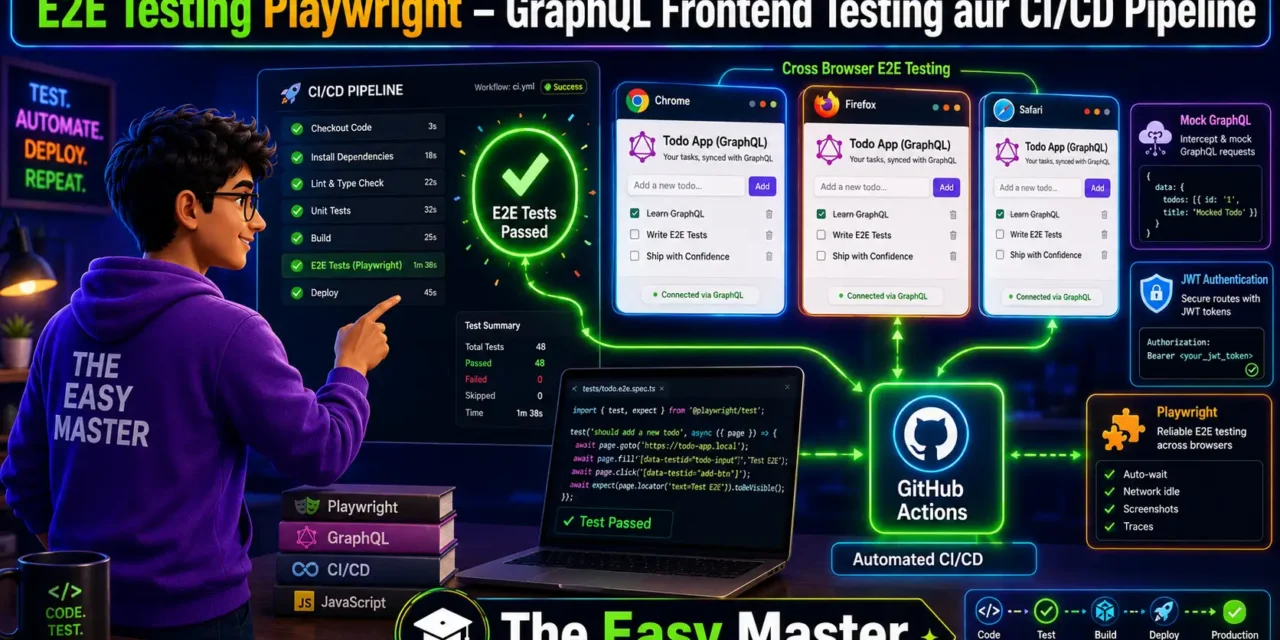
आपने unit testing, integration testing, API testing – सब कुछ सीख लिया। Lekin ab ek aakhri aur important level बाकी है – End-to-End (E2E) Testing। Kya aapka frontend React ya Next.js का GraphQL backend ke saath sahi se kaam kar raha hai? Login se lekar payment tak sab smooth hai? Koi button click karne पर data update हो रहा है? Ye sab check karne ke liye E2E testing zaroori hai।
Jab maine pehli baar E2E testing seekhi, maine manually har flow check karta tha – bohot time lagta tha aur kabhi na kabhi kuch toot jaata tha। Phir maine Playwright discover kiya। Playwright एक modern automation framework hai jo multiple browsers (Chrome, Firefox, Safari) mein real user interactions simulate karta hai।
Is End-to-end testing Playwright Hindi article mein main aapko sikhata hoon:
✅ Playwright kya hai aur kyun use karein – features, ecosystem
✅ Playwright setup – Node.js/TypeScript project में
✅ Pehla test likhein – page load, button click, form fill
✅ GraphQL frontend testing – real-time data validation
✅ Network interception & mocking – mock GraphQL queries, APIs
✅ Authentication strategies – JWT token, localStorage, cookies
✅ CI/CD pipeline integration – GitHub Actions setup
✅ Best practices – production-level tips
Chaliye real-world frontend testing seekhte hain! 🚀🎭
Table of Contents
1. E2E Testing Kya Hai? – Kyun Playwright?
End-to-End (E2E) testing aapke application ke complete user flows ko test karta hai – from browser UI to backend API to database। Ye simulate karta hai ki real user kya karega: login karega, search karega, form submit karega, logout karega।
Playwright kya hai?
Playwright ek open-source automation framework hai jo Microsoft ne banaya hai। Ye ek hi API ke saath multiple browsers (Chromium, Firefox, WebKit) support karta hai। Playwright real user-like interactions provide karta hai जो headless (without UI) ya headed (with UI) mode mein run ho sakte hain।
Playwright एक end-to-end automation framework है जो multiple browsers support karta hai, modern web apps ke liye built-in hai, aur CI/CD pipelines के साथ seamlessly integrate होता है।
Playwright Features (2026):
| Feature | Description |
|---|---|
| Multi-browser | Chromium, Firefox, WebKit एक ही API से |
| Auto-waiting | Element visible होने तक automatically wait karta hai |
| Network interception | HTTP requests ko mock/modify kar sakte ho |
| Mobile testing | Device emulation (iPhone, Android) |
| API testing | Direct API calls (REST, GraphQL) |
| Visual regression | Screenshot comparison |
| Trace viewer | Test run की visual timeline |
| Codegen | Record interactions and generate code |
Personal Experience: Maine ek e-commerce site par manually testing किया करता था – cart add, checkout, payment – har release से पहले 30 minutes lagte the। Playwright automate karne ke baad CI/CD mein tests 2 minutes में complete हो जाते हैं aur main confidently deploy kar sakta hoon। Playwright’s built-in request interception lets you decouple tests from flaky backends by mocking network traffic directly in the browser automation layer。
2. Playwright vs Cypress vs Selenium – Comparison
2026 mein E2E testing ke liye teen main options hain:
| Aspect | Playwright | Cypress | Selenium |
|---|---|---|---|
| Browser support | Chrome, Firefox, Safari, Edge | Chrome, Firefox, Edge (no Safari) | All browsers |
| Language support | JS, TS, Python, Java, .NET | Only JS/TS | Multiple languages |
| Auto-waiting | ✅ Built-in | ✅ Built-in | ❌ Manual waits needed |
| Network interception | ✅ Yes | ✅ Yes | ❌ Limited |
| Mobile testing | ✅ Yes | ❌ No | ✅ Yes (Appium) |
| CI/CD integration | Excellent | Good | Good |
| Parallel execution | ✅ Native | ❌ Paid only | ✅ Yes |
Why Playwright?
- Cross-browser testing – Chrome, Firefox, WebKit – sab supported
- Auto-waiting – Flaky tests कम होते हैं
- Mobile device emulation – Responsive design test kar sakte ho
- File downloads – Native support
- Multiple tabs/pages – Behaves like real user
- Performance – Fast execution
Playwright test runner provides zero-config cross-browser end-to-end testing for web apps, Jest-like assertions, and built-in support for TypeScript。
3. Playwright Setup – Node.js + TypeScript Project
3.1 Create a React + GraphQL Frontend App (Demo)
Hum ek simple Todo app banayenge jo GraphQL backend se connect hota hai।
# Create React app
npm create vite@latest todo-frontend -- --template react-ts
cd todo-frontend

# Install Apollo Client
npm install @apollo/client graphql

# Install Playwright
npm init playwright@latest
3.2 Playwright Installation
npm init playwright@latestSetup ke दौरान ये options select karo:
- Test directory:
e2e - Default browser: chromium
- Add GitHub Actions workflow? Yes
Playwright automatically installs browsers aur configuration files create karta hai।
3.3 Playwright Config – playwright.config.ts
import { defineConfig, devices } from '@playwright/test';

export default defineConfig({
  testDir: './e2e',
  fullyParallel: true,
  forbidOnly: !!process.env.CI,
  retries: process.env.CI ? 2 : 0,
  workers: process.env.CI ? 1 : undefined,
  reporter: [['html'], ['list']],
  use: {
    baseURL: 'http://localhost:5173', // Vite dev server
    trace: 'on-first-retry',
    screenshot: 'only-on-failure',
  },
  projects: [
    { name: 'chromium', use: { ...devices['Desktop Chrome'] } },
    { name: 'firefox', use: { ...devices['Desktop Firefox'] } },
    { name: 'webkit', use: { ...devices['Desktop Safari'] } },
  ],
  webServer: {
    command: 'npm run dev',
    url: 'http://localhost:5173',
    reuseExistingServer: !process.env.CI,
  },
});
Playwright’s webServer option automatically starts your frontend dev server before tests and closes it afterwards।
3.4 Folder Structure
text
todo-frontend/
├── e2e/
│   ├── todo.spec.ts
│   ├── auth.spec.ts
│   └── fixtures/
│       └── graphql-responses.ts
├── src/
├── playwright.config.ts
└── package.json
4. Pehla E2E Test – Page Navigation aur Button Click
Chaliye simple Todo App ke liye pehla test likhte hain।
React Component (App.tsx):
import { useQuery, useMutation, gql } from '@apollo/client';

const GET_TODOS = gql`
  query GetTodos {
    todos {
      id
      title
      completed
    }
  }
`;

const ADD_TODO = gql`
  mutation AddTodo($title: String!) {
    addTodo(title: $title) {
      id
      title
    }
  }
`;

function App() {
  const { data, loading, refetch } = useQuery(GET_TODOS);
  const [addTodo] = useMutation(ADD_TODO);

  const handleAdd = async (title: string) => {
    await addTodo({ variables: { title } });
    refetch();
  };

  if (loading) return <div>Loading...</div>;

  return (
    <div>
      <h1>My Todos</h1>
      <input id="new-todo" />
      <button id="add-btn" onClick={() => handleAdd(newTodoInput.value)}>Add</button>
      <ul id="todo-list">
        {data?.todos?.map(todo => (
          <li key={todo.id} data-testid={`todo-${todo.id}`}>
            {todo.title}
          </li>
        ))}
      </ul>
    </div>
  );
}
4.1 Playwright Test – e2e/todo.spec.ts
import { test, expect } from '@playwright/test';

test.describe('Todo App E2E Tests', () => {
  test.beforeEach(async ({ page }) => {
    await page.goto('/');
  });

  test('should display todo list', async ({ page }) => {
    await expect(page.getByRole('heading', { name: 'My Todos' })).toBeVisible();
    await expect(page.locator('#todo-list')).toBeVisible();
  });

  test('should add a new todo', async ({ page }) => {
    const todoTitle = 'Learn Playwright E2E';

    await page.fill('#new-todo', todoTitle);
    await page.click('#add-btn');

    const todoItem = page.getByText(todoTitle);
    await expect(todoItem).toBeVisible();
  });
});
Playwright’s auto-waiting ensures elements are ready before interacting, making tests more reliable。
4.2 Run Tests
# Run tests (headed mode – see browser)
npx playwright test --headed

# Run specific file
npx playwright test todo.spec.ts

# Run in UI mode (2026 feature)
npx playwright test --ui
5. GraphQL Frontend Testing – UI Data Validation
Frontend testing important hai kyunki ye ensure karta hai ki UI correct data display kar raha hai aur user interactions sahi GraphQL requests trigger kar rahe hain।
5.1 Test GraphQL Data Rendering
import { test, expect } from '@playwright/test';

test.describe('GraphQL Data Rendering', () => {
  test('should display todos fetched from GraphQL', async ({ page }) => {
    // Wait for network to be idle
    await page.goto('/', { waitUntil: 'networkidle' });

    // Wait for Apollo Client to finish GraphQL query
    await page.waitForSelector('[data-testid^="todo-"]', { timeout: 10000 });

    const todoItems = page.locator('[data-testid^="todo-"]');
    const count = await todoItems.count();

    expect(count).toBeGreaterThan(0);

    // Verify each todo has text
    for (let i = 0; i < count; i++) {
      await expect(todoItems.nth(i)).not.toBeEmpty();
    }
  });
});
5.2 Test GraphQL Loading State
test('should show loading state while fetching todos', async ({ page }) => {
  // Intercept GraphQL query to simulate slow network
  await page.route('**/graphql', async route => {
    await new Promise(resolve => setTimeout(resolve, 2000));
    await route.continue();
  });

  await page.goto('/');

  // Check loading spinner appears
  await expect(page.getByText('Loading...')).toBeVisible();

  // Wait for data to load
  await page.waitForSelector('#todo-list', { state: 'visible' });
  await expect(page.getByText('Loading...')).not.toBeVisible();
});
6. Network Interception aur Mocking – Mock GraphQL APIs
Mocking ke through aap backend server को bypass कर सकते हैं और अपने frontend को isolated test कर सकते हैं। Playwright’s route API हर network request को intercept करने की सुविधा देती है।
6.1 Mock GraphQL Query Response
import { test, expect } from '@playwright/test';

const MOCK_TODOS = {
  data: {
    todos: [
      { id: '1', title: 'Mocked Todo 1', completed: false },
      { id: '2', title: 'Mocked Todo 2', completed: true },
    ]
  }
};

test.describe('Mock GraphQL Queries', () => {
  test('should display mocked todos', async ({ page }) => {
    // Intercept GraphQL requests
    await page.route('**/graphql', async route => {
      const requestBody = route.request().postDataJSON?.();

      // Check if query is GET_TODOS
      if (requestBody?.query?.includes('GetTodos')) {
        await route.fulfill({
          status: 200,
          contentType: 'application/json',
          body: JSON.stringify(MOCK_TODOS)
        });
      } else {
        await route.continue();
      }
    });

    await page.goto('/');

    // Verify mocked todos are displayed
    await expect(page.getByText('Mocked Todo 1')).toBeVisible();
    await expect(page.getByText('Mocked Todo 2')).toBeVisible();
  });
});
6.2 Mock GraphQL Mutation Response (Add Todo)
test('should mock add todo mutation', async ({ page }) => {
  const mockAddResponse = {
    data: {
      addTodo: { id: '99', title: 'Mocked New Todo' }
    }
  };

  await page.route('**/graphql', async route => {
    const requestBody = route.request().postDataJSON?.();

    if (requestBody?.query?.includes('AddTodo')) {
      await route.fulfill({
        status: 200,
        body: JSON.stringify(mockAddResponse)
      });
    } else if (requestBody?.query?.includes('GetTodos')) {
      // Return updated todos list
      await route.fulfill({
        status: 200,
        body: JSON.stringify({
          data: {
            todos: [...MOCK_TODOS.data.todos,
              { id: '99', title: 'Mocked New Todo', completed: false }]
          }
        })
      });
    } else {
      await route.continue();
    }
  });

  await page.goto('/');
  await page.fill('#new-todo', 'Mocked New Todo');
  await page.click('#add-btn');

  await expect(page.getByText('Mocked New Todo')).toBeVisible();
});
6.3 Mock GraphQL Error Response
test('should handle GraphQL error gracefully', async ({ page }) => {
  await page.route('**/graphql', async route => {
    await route.fulfill({
      status: 200,
      contentType: 'application/json',
      body: JSON.stringify({
        errors: [{ message: 'Network error' }],
        data: null
      })
    });
  });

  await page.goto('/');

  // Check error message is displayed
  await expect(page.getByText('Error loading todos')).toBeVisible();
});
Mock Service Worker (MSW) also integrates well with Playwright for more sophisticated mocking scenarios। MSW intercepts both REST and GraphQL requests regardless of how they were made।
7. Authentication Testing – JWT, localStorage, Cookies
Modern apps JWT tokens store करती हैं localStorage या cookies में। Playwright इसे handle करने के लिए storageState feature provide karta hai।
7.1 Save Authenticated State (Global Setup)
Create e2e/global.setup.ts:
import { test as setup } from '@playwright/test';
import { login } from './utils/auth';

const authFile = 'playwright/.auth/user.json';

setup('authenticate', async ({ page }) => {
  // Perform login via UI or API
  await page.goto('/login');
  await page.fill('#email', 'test@example.com');
  await page.fill('#password', 'password123');
  await page.click('#login-btn');

  // Wait for redirect to dashboard
  await page.waitForURL('/dashboard');

  // Save storage state (cookies + localStorage)
  await page.context().storageState({ path: authFile });
});
Playwright’s storageState captures cookies, localStorage, and session data after login, allowing you to skip the login step in subsequent tests।
7.2 Use Saved State in Tests
Update playwright.config.ts:
import { defineConfig } from '@playwright/test';

export default defineConfig({
  globalSetup: require.resolve('./e2e/global.setup'),
  use: {
    storageState: 'playwright/.auth/user.json',
  },
});
Now all tests start with authenticated user already logged in।
7.3 Alternative: Inject Token via localStorage
Kai baar aap login UI skip karna chahte ho aur directly token inject karna chahte ho:
test('seed token directly into localStorage', async ({ page, context }) => {
  const token = 'mock-jwt-token';

  await context.addInitScript((authToken) => {
    localStorage.setItem('token', authToken);
  }, token);

  await page.goto('/dashboard');

  // Verify authenticated UI loads
  await expect(page.getByText('Welcome, User')).toBeVisible();
});
7.4 Refresh Token Handling
If tokens expire, you can save the session file before each suite:
npx playwright test --save-storage=auth.json8. CI/CD Pipeline – GitHub Actions Automation
Playwright को CI/CD pipeline में integrate karna bohot easy hai। GitHub Actions automatically triggers tests on every push or pull request।
8.1 GitHub Actions Workflow File
Create .github/workflows/playwright.yml:
name: Playwright E2E Tests

on:
  push:
    branches: [ main ]
  pull_request:
    branches: [ main ]

jobs:
  test:
    timeout-minutes: 60
    runs-on: ubuntu-latest

    steps:
    - uses: actions/checkout@v4

    - uses: actions/setup-node@v4
      with:
        node-version: '20'
        cache: 'npm'

    - name: Install dependencies
      run: npm ci

    - name: Install Playwright Browsers
      run: npx playwright install --with-deps

    - name: Start backend (if separate)
      run: |
        # Start your GraphQL backend service
        npm run start-backend &

    - name: Run Playwright tests
      run: npx playwright test

    - uses: actions/upload-artifact@v4
      if: always()
      with:
        name: playwright-report
        path: playwright-report/
        retention-days: 30
GitHub Actions को यह workflow automatic detect करने के लिए file playwright.yml को .github/workflows/ folder में रखना होगा।
8.2 Sharding for Faster Parallel Execution
Large test suites के लिए sharding use karo:
jobs:
  playwright-tests:
    runs-on: ubuntu-latest
    strategy:
      fail-fast: false
      matrix:
        shardIndex: [1, 2, 3]
        shardTotal: [3]

    steps:
      - run: npx playwright test --shard=${{ matrix.shardIndex }}/${{ matrix.shardTotal }}
8.3 Caching Node Modules and Playwright Browsers
- uses: actions/cache@v3
  with:
    path: |
      ~/.npm
      ~/.cache/ms-playwright
    key: ${{ runner.os }}-node-${{ hashFiles('package-lock.json') }}
This caches dependencies and browsers between runs – faster pipeline execution。
9. Best Practices – Production-Level Tips
✅ Data-testid attributes use karo: CSS classes या dynamic IDs पर depend mat karo। data-testid="todo-item" reliable hota hai:
<li data-testid={`todo-${todo.id}`}>{todo.title}</li>✅ waitFor / auto-waiting use karo: Playwright’s built-in auto-waiting flaky tests ko reduce karta है। Manually waitForTimeout mat use karo。
✅ Parallel execution use karo: By default Playwright tests parallel run karta hai – ensure tests isolated hain।
✅ Mock expensive operations: Network calls, email, payments – sabko mock karo taaki tests fast rahein।
✅ Record traces on failure: trace: 'on-first-retry' – test fail hone par visual trace milega।
✅ Use test.describe.serial for sequential tests: Agar tests dependent hain, use test.describe.serial।
✅ Keep tests short and focused: Ek test ek feature को test kare – multiple assertions theek hain lekin too many steps avoid karo।
✅ Run tests in CI on every PR: Regression bugs को early catch karne ke liye。
✅ Maintain stable test environment: Backend API stable होनी चाहिए या completely mocked होनी चाहिए।
✅ Use codegen for boilerplate: npx playwright codegen http://localhost:3000 – interactions record करके test code generate karo।
10. Common Mistakes (aur Unka Solution!)
| Mistake | Why it’s wrong | Solution |
|---|---|---|
Hard waits (waitForTimeout) | Tests slow and flaky become | Use auto-waiting assertions (toBeVisible, toHaveText) |
| Using CSS classes for selectors | Classes change, tests break | Use data-testid or getByRole/getByText |
| Not isolating tests | Ek test fail hone se doosra bhi fail | Reset state in beforeEach, run tests in parallel |
| Mocking too much | Real integration issues miss ho सकते हैं | Only mock external dependencies, test real frontend-backend interaction |
| No visual regression tests | UI layout issues catch nahi hote | Add snapshot testing for critical components |
| Not handling async properly | Race conditions cause flaky tests | Use waitFor or expect().toPass() |
| Skipping mobile testing | Responsive issues production mein aate hain | Run tests in device emulation mode |
| CI without caching | Slow builds – har baar browsers reinstall | Cache Playwright browsers in GitHub Actions |
11. Resources – Cheat Sheet & Practice Prompts
Playwright Commands Cheat Sheet
| Task | Command |
|---|---|
| Install Playwright | npm init playwright@latest |
| Run all tests | npx playwright test |
| Run in headed mode | npx playwright test --headed |
| Run specific file | npx playwright test todo.spec.ts |
| Run with UI mode | npx playwright test --ui |
| Generate code from recording | npx playwright codegen http://localhost:3000 |
| Debug test | npx playwright test --debug |
| Show report | npx playwright show-report |
| Install browsers | npx playwright install |
Playwright Selectors Cheat Sheet
// By text
page.getByText('Submit')

// By role (best practice)
page.getByRole('button', { name: 'Submit' })

// By test-id
page.getByTestId('todo-item')

// By placeholder
page.getByPlaceholder('Enter email')

// By label
page.getByLabel('Email')
Practice Prompts
Beginner:
- Simple Todo app (React + GraphQL) banayein। Playwright setup karein aur pehla test likhein jo page loads और “My Todos” heading check kare।
Intermediate:
- GraphQL mutation (add todo) ka mock implement karein। Mock response return karein aur test verify karein ki new todo UI mein appear ho raha hai।
Advanced:
- Complete CI/CD pipeline GitHub Actions mein setup karein। Add parallel sharding and trace upload on failure। Add visual regression testing for critical pages।
12. FAQ
Q1: Playwright aur Cypress mein kya antar hai?
Playwright multi-browser (Chrome, Firefox, Safari) support karta hai, Cypress limited hai। Playwright mobile testing support karta hai, Cypress doesn’t। Playwright’s architecture modern hai aur parallel execution native available है।
Q2: GraphQL frontend testing mei Playwright ka use kaise karein?
GraphQL ek single endpoint (/graphql) use karta hai। Playwright ke route() API se aap query/mutation को intercept kar sakte ho। Request body parse karo aur operation type ke hisaab से mock response bhejo।
Q3: Playwright tests CI/CD mein slow kyun ho rahe hain?
Sharding enable karo (--shard flag)। Caching setup karo for node_modules and browsers। Parallel workers count increase karo। Headless mode use karo (default in CI)।
Q4: Authentication state ko reuse kaise karein?
storageState feature use karo – login karo ek baar, save state to JSON file, aur use it in globalSetup। Isse har test authenticated start hoga।
Q5: Real API calls mock kaise karein bina backend ke?
Playwright’s page.route() use karo। POST body parse karo, query string check karo, aur mock response return karo। Alternative: MSW (@msw/playwright) use karo for more sophisticated mocking।
Q6: Flaky tests se kaise bachein?
Reliable selectors use karo (data-testid, getByRole)。Auto-waiting par rely karo। Avoid waitForTimeout। Mock external dependencies। Run tests in parallel to catch race conditions। Use trace viewer for debugging failures。
13. Conclusion – Ab Aapki Baari!
Bahut badhiya! Aapne aaj seekh liya:
✅ End-to-end testing Playwright Hindi – complete guide with GraphQL focus
✅ Playwright vs Cypress vs Selenium – comparison aur kyun Playwright
✅ Setup – React frontend + GraphQL backend ke saath
✅ Pehla E2E test – page navigation, button click, form fill
✅ GraphQL frontend testing – UI data validation aur loading states
✅ Network interception & mocking – mock GraphQL queries, mutations, errors
✅ Authentication testing – JWT token, localStorage, storageState
✅ CI/CD pipeline – GitHub Actions integration with sharding, caching
✅ Best practices & common mistakes
Playwright ke saath aap reliable, fast, aur maintainable E2E tests likh sakte ho jo GraphQL frontend-backend interaction को validate karte hain।
Aapki challenge: Ek simple Todo App banayein with React + Apollo Client (GraphQL backend)। Playwright setup karein। Tests likhein for: loading state, todo addition, todo completion, error handling। GitHub Actions pipeline setup karein। Apna code comment mein share karo!
Next topic kya chahiye?
- Visual Regression Testing with Playwright?
- Mobile App Testing with Playwright?
- Performance Testing with k6 and Playwright?
Comment mein batao!
The Easy Master ke saath E2E testing seekhte raho। Happy testing! 🚀🎭
Resources
- Playwright Official Documentation
- Playwright API Testing Guide (AutoNoma)
- Mocking GraphQL in Playwright with MSW
- Playwright GitHub Actions Integration Guide (TestDino)
- GraphQL Testing with Playwright (Dev.to)
Additional Resources
- MongoDB Setup – CRUD Operations समझे (Beginner Guide) 2026
- MongoDB Compass से GUI Database Manage करने का आसान तरीका | Beginner Tutorial 2026
- Node.js MongoDB Connection – Mongoose Setup समझे 2026
- MongoDB Data Modeling – Embedded Documents vs References 2026
- MongoDB Indexing – Query Speed बढ़ने करने का आसान तरीका
- MongoDB Aggregation Pipeline – Stages समझे | Practical Examples
- Express MongoDB CRUD – Complete REST API Example
- Mongoose ODM – Schema, Model, and Validation समझे 2026
- MongoDB Atlas – Cloud Database Free में Deploy करें 2026
- JWT Authentication MongoDB – User Login System कैसे बनाएं 2026
- Next.js App Router – Pages Router से क्या बदला? Complete Guide 2026
- Next.js Server Components – ‘use client’ कब और कहां Use करें
- Next.js Routing – Layouts, Dynamic Routes and Nested Routes 2026
- Next.js 16 New Features – Turbopack, Cache Components and proxy.ts
- Next.js Partial Prerendering – Static and Dynamic Content साथ में
- Next.js Authentication – JWT Session Management (App Router) 2026
- Next.js SEO – Metadata API and Image Optimization समझे 2026
- Next.js TypeScript – Full-Stack Type-Safe App कैसे बनाएं
- FastAPI Kya Hai? FastAPI Python Setup Aur Pehla API Hindi 2026
- FastAPI Path Parameters Hindi – शून्य से हीरो तक गाइड 2026
- Pydantic v2 Tutorial Hindi – Data Validation Master 2026
- FastAPI dependency injection Hindi – Code Reuse Ka Magic
- FastAPI Async Await Hindi – Non-Blocking Code 2026
- FastAPI PostgreSQL SQLModel Hindi – Async Guide 2026
- FastAPI JWT Authentication Hindi – Secure API Login
- FastAPI OpenAI Integration Hindi – AI Chatbot API 2026
- FastAPI Multi-Agent AI Hindi – LangGraph Zero to Hero
- FastAPI Deployment Hindi – Railway Zero to Hero 2026
- Docker Introduction in Hindi? Containers vs Virtual Machines
- Docker Images and Containers Hindi – Pehla Container
- Docker Compose Tutorial Hindi – Node.js + MongoDB
- Docker Volumes Networking Hindi – Data Persist कैसे करें
- Kubernetes Architecture Hindi – Pods, Nodes, Cluster
- Minikube Tutorial Hindi – Local Cluster कैसे बनाए
- Kubernetes Deployments Services Hindi – App Expose Karein
- K8s Ingress Tutorial Hindi – Domain se App Access
- Helm Kya Hai? – Kubernetes Charts Se App Deploy
- GraphQL Introduction in Hindi – REST vs GraphQL Comparison
- GraphQL Schema Tutorial Hindi – Types Queries Resolvers
- GraphQL Queries Mutations Hindi – Frontend Integration
- GraphQL Advanced Features Hindi – Fragments Aliases Variables
- Apollo Server GraphQL Node.js TypeScript Hindi – API Kaise Banaye
- Apollo Client React Hindi – GraphQL Queries Use Kaise Karein
- GraphQL Testing Supertest Hindi – Queries Mutations Test
- Integration Testing Node.js – Mock DB aur APIs Hindi
Views: 298