
नमस्ते दोस्तों! 🙏
स्वागत है The Easy Master पर!
क्या तुमने कभी सोचा है – MongoDB में complex data processing kaise karein? जैसे SQL में GROUP BY, JOIN, SUM, AVG – ye sab MongoDB mein Aggregation Pipeline se karte hain.
Aggregation pipeline data processing ka pipeline है – multiple stages se data pass होता है, हर stage data transform करता है.
MongoDB aggregation pipeline stages Hindi में समझना बहुत जरूरी है क्योंकि:
- SQL जैसे operations – GROUP BY, JOIN, SUM, AVG
- Complex reporting – sales reports, analytics
- Data transformation – reshape, filter, group
- Interview mein pakka aggregation questions puche jayenge
- Real-world apps mein daily use होता है
आज क्या सीखोगे?
| Stage | Kya Karta Hai? |
|---|---|
$match | Filter documents |
$group | Group by field + aggregations |
$project | Select/reshape fields |
$sort | Sort documents |
$limit / $skip | Pagination |
$lookup | Left join (like SQL JOIN) |
$unwind | Flatten arrays |
$addFields | Add computed fields |
$bucket | Bucket/range grouping |
$facet | Multiple aggregations |
Kya tumhe pata hai?
Aggregation pipeline में stages को pipe (|) operator की तरह chain करते हो – db.orders.aggregate([ { $match: {...} }, { $group: {...} } ])
तो चलिए शुरू करते हैं – MongoDB aggregation pipeline stages Hindi सीखने का सफर! 🚀
Table of Contents
1. Aggregation Pipeline Kya Hai? – Introduction
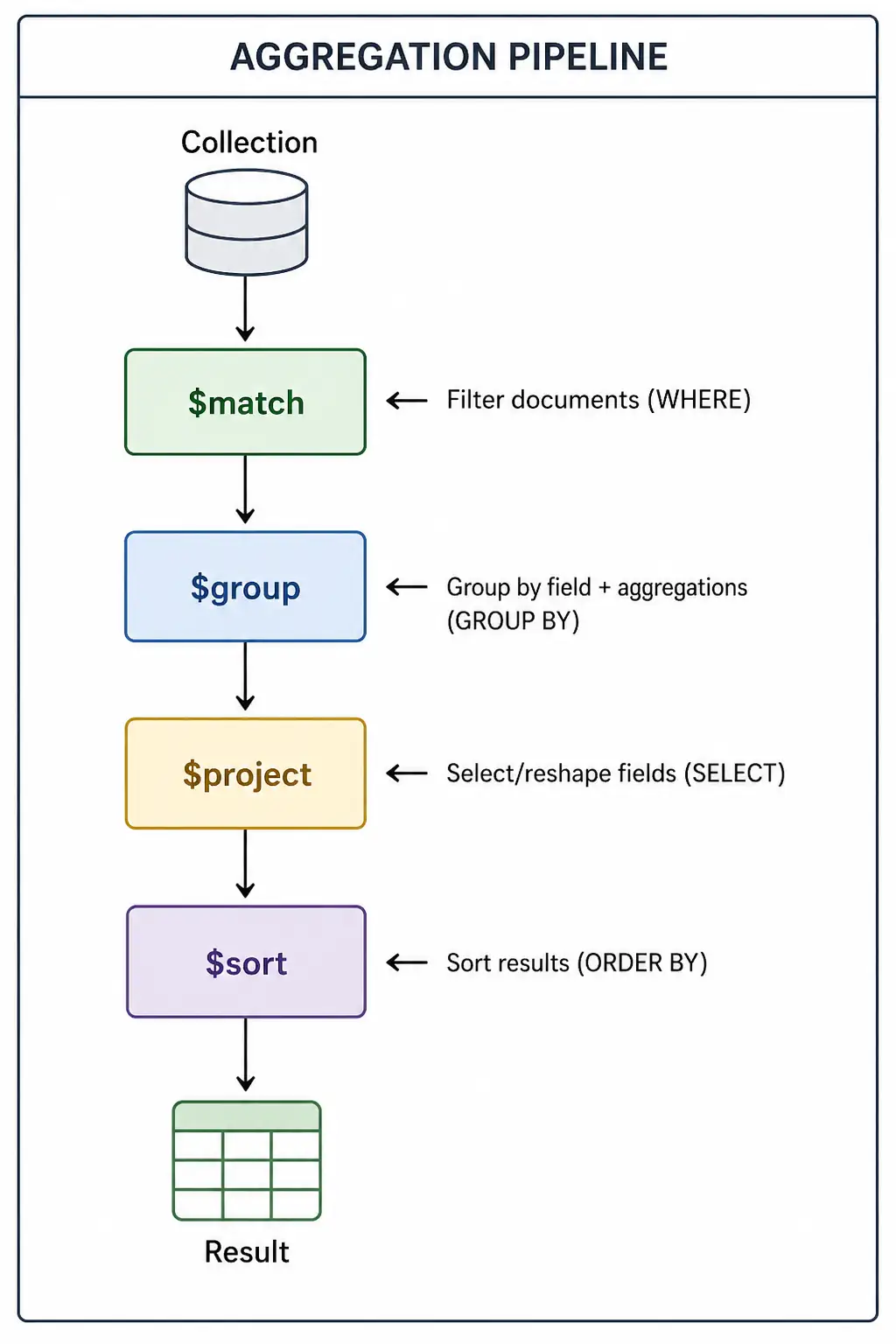
Aggregation pipeline data processing का framework है – SQL के GROUP BY, JOIN, HAVING जैसे operations के लिए.
Pipeline Flow:
Basic Syntax:
db.collection.aggregate([
  { stage1: { ... } },
  { stage2: { ... } },
  { stage3: { ... } }
])
MongoDB aggregation pipeline stages Hindi में हम सबसे important stages सीखेंगे.
2. $match – Filter Documents
$match SQL के WHERE clause जैसा है – documents को filter करता है.
Basic $match:
// Filter users by age
db.users.aggregate([
  { $match: { age: { $gt: 18 } } }
])

// Multiple conditions
db.users.aggregate([
  { $match: {
    age: { $gte: 18, $lte: 60 },
    city: "Mumbai",
    isActive: true
  } }
])
$match with Date:
// Orders from last 30 days
db.orders.aggregate([
  { $match: {
    createdAt: { $gte: new Date(Date.now() - 30*24*60*60*1000) }
  } }
])

// Specific date range
db.orders.aggregate([
  { $match: {
    createdAt: {
      $gte: ISODate("2026-01-01"),
      $lt: ISODate("2026-02-01")
    }
  } }
])
$match with $regex:
// Search products by name pattern
db.products.aggregate([
  { $match: { name: { $regex: /^Mac/, $options: "i" } } }
])
Best Practice:
// ✅ $match को पहले stage में रखो (performance के लिए)
db.orders.aggregate([
  { $match: { status: "completed" } },  // पहले filter
  { $group: { _id: "$customerId", total: { $sum: "$amount" } } }
])
3. $group – Group By + Aggregations
$group SQL के GROUP BY जैसा है – documents को group करता है और aggregations apply करता है.
Group By Single Field:
// Total sales by category
db.products.aggregate([
  { $group: {
    _id: "$category",
    totalProducts: { $sum: 1 },
    avgPrice: { $avg: "$price" },
    minPrice: { $min: "$price" },
    maxPrice: { $max: "$price" }
  } }
])
Group By Multiple Fields:
// Orders by year and month
db.orders.aggregate([
  { $group: {
    _id: {
      year: { $year: "$createdAt" },
      month: { $month: "$createdAt" }
    },
    totalOrders: { $sum: 1 },
    totalRevenue: { $sum: "$amount" }
  } }
])
Aggregation Operators:
| Operator | Description |
|---|---|
$sum | Sum of values |
$avg | Average of values |
$min | Minimum value |
$max | Maximum value |
$first | First document’s value |
$last | Last document’s value |
$push | Array of all values |
$addToSet | Array of unique values |
Examples:
// Users by city (count, average age, all names)
db.users.aggregate([
  { $group: {
    _id: "$city",
    count: { $sum: 1 },
    avgAge: { $avg: "$age" },
    allNames: { $push: "$name" },
    uniqueHobbies: { $addToSet: "$hobby" }
  } }
])

// Products by category with stats
db.products.aggregate([
  { $group: {
    _id: "$category",
    totalValue: { $sum: { $multiply: ["$price", "$stock"] } },
    avgRating: { $avg: "$rating" },
    inStockCount: { $sum: { $cond: ["$inStock", 1, 0] } }
  } }
])
4. $project – Select/Reshape Fields
$project SQL के SELECT जैसा है – fields को select, rename, या reshape करता है.
Basic $project:
// Select specific fields
db.users.aggregate([
  { $project: {
    name: 1,
    email: 1,
    age: 1,
    _id: 0
  } }
])
Computed Fields:
// Add computed fields
db.orders.aggregate([
  { $project: {
    orderId: 1,
    customerName: 1,
    total: 1,
    tax: { $multiply: ["$total", 0.18] },        // 18% tax
    grandTotal: { $add: ["$total", { $multiply: ["$total", 0.18] }] },
    isHighValue: { $gt: ["$total", 10000] }
  } }
])
String Operations:
// String manipulation
db.users.aggregate([
  { $project: {
    fullName: { $concat: ["$firstName", " ", "$lastName"] },
    emailDomain: { $arrayElemAt: [{ $split: ["$email", "@"] }, 1] },
    nameLength: { $strLenCP: "$name" },
    upperName: { $toUpper: "$name" }
  } }
])
Conditional Fields:
// Conditional logic
db.products.aggregate([
  { $project: {
    name: 1,
    price: 1,
    discountPrice: {
      $cond: {
        if: { $gt: ["$price", 1000] },
        then: { $multiply: ["$price", 0.9] },  // 10% off
        else: "$price"
      }
    },
    category: {
      $switch: {
        branches: [
          { case: { $eq: ["$category", "electronics"] }, then: "Electronics" },
          { case: { $eq: ["$category", "clothing"] }, then: "Fashion" }
        ],
        default: "Other"
      }
    }
  } }
])
5. $sort, $limit, $skip – Pagination
$sort – Sorting:
// Sort by multiple fields
db.products.aggregate([
  { $sort: { category: 1, price: -1 } }  // category ASC, price DESC
])

// Sort by computed field
db.orders.aggregate([
  { $project: { total: { $sum: "$items.price" } } },
  { $sort: { total: -1 } }
])
$limit and $skip – Pagination:
// Pagination (page 2, 10 items per page)
db.products.aggregate([
  { $skip: 10 },   // Skip first 10
  { $limit: 10 }   // Take next 10
])

// Complete pagination with sorting
db.products.aggregate([
  { $sort: { createdAt: -1 } },
  { $skip: (page - 1) * limit },
  { $limit: limit }
])
Top N Results:
// Top 5 most expensive products
db.products.aggregate([
  { $sort: { price: -1 } },
  { $limit: 5 }
])

// Top 3 categories by sales
db.orders.aggregate([
  { $group: { _id: "$category", totalSales: { $sum: "$amount" } } },
  { $sort: { totalSales: -1 } },
  { $limit: 3 }
])
6. $lookup – Left Join (SQL JOIN)
$lookup SQL के LEFT JOIN जैसा है – multiple collections को join करता है.
Basic $lookup:
// Users + Orders join
db.users.aggregate([
  { $lookup: {
    from: "orders",
    localField: "_id",
    foreignField: "userId",
    as: "userOrders"
  } }
])

// Result: user document में userOrders array add हो जाएगा
$lookup with Pipeline (Complex Join):
// Join with conditions
db.users.aggregate([
  { $lookup: {
    from: "orders",
    let: { userId: "$_id" },
    pipeline: [
      { $match: {
        $expr: { $eq: ["$userId", "$$userId"] },
        status: "completed"
      } },
      { $limit: 5 },
      { $sort: { createdAt: -1 } }
    ],
    as: "recentOrders"
  } }
])
Multi-stage $lookup:
// Users → Orders → Products
db.users.aggregate([
  { $lookup: {
    from: "orders",
    localField: "_id",
    foreignField: "userId",
    as: "orders"
  } },
  { $unwind: "$orders" },
  { $lookup: {
    from: "products",
    localField: "orders.productId",
    foreignField: "_id",
    as: "orders.productDetails"
  } }
])
7. $unwind – Flatten Arrays
$unwind array fields को flatten करता है – हर array element के लिए नया document बनाता है.
Basic $unwind:
// Without $unwind
// Document: { _id: 1, name: "Rahul", hobbies: ["coding", "reading"] }

db.users.aggregate([
  { $unwind: "$hobbies" }
])
// Output:
// { _id: 1, name: "Rahul", hobbies: "coding" }
// { _id: 1, name: "Rahul", hobbies: "reading" }
$unwind with Options:
// Preserve null/empty arrays
db.users.aggregate([
  { $unwind: { path: "$hobbies", preserveNullAndEmptyArrays: true } }
])

// Include array index
db.users.aggregate([
  { $unwind: { path: "$hobbies", includeArrayIndex: "hobbyIndex" } }
])
Practical Example – Order Items:
// Order items analysis
db.orders.aggregate([
  { $unwind: "$items" },  // Flatten items array
  { $group: {
    _id: "$items.productId",
    totalSold: { $sum: "$items.quantity" },
    totalRevenue: { $sum: { $multiply: ["$items.price", "$items.quantity"] } }
  } },
  { $sort: { totalSold: -1 } }
])
8. $addFields – Add Computed Fields
$addFields new fields add करता है या existing fields को modify करता है.
Basic $addFields:
db.orders.aggregate([
  { $addFields: {
    total: { $sum: "$items.price" },
    tax: { $multiply: [{ $sum: "$items.price" }, 0.18] },
    grandTotal: { $add: ["$total", "$tax"] }
  } }
])
Multiple Computations:
db.products.aggregate([
  { $addFields: {
    discountedPrice: { $cond: {
      if: { $gt: ["$price", 1000] },
      then: { $multiply: ["$price", 0.9] },
      else: "$price"
    } },
    profitMargin: { $subtract: ["$price", "$cost"] },
    profitPercent: { $multiply: [
      { $divide: [
        { $subtract: ["$price", "$cost"] },
        "$cost"
      ] },
      100
    ] }
  } }
])
9. $bucket – Bucket Grouping
$bucket values को ranges में group करता है (histogram).
Basic $bucket:
// Age groups
db.users.aggregate([
  { $bucket: {
    groupBy: "$age",
    boundaries: [18, 25, 35, 50, 65, 100],
    default: "Other",
    output: {
      count: { $sum: 1 },
      avgSalary: { $avg: "$salary" }
    }
  } }
])
Output:
[
  { "_id": 18, "count": 45, "avgSalary": 35000 },
  { "_id": 25, "count": 78, "avgSalary": 45000 },
  { "_id": 35, "count": 52, "avgSalary": 55000 },
  { "_id": 50, "count": 30, "avgSalary": 60000 },
  { "_id": 65, "count": 12, "avgSalary": 50000 },
  { "_id": "Other", "count": 5, "avgSalary": 30000 }
]
Price Buckets:
db.products.aggregate([
  { $bucket: {
    groupBy: "$price",
    boundaries: [0, 500, 1000, 5000, 10000, 50000, 100000],
    default: "Premium",
    output: {
      productCount: { $sum: 1 },
      avgRating: { $avg: "$rating" },
      products: { $push: "$name" }
    }
  } }
])
10. $facet – Multiple Aggregations
$facet एक ही pipeline में multiple aggregations करने देता है.
Basic $facet:
db.orders.aggregate([
  { $facet: {
    totalRevenue: [
      { $group: { _id: null, total: { $sum: "$amount" } } }
    ],
    categoryBreakdown: [
      { $group: { _id: "$category", total: { $sum: "$amount" } } }
    ],
    monthlyTrend: [
      { $group: {
        _id: { $month: "$createdAt" },
        count: { $sum: 1 },
        revenue: { $sum: "$amount" }
      } },
      { $sort: { "_id": 1 } }
    ]
  } }
])
Dashboard Analytics:
db.sales.aggregate([
  { $match: { createdAt: { $gte: startDate, $lte: endDate } } },
  { $facet: {
    summary: [
      { $group: {
        _id: null,
        totalSales: { $sum: "$amount" },
        avgOrderValue: { $avg: "$amount" },
        totalOrders: { $sum: 1 },
        uniqueCustomers: { $addToSet: "$customerId" }
      } },
      { $project: {
        totalSales: 1,
        avgOrderValue: 1,
        totalOrders: 1,
        uniqueCustomers: { $size: "$uniqueCustomers" }
      } }
    ],
    topProducts: [
      { $group: { _id: "$productId", totalSold: { $sum: "$quantity" } } },
      { $sort: { totalSold: -1 } },
      { $limit: 10 }
    ],
    dailySales: [
      { $group: {
        _id: { $dateToString: { format: "%Y-%m-%d", date: "$createdAt" } },
        revenue: { $sum: "$amount" }
      } },
      { $sort: { "_id": 1 } }
    ]
  } }
])
11. $out – Save Results to Collection
$out aggregation results को new collection में save करता है.
Basic $out:
// Save daily sales report to new collection
db.orders.aggregate([
  { $group: {
    _id: { $dateToString: { format: "%Y-%m-%d", date: "$createdAt" } },
    totalRevenue: { $sum: "$amount" },
    orderCount: { $sum: 1 }
  } },
  { $out: "daily_sales_report" }
])

// Now query the report collection
db.daily_sales_report.find()
$out with Replace:
// Replace entire collection
db.products.aggregate([
  { $match: { isActive: true } },
  { $project: { name: 1, price: 1, category: 1 } },
  { $out: "active_products" }  // Replaces active_products collection
])
$merge (Alternative to $out):
// Merge (update/insert) instead of replace
db.orders.aggregate([
  { $group: {
    _id: "$customerId",
    totalSpent: { $sum: "$amount" },
    orderCount: { $sum: 1 }
  } },
  { $merge: {
    into: "customer_summary",
    on: "_id",
    whenMatched: "merge",
    whenNotMatched: "insert"
  } }
])
12. Real-world Examples
Example 1: E-commerce Dashboard
// Complete sales dashboard
db.orders.aggregate([
  { $match: {
    status: "completed",
    createdAt: { $gte: ISODate("2026-01-01"), $lt: ISODate("2026-02-01") }
  } },
  { $facet: {
    summary: [
      { $group: {
        _id: null,
        totalRevenue: { $sum: "$total" },
        totalOrders: { $sum: 1 },
        avgOrderValue: { $avg: "$total" }
      } }
    ],
    categoryPerformance: [
      { $unwind: "$items" },
      { $group: {
        _id: "$items.category",
        revenue: { $sum: { $multiply: ["$items.price", "$items.quantity"] } },
        unitsSold: { $sum: "$items.quantity" }
      } },
      { $sort: { revenue: -1 } }
    ],
    topCustomers: [
      { $group: {
        _id: "$customerId",
        totalSpent: { $sum: "$total" },
        orderCount: { $sum: 1 }
      } },
      { $sort: { totalSpent: -1 } },
      { $limit: 10 }
    ],
    dailyTrend: [
      { $group: {
        _id: { $dateToString: { format: "%Y-%m-%d", date: "$createdAt" } },
        dailyRevenue: { $sum: "$total" },
        dailyOrders: { $sum: 1 }
      } },
      { $sort: { _id: 1 } }
    ]
  } }
])
Example 2: User Analytics
// User engagement analytics
db.users.aggregate([
  { $lookup: {
    from: "sessions",
    localField: "_id",
    foreignField: "userId",
    as: "sessions"
  } },
  { $addFields: {
    totalSessionTime: { $sum: "$sessions.duration" },
    sessionCount: { $size: "$sessions" },
    lastActive: { $max: "$sessions.endTime" }
  } },
  { $bucket: {
    groupBy: "$totalSessionTime",
    boundaries: [0, 3600, 7200, 14400, 28800, 86400],
    default: "Very Active",
    output: {
      userCount: { $sum: 1 },
      avgSessionCount: { $avg: "$sessionCount" }
    }
  } }
])
Example 3: Product Recommendation
// Products frequently bought together
db.orders.aggregate([
  { $unwind: "$items" },
  { $group: {
    _id: "$items.productId",
    boughtWith: { $addToSet: "$_id" }
  } },
  { $unwind: "$boughtWith" },
  { $group: {
    _id: { product: "$_id", with: "$boughtWith" },
    frequency: { $sum: 1 }
  } },
  { $match: { "_id.product": { $ne: "$_id.with" } } },
  { $sort: { frequency: -1 } },
  { $group: {
    _id: "$_id.product",
    recommendations: { $push: { product: "$_id.with", score: "$frequency" } }
  } },
  { $project: {
    product: "$_id",
    recommendations: { $slice: ["$recommendations", 5] }
  } }
])
13. Common Mistakes + Solutions
Mistake 1: $match after $group
// ❌ Inefficient – filters after grouping
db.orders.aggregate([
  { $group: { _id: "$category", total: { $sum: "$amount" } } },
  { $match: { total: { $gt: 10000 } } }
])

// ✅ Efficient – filter before group
db.orders.aggregate([
  { $match: { amount: { $gt: 10000 } } },
  { $group: { _id: "$category", total: { $sum: "$amount" } } }
])
Mistake 2: $lookup without index
// ❌ Slow – no index on foreignField
db.orders.aggregate([
  { $lookup: {
    from: "users",
    localField: "userId",
    foreignField: "_id",
    as: "user"
  } }
])

// ✅ Create index first
db.users.createIndex({ _id: 1 })  // Already has index on _id
Mistake 3: $unwind without preserving empty arrays
// ❌ Loses documents with empty arrays
db.users.aggregate([
  { $unwind: "$orders" }
])

// ✅ Preserve empty arrays
db.users.aggregate([
  { $unwind: { path: "$orders", preserveNullAndEmptyArrays: true } }
])
14. Quick Cheat Sheet
Common Pipelines:
// Group by with multiple aggregations
[
  { $group: {
    _id: "$field",
    count: { $sum: 1 },
    total: { $sum: "$amount" },
    avg: { $avg: "$amount" }
  } }
]

// Join two collections
[
  { $lookup: {
    from: "orders",
    localField: "_id",
    foreignField: "userId",
    as: "orders"
  } }
]

// Pagination
[
  { $sort: { createdAt: -1 } },
  { $skip: (page-1)*limit },
  { $limit: limit }
]
Aggregation Operators Summary:
| Stage | Purpose |
|---|---|
$match | Filter |
$group | Group + Aggregate |
$project | Reshape |
$sort | Order |
$limit/$skip | Pagination |
$lookup | Join |
$unwind | Flatten array |
$facet | Multiple pipelines |
15. FAQ
Q1: MongoDB aggregation pipeline stages Hindi में सबसे important kya hai?$match + $group – ये दो stages सबसे ज्यादा use होते हैं.
Q2: $match को पहले stage में kyu रखना चाहिए?
Data को पहले filter करने से बाद के stages को कम data process करना पड़ता है – performance better होती है.
Q3: $lookup vs SQL JOIN – kya antar hai?
$lookup LEFT JOIN equivalent है, but MongoDB में foreign key constraints नहीं होते.
Q4: $unwind kyu chahiye?
Array fields को flatten करने के लिए – $group से पहले $unwind करना पड़ता है.
Q5: $facet kya karta hai?
एक ही pipeline में multiple aggregations parallel run करता है – dashboard के लिए perfect.
Q6: $out vs $merge – kya antar hai?
$out replaces entire collection, $merge updates/inserts (upsert).
Q7: $project mein computed fields kaise banayein?{ $add: ["$field1", "$field2"] }, { $multiply: ["$price", 0.9] } etc.
Q8: $bucket kya karta hai?
Values को ranges में group करता है – histogram बनाने के लिए.
Q9: Aggregation pipeline performance kaise improve karein?
$match पहले रखो, indexes use करो, $limit जल्दी लगाओ, $unwind से पहले filter करो.
Q10: Pipeline memory limit kya hai?
100MB per stage – ज्यादा data के लिए { allowDiskUse: true } use करो.
16. Conclusion
बहुत बढ़िया दोस्तों! आज हमने MongoDB aggregation pipeline stages Hindi को पूरी detail में समझा.
Quick Recap:
| Stage | SQL Equivalent |
|---|---|
$match | WHERE |
$group | GROUP BY |
$project | SELECT |
$sort | ORDER BY |
$limit/$skip | LIMIT/OFFSET |
$lookup | LEFT JOIN |
$unwind | UNNEST / EXPLODE |
Mera personal experience:
Aggregation pipeline पहले complex लगता था, लेकिन stages को समझने के बाद SQL जैसी queries लिखना easy हो गया. $facet से dashboard analytics एक ही query में बना लेता हूँ.
Tum bhi ye steps follow karo:
- ✅ Basic $match + $group try करो
- ✅ $lookup से collections join करो
- ✅ $unwind से arrays flatten करो
- ✅ $facet से dashboard बनाओ
- ✅ $out से results save करो
अब तुम्हारी बारी है!
नीचे comment में बताओ:
- तुमने कभी aggregation use kiya है?
- कौन सा stage सबसे useful लगा?
- अगला topic क्या चाहिए? (MongoDB Transactions? Change Streams? Atlas Search?)
The Easy Master पर बने रहो। Happy Aggregating! 🚀🍃
Resources
- MongoDB Aggregation Documentation
- Aggregation Pipeline Stages Reference
- MongoDB Aggregation Examples
Additional Resources
- React.js Kya Hai? JSX aur Components Samjhe – Beginner Guide 2026
- React Props and State Data Flow Hindi – समझे आसान भाषा में 2026
- React Router v6 – Multi-Page App Banaye (Routing Guide) 2026
- Advanced React Hooks – useContext and useReducer Samjhe 2026
- Redux Toolkit Simplified – State Management Aasaan Tarika 2026
- React API Integration Made Easy with Fetch and Axios
- React Performance Optimization – App Ko Fast कैसे बनाएं 2026
- React 19 New Features – AI Integration with React (2026)
- Node.js क्या है? 2026 में अपना पहला Backend Server बनाएँ
- NPM Packages कैसे इंस्टॉल करें? Modules (ESM vs CommonJS) 2026
- Express.js Tutorial – REST API Routing और Middleware समझे 2026
- Prisma ORM MongoDB से Database Connect कैसे करें – Easy Tutorial Hindi
- JWT Authentication Node.js – Secure Login System बनाए 2026
- WebSockets Node.js – Live Chat App कैसे बनाएं (Socket.io)
- Async Await vs Promises – Node.js में Async Code कैसे सीखें?
- Microservices Architecture node.js आसान हिंदी Explanation 2026
- Docker से Node.js App Production Ready Deploy करें 2026
- Express.js Setup – पहला Server कैसे बनाएं (Step-by-Step) 2026
- Express.js Routing – GET POST PUT DELETE Complete Guide
- Express Middleware समझे – Application, Router, Error Middleware
- Express req and res Objects – Query, Params, Body, Headers Explained
- Express Static Files और Templating – EJS से Dynamic HTML Banaye
- Express Router – API Routes को Organize करें (Modular Code)
- Express.js में Environment Variables – .env File कैसे Use करें
- Express File Upload Multer Tutorial | Image PDF Hindi 2026
- Express Security – Helmet, CORS, Rate Limiting, Validation (2026)
- Express + TypeScript – Type-Safe API कैसे बनाएं 2026
- Express MongoDB CRUD – Complete REST API Example 2026
- Express Logging – Morgan और Winston से Debug करें
- Express API Testing – Supertest से Routes Test करें
- MongoDB Setup – CRUD Operations समझे (Beginner Guide) 2026
- MongoDB Compass से GUI Database Manage करने का आसान तरीका | Beginner Tutorial 2026
- Node.js MongoDB Connection – Mongoose Setup समझे 2026
- MongoDB Data Modeling – Embedded Documents vs References 2026
- MongoDB Indexing – Query Speed बढ़ने करने का आसान तरीका