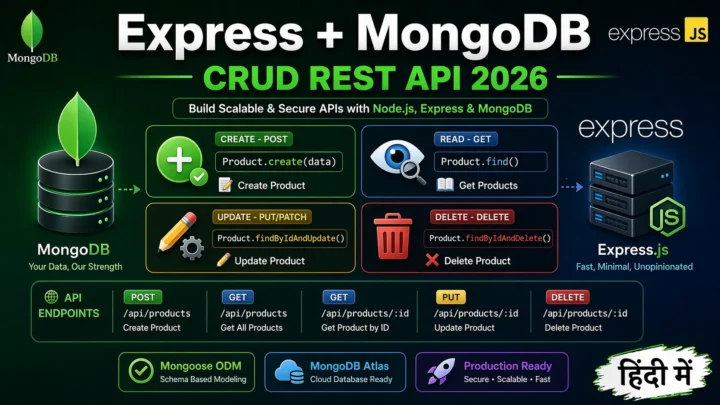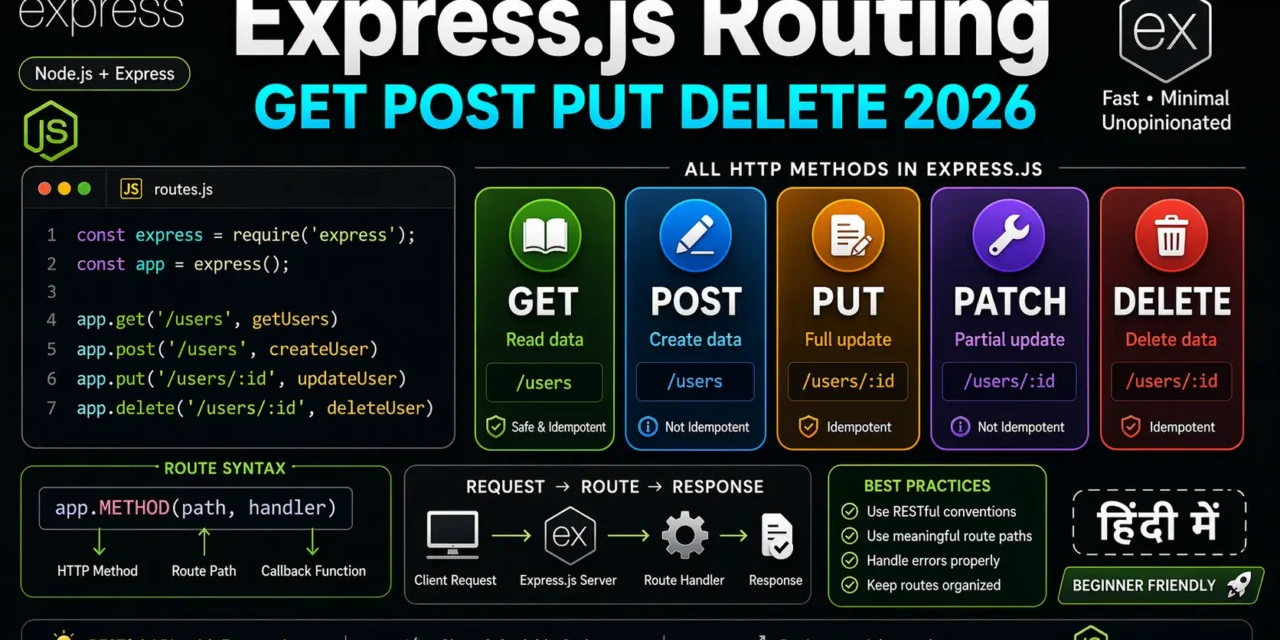
नमस्ते दोस्तों! 🙏
स्वागत है The Easy Master पर!
क्या तुमने कभी सोचा है – Express.js routing kaise kaam karta hai? GET, POST, PUT, DELETE – ye sab kya हैं?
Routing URLs को functions से map करता है। जब कोई client request bhejta है, Express decide karta hai ki kaun sa function run karna hai।
Express.js routing complete guide Hindi में समझना बहुत जरूरी है क्योंकि:
- REST APIs ka foundation routing है
- Every web framework mein routing hoti है
- Interview mein pakka routing questions puche jayenge
- Clean, organized code ke liye routing samajhna zaroori है
Aaj kya seekhoge?
| Topic | Kya Seekhega? |
|---|---|
| Routing Kya Hai? | Basics aur concepts |
| Route Methods | GET, POST, PUT, DELETE, PATCH |
| Route Parameters | Dynamic URLs (/users/:id) |
| Query Parameters | Filtering (?page=2) |
| Route Handlers | Multiple callbacks |
| app.route() | Chaining routes |
| express.Router() | Modular routes |
| Route Chaining | Same route different methods |
Kya tumhe pata hai?
Express.js supports route chaining – ek hi route ke liye multiple methods ek saath chain kar sakte ho!
तो चलिए शुरू करते हैं – Express.js routing complete guide Hindi सीखने का सफर! 🚀
Table of Contents
1. Routing क्या Hai? – Introduction
Routing = Different URLs के लिए different responses देना।
Basic Concept:
Client Request                    Server Response
     │                                  │
     ▼                                  ▼
GET /users          →      [List of users]
GET /users/1        →      [User with id 1]
POST /users         →      [Create new user]
PUT /users/1        →      [Update user 1]
DELETE /users/1     →      [Delete user 1]
Express.js Routing Syntax:
app.METHOD(PATH, HANDLER)

// Where:
// app = Express instance
// METHOD = HTTP method (get, post, put, delete, patch)
// PATH = URL path
// HANDLER = Function to execute
Express.js routing complete guide Hindi में हम सभी methods cover करेंगे।
2. Basic Routing – app.get(), app.post()
Basic Server Setup:
// server.js
const express = require('express');
const app = express();
const PORT = 3000;

// Middleware to parse JSON
app.use(express.json());

// GET route - Home page
app.get('/', (req, res) => {
  res.send('Welcome to the Home Page! 🏠');
});

// GET route - About page
app.get('/about', (req, res) => {
  res.send('About Us - Learn about our company');
});

// GET route - Contact page
app.get('/contact', (req, res) => {
  res.json({
    email: 'support@example.com',
    phone: '+91-1234567890',
    address: 'Mumbai, India'
  });
});

// POST route - Submit data
app.post('/contact', (req, res) => {
  const { name, email, message } = req.body;
  console.log('Contact form submitted:', { name, email, message });
  res.status(201).json({ message: 'Message sent successfully!' });
});

app.listen(PORT, () => {
  console.log(`Server running on http://localhost:${PORT}`);
});
Route Path Examples:
// Exact match
app.get('/users', (req, res) => {
  res.send('Users list');
});

// Multiple paths
app.get('/about|/about-us|/about/company', (req, res) => {
  res.send('About page');
});

// Pattern matching
app.get('/ab?cd', (req, res) => {
  // Matches /acd and /abcd
  res.send('Pattern matched!');
});

app.get('/ab+cd', (req, res) => {
  // Matches /abcd, /abbcd, /abbbcd
  res.send('Pattern matched!');
});

app.get('/ab*cd', (req, res) => {
  // Matches /abcd, /abXcd, /abXYZcd
  res.send('Pattern matched!');
});
3. Route Methods – GET, POST, PUT, PATCH, DELETE
Complete CRUD API Example:
// server.js
const express = require('express');
const app = express();
app.use(express.json());

// In-memory database
let products = [
  { id: 1, name: 'Laptop', price: 50000, category: 'electronics' },
  { id: 2, name: 'Mouse', price: 500, category: 'electronics' },
  { id: 3, name: 'Shirt', price: 1000, category: 'clothing' }
];

let nextId = 4;

// ============ GET - Read data ============

// GET /api/products - Get all products
app.get('/api/products', (req, res) => {
  res.json({
    success: true,
    count: products.length,
    data: products
  });
});

// GET /api/products/:id - Get single product
app.get('/api/products/:id', (req, res) => {
  const id = parseInt(req.params.id);
  const product = products.find(p => p.id === id);

  if (!product) {
    return res.status(404).json({
      success: false,
      error: 'Product not found'
    });
  }

  res.json({
    success: true,
    data: product
  });
});

// ============ POST - Create data ============

// POST /api/products - Create new product
app.post('/api/products', (req, res) => {
  const { name, price, category } = req.body;

  // Validation
  if (!name || !price) {
    return res.status(400).json({
      success: false,
      error: 'Name and price are required'
    });
  }

  const newProduct = {
    id: nextId++,
    name,
    price,
    category: category || 'general'
  };

  products.push(newProduct);

  res.status(201).json({
    success: true,
    message: 'Product created successfully',
    data: newProduct
  });
});

// ============ PUT - Full update ============

// PUT /api/products/:id - Update product (full)
app.put('/api/products/:id', (req, res) => {
  const id = parseInt(req.params.id);
  const { name, price, category } = req.body;

  const productIndex = products.findIndex(p => p.id === id);

  if (productIndex === -1) {
    return res.status(404).json({
      success: false,
      error: 'Product not found'
    });
  }

  // Full update - all fields required
  if (!name || !price) {
    return res.status(400).json({
      success: false,
      error: 'Name and price are required for full update'
    });
  }

  products[productIndex] = {
    id,
    name,
    price,
    category: category || products[productIndex].category
  };

  res.json({
    success: true,
    message: 'Product updated successfully',
    data: products[productIndex]
  });
});

// ============ PATCH - Partial update ============

// PATCH /api/products/:id - Update product (partial)
app.patch('/api/products/:id', (req, res) => {
  const id = parseInt(req.params.id);
  const updates = req.body;

  const productIndex = products.findIndex(p => p.id === id);

  if (productIndex === -1) {
    return res.status(404).json({
      success: false,
      error: 'Product not found'
    });
  }

  // Partial update - only provided fields
  products[productIndex] = {
    ...products[productIndex],
    ...updates
  };

  res.json({
    success: true,
    message: 'Product updated successfully',
    data: products[productIndex]
  });
});

// ============ DELETE - Delete data ============

// DELETE /api/products/:id - Delete product
app.delete('/api/products/:id', (req, res) => {
  const id = parseInt(req.params.id);

  const productIndex = products.findIndex(p => p.id === id);

  if (productIndex === -1) {
    return res.status(404).json({
      success: false,
      error: 'Product not found'
    });
  }

  products.splice(productIndex, 1);

  res.json({
    success: true,
    message: 'Product deleted successfully'
  });
});

app.listen(3000, () => {
  console.log('Server running on port 3000');
});
Testing Methods:
# GET all products
curl http://localhost:3000/api/products

# GET single product
curl http://localhost:3000/api/products/1

# POST create product
curl -X POST http://localhost:3000/api/products \
  -H "Content-Type: application/json" \
  -d '{"name":"Keyboard","price":1500,"category":"electronics"}'

# PUT full update
curl -X PUT http://localhost:3000/api/products/1 \
  -H "Content-Type: application/json" \
  -d '{"name":"Gaming Laptop","price":75000,"category":"electronics"}'

# PATCH partial update
curl -X PATCH http://localhost:3000/api/products/1 \
  -H "Content-Type: application/json" \
  -d '{"price":70000}'

# DELETE product
curl -X DELETE http://localhost:3000/api/products/2
4. Route Parameters – Dynamic URLs
Route parameters dynamic URLs के लिए – :parameter_name
Basic Route Parameters:
// Single parameter
app.get('/users/:userId', (req, res) => {
  const userId = req.params.userId;
  res.json({ userId });
});

// Multiple parameters
app.get('/users/:userId/posts/:postId', (req, res) => {
  const { userId, postId } = req.params;
  res.json({ userId, postId });
});

// Optional parameter (using ?)
app.get('/products/:category?', (req, res) => {
  const category = req.params.category || 'all';
  res.json({ category });
});
Real-world Example:
// Blog API with route parameters
let posts = [
  { id: 1, title: 'Post 1', author: 'Vivek', category: 'tech' },
  { id: 2, title: 'Post 2', author: 'Deepti', category: 'lifestyle' },
  { id: 3, title: 'Post 3', author: 'Vivek', category: 'tech' }
];

// Get posts by author
app.get('/api/posts/author/:author', (req, res) => {
  const { author } = req.params;
  const authorPosts = posts.filter(p => p.author === author);

  res.json({
    success: true,
    count: authorPosts.length,
    data: authorPosts
  });
});

// Get posts by category
app.get('/api/posts/category/:category', (req, res) => {
  const { category } = req.params;
  const categoryPosts = posts.filter(p => p.category === category);

  res.json({
    success: true,
    count: categoryPosts.length,
    data: categoryPosts
  });
});

// Get post by ID (with validation)
app.get('/api/posts/:id(\\d+)', (req, res) => {
  const id = parseInt(req.params.id);
  const post = posts.find(p => p.id === id);

  if (!post) {
    return res.status(404).json({ error: 'Post not found' });
  }

  res.json(post);
});
5. Query Parameters – URL Search Params
Query parameters filtering, pagination, sorting के लिए – ?key=value&key2=value2
Basic Query Parameters:
// GET /api/search?q=express&page=2&limit=10
app.get('/api/search', (req, res) => {
  const { q, page = 1, limit = 10, sort = 'relevance' } = req.query;

  res.json({
    query: q,
    page: parseInt(page),
    limit: parseInt(limit),
    sort,
    results: []
  });
});
Advanced Filtering Example:
let products = [
  { id: 1, name: 'Laptop', price: 50000, category: 'electronics', brand: 'Dell', inStock: true },
  { id: 2, name: 'Mouse', price: 500, category: 'electronics', brand: 'Logitech', inStock: true },
  { id: 3, name: 'Shirt', price: 1000, category: 'clothing', brand: 'Nike', inStock: false },
  { id: 4, name: 'Jeans', price: 2000, category: 'clothing', brand: 'Levis', inStock: true },
  { id: 5, name: 'Monitor', price: 15000, category: 'electronics', brand: 'Samsung', inStock: true }
];

app.get('/api/products', (req, res) => {
  let {
    category,
    brand,
    minPrice,
    maxPrice,
    inStock,
    search,
    page = 1,
    limit = 10,
    sortBy = 'id',
    order = 'asc'
  } = req.query;

  let filteredProducts = [...products];

  // Filter by category
  if (category) {
    filteredProducts = filteredProducts.filter(p => p.category === category);
  }

  // Filter by brand
  if (brand) {
    filteredProducts = filteredProducts.filter(p => p.brand === brand);
  }

  // Filter by price range
  if (minPrice) {
    filteredProducts = filteredProducts.filter(p => p.price >= parseInt(minPrice));
  }
  if (maxPrice) {
    filteredProducts = filteredProducts.filter(p => p.price <= parseInt(maxPrice));
  }

  // Filter by stock
  if (inStock !== undefined) {
    const inStockBool = inStock === 'true';
    filteredProducts = filteredProducts.filter(p => p.inStock === inStockBool);
  }

  // Search by name
  if (search) {
    const searchLower = search.toLowerCase();
    filteredProducts = filteredProducts.filter(p =>
      p.name.toLowerCase().includes(searchLower)
    );
  }

  // Sorting
  filteredProducts.sort((a, b) => {
    const aVal = a[sortBy];
    const bVal = b[sortBy];

    if (order === 'asc') {
      return aVal > bVal ? 1 : -1;
    } else {
      return aVal < bVal ? 1 : -1;
    }
  });

  // Pagination
  const total = filteredProducts.length;
  const startIndex = (parseInt(page) - 1) * parseInt(limit);
  const endIndex = startIndex + parseInt(limit);
  const paginatedProducts = filteredProducts.slice(startIndex, endIndex);

  res.json({
    success: true,
    data: paginatedProducts,
    pagination: {
      page: parseInt(page),
      limit: parseInt(limit),
      total,
      totalPages: Math.ceil(total / parseInt(limit)),
      hasNext: endIndex < total,
      hasPrev: startIndex > 0
    },
    filters: {
      category,
      brand,
      minPrice,
      maxPrice,
      inStock,
      search
    }
  });
});
Test URLs:
# Get all products
curl http://localhost:3000/api/products

# Filter by category
curl http://localhost:3000/api/products?category=electronics

# Filter by price range
curl http://localhost:3000/api/products?minPrice=1000&maxPrice=50000

# Search products
curl http://localhost:3000/api/products?search=laptop

# Pagination
curl http://localhost:3000/api/products?page=2&limit=2

# Sorting
curl http://localhost:3000/api/products?sortBy=price&order=desc

# Multiple filters
curl http://localhost:3000/api/products?category=electronics&inStock=true&minPrice=1000&sortBy=price
6. Route Handlers – Multiple Callbacks
Ek route ke liye multiple callback functions ho sakte हैं।
Multiple Handlers:
// Multiple callbacks in array
app.get('/api/users', [
  (req, res, next) => {
    console.log('Step 1: Authentication');
    req.user = { id: 1, name: 'Vivek' };
    next();
  },
  (req, res, next) => {
    console.log('Step 2: Authorization');
    if (req.user) {
      next();
    } else {
      res.status(401).json({ error: 'Unauthorized' });
    }
  },
  (req, res) => {
    console.log('Step 3: Send response');
    res.json({ user: req.user });
  }
]);
Practical Example – Validation Pipeline:
// Validation middleware
const validateName = (req, res, next) => {
  const { name } = req.body;
  if (!name || name.length < 2) {
    return res.status(400).json({ error: 'Name must be at least 2 characters' });
  }
  next();
};

const validateEmail = (req, res, next) => {
  const { email } = req.body;
  const emailRegex = /^[^\s@]+@[^\s@]+\.[^\s@]+$/;
  if (!email || !emailRegex.test(email)) {
    return res.status(400).json({ error: 'Valid email is required' });
  }
  next();
};

const validateAge = (req, res, next) => {
  const { age } = req.body;
  if (age && (age < 18 || age > 100)) {
    return res.status(400).json({ error: 'Age must be between 18 and 100' });
  }
  next();
};

const checkDuplicateEmail = (req, res, next) => {
  const { email } = req.body;
  const existingUser = users.find(u => u.email === email);
  if (existingUser) {
    return res.status(409).json({ error: 'Email already exists' });
  }
  next();
};

// Using multiple handlers
app.post('/api/users',
  validateName,
  validateEmail,
  validateAge,
  checkDuplicateEmail,
  (req, res) => {
    const newUser = {
      id: users.length + 1,
      ...req.body,
      createdAt: new Date()
    };
    users.push(newUser);
    res.status(201).json({ success: true, data: newUser });
  }
);
7. app.route() – Chaining Routes
app.route() same path ke liye multiple methods chain karne के लिए।
Without app.route():
// Separate route definitions
app.get('/api/users', getAllUsers);
app.post('/api/users', createUser);
app.get('/api/users/:id', getUserById);
app.put('/api/users/:id', updateUser);
app.delete('/api/users/:id', deleteUser);
With app.route():
// Clean and organized!
app.route('/api/users')
  .get(getAllUsers)
  .post(createUser);

app.route('/api/users/:id')
  .get(getUserById)
  .put(updateUser)
  .delete(deleteUser);
Complete Example:
// Product routes using app.route()
app.route('/api/products')
  .get((req, res) => {
    // GET all products
    res.json({ success: true, data: products });
  })
  .post((req, res) => {
    // POST create product
    const { name, price, category } = req.body;

    if (!name || !price) {
      return res.status(400).json({ error: 'Name and price required' });
    }

    const newProduct = {
      id: products.length + 1,
      name,
      price,
      category: category || 'general',
      createdAt: new Date()
    };

    products.push(newProduct);
    res.status(201).json({ success: true, data: newProduct });
  });

app.route('/api/products/:id')
  .get((req, res) => {
    // GET single product
    const id = parseInt(req.params.id);
    const product = products.find(p => p.id === id);

    if (!product) {
      return res.status(404).json({ error: 'Product not found' });
    }

    res.json({ success: true, data: product });
  })
  .put((req, res) => {
    // PUT update product (full)
    const id = parseInt(req.params.id);
    const { name, price, category } = req.body;

    const productIndex = products.findIndex(p => p.id === id);

    if (productIndex === -1) {
      return res.status(404).json({ error: 'Product not found' });
    }

    if (!name || !price) {
      return res.status(400).json({ error: 'Name and price required' });
    }

    products[productIndex] = {
      id,
      name,
      price,
      category: category || products[productIndex].category,
      updatedAt: new Date()
    };

    res.json({ success: true, data: products[productIndex] });
  })
  .patch((req, res) => {
    // PATCH update product (partial)
    const id = parseInt(req.params.id);
    const updates = req.body;

    const productIndex = products.findIndex(p => p.id === id);

    if (productIndex === -1) {
      return res.status(404).json({ error: 'Product not found' });
    }

    products[productIndex] = {
      ...products[productIndex],
      ...updates,
      updatedAt: new Date()
    };

    res.json({ success: true, data: products[productIndex] });
  })
  .delete((req, res) => {
    // DELETE product
    const id = parseInt(req.params.id);
    const productIndex = products.findIndex(p => p.id === id);

    if (productIndex === -1) {
      return res.status(404).json({ error: 'Product not found' });
    }

    products.splice(productIndex, 1);
    res.json({ success: true, message: 'Product deleted' });
  });
8. express.Router() – Modular Routes
express.Router() routes ko modular बनाने के लिए – alag-alag files mein organize करने के लिए।
Project Structure:
my-app/
├── server.js
├── routes/
│   ├── users.js
│   ├── products.js
│   └── orders.js
├── controllers/
│   ├── userController.js
│   └── productController.js
└── middleware/
    └── auth.js
User Routes (routes/users.js):
// routes/users.js
const express = require('express');
const router = express.Router();

// In-memory users
let users = [
  { id: 1, name: 'Vivek', email: 'vivek@example.com' },
  { id: 2, name: 'Priya', email: 'priya@example.com' }
];
let nextId = 3;

// GET /api/users
router.get('/', (req, res) => {
  res.json({ success: true, data: users });
});

// GET /api/users/:id
router.get('/:id', (req, res) => {
  const id = parseInt(req.params.id);
  const user = users.find(u => u.id === id);

  if (!user) {
    return res.status(404).json({ error: 'User not found' });
  }

  res.json({ success: true, data: user });
});

// POST /api/users
router.post('/', (req, res) => {
  const { name, email } = req.body;

  if (!name || !email) {
    return res.status(400).json({ error: 'Name and email required' });
  }

  const newUser = {
    id: nextId++,
    name,
    email,
    createdAt: new Date()
  };

  users.push(newUser);
  res.status(201).json({ success: true, data: newUser });
});

// PUT /api/users/:id
router.put('/:id', (req, res) => {
  const id = parseInt(req.params.id);
  const { name, email } = req.body;

  const userIndex = users.findIndex(u => u.id === id);

  if (userIndex === -1) {
    return res.status(404).json({ error: 'User not found' });
  }

  if (!name || !email) {
    return res.status(400).json({ error: 'Name and email required' });
  }

  users[userIndex] = {
    ...users[userIndex],
    name,
    email,
    updatedAt: new Date()
  };

  res.json({ success: true, data: users[userIndex] });
});

// DELETE /api/users/:id
router.delete('/:id', (req, res) => {
  const id = parseInt(req.params.id);
  const userIndex = users.findIndex(u => u.id === id);

  if (userIndex === -1) {
    return res.status(404).json({ error: 'User not found' });
  }

  users.splice(userIndex, 1);
  res.json({ success: true, message: 'User deleted' });
});

module.exports = router;
Product Routes (routes/products.js):
// routes/products.js
const express = require('express');
const router = express.Router();

let products = [
  { id: 1, name: 'Laptop', price: 50000, category: 'electronics' },
  { id: 2, name: 'Mouse', price: 500, category: 'electronics' }
];
let nextId = 3;

// GET /api/products
router.get('/', (req, res) => {
  const { category, minPrice, maxPrice } = req.query;
  let filtered = [...products];

  if (category) {
    filtered = filtered.filter(p => p.category === category);
  }
  if (minPrice) {
    filtered = filtered.filter(p => p.price >= parseInt(minPrice));
  }
  if (maxPrice) {
    filtered = filtered.filter(p => p.price <= parseInt(maxPrice));
  }

  res.json({ success: true, count: filtered.length, data: filtered });
});

// GET /api/products/:id
router.get('/:id', (req, res) => {
  const id = parseInt(req.params.id);
  const product = products.find(p => p.id === id);

  if (!product) {
    return res.status(404).json({ error: 'Product not found' });
  }

  res.json({ success: true, data: product });
});

// POST /api/products
router.post('/', (req, res) => {
  const { name, price, category } = req.body;

  if (!name || !price) {
    return res.status(400).json({ error: 'Name and price required' });
  }

  const newProduct = {
    id: nextId++,
    name,
    price,
    category: category || 'general',
    createdAt: new Date()
  };

  products.push(newProduct);
  res.status(201).json({ success: true, data: newProduct });
});

// PUT /api/products/:id
router.put('/:id', (req, res) => {
  const id = parseInt(req.params.id);
  const { name, price, category } = req.body;

  const productIndex = products.findIndex(p => p.id === id);

  if (productIndex === -1) {
    return res.status(404).json({ error: 'Product not found' });
  }

  if (!name || !price) {
    return res.status(400).json({ error: 'Name and price required' });
  }

  products[productIndex] = {
    id,
    name,
    price,
    category: category || products[productIndex].category,
    updatedAt: new Date()
  };

  res.json({ success: true, data: products[productIndex] });
});

// DELETE /api/products/:id
router.delete('/:id', (req, res) => {
  const id = parseInt(req.params.id);
  const productIndex = products.findIndex(p => p.id === id);

  if (productIndex === -1) {
    return res.status(404).json({ error: 'Product not found' });
  }

  products.splice(productIndex, 1);
  res.json({ success: true, message: 'Product deleted' });
});

module.exports = router;
Main Server File (server.js):
// server.js
const express = require('express');
const userRoutes = require('./routes/users');
const productRoutes = require('./routes/products');

const app = express();
const PORT = 3000;

// Middleware
app.use(express.json());

// Use routes
app.use('/api/users', userRoutes);
app.use('/api/products', productRoutes);

// Health check
app.get('/health', (req, res) => {
  res.json({ status: 'OK', timestamp: new Date() });
});

// 404 handler
app.use('*', (req, res) => {
  res.status(404).json({ error: `Cannot ${req.method} ${req.url}` });
});

// Error handler
app.use((err, req, res, next) => {
  console.error(err);
  res.status(500).json({ error: 'Internal server error' });
});

app.listen(PORT, () => {
  console.log(`Server running on http://localhost:${PORT}`);
  console.log(`📋 Users API: http://localhost:${PORT}/api/users`);
  console.log(`📦 Products API: http://localhost:${PORT}/api/products`);
});
9. Route Chaining – Same Route Different Methods
app.route() Chaining (already covered):
app.route('/api/posts')
  .get(getAllPosts)
  .post(createPost);

app.route('/api/posts/:id')
  .get(getPostById)
  .put(updatePost)
  .delete(deletePost);
Router Level Chaining:
const router = express.Router();

router.route('/')
  .get((req, res) => {
    res.json({ message: 'GET all items' });
  })
  .post((req, res) => {
    res.json({ message: 'POST create item' });
  });

router.route('/:id')
  .get((req, res) => {
    res.json({ message: `GET item ${req.params.id}` });
  })
  .put((req, res) => {
    res.json({ message: `PUT update item ${req.params.id}` });
  })
  .patch((req, res) => {
    res.json({ message: `PATCH partial update item ${req.params.id}` });
  })
  .delete((req, res) => {
    res.json({ message: `DELETE item ${req.params.id}` });
  });

app.use('/api/items', router);
10. Regular Expressions in Routes
Express.js supports regular expressions in route paths.
// Match any route with "user" anywhere
app.get(/.*user.*/, (req, res) => {
  res.send('Route contains "user"');
});

// Match routes ending with "fly"
app.get(/.*fly$/, (req, res) => {
  res.send('Route ends with "fly"');
});

// Match routes with numbers only
app.get(/^\/api\/users\/\d+$/, (req, res) => {
  res.send('User ID is a number');
});

// Using regex for route parameters
app.get('/api/users/:userId(\\d+)', (req, res) => {
  // Only matches numeric userId
  res.json({ userId: req.params.userId });
});

app.get('/api/users/:name([a-zA-Z]+)', (req, res) => {
  // Only matches alphabetic name
  res.json({ name: req.params.name });
});
11. Real-world API Example
Complete E-commerce API:
// server.js
const express = require('express');
const app = express();
app.use(express.json());

// ============ DATA ============
let categories = [
  { id: 1, name: 'Electronics', slug: 'electronics' },
  { id: 2, name: 'Clothing', slug: 'clothing' },
  { id: 3, name: 'Books', slug: 'books' }
];

let products = [
  { id: 1, name: 'Laptop', price: 50000, categoryId: 1, inStock: true },
  { id: 2, name: 'Mouse', price: 500, categoryId: 1, inStock: true },
  { id: 3, name: 'Shirt', price: 1000, categoryId: 2, inStock: false }
];

let orders = [];
let nextOrderId = 1;

// ============ CATEGORY ROUTES ============
app.route('/api/categories')
  .get((req, res) => {
    res.json({ success: true, data: categories });
  })
  .post((req, res) => {
    const { name, slug } = req.body;
    if (!name || !slug) {
      return res.status(400).json({ error: 'Name and slug required' });
    }

    const newCategory = {
      id: categories.length + 1,
      name,
      slug
    };
    categories.push(newCategory);
    res.status(201).json({ success: true, data: newCategory });
  });

app.route('/api/categories/:id')
  .get((req, res) => {
    const id = parseInt(req.params.id);
    const category = categories.find(c => c.id === id);

    if (!category) {
      return res.status(404).json({ error: 'Category not found' });
    }

    // Get products in this category
    const categoryProducts = products.filter(p => p.categoryId === id);

    res.json({
      success: true,
      data: {
        ...category,
        products: categoryProducts
      }
    });
  })
  .put((req, res) => {
    const id = parseInt(req.params.id);
    const { name, slug } = req.body;
    const categoryIndex = categories.findIndex(c => c.id === id);

    if (categoryIndex === -1) {
      return res.status(404).json({ error: 'Category not found' });
    }

    categories[categoryIndex] = {
      id,
      name: name || categories[categoryIndex].name,
      slug: slug || categories[categoryIndex].slug
    };

    res.json({ success: true, data: categories[categoryIndex] });
  })
  .delete((req, res) => {
    const id = parseInt(req.params.id);
    const categoryIndex = categories.findIndex(c => c.id === id);

    if (categoryIndex === -1) {
      return res.status(404).json({ error: 'Category not found' });
    }

    // Check if category has products
    const hasProducts = products.some(p => p.categoryId === id);
    if (hasProducts) {
      return res.status(400).json({ error: 'Cannot delete category with products' });
    }

    categories.splice(categoryIndex, 1);
    res.json({ success: true, message: 'Category deleted' });
  });

// ============ PRODUCT ROUTES ============
app.route('/api/products')
  .get((req, res) => {
    let { categoryId, inStock, minPrice, maxPrice, search } = req.query;
    let filtered = [...products];

    if (categoryId) {
      filtered = filtered.filter(p => p.categoryId === parseInt(categoryId));
    }
    if (inStock !== undefined) {
      filtered = filtered.filter(p => p.inStock === (inStock === 'true'));
    }
    if (minPrice) {
      filtered = filtered.filter(p => p.price >= parseInt(minPrice));
    }
    if (maxPrice) {
      filtered = filtered.filter(p => p.price <= parseInt(maxPrice));
    }
    if (search) {
      filtered = filtered.filter(p =>
        p.name.toLowerCase().includes(search.toLowerCase())
      );
    }

    // Add category name to each product
    const productsWithCategory = filtered.map(product => ({
      ...product,
      category: categories.find(c => c.id === product.categoryId)?.name
    }));

    res.json({ success: true, count: productsWithCategory.length, data: productsWithCategory });
  })
  .post((req, res) => {
    const { name, price, categoryId, inStock } = req.body;

    if (!name || !price || !categoryId) {
      return res.status(400).json({ error: 'Name, price, and categoryId required' });
    }

    const categoryExists = categories.some(c => c.id === categoryId);
    if (!categoryExists) {
      return res.status(400).json({ error: 'Invalid categoryId' });
    }

    const newProduct = {
      id: products.length + 1,
      name,
      price,
      categoryId,
      inStock: inStock !== undefined ? inStock : true
    };

    products.push(newProduct);
    res.status(201).json({ success: true, data: newProduct });
  });

app.route('/api/products/:id')
  .get((req, res) => {
    const id = parseInt(req.params.id);
    const product = products.find(p => p.id === id);

    if (!product) {
      return res.status(404).json({ error: 'Product not found' });
    }

    const category = categories.find(c => c.id === product.categoryId);
    res.json({
      success: true,
      data: {
        ...product,
        category: category?.name
      }
    });
  })
  .put((req, res) => {
    const id = parseInt(req.params.id);
    const { name, price, categoryId, inStock } = req.body;
    const productIndex = products.findIndex(p => p.id === id);

    if (productIndex === -1) {
      return res.status(404).json({ error: 'Product not found' });
    }

    if (categoryId && !categories.some(c => c.id === categoryId)) {
      return res.status(400).json({ error: 'Invalid categoryId' });
    }

    products[productIndex] = {
      id,
      name: name || products[productIndex].name,
      price: price || products[productIndex].price,
      categoryId: categoryId || products[productIndex].categoryId,
      inStock: inStock !== undefined ? inStock : products[productIndex].inStock
    };

    res.json({ success: true, data: products[productIndex] });
  })
  .patch((req, res) => {
    const id = parseInt(req.params.id);
    const updates = req.body;
    const productIndex = products.findIndex(p => p.id === id);

    if (productIndex === -1) {
      return res.status(404).json({ error: 'Product not found' });
    }

    products[productIndex] = {
      ...products[productIndex],
      ...updates
    };

    res.json({ success: true, data: products[productIndex] });
  })
  .delete((req, res) => {
    const id = parseInt(req.params.id);
    const productIndex = products.findIndex(p => p.id === id);

    if (productIndex === -1) {
      return res.status(404).json({ error: 'Product not found' });
    }

    // Check if product is in any order
    const inOrder = orders.some(order =>
      order.items.some(item => item.productId === id)
    );

    if (inOrder) {
      return res.status(400).json({ error: 'Cannot delete product with existing orders' });
    }

    products.splice(productIndex, 1);
    res.json({ success: true, message: 'Product deleted' });
  });

// ============ ORDER ROUTES ============
app.route('/api/orders')
  .get((req, res) => {
    res.json({ success: true, data: orders });
  })
  .post((req, res) => {
    const { userId, items } = req.body;

    if (!userId || !items || !items.length) {
      return res.status(400).json({ error: 'UserId and items required' });
    }

    // Calculate total and validate products
    let total = 0;
    const orderItems = [];

    for (const item of items) {
      const product = products.find(p => p.id === item.productId);
      if (!product) {
        return res.status(400).json({ error: `Product ${item.productId} not found` });
      }

      if (!product.inStock) {
        return res.status(400).json({ error: `Product ${product.name} is out of stock` });
      }

      const itemTotal = product.price * item.quantity;
      total += itemTotal;

      orderItems.push({
        productId: item.productId,
        name: product.name,
        price: product.price,
        quantity: item.quantity,
        total: itemTotal
      });
    }

    const newOrder = {
      id: nextOrderId++,
      userId,
      items: orderItems,
      total,
      status: 'pending',
      createdAt: new Date()
    };

    orders.push(newOrder);
    res.status(201).json({ success: true, data: newOrder });
  });

app.route('/api/orders/:id')
  .get((req, res) => {
    const id = parseInt(req.params.id);
    const order = orders.find(o => o.id === id);

    if (!order) {
      return res.status(404).json({ error: 'Order not found' });
    }

    res.json({ success: true, data: order });
  })
  .patch((req, res) => {
    const id = parseInt(req.params.id);
    const { status } = req.body;
    const orderIndex = orders.findIndex(o => o.id === id);

    if (orderIndex === -1) {
      return res.status(404).json({ error: 'Order not found' });
    }

    const validStatuses = ['pending', 'processing', 'shipped', 'delivered', 'cancelled'];
    if (!validStatuses.includes(status)) {
      return res.status(400).json({ error: 'Invalid status' });
    }

    orders[orderIndex].status = status;
    orders[orderIndex].updatedAt = new Date();

    res.json({ success: true, data: orders[orderIndex] });
  });

// ============ START SERVER ============
const PORT = 3000;
app.listen(PORT, () => {
  console.log(`🚀 E-commerce API running on http://localhost:${PORT}`);
  console.log(`📁 Categories: http://localhost:${PORT}/api/categories`);
  console.log(`📦 Products: http://localhost:${PORT}/api/products`);
  console.log(`📋 Orders: http://localhost:${PORT}/api/orders`);
});
12. Common Mistakes + Solutions
Mistake 1: Route order matters
// ❌ Wrong order – specific route after generic
app.get('/api/users/:id', handler);
app.get('/api/users/profile', handler); // Never reaches!

// ✅ Correct order – specific before generic
app.get('/api/users/profile', handler);
app.get('/api/users/:id', handler);
Mistake 2: Not handling route parameters validation
// ❌ No validation
app.get('/api/users/:id', (req, res) => {
  const id = req.params.id; // Could be non-numeric
});

// ✅ Validate parameter
app.get('/api/users/:id(\\d+)', (req, res) => {
  const id = parseInt(req.params.id); // Guaranteed numeric
});
Mistake 3: Forgetting next() in middleware
// ❌ No next() – request hangs
app.get('/api/data', (req, res, next) => {
  console.log('Middleware');
  // Missing next()!
}, handler);

// ✅ Call next()
app.get('/api/data', (req, res, next) => {
  console.log('Middleware');
  next();
}, handler);
Mistake 4: Not using express.Router()
// ❌ All routes in server.js – hard to maintain
app.get('/api/users', handler);
app.post('/api/users', handler);
app.get('/api/products', handler);
// ... hundreds more

// ✅ Use Router
const userRoutes = require('./routes/users');
const productRoutes = require('./routes/products');
app.use('/api/users', userRoutes);
app.use('/api/products', productRoutes);
13. Quick Cheat Sheet
Route Methods:
| Method | Purpose | Example |
|---|---|---|
app.get() | Read data | app.get('/users', handler) |
app.post() | Create data | app.post('/users', handler) |
app.put() | Full update | app.put('/users/:id', handler) |
app.patch() | Partial update | app.patch('/users/:id', handler) |
app.delete() | Delete data | app.delete('/users/:id', handler) |
Route Parameters:
| Type | Syntax | Example URL |
|---|---|---|
| Route param | :id | /users/123 |
| Query param | ?key=value | /users?page=2 |
| Multiple params | :userId/:postId | /users/1/posts/5 |
Router Methods:
| Method | Purpose |
|---|---|
express.Router() | Create router instance |
router.use() | Mount middleware |
router.route() | Chain methods |
module.exports | Export router |
app.route() Chain:
app.route('/path')
  .get(handler1)
  .post(handler2)
  .put(handler3)
  .delete(handler4);
14. FAQ
Q1: Express.js routing complete guide Hindi में सबसे important concept kya hai?
Route methods (GET, POST, PUT, DELETE) aur route parameters – ye REST API ki foundation हैं।
Q2: app.get() vs app.post() – kya antar hai?app.get() data read करता है (URL parameters), app.post() data create करता है (request body)।
Q3: Route parameters vs query parameters – kya antar hai?
Route parameters URL का mandatory part हैं (/users/123), query parameters optional हैं (?page=2)।
Q4: app.route() kyun use karein?
Same path ke multiple methods को chain kar सकते हो – code organized रहता है।
Q5: express.Router() kyun use karein?
Routes को modular बनाने के लिए – alag-alag files में organize कर सकते हो।
Q6: PUT vs PATCH – kya antar hai?
PUT – full update (सभी fields required), PATCH – partial update (सिर्फ changed fields)।
Q7: Route order kyun important hai?
Express routes ko order में match करता है। Specific routes generic से पहले होने चाहिए।
Q8: Multiple route handlers kaise use karein?
Array of functions: app.get('/path', [middleware1, middleware2], handler)
Q9: Regex in routes कब use karein?
Route parameters validate करने के लिए: /api/users/:id(\\d+) – sirf numbers allow करता है।
Q10: 404 route कहाँ लगाना चाहिए?
सबसे last में – सभी routes के बाद।
15. Conclusion
बहुत बढ़िया दोस्तों! आज हमने Express.js routing complete guide Hindi को पूरी detail में समझा।
Quick Recap:
| Concept | Key Takeaway |
|---|---|
| Route Methods | GET, POST, PUT, PATCH, DELETE |
| Route Parameters | Dynamic URLs (/users/:id) |
| Query Parameters | Filtering (?page=2) |
| app.route() | Chaining methods on same path |
| express.Router() | Modular, organized routes |
Mera personal experience:
Routing Express.js का heart है। जब मैंने पहली बार express.Router() seekha, तो मेरे projects bohot organized ho gaye। अब 100+ routes वाले projects में भी code easily maintain होता है।
Tum bhi ye steps follow karo:
- ✅ Basic GET/POST routes banao
- ✅ Route parameters use karo
- ✅ Query parameters implement karo
- ✅
app.route()se chain karo - ✅
express.Router()se organize karo
अब तुम्हारी बारी है!
नीचे comment में बताओ:
- तुम्हें कौन सा route method sabse easy laga?
- क्या तुम
express.Router()use karoge? - अगला topic क्या चाहिए? (MongoDB with Mongoose? Authentication? File Upload?)
The Easy Master पर बने रहो। Happy Routing! 🚀💻
Resources
Additional Resources
- React.js Kya Hai? JSX aur Components Samjhe – Beginner Guide 2026
- React Props and State Data Flow Hindi – समझे आसान भाषा में 2026
- React Router v6 – Multi-Page App Banaye (Routing Guide) 2026
- Advanced React Hooks – useContext and useReducer Samjhe 2026
- Redux Toolkit Simplified – State Management Aasaan Tarika 2026
- React API Integration Made Easy with Fetch and Axios
- React Performance Optimization – App Ko Fast कैसे बनाएं 2026
- React 19 New Features – AI Integration with React (2026)
- Node.js क्या है? 2026 में अपना पहला Backend Server बनाएँ
- NPM Packages कैसे इंस्टॉल करें? Modules (ESM vs CommonJS) 2026
- Express.js Tutorial – REST API Routing और Middleware समझे 2026
- Prisma ORM MongoDB से Database Connect कैसे करें – Easy Tutorial Hindi
- JWT Authentication Node.js – Secure Login System बनाए 2026
- WebSockets Node.js – Live Chat App कैसे बनाएं (Socket.io)
- Async Await vs Promises – Node.js में Async Code कैसे सीखें?
- Microservices Architecture node.js आसान हिंदी Explanation 2026
- Docker से Node.js App Production Ready Deploy करें 2026
- Express.js Setup – पहला Server कैसे बनाएं (Step-by-Step) 2026