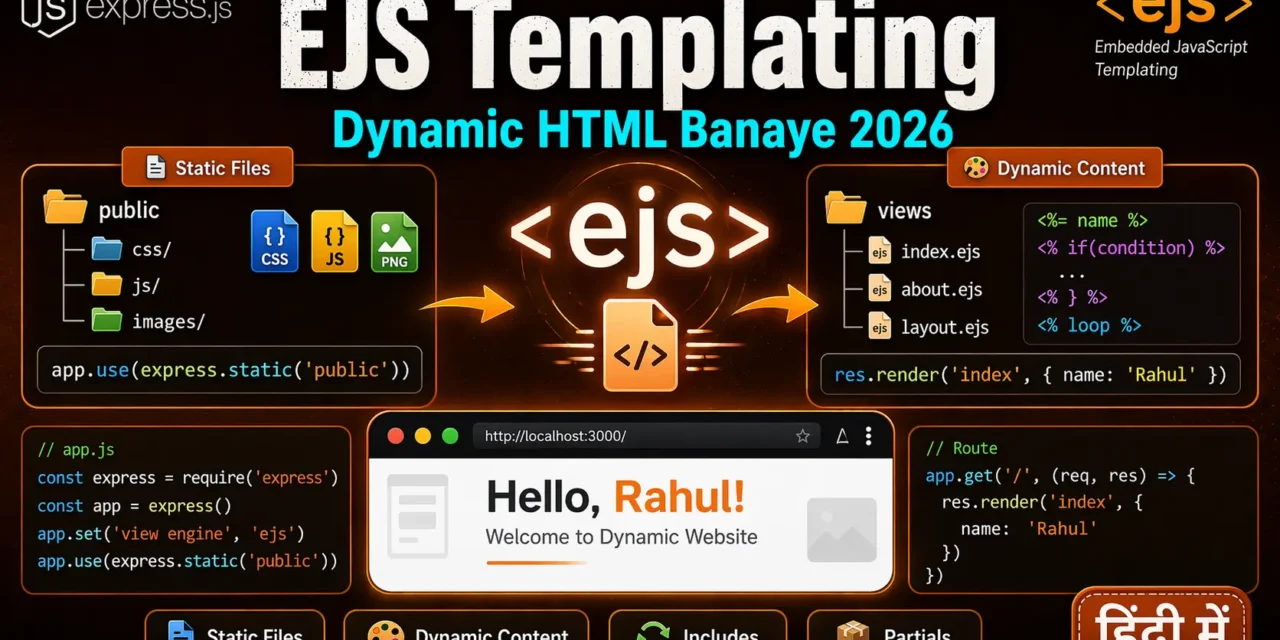
नमस्ते दोस्तों! 🙏
स्वागत है The Easy Master पर!
क्या तुमने कभी सोचा है – Express.js mein dynamic HTML pages kaise banayein? Jaise ki user ke naam ke saath “Hello, Rahul” dikhana?
Express.js sirf APIs ke liye nahीं, dynamic websites banane ke liye bhi use hota है। Templating engines se tum HTML में dynamic content inject kar sakte ho!
Express static files templating EJS Hindi में समझना बहुत जरूरी है क्योंकि:
- Dynamic websites banane के लिए templates use होती हैं
- EJS most popular templating engine hai for Express
- Code reuse – header, footer, navbar ek baar likho, sab jagah use करो
- Data binding – backend se data frontend में pass करो
Aaj kya seekhoge?
| Topic | Kya Seekhega? |
|---|---|
| Static Files | CSS, JS, Images serve karna |
| Templating Engines | EJS, Pug, Handlebars introduction |
| EJS Setup | Installation aur configuration |
| EJS Syntax | <%= %>, <%- %>, <% %> |
| Passing Data | Backend se frontend mein data |
| Layouts | Header, footer, navbar reuse |
| Partials | Reusable components |
| Real Project | Dynamic website banayenge |
Kya tumhe pata hai?
EJS ka full form Embedded JavaScript है – tum HTML ke andar JavaScript likh sakte ho!
तो चलिए शुरू करते हैं – Express static files templating EJS Hindi सीखने का सफर! 🚀
Table of Contents
1. Static Files – CSS, JS, Images Serve Karna
Static files woh files hain jo server se directly serve hoti हैं – CSS, JavaScript, images, fonts etc.
Project Structure:
my-app/
├── public/
│   ├── css/
│   │   └── style.css
│   ├── js/
│   │   └── script.js
│   └── images/
│       └── logo.png
├── views/
│   └── index.ejs
├── server.js
└── package.json
Serving Static Files:
// server.js
const express = require('express');
const path = require('path');
const app = express();

// Serve static files from 'public' directory
app.use(express.static('public'));

// Serve with custom path
app.use('/static', express.static('public'));

// Multiple directories
app.use(express.static('public'));
app.use(express.static('uploads'));

// With options (caching)
app.use(express.static('public', {
  maxAge: '1d',           // Cache for 1 day
  etag: true,             // Enable ETag
  lastModified: true,     // Enable Last-Modified
  setHeaders: (res, path) => {
    if (path.endsWith('.html')) {
      res.setHeader('Cache-Control', 'no-cache');
    }
  }
}));

// Serve specific file
app.get('/robots.txt', (req, res) => {
  res.sendFile(path.join(__dirname, 'public', 'robots.txt'));
});

app.listen(3000);
HTML File Using Static Files:
<!-- views/index.ejs -->
<!DOCTYPE html>
<html lang="en">
<head>
    <meta charset="UTF-8">
    <meta name="viewport" content="width=device-width, initial-scale=1.0">
    <title>My Express App</title>
    <!-- CSS from static folder -->
    <link rel="stylesheet" href="/css/style.css">
    <!-- Bootstrap CDN (external) -->
    <link href="https://cdn.jsdelivr.net/npm/bootstrap@5.3.0/dist/css/bootstrap.min.css" rel="stylesheet">
</head>
<body>
    <div class="container">
        <h1>Welcome to Express.js</h1>
        <img src="/images/logo.png" alt="Logo" width="100">
        <button id="myButton">Click Me</button>
    </div>

    <!-- JavaScript from static folder -->
    <script src="/js/script.js"></script>
</body>
</html>
CSS File (public/css/style.css):
body {
    font-family: 'Segoe UI', Tahoma, Geneva, Verdana, sans-serif;
    background: linear-gradient(135deg, #667eea 0%, #764ba2 100%);
    color: white;
    min-height: 100vh;
}

.container {
    max-width: 800px;
    margin: 50px auto;
    text-align: center;
    padding: 20px;
}

h1 {
    font-size: 3rem;
    margin-bottom: 20px;
}

button {
    background: #ff6b6b;
    color: white;
    border: none;
    padding: 10px 20px;
    border-radius: 5px;
    cursor: pointer;
    font-size: 16px;
    transition: transform 0.3s;
}

button:hover {
    transform: scale(1.05);
}
JavaScript File (public/js/script.js):
document.getElementById('myButton')?.addEventListener('click', () => {
    alert('Hello from Express.js! 🚀');
});
2. Templating Engines – Introduction
Templating engine HTML में dynamic content inject karne देता है।
Popular Templating Engines:
| Engine | Popularity | Syntax | Best For |
|---|---|---|---|
| EJS | Most popular | HTML + JavaScript | Beginners |
| Pug | Very popular | Indentation-based | Clean code |
| Handlebars | Popular | {{mustache}} | Logic-less templates |
| Mustache | Moderate | {{mustache}} | Simple projects |
Why EJS?
- HTML jaisa syntax – easy to learn
- JavaScript andar likh sakte ho – powerful
- Most popular with Express
- No new syntax – just JavaScript
Without Templating (Hardcoded HTML):
// ❌ Hardcoded HTML – not dynamic
app.get('/profile', (req, res) => {
  res.send(`
    <html>
      <body>
        <h1>Hello, User!</h1>
        <p>Welcome to your profile</p>
      </body>
    </html>
  `);
});
With Templating (Dynamic):
// ✅ Dynamic HTML with EJS
app.get('/profile', (req, res) => {
  const user = { name: 'Rahul', email: 'rahul@example.com', age: 25 };
  res.render('profile', { user });
});<!-- views/profile.ejs -->
<html>
<body>
<h1>Hello, <%= user.name %>!</h1>
<p>Email: <%= user.email %></p>
<p>Age: <%= user.age %></p>
</body>
</html>Express static files templating EJS Hindi में हम EJS को detail में समझेंगे।
3. EJS Setup – Installation aur Configuration
Step 1: Install EJS
npm install ejsStep 2: Configure Express
// server.js
const express = require('express');
const path = require('path');

const app = express();

// Set view engine to EJS
app.set('view engine', 'ejs');

// Set views directory (where .ejs files are stored)
app.set('views', path.join(__dirname, 'views'));

// Serve static files
app.use(express.static('public'));

// Routes
app.get('/', (req, res) => {
  res.render('index', { title: 'Home Page', message: 'Welcome!' });
});

app.get('/about', (req, res) => {
  res.render('about', { title: 'About Us' });
});

app.listen(3000, () => {
  console.log('Server running on http://localhost:3000');
});
Step 3: Create Views Folder
my-app/
├── views/
│   ├── index.ejs
│   ├── about.ejs
│   └── partials/
│       ├── header.ejs
│       └── footer.ejs
├── public/
│   ├── css/
│   └── js/
├── server.js
└── package.json
Step 4: Basic EJS File
<!-- views/index.ejs -->
<!DOCTYPE html>
<html lang="en">
<head>
    <meta charset="UTF-8">
    <meta name="viewport" content="width=device-width, initial-scale=1.0">
    <title><%= title %></title>
    <link rel="stylesheet" href="/css/style.css">
</head>
<body>
    <div class="container">
        <h1><%= message %></h1>
        <p>This is a dynamic page rendered with EJS!</p>
    </div>
</body>
</html>
4. EJS Syntax – <%=, <%-, <% Explained
EJS Tags:
| Tag | Purpose | Example |
|---|---|---|
<%= %> | Escape HTML, output value | <%= user.name %> |
<%- %> | Unescape HTML (raw HTML) | <%- htmlContent %> |
<% %> | Execute JavaScript (no output) | <% if(condition) { %> |
<%# %> | Comment (not rendered) | <%# This is comment %> |
<%- include() %> | Include partial | <%- include('header') %> |
Examples:
<!-- views/syntax.ejs -->
<!DOCTYPE html>
<html>
<head>
    <title>EJS Syntax Examples</title>
</head>
<body>
    <h1>EJS Syntax Examples</h1>

    <!-- 1. <%= %> - Escaped output -->
    <p>User Name: <%= userName %></p>
    <!-- If userName = "<script>alert('hack')</script>", it will be escaped -->

    <!-- 2. <%- %> - Unescaped output (raw HTML) -->
    <div><%- rawHtml %></div>
    <!-- If rawHtml = "<strong>Bold Text</strong>", it will render as HTML -->

    <!-- 3. <% %> - JavaScript logic (no output) -->
    <%
      const numbers = [1, 2, 3, 4, 5];
      let sum = 0;
      numbers.forEach(n => sum += n);
    %>
    <p>Sum of numbers: <%= sum %></p>

    <!-- 4. Conditionals -->
    <% if(isLoggedIn) { %>
        <p>Welcome back, <%= userName %>!</p>
    <% } else { %>
        <p>Please <a href="/login">login</a></p>
    <% } %>

    <!-- 5. Loops -->
    <ul>
      <% users.forEach(user => { %>
        <li><%= user.name %> - <%= user.email %></li>
      <% }) %>
    </ul>

    <!-- 6. <%# - Comment (not rendered) -->
    <%# This comment will not appear in HTML %>

</body>
</html>
Escape vs Unescape Difference:
// server.js
app.get('/escape-demo', (req, res) => {
  const userInput = '<script>alert("XSS Attack!")</script>';
  const safeHtml = '<strong>This is bold text</strong>';

  res.render('escape', { userInput, safeHtml });
});<!-- views/escape.ejs -->
<h2>Escaped (<%= %>)</h2>
<p><%= userInput %></p>
<!-- Output: <script>alert("XSS Attack!")</script> -->
<h2>Unescaped (<%- %>)</h2>
<p><%- userInput %></p>
<!-- ⚠️ WARNING: This will execute JavaScript! Be careful! -->
<h2>Safe HTML</h2>
<p><%- safeHtml %></p>
<!-- Output: <strong>This is bold text</strong> (rendered as bold) -->5. Passing Data – Backend to Frontend
Passing Single Variable:
// server.js
app.get('/user/:id', async (req, res) => {
  const user = await db.users.findById(req.params.id);

  res.render('profile', {
    title: `${user.name}'s Profile`,
    user: user,
    isOwnProfile: req.user.id === user.id
  });
});<!-- views/profile.ejs -->
<!DOCTYPE html>
<html>
<head>
<title><%= title %></title>
</head>
<body>
<h1><%= user.name %>'s Profile</h1>
<p>Email: <%= user.email %></p>
<p>Age: <%= user.age %></p>
<% if(isOwnProfile) { %>
<a href="/profile/edit">Edit Profile</a>
<% } %>
</body>
</html>Passing Multiple Data:
// server.js
app.get('/dashboard', async (req, res) => {
  const stats = {
    totalUsers: await db.users.count(),
    totalOrders: await db.orders.count(),
    totalRevenue: await db.orders.sum('amount')
  };

  const recentOrders = await db.orders.find().limit(5);
  const notifications = await db.notifications.find({ userId: req.user.id });

  res.render('dashboard', {
    title: 'Dashboard',
    userName: req.user.name,
    stats: stats,
    orders: recentOrders,
    notifications: notifications,
    currentYear: new Date().getFullYear()
  });
});<!-- views/dashboard.ejs -->
<!DOCTYPE html>
<html>
<head>
<title><%= title %></title>
</head>
<body>
<h1>Welcome, <%= userName %>!</h1>
<!-- Stats Cards -->
<div class="stats">
<div>Total Users: <%= stats.totalUsers %></div>
<div>Total Orders: <%= stats.totalOrders %></div>
<div>Total Revenue: ₹<%= stats.totalRevenue %></div>
</div>
<!-- Recent Orders -->
<h2>Recent Orders</h2>
<table>
<tr><th>ID</th><th>Amount</th><th>Date</th></tr>
<% orders.forEach(order => { %>
<tr>
<td><%= order.id %></td>
<td>₹<%= order.amount %></td>
<td><%= order.createdAt.toDateString() %></td>
</tr>
<% }) %>
</table>
<!-- Notifications -->
<% if(notifications.length > 0) { %>
<h2>Notifications</h2>
<ul>
<% notifications.forEach(notif => { %>
<li><%= notif.message %></li>
<% }) %>
</ul>
<% } %>
<footer>© <%= currentYear %> My App</footer>
</body>
</html>6. Conditionals in EJS – if-else
Basic Conditionals:
<!-- Basic if -->
<% if(isLoggedIn) { %>
    <p>Welcome back!</p>
<% } %>

<!-- if-else -->
<% if(isLoggedIn) { %>
    <p>Welcome back, <%= userName %>!</p>
<% } else { %>
    <p>Please <a href="/login">login</a></p>
<% } %>

<!-- if-else if-else -->
<% if(role === 'admin') { %>
    <p>Admin Dashboard</p>
<% } else if(role === 'moderator') { %>
    <p>Moderator Panel</p>
<% } else { %>
    <p>User Dashboard</p>
<% } %>
Real-world Example:
// server.js
app.get('/product/:id', async (req, res) => {
  const product = await db.products.findById(req.params.id);
  const user = req.user;
  const cart = req.session.cart || [];

  const isInCart = cart.some(item => item.id === product.id);
  const isOwner = user && user.id === product.userId;
  const discount = product.price > 1000 ? 10 : 0;
  const discountedPrice = product.price * (1 - discount/100);

  res.render('product', {
    product,
    isInCart,
    isOwner,
    discount,
    discountedPrice,
    userRole: user?.role || 'guest'
  });
});<!-- views/product.ejs -->
<div class="product">
<h1><%= product.name %></h1>
<p><%= product.description %></p>
<!-- Price with discount -->
<% if(discount > 0) { %>
<p class="original-price">Original: ₹<%= product.price %></p>
<p class="discounted-price">Discounted: ₹<%= discountedPrice %> (<%= discount %>% off!)</p>
<% } else { %>
<p>Price: ₹<%= product.price %></p>
<% } %>
<!-- Stock status -->
<% if(product.stock > 0) { %>
<p class="in-stock">✅ In Stock (<%= product.stock %> available)</p>
<!-- Cart button -->
<% if(isInCart) { %>
<button disabled>Already in Cart</button>
<% } else { %>
<button onclick="addToCart(<%= product.id %>)">Add to Cart</button>
<% } %>
<% } else { %>
<p class="out-of-stock">❌ Out of Stock</p>
<% } %>
<!-- Edit button (only for owner or admin) -->
<% if(isOwner || userRole === 'admin') { %>
<div class="admin-actions">
<a href="/product/<%= product.id %>/edit">Edit Product</a>
<button onclick="deleteProduct(<%= product.id %>)">Delete Product</button>
</div>
<% } %>
</div>7. Loops in EJS – forEach, for
Array Loops:
<!-- ForEach loop -->
<ul>
    <% users.forEach(user => { %>
        <li><%= user.name %> - <%= user.email %></li>
    <% }) %>
</ul>

<!-- For loop with index -->
<ul>
    <% for(let i = 0; i < products.length; i++) { %>
        <li><%= i+1 %>. <%= products[i].name %> - ₹<%= products[i].price %></li>
    <% } %>
</ul>

<!-- For...of loop -->
<ul>
    <% for(const product of products) { %>
        <li><%= product.name %></li>
    <% } %>
</ul>
Real-world Product Grid:
// server.js
app.get('/products', async (req, res) => {
  const { category, page = 1, limit = 12 } = req.query;

  let query = {};
  if (category) query.category = category;

  const products = await db.products.find(query)
    .skip((page - 1) * limit)
    .limit(limit);

  const total = await db.products.countDocuments(query);

  res.render('products', {
    title: 'Our Products',
    products,
    category,
    currentPage: parseInt(page),
    totalPages: Math.ceil(total / limit),
    hasNext: page * limit < total,
    hasPrev: page > 1
  });
});<!-- views/products.ejs -->
<!DOCTYPE html>
<html>
<head>
<title><%= title %></title>
<link rel="stylesheet" href="/css/products.css">
</head>
<body>
<h1><%= category ? category + ' - ' : '' %>Products</h1>
<!-- Product Grid -->
<div class="product-grid">
<% if(products.length === 0) { %>
<p>No products found.</p>
<% } else { %>
<% products.forEach(product => { %>
<div class="product-card">
<img src="<%= product.image %>" alt="<%= product.name %>">
<h3><%= product.name %></h3>
<p class="price">₹<%= product.price %></p>
<p class="rating">⭐ <%= product.rating %>/5</p>
<a href="/product/<%= product.id %>">View Details</a>
</div>
<% }) %>
<% } %>
</div>
<!-- Pagination -->
<% if(totalPages > 1) { %>
<div class="pagination">
<% if(hasPrev) { %>
<a href="?page=<%= currentPage - 1 %><%= category ? '&category=' + category : '' %>">Previous</a>
<% } %>
<span>Page <%= currentPage %> of <%= totalPages %></span>
<% if(hasNext) { %>
<a href="?page=<%= currentPage + 1 %><%= category ? '&category=' + category : '' %>">Next</a>
<% } %>
</div>
<% } %>
</body>
</html>8. Layouts – Header, Footer Reuse
Layout Pattern (No layout engine, using includes):
<!-- views/layout.ejs -->
<!DOCTYPE html>
<html lang="en">
<head>
    <meta charset="UTF-8">
    <meta name="viewport" content="width=device-width, initial-scale=1.0">
    <title><%= title %></title>
    <link rel="stylesheet" href="/css/style.css">
    <%- include('partials/head-css') %>
</head>
<body>
    <%- include('partials/header') %>

    <main class="container">
        <%- body %>
    </main>

    <%- include('partials/footer') %>

    <script src="/js/script.js"></script>
    <%- include('partials/foot-js') %>
</body>
</html><!-- views/partials/header.ejs -->
<header>
<nav class="navbar">
<div class="logo">
<a href="/">MyApp</a>
</div>
<ul class="nav-links">
<li><a href="/">Home</a></li>
<li><a href="/about">About</a></li>
<li><a href="/products">Products</a></li>
<li><a href="/contact">Contact</a></li>
</ul>
<div class="user-menu">
<% if(isLoggedIn) { %>
<span>Welcome, <%= user.name %></span>
<a href="/logout">Logout</a>
<% } else { %>
<a href="/login">Login</a>
<a href="/register">Register</a>
<% } %>
</div>
</nav>
</header><!-- views/partials/footer.ejs -->
<footer>
<div class="footer-content">
<p>© <%= new Date().getFullYear() %> MyApp. All rights reserved.</p>
<div class="footer-links">
<a href="/privacy">Privacy Policy</a>
<a href="/terms">Terms of Service</a>
<a href="/contact">Contact Us</a>
</div>
</div>
</footer>Using Layout in Routes:
// server.js
app.get('/', (req, res) => {
  res.render('layout', {
    title: 'Home Page',
    body: '<h1>Welcome to MyApp</h1><p>This is the home page content.</p>',
    isLoggedIn: req.user ? true : false,
    user: req.user
  });
});

app.get('/about', (req, res) => {
  res.render('layout', {
    title: 'About Us',
    body: '<h1>About Us</h1><p>We are a company that builds amazing products.</p>',
    isLoggedIn: req.user ? true : false,
    user: req.user
  });
});
9. Partials – Reusable Components
Partials small reusable components होते हैं।
Creating Partials:
<!-- views/partials/card.ejs -->
<div class="card">
    <div class="card-header">
        <h3><%= title %></h3>
    </div>
    <div class="card-body">
        <%- content %>
    </div>
    <% if(footer) { %>
        <div class="card-footer">
            <%= footer %>
        </div>
    <% } %>
</div><!-- views/partials/alert.ejs -->
<div class="alert alert-<%= type %>">
<span class="close-btn" onclick="this.parentElement.style.display='none'">×</span>
<strong><%= title %></strong> <%= message %>
</div><!-- views/partials/product-card.ejs -->
<div class="product-card">
<img src="<%= product.image %>" alt="<%= product.name %>">
<h3><%= product.name %></h3>
<p class="price">₹<%= product.price %></p>
<% if(product.discount > 0) { %>
<span class="discount-badge"><%= product.discount %>% off</span>
<% } %>
<a href="/product/<%= product.id %>" class="btn">View Details</a>
</div>Using Partials:
<!-- views/home.ejs -->
<!DOCTYPE html>
<html>
<head>
    <title>Home</title>
</head>
<body>
    <%- include('partials/header') %>

    <main>
        <%- include('partials/alert', {
            type: 'success',
            title: 'Welcome!',
            message: 'Thank you for visiting our site.'
        }) %>

        <h1>Featured Products</h1>
        <div class="products-grid">
            <% featuredProducts.forEach(product => { %>
                <%- include('partials/product-card', { product: product }) %>
            <% }) %>
        </div>

        <%- include('partials/card', {
            title: 'Special Offer',
            content: '<p>Get 20% off on your first purchase!</p>',
            footer: '<a href="/shop" class="btn">Shop Now</a>'
        }) %>
    </main>

    <%- include('partials/footer') %>
</body>
</html>
10. Including Other EJS Files
Basic Include:
<!-- views/index.ejs -->
<!DOCTYPE html>
<html>
<head>
    <title>My App</title>
</head>
<body>
    <%- include('partials/header') %>

    <main>
        <h1>Welcome</h1>
        <%- include('partials/card', { title: 'Card Title', content: 'Card content here' }) %>
    </main>

    <%- include('partials/footer') %>
</body>
</html>
Include with Variables:
<!-- views/partials/user-card.ejs -->
<div class="user-card">
    <img src="<%= user.avatar %>" alt="<%= user.name %>">
    <h3><%= user.name %></h3>
    <p>Email: <%= user.email %></p>
    <p>Role: <%= user.role %></p>
</div><!-- views/users.ejs -->
<h1>User List</h1>
<div class="users-grid">
<% users.forEach(user => { %>
<%- include('partials/user-card', { user: user }) %>
<% }) %>
</div>Dynamic Include Path:
// server.js
app.get('/:page', (req, res) => {
  const page = req.params.page;
  const validPages = ['home', 'about', 'contact', 'products'];

  if (validPages.includes(page)) {
    res.render('layout', {
      title: page.charAt(0).toUpperCase() + page.slice(1),
      body: `<%- include('pages/${page}') %>`,
      isLoggedIn: req.user ? true : false,
      user: req.user
    });
  } else {
    res.status(404).render('404');
  }
});
11. Real-world Project – Dynamic Website
Complete EJS Website Example:
// server.js
const express = require('express');
const path = require('path');
const session = require('express-session');

const app = express();

// Middleware
app.use(express.json());
app.use(express.urlencoded({ extended: true }));
app.use(express.static('public'));
app.use(session({
  secret: 'my-secret',
  resave: false,
  saveUninitialized: true
}));

// Set view engine
app.set('view engine', 'ejs');
app.set('views', path.join(__dirname, 'views'));

// Mock database
const products = [
  { id: 1, name: 'Laptop', price: 50000, category: 'electronics', image: '/images/laptop.jpg', rating: 4.5, stock: 10 },
  { id: 2, name: 'Mouse', price: 500, category: 'electronics', image: '/images/mouse.jpg', rating: 4.2, stock: 50 },
  { id: 3, name: 'Shirt', price: 1000, category: 'clothing', image: '/images/shirt.jpg', rating: 4.0, stock: 30 },
  { id: 4, name: 'Jeans', price: 2000, category: 'clothing', image: '/images/jeans.jpg', rating: 4.3, stock: 20 }
];

// Middleware to pass user data to all templates
app.use((req, res, next) => {
  res.locals.isLoggedIn = req.session.userId ? true : false;
  res.locals.user = req.session.user;
  res.locals.cartCount = req.session.cart?.length || 0;
  next();
});

// Routes
app.get('/', (req, res) => {
  const featuredProducts = products.slice(0, 3);
  res.render('pages/home', {
    title: 'Home - MyStore',
    featuredProducts,
    heroTitle: 'Welcome to MyStore',
    heroSubtitle: 'Best products at best prices'
  });
});

app.get('/products', (req, res) => {
  const { category, search, page = 1, limit = 6 } = req.query;

  let filteredProducts = [...products];

  if (category) {
    filteredProducts = filteredProducts.filter(p => p.category === category);
  }

  if (search) {
    filteredProducts = filteredProducts.filter(p =>
      p.name.toLowerCase().includes(search.toLowerCase())
    );
  }

  const total = filteredProducts.length;
  const start = (page - 1) * limit;
  const paginatedProducts = filteredProducts.slice(start, start + limit);

  res.render('pages/products', {
    title: 'Products - MyStore',
    products: paginatedProducts,
    category,
    search,
    currentPage: parseInt(page),
    totalPages: Math.ceil(total / limit),
    total,
    categories: ['electronics', 'clothing']
  });
});

app.get('/product/:id', (req, res) => {
  const product = products.find(p => p.id === parseInt(req.params.id));

  if (!product) {
    return res.status(404).render('pages/404', { title: '404 - Not Found' });
  }

  const relatedProducts = products
    .filter(p => p.category === product.category && p.id !== product.id)
    .slice(0, 3);

  res.render('pages/product-detail', {
    title: `${product.name} - MyStore`,
    product,
    relatedProducts,
    inCart: req.session.cart?.some(item => item.id === product.id) || false
  });
});

app.post('/cart/add', (req, res) => {
  const { productId, quantity = 1 } = req.body;
  const product = products.find(p => p.id === parseInt(productId));

  if (!product) {
    return res.status(404).json({ error: 'Product not found' });
  }

  if (!req.session.cart) {
    req.session.cart = [];
  }

  const existingItem = req.session.cart.find(item => item.id === product.id);

  if (existingItem) {
    existingItem.quantity += quantity;
  } else {
    req.session.cart.push({
      id: product.id,
      name: product.name,
      price: product.price,
      quantity: quantity
    });
  }

  res.json({ success: true, cartCount: req.session.cart.length });
});

app.get('/cart', (req, res) => {
  const cart = req.session.cart || [];
  const total = cart.reduce((sum, item) => sum + (item.price * item.quantity), 0);

  res.render('pages/cart', {
    title: 'Cart - MyStore',
    cart,
    total,
    isEmpty: cart.length === 0
  });
});

app.post('/cart/update', (req, res) => {
  const { productId, quantity } = req.body;

  if (!req.session.cart) {
    return res.json({ success: false });
  }

  const item = req.session.cart.find(item => item.id === parseInt(productId));

  if (item) {
    if (quantity <= 0) {
      req.session.cart = req.session.cart.filter(item => item.id !== parseInt(productId));
    } else {
      item.quantity = quantity;
    }
  }

  res.json({ success: true });
});

app.get('/about', (req, res) => {
  res.render('pages/about', {
    title: 'About - MyStore',
    companyName: 'MyStore',
    founded: 2020,
    mission: 'To provide best quality products at affordable prices'
  });
});

app.get('/contact', (req, res) => {
  res.render('pages/contact', {
    title: 'Contact - MyStore',
    email: 'support@mystore.com',
    phone: '+91-1234567890',
    address: 'Mumbai, India'
  });
});

// 404 handler
app.use((req, res) => {
  res.status(404).render('pages/404', { title: '404 - Page Not Found' });
});

app.listen(3000, () => {
  console.log('🚀 Server running on http://localhost:3000');
});
Layout Template (views/layout.ejs):
<!-- views/layout.ejs -->
<!DOCTYPE html>
<html lang="en">
<head>
<meta charset="UTF-8">
<meta name="viewport" content="width=device-width, initial-scale=1.0">
<title><%= title %></title>
<link href="https://cdn.jsdelivr.net/npm/bootstrap@5.3.0/dist/css/bootstrap.min.css" rel="stylesheet">
<link rel="stylesheet" href="https://cdnjs.cloudflare.com/ajax/libs/font-awesome/6.4.0/css/all.min.css">
<link rel="stylesheet" href="/css/style.css">
</head>
<body>
<!-- Navbar -->
<nav class="navbar navbar-expand-lg navbar-dark bg-dark">
<div class="container">
<a class="navbar-brand" href="/">MyStore</a>
<button class="navbar-toggler" type="button" data-bs-toggle="collapse" data-bs-target="#navbarNav">
<span class="navbar-toggler-icon"></span>
</button>
<div class="collapse navbar-collapse" id="navbarNav">
<ul class="navbar-nav ms-auto">
<li class="nav-item"><a class="nav-link" href="/">Home</a></li>
<li class="nav-item"><a class="nav-link" href="/products">Products</a></li>
<li class="nav-item"><a class="nav-link" href="/about">About</a></li>
<li class="nav-item"><a class="nav-link" href="/contact">Contact</a></li>
<li class="nav-item">
<a class="nav-link" href="/cart">
<i class="fas fa-shopping-cart"></i>
Cart <% if(cartCount > 0) { %><span class="badge bg-danger"><%= cartCount %></span><% } %>
</a>
</li>
</ul>
</div>
</div>
</nav>
<!-- Main Content -->
<main>
<%- body %>
</main>
<!-- Footer -->
<footer class="bg-dark text-white mt-5 py-4">
<div class="container text-center">
<p>© 2026 MyStore. All rights reserved.</p>
<p>Made with <i class="fas fa-heart text-danger"></i> in India</p>
</div>
</footer>
<script src="https://cdn.jsdelivr.net/npm/bootstrap@5.3.0/dist/js/bootstrap.bundle.min.js"></script>
<script src="/js/script.js"></script>
</body>
</html>Home Page (views/pages/home.ejs):
<!-- views/pages/home.ejs -->
<%- include('../partials/hero', { title: heroTitle, subtitle: heroSubtitle }) %>

<div class="container my-5">
    <h2 class="text-center mb-4">Featured Products</h2>
    <div class="row">
        <% featuredProducts.forEach(product => { %>
            <div class="col-md-4 mb-4">
                <%- include('../partials/product-card', { product: product }) %>
            </div>
        <% }) %>
    </div>

    <div class="text-center mt-4">
        <a href="/products" class="btn btn-primary btn-lg">View All Products</a>
    </div>
</div>

<%- include('../partials/newsletter') %>
Product Card Partial (views/partials/product-card.ejs):
<!-- views/partials/product-card.ejs -->
<div class="card h-100 shadow-sm">
    <img src="<%= product.image %>" class="card-img-top" alt="<%= product.name %>" style="height: 200px; object-fit: cover;">
    <div class="card-body">
        <h5 class="card-title"><%= product.name %></h5>
        <p class="card-text text-primary fw-bold">₹<%= product.price %></p>
        <div class="rating mb-2">
            <% for(let i = 1; i <= 5; i++) { %>
                <i class="fas fa-star <%= i <= product.rating ? 'text-warning' : 'text-muted' %>"></i>
            <% } %>
        </div>
        <a href="/product/<%= product.id %>" class="btn btn-outline-primary w-100">View Details</a>
    </div>
</div>
12. Common Mistakes + Solutions
Mistake 1: Forgetting to set view engine
// ❌ EJS not configured
app.get('/', (req, res) => {
  res.render('index'); // Error: No default engine
});

// ✅ Set view engine
app.set('view engine', 'ejs');
app.set('views', path.join(__dirname, 'views'));
Mistake 2: Wrong variable name in template
<!-- ❌ Variable name mismatch -->
<p>Welcome, <%= userName %></p>// Server sends 'name' but template expects 'userName'
res.render('index', { name: 'Rahul' }); // userName will be undefined!
// ✅ Match variable names
res.render('index', { userName: 'Rahul' });Mistake 3: Using <%= for raw HTML
<!-- ❌ HTML will be escaped -->
<%= htmlContent %>

<!-- ✅ Use <%- for raw HTML -->
<%- htmlContent %>
Mistake 4: Static files not loading
<!-- ❌ Wrong path -->
<link rel="stylesheet" href="css/style.css">

<!-- ✅ Correct path (starting with /) -->
<link rel="stylesheet" href="/css/style.css">// Also ensure static middleware is configured
app.use(express.static('public'));13. Quick Cheat Sheet
Setup Commands:
npm install ejsExpress Configuration:
app.set('view engine', 'ejs');
app.set('views', './views');
app.use(express.static('public'));
EJS Tags:
| Tag | Usage |
|---|---|
<%= variable %> | Escaped output |
<%- variable %> | Unescaped HTML |
<% code %> | JavaScript logic |
<%# comment %> | Comment |
<%- include('file') %> | Include partial |
Render Syntax:
// Basic
res.render('template', { data: value });

// With callback
res.render('template', { data: value }, (err, html) => {
  if (err) throw err;
  res.send(html);
});
14. FAQ
Q1: Express static files templating EJS Hindi में सबसे important concept kya hai?<%= %> aur <% %> – pehla output ke liye, dusra logic ke liye। Ye difference samajhna sabse zaroori है।
Q2: EJS vs HTML – kya antar hai?
EJS dynamic content generate karta hai, HTML static है। EJS server par render होता है, fir client ko HTML bhejta है।
Q3: Static files kyun serve karni padti हैं?
CSS, JS, images – ye files client side run होती हैं। Express unhe serve karne ke liye static middleware provide करता है।
Q4: res.render() vs res.send() – kya antar hai?res.render() EJS template render karta है, res.send() direct response bhejता है।
Q5: Partials kyun use karein?
Header, footer, card – jo components multiple jagah use होते हैं, unhe ek baar likho, sab jagah include करो।
Q6: Layouts kaise implement karein?
EJS mein built-in layout support नहीं है। Partials use करो या express-ejs-layouts package use करो।
Q7: EJS mein JavaScript variables kaise access karein?<%= variableName %> – variable server se pass karna padता है।
Q8: EJS mein loops kaise lagayein?<% array.forEach(item => { %> … <% }) %>
Q9: EJS mein conditionals kaise lagayein?<% if(condition) { %> … <% } else { %> … <% } %>
Q10: EJS production mein fast है?
Haan, EJS server side render करता है और output cache कर सकता है।
15. Conclusion
बहुत बढ़िया दोस्तों! आज हमने Express static files templating EJS Hindi को पूरी detail में समझा।
Quick Recap:
| Concept | Key Takeaway |
|---|---|
| Static Files | express.static() से CSS, JS, images serve करो |
| EJS Setup | app.set('view engine', 'ejs') |
| EJS Tags | <%= %> (escaped), <%- %> (unescaped), <% %> (logic) |
| Partials | include() से reusable components |
| Passing Data | res.render('file', { data }) |
Mera personal experience:
EJS seekhne ke baad maine ek complete e-commerce website banayi – products, cart, checkout – sab dynamic। Static files serve karna aur EJS templates use karna bohot easy लगा।
Tum bhi ye steps follow karo:
- ✅ EJS install aur configure करो
- ✅ Basic template banao
- ✅ Static files (CSS, JS) add करो
- ✅ Data pass करो backend से
- ✅ Partials बनाकर header/footer reuse करो
अब तुम्हारी बारी है!
नीचे comment में बताओ:
- तुम्हें EJS easy laga ya complex?
- क्या तुमने कभी dynamic website banayi है?
- अगला topic क्या चाहिए? (MongoDB with Mongoose? Authentication? File Upload?)
The Easy Master पर बने रहो। Happy Templating! 🚀💻
Resources
Additional Resources
- React.js Kya Hai? JSX aur Components Samjhe – Beginner Guide 2026
- React Props and State Data Flow Hindi – समझे आसान भाषा में 2026
- React Router v6 – Multi-Page App Banaye (Routing Guide) 2026
- Advanced React Hooks – useContext and useReducer Samjhe 2026
- Redux Toolkit Simplified – State Management Aasaan Tarika 2026
- React API Integration Made Easy with Fetch and Axios
- React Performance Optimization – App Ko Fast कैसे बनाएं 2026
- React 19 New Features – AI Integration with React (2026)
- Node.js क्या है? 2026 में अपना पहला Backend Server बनाएँ
- NPM Packages कैसे इंस्टॉल करें? Modules (ESM vs CommonJS) 2026
- Express.js Tutorial – REST API Routing और Middleware समझे 2026
- Prisma ORM MongoDB से Database Connect कैसे करें – Easy Tutorial Hindi
- JWT Authentication Node.js – Secure Login System बनाए 2026
- WebSockets Node.js – Live Chat App कैसे बनाएं (Socket.io)
- Async Await vs Promises – Node.js में Async Code कैसे सीखें?
- Microservices Architecture node.js आसान हिंदी Explanation 2026
- Docker से Node.js App Production Ready Deploy करें 2026
- Express.js Setup – पहला Server कैसे बनाएं (Step-by-Step) 2026
- Express.js Routing – GET POST PUT DELETE Complete Guide
- Express Middleware समझे – Application, Router, Error Middleware
- Express req and res Objects – Query, Params, Body, Headers Explained