नमस्ते दोस्तों! 🙏
स्वागत है The Easy Master पर!
क्या तुमने कभी सोचा है – Express API ko test kaise karein? Routes sahi kaam kar rahe hain ya nahi? Database connection theek hai?
API Testing bohot important hai – bugs early catch karne के लिए, production mein problems se बचने के लिए।
Express API testing Supertest Hindi में समझना बहुत जरूरी है क्योंकि:
- Bugs early catch – production से पहले
- Confidence – code change करो, test run करो
- Documentation – tests hi documentation हैं
- CI/CD – automatic testing
- Interview mein pakka testing questions puche jayenge
Aaj kya seekhoge?
| Topic | Kya Seekhega? |
|---|---|
| Testing Kya Hai? | Unit, Integration, E2E tests |
| Jest Setup | Testing framework |
| Supertest | HTTP assertions |
| Route Testing | GET, POST, PUT, DELETE tests |
| Database Testing | Test database setup |
| Authentication Testing | Protected routes test |
| Error Handling Tests | Error scenarios |
| Coverage Reports | Code coverage |
Kya tumhe pata hai?
Jest by default parallel mein tests run karta है – bohot fast!
तो चलिए शुरू करते हैं – Express API testing Supertest Hindi सीखने का सफर! 🚀
Table of Contents
1. Testing क्या Hai? – Introduction
Testing code ko verify करने का process है – expected behaviour check करना।
Types of Tests:
| Type | Purpose | Example |
|---|---|---|
| Unit Tests | Single function test | add(2,3) returns 5 |
| Integration Tests | Multiple components test | API + Database |
| E2E Tests | Full flow test | User login → order → payment |
Why Test Express API?
// Without tests – manual testing every time
// - Change code → manually open browser/postman
// - Check if API works
// - Repeat 100 times 😫

// With tests – automated!
npm test
// ✅ All 25 tests passed! 🎉
Express API testing Supertest Hindi में हम integration tests लिखेंगे।
2. Jest Setup – Installation & Configuration
Installation:
npm install -D jest supertest @types/jest @types/supertest
npm install -D cross-env
package.json Scripts:
{
  "scripts": {
    "test": "cross-env NODE_ENV=test jest --runInBand",
    "test:watch": "cross-env NODE_ENV=test jest --watch",
    "test:coverage": "cross-env NODE_ENV=test jest --coverage",
    "test:verbose": "cross-env NODE_ENV=test jest --verbose"
  },
  "jest": {
    "testEnvironment": "node",
    "coverageDirectory": "coverage",
    "collectCoverageFrom": [
      "src/controllers/**/*.js",
      "src/routes/**/*.js",
      "src/middleware/**/*.js",
      "!src/**/*.test.js"
    ]
  }
}
Jest Configuration (jest.config.js):
// jest.config.js
module.exports = {
  testEnvironment: 'node',
  verbose: true,
  forceExit: true,
  clearMocks: true,
  resetMocks: true,
  restoreMocks: true,
  coverageDirectory: 'coverage',
  collectCoverageFrom: [
    'src/**/*.js',
    '!src/**/*.test.js',
    '!src/server.js',
    '!src/config/database.js'
  ],
  testMatch: [
    '**/__tests__/**/*.js',
    '**/?(*.)+(spec|test).js'
  ],
  setupFilesAfterEnv: ['./jest.setup.js']
};
Jest Setup File (jest.setup.js):
// jest.setup.js
// Increase timeout for async tests
jest.setTimeout(30000);

// Global before all tests
beforeAll(async () => {
  console.log('Starting tests...');
});

// Global after all tests
afterAll(async () => {
  console.log('All tests completed!');
  await new Promise(resolve => setTimeout(resolve, 500));
});
3. Supertest – HTTP Assertions
Supertest HTTP requests को test करने के लिए library है।
Basic Supertest Example:
// __tests__/app.test.js
const request = require('supertest');
const app = require('../src/app');

describe('App Tests', () => {
  test('GET / should return welcome message', async () => {
    const response = await request(app)
      .get('/')
      .expect(200);

    expect(response.body).toHaveProperty('message');
    expect(response.body.message).toBe('Welcome to API');
  });

  test('GET /health should return status OK', async () => {
    const response = await request(app)
      .get('/health')
      .expect(200);

    expect(response.body.status).toBe('OK');
    expect(response.body).toHaveProperty('timestamp');
  });
});
Supertest Assertions:
// Status code
.expect(200)
.expect(201)
.expect(404)
.expect(500)

// Headers
.expect('Content-Type', /json/)
.expect('Content-Type', 'application/json')

// Body
.expect({ message: 'Success' })
.expect(res => {
  expect(res.body.data).toHaveLength(3);
})

// Chain
await request(app)
  .post('/api/users')
  .send({ name: 'Rahul' })
  .set('Authorization', 'Bearer token')
  .expect(201)
  .expect('Content-Type', /json/)
4. First Test – GET Route Test
Sample Express App:
// src/app.js
const express = require('express');
const app = express();

app.use(express.json());

// In-memory database
let users = [
  { id: 1, name: 'Rahul', email: 'rahul@example.com' },
  { id: 2, name: 'Priya', email: 'priya@example.com' }
];

// GET /api/users
app.get('/api/users', (req, res) => {
  res.json({
    success: true,
    count: users.length,
    data: users
  });
});

// GET /api/users/:id
app.get('/api/users/:id', (req, res) => {
  const id = parseInt(req.params.id);
  const user = users.find(u => u.id === id);

  if (!user) {
    return res.status(404).json({
      success: false,
      error: 'User not found'
    });
  }

  res.json({
    success: true,
    data: user
  });
});

module.exports = app;// server.js
const app = require('./src/app');
const PORT = process.env.PORT || 3000;
app.listen(PORT, () => {
console.log(`Server running on port ${PORT}`);
});GET Route Tests:
// __tests__/routes/users.test.js
const request = require('supertest');
const app = require('../../src/app');

describe('User Routes Tests', () => {
  describe('GET /api/users', () => {
    test('should return all users with 200 status', async () => {
      const response = await request(app)
        .get('/api/users')
        .expect(200);

      expect(response.body.success).toBe(true);
      expect(response.body.data).toBeInstanceOf(Array);
      expect(response.body.data).toHaveLength(2);
      expect(response.body.count).toBe(2);
    });

    test('should return correct user data structure', async () => {
      const response = await request(app)
        .get('/api/users')
        .expect(200);

      const user = response.body.data[0];
      expect(user).toHaveProperty('id');
      expect(user).toHaveProperty('name');
      expect(user).toHaveProperty('email');
    });
  });

  describe('GET /api/users/:id', () => {
    test('should return user when valid id provided', async () => {
      const response = await request(app)
        .get('/api/users/1')
        .expect(200);

      expect(response.body.success).toBe(true);
      expect(response.body.data).toHaveProperty('id', 1);
      expect(response.body.data).toHaveProperty('name', 'Rahul');
    });

    test('should return 404 when user not found', async () => {
      const response = await request(app)
        .get('/api/users/999')
        .expect(404);

      expect(response.body.success).toBe(false);
      expect(response.body.error).toBe('User not found');
    });

    test('should return 400 for invalid id format', async () => {
      const response = await request(app)
        .get('/api/users/invalid')
        .expect(400);

      expect(response.body.success).toBe(false);
    });
  });
});
5. POST Route Testing
Add POST Route:
// src/app.js (continued)
let nextId = 3;

// POST /api/users
app.post('/api/users', (req, res) => {
  const { name, email } = req.body;

  // Validation
  if (!name || !email) {
    return res.status(400).json({
      success: false,
      error: 'Name and email are required'
    });
  }

  // Check duplicate email
  const existingUser = users.find(u => u.email === email);
  if (existingUser) {
    return res.status(409).json({
      success: false,
      error: 'Email already exists'
    });
  }

  const newUser = {
    id: nextId++,
    name,
    email,
    createdAt: new Date()
  };

  users.push(newUser);

  res.status(201).json({
    success: true,
    message: 'User created successfully',
    data: newUser
  });
});
POST Route Tests:
// __tests__/routes/users.test.js (continued)

describe('POST /api/users', () => {
  test('should create new user with valid data', async () => {
    const newUser = {
      name: 'Amit Kumar',
      email: 'amit@example.com'
    };

    const response = await request(app)
      .post('/api/users')
      .send(newUser)
      .expect(201);

    expect(response.body.success).toBe(true);
    expect(response.body.data).toMatchObject(newUser);
    expect(response.body.data).toHaveProperty('id');
    expect(response.body.data).toHaveProperty('createdAt');
  });

  test('should return 400 when name missing', async () => {
    const response = await request(app)
      .post('/api/users')
      .send({ email: 'test@example.com' })
      .expect(400);

    expect(response.body.success).toBe(false);
    expect(response.body.error).toBe('Name and email are required');
  });

  test('should return 400 when email missing', async () => {
    const response = await request(app)
      .post('/api/users')
      .send({ name: 'Test User' })
      .expect(400);

    expect(response.body.success).toBe(false);
  });

  test('should return 409 when email already exists', async () => {
    const existingUser = {
      name: 'Duplicate',
      email: 'rahul@example.com' // Already exists
    };

    const response = await request(app)
      .post('/api/users')
      .send(existingUser)
      .expect(409);

    expect(response.body.success).toBe(false);
    expect(response.body.error).toBe('Email already exists');
  });

  test('should validate email format', async () => {
    const invalidUser = {
      name: 'Test',
      email: 'invalid-email'
    };

    const response = await request(app)
      .post('/api/users')
      .send(invalidUser)
      .expect(400);

    // Add email validation in app for this test
    expect(response.body.error).toBeDefined();
  });
});
6. PUT & DELETE Route Testing
Add PUT & DELETE Routes:
// src/app.js (continued)

// PUT /api/users/:id
app.put('/api/users/:id', (req, res) => {
  const id = parseInt(req.params.id);
  const { name, email } = req.body;

  const userIndex = users.findIndex(u => u.id === id);

  if (userIndex === -1) {
    return res.status(404).json({
      success: false,
      error: 'User not found'
    });
  }

  if (!name || !email) {
    return res.status(400).json({
      success: false,
      error: 'Name and email are required for full update'
    });
  }

  users[userIndex] = {
    ...users[userIndex],
    name,
    email,
    updatedAt: new Date()
  };

  res.json({
    success: true,
    message: 'User updated successfully',
    data: users[userIndex]
  });
});

// PATCH /api/users/:id
app.patch('/api/users/:id', (req, res) => {
  const id = parseInt(req.params.id);
  const updates = req.body;

  const userIndex = users.findIndex(u => u.id === id);

  if (userIndex === -1) {
    return res.status(404).json({
      success: false,
      error: 'User not found'
    });
  }

  users[userIndex] = {
    ...users[userIndex],
    ...updates,
    updatedAt: new Date()
  };

  res.json({
    success: true,
    message: 'User updated successfully',
    data: users[userIndex]
  });
});

// DELETE /api/users/:id
app.delete('/api/users/:id', (req, res) => {
  const id = parseInt(req.params.id);

  const userIndex = users.findIndex(u => u.id === id);

  if (userIndex === -1) {
    return res.status(404).json({
      success: false,
      error: 'User not found'
    });
  }

  users.splice(userIndex, 1);

  res.status(204).send();
});
PUT & DELETE Tests:
// __tests__/routes/users.test.js (continued)

describe('PUT /api/users/:id', () => {
  test('should update user with valid data', async () => {
    const updateData = {
      name: 'Rahul Sharma Updated',
      email: 'rahul.updated@example.com'
    };

    const response = await request(app)
      .put('/api/users/1')
      .send(updateData)
      .expect(200);

    expect(response.body.success).toBe(true);
    expect(response.body.data.name).toBe(updateData.name);
    expect(response.body.data.email).toBe(updateData.email);
  });

  test('should return 404 when user not found', async () => {
    const response = await request(app)
      .put('/api/users/999')
      .send({ name: 'Test', email: 'test@test.com' })
      .expect(404);

    expect(response.body.success).toBe(false);
  });

  test('should return 400 when name missing', async () => {
    const response = await request(app)
      .put('/api/users/1')
      .send({ email: 'test@test.com' })
      .expect(400);

    expect(response.body.success).toBe(false);
  });
});

describe('PATCH /api/users/:id', () => {
  test('should partially update user', async () => {
    const response = await request(app)
      .patch('/api/users/1')
      .send({ name: 'Rahul Kumar' })
      .expect(200);

    expect(response.body.success).toBe(true);
    expect(response.body.data.name).toBe('Rahul Kumar');
    // Email should remain unchanged
    expect(response.body.data.email).toBeDefined();
  });

  test('should return 404 when user not found', async () => {
    const response = await request(app)
      .patch('/api/users/999')
      .send({ name: 'Test' })
      .expect(404);

    expect(response.body.success).toBe(false);
  });
});

describe('DELETE /api/users/:id', () => {
  test('should delete existing user', async () => {
    // First create a user to delete
    const newUser = {
      name: 'ToDelete',
      email: 'delete@example.com'
    };

    const createRes = await request(app)
      .post('/api/users')
      .send(newUser);

    const userId = createRes.body.data.id;

    // Delete the user
    await request(app)
      .delete(`/api/users/${userId}`)
      .expect(204);

    // Verify user is deleted
    await request(app)
      .get(`/api/users/${userId}`)
      .expect(404);
  });

  test('should return 404 when user not found', async () => {
    await request(app)
      .delete('/api/users/999')
      .expect(404);
  });
});
7. Database Testing – Test Database Setup
Separate Test Database:
// src/config/database.js
const mongoose = require('mongoose');

const connectDB = async () => {
  let uri;

  if (process.env.NODE_ENV === 'test') {
    uri = process.env.TEST_MONGODB_URI || 'mongodb://localhost:27017/test_db';
  } else {
    uri = process.env.MONGODB_URI;
  }

  try {
    const conn = await mongoose.connect(uri);
    console.log(`MongoDB Connected: ${conn.connection.host}`);
    return conn;
  } catch (error) {
    console.error(`Error: ${error.message}`);
    process.exit(1);
  }
};

module.exports = connectDB;
Database Test Helpers:
// __tests__/helpers/db.js
const mongoose = require('mongoose');
const connectDB = require('../../src/config/database');

// Clear database between tests
const clearDatabase = async () => {
  const collections = mongoose.connection.collections;

  for (const key in collections) {
    await collections[key].deleteMany();
  }
};

// Close database connection
const closeDatabase = async () => {
  await mongoose.connection.dropDatabase();
  await mongoose.connection.close();
};

// Setup test database
const setupTestDB = () => {
  beforeAll(async () => {
    await connectDB();
  });

  beforeEach(async () => {
    await clearDatabase();
  });

  afterAll(async () => {
    await closeDatabase();
  });
};

module.exports = { setupTestDB, clearDatabase, closeDatabase };
Product Model Test:
// __tests__/models/product.test.js
const mongoose = require('mongoose');
const Product = require('../../src/models/Product');
const { setupTestDB } = require('../helpers/db');

setupTestDB();

describe('Product Model Tests', () => {
  test('should create product with valid data', async () => {
    const productData = {
      name: 'Test Laptop',
      description: 'A great laptop for testing',
      price: 50000,
      category: 'electronics',
      stock: 10
    };

    const product = await Product.create(productData);

    expect(product._id).toBeDefined();
    expect(product.name).toBe(productData.name);
    expect(product.price).toBe(productData.price);
    expect(product.createdAt).toBeDefined();
  });

  test('should fail when name is missing', async () => {
    const invalidProduct = {
      description: 'Missing name',
      price: 1000
    };

    await expect(Product.create(invalidProduct)).rejects.toThrow();
  });

  test('should fail when price is negative', async () => {
    const invalidProduct = {
      name: 'Invalid Product',
      description: 'Negative price',
      price: -100
    };

    await expect(Product.create(invalidProduct)).rejects.toThrow();
  });
});
8. Authentication Testing – Protected Routes
Auth Middleware:
// src/middleware/auth.js
const jwt = require('jsonwebtoken');

const authenticate = (req, res, next) => {
  const authHeader = req.headers.authorization;

  if (!authHeader || !authHeader.startsWith('Bearer ')) {
    return res.status(401).json({
      success: false,
      error: 'No token provided'
    });
  }

  const token = authHeader.split(' ')[1];

  try {
    const decoded = jwt.verify(token, process.env.JWT_SECRET);
    req.user = decoded;
    next();
  } catch (error) {
    return res.status(401).json({
      success: false,
      error: 'Invalid or expired token'
    });
  }
};

const generateToken = (user) => {
  return jwt.sign(
    { id: user.id, email: user.email },
    process.env.JWT_SECRET,
    { expiresIn: '1h' }
  );
};

module.exports = { authenticate, generateToken };
Auth Route Tests:
// __tests__/routes/auth.test.js
const request = require('supertest');
const app = require('../../src/app');
const { generateToken } = require('../../src/middleware/auth');

describe('Authentication Tests', () => {
  let authToken;

  beforeAll(async () => {
    // Create user and get token
    const user = { id: 1, email: 'test@example.com' };
    authToken = generateToken(user);
  });

  describe('Protected Routes', () => {
    test('should access protected route with valid token', async () => {
      const response = await request(app)
        .get('/api/profile')
        .set('Authorization', `Bearer ${authToken}`)
        .expect(200);

      expect(response.body.success).toBe(true);
    });

    test('should return 401 when no token provided', async () => {
      const response = await request(app)
        .get('/api/profile')
        .expect(401);

      expect(response.body.success).toBe(false);
      expect(response.body.error).toBe('No token provided');
    });

    test('should return 401 with invalid token', async () => {
      const response = await request(app)
        .get('/api/profile')
        .set('Authorization', 'Bearer invalid-token')
        .expect(401);

      expect(response.body.success).toBe(false);
    });

    test('should return 401 with malformed auth header', async () => {
      const response = await request(app)
        .get('/api/profile')
        .set('Authorization', 'InvalidFormat')
        .expect(401);

      expect(response.body.success).toBe(false);
    });
  });

  describe('Login/Register', () => {
    test('should login with valid credentials', async () => {
      const response = await request(app)
        .post('/api/login')
        .send({ email: 'test@example.com', password: 'password123' })
        .expect(200);

      expect(response.body).toHaveProperty('token');
      expect(response.body.user).toBeDefined();
    });

    test('should return 401 with invalid credentials', async () => {
      const response = await request(app)
        .post('/api/login')
        .send({ email: 'wrong@example.com', password: 'wrong' })
        .expect(401);

      expect(response.body.success).toBe(false);
    });
  });
});
9. Error Handling Tests
Error Handler Tests:
// __tests__/middleware/errorHandler.test.js
const request = require('supertest');
const app = require('../../src/app');

describe('Error Handling Tests', () => {
  test('should handle 404 for unknown routes', async () => {
    const response = await request(app)
      .get('/api/unknown-route')
      .expect(404);

    expect(response.body.success).toBe(false);
    expect(response.body.error).toBeDefined();
  });

  test('should handle validation errors', async () => {
    const response = await request(app)
      .post('/api/users')
      .send({}) // Empty body
      .expect(400);

    expect(response.body.success).toBe(false);
    expect(response.body.error).toContain('required');
  });

  test('should handle duplicate entry errors', async () => {
    // First create a user
    await request(app)
      .post('/api/users')
      .send({ name: 'Duplicate', email: 'duplicate@test.com' });

    // Try to create duplicate
    const response = await request(app)
      .post('/api/users')
      .send({ name: 'Duplicate2', email: 'duplicate@test.com' })
      .expect(409);

    expect(response.body.success).toBe(false);
    expect(response.body.error).toContain('already exists');
  });

  test('should handle database errors gracefully', async () => {
    // Mock database error scenario
    // This would require mocking the database connection

    const response = await request(app)
      .get('/api/error-test')
      .expect(500);

    expect(response.body.success).toBe(false);
    expect(response.body.error).toBeDefined();
  });

  test('should not expose stack trace in production', async () => {
    // Set NODE_ENV to production
    const originalEnv = process.env.NODE_ENV;
    process.env.NODE_ENV = 'production';

    // Reload app with production env (simplified)
    const response = await request(app)
      .get('/api/error-test')
      .expect(500);

    expect(response.body.stack).toBeUndefined();

    process.env.NODE_ENV = originalEnv;
  });
});
10. Test Coverage – Reports
Running Coverage:
npm run test:coverageCoverage Report Example:
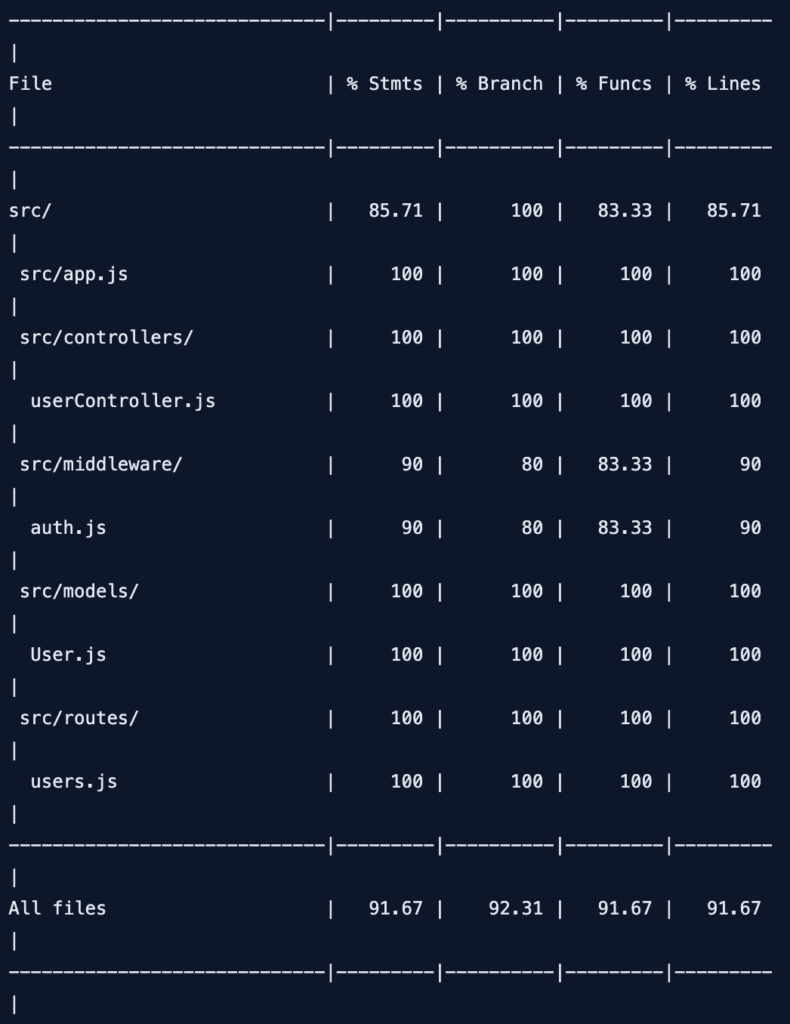
Coverage Configuration:
// package.json
{
  "jest": {
    "coverageThreshold": {
      "global": {
        "branches": 80,
        "functions": 80,
        "lines": 80,
        "statements": 80
      },
      "./src/controllers/": {
        "branches": 90,
        "functions": 90,
        "lines": 90,
        "statements": 90
      }
    }
  }
}
11. Complete Testing Suite
Complete Test File Example:
// __tests__/api/users.integration.test.js
const request = require('supertest');
const app = require('../../src/app');
const { setupTestDB } = require('../helpers/db');

setupTestDB();

describe('Users API Integration Tests', () => {
  let createdUserId;

  describe('POST /api/users', () => {
    test('should create a new user', async () => {
      const userData = {
        name: 'Integration Test User',
        email: 'integration@test.com',
        password: 'password123'
      };

      const response = await request(app)
        .post('/api/users')
        .send(userData)
        .expect(201);

      createdUserId = response.body.data.id;

      expect(response.body.success).toBe(true);
      expect(response.body.data.email).toBe(userData.email);
    });
  });

  describe('GET /api/users', () => {
    test('should get all users', async () => {
      const response = await request(app)
        .get('/api/users')
        .expect(200);

      expect(response.body.data).toBeInstanceOf(Array);
      expect(response.body.data.length).toBeGreaterThan(0);
    });
  });

  describe('GET /api/users/:id', () => {
    test('should get user by id', async () => {
      const response = await request(app)
        .get(`/api/users/${createdUserId}`)
        .expect(200);

      expect(response.body.data.id).toBe(createdUserId);
    });
  });

  describe('PUT /api/users/:id', () => {
    test('should update user', async () => {
      const updateData = {
        name: 'Updated Name',
        email: 'updated@test.com'
      };

      const response = await request(app)
        .put(`/api/users/${createdUserId}`)
        .send(updateData)
        .expect(200);

      expect(response.body.data.name).toBe(updateData.name);
      expect(response.body.data.email).toBe(updateData.email);
    });
  });

  describe('PATCH /api/users/:id', () => {
    test('should partially update user', async () => {
      const response = await request(app)
        .patch(`/api/users/${createdUserId}`)
        .send({ name: 'Patched Name' })
        .expect(200);

      expect(response.body.data.name).toBe('Patched Name');
    });
  });

  describe('DELETE /api/users/:id', () => {
    test('should delete user', async () => {
      await request(app)
        .delete(`/api/users/${createdUserId}`)
        .expect(204);

      // Verify user is deleted
      await request(app)
        .get(`/api/users/${createdUserId}`)
        .expect(404);
    });
  });
});
12. Common Mistakes + Solutions
Mistake 1: Not clearing database between tests
// ❌ Tests affect each other
test('create user', async () => {
  await createUser(); // User created
});

test('get users', async () => {
  const users = await getUsers(); // Includes user from previous test!
});

// ✅ Clear database between tests
beforeEach(async () => {
  await clearDatabase();
});
Mistake 2: Not waiting for async operations
// ❌ Missing await
test('create user', () => {
  request(app).post('/api/users').send(data); // Test passes but assertion missing
});

// ✅ Use await
test('create user', async () => {
  const response = await request(app).post('/api/users').send(data);
  expect(response.status).toBe(201);
});
Mistake 3: Testing implementation details
// ❌ Testing internal function calls
test('should call database method', () => {
  expect(db.save).toHaveBeenCalled();
});

// ✅ Test behavior/outcome
test('should create user', async () => {
  const response = await request(app).post('/api/users').send(data);
  expect(response.status).toBe(201);
});
Mistake 4: Not handling async errors in tests
// ❌ Unhandled promise rejection
test('should handle error', () => {
  request(app).get('/api/error'); // Promise not handled
});

// ✅ Handle promise
test('should handle error', async () => {
  const response = await request(app).get('/api/error');
  expect(response.status).toBe(500);
});
13. Quick Cheat Sheet
Basic Commands:
# Run all tests
npm test

# Run tests in watch mode
npm run test:watch

# Run coverage
npm run test:coverage

# Run specific test file
npx jest __tests__/routes/users.test.js

# Run tests by name pattern
npx jest -t "should create user"
Common Assertions:
// Status codes
expect(response.status).toBe(200);
expect(response.status).toBe(201);
expect(response.status).toBe(404);

// Body assertions
expect(response.body).toHaveProperty('data');
expect(response.body.data).toBeInstanceOf(Array);
expect(response.body.data.length).toBe(3);

// Headers
expect(response.headers['content-type']).toMatch(/json/);

// Error assertions
await expect(createUser()).rejects.toThrow();
14. FAQ
Q1: Express API testing Supertest Hindi में सबसे important kya hai?supertest + jest – ye combination HTTP requests test करने के लिए best है।
Q2: Unit test vs Integration test – kya antar hai?
Unit – single function test। Integration – multiple components (API + Database) test।
Q3: Supertest kya karta है?
HTTP requests mock करता है – bina server start किए routes test कर सकते हो।
Q4: Test database kyun chahiye?
Real database use करोगे तो data corrupt हो जाएगा। Test database isolated होता है।
Q5: beforeEach vs beforeAll – kya antar hai?
beforeEach – har test से पहले run। beforeAll – सभी tests से पहले एक बार run।
Q6: Coverage threshold kya hai?
Code ka kitna percent test किया गया – minimum 80% recommended।
Q7: Mocking kya hai?
External dependencies (database, API) को fake करना – isolated testing के लिए।
Q8: CI/CD mein tests kaise run karein?
GitHub Actions, GitLab CI, Jenkins – npm test command run करो।
Q9: E2E tests kya hote hain?
Complete user flow test – login → search → add to cart → checkout।
Q10: Tests slow kyun hote hain?
Database operations, network calls – parallel run करो, test database use करो।
15. Conclusion
बहुत बढ़िया दोस्तों! आज हमने Express API testing Supertest Hindi को पूरी detail में समझा।
Quick Recap:
| Tool | Purpose |
|---|---|
| Jest | Test framework (assertions, runner) |
| Supertest | HTTP request testing |
| Coverage | Code coverage reports |
Mera personal experience:
Testing से पहले main manual testing karta था – bohot time लगता था। Jest + Supertest use करने के बाद confidence आ गया। Code change करो, test run करो – सब काम कर रहा है या नहीं पता चल जाता है।
Tum bhi ye steps follow karo:
- ✅ Jest install करो
- ✅ Supertest install करो
- ✅ Pehla GET route test likho
- ✅ POST/PUT/DELETE tests likho
- ✅ Coverage check करो
अब तुम्हारी बारी है!
नीचे comment में बताओ:
- क्या तुमने कभी API testing kiya है?
- तुम्हें कौन सा test sabse helpful लगा?
- अगला topic क्या चाहिए? (CI/CD Pipeline? Docker Testing? Load Testing?)
The Easy Master पर बने रहो। Happy Testing! 🚀🧪
Resources
Additional Resources
- React.js Kya Hai? JSX aur Components Samjhe – Beginner Guide 2026
- React Props and State Data Flow Hindi – समझे आसान भाषा में 2026
- React Router v6 – Multi-Page App Banaye (Routing Guide) 2026
- Advanced React Hooks – useContext and useReducer Samjhe 2026
- Redux Toolkit Simplified – State Management Aasaan Tarika 2026
- React API Integration Made Easy with Fetch and Axios
- React Performance Optimization – App Ko Fast कैसे बनाएं 2026
- React 19 New Features – AI Integration with React (2026)
- Node.js क्या है? 2026 में अपना पहला Backend Server बनाएँ
- NPM Packages कैसे इंस्टॉल करें? Modules (ESM vs CommonJS) 2026
- Express.js Tutorial – REST API Routing और Middleware समझे 2026
- Prisma ORM MongoDB से Database Connect कैसे करें – Easy Tutorial Hindi
- JWT Authentication Node.js – Secure Login System बनाए 2026
- WebSockets Node.js – Live Chat App कैसे बनाएं (Socket.io)
- Async Await vs Promises – Node.js में Async Code कैसे सीखें?
- Microservices Architecture node.js आसान हिंदी Explanation 2026
- Docker से Node.js App Production Ready Deploy करें 2026
- Express.js Setup – पहला Server कैसे बनाएं (Step-by-Step) 2026
- Express.js Routing – GET POST PUT DELETE Complete Guide
- Express Middleware समझे – Application, Router, Error Middleware
- Express req and res Objects – Query, Params, Body, Headers Explained
- Express Static Files और Templating – EJS से Dynamic HTML Banaye
- Express Router – API Routes को Organize करें (Modular Code)
- Express.js में Environment Variables – .env File कैसे Use करें
- Express File Upload Multer Tutorial | Image PDF Hindi 2026
- Express Security – Helmet, CORS, Rate Limiting, Validation (2026)
- Express + TypeScript – Type-Safe API कैसे बनाएं 2026
- Express MongoDB CRUD – Complete REST API Example 2026
- Express Logging – Morgan और Winston से Debug करें