नमस्ते दोस्तों! 🙏
स्वागत है The Easy Master पर!
क्या तुमने कभी सोचा है – backend server कैसे बनाते हैं? API कैसे create करते हैं?
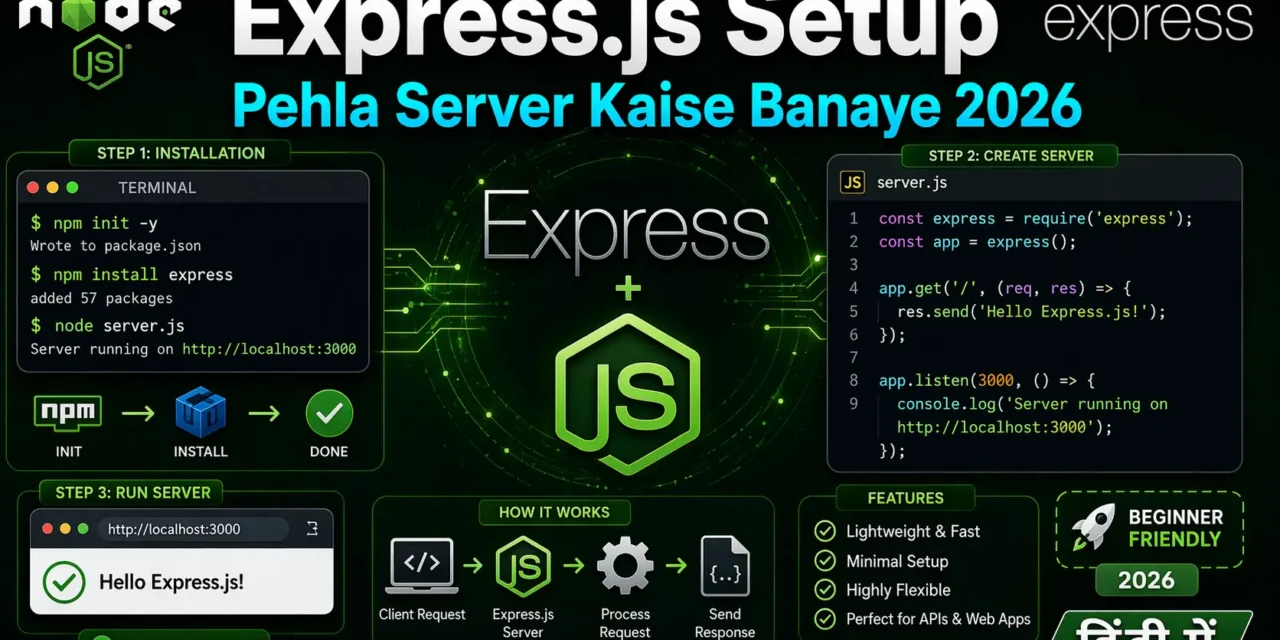
Express.js Node.js ka most popular framework hai – jo backend development ko super easy banata है। एक simple server 5 lines में बन जाता है!
Express.js setup Hindi में समझना बहुत जरूरी है क्योंकि:
- Express.js Node.js ka #1 framework hai (20M+ weekly downloads)
- Har Node.js developer ko Express.js aana chahiye
- Interview mein pakka Express.js questions puche jayenge
- REST APIs, web apps, microservices – सब Express.js से बनते हैं
Aaj kya seekhoge?
| Topic | Kya Seekhega? |
|---|---|
| Express.js Kya Hai? | Introduction and benefits |
| Installation | Setup step-by-step |
| Pehla Server | Hello World server |
| Routes | GET, POST, PUT, DELETE |
| Middleware | Request/response modify karna |
| Static Files | HTML, CSS, JS serve karna |
| Environment Variables | .env setup |
| Production Ready | Best practices |
Kya tumhe pata hai?
Express.js 20 million+ weekly downloads ke saath Node.js ka most starred framework hai GitHub par (60k+ stars)!
तो चलिए शुरू करते हैं – Express.js setup Hindi सीखने का सफर! 🚀
Table of Contents
1. Express.js क्या Hai? – Introduction
Express.js ek minimal aur flexible Node.js web framework है जो web aur mobile applications बनाने के लिए features provide करता है।
Why Express.js?
| Feature | Benefit |
|---|---|
| Minimal | Simple, less boilerplate code |
| Fast | Lightweight, no overhead |
| Flexible | कुछ भी configure kar sakte ho |
| Middleware | Request/response pipeline |
| Routing | Clean URL handling |
| Template Engines | EJS, Pug, Handlebars support |
| Ecosystem | 1000+ middleware packages |
Express.js के बिना (Raw Node.js):
// Pure Node.js HTTP module
const http = require('http');

const server = http.createServer((req, res) => {
  if (req.url === '/' && req.method === 'GET') {
    res.writeHead(200, { 'Content-Type': 'application/json' });
    res.end(JSON.stringify({ message: 'Hello World' }));
  } else if (req.url === '/users' && req.method === 'GET') {
    res.writeHead(200, { 'Content-Type': 'application/json' });
    res.end(JSON.stringify([{ name: 'Rahul' }]));
  } else {
    res.writeHead(404);
    res.end('Not Found');
  }
});

server.listen(3000);
Express.js के साथ:
// With Express.js - Clean & Simple!
const express = require('express');
const app = express();

app.get('/', (req, res) => {
  res.json({ message: 'Hello World' });
});

app.get('/users', (req, res) => {
  res.json([{ name: 'Rahul' }]);
});

app.listen(3000);
Express.js setup Hindi में आज हम step-by-step server बनाना सीखेंगे।
2. Prerequisites – क्या चाहिए?
Step 1: Node.js Install Karna
# Check if Node.js is installed
node --version
# Output: v18.x.x or higher

# Check if npm is installed
npm --version
# Output: 9.x.x or higher
Step 2: Text Editor
- VS Code (recommended)
- या कोई भी editor (Sublime, Atom, WebStorm)
Step 3: Terminal Knowledge
Basic commands aani chahiye:
cd– change directorymkdir– make directorynpm– node package manager
3. Project Setup – Installation
Step 1: Create Project Folder
# Create folder
mkdir my-express-server
cd my-express-server

# Initialize npm project
npm init -y
Step 2: Install Express.js
# Install express
npm install express

# Install nodemon for development (auto-restart)
npm install -D nodemon
Step 3: Project Structure
my-express-server/
├── node_modules/
├── package.json
├── package-lock.json
├── server.js
└── .gitignore
Step 4: package.json Scripts
{
  "name": "my-express-server",
  "version": "1.0.0",
  "description": "My first Express.js server",
  "main": "server.js",
  "scripts": {
    "start": "node server.js",
    "dev": "nodemon server.js"
  },
  "dependencies": {
    "express": "^4.18.2"
  },
  "devDependencies": {
    "nodemon": "^3.0.0"
  }
}
Step 5: .gitignore
node_modules/
.env
.DS_Store
*.log
4. Pehla Server – Hello World
Basic Express Server:
// server.js
const express = require('express');

// Create express app
const app = express();

// Define port
const PORT = 3000;

// Routes
app.get('/', (req, res) => {
  res.send('Hello World from Express.js! 🚀');
});

// Start server
app.listen(PORT, () => {
  console.log(`Server is running on http://localhost:${PORT}`);
});
Run the Server:
# Development mode (with auto-restart)
npm run dev

# OR production mode
npm start
Output:
Server is running on http://localhost:3000Browser में http://localhost:3000 खोलो – “Hello World from Express.js! 🚀” dikhega।
Different Response Types:
// server.js
const express = require('express');
const app = express();

app.get('/', (req, res) => {
  // Text response
  res.send('Hello World');
});

app.get('/json', (req, res) => {
  // JSON response
  res.json({
    message: 'Hello JSON!',
    status: 'success',
    timestamp: new Date()
  });
});

app.get('/html', (req, res) => {
  // HTML response
  res.send(`
    <!DOCTYPE html>
    <html>
      <head>
        <title>Express Server</title>
        <style>
          body { font-family: Arial; text-align: center; padding: 50px; }
          h1 { color: #61DAFB; }
        </style>
      </head>
      <body>
        <h1>🚀 Express.js Server</h1>
        <p>Your first server is running!</p>
      </body>
    </html>
  `);
});

app.get('/file', (req, res) => {
  // Send file
  res.sendFile(__dirname + '/public/index.html');
});

app.get('/redirect', (req, res) => {
  // Redirect
  res.redirect('/');
});

app.get('/status', (req, res) => {
  // Custom status code
  res.status(201).json({ message: 'Created' });
});

const PORT = 3000;
app.listen(PORT, () => {
  console.log(`Server running on http://localhost:${PORT}`);
});
5. Basic Routing – GET, POST, PUT, DELETE
Routing = Different URLs के लिए different responses।
Complete CRUD Routes:
// server.js
const express = require('express');
const app = express();

// Middleware to parse JSON request body
app.use(express.json());

// In-memory database
let users = [
  { id: 1, name: 'Rahul', email: 'rahul@example.com' },
  { id: 2, name: 'Priya', email: 'priya@example.com' }
];

let nextId = 3;

// ============ GET Routes (Read) ============

// GET /api/users - Get all users
app.get('/api/users', (req, res) => {
  res.json({
    success: true,
    count: users.length,
    data: users
  });
});

// GET /api/users/:id - Get single user
app.get('/api/users/:id', (req, res) => {
  const id = parseInt(req.params.id);
  const user = users.find(u => u.id === id);

  if (!user) {
    return res.status(404).json({
      success: false,
      error: 'User not found'
    });
  }

  res.json({
    success: true,
    data: user
  });
});

// ============ POST Routes (Create) ============

// POST /api/users - Create new user
app.post('/api/users', (req, res) => {
  const { name, email } = req.body;

  // Validation
  if (!name || !email) {
    return res.status(400).json({
      success: false,
      error: 'Name and email are required'
    });
  }

  // Check if email already exists
  const existingUser = users.find(u => u.email === email);
  if (existingUser) {
    return res.status(409).json({
      success: false,
      error: 'Email already exists'
    });
  }

  const newUser = {
    id: nextId++,
    name,
    email,
    createdAt: new Date()
  };

  users.push(newUser);

  res.status(201).json({
    success: true,
    message: 'User created successfully',
    data: newUser
  });
});

// ============ PUT Routes (Update Full) ============

// PUT /api/users/:id - Update user (full update)
app.put('/api/users/:id', (req, res) => {
  const id = parseInt(req.params.id);
  const { name, email } = req.body;

  const userIndex = users.findIndex(u => u.id === id);

  if (userIndex === -1) {
    return res.status(404).json({
      success: false,
      error: 'User not found'
    });
  }

  // Full update – all fields required
  if (!name || !email) {
    return res.status(400).json({
      success: false,
      error: 'Name and email are required for full update'
    });
  }

  users[userIndex] = {
    ...users[userIndex],
    name,
    email,
    updatedAt: new Date()
  };

  res.json({
    success: true,
    message: 'User updated successfully',
    data: users[userIndex]
  });
});

// ============ PATCH Routes (Update Partial) ============

// PATCH /api/users/:id - Update user (partial update)
app.patch('/api/users/:id', (req, res) => {
  const id = parseInt(req.params.id);
  const { name, email } = req.body;

  const userIndex = users.findIndex(u => u.id === id);

  if (userIndex === -1) {
    return res.status(404).json({
      success: false,
      error: 'User not found'
    });
  }

  // Partial update – only provided fields
  if (name) users[userIndex].name = name;
  if (email) users[userIndex].email = email;
  users[userIndex].updatedAt = new Date();

  res.json({
    success: true,
    message: 'User updated successfully',
    data: users[userIndex]
  });
});

// ============ DELETE Routes (Delete) ============

// DELETE /api/users/:id - Delete user
app.delete('/api/users/:id', (req, res) => {
  const id = parseInt(req.params.id);

  const userIndex = users.findIndex(u => u.id === id);

  if (userIndex === -1) {
    return res.status(404).json({
      success: false,
      error: 'User not found'
    });
  }

  users.splice(userIndex, 1);

  res.json({
    success: true,
    message: 'User deleted successfully'
  });
});

// ============ Start Server ============
const PORT = 3000;
app.listen(PORT, () => {
  console.log(`🚀 Server running on http://localhost:${PORT}`);
  console.log(`📋 Users API: http://localhost:${PORT}/api/users`);
});
Testing with curl:
# GET all users
curl http://localhost:3000/api/users

# GET single user
curl http://localhost:3000/api/users/1

# POST create user
curl -X POST http://localhost:3000/api/users \
  -H "Content-Type: application/json" \
  -d '{"name":"Amit","email":"amit@example.com"}'

# PUT update user
curl -X PUT http://localhost:3000/api/users/1 \
  -H "Content-Type: application/json" \
  -d '{"name":"Rahul Sharma","email":"rahul.sharma@example.com"}'

# PATCH partial update
curl -X PATCH http://localhost:3000/api/users/1 \
  -H "Content-Type: application/json" \
  -d '{"name":"Rahul Kumar"}'

# DELETE user
curl -X DELETE http://localhost:3000/api/users/2
6. Request aur Response Objects
Request Object (req):
app.get('/example', (req, res) => {
  // 1. req.params - URL parameters
  // GET /users/123
  console.log(req.params.id); // 123

  // 2. req.query - Query string parameters
  // GET /search?q=express&page=2
  console.log(req.query.q);    // express
  console.log(req.query.page);  // 2

  // 3. req.body - Request body (needs express.json())
  console.log(req.body);

  // 4. req.headers - HTTP headers
  console.log(req.headers['content-type']);
  console.log(req.headers.authorization);

  // 5. req.method - HTTP method
  console.log(req.method); // GET, POST, etc.

  // 6. req.url - Full URL
  console.log(req.url);

  // 7. req.ip - Client IP address
  console.log(req.ip);

  // 8. req.hostname - Hostname
  console.log(req.hostname);

  // 9. req.protocol - http or https
  console.log(req.protocol);

  res.send('OK');
});
Response Object (res):
app.get('/response-examples', (req, res) => {
  // 1. res.send() - Send response (auto-detects type)
  res.send('Hello World');
  res.send({ message: 'Hello' }); // Object → JSON

  // 2. res.json() - Send JSON response
  res.json({ name: 'Rahul', age: 25 });

  // 3. res.status() - Set HTTP status code
  res.status(201).json({ message: 'Created' });
  res.status(404).json({ error: 'Not found' });

  // 4. res.sendFile() - Send file
  res.sendFile(__dirname + '/public/index.html');

  // 5. res.redirect() - Redirect to another URL
  res.redirect('/new-page');
  res.redirect(301, '/permanent-redirect');

  // 6. res.set() - Set headers
  res.set('X-Custom-Header', 'CustomValue');
  res.set({
    'X-Header-1': 'Value1',
    'X-Header-2': 'Value2'
  });

  // 7. res.type() - Set Content-Type
  res.type('json');   // application/json
  res.type('html');   // text/html
  res.type('text');   // text/plain

  // 8. res.append() - Append to header
  res.append('Link', '<http://localhost/>');

  // 9. res.end() - End response (no data)
  res.end();

  // 10. res.download() - Download file
  res.download('/path/to/file.pdf', 'custom-name.pdf');
});
7. Middleware – Express.json, Morgan, CORS
What is Middleware?
Middleware functions request/response cycle के बीच में execute होते हैं।
Middleware Flow:
Request → Middleware 1 → Middleware 2 → Route → Response
              ↓              ↓
           next()         next()
Built-in Middleware:
const express = require('express');
const app = express();

// 1. express.json() - Parse JSON request body
app.use(express.json());

// 2. express.urlencoded() - Parse URL-encoded form data
app.use(express.urlencoded({ extended: true }));

// 3. express.static() - Serve static files
app.use(express.static('public'));
app.use('/static', express.static('uploads'));

// 4. express.raw() - Parse raw body
app.use(express.raw({ type: 'application/json' }));

// 5. express.text() - Parse text body
app.use(express.text({ type: 'text/plain' }));
Third-party Middleware:
npm install morgan cors helmet compression// server.js
const express = require('express');
const morgan = require('morgan');
const cors = require('cors');
const helmet = require('helmet');
const compression = require('compression');
const app = express();
// 1. Helmet - Security headers
app.use(helmet());
// 2. CORS - Cross-origin resource sharing
app.use(cors());
// Custom CORS
app.use(cors({
origin: 'https://myfrontend.com',
methods: ['GET', 'POST', 'PUT', 'DELETE'],
allowedHeaders: ['Content-Type', 'Authorization']
}));
// 3. Morgan - HTTP request logging
app.use(morgan('dev'));
// Formats: 'dev', 'combined', 'common', 'short', 'tiny'
// 4. Compression - Compress responses
app.use(compression());
// 5. JSON parser
app.use(express.json());
// Custom middleware
app.use((req, res, next) => {
console.log(`[${new Date().toISOString()}] ${req.method} ${req.url}`);
next();
});
// Logger middleware
app.use((req, res, next) => {
const start = Date.now();
res.on('finish', () => {
const duration = Date.now() - start;
console.log(`${req.method} ${req.url} - ${res.statusCode} - ${duration}ms`);
});
next();
});
// Authentication middleware
const authenticate = (req, res, next) => {
const token = req.headers.authorization;
if (!token) {
return res.status(401).json({ error: 'No token provided' });
}
if (token !== 'Bearer secret-token') {
return res.status(403).json({ error: 'Invalid token' });
}
req.user = { id: 1, name: 'Rahul' };
next();
};
// Protected route
app.get('/api/profile', authenticate, (req, res) => {
res.json({ user: req.user });
});
app.listen(3000);8. Static Files Serve Karna
Public Folder Structure:
my-express-server/
├── public/
│   ├── index.html
│   ├── about.html
│   ├── css/
│   │   └── style.css
│   ├── js/
│   │   └── script.js
│   └── images/
│       └── logo.png
├── server.js
└── package.json
Serve Static Files:
// server.js
const express = require('express');
const path = require('path');
const app = express();

// Serve static files from 'public' directory
app.use(express.static('public'));

// Serve with custom path
app.use('/static', express.static('public'));

// Multiple directories
app.use(express.static('public'));
app.use(express.static('uploads'));

// With options
app.use(express.static('public', {
  maxAge: '1d',           // Cache for 1 day
  etag: true,             // Enable ETag
  lastModified: true,     // Enable Last-Modified
  setHeaders: (res, path) => {
    if (path.endsWith('.html')) {
      res.setHeader('Cache-Control', 'no-cache');
    }
  }
}));

// Custom 404 page
app.use((req, res) => {
  res.status(404).sendFile(path.join(__dirname, 'public', '404.html'));
});

app.listen(3000);
HTML File (public/index.html):
<!DOCTYPE html>
<html lang="en">
<head>
    <meta charset="UTF-8">
    <meta name="viewport" content="width=device-width, initial-scale=1.0">
    <title>Express.js Server</title>
    <link rel="stylesheet" href="/css/style.css">
</head>
<body>
    <div class="container">
        <h1>🚀 Express.js Server Running!</h1>
        <p>Your static files are being served successfully.</p>
        <button onclick="fetchData()">Get API Data</button>
        <div id="result"></div>
    </div>
    <script src="/js/script.js"></script>
</body>
</html>
CSS File (public/css/style.css):
body {
    font-family: Arial, sans-serif;
    background: #0A1929;
    color: white;
    text-align: center;
    padding: 50px;
}

.container {
    max-width: 600px;
    margin: auto;
}

h1 {
    color: #61DAFB;
}

button {
    background: #61DAFB;
    color: #0A1929;
    padding: 10px 20px;
    border: none;
    border-radius: 5px;
    cursor: pointer;
    font-size: 16px;
    margin-top: 20px;
}

#result {
    margin-top: 20px;
    padding: 10px;
    background: #1A2A3A;
    border-radius: 5px;
}
JavaScript File (public/js/script.js):
async function fetchData() {
    try {
        const response = await fetch('/api/users');
        const data = await response.json();
        document.getElementById('result').innerHTML =
            `<pre>${JSON.stringify(data, null, 2)}</pre>`;
    } catch (error) {
        console.error('Error:', error);
    }
}
9. Environment Variables – .env Setup
Install dotenv:
npm install dotenvCreate .env File:
# .env
NODE_ENV=development
PORT=3000
DB_HOST=localhost
DB_PORT=5432
DB_NAME=mydb
DB_USER=myuser
DB_PASSWORD=mypassword
JWT_SECRET=my_super_secret_key_2026
API_KEY=abc123xyz
Use Environment Variables:
// server.js
require('dotenv').config();
const express = require('express');

const app = express();

const PORT = process.env.PORT || 3000;
const NODE_ENV = process.env.NODE_ENV;

console.log(`Running in ${NODE_ENV} mode`);

// Database configuration
const dbConfig = {
  host: process.env.DB_HOST,
  port: process.env.DB_PORT,
  database: process.env.DB_NAME,
  user: process.env.DB_USER,
  password: process.env.DB_PASSWORD
};

// JWT configuration
const JWT_SECRET = process.env.JWT_SECRET;

app.get('/api/config', (req, res) => {
  // Don't send sensitive data to client!
  res.json({
    env: NODE_ENV,
    port: PORT,
    // Never send secrets to client!
  });
});

app.listen(PORT, () => {
  console.log(`Server running on port ${PORT}`);
});
.gitignore:
node_modules/
.env
.env.local
.env.production
.DS_Store
*.log
10. Error Handling – 404 and Global Error Handler
404 Not Found Handler:
// server.js
const express = require('express');
const app = express();

// Your routes here
app.get('/', (req, res) => {
  res.send('Home Page');
});

app.get('/api/users', (req, res) => {
  res.json(users);
});

// 404 handler – MUST be after all routes
app.use('*', (req, res) => {
  res.status(404).json({
    success: false,
    error: `Cannot ${req.method} ${req.url}`
  });
});
Global Error Handler:
// server.js
const express = require('express');
const app = express();

// Custom error class
class AppError extends Error {
  constructor(message, statusCode) {
    super(message);
    this.statusCode = statusCode;
    this.isOperational = true;
  }
}

// Async error wrapper
const asyncHandler = (fn) => (req, res, next) => {
  Promise.resolve(fn(req, res, next)).catch(next);
};

// Routes with error handling
app.get('/api/users/:id', asyncHandler(async (req, res) => {
  const user = await db.findUser(req.params.id);

  if (!user) {
    throw new AppError('User not found', 404);
  }

  res.json(user);
}));

// Global error handler – MUST be after all routes
app.use((err, req, res, next) => {
  console.error('Error:', err);

  const statusCode = err.statusCode || 500;
  const message = err.isOperational ? err.message : 'Internal server error';

  res.status(statusCode).json({
    success: false,
    error: {
      message,
      statusCode,
      ...(process.env.NODE_ENV === 'development' && { stack: err.stack })
    }
  });
});
11. Production Best Practices
Production Ready Server:
// server.js
require('dotenv').config();
const express = require('express');
const helmet = require('helmet');
const cors = require('cors');
const compression = require('compression');
const morgan = require('morgan');

const app = express();

// Security middleware
app.use(helmet());

// CORS
app.use(cors({
  origin: process.env.CORS_ORIGIN || '*',
  methods: ['GET', 'POST', 'PUT', 'DELETE', 'PATCH'],
  allowedHeaders: ['Content-Type', 'Authorization']
}));

// Compression
app.use(compression());

// Logging
if (process.env.NODE_ENV === 'production') {
  app.use(morgan('combined'));
} else {
  app.use(morgan('dev'));
}

// Body parsing
app.use(express.json({ limit: '10mb' }));
app.use(express.urlencoded({ extended: true, limit: '10mb' }));

// Static files
app.use(express.static('public', {
  maxAge: '1d',
  etag: true
}));

// Health check endpoint
app.get('/health', (req, res) => {
  res.status(200).json({
    status: 'OK',
    timestamp: new Date().toISOString(),
    uptime: process.uptime(),
    memory: process.memoryUsage(),
    environment: process.env.NODE_ENV
  });
});

// Routes
app.use('/api/users', require('./routes/users'));
app.use('/api/products', require('./routes/products'));

// 404 handler
app.use('*', (req, res) => {
  res.status(404).json({
    success: false,
    error: `Cannot ${req.method} ${req.url}`
  });
});

// Global error handler
app.use((err, req, res, next) => {
  console.error(err);

  res.status(err.status || 500).json({
    success: false,
    error: {
      message: err.message || 'Internal server error',
      ...(process.env.NODE_ENV === 'development' && { stack: err.stack })
    }
  });
});

const PORT = process.env.PORT || 3000;
const server = app.listen(PORT, () => {
  console.log(`🚀 Server running on port ${PORT}`);
  console.log(`📝 Environment: ${process.env.NODE_ENV}`);
  console.log(`🔗 API: http://localhost:${PORT}`);
});

// Graceful shutdown
process.on('SIGTERM', () => {
  console.log('SIGTERM received, closing server...');
  server.close(() => {
    console.log('Server closed');
    process.exit(0);
  });
});
12. Common Mistakes + Solutions
Mistake 1: Forgetting express.json() middleware
// ❌ req.body will be undefined
app.post('/api/users', (req, res) => {
  console.log(req.body); // undefined!
});

// ✅ Add middleware
app.use(express.json());
Mistake 2: Not handling 404
// ❌ No 404 handler – server hangs
app.get('/api/users', handler);

// ✅ Add 404 handler at the end
app.use('*', (req, res) => {
  res.status(404).json({ error: 'Not found' });
});
Mistake 3: Middleware order
// ❌ Wrong order – routes before json middleware
app.post('/api/users', handler);
app.use(express.json());

// ✅ Correct order
app.use(express.json());
app.post('/api/users', handler);
Mistake 4: Not using environment variables
// ❌ Hardcoded port
app.listen(3000);

// ✅ Use environment variable
const PORT = process.env.PORT || 3000;
app.listen(PORT);
Mistake 5: Exposing sensitive data
// ❌ Sending password in response
res.json(user); // user contains password

// ✅ Remove sensitive fields
const { password, ...safeUser } = user;
res.json(safeUser);
13. Quick Cheat Sheet
Express.js Setup:
# Create project
mkdir my-app && cd my-app
npm init -y
npm install express
npm install -D nodemon
Basic Server:
const express = require('express');
const app = express();
const PORT = 3000;

app.get('/', (req, res) => {
  res.send('Hello World');
});

app.listen(PORT, () => {
  console.log(`Server running on port ${PORT}`);
});
Common Patterns:
| Pattern | Code |
|---|---|
| JSON response | res.json({ data }) |
| Status code | res.status(201).json(data) |
| URL params | req.params.id |
| Query params | req.query.page |
| Request body | req.body (needs middleware) |
| Static files | app.use(express.static('public')) |
| 404 handler | app.use('*', (req, res) => {}) |
| Error handler | app.use((err, req, res, next) => {}) |
14. FAQ
Q1: Express.js setup Hindi में सबसे important step kya hai?npm init -y और npm install express – ye do steps project start करते हैं।
Q2: nodemon kyun use karein?
Code change par server automatically restart होता है – development time save होता है।
Q3: app.get() vs app.use() – kya antar hai?app.get() sirf GET requests handle karta hai। app.use() sab HTTP methods handle karta hai (GET, POST, PUT, DELETE)।
Q4: req.params vs req.query – kya antar hai?req.params – URL के dynamic parts (/users/:id)। req.query – query string (?page=2)।
Q5: res.send() vs res.json() – kya use karein?res.json() JSON response ke लिए better है – automatically Content-Type: application/json set karta है।
Q6: Middleware order kyun important hai?
Middleware execute होते हैं जिस order में लिखे होते हैं। express.json() routes से पहले होना चाहिए।
Q7: 404 handler last mein kyun lagate hain?
Agar pehले लगाओगे, तो बाकी routes kabhi match nahi hोंगे।
Q8: Environment variables kyun use karein?
Port, database credentials, API keys – code mein hardcode नहीं करनी चाहिए।
Q9: Production mein server kaise run karein?
PM2 या Docker use करो। npm start se run करो (npm run dev development के लिए है)।
Q10: Express.js 2026 mein relevant hai?
Bilkul! 20M+ weekly downloads, #1 Node.js framework, हर Node.js job में requirement है।
15. Conclusion
बहुत बढ़िया दोस्तों! आज हमने Express.js setup Hindi को पूरी detail में समझा।
Quick Recap:
| Concept | Key Takeaway |
|---|---|
| Express.js | Minimal Node.js web framework |
| Setup | npm install express |
| Routes | GET, POST, PUT, DELETE |
| Middleware | Request/response pipeline |
| Static Files | express.static() |
| Error Handling | 404 + Global error handler |
Mera personal experience:
Express.js mere pehle backend framework tha – bohot simple aur easy laga। Raw Node.js से 10x faster development hota है। 5 lines में server ready!
Tum bhi ye steps follow karo:
- ✅ Node.js install karo
- ✅ Express.js project banao
- ✅ Basic server banao
- ✅ Routes add karo
- ✅ Middleware implement karo
अब तुम्हारी बारी है!
नीचे comment में बताओ:
- तुम्हारा पहला Express.js server कैसा रहा?
- तुम्हें कौन सा route sabse easy laga?
- अगला topic क्या चाहिए? (MongoDB? Authentication? File Upload?)
The Easy Master पर बने रहो। Happy Express.js Coding! 🚀💻
Resources
- Express.js Official Website
- Express.js API Reference
- Express.js Routing Guide
- Express.js Middleware Guide
Additional Resources
- React.js Kya Hai? JSX aur Components Samjhe – Beginner Guide 2026
- React Props and State Data Flow Hindi – समझे आसान भाषा में 2026
- React Router v6 – Multi-Page App Banaye (Routing Guide) 2026
- Advanced React Hooks – useContext and useReducer Samjhe 2026
- Redux Toolkit Simplified – State Management Aasaan Tarika 2026
- React API Integration Made Easy with Fetch and Axios
- React Performance Optimization – App Ko Fast कैसे बनाएं 2026
- React 19 New Features – AI Integration with React (2026)
- Node.js क्या है? 2026 में अपना पहला Backend Server बनाएँ
- NPM Packages कैसे इंस्टॉल करें? Modules (ESM vs CommonJS) 2026
- Express.js Tutorial – REST API Routing और Middleware समझे 2026
- Prisma ORM MongoDB से Database Connect कैसे करें – Easy Tutorial Hindi
- JWT Authentication Node.js – Secure Login System बनाए 2026
- WebSockets Node.js – Live Chat App कैसे बनाएं (Socket.io)
- Async Await vs Promises – Node.js में Async Code कैसे सीखें?
- Microservices Architecture node.js आसान हिंदी Explanation 2026
- Docker से Node.js App Production Ready Deploy करें 2026