नमस्ते दोस्तों! 🙏
स्वागत है The Easy Master पर!
क्या तुमने कभी सोचा है – React app mein API se data kaise fetch karein?
Real-world apps mein data server se aata hai – users list, products, posts, comments. Tumhe API calls karni padti hai data laane ke liye.
React API Integration Axios Hindi में समझना बहुत जरूरी है क्योंकि:
- 99% real apps API integration use karte hain
- Fetch vs Axios – dono ke pros and cons
- Loading states – user ko batana ki data aa raha hai
- Error handling – agar API fail ho to kya dikhana
- Custom hooks – reusable API logic
Aaj kya seekhoge?
| Topic | Kya Seekhega? |
|---|---|
| Fetch API | Browser built-in data fetching |
| Axios | Popular library (better features) |
| CRUD Operations | GET, POST, PUT, DELETE |
| Error Handling | Try-catch, error states |
| Loading States | Spinners, skeletons |
| Custom Hooks | Reusable API logic |
| Interceptors | Request/response modify karna |
Kya tumhe pata hai?
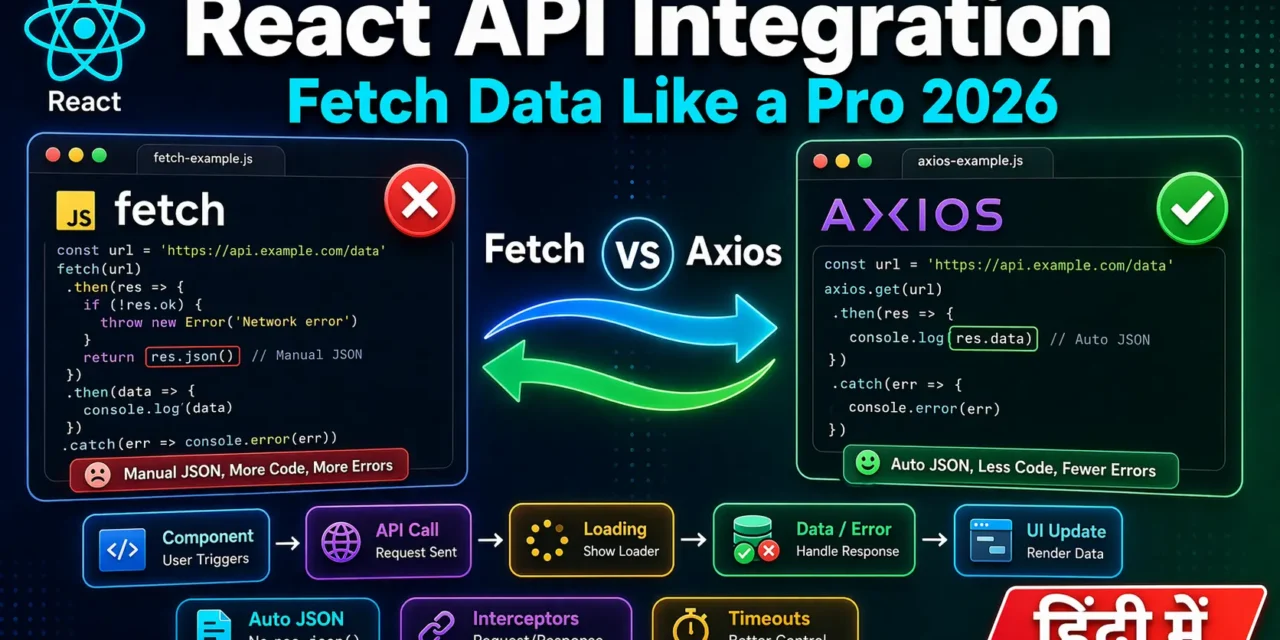
Axios automatically JSON parse kar deta hai, interceptors support karta hai, aur request cancellation bhi kar sakta hai. Fetch API mein ye sab manually karna padta hai!
तो चलिए शुरू करते हैं – React API Integration Axios Hindi सीखने का सफर! 🚀
Table of Contents
1. React API Integration – Introduction
React API Integration ka matlab hai – React app se external server (backend API) se data fetch karna aur display karna.
API Call Lifecycle:
// 1. Component renders initially
function UserList() {
  const [users, setUsers] = useState([]);
  const [loading, setLoading] = useState(true);
  const [error, setError] = useState(null);

  // 2. useEffect mein API call
  useEffect(() => {
    fetchUsers();
  }, []);

  // 3. API call function
  async function fetchUsers() {
    try {
      setLoading(true);
      const response = await fetch('/api/users');
      const data = await response.json();
      setUsers(data);  // 4. Success – update state
    } catch (err) {
      setError(err.message); // 5. Error – show error
    } finally {
      setLoading(false); // 6. Loading complete
    }
  }

  // 7. Render based on state
  if (loading) return <div>Loading...</div>;
  if (error) return <div>Error: {error}</div>;
  return <ul>{users.map(user => <li>{user.name}</li>)}</ul>;
}
React API Integration Axios Hindi में hum don’t repeat yourself (DRY) principle follow karenge – reusable API logic banayenge.
2. Fetch API – Browser Built-in Method
Fetch API browser mein built-in hai – kuch install karne ki zaroorat nahi.
Basic GET Request:
// GET request – data laane ke liye
async function getUsers() {
  try {
    const response = await fetch('https://jsonplaceholder.typicode.com/users');

    if (!response.ok) {
      throw new Error(`HTTP error! status: ${response.status}`);
    }

    const data = await response.json(); // JSON parse manually
    console.log(data);
    return data;
  } catch (error) {
    console.error('Fetch error:', error);
  }
}
GET Request in React Component:
// src/components/UsersList.jsx
import { useState, useEffect } from 'react';

function UsersList() {
  const [users, setUsers] = useState([]);
  const [loading, setLoading] = useState(true);
  const [error, setError] = useState(null);

  useEffect(() => {
    fetch('https://jsonplaceholder.typicode.com/users')
      .then(response => {
        if (!response.ok) throw new Error('Failed to fetch');
        return response.json();
      })
      .then(data => {
        setUsers(data);
        setLoading(false);
      })
      .catch(err => {
        setError(err.message);
        setLoading(false);
      });
  }, []);

  if (loading) return <div>Loading users...</div>;
  if (error) return <div>Error: {error}</div>;

  return (
    <ul>
      {users.map(user => (
        <li key={user.id}>{user.name} - {user.email}</li>
      ))}
    </ul>
  );
}
POST Request (Data Send Karna):
async function createUser(userData) {
  try {
    const response = await fetch('https://jsonplaceholder.typicode.com/users', {
      method: 'POST',
      headers: {
        'Content-Type': 'application/json',
      },
      body: JSON.stringify(userData), // Convert to JSON string
    });

    if (!response.ok) throw new Error('Failed to create user');

    const data = await response.json();
    console.log('User created:', data);
    return data;
  } catch (error) {
    console.error('Error:', error);
  }
}

// Usage
createUser({ name: 'Rahul', email: 'rahul@example.com' });
Fetch API Options Summary:
| Option | Description | Example |
|---|---|---|
method | HTTP method | 'GET', 'POST', 'PUT', 'DELETE' |
headers | Request headers | { 'Content-Type': 'application/json' } |
body | Request body | JSON.stringify(data) |
signal | AbortController signal | signal: abortController.signal |
Fetch API Limitations:
| Limitation | Explanation |
|---|---|
| No auto JSON | response.json() manually karna padta hai |
| No timeout | Built-in timeout nahi hai |
| No interceptors | Request/response modify nahi kar sakte |
| Error handling | Only network errors catch hota hai (HTTP errors like 404 nahi) |
3. Axios – Popular HTTP Library
Axios ek popular library hai jo fetch se better features deti hai.
Installation:
npm install axiosBasic GET Request with Axios:
import axios from 'axios';

async function getUsers() {
  try {
    const response = await axios.get('https://jsonplaceholder.typicode.com/users');
    console.log(response.data); // ✅ Auto JSON parsed!
    return response.data;
  } catch (error) {
    console.error('Axios error:', error);
  }
}
Axios in React Component:
// src/components/UsersList.jsx
import { useState, useEffect } from 'react';
import axios from 'axios';

function UsersList() {
  const [users, setUsers] = useState([]);
  const [loading, setLoading] = useState(true);
  const [error, setError] = useState(null);

  useEffect(() => {
    axios.get('https://jsonplaceholder.typicode.com/users')
      .then(response => {
        setUsers(response.data);
        setLoading(false);
      })
      .catch(err => {
        setError(err.message);
        setLoading(false);
      });
  }, []);

  if (loading) return <div>Loading users...</div>;
  if (error) return <div>Error: {error}</div>;

  return (
    <ul>
      {users.map(user => (
        <li key={user.id}>{user.name}</li>
      ))}
    </ul>
  );
}
Async/Await Syntax (Cleaner):
function UsersList() {
  const [users, setUsers] = useState([]);
  const [loading, setLoading] = useState(true);
  const [error, setError] = useState(null);

  useEffect(() => {
    const fetchUsers = async () => {
      try {
        const response = await axios.get('https://jsonplaceholder.typicode.com/users');
        setUsers(response.data);
      } catch (err) {
        setError(err.message);
      } finally {
        setLoading(false);
      }
    };

    fetchUsers();
  }, []);

  // ... render logic
}
4. Fetch vs Axios – Comparison
| Feature | Fetch API | Axios |
|---|---|---|
| Installation | Built-in (no install) | Need npm install axios |
| JSON parsing | Manual response.json() | Auto in response.data |
| Error handling | Only network errors | HTTP errors (404, 500) bhi catch |
| Request timeout | Not built-in | timeout: 5000 |
| Interceptors | ❌ No | ✅ Yes |
| Request cancellation | AbortController | CancelToken / AbortController |
| Browser support | Modern browsers | All browsers (including old) |
| Progress tracking | Difficult | Easy with onUploadProgress |
| Response transform | Manual | Built-in transformers |
| Bundle size | 0KB | ~12KB |
When to Use What:
// ✅ Use Fetch for:
// - Simple GET requests
// - Small apps (no extra dependency)
// - Modern browsers only

// ✅ Use Axios for:
// - Complex apps with many API calls
// - Need interceptors (auth tokens, logging)
// - Need request cancellation
// - Need timeout configuration
// - Need upload progress tracking
5. CRUD Operations with Axios
CRUD = Create, Read, Update, Delete
Setup API Service:
// src/services/api.js
import axios from 'axios';

const API_BASE_URL = 'https://jsonplaceholder.typicode.com';

// Axios instance with base configuration
export const api = axios.create({
  baseURL: API_BASE_URL,
  timeout: 10000,
  headers: {
    'Content-Type': 'application/json',
  },
});

// API methods
export const apiService = {
  // READ - GET all items
  getAll: async (endpoint) => {
    const response = await api.get(endpoint);
    return response.data;
  },

  // READ - GET single item
  getById: async (endpoint, id) => {
    const response = await api.get(`${endpoint}/${id}`);
    return response.data;
  },

  // CREATE - POST new item
  create: async (endpoint, data) => {
    const response = await api.post(endpoint, data);
    return response.data;
  },

  // UPDATE - PUT (full update) or PATCH (partial update)
  update: async (endpoint, id, data) => {
    const response = await api.put(`${endpoint}/${id}`, data);
    return response.data;
  },

  // DELETE - DELETE item
  delete: async (endpoint, id) => {
    const response = await api.delete(`${endpoint}/${id}`);
    return response.data;
  },
};
Using API Service in Components:
// src/components/PostsManager.jsx
import { useState, useEffect } from 'react';
import { apiService } from '../services/api';

function PostsManager() {
  const [posts, setPosts] = useState([]);
  const [loading, setLoading] = useState(true);
  const [formData, setFormData] = useState({ title: '', body: '' });

  // READ - Fetch posts
  const fetchPosts = async () => {
    try {
      setLoading(true);
      const data = await apiService.getAll('/posts');
      setPosts(data.slice(0, 10));
    } catch (error) {
      console.error('Fetch error:', error);
    } finally {
      setLoading(false);
    }
  };

  // CREATE - Add new post
  const createPost = async (e) => {
    e.preventDefault();
    try {
      const newPost = await apiService.create('/posts', {
        title: formData.title,
        body: formData.body,
        userId: 1,
      });
      setPosts([newPost, ...posts]);
      setFormData({ title: '', body: '' });
      alert('Post created successfully!');
    } catch (error) {
      console.error('Create error:', error);
    }
  };

  // UPDATE - Edit post
  const updatePost = async (id, updatedData) => {
    try {
      const updated = await apiService.update('/posts', id, updatedData);
      setPosts(posts.map(post =>
        post.id === id ? { ...post, ...updated } : post
      ));
      alert('Post updated!');
    } catch (error) {
      console.error('Update error:', error);
    }
  };

  // DELETE - Remove post
  const deletePost = async (id) => {
    try {
      await apiService.delete('/posts', id);
      setPosts(posts.filter(post => post.id !== id));
      alert('Post deleted!');
    } catch (error) {
      console.error('Delete error:', error);
    }
  };

  useEffect(() => {
    fetchPosts();
  }, []);

  if (loading) return <div>Loading posts...</div>;

  return (
    <div>
      <form onSubmit={createPost}>
        <input
          type="text"
          placeholder="Title"
          value={formData.title}
          onChange={(e) => setFormData({ ...formData, title: e.target.value })}
          required
        />
        <textarea
          placeholder="Body"
          value={formData.body}
          onChange={(e) => setFormData({ ...formData, body: e.target.value })}
          required
        />
        <button type="submit">Add Post</button>
      </form>

      <ul>
        {posts.map(post => (
          <li key={post.id}>
            <h3>{post.title}</h3>
            <p>{post.body}</p>
            <button onClick={() => deletePost(post.id)}>Delete</button>
          </li>
        ))}
      </ul>
    </div>
  );
}
6. Loading aur Error States Handle Karna
Complete Example with All States:
// src/components/ProductList.jsx
import { useState, useEffect } from 'react';
import axios from 'axios';

function ProductList() {
  const [products, setProducts] = useState([]);
  const [loading, setLoading] = useState(true);
  const [error, setError] = useState(null);
  const [retryCount, setRetryCount] = useState(0);

  const fetchProducts = async () => {
    try {
      setLoading(true);
      setError(null);

      const response = await axios.get('https://fakestoreapi.com/products');
      setProducts(response.data);
    } catch (err) {
      setError(err.response?.data?.message || err.message || 'Something went wrong');
      console.error('API Error:', err);
    } finally {
      setLoading(false);
    }
  };

  useEffect(() => {
    fetchProducts();
  }, [retryCount]);

  // Loading State
  if (loading) {
    return (
      <div className="loading-container">
        <div className="spinner"></div>
        <p>Loading products...</p>
      </div>
    );
  }

  // Error State
  if (error) {
    return (
      <div className="error-container">
        <h3>⚠️ Error Loading Products</h3>
        <p>{error}</p>
        <button onClick={() => setRetryCount(prev => prev + 1)}>
          Try Again
        </button>
      </div>
    );
  }

  // Empty State
  if (products.length === 0) {
    return (
      <div className="empty-container">
        <p>No products found.</p>
      </div>
    );
  }

  // Success State
  return (
    <div className="products-grid">
      {products.map(product => (
        <div key={product.id} className="product-card">
          <img src={product.image} alt={product.title} />
          <h3>{product.title}</h3>
          <p>${product.price}</p>
        </div>
      ))}
    </div>
  );
}
Skeleton Loading (Better UX):
// src/components/SkeletonLoader.jsx
function SkeletonLoader() {
  return (
    <div className="skeleton">
      <div className="skeleton-image"></div>
      <div className="skeleton-text"></div>
      <div className="skeleton-text short"></div>
    </div>
  );
}

// CSS
// .skeleton { animation: pulse 1.5s infinite; background: #e0e0e0; border-radius: 4px; }
// @keyframes pulse { 0% { opacity: 0.6; } 50% { opacity: 1; } 100% { opacity: 0.6; } }
7. Custom Hook – useFetch
Custom hook banayenge reusable API logic ke liye.
useFetch Hook:
// src/hooks/useFetch.js
import { useState, useEffect, useCallback } from 'react';
import axios from 'axios';

export function useFetch(url, options = {}) {
  const [data, setData] = useState(null);
  const [loading, setLoading] = useState(true);
  const [error, setError] = useState(null);

  const fetchData = useCallback(async () => {
    try {
      setLoading(true);
      setError(null);

      const response = await axios(url, options);
      setData(response.data);
    } catch (err) {
      setError(err.response?.data?.message || err.message);
    } finally {
      setLoading(false);
    }
  }, [url, options]);

  useEffect(() => {
    fetchData();
  }, [fetchData]);

  return { data, loading, error, refetch: fetchData };
}
Using useFetch Hook:
// src/components/PostsList.jsx
import { useFetch } from '../hooks/useFetch';

function PostsList() {
  const { data: posts, loading, error, refetch } = useFetch(
    'https://jsonplaceholder.typicode.com/posts'
  );

  if (loading) return <div>Loading posts...</div>;
  if (error) return <div>Error: {error}</div>;

  return (
    <div>
      <button onClick={refetch}>Refresh</button>
      <ul>
        {posts?.slice(0, 10).map(post => (
          <li key={post.id}>
            <h4>{post.title}</h4>
            <p>{post.body}</p>
          </li>
        ))}
      </ul>
    </div>
  );
}
Advanced useFetch with POST/PUT:
// src/hooks/useApi.js
import { useState, useCallback } from 'react';
import axios from 'axios';

export function useApi(baseUrl) {
  const [loading, setLoading] = useState(false);
  const [error, setError] = useState(null);

  const request = useCallback(async (method, endpoint, data = null) => {
    try {
      setLoading(true);
      setError(null);

      const response = await axios({
        method,
        url: `${baseUrl}${endpoint}`,
        data,
      });

      return response.data;
    } catch (err) {
      setError(err.response?.data?.message || err.message);
      throw err;
    } finally {
      setLoading(false);
    }
  }, [baseUrl]);

  const get = useCallback((endpoint) => request('GET', endpoint), [request]);
  const post = useCallback((endpoint, data) => request('POST', endpoint, data), [request]);
  const put = useCallback((endpoint, data) => request('PUT', endpoint, data), [request]);
  const del = useCallback((endpoint) => request('DELETE', endpoint), [request]);

  return { get, post, put, delete: del, loading, error };
}
8. Axios Interceptors – Request/Response Modify Karna
Interceptors request ya response ko modify karne देते हैं (jaise auth token add karna).
Request Interceptor (Auth Token Add Karna):
// src/services/axiosConfig.js
import axios from 'axios';

const api = axios.create({
  baseURL: process.env.REACT_APP_API_URL,
  timeout: 10000,
});

// Request Interceptor – har request se pehle run hota hai
api.interceptors.request.use(
  (config) => {
    // Get token from localStorage
    const token = localStorage.getItem('token');

    // Add token to headers if exists
    if (token) {
      config.headers.Authorization = `Bearer ${token}`;
    }

    // Add request timestamp for debugging
    config.headers['X-Request-Time'] = Date.now();

    console.log(`Request: ${config.method?.toUpperCase()} ${config.url}`);
    return config;
  },
  (error) => {
    console.error('Request error:', error);
    return Promise.reject(error);
  }
);

// Response Interceptor – har response ke baad run hota hai
api.interceptors.response.use(
  (response) => {
    // Log response time
    const requestTime = response.config.headers['X-Request-Time'];
    if (requestTime) {
      const duration = Date.now() - requestTime;
      console.log(`Response time: ${duration}ms`);
    }

    return response;
  },
  (error) => {
    // Handle 401 Unauthorized
    if (error.response?.status === 401) {
      localStorage.removeItem('token');
      window.location.href = '/login';
    }

    // Handle 403 Forbidden
    if (error.response?.status === 403) {
      alert('You don\'t have permission to perform this action');
    }

    // Handle 500 Server Error
    if (error.response?.status >= 500) {
      console.error('Server error:', error.response.data);
      alert('Server error. Please try again later.');
    }

    return Promise.reject(error);
  }
);

export default api;
Loading Interceptor (Global Loading State):
// src/services/loadingInterceptor.js
let activeRequests = 0;
let loadingCallback = null;

export const setLoadingCallback = (callback) => {
  loadingCallback = callback;
};

const updateLoadingState = () => {
  if (loadingCallback) {
    loadingCallback(activeRequests > 0);
  }
};

// Add to axios interceptors
api.interceptors.request.use((config) => {
  activeRequests++;
  updateLoadingState();
  return config;
});

api.interceptors.response.use(
  (response) => {
    activeRequests--;
    updateLoadingState();
    return response;
  },
  (error) => {
    activeRequests--;
    updateLoadingState();
    return Promise.reject(error);
  }
);
9. Axios Instance – Base Configuration
Axios instance banake base configuration set karte hain – baar-baar repeat nahi karna padta.
Creating Axios Instance:
// src/services/apiClient.js
import axios from 'axios';

// Create instance with base configuration
const apiClient = axios.create({
  baseURL: 'https://jsonplaceholder.typicode.com',
  timeout: 10000,
  headers: {
    'Content-Type': 'application/json',
    'Accept': 'application/json',
  },
});

// For different APIs
const authApi = axios.create({
  baseURL: 'https://auth.example.com/api',
  timeout: 5000,
});

const fileApi = axios.create({
  baseURL: 'https://files.example.com',
  headers: {
    'Content-Type': 'multipart/form-data',
  },
});

export { apiClient, authApi, fileApi };
Using Different Instances:
// src/services/userService.js
import { apiClient, authApi, fileApi } from './apiClient';

export const userService = {
  // Main API
  getUsers: () => apiClient.get('/users'),
  getUserById: (id) => apiClient.get(`/users/${id}`),

  // Auth API
  login: (credentials) => authApi.post('/login', credentials),
  logout: () => authApi.post('/logout'),

  // File API
  uploadAvatar: (file) => {
    const formData = new FormData();
    formData.append('avatar', file);
    return fileApi.post('/upload', formData);
  },
};
10. Request Cancellation – Performance Optimize
Request cancellation – jab component unmount ho jaye ya user new request kare, toh previous request cancel karna.
Using AbortController:
// src/components/SearchComponent.jsx
import { useState, useEffect, useRef } from 'react';
import axios from 'axios';

function SearchComponent() {
  const [searchTerm, setSearchTerm] = useState('');
  const [results, setResults] = useState([]);
  const [loading, setLoading] = useState(false);

  // Store abort controller reference
  const abortControllerRef = useRef(null);

  useEffect(() => {
    // Cancel previous request if exists
    if (abortControllerRef.current) {
      abortControllerRef.current.abort();
    }

    if (searchTerm.length < 2) {
      setResults([]);
      return;
    }

    const fetchResults = async () => {
      // Create new abort controller
      const abortController = new AbortController();
      abortControllerRef.current = abortController;

      try {
        setLoading(true);
        const response = await axios.get(
          `https://jsonplaceholder.typicode.com/posts?q=${searchTerm}`,
          { signal: abortController.signal }
        );
        setResults(response.data);
      } catch (err) {
        if (err.name !== 'AbortError') {
          console.error('Search error:', err);
        }
      } finally {
        setLoading(false);
      }
    };

    // Debounce search
    const timer = setTimeout(fetchResults, 500);

    return () => {
      clearTimeout(timer);
      if (abortControllerRef.current) {
        abortControllerRef.current.abort();
      }
    };
  }, [searchTerm]);

  return (
    <div>
      <input
        type="text"
        value={searchTerm}
        onChange={(e) => setSearchTerm(e.target.value)}
        placeholder="Search posts..."
      />
      {loading && <div>Searching...</div>}
      <ul>
        {results.map(result => (
          <li key={result.id}>{result.title}</li>
        ))}
      </ul>
    </div>
  );
}
11. Real-world Project – Blog App
Complete Blog App with API Integration:
// src/services/blogApi.js
import axios from 'axios';

const api = axios.create({
  baseURL: 'https://jsonplaceholder.typicode.com',
  timeout: 10000,
});

// Request interceptor for auth
api.interceptors.request.use((config) => {
  const token = localStorage.getItem('token');
  if (token) {
    config.headers.Authorization = `Bearer ${token}`;
  }
  return config;
});

export const blogApi = {
  // Posts
  getPosts: (page = 1, limit = 10) =>
    api.get(`/posts?_page=${page}&_limit=${limit}`),

  getPostById: (id) => api.get(`/posts/${id}`),

  createPost: (data) => api.post('/posts', data),

  updatePost: (id, data) => api.put(`/posts/${id}`, data),

  deletePost: (id) => api.delete(`/posts/${id}`),

  // Comments
  getComments: (postId) => api.get(`/posts/${postId}/comments`),

  createComment: (postId, data) =>
    api.post(`/posts/${postId}/comments`, data),

  // Users
  getUserById: (id) => api.get(`/users/${id}`),
};// src/pages/BlogList.jsx
import { useState, useEffect } from 'react';
import { blogApi } from '../services/blogApi';
function BlogList() {
const [posts, setPosts] = useState([]);
const [loading, setLoading] = useState(true);
const [page, setPage] = useState(1);
const [hasMore, setHasMore] = useState(true);
const fetchPosts = async () => {
try {
setLoading(true);
const response = await blogApi.getPosts(page, 10);
if (page === 1) {
setPosts(response.data);
} else {
setPosts(prev => [...prev, ...response.data]);
}
setHasMore(response.data.length === 10);
} catch (error) {
console.error('Fetch error:', error);
} finally {
setLoading(false);
}
};
useEffect(() => {
fetchPosts();
}, [page]);
const loadMore = () => {
if (!loading && hasMore) {
setPage(prev => prev + 1);
}
};
return (
<div className="blog-list">
<h1>Blog Posts</h1>
<div className="posts-grid">
{posts.map(post => (
<article key={post.id} className="post-card">
<h2>{post.title}</h2>
<p>{post.body.substring(0, 150)}...</p>
<button onClick={() => window.location.href = `/post/${post.id}`}>
Read More
</button>
</article>
))}
</div>
{loading && <div className="loader">Loading...</div>}
{hasMore && !loading && (
<button onClick={loadMore} className="load-more">
Load More
</button>
)}
</div>
);
}
export default BlogList;12. Common Mistakes + Solutions
Mistake 1: Forgetting to handle loading state
// ❌ Wrong – No loading state
function Component() {
  const [data, setData] = useState([]);

  useEffect(() => {
    fetchData().then(setData);
  }, []);

  return <div>{data[0]?.name}</div>; // undefined error initially
}

// ✅ Correct – With loading state
function Component() {
  const [data, setData] = useState([]);
  const [loading, setLoading] = useState(true);

  useEffect(() => {
    fetchData().then(setData).finally(() => setLoading(false));
  }, []);

  if (loading) return <div>Loading...</div>;
  return <div>{data[0]?.name}</div>;
}
Mistake 2: Not cancelling requests on unmount
// ❌ Memory leak – Sets state after unmount
useEffect(() => {
  fetchData().then(setData);
}, []);

// ✅ Cancel on unmount
useEffect(() => {
  let isMounted = true;

  fetchData().then(data => {
    if (isMounted) setData(data);
  });

  return () => { isMounted = false; };
}, []);
Mistake 3: Not handling errors properly
// ❌ No error handling
const fetchData = async () => {
  const response = await axios.get('/api/data');
  setData(response.data);
};

// ✅ Proper error handling
const fetchData = async () => {
  try {
    const response = await axios.get('/api/data');
    setData(response.data);
  } catch (err) {
    setError(err.response?.data?.message || 'Something went wrong');
  }
};
Mistake 4: Hardcoding API URLs everywhere
// ❌ Hardcoded URLs
axios.get('https://api.example.com/users');
axios.post('https://api.example.com/posts');

// ✅ Use environment variables + axios instance
const api = axios.create({ baseURL: process.env.REACT_APP_API_URL });
api.get('/users');
api.post('/posts');
13. Quick Cheat Sheet
| Operation | Fetch | Axios |
|---|---|---|
| GET | fetch(url).then(res => res.json()) | axios.get(url).then(res => res.data) |
| POST | fetch(url, { method: 'POST', body: JSON.stringify(data) }) | axios.post(url, data) |
| PUT | fetch(url, { method: 'PUT', body: JSON.stringify(data) }) | axios.put(url, data) |
| DELETE | fetch(url, { method: 'DELETE' }) | axios.delete(url) |
| Headers | headers: { 'Content-Type': 'application/json' } | { headers: { 'Content-Type': 'application/json' } } |
| Error Handling | Check !response.ok | catch block automatically catches HTTP errors |
| Timeout | Not built-in | timeout: 5000 in config |
| Cancel | AbortController | CancelToken or AbortController |
14. FAQ
Q1: React API Integration Axios Hindi में सबसे important concept kya hai?
Error handling aur loading states – user ko batana ki kya ho raha hai aur agar kuch fail ho to kya dikhana.
Q2: Fetch vs Axios – React mein kya use karein?
Small/simple apps – Fetch enough hai। Complex apps with interceptors, timeouts, auth – Axios better है।
Q3: API calls kahan karna chahiye React mein?useEffect hook mein, usually component mount hone par (empty dependency array [])।
Q4: Loading state kyun important hai?
User ko pata hona chahiye ki data aa raha hai – nahi toh app slow lagega।
Q5: Error state mein kya dikhana chahiye?
User-friendly message + retry button – technical jargon avoid karo।
Q6: Axios interceptors kyun use karein?
Auth token automatically add karne के लिए, error globally handle karne के लिए, request/response log karne के लिए।
Q7: Request cancellation kyun chahiye?
Component unmount hone par state update nahi karna, search typing ke time previous request cancel karna।
Q8: Environment variables kyun use karein?
API URLs hardcode mat karo – development, staging, production ke different URLs होते हैं।
Q9: useFetch custom hook kyun banayein?
DRY (Don’t Repeat Yourself) – same API logic baar-baar likhne se bachne के लिए।
Q10: API calls mein debounce kyun use karein?
Search input mein – har character par API call nahi karni, user typing stop karne ke baad call karo।
15. Conclusion
बहुत बढ़िया दोस्तों! आज हमने React API Integration Axios Hindi को पूरी detail में समझा।
Quick Recap:
| Concept | Key Takeaway |
|---|---|
| Fetch API | Built-in, simple GET requests के लिए |
| Axios | Better features – interceptors, timeout, auto JSON |
| CRUD | GET, POST, PUT, DELETE operations |
| Error/Loading | User feedback के लिए must-have |
| Custom Hooks | Reusable API logic |
| Interceptors | Auth token, logging, global error handling |
Mera personal experience:
जब मैंने पहली बार API integration सीखा, तो loading aur error states handle karna bhool jata था। App slow lagta था और errors par app crash हो जाता था। अब हर API call mein loading, error, aur success states handle karta हूँ।
Tum bhi ye projects zaroor karo:
- ✅ Users List with Fetch API
- ✅ Todo App with Axios (CRUD)
- ✅ Blog App with Comments
- ✅ Search with Debounce + Cancel
अब तुम्हारी बारी है!
नीचे comment में बताओ:
- तुम Fetch API use karoge ya Axios? क्यों?
- क्या तुमने कभी custom hook banaya है API calls के लिए?
- अगला topic क्या चाहिए? (Next.js? Tailwind CSS? React 19 Features?)
The Easy Master पर बने रहो। Happy Coding! ⚛️🚀
Resources
- Axios Official Documentation
- JSONPlaceholder – Free Fake API
- MDN Fetch API Guide
- React API Integration Best Practices
Additional Resources
- Master ES6: A Complete Feature Guide with Examples
- Top 10 React Libraries and Tools Every Developer Must Know in 2025
- Top 10 Free APIs for Practice in 2026
- JavaScript Deep Dive 2026: Closures, Promises & Event Loop
- TypeScript Modules Export Import Best Practices – समझे आसान भाषा में 2026
- React.js Kya Hai? JSX aur Components Samjhe – Beginner Guide 2026
- React Props and State Data Flow Hindi – समझे आसान भाषा में 2026
- React Router v6 – Multi-Page App Banaye (Routing Guide) 2026
- Advanced React Hooks – useContext and useReducer Samjhe 2026
- Redux Toolkit Simplified – State Management Aasaan Tarika 2026