नमस्ते दोस्तों! 🙏
स्वागत है The Easy Master पर!
क्या तुमने कभी सोचा है – React और TypeScript ek saath kyun use karte hain?
React apps बड़ा ho jata hai (50+ components), toh bugs aane lagte hain:
propsmein wrong type pass ho jata haiuseStateka type TypeScript automatically detect nahi kar paata- API se aaya data undefined ho jata hai
- Runtime errors production mein aa jaate hain
TypeScript with React Hindi में समझना बहुत जरूरी है क्योंकि:
- 90% job descriptions TypeScript + React maangti hain
- Companies like Microsoft, Google, Amazon TypeScript use karti hain
- Bug 70% kam ho jaate hain
- Developer experience – autocomplete, refactoring, documentation
Aaj kya seekhoge?
| Topic | Kya Seekhega? |
|---|---|
| Why TypeScript + React? | JavaScript vs TypeScript comparison |
| Setup | Vite + TypeScript project create |
| Component Types | React.FC, Props, Children typing |
| Hooks Typing | useState, useEffect, useReducer, useContext |
| Event Types | onClick, onChange, onSubmit typing |
| API Integration | Axios + TypeScript |
| Utility Types | React-specific utility types |
| Job-Ready Patterns | Real-world project structure |
Kya tumhe pata hai?
TypeScript React 18+ ke saath perfect kaam karta hai. Vite TypeScript template ke saath setup sirf 1 minute mein hota hai!
तो चलिए शुरू करते हैं – TypeScript with React Hindi सीखने का सफर! 🚀
Table of Contents
1. TypeScript with React – Introduction
TypeScript with React Hindi mein sabse pehle ye samajhna zaroori hai ki TypeScript React ko kaise better banata hai.
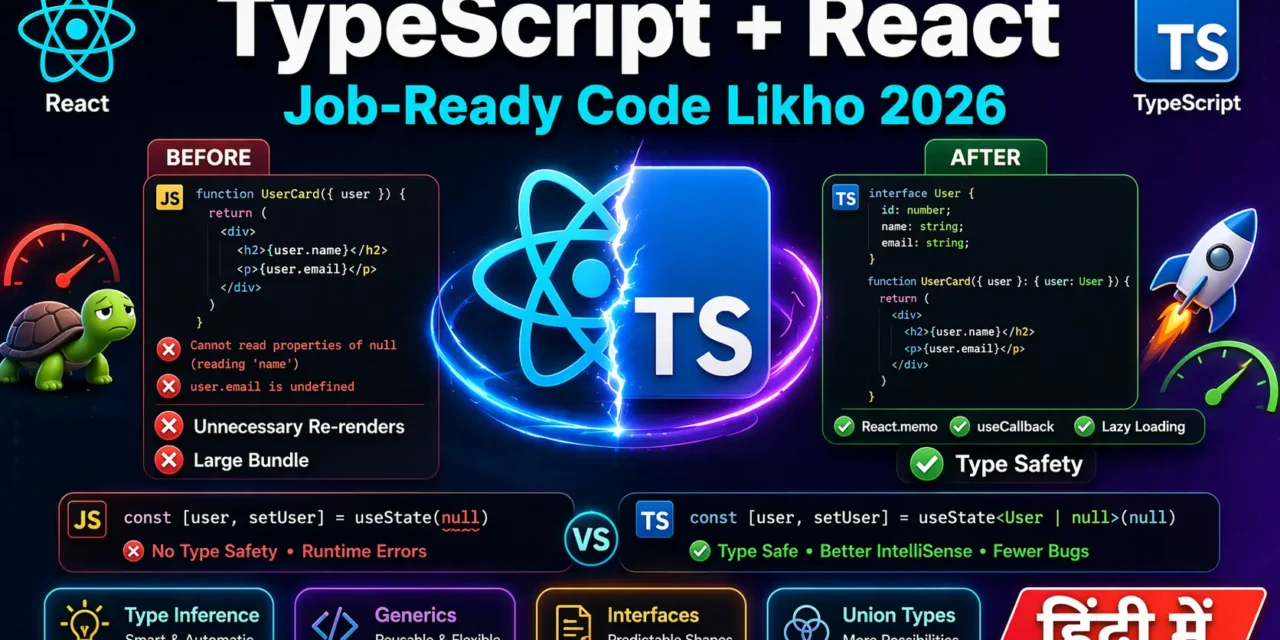
JavaScript vs TypeScript Comparison:c
// ❌ JavaScript – No type safety
function UserCard({ user }) {
  // Kya user.name exist karta hai? Pata nahi!
  // user.age string hai ya number? Pata nahi!
  return (
    <div>
      <h3>{user.name}</h3>
      <p>Age: {user.age}</p>
    </div>
  );
}

// ✅ TypeScript – Complete type safety
interface User {
  id: number;
  name: string;
  email: string;
  age: number;
}

function UserCard({ user }: { user: User }) {
  // TypeScript guarantee karta hai ki user.name string hai
  // user.age number hai
  return (
    <div>
      <h3>{user.name}</h3>
      <p>Age: {user.age}</p>
    </div>
  );
}

// Wrong usage – TypeScript error dega!
// <UserCard user={{ name: "Rahul" }} /> // ❌ Error: missing email, age, id
TypeScript Benefits in React:
| Benefit | Explanation |
|---|---|
| Type Safety | Props, state, variables ka type fix |
| Better Autocomplete | IDE suggestions |
| Refactoring | Safe code changes |
| Self-documenting | Code hi documentation hai |
| Compile-time errors | Production mein runtime errors kam |
2. Why TypeScript + React? (Benefits)
Real-world Scenario:
// ❌ JavaScript – Runtime error production mein
function ProductList() {
  const [products, setProducts] = useState([]);

  useEffect(() => {
    fetchProducts().then(data => setProducts(data));
  }, []);

  return (
    <div>
      {products.map(product => (
        // Kya product.name exist karta hai?
        // Kya product.price number hai?
        // Agar API ne price string bhej diya? 💥 Runtime error!
        <div key={product.id}>{product.name} - ${product.price}</div>
      ))}
    </div>
  );
}

// ✅ TypeScript – Compile-time error
interface Product {
  id: number;
  name: string;
  price: number;  // TypeScript ensure karega ki price number hai
}

function ProductList() {
  const [products, setProducts] = useState<Product[]>([]); // Type specified

  useEffect(() => {
    fetchProducts().then(data => setProducts(data));
    // Agar API ne price string bheja, TypeScript error dega
  }, []);

  return (
    <div>
      {products.map(product => (
        <div key={product.id}>{product.name} - ${product.price}</div>
      ))}
    </div>
  );
}
Developer Experience Benefits:
// TypeScript se autocomplete magic
function Header({ user, onLogout, theme }) {
  // Jab tum "user." likhoge, IDE dikhayega:
  // - user.id
  // - user.name
  // - user.email
  // - user.avatar
  // No need to remember!

  return (
    <header>
      <h1>Welcome, {user.name}</h1>
      <button onClick={onLogout}>Logout</button>
    </header>
  );
}
3. Setup – Vite + TypeScript Project
Step 1: Create Project
# Vite + TypeScript template
npm create vite@latest my-app -- --template react-ts

# OR (yarn)
yarn create vite my-app --template react-ts

# OR (npm with specific version)
npm create vite@latest my-app -- --template react-ts

# Install dependencies
cd my-app
npm install

# Start development server
npm run dev
Step 2: Folder Structure
my-app/
├── src/
│   ├── components/
│   │   ├── Button.tsx
│   │   ├── Button.module.css
│   │   └── index.ts
│   ├── pages/
│   │   ├── Home.tsx
│   │   └── About.tsx
│   ├── hooks/
│   │   └── useFetch.ts
│   ├── types/
│   │   └── index.ts
│   ├── services/
│   │   └── api.ts
│   ├── App.tsx
│   ├── main.tsx
│   └── vite-env.d.ts
├── tsconfig.json
├── tsconfig.node.json
└── package.json
Step 3: tsconfig.json Important Settings
{
  "compilerOptions": {
    "target": "ES2020",
    "useDefineForClassFields": true,
    "lib": ["ES2020", "DOM", "DOM.Iterable"],
    "module": "ESNext",
    "skipLibCheck": true,

    /* Bundler mode */
    "moduleResolution": "bundler",
    "allowImportingTsExtensions": true,
    "resolveJsonModule": true,
    "isolatedModules": true,
    "noEmit": true,
    "jsx": "react-jsx",

    /* Linting - Strict mode ON */
    "strict": true,
    "noUnusedLocals": true,
    "noUnusedParameters": true,
    "noFallthroughCasesInSwitch": true
  },
  "include": ["src"],
  "references": [{ "path": "./tsconfig.node.json" }]
}
4. Component Types – Props, Children, Return Types
Basic Component Typing:
// src/components/Button.tsx

// Props type definition
interface ButtonProps {
  label: string;
  onClick: () => void;
  variant?: 'primary' | 'secondary' | 'danger'; // Optional with default
  disabled?: boolean;
  children?: React.ReactNode;
}

// Component with React.FC (FunctionComponent)
const Button: React.FC<ButtonProps> = ({
  label,
  onClick,
  variant = 'primary',
  disabled = false,
  children
}) => {
  return (
    <button
      onClick={onClick}
      disabled={disabled}
      className={`btn btn-${variant}`}
    >
      {label}
      {children}
    </button>
  );
};

export default Button;
Alternative – Without React.FC:
// Many developers prefer this (no implicit children)
interface ButtonProps {
  label: string;
  onClick: () => void;
  variant?: 'primary' | 'secondary';
}

function Button({ label, onClick, variant = 'primary' }: ButtonProps) {
  return (
    <button onClick={onClick} className={`btn btn-${variant}`}>
      {label}
    </button>
  );
}

// Explicit children typing
interface CardProps {
  title: string;
  children: React.ReactNode;
}

function Card({ title, children }: CardProps) {
  return (
    <div className="card">
      <h2>{title}</h2>
      <div className="card-content">{children}</div>
    </div>
  );
}
Component Return Types:
// TypeScript automatically infers return type
function SimpleComponent() {
  return <div>Hello</div>; // Type: JSX.Element
}

// Explicit return type (optional but good practice)
function ExplicitComponent(): JSX.Element {
  return <div>Hello</div>;
}

// Component that returns null
function ConditionalComponent(): JSX.Element | null {
  const isVisible = false;
  return isVisible ? <div>Visible</div> : null;
}

// Fragment component
function FragmentComponent(): React.ReactNode {
  return (
    <>
      <h1>Title</h1>
      <p>Content</p>
    </>
  );
}
PropsWithChildren Utility Type:
import { PropsWithChildren } from 'react';

// Instead of manually adding children
interface LayoutProps {
  title: string;
  children: React.ReactNode;
}

// Using PropsWithChildren
interface LayoutProps {
  title: string;
}
// children automatically included
function Layout({ title, children }: PropsWithChildren<LayoutProps>) {
  return (
    <div>
      <h1>{title}</h1>
      {children}
    </div>
  );
}
5. Hooks Typing – useState, useEffect, useReducer, useContext
useState Typing:
// TypeScript automatically infers
const [count, setCount] = useState(0); // count is number

// Explicit type (when initial value is null/undefined)
const [user, setUser] = useState<User | null>(null); // user can be User or null

// Complex state object
interface FormData {
  name: string;
  email: string;
  age: number;
}

const [form, setForm] = useState<FormData>({
  name: '',
  email: '',
  age: 0,
});

// Array state
const [todos, setTodos] = useState<Todo[]>([]);
useEffect Typing:
useEffect(() => {
  // No return value
  const timer = setTimeout(() => {
    console.log('Timer done');
  }, 1000);

  // Cleanup function (return void or function)
  return () => {
    clearTimeout(timer);
  };
}, []); // Empty array dependency
useReducer Typing:
// Define state type
interface CounterState {
  count: number;
  step: number;
}

// Define action types
type CounterAction =
  | { type: 'INCREMENT' }
  | { type: 'DECREMENT' }
  | { type: 'SET_STEP'; payload: number }
  | { type: 'RESET' };

// Reducer with typed state and action
function counterReducer(state: CounterState, action: CounterAction): CounterState {
  switch (action.type) {
    case 'INCREMENT':
      return { ...state, count: state.count + state.step };
    case 'DECREMENT':
      return { ...state, count: state.count - state.step };
    case 'SET_STEP':
      return { ...state, step: action.payload };
    case 'RESET':
      return { ...state, count: 0 };
    default:
      return state;
  }
}

// Use in component
function Counter() {
  const [state, dispatch] = useReducer(counterReducer, { count: 0, step: 1 });

  return (
    <div>
      <p>Count: {state.count}</p>
      <p>Step: {state.step}</p>
      <button onClick={() => dispatch({ type: 'INCREMENT' })}>+</button>
      <button onClick={() => dispatch({ type: 'DECREMENT' })}>-</button>
      <button onClick={() => dispatch({ type: 'SET_STEP', payload: 2 })}>
        Set Step 2
      </button>
    </div>
  );
}
useContext Typing:
// src/contexts/ThemeContext.tsx
import { createContext, useContext, useState, ReactNode } from 'react';

// Context type
interface ThemeContextType {
  theme: 'light' | 'dark';
  toggleTheme: () => void;
}

// Create context with initial value (null or default)
const ThemeContext = createContext<ThemeContextType | undefined>(undefined);

// Provider component
export function ThemeProvider({ children }: { children: ReactNode }) {
  const [theme, setTheme] = useState<'light' | 'dark'>('light');

  const toggleTheme = () => {
    setTheme(prev => prev === 'light' ? 'dark' : 'light');
  };

  return (
    <ThemeContext.Provider value={{ theme, toggleTheme }}>
      {children}
    </ThemeContext.Provider>
  );
}

// Custom hook with type guard
export function useTheme() {
  const context = useContext(ThemeContext);
  if (context === undefined) {
    throw new Error('useTheme must be used within ThemeProvider');
  }
  return context;
}
useRef Typing:
import { useRef } from 'react';

// For DOM elements
function InputFocus() {
  const inputRef = useRef<HTMLInputElement>(null);

  const focusInput = () => {
    inputRef.current?.focus(); // Optional chaining for null check
  };

  return (
    <div>
      <input ref={inputRef} type="text" />
      <button onClick={focusInput}>Focus Input</button>
    </div>
  );
}

// For mutable values (not DOM)
function Timer() {
  const timerRef = useRef<number | null>(null);

  const startTimer = () => {
    timerRef.current = setTimeout(() => {
      console.log('Timer done');
    }, 1000);
  };

  const stopTimer = () => {
    if (timerRef.current) {
      clearTimeout(timerRef.current);
      timerRef.current = null;
    }
  };

  return (
    <div>
      <button onClick={startTimer}>Start</button>
      <button onClick={stopTimer}>Stop</button>
    </div>
  );
}
6. Event Types – onClick, onChange, onSubmit
Mouse Events:
import { MouseEvent } from 'react';

function Button() {
  // Click event
  const handleClick = (event: MouseEvent<HTMLButtonElement>) => {
    console.log('Button clicked at:', event.clientX, event.clientY);
  };

  // Right click
  const handleContextMenu = (event: MouseEvent<HTMLDivElement>) => {
    event.preventDefault();
    console.log('Right clicked!');
  };

  return (
    <div onContextMenu={handleContextMenu}>
      <button onClick={handleClick}>Click Me</button>
    </div>
  );
}
Input Events:
import { ChangeEvent, KeyboardEvent } from 'react';

function SearchInput() {
  // Change event
  const handleChange = (event: ChangeEvent<HTMLInputElement>) => {
    console.log('Value:', event.target.value);
  };

  // Key press event
  const handleKeyPress = (event: KeyboardEvent<HTMLInputElement>) => {
    if (event.key === 'Enter') {
      console.log('Search submitted:', event.currentTarget.value);
    }
  };

  return (
    <input
      type="text"
      onChange={handleChange}
      onKeyPress={handleKeyPress}
      placeholder="Search..."
    />
  );
}
Form Events:
import { FormEvent, useState } from 'react';

interface LoginForm {
  email: string;
  password: string;
}

function LoginForm() {
  const [formData, setFormData] = useState<LoginForm>({
    email: '',
    password: '',
  });

  const handleSubmit = (event: FormEvent<HTMLFormElement>) => {
    event.preventDefault();
    console.log('Form submitted:', formData);
  };

  const handleInputChange = (event: ChangeEvent<HTMLInputElement>) => {
    const { name, value } = event.target;
    setFormData(prev => ({ ...prev, [name]: value }));
  };

  return (
    <form onSubmit={handleSubmit}>
      <input
        type="email"
        name="email"
        value={formData.email}
        onChange={handleInputChange}
      />
      <input
        type="password"
        name="password"
        value={formData.password}
        onChange={handleInputChange}
      />
      <button type="submit">Login</button>
    </form>
  );
}
Common Event Types:
| Event | Type | Element |
|---|---|---|
| Click | MouseEvent<HTMLButtonElement> | button, div, span |
| Change | ChangeEvent<HTMLInputElement> | input, select, textarea |
| Submit | FormEvent<HTMLFormElement> | form |
| KeyPress | KeyboardEvent<HTMLInputElement> | input, textarea |
| Focus | FocusEvent<HTMLInputElement> | input, button |
7. Forms with TypeScript – Controlled Components
Complete Form Example:
// src/types/form.ts
export interface RegistrationForm {
  username: string;
  email: string;
  password: string;
  confirmPassword: string;
  age: number;
  gender: 'male' | 'female' | 'other';
  terms: boolean;
}

export interface FormErrors {
  username?: string;
  email?: string;
  password?: string;
  confirmPassword?: string;
  age?: string;
  terms?: string;
}

// src/components/RegistrationForm.tsx
import { useState, ChangeEvent, FormEvent } from 'react';
import { RegistrationForm, FormErrors } from '../types/form';

function RegistrationForm() {
  const [formData, setFormData] = useState<RegistrationForm>({
    username: '',
    email: '',
    password: '',
    confirmPassword: '',
    age: 0,
    gender: 'male',
    terms: false,
  });

  const [errors, setErrors] = useState<FormErrors>({});

  const validateField = (name: string, value: any): string | undefined => {
    switch (name) {
      case 'username':
        if (!value) return 'Username is required';
        if (value.length < 3) return 'Username must be at least 3 characters';
        return undefined;
      case 'email':
        if (!value) return 'Email is required';
        if (!/\S+@\S+\.\S+/.test(value)) return 'Email is invalid';
        return undefined;
      case 'password':
        if (!value) return 'Password is required';
        if (value.length < 6) return 'Password must be at least 6 characters';
        return undefined;
      case 'confirmPassword':
        if (value !== formData.password) return 'Passwords do not match';
        return undefined;
      case 'age':
        if (value < 18) return 'You must be 18 or older';
        return undefined;
      case 'terms':
        if (!value) return 'You must accept terms';
        return undefined;
      default:
        return undefined;
    }
  };

  const handleChange = (event: ChangeEvent<HTMLInputElement | HTMLSelectElement>) => {
    const { name, value, type } = event.target;
    const checked = (event.target as HTMLInputElement).checked;

    const newValue = type === 'checkbox' ? checked :
                     type === 'number' ? parseInt(value) : value;

    setFormData(prev => ({ ...prev, [name]: newValue }));

    // Validate field on change
    const error = validateField(name, newValue);
    setErrors(prev => ({ ...prev, [name]: error }));
  };

  const handleSubmit = (event: FormEvent<HTMLFormElement>) => {
    event.preventDefault();

    // Validate all fields
    const newErrors: FormErrors = {};
    Object.keys(formData).forEach(key => {
      const error = validateField(key, formData[key as keyof RegistrationForm]);
      if (error) newErrors[key as keyof FormErrors] = error;
    });

    if (Object.keys(newErrors).length > 0) {
      setErrors(newErrors);
      return;
    }

    console.log('Form submitted:', formData);
    alert('Registration successful!');
  };

  return (
    <form onSubmit={handleSubmit}>
      <div>
        <label>Username:</label>
        <input
          type="text"
          name="username"
          value={formData.username}
          onChange={handleChange}
        />
        {errors.username && <span className="error">{errors.username}</span>}
      </div>

      <div>
        <label>Email:</label>
        <input
          type="email"
          name="email"
          value={formData.email}
          onChange={handleChange}
        />
        {errors.email && <span className="error">{errors.email}</span>}
      </div>

      <div>
        <label>Password:</label>
        <input
          type="password"
          name="password"
          value={formData.password}
          onChange={handleChange}
        />
        {errors.password && <span className="error">{errors.password}</span>}
      </div>

      <div>
        <label>Confirm Password:</label>
        <input
          type="password"
          name="confirmPassword"
          value={formData.confirmPassword}
          onChange={handleChange}
        />
        {errors.confirmPassword && <span className="error">{errors.confirmPassword}</span>}
      </div>

      <div>
        <label>Age:</label>
        <input
          type="number"
          name="age"
          value={formData.age}
          onChange={handleChange}
        />
        {errors.age && <span className="error">{errors.age}</span>}
      </div>

      <div>
        <label>Gender:</label>
        <select name="gender" value={formData.gender} onChange={handleChange}>
          <option value="male">Male</option>
          <option value="female">Female</option>
          <option value="other">Other</option>
        </select>
      </div>

      <div>
        <label>
          <input
            type="checkbox"
            name="terms"
            checked={formData.terms}
            onChange={handleChange}
          />
          Accept Terms & Conditions
        </label>
        {errors.terms && <span className="error">{errors.terms}</span>}
      </div>

      <button type="submit">Register</button>
    </form>
  );
}
8. API Integration – Axios + TypeScript
Type Definitions for API:
// src/types/api.ts
export interface User {
  id: number;
  name: string;
  email: string;
  phone: string;
  website: string;
}

export interface Post {
  id: number;
  userId: number;
  title: string;
  body: string;
}

export interface ApiResponse<T> {
  data: T;
  status: number;
  message?: string;
}

// src/services/api.ts
import axios, { AxiosInstance, AxiosResponse, AxiosError } from 'axios';
import { User, Post, ApiResponse } from '../types/api';

class ApiService {
  private api: AxiosInstance;

  constructor() {
    this.api = axios.create({
      baseURL: 'https://jsonplaceholder.typicode.com',
      timeout: 10000,
      headers: {
        'Content-Type': 'application/json',
      },
    });

    // Request interceptor
    this.api.interceptors.request.use(
      (config) => {
        const token = localStorage.getItem('token');
        if (token) {
          config.headers.Authorization = `Bearer ${token}`;
        }
        return config;
      },
      (error: AxiosError) => {
        return Promise.reject(error);
      }
    );

    // Response interceptor
    this.api.interceptors.response.use(
      (response: AxiosResponse) => response,
      (error: AxiosError) => {
        if (error.response?.status === 401) {
          localStorage.removeItem('token');
          window.location.href = '/login';
        }
        return Promise.reject(error);
      }
    );
  }

  async getUsers(): Promise<User[]> {
    const response = await this.api.get<User[]>('/users');
    return response.data;
  }

  async getUserById(id: number): Promise<User> {
    const response = await this.api.get<User>(`/users/${id}`);
    return response.data;
  }

  async createPost(post: Omit<Post, 'id'>): Promise<Post> {
    const response = await this.api.post<Post>('/posts', post);
    return response.data;
  }

  async updatePost(id: number, post: Partial<Post>): Promise<Post> {
    const response = await this.api.put<Post>(`/posts/${id}`, post);
    return response.data;
  }

  async deletePost(id: number): Promise<void> {
    await this.api.delete(`/posts/${id}`);
  }
}

export const apiService = new ApiService();
Using API in Component:
// src/components/UserList.tsx
import { useState, useEffect } from 'react';
import { apiService } from '../services/api';
import { User } from '../types/api';

function UserList() {
  const [users, setUsers] = useState<User[]>([]);
  const [loading, setLoading] = useState<boolean>(true);
  const [error, setError] = useState<string | null>(null);

  useEffect(() => {
    const fetchUsers = async () => {
      try {
        setLoading(true);
        const data = await apiService.getUsers();
        setUsers(data);
      } catch (err) {
        setError(err instanceof Error ? err.message : 'Failed to fetch users');
      } finally {
        setLoading(false);
      }
    };

    fetchUsers();
  }, []);

  if (loading) return <div className="loader">Loading users...</div>;
  if (error) return <div className="error">Error: {error}</div>;

  return (
    <div className="user-list">
      <h2>Users ({users.length})</h2>
      <ul>
        {users.map(user => (
          <li key={user.id}>
            <strong>{user.name}</strong>
            <br />
            <small>{user.email}</small>
          </li>
        ))}
      </ul>
    </div>
  );
}

export default UserList;
9. Context API with TypeScript
Complete Context Example:
// src/contexts/AuthContext.tsx
import { createContext, useContext, useState, ReactNode } from 'react';

// Types
interface User {
  id: number;
  name: string;
  email: string;
  role: 'admin' | 'user';
}

interface AuthContextType {
  user: User | null;
  isAuthenticated: boolean;
  loading: boolean;
  login: (email: string, password: string) => Promise<void>;
  logout: () => void;
}

// Create context
const AuthContext = createContext<AuthContextType | undefined>(undefined);

// Provider props
interface AuthProviderProps {
  children: ReactNode;
}

// Provider component
export function AuthProvider({ children }: AuthProviderProps) {
  const [user, setUser] = useState<User | null>(null);
  const [loading, setLoading] = useState<boolean>(false);

  const login = async (email: string, password: string): Promise<void> => {
    setLoading(true);
    try {
      // API call
      const response = await fetch('/api/login', {
        method: 'POST',
        headers: { 'Content-Type': 'application/json' },
        body: JSON.stringify({ email, password }),
      });

      if (!response.ok) throw new Error('Login failed');

      const userData: User = await response.json();
      setUser(userData);
      localStorage.setItem('token', 'dummy-token');
    } finally {
      setLoading(false);
    }
  };

  const logout = () => {
    setUser(null);
    localStorage.removeItem('token');
  };

  const value: AuthContextType = {
    user,
    isAuthenticated: !!user,
    loading,
    login,
    logout,
  };

  return (
    <AuthContext.Provider value={value}>
      {children}
    </AuthContext.Provider>
  );
}

// Custom hook
export function useAuth(): AuthContextType {
  const context = useContext(AuthContext);
  if (context === undefined) {
    throw new Error('useAuth must be used within AuthProvider');
  }
  return context;
}
Using Auth Context:
// src/components/Profile.tsx
import { useAuth } from '../contexts/AuthContext';

function Profile() {
  const { user, logout } = useAuth();

  if (!user) {
    return <div>Please login</div>;
  }

  return (
    <div>
      <h2>Welcome, {user.name}!</h2>
      <p>Email: {user.email}</p>
      <p>Role: {user.role}</p>
      <button onClick={logout}>Logout</button>
    </div>
  );
}
10. React Utility Types – ComponentProps, PropsWithChildren
ComponentProps – Extract Props Type:
// src/components/Button.tsx
interface ButtonProps {
  label: string;
  onClick: () => void;
  variant: 'primary' | 'secondary';
}

export function Button({ label, onClick, variant }: ButtonProps) {
  return (
    <button onClick={onClick} className={`btn btn-${variant}`}>
      {label}
    </button>
  );
}

// Another component that wraps Button
import { ComponentProps } from 'react';
import { Button } from './Button';

// Extract Button's props type
type ButtonPropsFromComponent = ComponentProps<typeof Button>;

const defaultButtonProps: ButtonPropsFromComponent = {
  label: 'Click',
  onClick: () => console.log('clicked'),
  variant: 'primary',
};

function ButtonWrapper(props: ButtonPropsFromComponent) {
  return <Button {...props} />;
}
PropsWithChildren:
import { PropsWithChildren } from 'react';

// Without PropsWithChildren
interface CardProps {
  title: string;
  children: React.ReactNode;
}

// With PropsWithChildren (children automatically included)
interface CardProps {
  title: string;
}

function Card({ title, children }: PropsWithChildren<CardProps>) {
  return (
    <div className="card">
      <h2>{title}</h2>
      <div className="card-content">{children}</div>
    </div>
  );
}
Omit, Pick, Partial with Props:
interface UserCardProps {
  id: number;
  name: string;
  email: string;
  age: number;
  phone: string;
  address: string;
}

// Create type with only id and name
type UserCardBasic = Pick<UserCardProps, 'id' | 'name'>;

// Create type without email and phone
type UserCardWithoutContact = Omit<UserCardProps, 'email' | 'phone'>;

// Make all props optional
type UserCardPartial = Partial<UserCardProps>;
11. Real-world Job-Ready Project Structure
Complete Project Structure:
// src/types/index.ts
export * from './user';
export * from './product';
export * from './api';

// src/types/user.ts
export interface User {
  id: number;
  name: string;
  email: string;
  avatar?: string;
  role: 'admin' | 'user' | 'guest';
  createdAt: Date;
}

// src/types/product.ts
export interface Product {
  id: number;
  name: string;
  price: number;
  category: string;
  inStock: boolean;
}

// src/services/api/client.ts
import axios, { AxiosInstance } from 'axios';

class HttpClient {
  private instance: AxiosInstance;

  constructor(baseURL: string) {
    this.instance = axios.create({
      baseURL,
      timeout: 10000,
    });

    this.setupInterceptors();
  }

  private setupInterceptors() {
    this.instance.interceptors.request.use((config) => {
      const token = localStorage.getItem('token');
      if (token) {
        config.headers.Authorization = `Bearer ${token}`;
      }
      return config;
    });
  }

  get<T>(url: string) {
    return this.instance.get<T>(url);
  }

  post<T>(url: string, data: any) {
    return this.instance.post<T>(url, data);
  }

  put<T>(url: string, data: any) {
    return this.instance.put<T>(url, data);
  }

  delete<T>(url: string) {
    return this.instance.delete<T>(url);
  }
}

export const httpClient = new HttpClient(import.meta.env.VITE_API_URL);
Custom Hook with TypeScript:
// src/hooks/useFetch.ts
import { useState, useEffect, useCallback } from 'react';
import { httpClient } from '../services/api/client';

interface UseFetchOptions {
  immediate?: boolean;
  onSuccess?: (data: any) => void;
  onError?: (error: Error) => void;
}

function useFetch<T = any>(url: string, options: UseFetchOptions = {}) {
  const [data, setData] = useState<T | null>(null);
  const [loading, setLoading] = useState<boolean>(false);
  const [error, setError] = useState<Error | null>(null);

  const fetchData = useCallback(async () => {
    try {
      setLoading(true);
      setError(null);
      const response = await httpClient.get<T>(url);
      setData(response.data);
      options.onSuccess?.(response.data);
    } catch (err) {
      const error = err instanceof Error ? err : new Error('Unknown error');
      setError(error);
      options.onError?.(error);
    } finally {
      setLoading(false);
    }
  }, [url]);

  useEffect(() => {
    if (options.immediate !== false) {
      fetchData();
    }
  }, [fetchData]);

  return { data, loading, error, refetch: fetchData };
}

export default useFetch;
Component with TypeScript:
// src/pages/ProductList.tsx
import { useState } from 'react';
import useFetch from '../hooks/useFetch';
import { Product } from '../types/product';

function ProductList() {
  const [category, setCategory] = useState<string>('all');
  const { data: products, loading, error } = useFetch<Product[]>('/api/products');

  const filteredProducts = products?.filter(
    product => category === 'all' || product.category === category
  );

  if (loading) return <ProductSkeleton />;
  if (error) return <ErrorMessage error={error} />;

  return (
    <div>
      <CategoryFilter value={category} onChange={setCategory} />
      <div className="products-grid">
        {filteredProducts?.map(product => (
          <ProductCard key={product.id} product={product} />
        ))}
      </div>
    </div>
  );
}

// ProductCard with typed props
interface ProductCardProps {
  product: Product;
}

function ProductCard({ product }: ProductCardProps) {
  return (
    <div className="product-card">
      <h3>{product.name}</h3>
      <p>${product.price}</p>
      <span className={product.inStock ? 'in-stock' : 'out-of-stock'}>
        {product.inStock ? 'In Stock' : 'Out of Stock'}
      </span>
    </div>
  );
}

// CategoryFilter with typed props
interface CategoryFilterProps {
  value: string;
  onChange: (value: string) => void;
}

function CategoryFilter({ value, onChange }: CategoryFilterProps) {
  const categories = ['all', 'electronics', 'clothing', 'books'];

  return (
    <select value={value} onChange={(e) => onChange(e.target.value)}>
      {categories.map(cat => (
        <option key={cat} value={cat}>
          {cat.toUpperCase()}
        </option>
      ))}
    </select>
  );
}
12. Common Mistakes + Solutions
Mistake 1: Using any type
// ❌ Avoid any – defeats TypeScript purpose
function handleData(data: any) {
  console.log(data.name); // No type safety
}

// ✅ Use proper type or unknown
function handleData(data: unknown) {
  if (typeof data === 'object' && data !== null && 'name' in data) {
    console.log(data.name);
  }
}

// ✅ Better – proper interface
interface Data {
  name: string;
  age: number;
}
function handleData(data: Data) {
  console.log(data.name);
}
Mistake 2: Not handling null/undefined
// ❌ No null check
function UserProfile({ user }: { user: User }) {
  return <div>{user.name}</div>; // Crash if user is null
}

// ✅ Handle nullable
function UserProfile({ user }: { user: User | null }) {
  if (!user) return <div>No user data</div>;
  return <div>{user.name}</div>;
}
Mistake 3: Missing event types
// ❌ Using any for events
function handleClick(e: any) {
  console.log(e.target.value);
}

// ✅ Proper event type
function handleClick(e: React.MouseEvent<HTMLButtonElement>) {
  console.log(e.currentTarget.value);
}
Mistake 4: Not typing useState initial value
// ❌ TypeScript can't infer
const [user, setUser] = useState(null); // user is null always

// ✅ Explicit type
const [user, setUser] = useState<User | null>(null);
13. Quick Cheat Sheet
| Concept | Syntax |
|---|---|
| Component Props | interface Props { name: string } |
| Children | children: React.ReactNode |
| useState | const [state, setState] = useState<Type>(initial) |
| useEffect | useEffect(() => {}, [deps]) |
| useRef | const ref = useRef<HTMLDivElement>(null) |
| Event | (e: React.ChangeEvent<HTMLInputElement>) => void |
| API Response | const { data } = await axios.get<User[]>('/users') |
| Context | createContext<Type | undefined>(undefined) |
| React.FC | const Component: React.FC<Props> = ({ prop }) => {} |
| ComponentProps | type Props = ComponentProps<typeof Button> |
14. FAQ
Q1: TypeScript with React Hindi में सबसे important benefit kya hai?
Type safety – runtime errors 70% kam ho jaate hain aur development experience better hota hai.
Q2: Kya sab components mein types likhna zaroori hai?
Haan – better safe than sorry. TypeScript inference use karo, lekin complex props mein explicit types likho.
Q3: React.FC use karein ya nahi?
Personal preference। React.FC implicitly children include karta hai। Many developers prefer explicit typing without React.FC।
Q4: API responses ka type kaise guarantee karein?
TypeScript compile-time guarantee karta hai – runtime mein API wrong data bhej sakti hai। Zod jaise validation library use karo runtime ke liye।
Q5: any type kab use karein?
Almost never। unknown better hai। any sirf migration ke time ya third-party library issue ho tab।
Q6: TypeScript se bundle size badhti hai?
Nahi – TypeScript compile time hat jaata hai। Runtime par sirf JavaScript rehti hai।
Q7: TypeScript + React seekhne mein kitna time lagta hai?
TypeScript basics – 2-3 days। React + TypeScript together – 1-2 weeks।
Q8: Vite vs CRA – TypeScript ke liye kya better hai?
Vite – faster, modern, recommended for 2026। CRA is slower and deprecated।
Q9: Generic components kaise banayein?function List<T>({ items, renderItem }: ListProps<T>) { }
Q10: TypeScript strict mode kyun use karein?
Strict mode better type checking karta hai – strict: true in tsconfig.json।
15. Conclusion
बहुत बढ़िया दोस्तों! आज हमने TypeScript with React Hindi को पूरी detail में समझा।
Quick Recap:
| Concept | Key Takeaway |
|---|---|
| Setup | Vite + TypeScript template |
| Component Types | Props, children, return types |
| Hooks | useState, useEffect, useReducer typing |
| Events | MouseEvent, ChangeEvent, FormEvent |
| API | Axios + TypeScript interfaces |
| Context | Type-safe context with custom hooks |
| Utility Types | ComponentProps, PropsWithChildren |
Mera personal experience:
जब मैंने पहली बार TypeScript + React use kiya, toh mujhe lagta tha “JavaScript enough hai”। But ek baar production bug aaya – API ne string bhej diya jahan number expected tha – app crash ho gayi। Tabse TypeScript use karta hoon, aisa bug kabhi nahi aaya।
Tum bhi ye steps follow karo:
- ✅ Vite + TypeScript project create karo
- ✅ Components ko type karo
- ✅ Hooks sahi se type karo
- ✅ API responses ke liye interfaces banao
- ✅ Strict mode enable rakho
अब तुम्हारी बारी है!
नीचे comment में बताओ:
- तुम TypeScript use karoge React ke saath ya nahi? क्यों?
- तुम्हें कौन sa TypeScript feature sabse useful laga?
- अगला topic क्या चाहिए? (Next.js? Tailwind CSS? React Native?)
The Easy Master पर बने रहो। Happy Typing! ⚛️📘
Resources
- TypeScript + React Cheatsheet
- Vite + TypeScript Setup
- TypeScript Official React Guide
- React TypeScript GitHub Repository
Additional Resources
- Master ES6: A Complete Feature Guide with Examples
- Top 10 React Libraries and Tools Every Developer Must Know in 2025
- Top 10 Free APIs for Practice in 2026
- JavaScript Deep Dive 2026: Closures, Promises & Event Loop
- TypeScript Modules Export Import Best Practices – समझे आसान भाषा में 2026
- React.js Kya Hai? JSX aur Components Samjhe – Beginner Guide 2026
- React Props and State Data Flow Hindi – समझे आसान भाषा में 2026
- React Router v6 – Multi-Page App Banaye (Routing Guide) 2026
- Advanced React Hooks – useContext and useReducer Samjhe 2026
- Redux Toolkit Simplified – State Management Aasaan Tarika 2026
- React API Integration Made Easy with Fetch and Axios
- React Performance Optimization – App Ko Fast कैसे बनाएं 2026