नमस्ते दोस्तों! 🙏
स्वागत है The Easy Master पर!
क्या तुमने कभी सोचा है – जब React app bada ho jata hai (100+ components), तो state management kaise karein?
useState और useContext chhoti apps के लिए ठीक हैं, लेकिन बड़ी apps में:
- Prop drilling थका देती है
- Context API performance issues create karta hai
- State updates unpredictable ho jati hain
Redux Toolkit State Management Hindi में समझना बहुत जरूरी है क्योंकि:
- Redux Toolkit (RTK) Redux ka official, modern way है
- 90% large enterprises Redux use karti hain
- Boilerplate code 70% kam ho jata hai
- DevTools se debugging super easy
- Interview में 100% Redux questions पूछे जाते हैं
Kya tumhe pata hai?
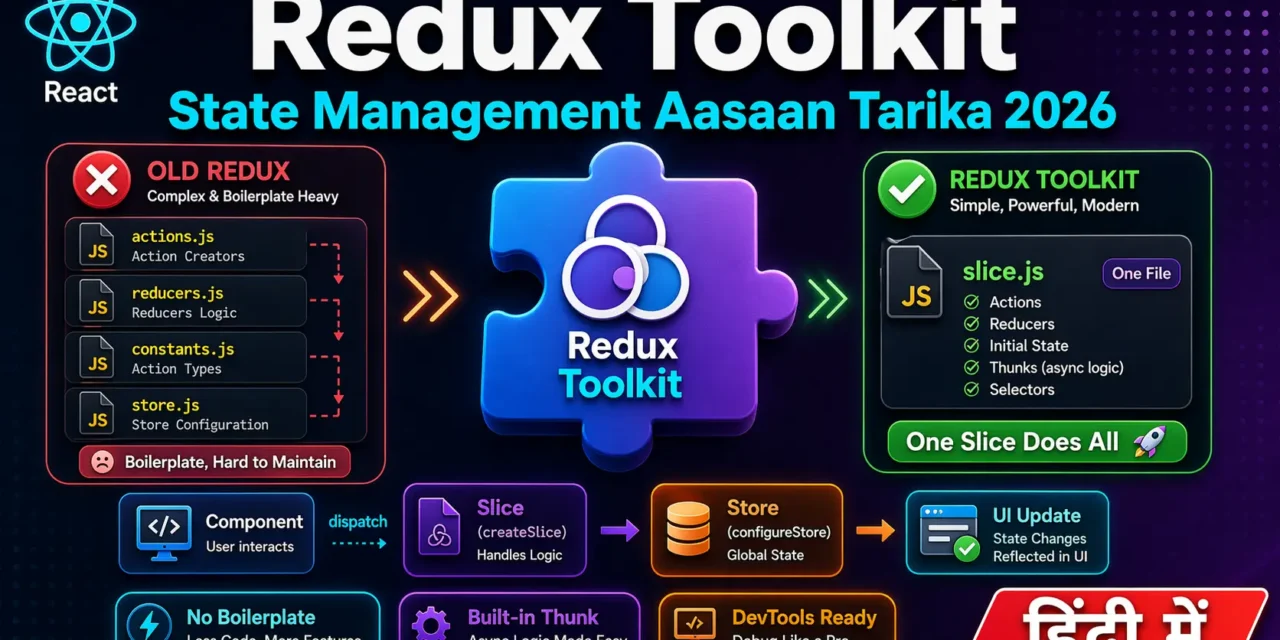
Pehle Redux bohot complex tha – actions, reducers, constants, store setup – बहुत सारा boilerplate। Redux Toolkit ने सब simplify kar diya – ab ek createSlice से सब कुछ हो जाता है!
Aaj kya seekhoge?
| Topic | Kya Seekhega? |
|---|---|
| Redux vs Redux Toolkit | Purana vs naya tarika |
| Store aur Slice | Central state management |
| Actions aur Reducers | State update ka pattern |
| useSelector aur useDispatch | React-Redux hooks |
| createAsyncThunk | API calls handle karna |
| RTK Query | Data fetching simplified |
| Real Projects | Todo App, Cart App |
तो चलिए शुरू करते हैं – Redux Toolkit State Management Hindi सीखने का सफर! 🚀
Table of Contents
1. Redux Toolkit State Management – Introduction
Redux Toolkit State Management Hindi mein sabse pehle ye samajhna zaroori hai ki Redux क्या problem solve karta hai.
Problem:
// ❌ Bina Redux – props drilling
function App() {
  const [user, setUser] = useState({ name: "Rahul" });
  return <Header user={user} />;  // Prop #1
}

function Header({ user }) {  // Doesn't need user
  return <Navbar user={user} />;  // Prop #2
}

function Navbar({ user }) {  // Doesn't need user
  return <UserMenu user={user} />;  // Prop #3
}

function UserMenu({ user }) {  // Finally needs user
  return <span>{user.name}</span>;
}
Solution: Redux
// ✅ Redux se – direct access
function UserMenu() {
  const user = useSelector(state => state.user);  // Direct!
  return <span>{user.name}</span>;
}
Redux Toolkit Redux ka modern version है – less boilerplate, better defaults, built-in best practices .
2. Redux Kya Hai?
Redux ek state management library hai jo 3 principles par kaam karta hai:
1. Single Source of Truth
Puri app ka state ek central store mein rakho.
// Store – app ka ek hi source of truth
const store = {
  user: { name: "Rahul", isLoggedIn: true },
  cart: [{ id: 1, name: "Laptop", quantity: 1 }],
  theme: "dark"
};
2. State is Read-Only
State change karne ke liye action dispatch karo – direct modify nahi kar sakte .
// ❌ Wrong – direct modify
store.user.name = "Priya";

// ✅ Correct – dispatch action
dispatch({ type: "user/updateName", payload: "Priya" });
3. Changes via Pure Functions (Reducers)
Reducer decide karta hai ki action ke according state kaise change hogi.
Redux Data Flow:
UI Component → dispatch(action) → Reducer → Store → UI Update3. Redux vs Redux Toolkit – Purana vs Naya Tarika
❌ Old Redux (Too Much Boilerplate):
// 1. Action Types
const INCREMENT = "INCREMENT";
const DECREMENT = "DECREMENT";

// 2. Action Creators
function increment() { return { type: INCREMENT }; }
function decrement() { return { type: DECREMENT }; }

// 3. Reducer (switch statement)
function counterReducer(state = 0, action) {
  switch (action.type) {
    case INCREMENT: return state + 1;
    case DECREMENT: return state - 1;
    default: return state;
  }
}

// 4. Store Setup
import { createStore } from "redux";
const store = createStore(counterReducer);
✅ Redux Toolkit (Modern – Simple):
// 1. Create Slice – सब एक साथ!
import { createSlice, configureStore } from "@reduxjs/toolkit";

const counterSlice = createSlice({
  name: "counter",
  initialState: 0,
  reducers: {
    increment: (state) => state + 1,
    decrement: (state) => state - 1,
  },
});

// 2. Export actions & reducer
export const { increment, decrement } = counterSlice.actions;
export default counterSlice.reducer;

// 3. Store Setup
const store = configureStore({ reducer: { counter: counterReducer } });
Difference: Old Redux mein 50+ lines, Redux Toolkit mein 15 lines!
4. Installation aur Setup
Step 1: Install Packages
# Redux Toolkit + React-Redux
npm install @reduxjs/toolkit react-redux
Step 2: Create Store
// src/redux/store.js
import { configureStore } from "@reduxjs/toolkit";
import counterReducer from "./features/counterSlice";
import userReducer from "./features/userSlice";

export const store = configureStore({
  reducer: {
    counter: counterReducer,
    user: userReducer,
  },
});

// TypeScript ke liye (optional)
export type RootState = ReturnType<typeof store.getState>;
export type AppDispatch = typeof store.dispatch;
Step 3: Provider se App Wrap Karo
// src/main.jsx
import React from "react";
import ReactDOM from "react-dom/client";
import { Provider } from "react-redux";
import { store } from "./redux/store";
import App from "./App";

ReactDOM.createRoot(document.getElementById("root")).render(
  <Provider store={store}>
    <App />
  </Provider>
);
5. Store – Central State Container
Store app ka central state container hai – jahan sab data rehta hai .
Store ka Structure:
// store.js
import { configureStore } from "@reduxjs/toolkit";

export const store = configureStore({
  reducer: {
    // Multiple slices combine karte hain
    auth: authReducer,
    cart: cartReducer,
    products: productsReducer,
    theme: themeReducer,
  },
});

// Store mein state kuch aise dikhti hai:
// {
//   auth: { user: null, token: null },
//   cart: { items: [], total: 0 },
//   products: { list: [], loading: false },
//   theme: "dark"
// }
configureStore kya karta hai?
- Automatically combine reducers karta hai
- Redux DevTools enable karta hai
- redux-thunk middleware add karta hai (async ke liye)
- Development mein immutability checks karta hai
6. Slice – State + Reducers Ek Sath
Slice ek feature ki state + reducers ka group hai .
Counter Slice Example:
// src/redux/features/counterSlice.js
import { createSlice } from "@reduxjs/toolkit";

const counterSlice = createSlice({
  name: "counter",  // Slice ka unique naam
  initialState: {   // Initial state
    value: 0,
    loading: false,
  },
  reducers: {
    // Immer automatically immutable updates handle karta hai
    increment: (state) => {
      state.value += 1;  // Direct mutate allowed!
    },
    decrement: (state) => {
      state.value -= 1;
    },
    incrementByAmount: (state, action) => {
      state.value += action.payload;
    },
    reset: (state) => {
      state.value = 0;
    },
  },
});

// Actions export
export const { increment, decrement, incrementByAmount, reset } = counterSlice.actions;

// Reducer export (store mein use hoga)
export default counterSlice.reducer;
Todo Slice Example:
// src/redux/features/todoSlice.js
import { createSlice } from "@reduxjs/toolkit";

const initialState = {
  todos: [],
  filter: "all",
};

const todoSlice = createSlice({
  name: "todos",
  initialState,
  reducers: {
    addTodo: (state, action) => {
      state.todos.push({
        id: Date.now(),
        text: action.payload,
        completed: false,
      });
    },
    toggleTodo: (state, action) => {
      const todo = state.todos.find(t => t.id === action.payload);
      if (todo) todo.completed = !todo.completed;
    },
    deleteTodo: (state, action) => {
      state.todos = state.todos.filter(t => t.id !== action.payload);
    },
    setFilter: (state, action) => {
      state.filter = action.payload;
    },
  },
});

export const { addTodo, toggleTodo, deleteTodo, setFilter } = todoSlice.actions;
export default todoSlice.reducer;
Immer ka Magic:
Pehle Redux mein tumhe immutable updates manually karni padti thi:
// ❌ Old Redux – complex immutable updates
case "ADD_TODO":
  return {
    ...state,
    todos: [...state.todos, { id: Date.now(), text: action.payload }]
  };

// ✅ Redux Toolkit – direct mutate allowed!
case "ADD_TODO":
  state.todos.push({ id: Date.now(), text: action.payload });
Immer internally immutable copies banata hai – tumhe tension lene ki zaroorat nahi !
7. React-Redux Hooks – useSelector aur useDispatch
Typed Hooks Setup (Recommended) :
// src/redux/hooks.js
import { useDispatch, useSelector } from "react-redux";

// Pre-typed hooks – TypeScript friendly
export const useAppDispatch = () => useDispatch();
export const useAppSelector = useSelector;
Component Mein Use Karna:
// src/components/Counter.jsx
import { useAppDispatch, useAppSelector } from "../redux/hooks";
import { increment, decrement, reset } from "../redux/features/counterSlice";

function Counter() {
  // useSelector – state read karna
  const count = useAppSelector((state) => state.counter.value);

  // useDispatch – actions dispatch karna
  const dispatch = useAppDispatch();

  return (
    <div>
      <h1>Count: {count}</h1>
      <button onClick={() => dispatch(increment())}>+</button>
      <button onClick={() => dispatch(decrement())}>-</button>
      <button onClick={() => dispatch(reset())}>Reset</button>
    </div>
  );
}
Multiple State Values Select Karna:
function TodoApp() {
  // Single value
  const todos = useAppSelector((state) => state.todos.todos);

  // Multiple values – object return karo
  const { filter, todos: allTodos } = useAppSelector((state) => ({
    filter: state.todos.filter,
    todos: state.todos.todos,
  }));

  // Memoized selector – computed data ke liye
  const filteredTodos = useAppSelector((state) => {
    const { todos, filter } = state.todos;
    if (filter === "completed") return todos.filter(t => t.completed);
    if (filter === "active") return todos.filter(t => !t.completed);
    return todos;
  });

  return (
    <div>
      {filteredTodos.map(todo => (
        <div key={todo.id}>{todo.text}</div>
      ))}
    </div>
  );
}
8. createAsyncThunk – API Calls Handle Karna
createAsyncThunk async operations (API calls) ke liye hai – automatically pending, fulfilled, rejected states handle karta hai .
User Slice with Async Thunk:
// src/redux/features/userSlice.js
import { createSlice, createAsyncThunk } from "@reduxjs/toolkit";
import axios from "axios";

// Async thunk
export const fetchUsers = createAsyncThunk(
  "users/fetchUsers",  // Action type prefix
  async (_, { rejectWithValue }) => {
    try {
      const response = await axios.get("https://jsonplaceholder.typicode.com/users");
      return response.data; // This becomes action.payload on fulfilled
    } catch (error) {
      return rejectWithValue(error.message);
    }
  }
);

export const addUser = createAsyncThunk(
  "users/addUser",
  async (userData, { rejectWithValue }) => {
    try {
      const response = await axios.post("https://jsonplaceholder.typicode.com/users", userData);
      return response.data;
    } catch (error) {
      return rejectWithValue(error.message);
    }
  }
);

const initialState = {
  users: [],
  loading: false,
  error: null,
};

const userSlice = createSlice({
  name: "users",
  initialState,
  reducers: {
    clearError: (state) => {
      state.error = null;
    },
  },
  extraReducers: (builder) => {
    builder
      // Fetch Users
      .addCase(fetchUsers.pending, (state) => {
        state.loading = true;
        state.error = null;
      })
      .addCase(fetchUsers.fulfilled, (state, action) => {
        state.loading = false;
        state.users = action.payload;
      })
      .addCase(fetchUsers.rejected, (state, action) => {
        state.loading = false;
        state.error = action.payload;
      })
      // Add User
      .addCase(addUser.fulfilled, (state, action) => {
        state.users.push(action.payload);
      });
  },
});

export const { clearError } = userSlice.actions;
export default userSlice.reducer;
Component Mein Use Karna:
// src/components/UserList.jsx
import { useEffect } from "react";
import { useAppDispatch, useAppSelector } from "../redux/hooks";
import { fetchUsers, clearError } from "../redux/features/userSlice";

function UserList() {
  const dispatch = useAppDispatch();
  const { users, loading, error } = useAppSelector((state) => state.users);

  useEffect(() => {
    dispatch(fetchUsers());
  }, [dispatch]);

  if (loading) return <div>Loading users...</div>;
  if (error) return (
    <div>
      <p>Error: {error}</p>
      <button onClick={() => dispatch(clearError())}>Retry</button>
    </div>
  );

  return (
    <ul>
      {users.map(user => (
        <li key={user.id}>{user.name}</li>
      ))}
    </ul>
  );
}
9. RTK Query – Data Fetching Simplified
RTK Query Redux Toolkit ka built-in data fetching solution है – API calls, caching, loading states – सब automatic .
API Slice Setup:
// src/redux/api/apiSlice.js
import { createApi, fetchBaseQuery } from "@reduxjs/toolkit/query/react";

export const apiSlice = createApi({
  reducerPath: "api",  // Store mein key
  baseQuery: fetchBaseQuery({
    baseUrl: "https://jsonplaceholder.typicode.com",
  }),
  tagTypes: ["Post", "User"],  // Cache invalidation ke liye
  endpoints: (builder) => ({
    // GET request
    getPosts: builder.query({
      query: () => "/posts",
      providesTags: ["Post"],
    }),

    getPostById: builder.query({
      query: (id) => `/posts/${id}`,
    }),

    // POST request
    createPost: builder.mutation({
      query: (newPost) => ({
        url: "/posts",
        method: "POST",
        body: newPost,
      }),
      invalidatesTags: ["Post"],  // Posts list refresh ho jayegi
    }),

    // DELETE request
    deletePost: builder.mutation({
      query: (id) => ({
        url: `/posts/${id}`,
        method: "DELETE",
      }),
      invalidatesTags: ["Post"],
    }),
  }),
});

// Auto-generated hooks
export const {
  useGetPostsQuery,
  useGetPostByIdQuery,
  useCreatePostMutation,
  useDeletePostMutation,
} = apiSlice;
Store Mein Include Karna:
// src/redux/store.js
import { configureStore } from "@reduxjs/toolkit";
import { apiSlice } from "./api/apiSlice";

export const store = configureStore({
  reducer: {
    [apiSlice.reducerPath]: apiSlice.reducer,
  },
  middleware: (getDefaultMiddleware) =>
    getDefaultMiddleware().concat(apiSlice.middleware),
});
Component Mein Use Karna:
// src/components/PostsList.jsx
import { useGetPostsQuery, useCreatePostMutation } from "../redux/api/apiSlice";
import { useState } from "react";

function PostsList() {
  const { data: posts, isLoading, isError, error, refetch } = useGetPostsQuery();
  const [createPost, { isLoading: isCreating }] = useCreatePostMutation();
  const [title, setTitle] = useState("");

  const handleSubmit = async (e) => {
    e.preventDefault();
    if (title.trim()) {
      await createPost({ title, body: "Sample body", userId: 1 });
      setTitle("");
    }
  };

  if (isLoading) return <div>Loading posts...</div>;
  if (isError) return <div>Error: {error.message}</div>;

  return (
    <div>
      <form onSubmit={handleSubmit}>
        <input
          value={title}
          onChange={(e) => setTitle(e.target.value)}
          placeholder="New post title"
        />
        <button type="submit" disabled={isCreating}>
          {isCreating ? "Adding..." : "Add Post"}
        </button>
      </form>

      <button onClick={refetch}>Refresh</button>

      <ul>
        {posts?.slice(0, 10).map(post => (
          <li key={post.id}>{post.title}</li>
        ))}
      </ul>
    </div>
  );
}
10. Redux DevTools – Debugging Superpower
Redux DevTools browser extension hai jo har action ko track karta hai .
Features:
| Feature | Karta Kya Hai? |
|---|---|
| Action Log | Har dispatch action dikhta hai |
| State Timeline | State kaise change hui – step by step |
| Time Travel | Kisi bhi previous state par jao |
| Action Replay | Actions ko dubara run karo |
| Diff View | Exactly kya change hua – dikhta hai |
Installation:
- Chrome Web Store se “Redux DevTools” install karo
- Extension automatically detect karega configureStore ko
11. Real-world Project – Shopping Cart
Cart Slice:
// src/redux/features/cartSlice.js
import { createSlice } from "@reduxjs/toolkit";

const initialState = {
  items: [],
  totalQuantity: 0,
  totalAmount: 0,
};

const cartSlice = createSlice({
  name: "cart",
  initialState,
  reducers: {
    addItem: (state, action) => {
      const existingItem = state.items.find(item => item.id === action.payload.id);

      if (existingItem) {
        existingItem.quantity += 1;
        existingItem.totalPrice += action.payload.price;
      } else {
        state.items.push({
          ...action.payload,
          quantity: 1,
          totalPrice: action.payload.price,
        });
      }

      state.totalQuantity += 1;
      state.totalAmount += action.payload.price;
    },

    removeItem: (state, action) => {
      const item = state.items.find(item => item.id === action.payload);
      if (item) {
        state.totalQuantity -= item.quantity;
        state.totalAmount -= item.totalPrice;
        state.items = state.items.filter(i => i.id !== action.payload);
      }
    },

    updateQuantity: (state, action) => {
      const { id, quantity } = action.payload;
      const item = state.items.find(item => item.id === id);

      if (item) {
        const diff = quantity - item.quantity;
        item.quantity = quantity;
        item.totalPrice = item.price * quantity;
        state.totalQuantity += diff;
        state.totalAmount += diff * item.price;
      }
    },

    clearCart: (state) => {
      state.items = [];
      state.totalQuantity = 0;
      state.totalAmount = 0;
    },
  },
});

export const { addItem, removeItem, updateQuantity, clearCart } = cartSlice.actions;
export default cartSlice.reducer;
Cart Component:
// src/components/Cart.jsx
import { useAppDispatch, useAppSelector } from "../redux/hooks";
import { removeItem, updateQuantity, clearCart } from "../redux/features/cartSlice";

function Cart() {
  const dispatch = useAppDispatch();
  const { items, totalQuantity, totalAmount } = useAppSelector((state) => state.cart);

  if (items.length === 0) {
    return (
      <div className="cart-empty">
        <h2>Your cart is empty</h2>
        <p>Add some products to get started!</p>
      </div>
    );
  }

  return (
    <div className="cart">
      <h2>Your Cart ({totalQuantity} items)</h2>

      {items.map(item => (
        <div key={item.id} className="cart-item">
          <img src={item.image} alt={item.name} />
          <div className="item-details">
            <h3>{item.name}</h3>
            <p>₹{item.price} each</p>
          </div>

          <div className="item-quantity">
            <button
              onClick={() => dispatch(updateQuantity({
                id: item.id,
                quantity: item.quantity - 1
              }))}
              disabled={item.quantity === 1}
            >
              -
            </button>
            <span>{item.quantity}</span>
            <button
              onClick={() => dispatch(updateQuantity({
                id: item.id,
                quantity: item.quantity + 1
              }))}
            >
              +
            </button>
          </div>

          <div className="item-total">
            ₹{item.totalPrice}
          </div>

          <button
            className="remove-btn"
            onClick={() => dispatch(removeItem(item.id))}
          >
            Remove
          </button>
        </div>
      ))}

      <div className="cart-summary">
        <h3>Total: ₹{totalAmount}</h3>
        <button onClick={() => dispatch(clearCart())}>Clear Cart</button>
        <button className="checkout-btn">Proceed to Checkout</button>
      </div>
    </div>
  );
}
12. Redux vs Zustand vs Context API – Kab Kya Use Karein?
| Feature | Redux Toolkit | Zustand | Context API |
|---|---|---|---|
| Boilerplate | Medium | Minimal | Low |
| Learning Curve | Medium | Easy | Easy |
| Performance | Excellent (selectors) | Excellent | Poor (frequent updates) |
| DevTools | ✅ Powerful | ✅ Basic | ❌ None |
| Bundle Size | ~10KB | ~1KB | 0 (built-in) |
| Best for | Large apps, complex state | Small-medium apps | Theme, auth, language |
| Team Size | Large teams | Small-medium teams | Any (limited use) |
Decision Framework :
1. क्या state 3+ levels deep components mein chahiye?
   NO → useState use karo
   YES → Continue

2. क्या state frequently update hoti hai? (e.g., cart, typing)
   NO → Context API enough hai
   YES → Continue

3. क्या app large hai (50+ components) ya team size 3+ hai?
   NO → Zustand use karo (simple)
   YES → Redux Toolkit use karo

4. क्या API data fetching/caching chahiye?
   YES → RTK Query (Redux Toolkit ka part)
Zustand Example (Alternative):
// Zustand – 10x simpler than Redux
import { create } from "zustand";

const useStore = create((set) => ({
  count: 0,
  increment: () => set((state) => ({ count: state.count + 1 })),
  decrement: () => set((state) => ({ count: state.count - 1 })),
}));

function Counter() {
  const { count, increment, decrement } = useStore();
  return <button onClick={increment}>{count}</button>;
}
13. Common Mistakes + Solutions
Mistake 1: Directly mutating state in components
// ❌ Wrong
const user = useSelector(state => state.user);
user.name = "New Name";  // No action dispatch!

// ✅ Correct
dispatch(updateUser({ name: "New Name" }));
Mistake 2: Not using selectors for computed data
// ❌ Wrong – recomputes on every render
function TodoList() {
  const todos = useSelector(state => state.todos);
  const completedTodos = todos.filter(t => t.completed); // Recomputes
}

// ✅ Correct – memoized selector
const selectCompletedTodos = (state) =>
  state.todos.filter(t => t.completed);

function TodoList() {
  const completedTodos = useSelector(selectCompletedTodos);
}
Mistake 3: Forgetting to add reducer to store
// ❌ Error: store mein reducer add nahi kiya
export const store = configureStore({
  reducer: {}  // Empty!
});

// ✅ Correct
export const store = configureStore({
  reducer: {
    cart: cartReducer,
    user: userReducer,
  }
});
Mistake 4: Mutating state in extraReducers
// ❌ Wrong – returning instead of mutating
extraReducers: (builder) => {
  builder.addCase(fetchUsers.fulfilled, (state, action) => {
    return { ...state, users: action.payload }; // ❌ Not needed in RTK
  });
}

// ✅ Correct – Immer handles mutation
extraReducers: (builder) => {
  builder.addCase(fetchUsers.fulfilled, (state, action) => {
    state.users = action.payload;  // ✅ Direct assignment works!
    state.loading = false;
  });
}
14. Quick Cheat Sheet
| Concept | Syntax | Purpose |
|---|---|---|
| configureStore | configureStore({ reducer }) | Create store with defaults |
| createSlice | createSlice({ name, initialState, reducers }) | State + reducers together |
| useSelector | const value = useSelector(state => state.x) | Read state |
| useDispatch | const dispatch = useDispatch() | Get dispatch function |
| createAsyncThunk | createAsyncThunk(type, payloadCreator) | Async actions |
| extraReducers | extraReducers: (builder) => builder.addCase() | Handle async actions |
| RTK Query | createApi({ baseQuery, endpoints }) | Data fetching simplified |
| Provider | <Provider store={store}> | Provide store to app |
15. FAQ
Q1: Redux Toolkit State Management Hindi में सबसे important concept kya hai?createSlice – jo state, actions, aur reducers ek saath combine karta है। Boilerplate 70% kam ho jata है।
Q2: Redux Toolkit vs Context API – कब क्या use karein?
Context API – theme, language, auth flags (low-frequency updates)। Redux – shopping cart, complex forms, frequently changing state।
Q3: Redux Toolkit vs Zustand – क्या Redux Toolkit ज्यादा complex है?
Redux Toolkit has more concepts (actions, reducers, store, middleware)। Zustand simpler है – lekin large apps mein Redux Toolkit better structure देता है ।
Q4: Redux Toolkit mein Immer kya karta है?
Immer leta hai tumhe direct mutation jaisa code likhne देता है – lekin internally immutable updates create karta है ।
Q5: createAsyncThunk kyun use karein?
Ye automatically pending/fulfilled/rejected actions generate karta है – loading aur error states handle karna easy हो जाता है।
Q6: RTK Query kya है?
Redux Toolkit ka built-in data fetching solution – API calls, caching, loading states – सब automatic 。
Q7: Kya Redux Toolkit TypeScript ke saath kaam karta है?
Haan – excellent TypeScript support है। Typed hooks (useAppDispatch, useAppSelector) banane की recommendation है 。
Q8: Redux DevTools kyun use karein?
Har action aur state change track karne के लिए। Time travel debugging – किसी previous state पर जा सकते हो।
Q9: Kya Redux Toolkit Next.js ke saath kaam karta है?
Haan – but special setup chahiye (store per request create karna) 。
Q10: Redux Toolkit seekhne mein kitna time lagta है?
Basics – 2-3 days। Real projects – 1-2 weeks। createSlice और hooks समझ लिया तो 80% kaam हो जाता है।
16. Conclusion
बहुत बढ़िया दोस्तों! आज हमने Redux Toolkit State Management Hindi को पूरी detail में समझा।
Quick Recap:
| Concept | Key Takeaway |
|---|---|
| Redux Toolkit | Modern Redux – less boilerplate |
| createSlice | State + actions + reducers एक साथ |
| useSelector/useDispatch | React-Redux hooks |
| createAsyncThunk | API calls handle karna |
| RTK Query | Data fetching + caching simplified |
Mera personal experience:
जब मैंने पहली बार old Redux सीखा, तो boilerplate से परेशान हो गया था – actions, constants, reducers, store – बहुत सारी files। Redux Toolkit ने सब बदल दिया। अब एक createSlice से सब कुछ हो जाता है।
Tum bhi ye projects zaroor karo:
- ✅ Counter App (basic slice)
- ✅ Todo App with filters
- ✅ Shopping Cart (complete cart logic)
- ✅ API Integration with createAsyncThunk
अब तुम्हारी बारी है!
नीचे comment में बताओ:
- तुम्हें Redux Toolkit easy laga ya complex?
- क्या तुम Zustand use karoge ya Redux Toolkit?
- अगला topic क्या चाहिए? (Next.js Introduction? Tailwind CSS? React 19 Features?)
The Easy Master पर बने रहो। Happy Coding! ⚛️🚀
Resources
- Redux Toolkit Official Docs
- Redux Essentials Tutorial
- RTK Query Quick Start
- Redux DevTools Extension
Additional Resources
- Master ES6: A Complete Feature Guide with Examples
- Top 10 React Libraries and Tools Every Developer Must Know in 2025
- Top 10 Free APIs for Practice in 2026
- JavaScript Deep Dive 2026: Closures, Promises & Event Loop
- TypeScript Modules Export Import Best Practices – समझे आसान भाषा में 2026
- React.js Kya Hai? JSX aur Components Samjhe – Beginner Guide 2026
- React Props and State Data Flow Hindi – समझे आसान भाषा में 2026
- React Router v6 – Multi-Page App Banaye (Routing Guide) 2026
- Advanced React Hooks – useContext and useReducer Samjhe 2026