नमस्ते दोस्तों! 🙏
स्वागत है The Easy Master पर!
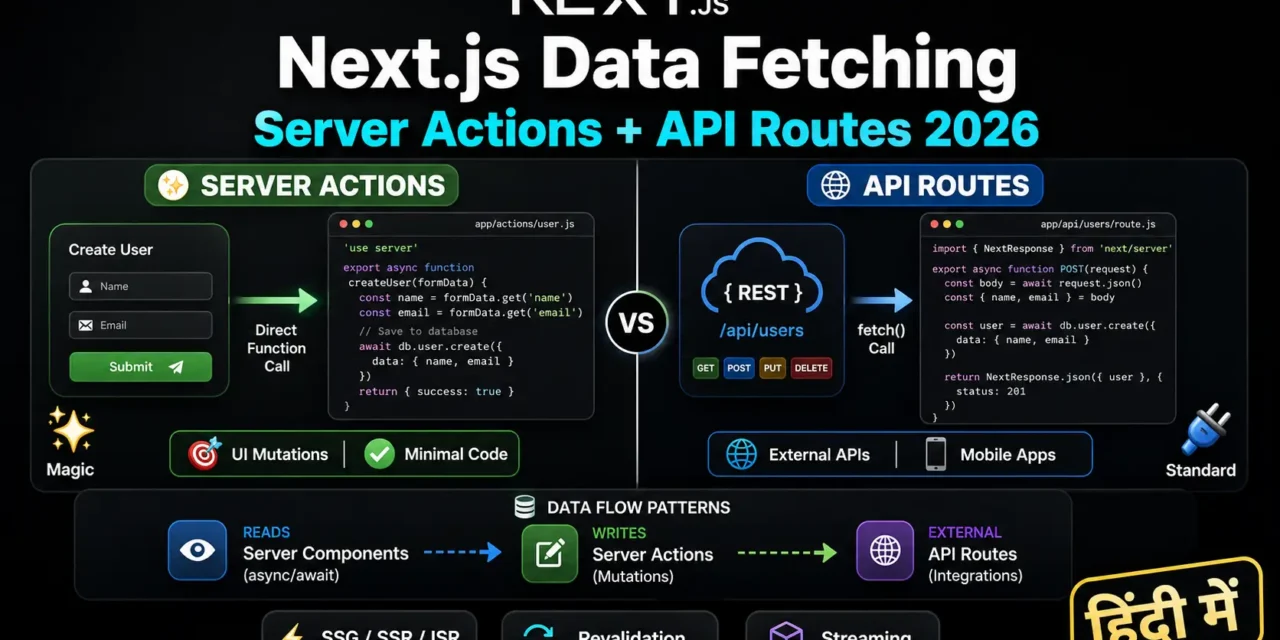
क्या तुमने कभी सोचा है – Next.js में data fetch करने के कितने तरीके हैं? Server Components, Client Components, Server Actions, API Routes – इतने सारे options में confusion हो जाता है.
Next.js App Router ने data fetching को completely transform कर दिया है. Server Components default हैं, fetch() by default cached है, और Server Actions के साथ mutations super easy हो गई हैं.
Next.js data fetching server actions api routes Hindi में समझना बहुत जरूरी है क्योंकि:
- App Router default data fetching pattern है
- Server Components direct database access कर सकते हैं
- Server Actions API boilerplate खत्म कर देते हैं
- Interview mein pakka data fetching questions puche jayenge
- 2026 में यह standard practice है
Aaj kya seekhoge?
| Topic | Kya Seekhega? |
|---|---|
| Server Components Fetching | async/await direct use |
| Client Components Fetching | SWR, React Query, use hook |
| Server Actions | 'use server' directives |
| API Routes vs Server Actions | Kab kya use karein |
| Caching Strategies | force-cache, no-store, revalidate |
| Streaming | loading.js and Suspense |
| Best Practices | Data fetching architecture |
Kya tumhe pata hai?
Server Actions POST requests use करती हैं under the hood – लेकिन तुम्हें fetch manually write नहीं करना पड़ता!
तो चलिए शुरू करते हैं – Next.js data fetching server actions api routes Hindi सीखने का सफर! 🚀
Table of Contents
1. Data Fetching in Next.js – Introduction
Next.js App Router में data fetching के multiple ways हैं – हर use case के लिए अलग approach.
Data Fetching Approaches Overview:
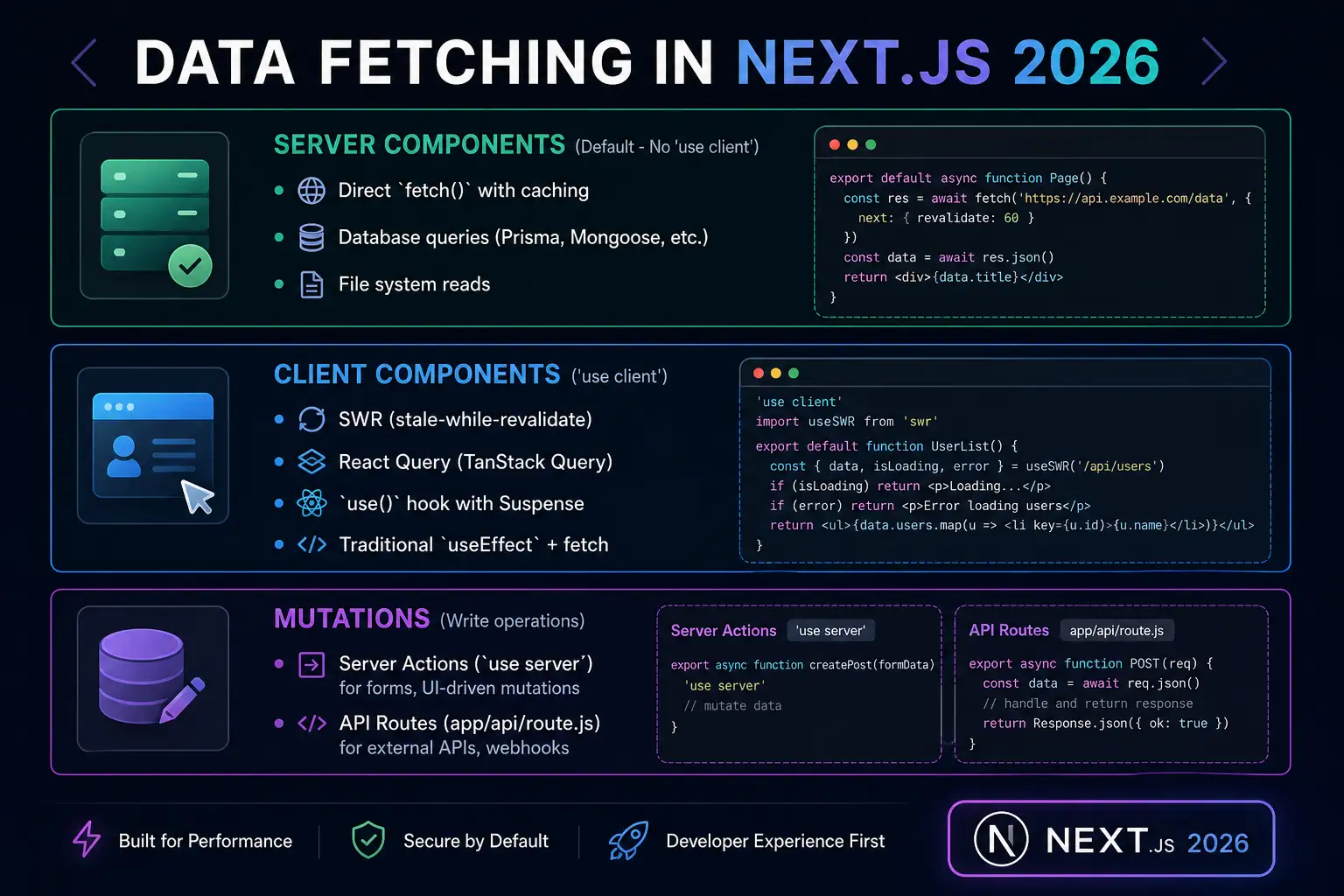
Next.js data fetching server actions api routes Hindi में हम सब कुछ detail में समझेंगे.
2. Server Components – Default Fetching
Server Components default हैं – बिना 'use client' के सब Server Components हैं.
Basic Server Component Fetching:
// app/blog/page.js
// ✅ Server Component - default

async function getPosts() {
  // fetch automatically caches by default
  const res = await fetch('https://api.example.com/posts');
  if (!res.ok) throw new Error('Failed to fetch');
  return res.json();
}

export default async function BlogPage() {
  const posts = await getPosts();

  return (
    <div>
      <h1>My Blog</h1>
      <ul>
        {posts.map(post => (
          <li key={post.id}>{post.title}</li>
        ))}
      </ul>
    </div>
  );
}
Direct Database Access:
// app/products/page.js
import { db } from '@/lib/db';

async function getProducts() {
  // Direct database access - safe on server!
  return await db.product.findMany({
    where: { isActive: true },
    orderBy: { createdAt: 'desc' }
  });
}

export default async function ProductsPage() {
  const products = await getProducts();

  return (
    <div className="products-grid">
      {products.map(product => (
        <ProductCard key={product.id} product={product} />
      ))}
    </div>
  );
}
Caching with fetch Options:
| Option | Behavior | Use Case |
|---|---|---|
cache: 'force-cache' | Default – caches forever | Static content (SSG) |
cache: 'no-store' | No cache – fresh every request | Real-time data (SSR) |
next: { revalidate: 60 } | Revalidate every 60 seconds | Semi-dynamic (ISR) |
// Static (SSG) - builds once
export default async function StaticPage() {
  const data = await fetch('https://api.example.com/static', {
    cache: 'force-cache'  // Default, can omit
  });
  return <div>{data}</div>;
}

// Dynamic (SSR) - fresh every request
export default async function DynamicPage() {
  const data = await fetch('https://api.example.com/live', {
    cache: 'no-store'  // Always fresh
  });
  return <div>{data}</div>;
}

// ISR - revalidate every 60 seconds
export default async function ISRPage() {
  const data = await fetch('https://api.example.com/data', {
    next: { revalidate: 60 }  // ISR
  });
  return <div>{data}</div>;
}
3. Client Components – SWR, React Query, use Hook
Option 1: SWR (Recommended for Client Fetching)
// app/profile/page.js
'use client';
import useSWR from 'swr';

const fetcher = (url) => fetch(url).then(res => res.json());

export default function ProfilePage() {
  const { data, error, isLoading } = useSWR('/api/user', fetcher);

  if (isLoading) return <div>Loading...</div>;
  if (error) return <div>Error: {error.message}</div>;

  return (
    <div>
      <h1>{data.name}</h1>
      <p>{data.email}</p>
    </div>
  );
}
Option 2: use() Hook with Suspense
// app/blog/page.js (Server Component)
import Posts from '@/components/Posts';
import { Suspense } from 'react';

// Don't await - pass promise directly
const postsPromise = fetch('https://api.example.com/posts').then(res => res.json());

export default function BlogPage() {
  return (
    <div>
      <h1>Blog</h1>
      <Suspense fallback={<div>Loading posts...</div>}>
        <Posts postsPromise={postsPromise} />
      </Suspense>
    </div>
  );
}// components/Posts.js (Client Component)
'use client';
import { use } from 'react';
export default function Posts({ postsPromise }) {
const posts = use(postsPromise); // Suspense will handle loading
return (
<ul>
{posts.map(post => <li key={post.id}>{post.title}</li>)}
</ul>
);
}Option 3: Traditional useEffect (Not Recommended)
'use client';
import { useState, useEffect } from 'react';

export default function DataComponent() {
  const [data, setData] = useState(null);
  const [loading, setLoading] = useState(true);

  useEffect(() => {
    fetch('/api/data')
      .then(res => res.json())
      .then(data => {
        setData(data);
        setLoading(false);
      });
  }, []);

  if (loading) return <div>Loading...</div>;
  return <div>{data}</div>;
}
4. Caching Strategies – SSG, SSR, ISR
Static Site Generation (SSG)
Build time पर render होता है – सबसे fast, लेकिन data stale हो सकता है.
// app/blog/page.js
export default async function BlogPage() {
  // cache: 'force-cache' is default
  const posts = await fetch('https://api.example.com/posts', {
    cache: 'force-cache'  // Can omit - this is default
  });

  return <div>{/* posts */}</div>;
}
Output: Build time पर HTML generate → fast, scalable, but data बदले तो rebuild चाहिए.
Server-Side Rendering (SSR)
Every request पर fresh data – hamesha up-to-date, लेकिन slow हो सकता है.
// app/products/page.js
export default async function ProductsPage() {
  const products = await fetch('https://api.example.com/products', {
    cache: 'no-store'  // Never cache - always fresh
  });

  return <div>{/* products */}</div>;
}
Output: हर request पर fresh data → always up-to-date, लेकिन server load ज्यादा.
Incremental Static Regeneration (ISR)
Static + Dynamic का hybrid – specified interval के बाद revalidate होता है.
// app/events/page.js
export default async function EventsPage() {
  const events = await fetch('https://api.example.com/events', {
    next: { revalidate: 60 }  // Revalidate every 60 seconds
  });

  return <div>{/* events */}</div>;
}
Output: Build time पर static, फिर हर 60 seconds में background refresh → best of both.
Summary Table:
| Strategy | Syntax | Freshness | Speed | Use Case |
|---|---|---|---|---|
| SSG | cache: 'force-cache' | Stale | Fastest | Blog, docs |
| SSR | cache: 'no-store' | Always fresh | Slower | Stock prices, live scores |
| ISR | next: { revalidate: N } | Revalidates every N sec | Fast | Events, semi-dynamic |
5. Server Actions – Mutations Simplified
Server Actions mutations के लिए हैं – API endpoint बनाने की जरूरत नहीं.
What are Server Actions?
Server Actions special functions हैं जो:
'use server'directive से marked होते हैं- Client Components से directly call हो सकते हैं
- Under the hood POST requests भेजते हैं
- Automatic revalidation support
Basic Server Action:
// app/actions.ts
'use server';

import { revalidatePath } from 'next/cache';

export async function createPost(formData: FormData) {
  const title = formData.get('title');
  const content = formData.get('content');

  // Save to database
  await db.post.create({ data: { title, content } });

  // Revalidate the blog page
  revalidatePath('/blog');
}
Using Server Action in Client Component:
// app/blog/new/page.js
'use client';
import { createPost } from '@/app/actions';
import { useTransition } from 'react';

export default function NewPostPage() {
  const [isPending, startTransition] = useTransition();

  return (
    <form action={createPost}>
      <input name="title" placeholder="Title" required />
      <textarea name="content" placeholder="Content" />
      <button type="submit" disabled={isPending}>
        {isPending ? 'Creating...' : 'Create Post'}
      </button>
    </form>
  );
}
Form Validation with Server Actions:
// app/actions.ts
'use server';

import { z } from 'zod';
import { revalidatePath } from 'next/cache';

const postSchema = z.object({
  title: z.string().min(3, 'Title must be at least 3 characters'),
  content: z.string().min(10, 'Content must be at least 10 characters')
});

export async function createPost(prevState: any, formData: FormData) {
  const validated = postSchema.safeParse({
    title: formData.get('title'),
    content: formData.get('content')
  });

  if (!validated.success) {
    return { errors: validated.error.flatten().fieldErrors };
  }

  await db.post.create({ data: validated.data });
  revalidatePath('/blog');
  return { success: true };
}'use client';
import { createPost } from '@/app/actions';
import { useFormState } from 'react-dom';
export default function NewPostPage() {
const [state, formAction] = useFormState(createPost, null);
return (
<form action={formAction}>
<input name="title" placeholder="Title" />
{state?.errors?.title && <p>{state.errors.title[0]}</p>}
<textarea name="content" placeholder="Content" />
{state?.errors?.content && <p>{state.errors.content[0]}</p>}
<button type="submit">Create Post</button>
</form>
);
}6. API Routes – Traditional REST API
API Routes traditional REST API endpoints हैं – external clients, webhooks, mobile apps के लिए.
Basic API Route:
// app/api/posts/route.js
import { NextResponse } from 'next/server';
import { db } from '@/lib/db';

// GET /api/posts
export async function GET(request) {
  const posts = await db.post.findMany();
  return NextResponse.json(posts);
}

// POST /api/posts
export async function POST(request) {
  const body = await request.json();
  const post = await db.post.create({ data: body });
  return NextResponse.json(post, { status: 201 });
}
Dynamic API Routes:
// app/api/posts/[id]/route.js
import { NextResponse } from 'next/server';
import { db } from '@/lib/db';

// GET /api/posts/123
export async function GET(request, { params }) {
  const post = await db.post.findUnique({
    where: { id: parseInt(params.id) }
  });

  if (!post) {
    return NextResponse.json({ error: 'Post not found' }, { status: 404 });
  }

  return NextResponse.json(post);
}

// PUT /api/posts/123
export async function PUT(request, { params }) {
  const body = await request.json();
  const post = await db.post.update({
    where: { id: parseInt(params.id) },
    data: body
  });
  return NextResponse.json(post);
}

// DELETE /api/posts/123
export async function DELETE(request, { params }) {
  await db.post.delete({ where: { id: parseInt(params.id) } });
  return new Response(null, { status: 204 });
}
7. Server Actions vs API Routes – Comparison
Detailed Comparison:
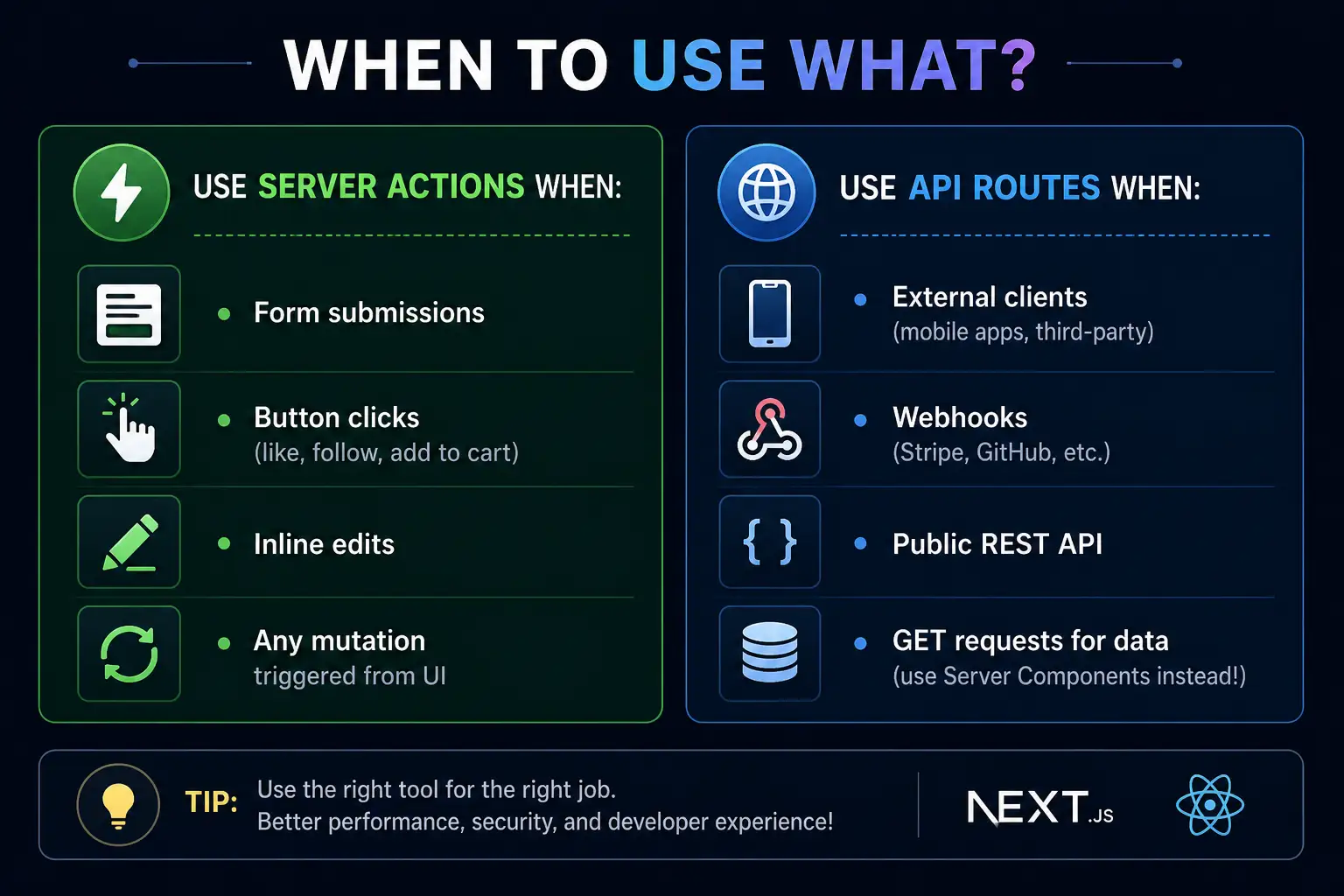
When to Use What?
Streaming page को छोटे chunks में send करता है – slow data हो तो भी page immediately show होता है.
Option 1: loading.js (Page-level Streaming)
// app/blog/loading.js
export default function BlogLoading() {
  return (
    <div className="loading-container">
      <div className="spinner"></div>
      <p>Loading blog posts...</p>
    </div>
  );
}// app/blog/page.js
export default async function BlogPage() {
// This will show loading.js while fetching
const posts = await getPosts(); // Takes 2 seconds
return <div>{/* posts */}</div>;
}Option 2: <Suspense> (Component-level Streaming)
// app/dashboard/page.js
import { Suspense } from 'react';
import { UserStats, RecentOrders, ActivityFeed } from './components';

export default function DashboardPage() {
  return (
    <div>
      <h1>Dashboard</h1>

      {/* Stats load fast - no suspense needed */}
      <UserStats />

      {/* Orders slow - show loading skeleton */}
      <Suspense fallback={<OrdersSkeleton />}>
        <RecentOrders />
      </Suspense>

      {/* Activity slow - show loading skeleton */}
      <Suspense fallback={<ActivitySkeleton />}>
        <ActivityFeed />
      </Suspense>
    </div>
  );
}
9. Sequential vs Parallel Fetching
Sequential Fetching (❌ Slow):
// ❌ Bad - requests happen one after another
export default async function Page() {
  const user = await fetchUser();        // Waits for user
  const posts = await fetchPosts();      // Then fetches posts
  const comments = await fetchComments(); // Then fetches comments

  return <div>{/* 3 seconds total */}</div>;
}
Parallel Fetching (✅ Fast):
// ✅ Good - requests happen in parallel
export default async function Page() {
  // Start all requests at once
  const userPromise = fetchUser();
  const postsPromise = fetchPosts();
  const commentsPromise = fetchComments();

  // Wait for all together
  const [user, posts, comments] = await Promise.all([
    userPromise,
    postsPromise,
    commentsPromise
  ]);

  return <div>{/* ~1 second total */}</div>;
}
10. Revalidation – revalidatePath and revalidateTag
revalidatePath – Revalidate specific route:
'use server';
import { revalidatePath } from 'next/cache';

export async function updateProfile(formData) {
  await db.user.update({ ... });

  // Revalidate the profile page
  revalidatePath('/profile');

  // Revalidate multiple paths
  revalidatePath('/dashboard');
  revalidatePath('/settings');
}
revalidateTag – Revalidate by tag:
// Fetch with tag
async function getPosts() {
  const res = await fetch('https://api.example.com/posts', {
    next: { tags: ['posts'] }
  });
  return res.json();
}

// Server action that invalidates
'use server';
import { revalidateTag } from 'next/cache';

export async function createPost(formData) {
  await db.post.create({ ... });
  revalidateTag('posts');  // All fetches with 'posts' tag will revalidate
}
11. Best Practices – Architecture Patterns
The Colocation Pattern:
app/
  dashboard/
    page.tsx              # Server Component - fetches data
    layout.tsx            # Dashboard layout
    loading.tsx           # Streaming loading state
    components/
      MetricsChart.tsx    # Client Component (interactive)
      StatsCard.tsx       # Server Component (pure)
    actions.ts            # Server actions for this route only
    lib/
      queries.ts          # Data fetching for this route
The Rule of Proximity:
A file should live as close as possible to where it’s used.
- Used in one route → live in that route’s folder
- Used in multiple routes → move one level up
- Used app-wide → move to shared layer (
components/ui/,lib/)
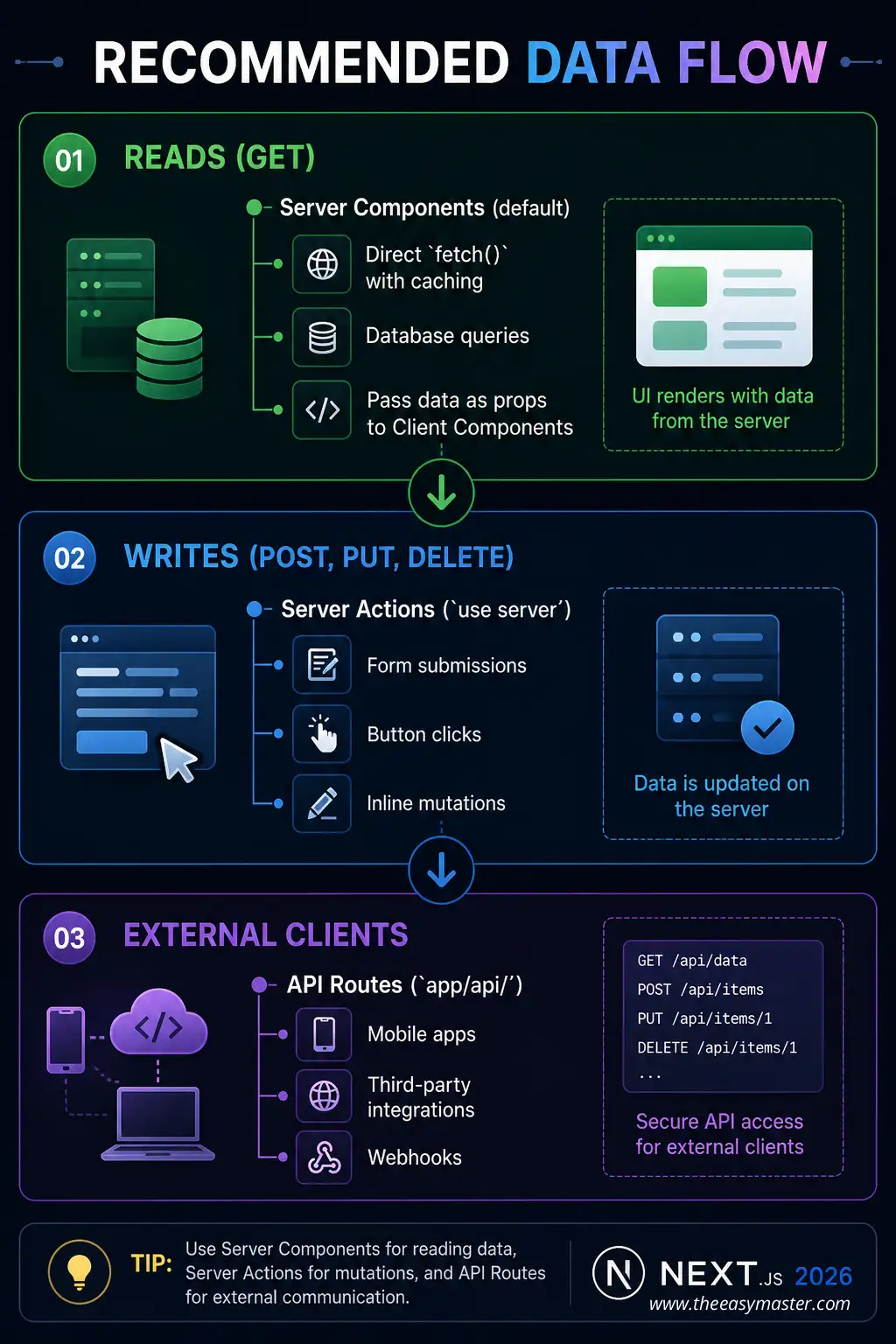
Data Flow Architecture:
12. Common Mistakes + Solutions
Mistake 1: Using useEffect for data that could be fetched on server
// ❌ Bad - client-side fetch for static data
'use client';
useEffect(() => {
  fetch('/api/posts').then(res => res.json()).then(setPosts);
}, []);

// ✅ Good - server component
export default async function Page() {
  const posts = await fetch('https://api.example.com/posts');
  return <div>{/* posts */}</div>;
}
Mistake 2: Not using proper caching strategy
// ❌ Bad - revalidating too often
fetch('https://api.example.com/static-content', {
  next: { revalidate: 1 }  // Every second!
});

// ✅ Good - appropriate revalidation
fetch('https://api.example.com/static-content', {
  cache: 'force-cache'  // Build once
});
Mistake 3: Sequential API calls when parallel possible
// ❌ Bad - sequential
const user = await fetchUser();
const posts = await fetchPosts();

// ✅ Good - parallel
const [user, posts] = await Promise.all([fetchUser(), fetchPosts()]);
13. Quick Cheat Sheet
Server Component Fetching:
// SSG (Static)
fetch(url, { cache: 'force-cache' })

// SSR (Dynamic)
fetch(url, { cache: 'no-store' })

// ISR (Revalidate)
fetch(url, { next: { revalidate: 60 } })
Client Component Fetching:
// SWR
const { data, error } = useSWR('/api/data', fetcher);

// React.use() with Suspense
const data = use(dataPromise);
Server Actions:
'use server';
export async function action(formData) { ... }
API Routes:
export async function GET(request) { ... }
export async function POST(request) { ... }
14. FAQ
Q1: Next.js data fetching server actions api routes Hindi में सबसे important kya hai?
Server Components default हैं – जहाँ possible हो, Server Components use करो. Client Components sirf interactivity चाहिए तब use करो.
Q2: Server Components vs Client Components – data fetching में kya antar hai?
Server Components direct async/await और database access कर सकते हैं. Client Components को API routes या Server Actions चाहिए.
Q3: Server Actions vs API Routes – kab kya use karein?
Server Actions – UI-driven mutations (forms, buttons). API Routes – external clients (mobile apps, webhooks).
Q4: fetch() default caching behavior kya hai?cache: 'force-cache' – by default cached होता है (SSG).
Q5: SSG vs SSR vs ISR – kya antar hai?
SSG – build time (fastest), SSR – every request (always fresh), ISR – background revalidate (best of both).
Q6: Streaming kya hai aur kyun use karein?
Page को small chunks में send करना – slow data हो तो भी page immediately show.
Q7: revalidatePath vs revalidateTag – kya antar hai?revalidatePath – specific route revalidate करता है। revalidateTag – tagged fetches revalidate करता है.
Q8: Sequential vs Parallel fetching – performance impact?
Parallel fetching 3 requests को 1 second में complete कर सकता है, sequential 3 seconds लेगा.
Q9: Server Action sequential kyun hoti हैं?
React rendering consistency के लिए – race conditions prevent करने के लिए.
Q10: use() hook kya karta है?
Promises को Client Component में consume करता है – Suspense boundaries के साथ काम करता है.
15. Conclusion
बहुत बढ़िया दोस्तों! आज हमने Next.js data fetching server actions api routes Hindi को पूरी detail में समझा.
Quick Recap:
| Approach | Use For | Key Feature |
|---|---|---|
| Server Component | Reads (GET) | Direct async/await |
| Client Component + SWR | Client-side reads | Stale-while-revalidate |
| Server Actions | Mutations | No API boilerplate |
| API Routes | External APIs | Full HTTP control |
Mera personal experience:
Server Components ने data fetching को super simple बना दिया है. अब API routes sirf external clients के लिए use करता हूँ, forms के लिए Server Actions, और data display के लिए Server Components. यह pattern clean और maintainable है.
Tum bhi ye steps follow karo:
- ✅ Server Components default समझो
- ✅
fetch()caching options जानो - ✅ Server Actions से forms बनाओ
- ✅ Streaming के लिए
loading.jsuse करो - ✅ Parallel fetching से performance improve करो
अब तुम्हारी बारी है!
नीचे comment में बताओ:
- क्या तुमने Server Actions try किए हैं?
- तुम्हें कौन सी fetching strategy सबसे useful लगी?
- अगला topic क्या चाहिए? (Next.js Middleware? Authentication? Caching Deep Dive?)
The Easy Master पर बने रहो। Happy Fetching with Next.js! 🚀⚛️
Resources
- Next.js Data Fetching Documentation
- Next.js Server Actions Documentation
- Next.js Caching Documentation
Additional Resources
- Express.js Setup – पहला Server कैसे बनाएं (Step-by-Step) 2026
- Express.js Routing – GET POST PUT DELETE Complete Guide
- Express Middleware समझे – Application, Router, Error Middleware
- Express req and res Objects – Query, Params, Body, Headers Explained
- Express Static Files और Templating – EJS से Dynamic HTML Banaye
- Express Router – API Routes को Organize करें (Modular Code)
- Express.js में Environment Variables – .env File कैसे Use करें
- Express File Upload Multer Tutorial | Image PDF Hindi 2026
- Express Security – Helmet, CORS, Rate Limiting, Validation (2026)
- Express + TypeScript – Type-Safe API कैसे बनाएं 2026
- Express MongoDB CRUD – Complete REST API Example 2026
- Express Logging – Morgan और Winston से Debug करें
- Express API Testing – Supertest से Routes Test करें
- MongoDB Setup – CRUD Operations समझे (Beginner Guide) 2026
- MongoDB Compass से GUI Database Manage करने का आसान तरीका | Beginner Tutorial 2026
- Node.js MongoDB Connection – Mongoose Setup समझे 2026
- MongoDB Data Modeling – Embedded Documents vs References 2026
- MongoDB Indexing – Query Speed बढ़ने करने का आसान तरीका
- MongoDB Aggregation Pipeline – Stages समझे | Practical Examples
- Express MongoDB CRUD – Complete REST API Example
- Mongoose ODM – Schema, Model, and Validation समझे 2026
- MongoDB Atlas – Cloud Database Free में Deploy करें 2026
- JWT Authentication MongoDB – User Login System कैसे बनाएं 2026
- Next.js App Router – Pages Router से क्या बदला? Complete Guide 2026
- Next.js Server Components – ‘use client’ कब और कहां Use करें
- Next.js Routing – Layouts, Dynamic Routes and Nested Routes 2026