नमस्ते दोस्तों! 🙏
स्वागत है The Easy Master पर!
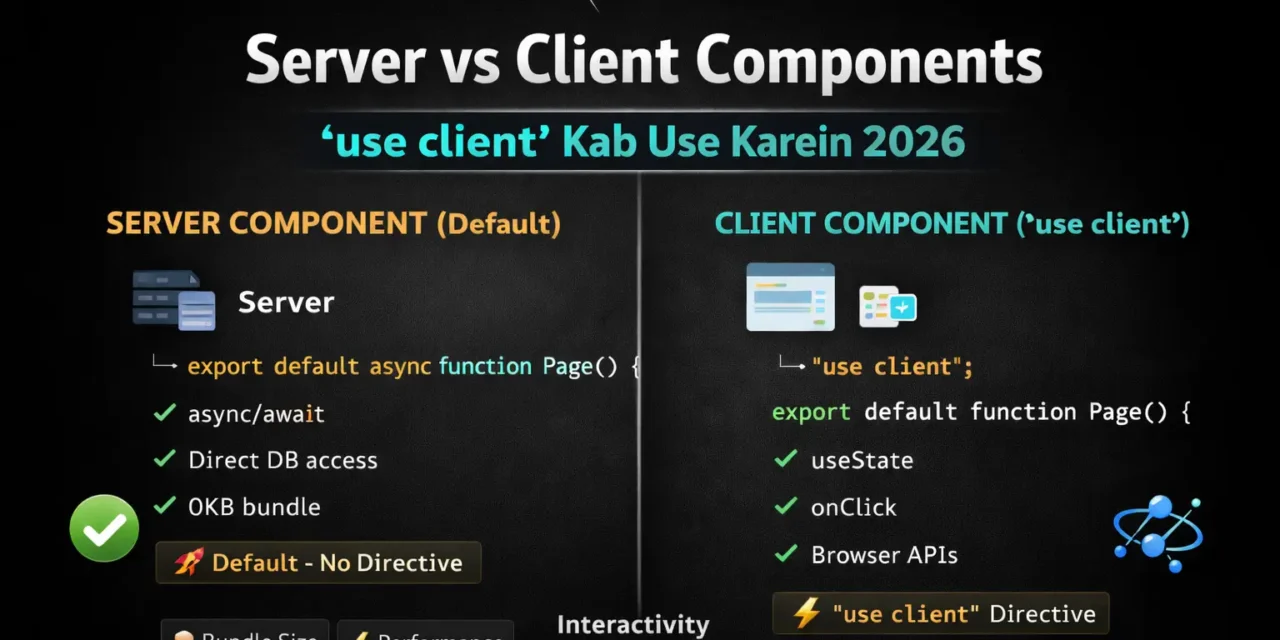
क्या तुमने कभी सोचा है – Next.js App Router mein 'use client' kab use karna chahiye? Server Components default हैं, तो कब Client Component बनाना है?
Next.js Server Components App Router का सबसे important feature है – यह default है. 'use client' directive से components को client-side interactive बनाते हैं.
Next.js Server Components use client Hindi में समझना बहुत जरूरी है क्योंकि:
- App Router default Server Components है
- Performance – सही use से bundle size 50% छोटा
- Hydration issues – गलत use से app slow
- Interview mein pakka Server Components questions puche jayenge
- 2026 में यह standard practice है
Aaj kya seekhoge?
| Topic | Kya Seekhega? |
|---|---|
| Server Components Kya Hain? | Default rendering in App Router |
| Client Components Kya Hain? | 'use client' directive |
| Kab Server Component Use Karein | Rules and guidelines |
| Kab Client Component Use Karein | Rules and guidelines |
| Component Composition | Server + Client together |
| Common Mistakes | Aur unke solutions |
Kya tumhe pata hai?'use client' directive server par execute nahi hota – ye sirf bundler को बताता है कि यह component client-side bundle mein जाना चाहिए!
तो चलिए शुरू करते हैं – Next.js Server Components use client Hindi सीखने का सफर! 🚀
Table of Contents
1. Server Components Kya Hain? – Introduction
Server Components App Router में default हैं – बिना 'use client' के सब Server Components हैं.
Server Component Example:
// app/products/page.js
// ✅ यह Server Component है (default)

async function getProducts() {
  const res = await fetch('https://api.example.com/products');
  return res.json();
}

export default async function ProductsPage() {
  const products = await getProducts();

  return (
    <div>
      <h1>Our Products</h1>
      {products.map(product => (
        <div key={product.id}>
          <h2>{product.name}</h2>
          <p>{product.price}</p>
        </div>
      ))}
    </div>
  );
}
Server Components में क्या कर सकते हैं:
| Feature | Supported? |
|---|---|
async/await | ✅ Yes |
| Direct database access | ✅ Yes |
| File system access | ✅ Yes |
| Environment variables | ✅ Yes |
fetch() with caching | ✅ Yes |
| Import Client Components | ✅ Yes |
Server Components में क्या नहीं कर सकते:
| Feature | Supported? |
|---|---|
useState, useEffect | ❌ No |
Event handlers (onClick) | ❌ No |
Browser APIs (window, document) | ❌ No |
| Context providers (client-side) | ❌ No |
| Custom hooks with client state | ❌ No |
Next.js Server Components use client Hindi में हम सब कुछ detail में समझेंगे.
2. Client Components Kya Hain? – 'use client' Directive
Client Components वो components हैं जो browser में run होते हैं – इनमें interactivity होती है.
Client Component Example:
// app/components/Counter.js
'use client';  // ✅ यह Client Component है

import { useState } from 'react';

export default function Counter() {
  const [count, setCount] = useState(0);

  return (
    <button onClick={() => setCount(count + 1)}>
      Count: {count}
    </button>
  );
}
'use client' Directive क्या करता है:
- Bundler को बताता है – यह component client-side bundle में जाना चाहिए
- Server par execute नहीं होता – hydration के लिए client भेजा जाता है
- Children components – automatically client components नहीं बनते
Client Components में क्या कर सकते हैं:
| Feature | Supported? |
|---|---|
useState, useEffect | ✅ Yes |
Event handlers (onClick, onChange) | ✅ Yes |
Browser APIs (window, document) | ✅ Yes |
| Context providers | ✅ Yes |
| Custom hooks with state | ✅ Yes |
Client Components में क्या नहीं कर सकते:
| Feature | Supported? |
|---|---|
async/await directly | ❌ No (needs useEffect) |
| Server-only features | ❌ No |
3. Server vs Client – Comparison
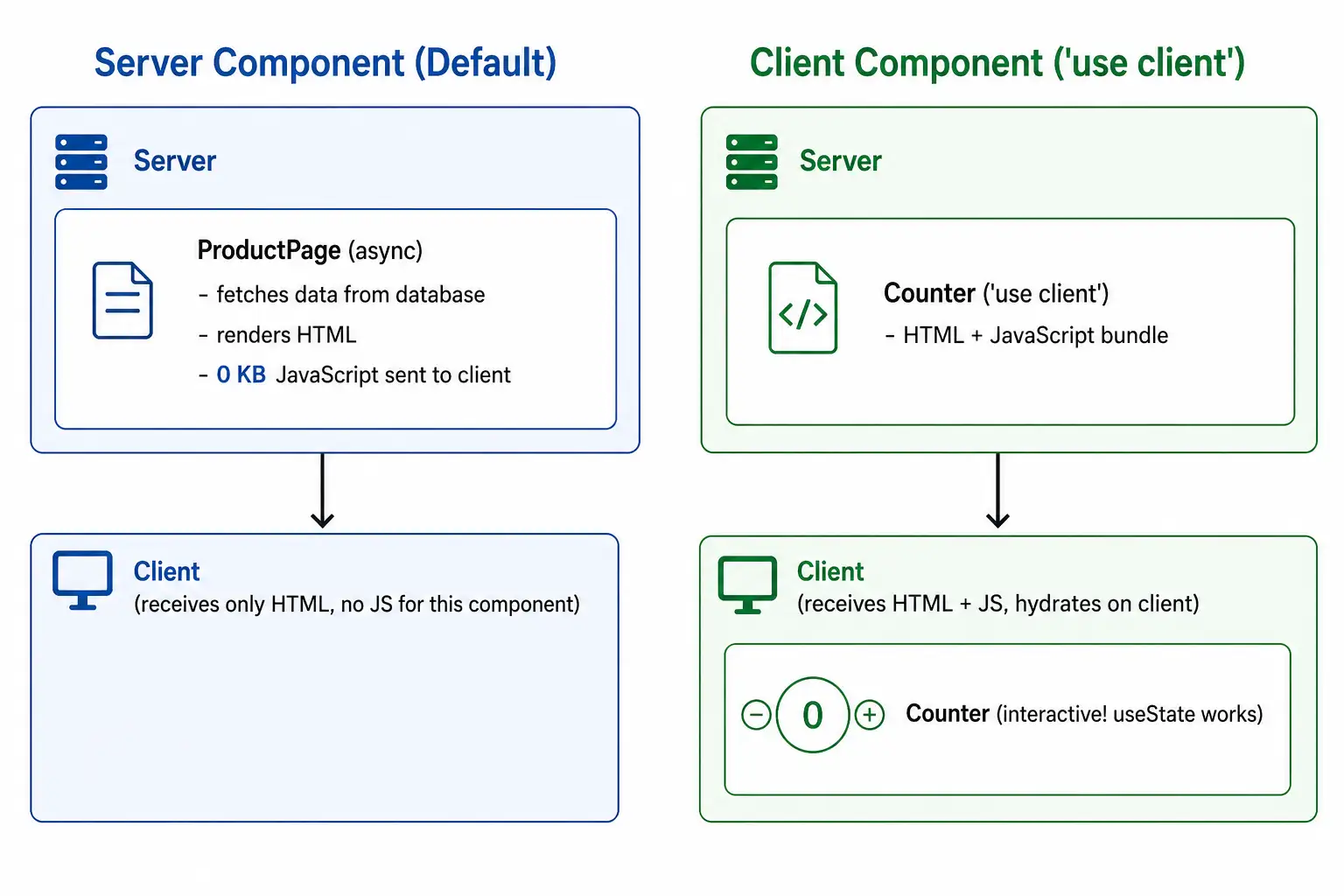
Quick Comparison Table:
| Feature | Server Component | Client Component |
|---|---|---|
| Directive | Default (no directive) | 'use client' at top |
| Rendering | Server only | Server + Client (hydrates) |
| Bundle Size | 0 KB (not sent to client) | Sent to client |
async/await | ✅ Directly | ❌ Needs useEffect |
useState, useEffect | ❌ Not allowed | ✅ Allowed |
| Event Handlers | ❌ Not allowed | ✅ Allowed |
| Browser APIs | ❌ Not allowed | ✅ Allowed |
| Database Access | ✅ Direct | ❌ Via API |
| File System | ✅ Direct | ❌ Not possible |
| Hydration | No hydration needed | Hydrates on client |
| Use Case | Data fetching, static content | Interactive UI |
Visual Comparison:
4. कब Server Component Use करें?
Server Component Use करो जब:
1. Data Fetching:
// Server Component – database se direct fetch
export default async function UserProfile({ userId }) {
  const user = await db.user.findUnique({ where: { id: userId } });
  return <div>{user.name}</div>;
}
2. Static Content:
// Server Component – no interactivity needed
export default function AboutPage() {
  return (
    <div>
      <h1>About Us</h1>
      <p>This is a static page with no interactive elements.</p>
    </div>
  );
}
3. SEO-critical Content:
// Server Component – full HTML for search engines
export default async function BlogPost({ params }) {
  const post = await getPost(params.slug);
  return (
    <article>
      <h1>{post.title}</h1>
      <div dangerouslySetInnerHTML={{ __html: post.content }} />
    </article>
  );
}
4. Large Libraries (Reduce Bundle):
// Server Component – heavy library stays on server
import { heavyMarkdownParser } from 'heavy-library';

export default async function MarkdownPage() {
  const html = await heavyMarkdownParser(await getMarkdown());
  return <div dangerouslySetInnerHTML={{ __html: html }} />;
  // heavyMarkdownParser NOT sent to client!
}
5. Reading Environment Variables:
// Server Component – env vars accessible
export default function ConfigPage() {
  const apiUrl = process.env.API_URL;
  return <div>API URL: {apiUrl}</div>;
}
Server Component Decision Flowchart:
क्या component को interactivity चाहिए? (useState, onClick, etc.)
    │
    ├── NO ──► क्या component async data fetch करता है?
    │              │
    │              ├── YES ──► Server Component
    │              │
    │              └── NO ───► क्या component SEO important है?
    │                              │
    │                              ├── YES ──► Server Component
    │                              │
    │                              └── NO ───► Server Component (default)
    │
    └── YES ──► Client Component (use 'use client')
5. Kab Client Component Use करें?
Client Component Use करो जब:
1. State Management (useState, useReducer):
'use client';
// Client Component – needs state
export function SearchBar() {
  const [query, setQuery] = useState('');
  return (
    <input
      value={query}
      onChange={(e) => setQuery(e.target.value)}
      placeholder="Search..."
    />
  );
}
2. Side Effects (useEffect):
'use client';
// Client Component – needs useEffect
export function AnalyticsTracker() {
  useEffect(() => {
    // Track page view on client
    analytics.trackPageView();
  }, []);
  return null;
}
3. Event Handlers:
'use client';
// Client Component – needs onClick
export function LikeButton({ postId }) {
  const [liked, setLiked] = useState(false);

  const handleLike = async () => {
    await fetch(`/api/posts/${postId}/like`, { method: 'POST' });
    setLiked(true);
  };

  return (
    <button onClick={handleLike}>
      {liked ? '❤️ Liked' : '🤍 Like'}
    </button>
  );
}
4. Browser APIs:
'use client';
//  Client Component – needs window.localStorage
export function ThemeToggle() {
  const [theme, setTheme] = useState(() => {
    return localStorage.getItem('theme') || 'light';
  });

  const toggleTheme = () => {
    const newTheme = theme === 'light' ? 'dark' : 'light';
    setTheme(newTheme);
    localStorage.setItem('theme', newTheme);
  };

  return <button onClick={toggleTheme}>Toggle {theme}</button>;
}
5. Third-party Libraries that need Browser:
'use client';
// Client Component – needs document for React Quill
import dynamic from 'next/dynamic';

const RichTextEditor = dynamic(
  () => import('react-quill'),
  { ssr: false }
);

export default function Editor() {
  const [value, setValue] = useState('');
  return <RichTextEditor value={value} onChange={setValue} />;
}
6. Context Providers (client-side):
'use client';
// Client Component – Context needs client
import { createContext, useContext, useState } from 'react';

const CartContext = createContext();

export function CartProvider({ children }) {
  const [cart, setCart] = useState([]);
  return (
    <CartContext.Provider value={{ cart, setCart }}>
      {children}
    </CartContext.Provider>
  );
}
6. Component Composition – Server + Client Together
Pattern 1: Server Component में Client Component Import करना:
// app/products/page.js (Server Component)
import ClientButton from './ClientButton';  // 'use client' component

async function getProducts() {
  const products = await db.product.findMany();
  return products;
}

export default async function ProductsPage() {
  const products = await getProducts();

  return (
    <div>
      <h1>Products</h1>
      <div className="products-grid">
        {products.map(product => (
          <div key={product.id}>
            <h3>{product.name}</h3>
            <ClientButton productId={product.id} />
          </div>
        ))}
      </div>
    </div>
  );
}// app/products/ClientButton.js
'use client';
export default function ClientButton({ productId }) {
const [added, setAdded] = useState(false);
return (
<button onClick={() => setAdded(true)}>
{added ? 'Added!' : 'Add to Cart'}
</button>
);
}Pattern 2: Client Component में Server Component Import (❌ Not Allowed):
// ❌ You cannot import Server Component into Client Component
'use client';
import ServerComponent from './ServerComponent'; // Error!

export default function ClientPage() {
  return (
    <div>
      <ServerComponent /> {/* Won't work properly */}
    </div>
  );
}
Pattern 3: Server Component as Children (✅ Allowed):
// app/layout.js (Server Component)
import ClientWrapper from './ClientWrapper';
import ServerFooter from './ServerFooter';

export default function Layout({ children }) {
  return (
    <html>
      <body>
        <ClientWrapper>
          {children}  {/* children can be Server Components */}
        </ClientWrapper>
        <ServerFooter />
      </body>
    </html>
  );
}// app/ClientWrapper.js
'use client';
export default function ClientWrapper({ children }) {
const [theme, setTheme] = useState('light');
return (
<div data-theme={theme}>
{children} {/* Server Components work as children */}
</div>
);
}Pattern 4: Props from Server to Client:
// app/page.js (Server Component)
import ClientUserCard from './ClientUserCard';

async function getUser() {
  const user = await db.user.findUnique({ where: { id: 1 } });
  return user;
}

export default async function HomePage() {
  const user = await getUser(); // Fetched on server

  return (
    <div>
      <h1>Welcome</h1>
      {/* ✅ Pass server-fetched data as props to client component */}
      <ClientUserCard user={user} />
    </div>
  );
}// app/ClientUserCard.js
'use client';
export default function ClientUserCard({ user }) {
// user data comes from server component (already serialized)
const [isFollowing, setIsFollowing] = useState(false);
return (
<div>
<h3>{user.name}</h3>
<button onClick={() => setIsFollowing(!isFollowing)}>
{isFollowing ? 'Following' : 'Follow'}
</button>
</div>
);
}7. 'use client' Boundary – कैसे काम करता है
'use client' boundary बनाता है – इसके नीचे के सभी components automatically client components हो जाते हैं.
Example:
// app/components/ClientSection.js
'use client';  // ← CLIENT BOUNDARY START

export function ClientComponent1() {
  // ✅ Client Component (automatically)
  return <div>Client 1</div>;
}

export function ClientComponent2() {
  // ✅ Client Component (automatically)
  return <div>Client 2</div>;
}

function HelperComponent() {
  // ✅ Client Component (automatically, even without 'use client')
  return <div>Helper</div>;
}
Boundary Visualization:
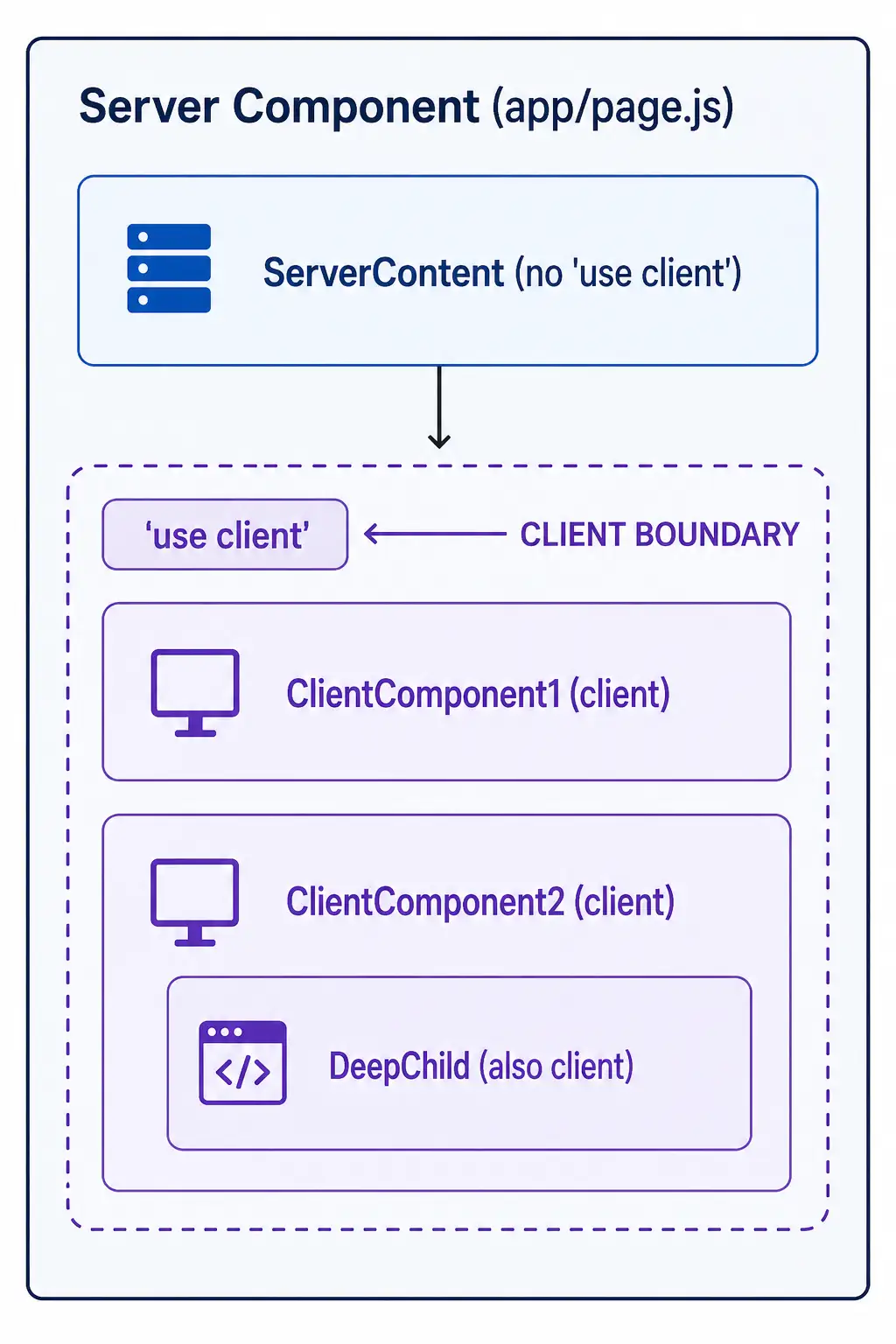
Best Practice:
'use client' को leaf components (small, interactive components) में use करो – not in large layout components.
// ❌ Avoid – too broad boundary
'use client';  // Whole page becomes client component

export default function Page() {
  // Everything here is client component
}

// ✅ Better – narrow boundary
export default function Page() {
  return (
    <div>
      <ServerSection />      // Server component
      <ClientButton />       // Only this is client component
      <ServerFooter />       // Server component
    </div>
  );
}
8. Common Patterns – Real Examples
Pattern 1: Interactive Form with Server Action
// app/contact/page.js (Server Component)
import { submitContactForm } from './actions';
import SubmitButton from './SubmitButton';

export default function ContactPage() {
  return (
    <form action={submitContactForm}>
      <input name="name" placeholder="Name" required />
      <input name="email" type="email" placeholder="Email" required />
      <textarea name="message" placeholder="Message" required />
      <SubmitButton />
    </form>
  );
}// app/contact/SubmitButton.js
'use client';
import { useFormStatus } from 'react-dom';
export default function SubmitButton() {
const { pending } = useFormStatus();
return (
<button type="submit" disabled={pending}>
{pending ? 'Sending...' : 'Send Message'}
</button>
);
}Pattern 2: Theme Provider
// app/providers/ThemeProvider.js
'use client';
import { createContext, useContext, useState, useEffect } from 'react';

const ThemeContext = createContext();

export function ThemeProvider({ children }) {
  const [theme, setTheme] = useState('light');

  useEffect(() => {
    const saved = localStorage.getItem('theme');
    if (saved) setTheme(saved);
  }, []);

  const toggleTheme = () => {
    const newTheme = theme === 'light' ? 'dark' : 'light';
    setTheme(newTheme);
    localStorage.setItem('theme', newTheme);
  };

  return (
    <ThemeContext.Provider value={{ theme, toggleTheme }}>
      {children}
    </ThemeContext.Provider>
  );
}

export function useTheme() {
  return useContext(ThemeContext);
}// app/layout.js
import { ThemeProvider } from './providers/ThemeProvider';
export default function RootLayout({ children }) {
return (
<html>
<body>
<ThemeProvider>
{children}
</ThemeProvider>
</body>
</html>
);
}Pattern 3: Dynamic Import with SSR Disabled
// app/page.js
import dynamic from 'next/dynamic';

// Client Component with no SSR (for heavy libraries)
const HeavyChart = dynamic(
  () => import('./HeavyChart'),
  {
    ssr: false,
    loading: () => <div>Loading chart...</div>
  }
);

export default function Page() {
  return (
    <div>
      <h1>Dashboard</h1>
      <HeavyChart />
    </div>
  );
}
9. Performance Impact – Bundle Size Analysis
Server vs Client Component Bundle Size:
| Component Type | JavaScript Bundle | First Paint | Interactivity Ready |
|---|---|---|---|
| Server Component | 0 KB | Very Fast | N/A (no interactivity) |
| Client Component (small) | ~5 KB | Fast | Fast |
| Client Component (large) | ~100 KB | Slower | Slower |
Real Example: E-commerce Product Page
// ❌ Bad – Whole page client component
'use client';
export default function ProductPage() {
  // Everything here is client component
  // Bundle size: 150 KB
  // Includes: product data fetching, image gallery, reviews, add to cart
}

// ✅ Good – Hybrid approach
// app/products/[id]/page.js (Server Component)
export default async function ProductPage({ params }) {
  const product = await getProduct(params.id);

  return (
    <div>
      <ProductImages images={product.images} />  // Client (lightweight)
      <ProductInfo product={product} />          // Server
      <ProductReviews productId={product.id} />  // Server (data)
      <AddToCartButton productId={product.id} /> // Client (lightweight)
    </div>
  );
}
Optimization Tips:
- Push
'use client'as deep as possible - Keep client components small
- Use
dynamic()withssr: falsefor heavy components - Move non-interactive parts to server components
10. Common Mistakes + Solutions
Mistake 1: Adding 'use client' to every component
// ❌ Unnecessary 'use client'
'use client';
export default function StaticText() {
  return <div>This has no interactivity!</div>;
}

// ✅ Remove 'use client' – let it be server component
export default function StaticText() {
  return <div>This has no interactivity!</div>;
}
Mistake 2: Using useState without 'use client'
// ❌ Error
export default function Counter() {
  const [count, setCount] = useState(0); // Error!
  return <button onClick={() => setCount(count + 1)}>{count}</button>;
}

// ✅ Add 'use client'
'use client';
export default function Counter() {
  const [count, setCount] = useState(0);
  return <button onClick={() => setCount(count + 1)}>{count}</button>;
}
Mistake 3: Importing Server Component into Client Component
// ❌ Error
'use client';
import ServerComponent from './ServerComponent'; // Won't work properly

export default function Page() {
  return <ServerComponent />;
}

// ✅ Solution: Pass as children
'use client';
export default function ClientWrapper({ children }) {
  return <div>{children}</div>;
}
Mistake 4: Using async in Client Component
// ❌ Error
'use client';
export default async function Page() {  // Error: async not allowed in client component
  const data = await fetchData();
  return <div>{data}</div>;
}

// ✅ Fetch in useEffect or use Server Component
export default async function Page() {  // Remove 'use client'
  const data = await fetchData();
  return <div>{data}</div>;
}
11. Quick Cheat Sheet
When to use 'use client':
| Scenario | Use ‘use client’? |
|---|---|
useState, useReducer | ✅ Yes |
useEffect | ✅ Yes |
onClick, onChange handlers | ✅ Yes |
Browser APIs (window, document) | ✅ Yes |
| Context consumers | ✅ Yes |
| Custom hooks with client state | ✅ Yes |
async/await | ❌ No (use Server Component) |
| Database queries | ❌ No (use Server Component) |
| Static content | ❌ No (use Server Component) |
Quick Commands:
# Create new Next.js app (App Router default)
npx create-next-app@latest my-app

# Run dev server
npm run dev
File Structure Reminder:
app/
├── layout.js        # Can be server component (no 'use client')
├── page.js          # Can be server component
├── components/
│   ├── ServerComponent.js      # No 'use client'
│   └── ClientComponent.js      # 'use client' at top
12. FAQ
Q1: Next.js Server Components use client Hindi में सबसे important kya hai?
Default Server Components हैं – 'use client' sirf interactivity चाहिए तो use करो.
Q2: Server Component bundle size mein कितना difference आता है?
Server Component 0 KB JavaScript भेजता है – bundle size significantly छोटा होता है.
Q3: 'use client' directive कहाँ लगाना चाहिए?
File के top पर – सबसे पहली line.
Q4: Kya Server Component async function हो सकता है?
✅ Haan! Server Components async हो सकते हैं – data fetch कर सकते हैं.
Q5: Kya Client Component async function हो सकता है?
❌ Nahi! Client Components async नहीं हो सकते.
Q6: Server Component में onClick use कर सकते हैं?
❌ Nahi – Server Components browser में execute नहीं होते, event handlers काम नहीं करेंगे.
Q7: 'use client' boundary क्या है?'use client' वाली file और उसके सभी children client components बन जाते हैं.
Q8: Server Component में Client Component import कर सकते हैं?
✅ Haan – Server Component Client Component को import कर सकता है.
Q9: Client Component में Server Component import कर सकते हैं?
❌ Nahi – direct import काम नहीं करेगा. Children के रूप में pass करना पड़ता है.
Q10: 2026 में क्या default use karein?
Server Components default हैं – जहाँ interactivity नहीं चाहिए वहाँ Server Component रखो, interactivity चाहिए तो 'use client' add करो.
13. Conclusion
बहुत बढ़िया दोस्तों! आज हमने Next.js Server Components use client Hindi को पूरी detail में समझा.
Quick Recap:
| Type | Directive | Use When |
|---|---|---|
| Server Component | Default (no directive) | Data fetching, static content, SEO |
| Client Component | 'use client' | Interactivity, state, events, browser APIs |
Mera personal experience:
Server Components seekhne के बाद मेरे Next.js apps ~40% faster हो गए. Bundle size kam हुआ, SEO better हुआ. 'use client' boundary को सही जगह लगाने से performance boost मिलता है.
Tum bhi ye steps follow karo:
- ✅ Server Component default है – समझो
- ✅ Interactivity चाहिए तो
'use client'add करो - ✅
'use client'boundary को deep rakho - ✅ Client components small rakho
- ✅ Server + Client composition patterns follow करो
अब तुम्हारी बारी है!
नीचे comment में बताओ:
- क्या तुमने Server Components try किए हैं?
- तुम्हें कौन सा pattern सबसे useful लगा?
- अगला topic क्या चाहिए? (Next.js Server Actions? Middleware? Caching?)
The Easy Master पर बने रहो। Happy Coding with Next.js! 🚀⚛️
Resources
- Next.js Server Components Documentation
- Next.js Client Components Documentation
- React Server Components – Official Documentation
Additional Resources
- Express.js Setup – पहला Server कैसे बनाएं (Step-by-Step) 2026
- Express.js Routing – GET POST PUT DELETE Complete Guide
- Express Middleware समझे – Application, Router, Error Middleware
- Express req and res Objects – Query, Params, Body, Headers Explained
- Express Static Files और Templating – EJS से Dynamic HTML Banaye
- Express Router – API Routes को Organize करें (Modular Code)
- Express.js में Environment Variables – .env File कैसे Use करें
- Express File Upload Multer Tutorial | Image PDF Hindi 2026
- Express Security – Helmet, CORS, Rate Limiting, Validation (2026)
- Express + TypeScript – Type-Safe API कैसे बनाएं 2026
- Express MongoDB CRUD – Complete REST API Example 2026
- Express Logging – Morgan और Winston से Debug करें
- Express API Testing – Supertest से Routes Test करें
- MongoDB Setup – CRUD Operations समझे (Beginner Guide) 2026
- MongoDB Compass से GUI Database Manage करने का आसान तरीका | Beginner Tutorial 2026
- Node.js MongoDB Connection – Mongoose Setup समझे 2026
- MongoDB Data Modeling – Embedded Documents vs References 2026
- MongoDB Indexing – Query Speed बढ़ने करने का आसान तरीका
- MongoDB Aggregation Pipeline – Stages समझे | Practical Examples
- Express MongoDB CRUD – Complete REST API Example
- Mongoose ODM – Schema, Model, and Validation समझे 2026
- MongoDB Atlas – Cloud Database Free में Deploy करें 2026
- JWT Authentication MongoDB – User Login System कैसे बनाएं 2026
- Next.js App Router – Pages Router से क्या बदला? Complete Guide 2026