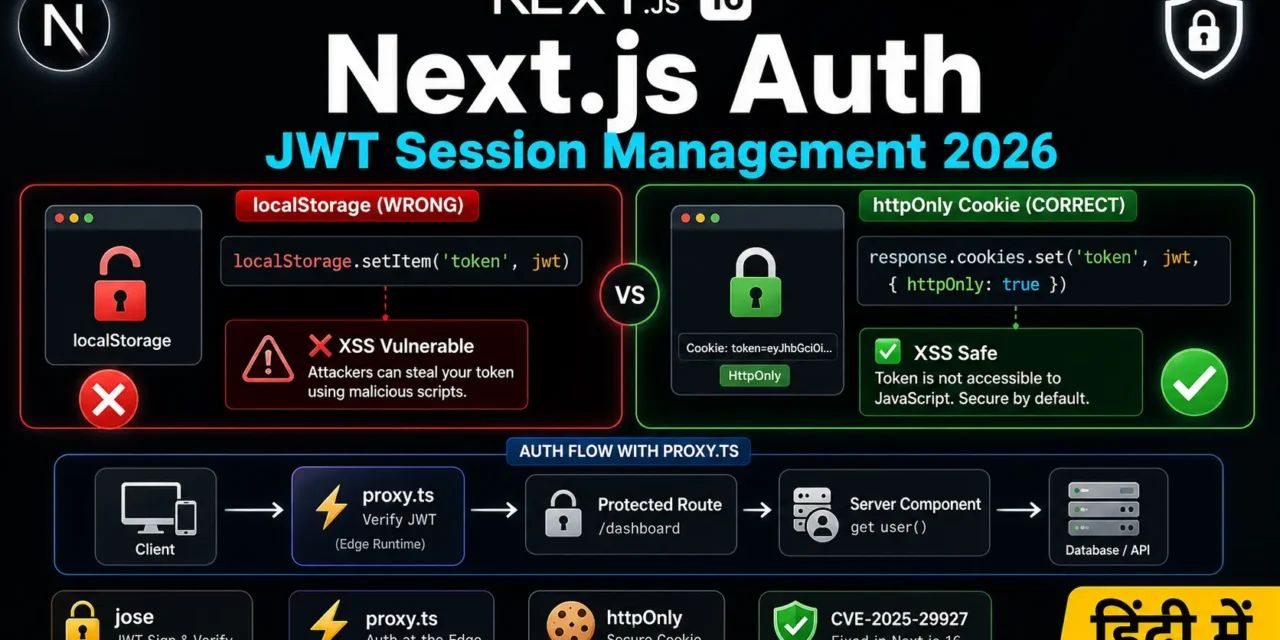
नमस्ते दोस्तों! 🙏 स्वागत है The Easy Master पर!
क्या तुमने कभी सोचा है – Next.js App Router में JWT authentication कैसे implement करें? localStorage में token store करें या httpOnly cookies में? Edge Middleware में token verify कैसे करें?
JWT authentication Next.js 16 में completely transform हो गया है – proxy.ts ने middleware.ts replace किया, और jose अब standard है (Edge Runtime support के लिए).
Next.js authentication JWT session management Hindi में समझना बहुत जरूरी है क्योंकि:
- httpOnly cookies – XSS attacks से बचाती हैं
- Edge Runtime –
jsonwebtokenकाम नहीं करता,joseचाहिए - Server Components – बिना client-side JS के session access कर सकते हैं
- Hydration mismatches – cookies से solve होते हैं
- CVE-2025-29927 – middleware-only protection bypassable है
Aaj kya seekhoge?
| Topic | Kya Seekhega? |
|---|---|
| Token Storage Strategy | localStorage vs httpOnly cookie vs in-memory (Zustand) |
| proxy.ts Setup | Next.js 16 का new middleware |
| jose vs jsonwebtoken | Edge Runtime में क्या काम करता है |
| Login API | httpOnly cookie set करना |
| Route Protection | proxy.ts से protected routes |
| Server Component Session | headers() से user data access |
| Server Actions Auth | Action में session verify |
| Auth Libraries 2026 | Clerk, Better Auth, Auth.js v5 |
Kya tumhe pata hai? CVE-2025-29927 में पता चला कि x-middleware-subrequest header spoof करके middleware-only session protection bypass किया जा सकता है – इसलिए defense-in-depth जरूरी है!
तो चलिए शुरू करते हैं – Next.js authentication JWT session management Hindi सीखने का सफर! 🚀
Table of Contents
1. JWT Session Management – Introduction
The Problem with Traditional Authentication
पहले हम localStorage में JWT store करते थे – लेकिन इससे कई problems आती हैं:
The Solution: httpOnly Cookies
httpOnly cookies इन सभी problems को solve करती हैं:
Next.js authentication JWT session management Hindi में हम httpOnly cookie-based authentication implement करेंगे।
2. Token Storage – localStorage vs httpOnly Cookie vs In-Memory
Comparison Table
| Storage Method | XSS Risk | CSRF Risk | SSR Support | Automatic Requests | Persistence |
|---|---|---|---|---|---|
| localStorage | 🔴 High | 🟢 Low | 🔴 No | 🔴 Manual | ✅ Yes |
| httpOnly Cookie | 🟢 None | 🟡 Medium | ✅ Yes | ✅ Yes | ✅ Yes |
| In-Memory (Zustand/Redux) | 🟢 Low | 🟢 Low | 🔴 No | 🔴 Manual | 🔴 No |
Recommendation
✅ RECOMMENDED: httpOnly Cookie + Refresh Token Pattern

- Access Token: Short-lived (15-60 min), httpOnly cookie mein store
- Refresh Token: Long-lived (7-30 days), httpOnly cookie mein store
- Optional In-Memory: Access token copy for client-side convenience [citation:2]

❌ AVOID: localStorage
localStorage.setItem('token', jwt); // ❌ DO NOT DO THIS! [citation:7]

✅ DO THIS INSTEAD:
response.cookies.set('token', jwt, {
  httpOnly: true,
  secure: process.env.NODE_ENV === 'production',
  sameSite: 'lax',
  path: '/',
  maxAge: 60 * 60 * 24 // 24 hours
}); [citation:7]
Why In-Memory (Zustand) Sometimes?
Some implementations use in-memory store + httpOnly refresh token pattern :
- Refresh token: httpOnly cookie में (automatic, secure)
- Access token: in-memory (Zustand) में (client-side convenience)
- Page refresh पर:
/auth/refreshcall करके new access token लेना
यह most secure pattern है – access token कभी persistent storage में नहीं जाता।
3. Next.js 16 Authentication – proxy.ts
Next.js 16 में middleware.ts को deprecated कर proxy.ts replace कर दिया गया है .
The Change
| Before (Next.js 15) | After (Next.js 16) |
|---|---|
middleware.ts file | proxy.ts file |
export function middleware() | export function proxy() or export default function proxy() |
| Edge Runtime (default) | Node.js Runtime (fixed) |
Why the Change?
middleware.ts name ambiguous था – यह edge middleware भी हो सकता था, application middleware भी। proxy.ts स्पष्ट करता है: यह network boundary पर runs है.
Additionally, proxy.ts Node.js runtime पर runs है – Edge पर नहीं। इसलिए jose जैसे pure Web Crypto libraries use करने ही पड़ते हैं (full Node.js crypto module available है, लेकि consistency के लिए jose recommended है).
Basic proxy.ts Structure
// proxy.ts (root of project)
import { NextResponse } from 'next/server';
import type { NextRequest } from 'next/server';

export function proxy(request: NextRequest) {
  // Lightweight authentication check
  const token = request.cookies.get('auth_token');

  if (!token) {
    return NextResponse.redirect(new URL('/login', request.url));
  }

  return NextResponse.next();
}

// Tell Next.js which paths this proxy runs on
export const config = {
  matcher: ['/dashboard/:path*', '/settings/:path*'],
};
⚠️ Important: The
proxyfile and named export are both renamed frommiddleware. Default exports work without code changes, but for clarity, named exportproxyis recommended.
A couple of important points: The
proxyruns exclusively on Node.js – giving auth libraries access to the full Node API but removing edge execution as an option. Keep it light – useproxy.tsfor high-level traffic control, not heavy JWT verification. Move complexity (detailed validation, role checks) to Server Components.
4. jose vs jsonwebtoken – Edge Runtime में क्या Use करें
The Problem with jsonwebtoken
The popular jsonwebtoken package relies on Node.js’s built-in crypto module, which is unavailable in Edge Runtime environments. It will throw at runtime in proxy.ts.
Solution: jose
jose is a pure Web Crypto API implementation that works in:
- Edge Runtime (Cloudflare Workers, Vercel Edge)
- Next.js
proxy.ts(Node.js runtime, but consistent API) - Service Workers
- Browsers
Why jose for Next.js 16?
Though Next.js 16’s proxy.ts runs on Node.js (not the edge runtime), jose is still the right choice because:
- Consistency – Same code works whether you’re in
proxy.tsor actual edge functions - Future-proof – If you ever move to edge, no code changes needed
- Smaller bundle – No Node.js native dependencies
- Standard – Uses Web APIs available everywhere
Installation
npm install jose⚠️ TypeScript types included – no
@types/joseneeded.
Basic jose Usage
import { SignJWT, jwtVerify } from 'jose';

const secret = new TextEncoder().encode(process.env.JWT_SECRET!);

// Sign JWT
const token = await new SignJWT({ userId: '123', role: 'admin' })
  .setProtectedHeader({ alg: 'HS256' })
  .setIssuedAt()
  .setExpirationTime('1h')
  .sign(secret);

// Verify JWT
const { payload } = await jwtVerify(token, secret);
console.log(payload.userId); // '123'
5. Login – JWT Generate aur httpOnly Cookie Set
API Route (Route Handler)
// app/api/auth/login/route.ts
import { NextRequest, NextResponse } from 'next/server';
import { SignJWT } from 'jose';
import { compare } from 'bcryptjs';
import { db } from '@/lib/db';

const JWT_SECRET = new TextEncoder().encode(process.env.JWT_SECRET!);

export async function POST(req: NextRequest) {
  try {
    const { email, password } = await req.json();

    // 1. Find user in database
    const user = await db.user.findUnique({ where: { email } });
    if (!user) {
      return NextResponse.json(
        { error: 'Invalid credentials' },
        { status: 401 }
      );
    }

    // 2. Verify password
    const isValid = await compare(password, user.passwordHash);
    if (!isValid) {
      return NextResponse.json(
        { error: 'Invalid credentials' },
        { status: 401 }
      );
    }

    // 3. Generate JWT
    const token = await new SignJWT({
      sub: user.id,
      email: user.email,
      role: user.role
    })
      .setProtectedHeader({ alg: 'HS256' })
      .setIssuedAt()
      .setExpirationTime('24h')
      .sign(JWT_SECRET);

    // 4. Create response with httpOnly cookie
    const response = NextResponse.json({
      success: true,
      user: { id: user.id, name: user.name, email: user.email, role: user.role }
    });

    // Set httpOnly cookie
    response.cookies.set('auth_token', token, {
      httpOnly: true,
      secure: process.env.NODE_ENV === 'production',
      sameSite: 'lax',
      path: '/',
      maxAge: 60 * 60 * 24 // 24 hours
    });

    return response;
  } catch (error) {
    console.error('Login error:', error);
    return NextResponse.json(
      { error: 'Internal server error' },
      { status: 500 }
    );
  }
}
Login Form (Client Component)
// app/login/page.tsx
'use client';
import { useState } from 'react';
import { useRouter } from 'next/navigation';

export default function LoginPage() {
  const router = useRouter();
  const [email, setEmail] = useState('');
  const [password, setPassword] = useState('');
  const [error, setError] = useState('');
  const [loading, setLoading] = useState(false);

  const handleSubmit = async (e: React.FormEvent) => {
    e.preventDefault();
    setLoading(true);
    setError('');

    try {
      const res = await fetch('/api/auth/login', {
        method: 'POST',
        headers: { 'Content-Type': 'application/json' },
        body: JSON.stringify({ email, password })
      });

      const data = await res.json();

      if (!res.ok) {
        throw new Error(data.error || 'Login failed');
      }

      // Redirect to dashboard
      router.push('/dashboard');
      router.refresh(); // Refresh server components
    } catch (err) {
      setError(err instanceof Error ? err.message : 'Login failed');
    } finally {
      setLoading(false);
    }
  };

  return (
    <form onSubmit={handleSubmit}>
      <input
        type="email"
        value={email}
        onChange={(e) => setEmail(e.target.value)}
        placeholder="Email"
        required
      />
      <input
        type="password"
        value={password}
        onChange={(e) => setPassword(e.target.value)}
        placeholder="Password"
        required
      />
      {error && <p className="text-red-500">{error}</p>}
      <button type="submit" disabled={loading}>
        {loading ? 'Logging in...' : 'Login'}
      </button>
    </form>
  );
}
6. Logout – Cookie Clear
Server Action for Logout
// app/actions/auth.ts
'use server';
import { cookies } from 'next/headers';
import { redirect } from 'next/navigation';

export async function logout() {
  const cookieStore = await cookies();
  cookieStore.delete('auth_token');
  redirect('/login');
}
Logout Button
'use client';
import { logout } from '@/app/actions/auth';

export function LogoutButton() {
  return (
    <form action={logout}>
      <button type="submit">Sign Out</button>
    </form>
  );
}
7. proxy.ts – Route Protection
Complete proxy.ts with JWT Verification
// proxy.ts (root of project)
import { NextRequest, NextResponse } from 'next/server';
import { jwtVerify } from 'jose';

const JWT_SECRET = new TextEncoder().encode(process.env.JWT_SECRET!);

// Routes that require authentication
const PROTECTED_ROUTES = ['/dashboard', '/profile', '/settings'];
// Routes that are public (auth pages)
const PUBLIC_ROUTES = ['/login', '/register', '/forgot-password'];

export async function proxy(request: NextRequest) {
  const { pathname } = request.nextUrl;

  // Allow public routes
  if (PUBLIC_ROUTES.some(route => pathname.startsWith(route))) {
    return NextResponse.next();
  }

  // Check if route needs protection
  const isProtected = PROTECTED_ROUTES.some(route => pathname.startsWith(route));
  if (!isProtected) {
    return NextResponse.next();
  }

  // Get token from httpOnly cookie
  const token = request.cookies.get('auth_token')?.value;

  if (!token) {
    const loginUrl = new URL('/login', request.url);
    loginUrl.searchParams.set('redirect', pathname);
    return NextResponse.redirect(loginUrl);
  }

  try {
    // Verify JWT signature and expiration
    const { payload } = await jwtVerify(token, JWT_SECRET);

    // Forward user claims as headers for Server Components
    const requestHeaders = new Headers(request.headers);
    requestHeaders.set('x-user-id', String(payload.sub));
    requestHeaders.set('x-user-email', String(payload.email || ''));
    requestHeaders.set('x-user-role', String(payload.role || 'user'));

    return NextResponse.next({
      request: { headers: requestHeaders }
    });
  } catch (error) {
    // Token expired or invalid
    const response = NextResponse.redirect(new URL('/login', request.url));
    response.cookies.delete('auth_token');
    return response;
  }
}

// Configure which routes the proxy runs on
export const config = {
  matcher: [
    /*
     * Match all request paths except:
     * - _next/static (static files)
     * - _next/image (image optimization files)
     * - favicon.ico (favicon file)
     * - public folder
     */
    '/((?!_next/static|_next/image|favicon.ico|.*\\.(?:svg|png|jpg|jpeg|gif|webp)$).*)',
  ],
};
Important Security Note (CVE-2025-29927):
It’s worth noting a significant security vulnerability disclosed in March 2025:
x-middleware-subrequestheader can be spoofed to bypass middleware-only session protection. Never rely solely onproxy.tsfor authorization – always verify permissions again in Server Components and Server Actions.This is called defense-in-depth: use
proxy.tsfor initial route-level checks, but verify every time closer to your data.
8. Server Components – User Session Access
Once proxy.ts forwards user claims as headers, any Server Component can read them.
Option 1: Reading Forwarded Headers
// app/dashboard/page.tsx
import { headers } from 'next/headers';

export default async function DashboardPage() {
  const headersList = await headers();
  const userId = headersList.get('x-user-id');
  const userEmail = headersList.get('x-user-email');
  const userRole = headersList.get('x-user-role');

  if (!userId) {
    // proxy should have caught this, but defensive check
    return <p>Not authenticated</p>;
  }

  // Fetch user-specific data
  const userData = await fetchUserData(userId);

  return (
    <div>
      <h1>Dashboard</h1>
      <p>Welcome, {userEmail}!</p>
      <p>Your role: {userRole}</p>
      {/* Role-based UI */}
      {userRole === 'admin' && <AdminPanel />}
    </div>
  );
}
Option 2: Direct Cookie Verification (No Header Forwarding)
If you prefer not to use headers, verify the token directly in Server Components:
// lib/auth.ts
import { cookies } from 'next/headers';
import { jwtVerify, type JWTPayload } from 'jose';

const JWT_SECRET = new TextEncoder().encode(process.env.JWT_SECRET!);

export interface AuthUser extends JWTPayload {
  sub: string;
  email: string;
  role: string;
}

export async function getCurrentUser(): Promise<AuthUser | null> {
  const cookieStore = await cookies();
  const token = cookieStore.get('auth_token')?.value;

  if (!token) return null;

  try {
    const { payload } = await jwtVerify(token, JWT_SECRET);
    return payload as AuthUser;
  } catch {
    return null;
  }
}// app/dashboard/page.tsx
import { getCurrentUser } from '@/lib/auth';
import { redirect } from 'next/navigation';
export default async function DashboardPage() {
const user = await getCurrentUser();
if (!user) {
redirect('/login');
}
return (
<div>
<h1>Welcome, {user.email}!</h1>
{/* Your dashboard content */}
</div>
);
}9. Server Actions – Action-Level Authentication
Server Actions create public HTTP POST endpoints – they must include their own authentication checks. Don’t rely solely on proxy.ts protection!
// app/actions/user.ts
'use server';
import { cookies } from 'next/headers';
import { jwtVerify } from 'jose';
import { revalidatePath } from 'next/cache';

const JWT_SECRET = new TextEncoder().encode(process.env.JWT_SECRET!);

// Helper to get current user in Server Actions
async function getCurrentUser() {
  const cookieStore = await cookies();
  const token = cookieStore.get('auth_token')?.value;

  if (!token) return null;

  try {
    const { payload } = await jwtVerify(token, JWT_SECRET);
    return payload;
  } catch {
    return null;
  }
}

export async function updateProfile(formData: FormData) {
  // 1. Authenticate – ALWAYS check!
  const user = await getCurrentUser();
  if (!user) {
    throw new Error('Unauthorized');
  }

  // 2. Authorize – check permissions
  if (user.role !== 'admin' && user.sub !== formData.get('userId')) {
    throw new Error('Forbidden');
  }

  // 3. Update data
  const name = formData.get('name');
  await db.user.update({
    where: { id: user.sub },
    data: { name }
  });

  // 4. Revalidate cache
  revalidatePath('/profile');
}

export async function deleteUser(userId: string) {
  const user = await getCurrentUser();

  if (!user) throw new Error('Unauthorized');
  if (user.role !== 'admin') throw new Error('Admin access required');

  await db.user.delete({ where: { id: userId } });
  revalidatePath('/admin/users');
}
Client Component Usage
'use client';
import { updateProfile, deleteUser } from '@/app/actions/user';

export function ProfileForm({ userId, currentName }: { userId: string; currentName: string }) {
  return (
    <form action={updateProfile}>
      <input type="hidden" name="userId" value={userId} />
      <input name="name" defaultValue={currentName} />
      <button type="submit">Update Profile</button>
    </form>
  );
}
10. Silent Refresh – Session Extension
Why Silent Refresh?
Access token short-lived (24 hours) होता है – session extend करने के लिए silent refresh चाहिए।
Refresh Token Pattern
There are two common patterns:
Pattern 1: Single Token + Short Expiry
- Single token with short expiry (e.g., 24 hours)
- User automatically logged out after expiry
- Simple, no refresh endpoint needed
Pattern 2: Access + Refresh Tokens (Two Cookies)
// Login sets both cookies
response.cookies.set('access_token', accessToken, {
  httpOnly: true,
  maxAge: 60 * 15 // 15 minutes
});
response.cookies.set('refresh_token', refreshToken, {
  httpOnly: true,
  maxAge: 60 * 60 * 24 * 7 // 7 days
});

// Refresh endpoint
// app/api/auth/refresh/route.ts
export async function POST(req: NextRequest) {
  const refreshToken = req.cookies.get('refresh_token')?.value;

  if (!refreshToken) {
    return NextResponse.json({ error: 'No refresh token' }, { status: 401 });
  }

  try {
    const { payload } = await jwtVerify(refreshToken, REFRESH_SECRET);

    // Issue new access token
    const newAccessToken = await new SignJWT({ sub: payload.sub })
      .setProtectedHeader({ alg: 'HS256' })
      .setIssuedAt()
      .setExpirationTime('15m')
      .sign(ACCESS_SECRET);

    const response = NextResponse.json({ success: true });
    response.cookies.set('access_token', newAccessToken, {
      httpOnly: true,
      maxAge: 60 * 15
    });

    return response;
  } catch {
    return NextResponse.json({ error: 'Invalid refresh token' }, { status: 401 });
  }
}
Pattern 3: In-Memory Access Token + httpOnly Refresh Token
This pattern stores access token in memory (Zustand) and refresh token in httpOnly cookie – most secure but requires more client-side code.
// auth store (Zustand)
const useAuthStore = create((set) => ({
  accessToken: null,
  setAccessToken: (token) => set({ accessToken: token }),
  logout: () => {
    set({ accessToken: null });
    fetch('/api/auth/logout', { method: 'POST' });
  }
}));

// Silent refresh on page load
useEffect(() => {
  fetch('/api/auth/refresh', { method: 'POST' })
    .then(res => res.json())
    .then(data => {
      if (data.accessToken) {
        setAccessToken(data.accessToken);
      }
    });
}, []);
11. Complete Example – Full Auth System
Project Structure
my-app/
├── app/
│   ├── (auth)/
│   │   ├── login/
│   │   │   └── page.tsx
│   │   └── register/
│   │       └── page.tsx
│   ├── (protected)/
│   │   ├── dashboard/
│   │   │   └── page.tsx
│   │   ├── profile/
│   │   │   └── page.tsx
│   │   └── layout.tsx
│   ├── actions/
│   │   └── auth.ts
│   ├── api/
│   │   └── auth/
│   │       ├── login/
│   │       │   └── route.ts
│   │       ├── register/
│   │       │   └── route.ts
│   │       └── refresh/
│   │           └── route.ts
│   ├── layout.tsx
│   └── page.tsx
├── lib/
│   ├── auth.ts
│   └── db.ts
├── proxy.ts
└── .env
Complete lib/auth.ts
// lib/auth.ts
import { cookies } from 'next/headers';
import { SignJWT, jwtVerify, type JWTPayload } from 'jose';

const JWT_SECRET = new TextEncoder().encode(process.env.JWT_SECRET!);
const REFRESH_SECRET = new TextEncoder().encode(process.env.JWT_REFRESH_SECRET!);

export interface SessionUser extends JWTPayload {
  sub: string;
  email: string;
  name: string;
  role: 'user' | 'admin';
}

export async function createSession(user: {
  id: string;
  email: string;
  name: string;
  role: 'user' | 'admin';
}) {
  const accessToken = await new SignJWT({
    sub: user.id,
    email: user.email,
    name: user.name,
    role: user.role
  })
    .setProtectedHeader({ alg: 'HS256' })
    .setIssuedAt()
    .setExpirationTime('15m')
    .sign(JWT_SECRET);

  const refreshToken = await new SignJWT({ sub: user.id })
    .setProtectedHeader({ alg: 'HS256' })
    .setIssuedAt()
    .setExpirationTime('7d')
    .sign(REFRESH_SECRET);

  return { accessToken, refreshToken };
}

export async function getSession(): Promise<SessionUser | null> {
  const cookieStore = await cookies();
  const token = cookieStore.get('auth_token')?.value;

  if (!token) return null;

  try {
    const { payload } = await jwtVerify(token, JWT_SECRET);
    return payload as SessionUser;
  } catch {
    return null;
  }
}

export async function requireAuth(): Promise<SessionUser> {
  const user = await getSession();
  if (!user) throw new Error('Unauthorized');
  return user;
}

export async function requireRole(role: 'user' | 'admin'): Promise<SessionUser> {
  const user = await requireAuth();
  if (user.role !== role) throw new Error('Forbidden');
  return user;
}
Protected Layout
// app/(protected)/layout.tsx
import { getSession } from '@/lib/auth';
import { redirect } from 'next/navigation';
import { LogoutButton } from '@/components/LogoutButton';

export default async function ProtectedLayout({
  children,
}: {
  children: React.ReactNode;
}) {
  const user = await getSession();

  if (!user) {
    redirect('/login');
  }

  return (
    <div>
      <header className="flex justify-between p-4 bg-gray-800">
        <div>Welcome, {user.name}!</div>
        <LogoutButton />
      </header>
      <main>{children}</main>
    </div>
  );
}
Complete proxy.ts
// proxy.ts
import { NextRequest, NextResponse } from 'next/server';
import { jwtVerify } from 'jose';

const JWT_SECRET = new TextEncoder().encode(process.env.JWT_SECRET!);

const PUBLIC_ROUTES = ['/login', '/register', '/forgot-password', '/'];
const PROTECTED_ROUTES = ['/dashboard', '/profile', '/settings', '/admin'];

export async function proxy(request: NextRequest) {
  const { pathname } = request.nextUrl;

  // Allow public routes and static assets
  if (
    PUBLIC_ROUTES.includes(pathname) ||
    pathname.startsWith('/_next') ||
    pathname.includes('.')
  ) {
    return NextResponse.next();
  }

  // Check if route needs protection
  const isProtected = PROTECTED_ROUTES.some(route => pathname.startsWith(route));

  if (!isProtected) {
    return NextResponse.next();
  }

  const token = request.cookies.get('auth_token')?.value;

  if (!token) {
    const loginUrl = new URL('/login', request.url);
    loginUrl.searchParams.set('redirect', pathname);
    return NextResponse.redirect(loginUrl);
  }

  try {
    await jwtVerify(token, JWT_SECRET);
    return NextResponse.next();
  } catch {
    const response = NextResponse.redirect(new URL('/login', request.url));
    response.cookies.delete('auth_token');
    return response;
  }
}

export const config = {
  matcher: [
    '/((?!_next/static|_next/image|favicon.ico|.*\\.(?:svg|png|jpg|jpeg|gif|webp)$).*)',
  ],
};
12. Auth Libraries 2026 – Overview
Comparison of Major Auth Solutions
| Library | Best For | proxy.ts Support | Server Components | Edge Support | Self-Hosted |
|---|---|---|---|---|---|
| Better Auth | New projects | ✅ Yes | ✅ Yes | ✅ Yes | ✅ Yes |
| Clerk | Fast setup, pre-built UI | ✅ Yes | ✅ Yes | ✅ Yes | ❌ No |
| Auth.js v5 | Existing v4 projects | ✅ Yes (with config) | ✅ Yes | ✅ Edge-incompatible (database sessions) | ✅ Yes |
| Supabase Auth | PostgreSQL + Row Level Security | ✅ Yes | ✅ Yes | ⚠️ Limited | ✅ Yes |
| Auth0 | Enterprise SSO | ⚠️ Pending | ✅ Yes | ⚠️ Limited | ❌ No |
Auth.js v5 (Formerly NextAuth)
Status: Auth.js v5 maintainers now recommend Better Auth for new projects. The library is in security-patch mode.
Next.js 16 compatibility: Auth.js v5’s documented pattern predates the middleware.ts → proxy.ts rename. The fix:
// proxy.ts – for Auth.js v5
import NextAuth from "next-auth"
import { authConfig } from "./auth.config"

export default NextAuth(authConfig).auth

export const config = {
  matcher: ["/dashboard/:path*", "/settings/:path*"],
}
Important: Import
authConfighere, notauth.ts. Importingauth.tspulls in the Prisma adapter, which references Node.js APIs unavailable in the edge runtime where session verification runs. The split config exists precisely to prevent this.
Clerk
Clerk is a hosted identity platform – the session store, user database, and JWT signing keys all live in Clerk’s infrastructure.
Installation:
npm install @clerk/nextjsproxy.ts configuration:
// proxy.ts
import { clerkMiddleware } from "@clerk/nextjs/server"

export const proxy = clerkMiddleware()

export const config = {
  matcher: [
    "/((?!_next|[^?]*\\.(?:html?|css|js(?!on)|jpe?g|webp|png|gif|svg|ttf|woff2?|ico|csv|docx?|xlsx?|zip|webmanifest)).*)",
    "/(api|trpc)(.*)",
  ],
}clerkMiddleware()runs at the edge and validates session token cryptographically against Clerk’s cached JWKS endpoint – with no database call and no Node.js runtime required.- Server Component helper:
// app/dashboard/page.tsx
import { auth } from "@clerk/nextjs/server"

export default async function DashboardPage() {
  const { userId } = await auth()
  if (!userId) return <div>Not authenticated</div>
  return <div>Welcome!</div>
}
Better Auth
Better Auth is the modern replacement for Auth.js – fully Edge-compatible, TypeScript-first, and actively maintained.
Installation:
bun add better-authSetup:
// src/auth/config.ts
import { betterAuth } from "better-auth";

export const auth = betterAuth({
  database: {
    provider: "sqlite", // or "postgresql"
    url: process.env.DATABASE_URL,
  },
  emailAndPassword: {
    enabled: true,
  },
  socialProviders: {
    github: {
      clientId: process.env.GITHUB_CLIENT_ID!,
      clientSecret: process.env.GITHUB_CLIENT_SECRET!,
    },
  },
});
Then you can integrate with Next.js App Router – see the Better Auth Next.js documentation for full setup.
13. Common Mistakes + Solutions
Mistake 1: Storing JWT in localStorage
// ❌ DANGEROUS
localStorage.setItem('token', jwt);

// ✅ Use httpOnly cookie
response.cookies.set('token', jwt, { httpOnly: true }); [citation:1][citation:7]
Mistake 2: Using jsonwebtoken in proxy.ts
// ❌ Throws error in edge runtime
import jwt from 'jsonwebtoken';

// ✅ Use jose
import { jwtVerify } from 'jose'; [citation:7]
Mistake 3: Relying only on proxy.ts for authorization
// proxy.ts has this check – BUT it can be bypassed! (CVE-2025-29927)
// ✅ ALWAYS verify in Server Components and Server Actions too [citation:9]
Remember: The vulnerability where x-middleware-subrequest header can be spoofed means defense-in-depth is non-negotiable. Never trust that proxy.ts alone will protect your routes.
Mistake 4: Forgetting await with cookies() in Next.js 15/16
// ❌ Sync access – will error
const cookieStore = cookies();

// ✅ Async access – required
const cookieStore = await cookies(); [citation:6]
14. Quick Cheat Sheet
Installation
# Core dependencies
npm install jose bcryptjs

# Database (if using)
npm install prisma @prisma/client

# Auth libraries (choose one)
npm install @clerk/nextjs
# or
npm install better-auth
# or
npm install next-auth@beta   # Auth.js v5
jose Cheat Sheet
import { SignJWT, jwtVerify } from 'jose';

const secret = new TextEncoder().encode(process.env.JWT_SECRET!);

// Sign
const token = await new SignJWT({ userId: '123' })
  .setProtectedHeader({ alg: 'HS256' })
  .setIssuedAt()
  .setExpirationTime('1h')
  .sign(secret);

// Verify
const { payload } = await jwtVerify(token, secret);
Cookie Operations
// Set cookie
response.cookies.set('name', value, {
  httpOnly: true,
  secure: process.env.NODE_ENV === 'production',
  sameSite: 'lax',
  maxAge: 60 * 60 * 24
});

// Get cookie (Server Component)
const cookieStore = await cookies();
const token = cookieStore.get('name')?.value;

// Delete cookie (Server Action)
cookieStore.delete('name');
proxy.ts Template
import { NextRequest, NextResponse } from 'next/server';
import { jwtVerify } from 'jose';

const SECRET = new TextEncoder().encode(process.env.JWT_SECRET!);
const PROTECTED = ['/dashboard', '/profile'];

export async function proxy(req: NextRequest) {
  const { pathname } = req.nextUrl;

  if (PROTECTED.some(p => pathname.startsWith(p))) {
    const token = req.cookies.get('auth_token')?.value;
    if (!token) return NextResponse.redirect(new URL('/login', req.url));
    try {
      await jwtVerify(token, SECRET);
    } catch {
      return NextResponse.redirect(new URL('/login', req.url));
    }
  }
  return NextResponse.next();
}

export const config = { matcher: ['/((?!_next/static|favicon.ico).*)'] };
15. FAQ
Q1: Next.js authentication JWT session management Hindi में सबसे important kya hai?
httpOnly cookies – यह XSS attacks से बचाती हैं और SSR-friendly हैं। localStorage use करना security risk है।
Q2: proxy.ts और middleware.ts में kya antar hai?
proxy.ts Next.js 16 में नया file है जो middleware.ts replace करता है – यह स्पष्ट करता है कि code network boundary पर runs है। proxy.ts Node.js runtime पर runs है (Edge पर नहीं)।
Q3: jose क्यों use karein, jsonwebtoken क्यों नहीं?
jsonwebtoken Node.js crypto module पर depend करता है जो edge runtime (and technically proxy.ts even though Node) में consistent availability नहीं है – jose pure Web Crypto API है जो everywhere काम करता है।
Q4: proxy.ts में jsonwebtoken use kar sakte hain kya?
proxy.ts अब Node.js runtime पर runs है, technically jsonwebtoken काम कर सकता है, but jose recommended है – consistent codebase के लिए।
Q5: Token store कहाँ karein?
Production apps में httpOnly cookies best practice है।
Q6: proxy.ts alone enough है security के लिए?
No! CVE-2025-29927 shows middleware-only protection can be bypassed. Always verify authorization again in Server Components and Server Actions – this is called defense-in-depth.
Q7: Server Component में session कैसे access karein?
headers() से forwarded headers read करें या jwtVerify को cookie पर directly call करें।
Q8: Server Action में session कैसे verify karein?
Call await cookies() get the token, then await jwtVerify() – don’t rely on proxy.ts.
Q9: 2026 में कौन सा auth library use karein?
- New projects: Better Auth or Clerk
- Enterprise SSO: Auth0 or WorkOS
- PostgreSQL + RLS: Supabase Auth
- Existing Auth.js v4: Stay or migrate to Better Auth
Q10: Silent refresh kaise implement karein?
Refresh token httpOnly cookie में store करें, access token short-lived rakhe (15-60 min). /api/auth/refresh endpoint बनाएं जो refresh token से new access token issue करे।
16. Conclusion
बहुत बढ़िया दोस्तों! आज हमने Next.js authentication JWT session management Hindi को पूरी detail में समझा।
Quick Recap:
| Layer | Purpose |
|---|---|
| httpOnly Cookie | Secure token storage – XSS safe |
| proxy.ts | Route-level protection (optimistic check) |
| Server Components | Authorization (definitive check) |
| Server Actions | Per-action authentication |
| jose | Edge-compatible JWT library |
Mera personal experience:
Next.js authentication seekhne के बाद maine apni apps को properly secure करना शुरू किया। localStorage से httpOnly cookies में shift करने के बाद security bohot improve हुई। CVE-2025-29927 ने सिखाया कि middleware-only protection sufficient नहीं है – हमेशा defense-in-depth follow करो।
Tum bhi ye steps follow karo:
- ✅
joseinstall करो - ✅
proxy.tsबनाओ - ✅ Login API में
httpOnlycookie set करो - ✅ Server Component में
getCurrentUser()helper बनाओ - ✅ Server Actions में verify करो
अब तुम्हारी बारी है!
नीचे comment में बताओ:
- क्या तुमने
httpOnlycookie-based auth implement kiya है? - तुम्हें कौन सा auth library best लगा?
- अगला topic क्या चाहिए? (Next.js Authorization – Roles & Permissions? OAuth with NextAuth? Authentication Patterns Comparison?)
The Easy Master पर बने रहो। Happy Secure Coding! 🔐🚀
Resources
- Next.js proxy.ts Documentation
- jose npm Package
- Clerk Next.js Documentation
- Better Auth Next.js Guide
- Auth.js Documentation
Additional Resources
- Express.js Setup – पहला Server कैसे बनाएं (Step-by-Step) 2026
- Express.js Routing – GET POST PUT DELETE Complete Guide
- Express Middleware समझे – Application, Router, Error Middleware
- Express req and res Objects – Query, Params, Body, Headers Explained
- Express Static Files और Templating – EJS से Dynamic HTML Banaye
- Express Router – API Routes को Organize करें (Modular Code)
- Express.js में Environment Variables – .env File कैसे Use करें
- Express File Upload Multer Tutorial | Image PDF Hindi 2026
- Express Security – Helmet, CORS, Rate Limiting, Validation (2026)
- Express + TypeScript – Type-Safe API कैसे बनाएं 2026
- Express MongoDB CRUD – Complete REST API Example 2026
- Express Logging – Morgan और Winston से Debug करें
- Express API Testing – Supertest से Routes Test करें
- MongoDB Setup – CRUD Operations समझे (Beginner Guide) 2026
- MongoDB Compass से GUI Database Manage करने का आसान तरीका | Beginner Tutorial 2026
- Node.js MongoDB Connection – Mongoose Setup समझे 2026
- MongoDB Data Modeling – Embedded Documents vs References 2026
- MongoDB Indexing – Query Speed बढ़ने करने का आसान तरीका
- MongoDB Aggregation Pipeline – Stages समझे | Practical Examples
- Express MongoDB CRUD – Complete REST API Example
- Mongoose ODM – Schema, Model, and Validation समझे 2026
- MongoDB Atlas – Cloud Database Free में Deploy करें 2026
- JWT Authentication MongoDB – User Login System कैसे बनाएं 2026
- Next.js App Router – Pages Router से क्या बदला? Complete Guide 2026
- Next.js Server Components – ‘use client’ कब और कहां Use करें
- Next.js Routing – Layouts, Dynamic Routes and Nested Routes 2026
- Next.js 16 New Features – Turbopack, Cache Components and proxy.ts
- Next.js Partial Prerendering – Static and Dynamic Content साथ में