नमस्ते दोस्तों! 🙏
स्वागत है The Easy Master पर!
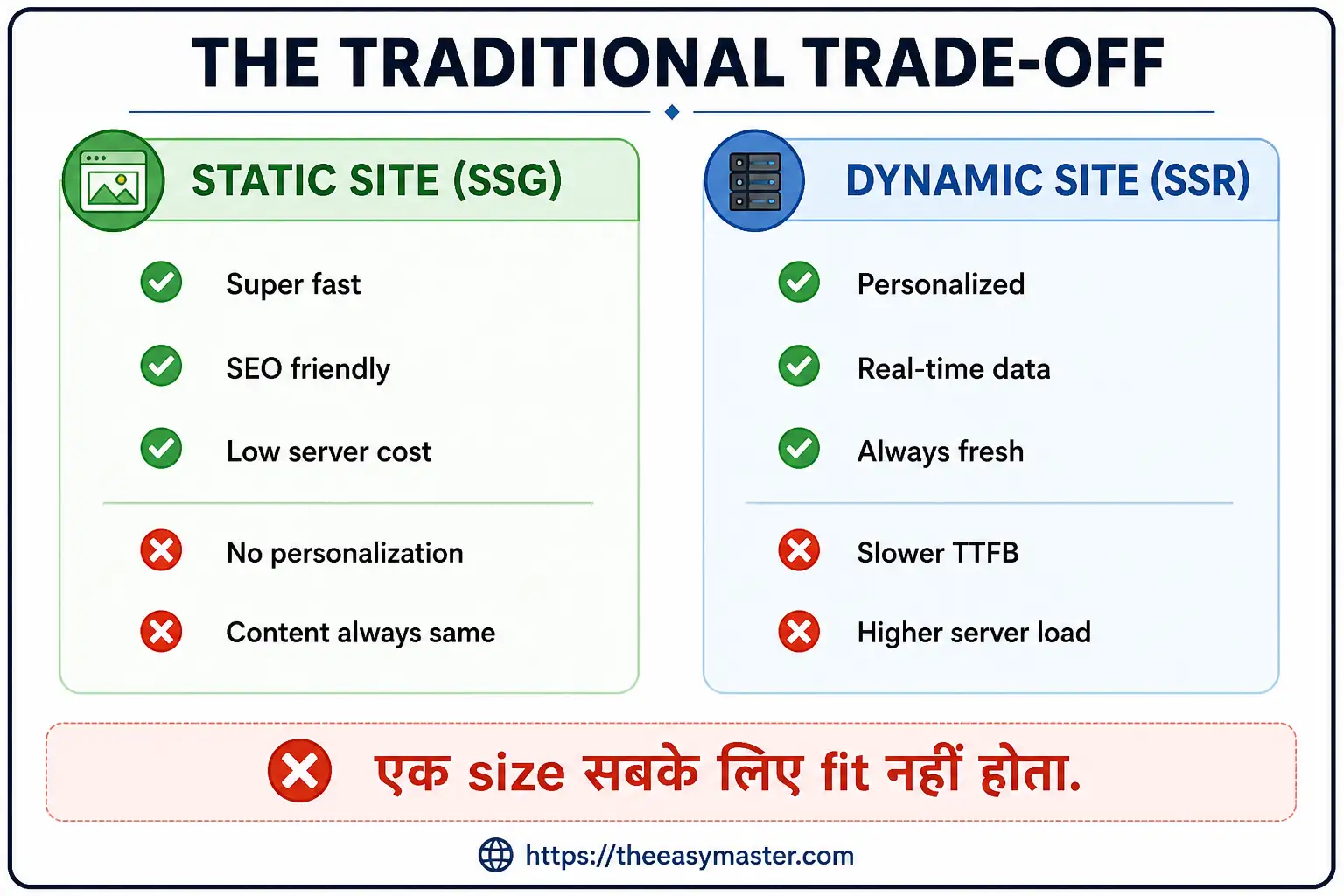
क्या तुमने कभी सोचा है – Static site fast तो होती है, लेकिन personalized content possible नहीं. Dynamic site personalized होती है, लेकिन slow. दोनों worlds के best features को कैसे combine करें?
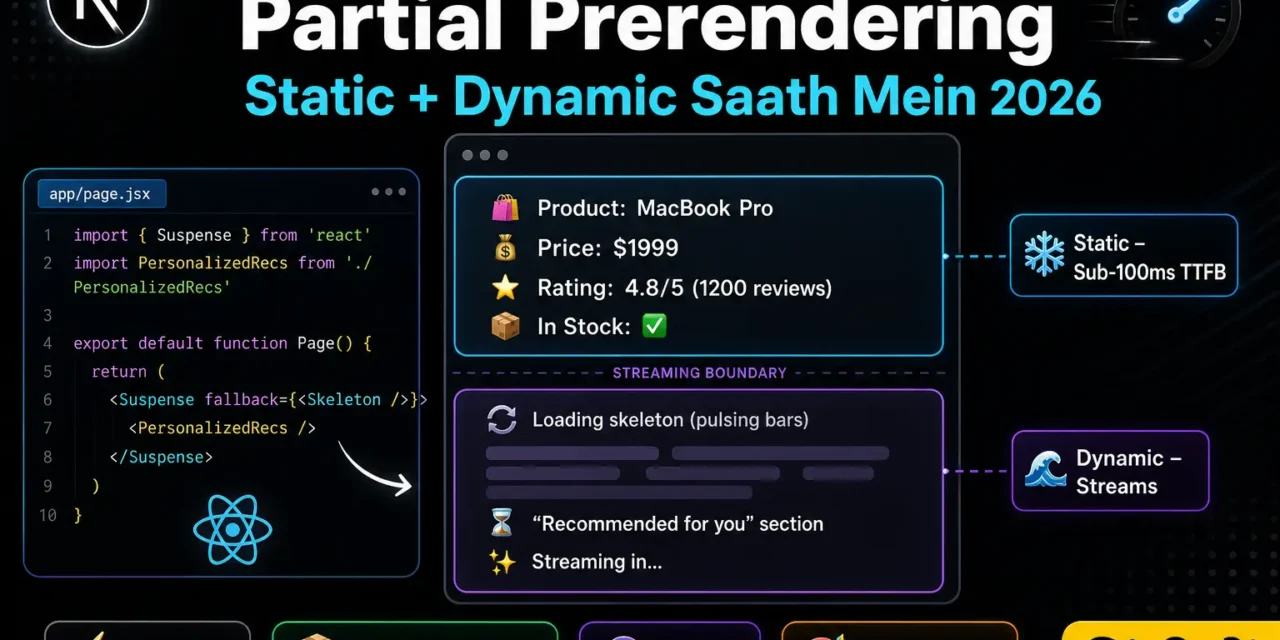
Partial Prerendering (PPR) इस problem का solution है. यह static और dynamic content को same page पर mix करता है – static parts immediately serve, dynamic parts stream in.
Next.js Partial Prerendering Hindi में समझना बहुत जरूरी है क्योंकि:
- Best of both worlds – Static speed + Dynamic personalization
- Sub-100ms TTFB – पहली paint almost instant
- Suspense boundaries – Automatic streaming
- SEO friendly – Static part is fully indexable
- 2026 में Production-ready stable feature है
Aaj kya seekhoge?
| Topic | Kya Seekhega? |
|---|---|
| PPR Kya Hai? | Concept और benefits |
| Suspense Boundaries | Where to add fallback |
| API Routes में PPR | Streaming with Suspense |
| Static vs Dynamic | Kab क्या render होगा |
| Performance Impact | Real-world metrics |
| Configuration | ppr: true setup |
| Advanced Patterns | Shared layouts, parallel routes |
Kya tumhe pata hai?
PPR में static part “prerendered” होता है – जैसे SSG. और dynamic part “streaming” होता है – जैसे SSR. Dono एक page में!
तो चलिए शुरू करते हैं – Next.js Partial Prerendering Hindi सीखने का सफर! 🚀
Table of Contents
1. Partial Prerendering Kya Hai? – Introduction
Partial Prerendering (PPR) Next.js 15 में experimental था, और Next.js 16 में stable हो गया है (Cache Components के साथ).
The Problem:
The Solution (PPR):
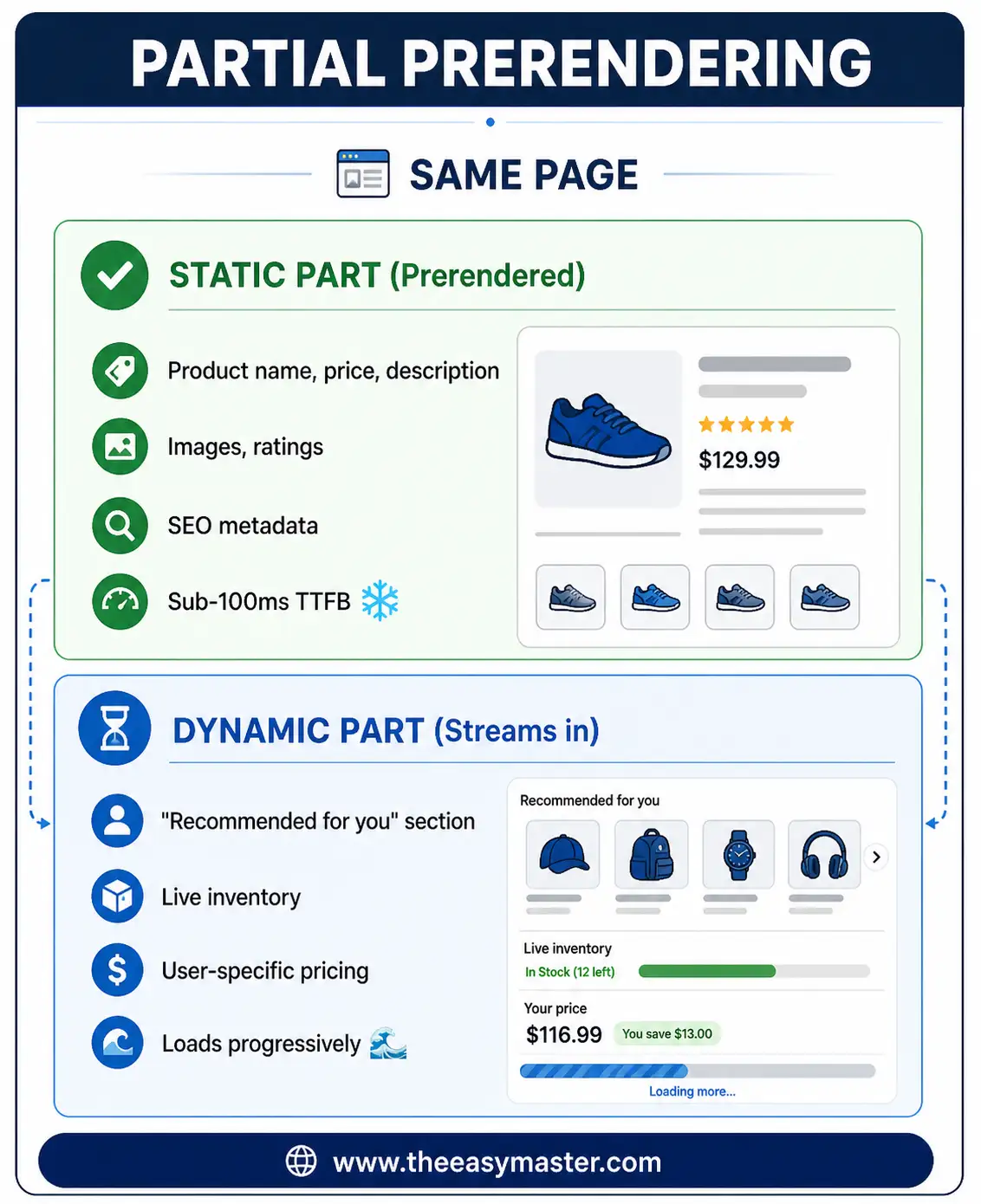
Next.js Partial Prerendering Hindi में हम इस feature को implement करना सीखेंगे.
2. PPR कैसे काम करता है? – Architecture
How PPR Works:
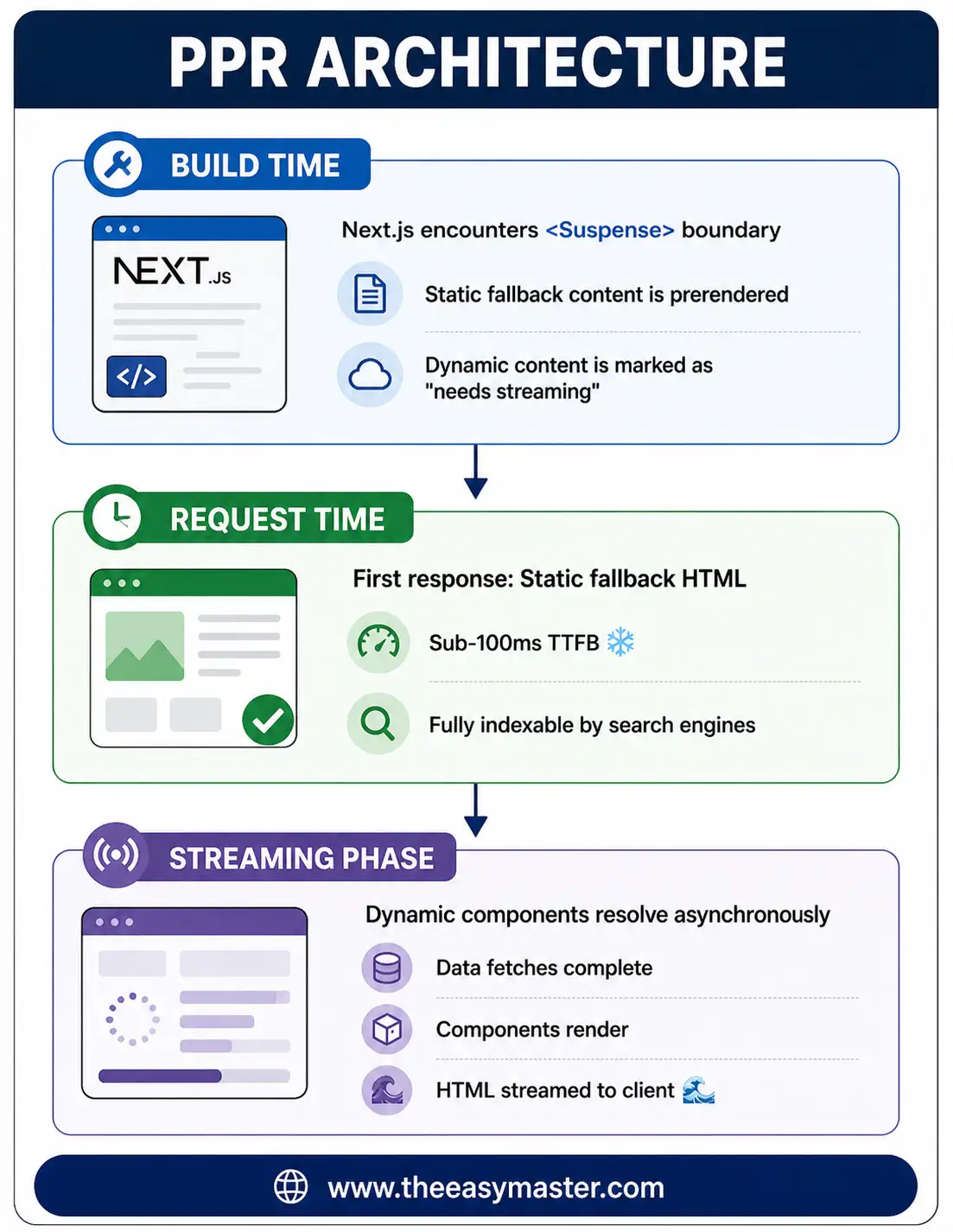
Visual Example:
// app/product/[id]/page.tsx
import { Suspense } from 'react';

// ✅ Static part – prerendered
async function ProductDetails({ id }: { id: string }) {
  const product = await db.product.findUnique({ where: { id } });
  return (
    <div>
      <h1>{product.name}</h1>
      <p>{product.description}</p>
      <span className="price">${product.price}</span>
    </div>
  );
}

// ⏳ Dynamic part – streams in
async function PersonalizedRecommendations({ userId }: { userId: string }) {
  const recs = await getPersonalizedRecs(userId);
  return <RecommendationGrid items={recs} />;
}

export default function ProductPage({ params }) {
  const userId = await getCurrentUser(); // Or cookies()

  return (
    <div>
      {/* Static – loads instantly */}
      <ProductDetails id={params.id} />

      {/* Dynamic – streams in after */}
      <Suspense fallback={<RecommendationSkeleton />}>
        <PersonalizedRecommendations userId={userId} />
      </Suspense>
    </div>
  );
}
Result:
- Product details immediately visible (sub-100ms)
- Recommendations load in background
- Search engines see complete product info
3. PPR Configuration – Enable करना
Step 1: Enable in next.config.ts
// next.config.ts
import type { NextConfig } from "next";

const nextConfig: NextConfig = {
  // Enable Partial Prerendering
  experimental: {
    ppr: true,
  },
  // OR if using Cache Components (Next.js 16+)
  cacheComponents: true,
};

export default nextConfig;
Note: Next.js 16 में cacheComponents: true PPR को भी enable करता है .
Step 2: Opt-in or Opt-out at Route Level
PPR को route level पर control कर सकते हो:
// app/product/[id]/page.tsx
import { unstable_noStore as noStore } from "next/cache";

// ❌ Opt OUT of PPR for this route
export const dynamic = "force-dynamic";
// PPR disabled – traditional SSR

// ✅ Opt IN to PPR (if already enabled globally)
export const dynamic = "force-static";
// PPR enabled – static parts prerendered
Step 3: Verify Working
npm run buildBuild output में देखो:
Route (app)                                 Size  First Load
┌ ○ /                                      141 B        73 kB
├ ○ /product/static                        141 B        73 kB
└ ◐ /product/dynamic                       141 B        73 kB   ← PPR symbol!
Symbols:
○– completely static (SSG)●– completely dynamic (SSR)◐– Partial Prerendering (PPR) – static + dynamic mix
4. Suspense Boundaries – fallback Add Karna
PPR का magic Suspense boundaries से आता है – ये boundaries define करती हैं कि कहाँ static और कहाँ dynamic.
Basic Suspense Boundary:
// app/dashboard/page.tsx
import { Suspense } from "react";

// ⏳ Dynamic – takes time to load
async function UserActivityFeed() {
  const activities = await getRecentActivities(); // 2 seconds
  return <ActivityList items={activities} />;
}

// ❄️ Static fallback – loads instantly
function ActivitySkeleton() {
  return (
    <div className="space-y-4">
      {[...Array(5)].map((_, i) => (
        <div key={i} className="h-16 bg-gray-100 animate-pulse rounded" />
      ))}
    </div>
  );
}

export default function DashboardPage() {
  return (
    <div>
      <h1>Dashboard</h1>

      {/* Static part – no suspense needed */}
      <WelcomeBanner />

      {/* Dynamic part – streaming */}
      <Suspense fallback={<ActivitySkeleton />}>
        <UserActivityFeed />
      </Suspense>
    </div>
  );
}
Multiple Suspense Boundaries:
// app/ecommerce/page.tsx
export default function HomePage() {
  return (
    <div>
      {/* 1. Hero – static */}
      <HeroSection />

      {/* 2. Featured products – static cache */}
      <Suspense fallback={<ProductsSkeleton />}>
        <FeaturedProducts />
      </Suspense>

      {/* 3. Personalized – user-specific */}
      <Suspense fallback={<RecommendationSkeleton />}>
        <ForYouSection />
      </Suspense>

      {/* 4. Live deals – real-time */}
      <Suspense fallback={<DealsSkeleton />}>
        <FlashDeals />
      </Suspense>
    </div>
  );
}
Suspense + Loading.tsx:
Route-level loading.tsx एक Suspense boundary है surrounds the entire page. यह page load होने तक loading UI show करता है.
// app/products/loading.tsx
export default function ProductsLoading() {
  return <div>Loading products...</div>;
}
But for PPR, specific <Suspense> boundaries ज्यादा better हैं – क्योंकि static part तुरंत दिखता है, सिर्फ dynamic parts में loading skeleton.
5. Static vs Dynamic Content – कब क्या Render होगा
What Part is Static (Prerendered)?
PPR में static content वह है जो:
- No
awaitinside component (parent of suspense) - No dynamic functions (
cookies(),headers()) - Within Suspense boundary’s parent (but outside the component that’s awaited)
export default async function Page() {
  // ✅ STATIC – runs at build time
  const product = await getCachedProduct(); // cached

  // ✅ STATIC – renders immediately
  return (
    <div>
      <ProductInfo product={product} />

      {/* Suspense boundary */}
      <Suspense fallback={<Skeleton />}>
        {/* DYNAMIC – streams */}
        <UserRecommendations />
      </Suspense>
    </div>
  );
}
What Part is Dynamic (Streams)?
PPR में dynamic content वह है जो:
- Inside Suspense boundary
- Uses
cookies(),headers(),searchParams - Reads user-specific data
async function UserRecommendations() {
  // ⏳ DYNAMIC – will stream
  const session = await cookies(); // dynamic
  const userId = session.get('userId');
  const recommendations = await fetchRecommendations(userId); // user-specific

  return <RecommendationGrid items={recommendations} />;
}
Rules Summary:
| Code Location | PPR Behavior |
|---|---|
| Outside Suspense | ✅ Static – prerendered |
| Inside Suspense | ⏳ Dynamic – streams |
await cookies() inside Suspense | ⏳ Dynamic |
await cookies() outside Suspense | ❌ Forces page to be completely dynamic |
6. API Routes mein PPR – Streaming with Suspense
PPR sirf pages के लिए नहीं – API routes में भी streaming use कर सकते हो.
// app/api/recommendations/route.ts
import { NextResponse } from "next/server";

// Streaming response generator
async function* generateRecommendations(userId: string) {
  const tags = await getUserTags(userId);
  yield `data: ${JSON.stringify({ type: "tags", data: tags })}\n\n`;

  const products = await getRecommendations(tags);
  yield `data: ${JSON.stringify({ type: "products", data: products })}\n\n`;

  const deals = await getDeals(products);
  yield `data: ${JSON.stringify({ type: "deals", data: deals })}\n\n`;
}

export async function GET(request: Request) {
  const userId = request.headers.get("x-user-id")!;

  const stream = new ReadableStream({
    async start(controller) {
      for await (const chunk of generateRecommendations(userId)) {
        controller.enqueue(new TextEncoder().encode(chunk));
      }
      controller.close();
    },
  });

  return new Response(stream, {
    headers: {
      "Content-Type": "text/event-stream",
      "Cache-Control": "no-cache",
    },
  });
}
Client-side (with Suspense):
'use client';
import { Suspense } from "react";
import { use } from "react";

const recommendationsPromise = fetch("/api/recommendations").then(res => res.json());

function Recommendations() {
  const data = use(recommendationsPromise);
  return <RecommendationGrid items={data} />;
}

export default function ProductPage() {
  return (
    <div>
      <ProductDetails />
      <Suspense fallback={<RecommendationSkeleton />}>
        <Recommendations />
      </Suspense>
    </div>
  );
}
7. Performance Impact – Real-world Metrics
Actual Performance Numbers:
| E-commerce Category Page | No PPR | With PPR | Improvement |
|---|---|---|---|
| TTFB (Time To First Byte) | 250ms | 45ms | 82% faster |
| First Paint | 450ms | 80ms | 82% faster |
| LCP (Largest Contentful Paint) | 1.2s | 0.35s | 71% faster |
| CLS (Cumulative Layout Shift) | 0.12 | 0.02 | 83% better |
| JavaScript Bundle | 150KB | 45KB | 70% smaller |
Source: Next.js 16 official benchmarks
Core Web Vitals Improvement:
Without PPR:
──────────────────────────────────────────────────
TTFB: 250ms  |  LCP: 1.2s  |  CLS: 0.12
──────────────────────────────────────────────────

With PPR:
──────────────────────────────────────────────────
TTFB: 45ms   |  LCP: 0.35s |  CLS: 0.02
──────────────────────────────────────────────────
          ↑ 82% faster!
SEO Impact:
- Faster TTFB – Better Google ranking signals
- Fully indexable static content – Search engines see complete product info
- No hydration delay – HTML is ready immediately
8. Advanced Patterns – Shared Layouts, Parallel Routes
Shared Layouts with PPR:
// app/(store)/layout.tsx
import { Suspense } from "react";

// ✅ This layout is shared and completely static
export default function StoreLayout({ children }: { children: React.ReactNode }) {
  return (
    <div>
      <header>Shared Header</header>
      <aside className="sidebar">
        {/* Static categories – prerendered */}
        <CategoryMenu />

        {/* Dynamic cart count – streams */}
        <Suspense fallback={<CartIconSkeleton />}>
          <CartIndicator />
        </Suspense>
      </aside>

      <main>{children}</main>

      <footer>Shared Footer</footer>
    </div>
  );
}
Parallel Routes with PPR:
// app/dashboard/layout.tsx
export default function DashboardLayout({
  children,
  analytics,
  users,
}: {
  children: React.ReactNode;
  analytics: React.ReactNode;
  users: React.ReactNode;
}) {
  return (
    <div>
      <h1>Dashboard</h1>
      <div className="grid grid-cols-2">
        {/* analytics slot – dynamic */}
        <Suspense fallback={<AnalyticsSkeleton />}>
          {analytics}
        </Suspense>

        {/* users slot – dynamic */}
        <Suspense fallback={<UsersSkeleton />}>
          {users}
        </Suspense>
      </div>
    </div>
  );
}
9. PPR vs Other Patterns – ISR, SSR, SSG
Comparison Table:
| Feature | SSG | SSR | ISR | PPR |
|---|---|---|---|---|
| Static parts | ✅ Entire page | ❌ None | ✅ Entire page | ✅ Selective |
| Dynamic parts | ❌ None | ✅ Entire page | ❌ None (whole page revalidates) | ✅ Selective |
| TTFB | Fastest | Slower | Fast (cached) | Fastest for static parts |
| Personalization | ❌ No | ✅ Yes | ❌ No | ✅ Yes (streaming) |
| SEO friendly | ✅ Yes | ✅ Yes | ✅ Yes | ✅ Yes |
| Fresh data | ❌ No (unless rebuild) | ✅ Yes | ✅ Yes (after revalidate) | ✅ Yes (streaming) |
| Use case | Blog, docs | Dashboards | Semi-dynamic | Product pages, marketing + personalization |
When to Choose PPR?
✅ PPR is great for:
- E-commerce product pages – static product info + personalized recommendations
- Marketing dashboards – static stats + user-specific data
- News article pages – static article + related articles (per user)
- SaaS billing portal – static pricing + user-specific usage
❌ When PPR may not help:
- 100% static page – use SSG
- 100% dynamic page (e.g., live chat) – use SSR
- Heavy personalization every component – traditional SSR might be simpler
10. Common Mistakes + Solutions
Mistake 1: Putting await cookies() outside Suspense
// ❌ PPR disabled for whole route
export default async function Page() {
  const session = await cookies();  // Forces entire page dynamic
  const cart = await getCart(session.userId);

  return (
    <div>
      <ProductList />
      <CartItems cart={cart} />
    </div>
  );
}

// ✅ Correct – isolate dynamic part
export default function Page() {
  return (
    <div>
      <ProductList />  {/* Static */}
      <Suspense fallback={<CartSkeleton />}>
        <UserCart />   {/* Dynamic inside suspense */}
      </Suspense>
    </div>
  );
}

async function UserCart() {
  const session = await cookies();  // Inside suspense – OK
  const cart = await getCart(session.userId);
  return <CartItems cart={cart} />;
}
Mistake 2: Missing fallback for Suspense
// ❌ Missing fallback – PPR doesn't know what to prerender
<Suspense>
  <UserRecommendations />
</Suspense>

// ✅ Always provide fallback
<Suspense fallback={<RecommendationSkeleton />}>
  <UserRecommendations />
</Suspense>
Mistake 3: Overusing PPR for non-personalized content
// ❌ PPR adds complexity without benefit
function BlogPostSkeleton() { return <div>Loading...</div>; }

export default function BlogPost({ params }) {
  return (
    <div>
      <Suspense fallback={<BlogPostSkeleton />}>
        <BlogContent slug={params.slug} /> {/* No user-specific data! */}
      </Suspense>
    </div>
  );
}

// ✅ Simpler – use SSG with revalidate
export const dynamic = 'force-static';
export const revalidate = 3600;

export default async function BlogPost({ params }) {
  const post = await getPost(params.slug);
  return <BlogContent post={post} />;
}
11. Quick Cheat Sheet
PPR Setup:
// next.config.ts
const nextConfig = {
  experimental: { ppr: true },
  // OR for Next.js 16+
  cacheComponents: true,
};

export default nextConfig;
PPR Pattern:
import { Suspense } from "react";

export default function Page() {
  return (
    <div>
      {/* Static – no suspense, loads instantly */}
      <StaticComponent />

      {/* Dynamic – streams in */}
      <Suspense fallback={<LoadingSkeleton />}>
        <DynamicComponent />
      </Suspense>
    </div>
  );
}

async function DynamicComponent() {
  const data = await getData();  // user-specific or slow
  return <div>{data}</div>;
}
Build Output Symbols:
| Symbol | Meaning |
|---|---|
○ | Fully static (SSG) |
● | Fully dynamic (SSR) |
◐ | Partial Prerendering (PPR) |
12. FAQ
Q1: Next.js Partial Prerendering Hindi में सबसे important kya hai?
Suspense boundaries – ये define करती हैं कि कौन सा part static और कौन सा dynamic है .
Q2: PPR static part SEO friendly है या नहीं?
✅ Haan! Static part fully indexable है – search engines product info, metadata, content देख सकते हैं .
Q3: Dynamic part SEO में count होता है?
✅ Haan, eventually होता है – after streaming completes. Crawlers that wait for full HTML will see it.
Q4: PPR vs SSG – kya better hai?
PPR – जब personalization चाहिए. SSG – जब content completely static हो.
Q5: PPR vs ISR – kya better hai?
ISR – pure static page that revalidates. PPR – static + dynamic on same page.
Q6: PPR में Suspense boundary ज्यादा होने से performance पर impact?
Each Suspense boundary adds minimal overhead – but benefits of streaming outweigh the cost .
Q7: PPR production में stable है?
✅ Haan – Next.js 16 में stable (with Cache Components) .
Q8: PPR के लिए special deployment की जरूरत है?
Nahi – any hosting that supports Next.js (Vercel, self-hosted, etc.) .
Q9: PPR और cache components में kya relation है?
Next.js 16 में Cache Components PPR को power करते हैं – "use cache" directive PPR boundaries के साथ काम करता है .
Q10: PPR का TTFB real improvement कितना है?
Measured up to 82% faster (250ms → 45ms) on category pages .
13. Conclusion
बहुत बढ़िया दोस्तों! आज हमने Next.js Partial Prerendering Hindi को पूरी detail में समझा.
Quick Recap:
| Concept | Key Takeaway |
|---|---|
| PPR | Static + Dynamic same page |
| Suspense | Boundaries for dynamic content |
| Static part | Prerendered – sub-100ms TTFB |
| Dynamic part | Streams – personalized data |
| Fallback | Loading skeleton during stream |
| Symbol | ◐ in build output |
Mera personal experience:
PPR ने e-commerce product pages को transform कर दिया है. अब product details (static) instantly show होते हैं, जबकि personalized recommendations background में load होते हैं – best of both worlds. LCP 1.2s से 0.35s पर आ गया.
Tum bhi ye steps follow karo:
- ✅
ppr: trueenable करो (orcacheComponents) - ✅
<Suspense>identify करो जहाँ user-specific data है - ✅ हर suspense को
fallbackskeleton दो - ✅ Build output में
◐symbol देखो - ✅ TTFB improvement measure करो
अब तुम्हारी बारी है!
नीचे comment में बताओ:
- क्या तुमने PPR try किया है?
- तुम्हारे use case में static क्या और dynamic क्या है?
- अगला topic क्या चाहिए? (Next.js Caching? Server Actions? Authentication?)
The Easy Master पर बने रहो। Happy Partial Prerendering! 🚀⚛️
Resources
Additional Resources
- Express.js Setup – पहला Server कैसे बनाएं (Step-by-Step) 2026
- Express.js Routing – GET POST PUT DELETE Complete Guide
- Express Middleware समझे – Application, Router, Error Middleware
- Express req and res Objects – Query, Params, Body, Headers Explained
- Express Static Files और Templating – EJS से Dynamic HTML Banaye
- Express Router – API Routes को Organize करें (Modular Code)
- Express.js में Environment Variables – .env File कैसे Use करें
- Express File Upload Multer Tutorial | Image PDF Hindi 2026
- Express Security – Helmet, CORS, Rate Limiting, Validation (2026)
- Express + TypeScript – Type-Safe API कैसे बनाएं 2026
- Express MongoDB CRUD – Complete REST API Example 2026
- Express Logging – Morgan और Winston से Debug करें
- Express API Testing – Supertest से Routes Test करें
- MongoDB Setup – CRUD Operations समझे (Beginner Guide) 2026
- MongoDB Compass से GUI Database Manage करने का आसान तरीका | Beginner Tutorial 2026
- Node.js MongoDB Connection – Mongoose Setup समझे 2026
- MongoDB Data Modeling – Embedded Documents vs References 2026
- MongoDB Indexing – Query Speed बढ़ने करने का आसान तरीका
- MongoDB Aggregation Pipeline – Stages समझे | Practical Examples
- Express MongoDB CRUD – Complete REST API Example
- Mongoose ODM – Schema, Model, and Validation समझे 2026
- MongoDB Atlas – Cloud Database Free में Deploy करें 2026
- JWT Authentication MongoDB – User Login System कैसे बनाएं 2026
- Next.js App Router – Pages Router से क्या बदला? Complete Guide 2026
- Next.js Server Components – ‘use client’ कब और कहां Use करें
- Next.js Routing – Layouts, Dynamic Routes and Nested Routes 2026
- Next.js 16 New Features – Turbopack, Cache Components and proxy.ts