नमस्ते दोस्तों! 🙏
स्वागत है The Easy Master पर!
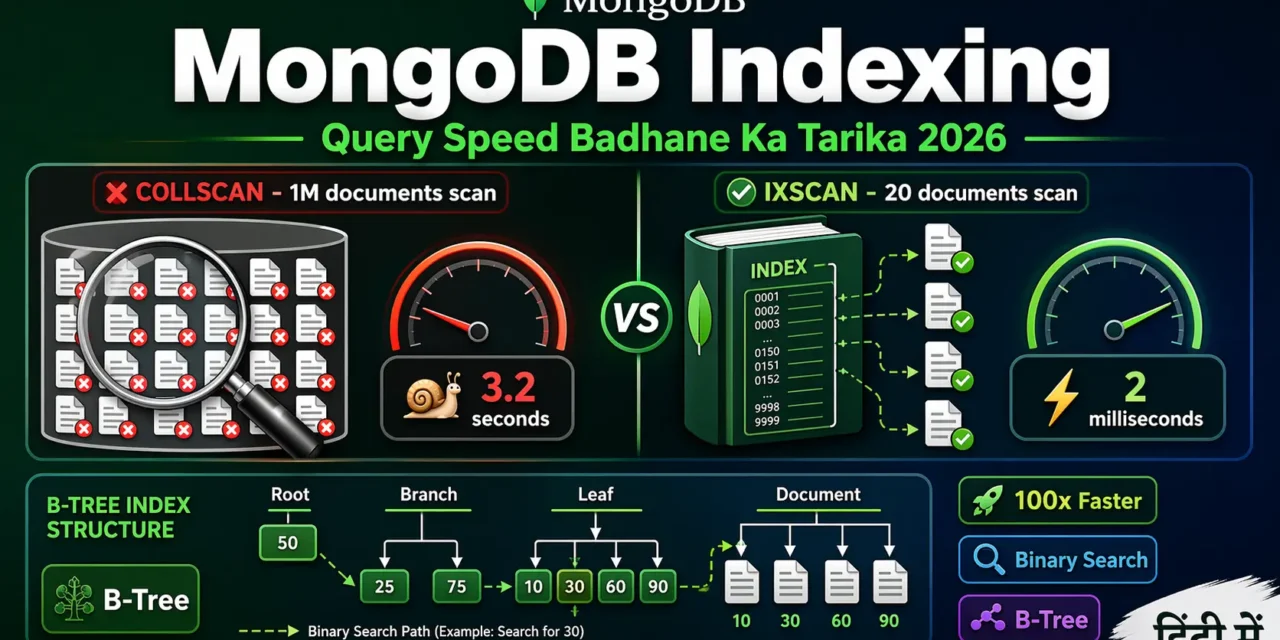
क्या तुमने कभी सोचा है – Database query slow kyun ho jati hai? 1 लाख documents में search करने में 10-15 seconds lagte hain? Kyu? Index nahi hai!
Indexing वही है जो किताब के पीछे लगा इंडेक्स – बिना इंडेक्स के तुम पूरी किताब पढ़ते हो, इंडेक्स से सीधा पन्ना खोलते हो.
MongoDB indexing Hindi में समझना बहुत जरूरी है क्योंकि:
- COLLSCAN vs IXSCAN – 1M docs में 1M scans vs सिर्फ 20 scans
- Query 100x faster हो सकती है
- Interview में पक्का indexing questions puche jayenge
- Production app mein indexing must है
Aaj kya seekhoge?
| Topic | Kya Seekhega? |
|---|---|
| Index Kya Hai? | Linear vs Binary search |
| COLLSCAN vs IXSCAN | Query plan samjho |
| Single Field Index | एक field पर index |
| Compound Index | Multiple fields |
| Multikey Index | Array fields |
| Text Index | Full-text search |
| TTL Index | Auto-delete expired data |
| explain() | Query analysis |
| Best Practices | Production tips |
Kya tumhe pata hai?
Index के बिना 1M documents में 999,999 को खोजने में 999,999 iterations लगते हैं, index से सिर्फ 20!
तो चलिए शुरू करते हैं – MongoDB indexing Hindi सीखने का सफर! 🚀
Table of Contents
1. Index Kya Hai? – Introduction
Index ek special data structure hai (B-tree) जो किसी field के values को sorted order में store करता है.
Real-world Analogy:
📚 किताब का Index:
बिना Index → पूरी किताब पढ़नी पड़ेगी (COLLSCAN)
Index के साथ → "Index" देखो, सीधा पन्ना खोलो (IXSCAN)
Index कैसे काम करता है:
// बिना Index (COLLSCAN)
db.users.find({ age: 25 })
// MongoDB 1M documents में से हर document check करेगा!

// Index के साथ (IXSCAN)
db.users.createIndex({ age: 1 })
db.users.find({ age: 25 })
// MongoDB सीधा age=25 वाले documents ढूंढेगा!
2. Linear Search vs Binary Search – समझो क्यों Fast Hai
Index क्यूं fast है? क्योंकि यह Binary Search use करता है.
Linear Search (बिना Index):
// हर item एक-एक करके check करना
function linearSearch(arr, target) {
    for (let i = 0; i < arr.length; i++) {
        if (arr[i] === target) return i;
    }
    return -1;
}
// 1,000,000 items में 1,000,000 iterations!
Binary Search (Index के साथ):
// हर step में आधे items को हटा देना
function binarySearch(arr, target) {
    let left = 0, right = arr.length - 1;
    while (left <= right) {
        const mid = Math.floor((left + right) / 2);
        if (arr[mid] === target) return mid;
        if (arr[mid] < target) left = mid + 1;
        else right = mid - 1;
    }
    return -1;
}
// 1,000,000 items में सिर्फ 20 iterations!
Performance Comparison:
Dataset Size: 1,000,000 items

Target     Linear Iterations    Binary Iterations
10                    10                   20
500,000          500,000                    1
999,999          999,999                   19
-1             1,000,000                   19
Index का magic यही है – Binary Search!
3. COLLSCAN vs IXSCAN – Query Plan
MongoDB में दो तरह के scans होते हैं:
COLLSCAN (Collection Scan – बिना Index):
// पूरा collection scan होता है
db.movies.find({ "awards.wins": 5 }).explain("executionStats"){
"executionStats": {
"executionStages": { "stage": "COLLSCAN" }, // ❌ पूरा scan!
"totalDocsExamined": 21349, // 21,349 documents scan!
"nReturned": 24, // सिर्फ 24 returned
"totalKeysExamined": 0, // कोई index use नहीं
"executionTimeMillis": 21
}
}IXSCAN (Index Scan – Index के साथ):
// Index create करो
db.movies.createIndex({ "awards.wins": 1 })

// अब query करो
db.movies.find({ "awards.wins": { "$gt": 30 } }).explain("executionStats"){
"executionStats": {
"executionStages": {
"stage": "FETCH",
"inputStage": { "stage": "IXSCAN" } // ✅ Index use किया!
},
"totalKeysExamined": 331, // सिर्फ 331 keys
"totalDocsExamined": 331, // सिर्फ 331 docs
"nReturned": 326,
"executionTimeMillis": 1 // 21ms से 1ms! 🚀
}
}Difference: 21,349 docs scanned → 331 docs scanned! 64x faster!
4. Single Field Index – एक Field पर Index
सबसे basic index – एक field पर.
Create Index:
// Ascending order (1)
db.users.createIndex({ email: 1 })

// Descending order (-1)
db.users.createIndex({ createdAt: -1 })

// Unique index (duplicate values not allowed)
db.users.createIndex({ email: 1 }, { unique: true })
Query Examples:
// ये queries index use करेंगी
db.users.find({ email: "vivek@example.com" })
db.users.find({ email: { $in: ["a@b.com", "c@d.com"] } })
db.users.find({ email: { $regex: "^rahul" } })  // prefix regex

// Sort query
db.users.find().sort({ createdAt: -1 })  // descending index use karega
Check if Index is Used:
db.users.find({ email: "vivek@example.com" }).explain("executionStats")
// देखो: "stage": "IXSCAN" होना चाहिए
5. Compound Index – Multiple Fields
Compound index multiple fields पर बनता है.
Create Compound Index:
// status और createdAt पर index
db.orders.createIndex({ status: 1, createdAt: -1 })
ESR Rule (Equality, Sort, Range):
// Query: status = "active", sort by createdAt, price > 100
db.orders.find({
  status: "active",
  price: { $gt: 100 }
}).sort({ createdAt: -1 })

// Index order according to ESR Rule:
// E (Equality) → status: 1
// S (Sort) → createdAt: -1
// R (Range) → price: 1
db.orders.createIndex({ status: 1, createdAt: -1, price: 1 })
Most Left Prefix Rule:
// Index: { a: 1, b: 1, c: 1 }

// ✅ ये queries index use करेंगी:
db.collection.find({ a: 5 })           // Prefix {a}
db.collection.find({ a: 5, b: 10 })    // Prefix {a, b}
db.collection.find({ a: 5, b: 10, c: 15 }) // Full index

// ❌ ये queries index use नहीं करेंगी:
db.collection.find({ b: 10 })           // No {a} prefix
db.collection.find({ b: 10, c: 15 })    // No {a} prefix
db.collection.find({ c: 15 })           // No {a} prefix
6. Multikey Index – Array Fields
जब field array हो, तो Multikey index automatically ban जाता है.
Create Multikey Index:
// Document: { name: "Server A", tags: ["web", "production", "nginx"] }

// Array field पर index
db.servers.createIndex({ tags: 1 })

// Query use karegi index
db.servers.find({ tags: "production" })
db.servers.find({ tags: { $in: ["web", "api"] } })
Important Limitations:
// ✅ Allowed: एक array field
db.collection.createIndex({ tags: 1, category: 1 })  // category non-array

// ❌ Error: दो array fields एक साथ
db.collection.createIndex({ tags: 1, categories: 1 })  // दोनों arrays!
7. Text Index – Full-Text Search
Text index full-text search के लिए.
Create Text Index:
// एक field पर
db.articles.createIndex({ content: "text" })

// Multiple fields पर
db.articles.createIndex({ title: "text", content: "text" })

// With weights (importance)
db.articles.createIndex(
  { title: "text", content: "text" },
  { weights: { title: 10, content: 1 } }  // title 10x important
)
Text Search Queries:
// Basic search
db.articles.find({ $text: { $search: "mongodb indexing" } })

// Phrase search (exact match)
db.articles.find({ $text: { $search: "\"query optimization\"" } })

// Exclude words
db.articles.find({ $text: { $search: "mongodb -sql" } })

// With relevance score
db.articles.find(
  { $text: { $search: "mongodb performance" } },
  { score: { $meta: "textScore" } }
).sort({ score: { $meta: "textScore" } })
Important Limitations:
// ❌ Collection में सिर्फ ONE text index allowed!
// ❌ $regex text index use नहीं करता
// ❌ Hindi/Chinese support limited (use Atlas Search instead)
8. TTL Index – Auto Delete Expired Data
TTL (Time-To-Live) Index documents को automatically delete करता है.
Create TTL Index:
// 30 days के बाद delete
db.sessions.createIndex(
  { createdAt: 1 },
  { expireAfterSeconds: 2592000 }  // 30 days = 30*24*60*60
)

// Specific expiry date field
db.events.createIndex(
  { expireAt: 1 },
  { expireAfterSeconds: 0 }  // expireAt time पर delete
)

// Document example
db.events.insertOne({
  event: "promotion",
  expireAt: ISODate("2026-12-31")
})
Use Cases:
| Use Case | TTL Index |
|---|---|
| Sessions | Login sessions expire करना |
| Logs | Old logs auto delete |
| OTP Codes | Temporary codes expire |
| Cache | Cache entries auto cleanup |
9. Unique Index – Duplicate Values Rokna
Unique index duplicate values prevent करता है.
Create Unique Index:
// Email unique
db.users.createIndex({ email: 1 }, { unique: true })

// Compound unique (email + phone combination unique)
db.users.createIndex(
  { email: 1, phone: 1 },
  { unique: true }
)

// Partial unique (only for documents with email)
db.users.createIndex(
  { email: 1 },
  {
    unique: true,
    partialFilterExpression: { email: { $exists: true } }
  }
)
10. explain() – Query Analyze Karna
explain() सबसे important tool है performance analysis के लिए.
explain() Modes:
// 1. queryPlanner (default) – सिर्फ plan दिखाता है
db.collection.find({ age: 25 }).explain()

// 2. executionStats – actual statistics दिखाता है (recommended!)
db.collection.find({ age: 25 }).explain("executionStats")

// 3. allPlansExecution – सभी candidate plans दिखाता है
db.collection.find({ age: 25 }).explain("allPlansExecution")
Reading explain() Output:
{
  "queryPlanner": {
    "winningPlan": {
      "stage": "FETCH",           // Document fetch
      "inputStage": {
        "stage": "IXSCAN",        // ✅ Index use! (IXSCAN good)
        "indexName": "age_1"
      }
    }
  },
  "executionStats": {
    "nReturned": 50,              // Documents returned
    "totalKeysExamined": 50,      // Index keys examined
    "totalDocsExamined": 50,      // Documents examined
    "executionTimeMillis": 2,     // Execution time
    "executionStages": {
      "stage": "FETCH",
      "docsExamined": 50,
      "inputStage": {
        "stage": "IXSCAN",
        "keysExamined": 50
      }
    }
  }
}
Key Metrics to Check:
| Metric | Good | Bad | Meaning |
|---|---|---|---|
| stage | IXSCAN | COLLSCAN | Index use vs full scan |
| totalDocsExamined | ≈ nReturned | >> nReturned | Extra work |
| totalKeysExamined | ≈ nReturned | >> nReturned | Index inefficient |
| executionTimeMillis | < 10ms | > 100ms | Slow query |
11. Covered Query – Sabse Fast
Covered Query – जब सारे required fields index में ही हों, document fetch नहीं करना पड़ता.
Covered Query Example:
// Index: { status: 1, price: 1 }

// ❌ Not covered – _id default return होता है
db.products.find(
  { status: "active" },
  { status: 1, price: 1 }
)
// _id भी return होगा, जो index में नहीं है

// ✅ Covered query – सिर्फ index fields
db.products.find(
  { status: "active" },
  { status: 1, price: 1, _id: 0 }  // _id exclude करो!
)

// Check in explain()
db.products.find(
  { status: "active" },
  { status: 1, price: 1, _id: 0 }
).explain("executionStats")

// totalDocsExamined: 0 होना चाहिए! (no document fetch)[citation:4][citation:8]
Covered Query Benefits:
- ⚡ Fastest possible – सिर्फ index पढ़ना
- 💾 No disk I/O – index usually memory में
- 📊 totalDocsExamined: 0
12. Index Best Practices
✅ DO’s:
// 1. Create index on frequently queried fields
db.orders.createIndex({ userId: 1, status: 1 })

// 2. Use ESR Rule for compound indexes[citation:4][citation:8]
// Equality → Sort → Range
db.orders.createIndex({ status: 1, createdAt: -1, price: 1 })

// 3. Use partial indexes for filtered data[citation:4]
db.products.createIndex(
  { name: 1 },
  { partialFilterExpression: { active: true } }
)

// 4. Use covered queries when possible[citation:4][citation:8]
db.users.find(
  { email: "test@test.com" },
  { email: 1, _id: 0 }
)

// 5. Monitor with explain()
db.collection.find(query).explain("executionStats")
❌ DON’Ts:
// 1. Don't over-index (every index slows writes)
// ❌ 10+ indexes on one collection

// 2. Don't index low-cardinality fields
// ❌ db.users.createIndex({ gender: 1 })  // only "M" or "F"

// 3. Don't use $regex without ^ prefix
// ❌ db.users.find({ name: /vivek/ })  // no index use

// 4. Don't forget _id exclusion in covered queries
// ❌ db.users.find({}, { email: 1 })  // _id returned

// 5. Don't create unnecessary compound indexes
// If you have { a: 1, b: 1 }, you don't need { a: 1 } separately[citation:8]
13. Common Mistakes + Solutions
Mistake 1: COLLSCAN instead of IXSCAN
// ❌ No index, full collection scan
db.orders.find({ status: "pending" })  // COLLSCAN

// ✅ Create index
db.orders.createIndex({ status: 1 })   // Now IXSCAN[citation:1]
Mistake 2: Wrong field order in compound index
// Query: status + price range
db.orders.find({ status: "active", price: { $gt: 100 } })

// ❌ Range field pehle (index not efficient)
db.orders.createIndex({ price: 1, status: 1 })

// ✅ Equality pehle (ESR Rule)[citation:4]
db.orders.createIndex({ status: 1, price: 1 })
Mistake 3: $regex without ^ prefix
// ❌ No index use
db.users.find({ name: /vivek/ })  // scans everything!

// ✅ With ^ prefix, index use
db.users.find({ name: /^vivek/ }) // uses index on name

// ✅ Better: Use text index for full-text search[citation:9]
db.articles.createIndex({ content: "text" })
db.articles.find({ $text: { $search: "mongodb" } })
Mistake 4: Covered query mein _id bhoolna
// ❌ Not covered (_id returned)
db.users.find({ email: "test@test.com" }, { email: 1 })

// ✅ Covered (_id excluded)
db.users.find({ email: "test@test.com" }, { email: 1, _id: 0 })
14. Quick Cheat Sheet
Index Creation Commands:
| Index Type | Command |
|---|---|
| Single Field | db.col.createIndex({ field: 1 }) |
| Compound | db.col.createIndex({ a: 1, b: -1 }) |
| Unique | db.col.createIndex({ email: 1 }, { unique: true }) |
| Text | db.col.createIndex({ content: "text" }) |
| TTL | db.col.createIndex({ createdAt: 1 }, { expireAfterSeconds: 3600 }) |
| Partial | db.col.createIndex({ field: 1 }, { partialFilterExpression: { active: true } }) |
Index Management:
// View all indexes
db.collection.getIndexes()

// Drop index
db.collection.dropIndex("index_name")
db.collection.dropIndex({ field: 1 })

// Drop all indexes (except _id)
db.collection.dropIndexes()

// Hide index (test before delete)[citation:4]
db.collection.hideIndex("index_name")
explain() Quick Reference:
// What to check:
// 1. stage = "IXSCAN" → ✅ Good
// 2. stage = "COLLSCAN" → ❌ Add index
// 3. totalDocsExamined ≈ nReturned → ✅ Efficient
// 4. totalDocsExamined >> nReturned → ❌ Inefficient
// 5. totalDocsExamined = 0 → 🏆 Covered query![citation:4]
15. FAQ
Q1: MongoDB indexing Hindi में सबसे important kya hai?explain("executionStats") – इससे पता चलता है query index use कर रही है या full scan.
Q2: COLLSCAN vs IXSCAN – kya antar hai?
COLLSCAN = पूरा collection scan (slow), IXSCAN = index scan (fast).
Q3: Index query ko fast kyu banata hai?
Index B-tree structure use करता है – binary search से O(log n) time, linear search से बहुत fast.
Q4: Compound index mein field order kyu important hai?
ESR Rule (Equality → Sort → Range) follow करो. Wrong order से index inefficient हो जाता है.
Q5: Text index vs $regex – kya use karein?
Full-text search के लिए text index use करो[$regex से performance बहुत खराब होती है.
Q6: TTL index kya karta hai?
Documents को auto delete करता है specified time के बाद – sessions, logs, OTP के लिए perfect.
Q7: Covered query kya hai?
Query result सिर्फ index से आता है, document fetch नहीं होता – fastest possible.
Q8: Unique index kyu use karein?
Duplicate values prevent करने के लिए – email, phone number fields पर.
Q9: Index writes ko slow kyu karta hai?
Har write operation index को भी update करता है – insert/update/delete slow हो सकते हैं.
Q10: Partial index kya hai?
Sirf specific documents पर index – size छोटा, performance better.
16. Conclusion
बहुत बढ़िया दोस्तों! आज हमने MongoDB indexing Hindi को पूरी detail में समझा.
Quick Recap:
| Index Type | Use Case |
|---|---|
| Single Field | एक field पर query |
| Compound | Multiple fields + ESR Rule |
| Multikey | Array fields |
| Text | Full-text search |
| TTL | Auto-delete expired data |
| Unique | Duplicate prevention |
Mera personal experience:
जब पहली बार index use किया, 50,000 documents वाली query 3 seconds से 30ms पर आ गई. Indexing के बिना production app impossible है. पहले query pattern समझो, फिर index बनाओ.
Tum bhi ye steps follow karo:
- ✅ Slow query ढूंढो (
explain()use करके) - ✅ Frequently queried fields पर index बनाओ
- ✅ Compound index में ESR Rule follow करो
- ✅ Covered queries के लिए projection use करो
- ✅ Unused indexes को हटाओ
अब तुम्हारी बारी है!
नीचे comment में बताओ:
- तुमने कभी index use kiya है?
- कौन सी query slow थी?
- अगला topic क्या चाहिए? (MongoDB Aggregation Pipeline? Performance Tuning? Atlas Search?)
The Easy Master पर बने रहो। Happy Indexing! 🚀🍃
Resources
Additional Resources
- React.js Kya Hai? JSX aur Components Samjhe – Beginner Guide 2026
- React Props and State Data Flow Hindi – समझे आसान भाषा में 2026
- React Router v6 – Multi-Page App Banaye (Routing Guide) 2026
- Advanced React Hooks – useContext and useReducer Samjhe 2026
- Redux Toolkit Simplified – State Management Aasaan Tarika 2026
- React API Integration Made Easy with Fetch and Axios
- React Performance Optimization – App Ko Fast कैसे बनाएं 2026
- React 19 New Features – AI Integration with React (2026)
- Node.js क्या है? 2026 में अपना पहला Backend Server बनाएँ
- NPM Packages कैसे इंस्टॉल करें? Modules (ESM vs CommonJS) 2026
- Express.js Tutorial – REST API Routing और Middleware समझे 2026
- Prisma ORM MongoDB से Database Connect कैसे करें – Easy Tutorial Hindi
- JWT Authentication Node.js – Secure Login System बनाए 2026
- WebSockets Node.js – Live Chat App कैसे बनाएं (Socket.io)
- Async Await vs Promises – Node.js में Async Code कैसे सीखें?
- Microservices Architecture node.js आसान हिंदी Explanation 2026
- Docker से Node.js App Production Ready Deploy करें 2026
- Express.js Setup – पहला Server कैसे बनाएं (Step-by-Step) 2026
- Express.js Routing – GET POST PUT DELETE Complete Guide
- Express Middleware समझे – Application, Router, Error Middleware
- Express req and res Objects – Query, Params, Body, Headers Explained
- Express Static Files और Templating – EJS से Dynamic HTML Banaye
- Express Router – API Routes को Organize करें (Modular Code)
- Express.js में Environment Variables – .env File कैसे Use करें
- Express File Upload Multer Tutorial | Image PDF Hindi 2026
- Express Security – Helmet, CORS, Rate Limiting, Validation (2026)
- Express + TypeScript – Type-Safe API कैसे बनाएं 2026
- Express MongoDB CRUD – Complete REST API Example 2026
- Express Logging – Morgan और Winston से Debug करें
- Express API Testing – Supertest से Routes Test करें
- MongoDB Setup – CRUD Operations समझे (Beginner Guide) 2026
- MongoDB Compass से GUI Database Manage करने का आसान तरीका | Beginner Tutorial 2026
- Node.js MongoDB Connection – Mongoose Setup समझे 2026
- MongoDB Data Modeling – Embedded Documents vs References 2026