नमस्ते दोस्तों! 🙏
स्वागत है The Easy Master पर!
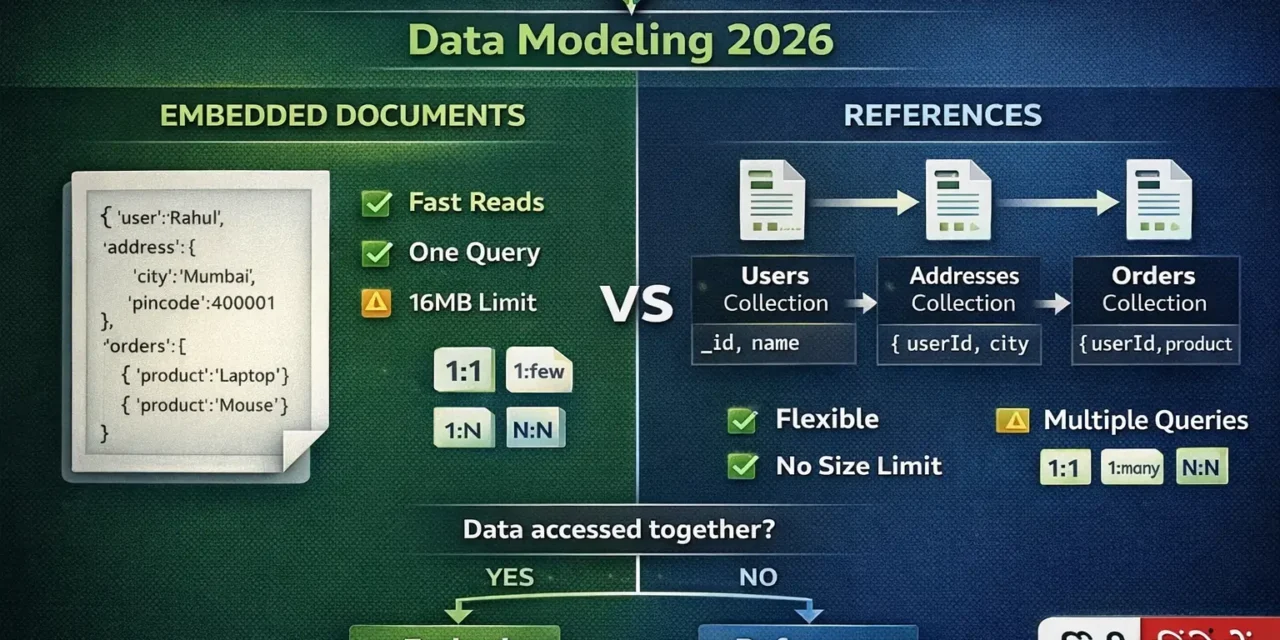
क्या तुमने कभी सोचा है – MongoDB में data को कैसे organize करें? एक collection में सब कुछ रखें या multiple collections में बाँटें?
Data modeling MongoDB में सबसे important concept है। गलत modeling से queries slow हो जाती हैं, data duplicate हो जाता है, scalability issues आते हैं।
MongoDB data modeling embedded documents vs references Hindi में समझना बहुत जरूरी है क्योंकि:
- Performance – सही modeling से queries 10x faster
- Data consistency – duplicate data se bachna
- Scalability – बड़े apps के लिए जरूरी
- Interview mein pakka data modeling questions puche jayenge
- Production apps में यही decisions लेने पड़ते हैं
Aaj kya seekhoge?
| Topic | Kya Seekhega? |
|---|---|
| Data Modeling Kya Hai? | MongoDB में data organize करना |
| Embedded Documents | एक document के अंदर data |
| References | अलग collections में data, IDs से link |
| When to Embed | कब embedded use करें |
| When to Reference | कब references use करें |
| One-to-One | 1:1 relationships |
| One-to-Many | 1:N relationships |
| Many-to-Many | N:N relationships |
| Hybrid Approach | दोनों का combination |
| Best Practices | Production tips |
Kya tumhe pata hai?
MongoDB documents ka size limit 16MB है – यह embedded documents के लिए important constraint है!
तो चलिए शुरू करते हैं – MongoDB data modeling embedded documents vs references Hindi सीखने का सफर! 🚀
Table of Contents
1. Data Modeling Kya Hai? – Introduction
Data modeling database में data को structure देने का process है।
SQL vs MongoDB Data Modeling:
| SQL (Relational) | MongoDB (Document) |
|---|---|
| Normalization | Denormalization |
| JOINs | Embedded documents |
| Foreign keys | References |
| Fixed schema | Flexible schema |
Two Main Approaches:
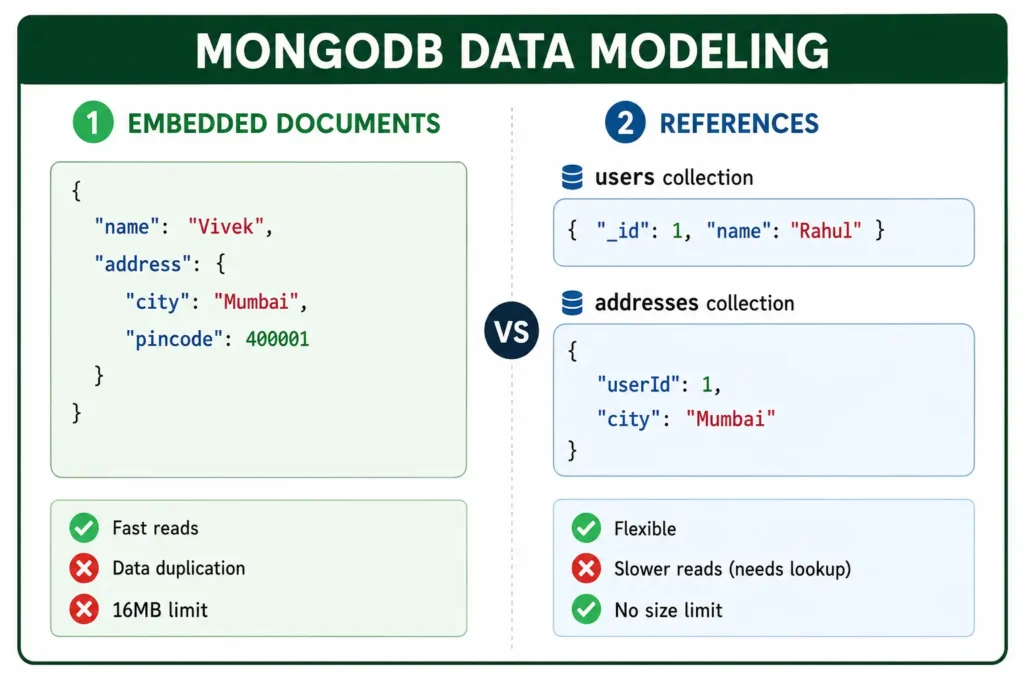
MongoDB data modeling embedded documents vs references Hindi में हम दोनों approaches को detail में समझेंगे।
2. Embedded Documents – एक Document के अंदर Data
Embedded documents एक document के अंदर दूसरा document या array रखना।
Basic Embedded Document:
// User document with embedded address
{
  "_id": ObjectId("65f1a2b3c4d5e6f7g8h9i0j1"),
  "name": "Vivek Sharma",
  "email": "vivek@example.com",
  "address": {
    "street": "MG Road",
    "city": "Mumbai",
    "pincode": 400001,
    "country": "India"
  }
}
Embedded Array of Documents:
// Blog post with embedded comments
{
  "_id": ObjectId("..."),
  "title": "MongoDB Data Modeling",
  "content": "Complete guide...",
  "author": "Vivek",
  "comments": [
    {
      "user": "Deepti",
      "text": "Great article!",
      "createdAt": ISODate("2026-01-15T10:30:00Z"),
      "likes": 5
    },
    {
      "user": "Amit",
      "text": "Very helpful",
      "createdAt": ISODate("2026-01-15T11:00:00Z"),
      "likes": 3
    }
  ],
  "tags": ["mongodb", "database", "tutorial"]
}
Deeply Nested Embedded Documents:
// E-commerce order with nested products and shipping
{
  "_id": ObjectId("..."),
  "orderId": "ORD-001",
  "customer": {
    "name": "Vivek Sharma",
    "email": "vivek@example.com",
    "shippingAddress": {
      "street": "MG Road",
      "city": "Mumbai",
      "pincode": 400001
    },
    "billingAddress": {
      "street": "MG Road",
      "city": "Mumbai",
      "pincode": 400001
    }
  },
  "items": [
    {
      "productId": "PROD-001",
      "name": "Laptop",
      "price": 50000,
      "quantity": 1,
      "total": 50000
    },
    {
      "productId": "PROD-002",
      "name": "Mouse",
      "price": 500,
      "quantity": 2,
      "total": 1000
    }
  ],
  "totalAmount": 51000,
  "paymentStatus": "completed"
}
3. References – Alag Collections Mein Data
References data को अलग collections में रखना और IDs से link करना।
Basic References:
// users collection
{
  "_id": ObjectId("65f1a2b3c4d5e6f7g8h9i0j1"),
  "name": "Vivek Sharma",
  "email": "vivek@example.com"
}

// addresses collection
{
  "_id": ObjectId("65f1a2b3c4d5e6f7g8h9i0j2"),
  "userId": ObjectId("65f1a2b3c4d5e6f7g8h9i0j1"),
  "type": "shipping",
  "street": "MG Road",
  "city": "Mumbai",
  "pincode": 400001
}
Array of References:
// users collection
{
  "_id": ObjectId("user123"),
  "name": "Vivek",
  "followers": [
    ObjectId("user456"),
    ObjectId("user789"),
    ObjectId("user101")
  ]
}

// posts collection
{
  "_id": ObjectId("post123"),
  "title": "MongoDB Tutorial",
  "authorId": ObjectId("user123"),
  "likes": [
    ObjectId("user456"),
    ObjectId("user789")
  ]
}
Using populate() in Mongoose:
// Schema with references
const userSchema = new mongoose.Schema({
  name: String,
  email: String
});

const postSchema = new mongoose.Schema({
  title: String,
  content: String,
  authorId: {
    type: mongoose.Schema.Types.ObjectId,
    ref: 'User'
  },
  likes: [{
    type: mongoose.Schema.Types.ObjectId,
    ref: 'User'
  }]
});

// Query with populate
const posts = await Post.find()
  .populate('authorId', 'name email')
  .populate('likes', 'name');
4. Embedded vs References – Comparison
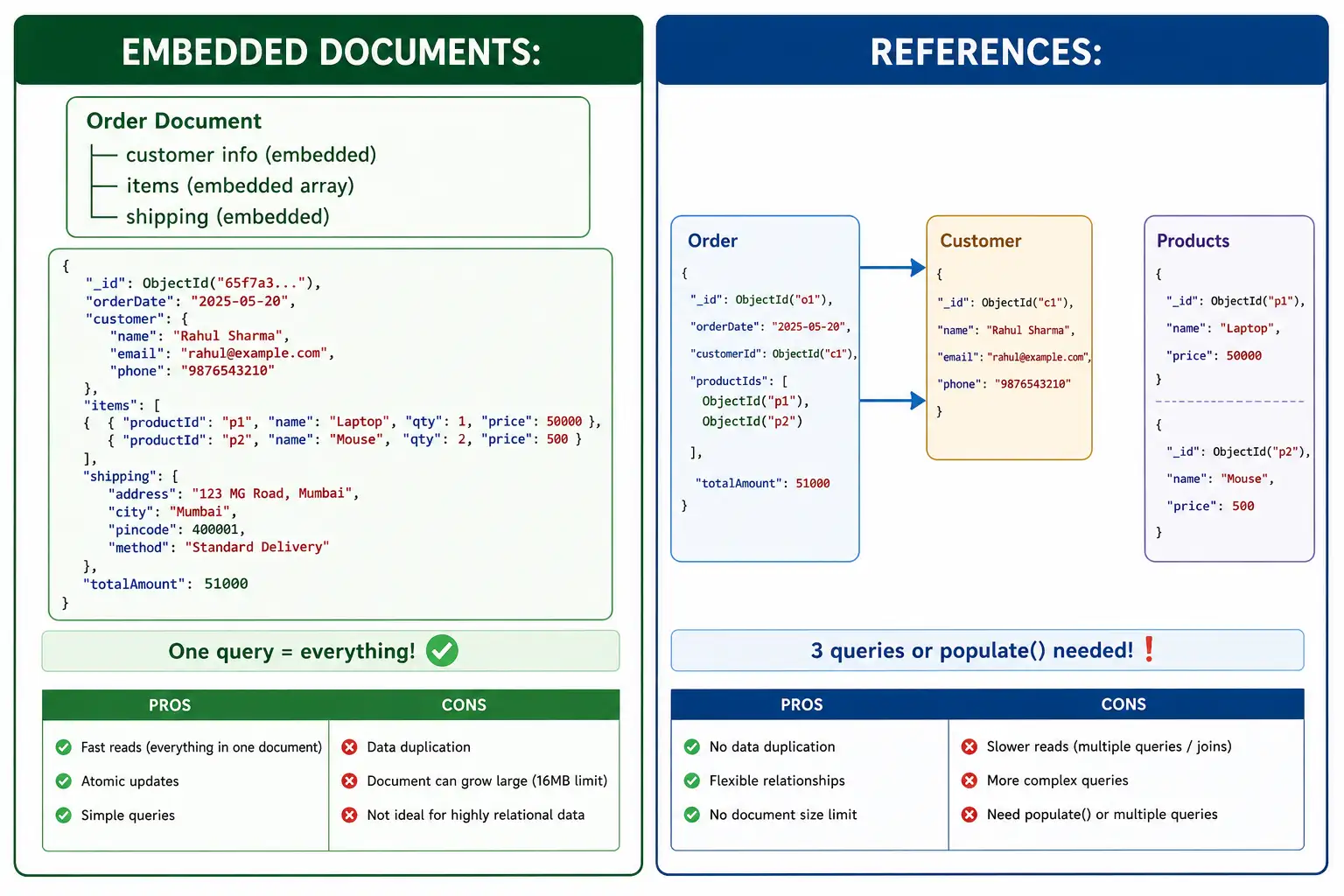
Comparison Table:
| Criteria | Embedded Documents | References |
|---|---|---|
| Read Performance | ⚡ Very Fast (single query) | 🐌 Slower (multiple queries or populate) |
| Write Performance | 🐌 Slower (rewrites whole document) | ⚡ Faster (update single document) |
| Data Duplication | ❌ Possible duplication | ✅ No duplication |
| Document Size | ❌ Limited to 16MB | ✅ No limit |
| Atomicity | ✅ Single document atomic | ❌ Multiple documents (no atomicity) |
| Query Flexibility | Limited | Very flexible |
| Best For | Read-heavy, related data | Write-heavy, independent data |
Visual Comparison:
5. One-to-One Relationships
Example: User and Profile
Option 1: Embedded (Recommended for 1:1)
// Single document with embedded profile
{
  "_id": ObjectId("..."),
  "username": "vivek123",
  "email": "vivek@example.com",
  "profile": {
    "fullName": "Vivek Sharma",
    "bio": "Software Developer",
    "avatar": "avatar.jpg",
    "phone": "+91-1234567890"
  }
}
Option 2: References (When data accessed separately)
// users collection
{
  "_id": ObjectId("user123"),
  "username": "vivek123",
  "email": "vivek@example.com",
  "profileId": ObjectId("profile456")
}

// profiles collection
{
  "_id": ObjectId("profile456"),
  "fullName": "Vivek Sharma",
  "bio": "Software Developer",
  "avatar": "avatar.jpg",
  "phone": "+91-1234567890"
}
When to use which:
| Use Embedded When… | Use References When… |
|---|---|
| Profile always accessed with user | Profile accessed separately |
| Data changes together | Profile updated frequently |
| Size < 16MB | Large profile data |
| 1:1 relationship | 1:1 but independent |
6. One-to-Many Relationships
Example: User and Posts
Option 1: Embedded (Few posts, always shown together)
{
  "_id": ObjectId("user123"),
  "name": "Vivek",
  "posts": [
    {
      "title": "First Post",
      "content": "Hello World",
      "createdAt": ISODate("2026-01-15")
    },
    {
      "title": "Second Post",
      "content": "Learning MongoDB",
      "createdAt": ISODate("2026-01-16")
    }
  ]
}
Option 2: References (Many posts, pagination needed)
// users collection
{
  "_id": ObjectId("user123"),
  "name": "Vivek",
  "email": "vivek@example.com"
}

// posts collection
{
  "_id": ObjectId("post456"),
  "title": "First Post",
  "content": "Hello World",
  "authorId": ObjectId("user123"),
  "createdAt": ISODate("2026-01-15")
}
Option 3: Hybrid (Recent posts embedded, older referenced)
{
  "_id": ObjectId("user123"),
  "name": "Rahul",
  "recentPosts": [
    { "title": "Recent Post 1", "content": "..." },
    { "title": "Recent Post 2", "content": "..." }
  ],
  "postsCount": 150,
  "oldestPostId": ObjectId("oldPost456")
}
Decision Guide:
| Number of Posts | Best Approach |
|---|---|
| 1-10 posts | ✅ Embedded |
| 10-100 posts | ⚠️ Hybrid (recent embedded) |
| 100+ posts | ✅ References |
7. Many-to-Many Relationships
Example: Users and Products (Favorites/Wishlist)
Option 1: Embedded (Limited size)
// User document with embedded product IDs
{
  "_id": ObjectId("user123"),
  "name": "Vivek",
  "wishlist": [
    ObjectId("prod001"),
    ObjectId("prod002"),
    ObjectId("prod003")
  ]
}
Option 2: References (Scalable)
// users collection
{
  "_id": ObjectId("user123"),
  "name": "Vivek"
}

// products collection
{
  "_id": ObjectId("prod001"),
  "name": "Laptop",
  "price": 50000
}

// user_wishlists collection (junction table)
{
  "_id": ObjectId("..."),
  "userId": ObjectId("user123"),
  "productId": ObjectId("prod001"),
  "addedAt": ISODate("2026-01-15")
}
Example: Students and Courses
Option 1: Embedded (Limited)
// Student document
{
  "_id": ObjectId("student123"),
  "name": "Vivek",
  "courses": [
    { "courseId": "CS101", "grade": "A" },
    { "courseId": "CS102", "grade": "B+" }
  ]
}
Option 2: References (Scalable)
// students collection
{
  "_id": ObjectId("student123"),
  "name": "Vivek"
}

// courses collection
{
  "_id": ObjectId("course456"),
  "code": "CS101",
  "name": "Computer Science",
  "credits": 4
}

// enrollments collection
{
  "_id": ObjectId("..."),
  "studentId": ObjectId("student123"),
  "courseId": ObjectId("course456"),
  "grade": "A",
  "semester": "Fall 2026"
}
8. When to Embed – Use Cases
✅ Good Candidates for Embedding:
| Scenario | Why Embed? |
|---|---|
| Data accessed together | One query gets everything |
| One-to-few relationship | Small number of related items |
| Data changes together | Atomic updates |
| Read-heavy workload | Faster reads |
| No need to query separately | Always shown with parent |
Real-world Examples:
// 1. Address (always with user)
{
  "name": "Vivek",
  "address": {
    "city": "Mumbai",
    "pincode": 400001
  }
}

// 2. Order items (always with order)
{
  "orderId": "ORD-001",
  "items": [
    { "product": "Laptop", "price": 50000, "qty": 1 },
    { "product": "Mouse", "price": 500, "qty": 2 }
  ]
}

// 3. Product specifications (always with product)
{
  "name": "Laptop",
  "specs": {
    "processor": "Intel i7",
    "ram": "16GB",
    "storage": "512GB SSD"
  }
}

// 4. Blog post comments (few comments, shown with post)
{
  "title": "My Post",
  "comments": [
    { "user": "Priya", "text": "Nice!", "date": "2026-01-15" },
    { "user": "Amit", "text": "Helpful", "date": "2026-01-16" }
  ]
}

// 5. User settings (always with user)
{
  "name": "Vivek",
  "settings": {
    "theme": "dark",
    "notifications": true,
    "language": "hindi"
  }
}
9. When to Reference – Use Cases
✅ Good Candidates for References:
| Scenario | Why Reference? |
|---|---|
| Data accessed separately | Independent queries |
| One-to-many or many-to-many | Large number of related items |
| Frequently updated data | Avoid large document rewrites |
| Large data sets | Avoid 16MB limit |
| Data shared across parents | Avoid duplication |
Real-world Examples:
// 1. User and Posts (many posts)
// users: { _id, name, email }
// posts: { _id, title, content, authorId }

// 2. Products and Categories (many-to-many)
// products: { _id, name, price, categoryIds[] }
// categories: { _id, name, description }

// 3. Orders and Products (many-to-many)
// orders: { _id, userId, items: [{ productId, qty }] }
// products: { _id, name, price, stock }

// 4. User and Followers (many-to-many, large)
// users: { _id, name, followerIds[] }
// (or separate followers collection)

// 5. Comments on popular posts (millions of comments)
// posts: { _id, title, content }
// comments: { _id, postId, userId, text, createdAt }
10. Hybrid Approach – Best of Both
Example: E-commerce Product with Reviews
// Product document (embedded recent reviews, reference for all)
{
  "_id": ObjectId("prod001"),
  "name": "Laptop",
  "price": 50000,
  "rating": 4.5,
  "totalReviews": 1250,
  "recentReviews": [
    {
      "userId": ObjectId("user456"),
      "userName": "Priya",
      "rating": 5,
      "comment": "Excellent product!",
      "createdAt": ISODate("2026-01-18")
    },
    {
      "userId": ObjectId("user789"),
      "userName": "Amit",
      "rating": 4,
      "comment": "Good value for money",
      "createdAt": ISODate("2026-01-17")
    }
  ]
}

// Separate reviews collection for pagination
// reviews collection
{
  "_id": ObjectId("review001"),
  "productId": ObjectId("prod001"),
  "userId": ObjectId("user123"),
  "userName": "Vivek",
  "rating": 5,
  "comment": "Amazing laptop!",
  "createdAt": ISODate("2026-01-10")
}
Example: Blog with Tags
// Post document (embedded tag names for quick display)
{
  "_id": ObjectId("post001"),
  "title": "MongoDB Tutorial",
  "content": "...",
  "tags": ["mongodb", "database", "nosql"]
}

// Tags collection (for tag pages, analytics)
{
  "_id": ObjectId("tag001"),
  "name": "mongodb",
  "slug": "mongodb",
  "postCount": 150,
  "popularity": 95
}
11. Real-world Examples
Example 1: E-commerce System
// PRODUCTS collection (embedded specs, reference category)
{
  "_id": ObjectId("prod001"),
  "name": "iPhone 15",
  "price": 75000,
  "specs": {
    "brand": "Apple",
    "color": "Black",
    "storage": "128GB",
    "ram": "6GB"
  },
  "categoryId": ObjectId("cat001"),  // Reference
  "sellerId": ObjectId("seller001"),  // Reference
  "reviews": [  // Embedded recent reviews
    { "userId": "user123", "rating": 5, "comment": "Best phone!" }
  ]
}

// ORDERS collection (embedded items snapshot)
{
  "_id": ObjectId("order001"),
  "userId": ObjectId("user123"),  // Reference
  "items": [  // Embedded snapshot (price at time of order)
    {
      "productId": ObjectId("prod001"),
      "name": "iPhone 15",
      "price": 75000,
      "quantity": 1
    }
  ],
  "shippingAddress": {  // Embedded (snapshot)
    "street": "MG Road",
    "city": "Mumbai",
    "pincode": 400001
  },
  "total": 75000,
  "status": "delivered"
}
Example 2: Blog Platform
// USERS collection
{
  "_id": ObjectId("user123"),
  "username": "vivek123",
  "email": "vivek@example.com",
  "profile": {
    "bio": "Tech blogger",
    "avatar": "avatar.jpg"
  },
  "stats": {
    "postCount": 25,
    "followerCount": 1000,
    "followingCount": 500
  }
}

// POSTS collection (embedded author info snapshot)
{
  "_id": ObjectId("post001"),
  "title": "MongoDB Data Modeling",
  "slug": "mongodb-data-modeling",
  "content": "...",
  "authorId": ObjectId("user123"),  // Reference
  "author": {  // Embedded snapshot (denormalized)
    "username": "vivek123",
    "avatar": "avatar.jpg"
  },
  "tags": ["mongodb", "database"],
  "stats": {
    "views": 10000,
    "likes": 500,
    "comments": 50
  },
  "createdAt": ISODate("2026-01-15")
}

// COMMENTS collection (separate for pagination)
{
  "_id": ObjectId("comment001"),
  "postId": ObjectId("post001"),
  "userId": ObjectId("user456"),
  "userName": "Priya",
  "text": "Great article!",
  "likes": 10,
  "createdAt": ISODate("2026-01-16")
}
Example 3: Social Media App
// USERS collection
{
  "_id": ObjectId("user123"),
  "name": "Vivek",
  "followers": [  // Embedded array of IDs (limited)
    ObjectId("user456"),
    ObjectId("user789")
  ],
  "following": [
    ObjectId("user456"),
    ObjectId("user101")
  ]
}

// POSTS collection (feed posts)
{
  "_id": ObjectId("post001"),
  "userId": ObjectId("user123"),
  "content": "Hello world!",
  "image": "post.jpg",
  "likes": [  // Embedded likes array
    ObjectId("user456"),
    ObjectId("user789")
  ],
  "comments": [  // Embedded recent comments (limited)
    {
      "userId": ObjectId("user456"),
      "text": "Nice!",
      "createdAt": ISODate("2026-01-15")
    }
  ],
  "createdAt": ISODate("2026-01-15")
}
12. Common Mistakes + Solutions
Mistake 1: Embedding unlimited arrays
// ❌ BAD – Comments array can grow infinitely
{
  "postId": "...",
  "comments": [ 10000+ comments ]  // Document size limit!
}

// ✅ GOOD – Reference for large arrays
// comments collection separate
Mistake 2: Not considering 16MB limit
// ❌ BAD – Product with 10000 reviews embedded
{
  "product": "...",
  "reviews": [ 10000 reviews ]  // Exceeds 16MB!
}

// ✅ GOOD – Embedded recent 5 reviews + reference for all
{
  "product": "...",
  "recentReviews": [ 5 reviews ],
  "totalReviews": 10000
}
Mistake 3: Referencing when embedding makes sense
// ❌ BAD – Address as reference (always queried with user)
users: { _id, name, addressId }
addresses: { _id, city, pincode }

// ✅ GOOD – Embed address
users: { _id, name, address: { city, pincode } }
Mistake 4: Embedding frequently updated data
// ❌ BAD – User stats embedded (updates cause full rewrite)
{
  "user": "...",
  "stats": { "loginCount": 100, "points": 5000 }
}

// ✅ GOOD – Separate collection for stats
// user_stats: { userId, loginCount, points }
13. Quick Cheat Sheet
Decision Flowchart:
Start
  │
  ▼
Do you always access data together?
  │
  ├── YES ──► Is data size < 16MB?
  │              │
  │              ├── YES ──► Is array size small?
  │              │              │
  │              │              ├── YES ──► ✅ EMBED
  │              │              └── NO ──► ⚠️ HYBRID
  │              │
  │              └── NO ──► ❌ REFERENCE
  │
  └── NO ──► Do you need independent updates?
               │
               ├── YES ──► ✅ REFERENCE
               └── NO ──► ⚠️ HYBRID
Relationship Guidelines:
| Relationship | Cardinality | Best Approach |
|---|---|---|
| 1:1 | One-to-one | ✅ Embed |
| 1:few | 1-10 items | ✅ Embed |
| 1:many | 10-100 items | ⚠️ Hybrid |
| 1:very many | 100+ items | ✅ Reference |
| N:N | Many-to-many | ✅ Reference |
14. FAQ
Q1: MongoDB data modeling embedded documents vs references Hindi में सबसे important kya hai?
Access patterns – data कैसे access होगा, यही decision लेता है embedded या reference।
Q2: Embedded documents ka size limit kya hai?
16MB per document – यह सबसे important constraint है।
Q3: References ke saath populate() slow kyun होता है?
Multiple queries execute होती हैं – एक parent document के लिए, फिर child documents के लिए।
Q4: Array of references vs embedded array – kya better hai?
Small array (< 100 items) – embed। Large array – references।
Q5: Data duplication acceptable है?
Read-heavy apps में duplication acceptable है – performance के लिए।
Q6: One-to-many relationship में क्या use karein?
Few items (1-10) – embed। Many items (100+) – reference।
Q7: Many-to-many relationship में क्या use karein?
References + junction collection (like SQL join table)।
Q8: Hybrid approach kya hai?
Recent/frequent data embed, old/bulk data reference – best of both।
Q9: Schema migration kaise handle karein?
Embedded documents में schema change आसान है। References में multiple collections update करने पड़ते हैं।
Q10: Production mein modeling decision change कर सकते हैं?
Haan, but data migration tool likhna पड़ता है – शुरू में सही modeling जरूरी है।
15. Conclusion
बहुत बढ़िया दोस्तों! आज हमने MongoDB data modeling embedded documents vs references Hindi को पूरी detail में समझा।
Quick Recap:
| Approach | Best For | Avoid When |
|---|---|---|
| Embedded | Small related data, read-heavy | Large arrays, frequent updates |
| References | Large datasets, independent data | Always accessed together |
| Hybrid | Recent + archive pattern | Simple relationships |
Mera personal experience:
Data modeling में गलती करने से queries 10x slow हो गई थीं। Embedded vs references का decision access patterns पर depend करता है – पहले सोचो data कैसे read/write होगा, फिर model करो।
Tum bhi ye steps follow karo:
- ✅ Access patterns analyze करो
- ✅ 1:1 relationships → embed
- ✅ 1:few → embed
- ✅ 1:many → hybrid या reference
- ✅ N:N → reference + junction collection
अब तुम्हारी बारी है!
नीचे comment में बताओ:
- तुमने कभी data modeling kiya है?
- कौन सा relationship सबसे complex लगा?
- अगला topic क्या चाहिए? (MongoDB Aggregation Pipeline? Indexing Strategies? Performance Tuning?)
The Easy Master पर बने रहो। Happy Data Modeling! 🚀🍃
Resources
Additional Resources
- React.js Kya Hai? JSX aur Components Samjhe – Beginner Guide 2026
- React Props and State Data Flow Hindi – समझे आसान भाषा में 2026
- React Router v6 – Multi-Page App Banaye (Routing Guide) 2026
- Advanced React Hooks – useContext and useReducer Samjhe 2026
- Redux Toolkit Simplified – State Management Aasaan Tarika 2026
- React API Integration Made Easy with Fetch and Axios
- React Performance Optimization – App Ko Fast कैसे बनाएं 2026
- React 19 New Features – AI Integration with React (2026)
- Node.js क्या है? 2026 में अपना पहला Backend Server बनाएँ
- NPM Packages कैसे इंस्टॉल करें? Modules (ESM vs CommonJS) 2026
- Express.js Tutorial – REST API Routing और Middleware समझे 2026
- Prisma ORM MongoDB से Database Connect कैसे करें – Easy Tutorial Hindi
- JWT Authentication Node.js – Secure Login System बनाए 2026
- WebSockets Node.js – Live Chat App कैसे बनाएं (Socket.io)
- Async Await vs Promises – Node.js में Async Code कैसे सीखें?
- Microservices Architecture node.js आसान हिंदी Explanation 2026
- Docker से Node.js App Production Ready Deploy करें 2026
- Express.js Setup – पहला Server कैसे बनाएं (Step-by-Step) 2026
- Express.js Routing – GET POST PUT DELETE Complete Guide
- Express Middleware समझे – Application, Router, Error Middleware
- Express req and res Objects – Query, Params, Body, Headers Explained
- Express Static Files और Templating – EJS से Dynamic HTML Banaye
- Express Router – API Routes को Organize करें (Modular Code)
- Express.js में Environment Variables – .env File कैसे Use करें
- Express File Upload Multer Tutorial | Image PDF Hindi 2026
- Express Security – Helmet, CORS, Rate Limiting, Validation (2026)
- Express + TypeScript – Type-Safe API कैसे बनाएं 2026
- Express MongoDB CRUD – Complete REST API Example 2026
- Express Logging – Morgan और Winston से Debug करें
- Express API Testing – Supertest से Routes Test करें
- MongoDB Setup – CRUD Operations समझे (Beginner Guide) 2026
- MongoDB Compass से GUI Database Manage करने का आसान तरीका | Beginner Tutorial 2026
- Node.js MongoDB Connection – Mongoose Setup समझे 2026