नमस्ते दोस्तों! 🙏
स्वागत है The Easy Master पर!
क्या तुमने कभी सोचा है – Data कहाँ store होता है? जब तुम Instagram पर post करते हो, product order करते हो – सब data database में जाता है।
MongoDB ek NoSQL database है – data JSON जैसे documents में store होता है। SQL databases से ज्यादा flexible और easy है।
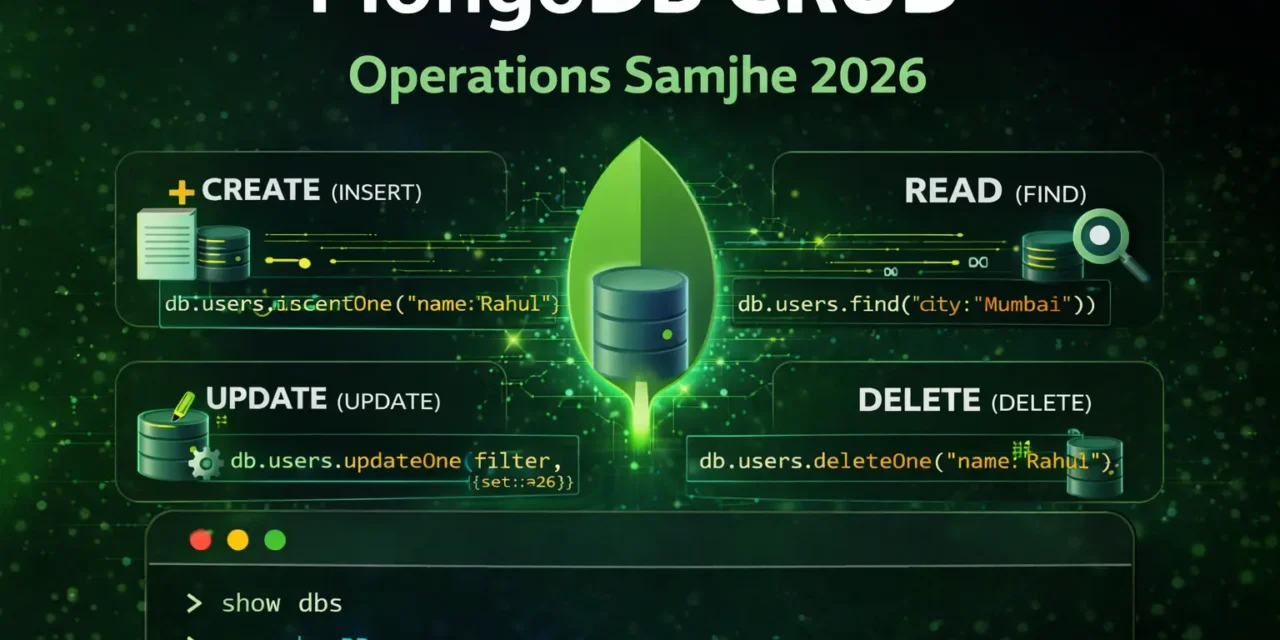
MongoDB CRUD operations Hindi में समझना बहुत जरूरी है क्योंकि:
- MERN stack MongoDB par based है
- Flexible schema – fields बदल सकते हो
- JSON-like documents – JavaScript developers के लिए easy
- Scalable – बड़े apps के लिए perfect
- Interview mein pakka MongoDB questions puche jayenge
Aaj kya seekhoge?
| Topic | Kya Seekhega? |
|---|---|
| MongoDB Kya Hai? | NoSQL database introduction |
| Installation | Local ya Atlas setup |
| MongoDB Shell | Command line interface |
| MongoDB Compass | GUI tool |
| Create (Insert) | Documents insert karna |
| Read (Find) | Documents search karna |
| Update | Documents modify karna |
| Delete | Documents remove karna |
Kya tumhe pata hai?
MongoDB ka naam “humongous” से आया है – बहुत बड़े data handle करने के लिए!
तो चलिए शुरू करते हैं – MongoDB CRUD operations Hindi सीखने का सफर! 🚀
Table of Contents
1. MongoDB क्या Hai? – Introduction
MongoDB ek NoSQL document database है जो data को JSON-like documents में store करता है .
MongoDB vs Traditional Database:
| Traditional (SQL) | MongoDB (NoSQL) |
|---|---|
| Tables | Collections |
| Rows | Documents |
| Columns | Fields |
| Fixed Schema | Flexible Schema |
| JOINs | Embedded Documents |
MongoDB Document Example:
{
  "_id": ObjectId("65f1a2b3c4d5e6f7g8h9i0j1"),
  "name": "Vivek Sharma",
  "email": "vivek@example.com",
  "age": 25,
  "address": {
    "city": "Mumbai",
    "pincode": 400001
  },
  "hobbies": ["coding", "reading", "gaming"],
  "createdAt": ISODate("2026-01-15T10:30:00Z")
}
MongoDB CRUD operations Hindi में हम shell और Compass दोनों सीखेंगे।
2. SQL vs NoSQL – Comparison
SQL Databases (MySQL, PostgreSQL):
┌─────────────────────────────────────┐
│            USERS TABLE             │
├─────┬───────────┬──────────────────┤
│ id  │ name      │ email            │
├─────┼───────────┼──────────────────┤
│ 1   │ Vivek     │ vivek@test.com   │
│ 2   │ Deepti    │ deepti@test.com  │
└─────┴───────────┴──────────────────┘

- Fixed schema (columns fixed)
- Data related across tables (JOINs)
- ACID transactions
NoSQL Databases (MongoDB):
// Collection: users
[
  { "_id": 1, "name": "Vivek", "email": "vivek@test.com" },
  { "_id": 2, "name": "Deepti", "email": "deepti@test.com", "phone": "1234567890" }
]

- Flexible schema (fields can vary)
- Embedded documents (no JOINs needed)
- High scalability
When to Use MongoDB:
| Use MongoDB | Use SQL |
|---|---|
| Rapid development | Complex transactions |
| Flexible schema | Fixed schema |
| Large scale data | Data integrity critical |
| JSON/JavaScript apps | Reporting & analytics |
| Real-time analytics | Multi-row transactions |
3. Installation – MongoDB Setup
Option 1: MongoDB Atlas (Cloud – Recommended)
- Sign up at mongodb.com/atlas
- Create free cluster
- Get connection string
- No installation needed!
Option 2: Local Installation (Ubuntu)
# Import MongoDB public key
wget -qO - https://www.mongodb.org/static/pgp/server-6.0.asc | sudo apt-key add -

# Add MongoDB repository
echo "deb [ arch=amd64,arm64 ] https://repo.mongodb.org/apt/ubuntu $(lsb_release -cs)/mongodb-org/6.0 multiverse" | sudo tee /etc/apt/sources.list.d/mongodb-org-6.0.list

# Update and install
sudo apt update
sudo apt install -y mongodb-org

# Start MongoDB service
sudo systemctl start mongod
sudo systemctl enable mongod

# Check status
sudo systemctl status mongod

# Start MongoDB shell
mongoshOption 3: Local Installation (Windows/Mac)
- Download from mongodb.com/try/download/community
- Run installer
- Add MongoDB to PATH
- Open terminal and run
mongosh
4. MongoDB Compass – GUI Tool
MongoDB Compass GUI tool है – बिना code likhe database manage karne के लिए .
Installation:
- Download from mongodb.com/products/compass
- Install for your OS
- Open Compass
Connect to Database:
Connection String: mongodb://localhost:27017
Or Atlas: mongodb+srv://username:password@cluster.mongodb.net/
Compass Features:
| Feature | Use |
|---|---|
| Database Explorer | View all databases |
| Collection Viewer | See documents |
| Visual Query Builder | Build queries without code |
| Schema Analyzer | Understand data structure |
| Index Manager | Create/manage indexes |
| Aggregation Builder | Build pipelines visually |
Using Compass:
- Create Database: Click “+” → Enter name → Create
- Create Collection: Click “Create Collection” → Enter name
- Insert Document: Click “Add Data” → Insert Document
- Query Data: Enter filter like
{ "name": "Vivek" } - Update Document: Click edit icon → Modify → Update
5. MongoDB Shell – Command Line
MongoDB Shell (mongosh) command line interface है .
Start MongoDB Shell:
# Start shell
mongosh

# Connect to specific database
mongosh mongodb://localhost:27017/mydb

# With Atlas
mongosh "mongodb+srv://cluster.mongodb.net/mydb" --username myuser
Basic Shell Commands:
// Show all databases
show dbs

// Switch to/create database
use mydb

// Show current database
db

// Show all collections
show collections

// Get database stats
db.stats()

// Drop current database
db.dropDatabase()
Help Commands:
// General help
help

// Database methods help
db.help()

// Collection methods help
db.users.help()
6. Databases aur Collections
Database Commands:
// List all databases
show dbs

// Create/switch to database
use shopDB

// Check current database
db

// Get database stats
db.stats()
// Output: { "db": "shopDB", "collections": 0, "objects": 0, ... }

// Drop database (WARNING: deletes everything!)
db.dropDatabase()
Collection Commands:
// Create collection explicitly
db.createCollection("products")

// Create collection by inserting (auto-created)
db.users.insertOne({ name: "Vivek" })

// List collections
show collections
// or
db.getCollectionNames()

// Get collection stats
db.products.stats()

// Drop collection
db.products.drop()
7. CREATE – Insert Operations
insertOne() – Single Document:
// Insert one document
db.users.insertOne({
  name: "Vivek Sharma",
  email: "vivek@example.com",
  age: 25,
  city: "Mumbai"
})

// Output:
{
  acknowledged: true,
  insertedId: ObjectId("65f1a2b3c4d5e6f7g8h9i0j1")
}
insertMany() – Multiple Documents:
// Insert multiple documents
db.users.insertMany([
  {
    name: "Priya Patel",
    email: "priya@example.com",
    age: 23,
    city: "Delhi"
  },
  {
    name: "Amit Kumar",
    email: "amit@example.com",
    age: 28,
    city: "Bangalore"
  },
  {
    name: "Neha Gupta",
    email: "neha@example.com",
    age: 26,
    city: "Mumbai"
  }
])

// Output:
{
  acknowledged: true,
  insertedIds: {
    '0': ObjectId("..."),
    '1': ObjectId("..."),
    '2': ObjectId("...")
  }
}
Insert with Different Field Types:
db.products.insertOne({
  name: "MacBook Pro",
  price: 150000,
  inStock: true,
  tags: ["electronics", "apple", "laptop"],
  specifications: {
    ram: "16GB",
    storage: "512GB",
    processor: "M3"
  },
  createdAt: new Date()
})
8. READ – Find Operations
find() – Find Multiple Documents:
// Find all documents
db.users.find()

// Format output (pretty print)
db.users.find().pretty()

// Find with filter
db.users.find({ city: "Mumbai" })

// Find with multiple conditions
db.users.find({ city: "Mumbai", age: { $gt: 20 } })
findOne() – Find Single Document:
// Find first matching document
db.users.findOne({ name: "Vivek Sharma" })

// Find by _id
db.users.findOne({ _id: ObjectId("65f1a2b3c4d5e6f7g8h9i0j1") })
Query Operators:
// Comparison operators
db.users.find({ age: { $gt: 25 } })   // Greater than
db.users.find({ age: { $gte: 25 } })  // Greater than or equal
db.users.find({ age: { $lt: 25 } })   // Less than
db.users.find({ age: { $lte: 25 } })  // Less than or equal
db.users.find({ age: { $ne: 25 } })   // Not equal

// Logical operators
db.users.find({
  $or: [
    { city: "Mumbai" },
    { city: "Delhi" }
  ]
})

db.users.find({
  $and: [
    { age: { $gt: 20 } },
    { age: { $lt: 30 } }
  ]
})

// Array operators
db.users.find({ hobbies: { $in: ["coding", "reading"] } })
db.users.find({ tags: { $all: ["electronics", "laptop"] } })
Projection (Select Specific Fields):
// Include only name and email (exclude _id)
db.users.find(
  { city: "Mumbai" },
  { name: 1, email: 1, _id: 0 }
)

// Exclude password
db.users.find(
  { email: "vivek@example.com" },
  { password: 0 }
)
Sorting, Limiting, Skipping:
// Sort by age ascending
db.users.find().sort({ age: 1 })

// Sort by age descending
db.users.find().sort({ age: -1 })

// Limit results
db.users.find().limit(5)

// Skip results (pagination)
db.users.find().skip(10).limit(5)

// Chain operations
db.users.find({ city: "Mumbai" })
  .sort({ age: -1 })
  .skip(0)
  .limit(10)
9. UPDATE – Update Operations
updateOne() – Update Single Document:
// Update one document
db.users.updateOne(
  { name: "Vivek Sharma" },        // Filter
  { $set: { age: 26, city: "Pune" } }  // Update
)

// Output:
{ acknowledged: true, matchedCount: 1, modifiedCount: 1 }
updateMany() – Update Multiple Documents:
// Update all users in Mumbai
db.users.updateMany(
  { city: "Mumbai" },
  { $set: { state: "Maharashtra" } }
)

// Increment age by 1 for all users
db.users.updateMany(
  {},
  { $inc: { age: 1 } }
)
Update Operators:
| Operator | Use | Example |
|---|---|---|
$set | Set field value | { $set: { name: "New" } } |
$unset | Remove field | { $unset: { temp: "" } } |
$inc | Increment number | { $inc: { age: 1 } } |
$mul | Multiply number | { $mul: { price: 1.1 } } |
$rename | Rename field | { $rename: { "old": "new" } } |
$min | Set if less than current | { $min: { age: 18 } } |
$max | Set if greater than current | { $max: { score: 100 } } |
Array Update Operators:
// Add element to array
db.users.updateOne(
  { name: "Vivek" },
  { $push: { hobbies: "swimming" } }
)

// Add multiple elements
db.users.updateOne(
  { name: "Vivek" },
  { $push: { hobbies: { $each: ["cycling", "traveling"] } } }
)

// Remove element from array
db.users.updateOne(
  { name: "Vivek" },
  { $pull: { hobbies: "gaming" } }
)

// Add to array if not exists
db.users.updateOne(
  { name: "Vivek" },
  { $addToSet: { hobbies: "reading" } }
)
findOneAndUpdate():
// Update and return updated document
db.users.findOneAndUpdate(
  { name: "Vivek Sharma" },
  { $set: { age: 27 } },
  { returnNewDocument: true }
)

// Update and return original document
db.users.findOneAndUpdate(
  { name: "Vivek Sharma" },
  { $set: { age: 27 } }
)
replaceOne() – Full Document Replacement:
// Replace entire document (except _id)
db.users.replaceOne(
  { name: "Vivek Sharma" },
  {
    name: "Vivek Kumar",
    email: "vivek@example.com",
    age: 28,
    city: "Chennai"
  }
)
10. DELETE – Delete Operations
deleteOne() – Delete Single Document:
// Delete first matching document
db.users.deleteOne({ name: "Amit Kumar" })

// Output:
{ acknowledged: true, deletedCount: 1 }

// Delete by _id
db.users.deleteOne({ _id: ObjectId("65f1a2b3c4d5e6f7g8h9i0j1") })
deleteMany() – Delete Multiple Documents:
// Delete all users from Delhi
db.users.deleteMany({ city: "Delhi" })

// Delete users older than 30
db.users.deleteMany({ age: { $gt: 30 } })

// Delete all documents (be careful!)
db.users.deleteMany({})
findOneAndDelete():
// Delete and return deleted document
const deletedUser = db.users.findOneAndDelete(
  { name: "Vivek Sharma" }
)

// Output: Returns the deleted document
11. Query Operators – $gt, $lt, $or, $in
Complete Operators Reference:
// Comparison Operators
$eq  - Equal to          { age: { $eq: 25 } }
$ne  - Not equal to      { age: { $ne: 25 } }
$gt  - Greater than      { age: { $gt: 25 } }
$gte - Greater or equal  { age: { $gte: 25 } }
$lt  - Less than         { age: { $lt: 25 } }
$lte - Less or equal     { age: { $lte: 25 } }
$in  - In array          { city: { $in: ["Mumbai", "Delhi"] } }
$nin - Not in array      { city: { $nin: ["Mumbai"] } }

// Logical Operators
$or  - OR condition      { $or: [ { age: 25 }, { city: "Mumbai" } ] }
$and - AND condition     { $and: [ { age: 25 }, { city: "Mumbai" } ] }
$not - NOT condition     { age: { $not: { $gt: 25 } } }
$nor - NOR condition     { $nor: [ { age: 25 }, { city: "Mumbai" } ] }

// Element Operators
$exists - Field exists   { email: { $exists: true } }
$type   - Field type     { age: { $type: "number" } }

// Array Operators
$all   - All elements    { tags: { $all: ["mongodb", "express"] } }
$size  - Array size      { hobbies: { $size: 3 } }
Practical Examples:
// Find users between age 20 and 30
db.users.find({ age: { $gt: 20, $lt: 30 } })

// Find users from Mumbai or Delhi
db.users.find({ city: { $in: ["Mumbai", "Delhi"] } })

// Find users with age > 25 OR city Mumbai
db.users.find({
  $or: [
    { age: { $gt: 25 } },
    { city: "Mumbai" }
  ]
})

// Find users with email field exists
db.users.find({ email: { $exists: true } })

// Find users with at least 3 hobbies
db.users.find({ hobbies: { $size: 3 } })
12. Quick Cheat Sheet
Database Commands:
| Command | Purpose |
|---|---|
show dbs | List databases |
use dbname | Switch/create database |
db | Show current database |
db.dropDatabase() | Delete database |
Collection Commands:
| Command | Purpose |
|---|---|
show collections | List collections |
db.createCollection("name") | Create collection |
db.collection.drop() | Delete collection |
CRUD Commands:
| Operation | Command |
|---|---|
| Create | db.collection.insertOne(doc) |
| Create Many | db.collection.insertMany([docs]) |
| Read All | db.collection.find() |
| Read One | db.collection.findOne(filter) |
| Update One | db.collection.updateOne(filter, update) |
| Update Many | db.collection.updateMany(filter, update) |
| Delete One | db.collection.deleteOne(filter) |
| Delete Many | db.collection.deleteMany(filter) |
Query Operators:
| Operator | Meaning |
|---|---|
$gt | Greater than |
$lt | Less than |
$gte | Greater or equal |
$lte | Less or equal |
$eq | Equal |
$ne | Not equal |
$in | In array |
$or | OR condition |
$and | AND condition |
$set | Set value (update) |
$inc | Increment (update) |
$push | Add to array |
$pull | Remove from array |
13. FAQ
Q1: MongoDB CRUD operations Hindi में सबसे important kya hai?insertOne(), find(), updateOne(), deleteOne() – ye charo basic CRUD operations हैं।
Q2: MongoDB vs MySQL – kya use karein?
Flexible schema चाहिए, rapid development करना है – MongoDB। Complex transactions, data integrity चाहिए – MySQL।
Q3: MongoDB Atlas kya hai?
Cloud-based MongoDB service – free tier available, no installation needed।
Q4: find() vs findOne() – kya antar hai?find() returns cursor (multiple documents), findOne() returns single document.
Q5: updateOne() vs updateMany() – kya antar hai?updateOne() – sirf first matching document update, updateMany() – सभी matching documents update।
Q6: $set operator kya karta hai?
Document में field set करता है – agar field exists नहीं तो create करता है।
Q7: $inc operator kya karta hai?
Numeric field की value increment/decrement करता है।
Q8: MongoDB Compass kya hai?
GUI tool hai – बिना code likhe database manage करने के लिए।
Q9: _id field kya hai?
Unique identifier for each document – automatically generated (ObjectId)।
Q10: Index kyun banayein?
Query performance improve करने के लिए – frequently queried fields पर index banाएं।
14. Conclusion
बहुत बढ़िया दोस्तों! आज हमने MongoDB CRUD operations Hindi को पूरी detail में समझा।
Quick Recap:
| Operation | Method | Example |
|---|---|---|
| Create | insertOne() / insertMany() | db.users.insertOne({name:"Vivek"}) |
| Read | find() / findOne() | db.users.find({city:"Mumbai"}) |
| Update | updateOne() / updateMany() | db.users.updateOne(filter, {$set:{age:26}}) |
| Delete | deleteOne() / deleteMany() | db.users.deleteOne({name:"Vivek"}) |
Mera personal experience:
MongoDB seekhne ke baad maine bohot saare projects banaye – flexible schema की वजह से development bohot fast हो गया। Compass GUI से data देखना और debug करना भी easy है।
Tum bhi ye steps follow karo:
- ✅ MongoDB Atlas account banao
- ✅ Compass install करो
- ✅ Pehla database aur collection banao
- ✅ insertOne() और find() try करो
- ✅ updateOne() और deleteOne() try करो
अब तुम्हारी बारी है!
नीचे comment में बताओ:
- तुम MongoDB use karoge ya SQL?
- कौन सा CRUD operation सबसे easy लगा?
- अगला topic क्या चाहिए? (MongoDB with Node.js? Mongoose ODM? Aggregation Pipeline?)
The Easy Master पर बने रहो। Happy Coding! 🚀🍃
Resource
Additional Resources
- React.js Kya Hai? JSX aur Components Samjhe – Beginner Guide 2026
- React Props and State Data Flow Hindi – समझे आसान भाषा में 2026
- React Router v6 – Multi-Page App Banaye (Routing Guide) 2026
- Advanced React Hooks – useContext and useReducer Samjhe 2026
- Redux Toolkit Simplified – State Management Aasaan Tarika 2026
- React API Integration Made Easy with Fetch and Axios
- React Performance Optimization – App Ko Fast कैसे बनाएं 2026
- React 19 New Features – AI Integration with React (2026)
- Node.js क्या है? 2026 में अपना पहला Backend Server बनाएँ
- NPM Packages कैसे इंस्टॉल करें? Modules (ESM vs CommonJS) 2026
- Express.js Tutorial – REST API Routing और Middleware समझे 2026
- Prisma ORM MongoDB से Database Connect कैसे करें – Easy Tutorial Hindi
- JWT Authentication Node.js – Secure Login System बनाए 2026
- WebSockets Node.js – Live Chat App कैसे बनाएं (Socket.io)
- Async Await vs Promises – Node.js में Async Code कैसे सीखें?
- Microservices Architecture node.js आसान हिंदी Explanation 2026
- Docker से Node.js App Production Ready Deploy करें 2026
- Express.js Setup – पहला Server कैसे बनाएं (Step-by-Step) 2026
- Express.js Routing – GET POST PUT DELETE Complete Guide
- Express Middleware समझे – Application, Router, Error Middleware
- Express req and res Objects – Query, Params, Body, Headers Explained
- Express Static Files और Templating – EJS से Dynamic HTML Banaye
- Express Router – API Routes को Organize करें (Modular Code)
- Express.js में Environment Variables – .env File कैसे Use करें
- Express File Upload Multer Tutorial | Image PDF Hindi 2026
- Express Security – Helmet, CORS, Rate Limiting, Validation (2026)
- Express + TypeScript – Type-Safe API कैसे बनाएं 2026
- Express MongoDB CRUD – Complete REST API Example 2026
- Express Logging – Morgan और Winston से Debug करें
- Express API Testing – Supertest से Routes Test करें