नमस्ते दोस्तों! 🙏
स्वागत है The Easy Master पर!
क्या तुमने कभी सोचा है – Node.js app ko MongoDB se connect कैसे करें? Database se data kaise fetch करें, insert करें, update करें?
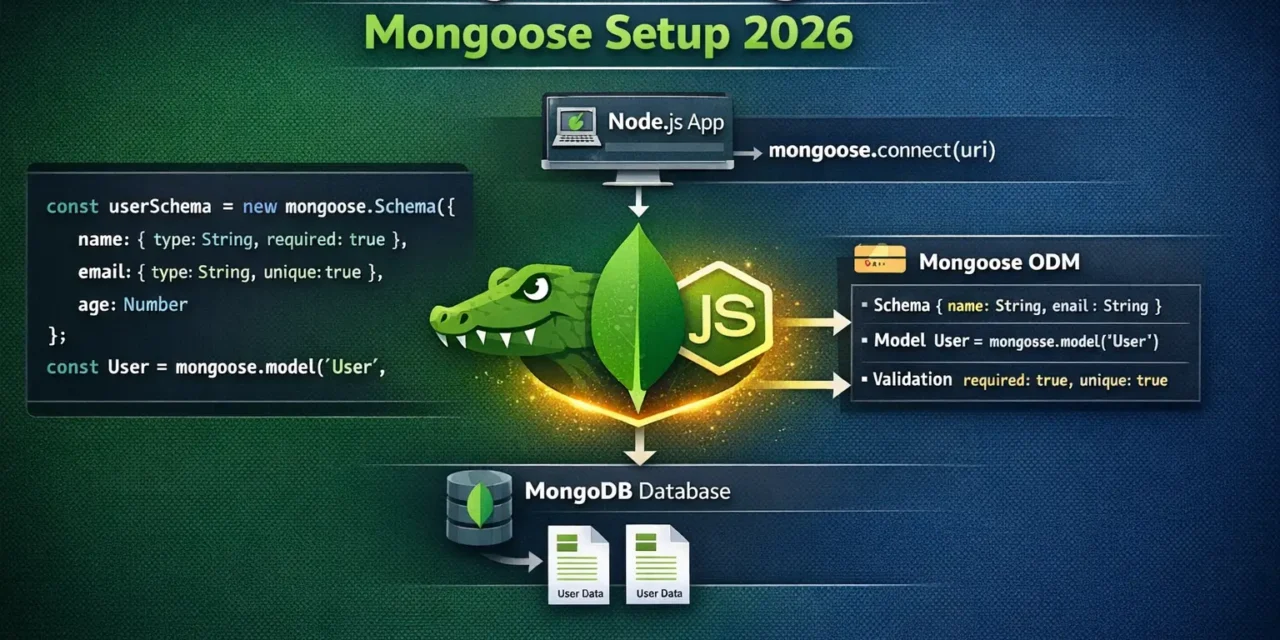
Mongoose एक ODM (Object Data Modeling) library है जो Node.js और MongoDB के बीच bridge का काम करता है। यह schema validation, type casting, relationships को easy बनाता है।
Node.js MongoDB connection Mongoose Hindi में समझना बहुत जरूरी है क्योंकि:
- MERN stack का heart है Mongoose
- Schema validation – data consistency maintain करता है
- Type casting – automatically data types convert करता है
- Relationships –
populate()से easy joins - Middleware – pre/post hooks for business logic
Aaj kya seekhoge?
| Topic | Kya Seekhega? |
|---|---|
| Mongoose Kya Hai? | ODM introduction |
| Installation | Package install karna |
| Connection | MongoDB se connect |
| Schema | Data structure define |
| Model | Collection ka blueprint |
| CRUD Operations | Create, Read, Update, Delete |
| Query Methods | find, findOne, findById |
| Validation | Schema validation rules |
| Relationships | populate() se joins |
| Middleware | pre/post hooks |
Kya tumhe pata hai?
Mongoose automatic connection pooling करता है – multiple connections manage करने की जरूरत नहीं!
तो चलिए शुरू करते हैं – Node.js MongoDB connection Mongoose Hindi सीखने का सफर! 🚀
Table of Contents
1. Mongoose Kya Hai? – Introduction
Mongoose ek ODM (Object Data Modeling) library है जो MongoDB और Node.js के बीच bridge का काम करता है.
Mongoose vs Native MongoDB Driver:
| Feature | Native Driver | Mongoose |
|---|---|---|
| Schema | ❌ No | ✅ Yes |
| Validation | ❌ Manual | ✅ Built-in |
| Type Casting | ❌ Manual | ✅ Automatic |
| Relationships | ❌ Manual | ✅ populate() |
| Middleware | ❌ No | ✅ pre/post hooks |
| Query Builder | Basic | Advanced |
Without Mongoose (Native Driver):
// ❌ No schema, no validation
const { MongoClient } = require('mongodb');
const client = new MongoClient('mongodb://localhost:27017');
await client.connect();
const db = client.db('mydb');
const users = db.collection('users');

// Any data can be inserted!
await users.insertOne({ name: 123 }); // No validation!
With Mongoose:
// ✅ Schema, validation, type safety
const mongoose = require('mongoose');
await mongoose.connect('mongodb://localhost:27017/mydb');

const userSchema = new mongoose.Schema({
  name: { type: String, required: true },
  email: { type: String, required: true, unique: true }
});

const User = mongoose.model('User', userSchema);

// Validation applied automatically!
await User.create({ name: 'Vivek', email: 'vivek@example.com' });
Node.js MongoDB connection Mongoose Hindi में हम production-ready setup बनाएंगे.
2. Installation – Package Setup
Step 1: Create Project
mkdir mongoose-demo
cd mongoose-demo
npm init -y
Step 2: Install Dependencies
# Install mongoose
npm install mongoose

# Install dotenv for environment variables
npm install dotenv

# Development dependencies
npm install -D nodemon
Step 3: Environment Variables (.env)
# .env
PORT=3000
MONGODB_URI=mongodb://localhost:27017/mydb
# OR for MongoDB Atlas
# MONGODB_URI=mongodb+srv://username:password@cluster.mongodb.net/mydb
Step 4: Basic Setup
// server.js
require('dotenv').config();
const mongoose = require('mongoose');
const express = require('express');

const app = express();
app.use(express.json());

// Connect to MongoDB
mongoose.connect(process.env.MONGODB_URI)
  .then(() => console.log('✅ MongoDB Connected Successfully'))
  .catch((err) => console.error('❌ MongoDB Connection Error:', err));

// Handle connection events
mongoose.connection.on('connected', () => {
  console.log('Mongoose connected to MongoDB');
});

mongoose.connection.on('error', (err) => {
  console.log('Mongoose connection error:', err);
});

mongoose.connection.on('disconnected', () => {
  console.log('Mongoose disconnected');
});

// Graceful shutdown
process.on('SIGINT', async () => {
  await mongoose.connection.close();
  console.log('Mongoose disconnected through app termination');
  process.exit(0);
});

const PORT = process.env.PORT || 3000;
app.listen(PORT, () => {
  console.log(`🚀 Server running on port ${PORT}`);
});
package.json Scripts:
{
  "scripts": {
    "start": "node server.js",
    "dev": "nodemon server.js"
  }
}
3. Database Connection – MongoDB Connect Karna
Connection String Formats:
// Local MongoDB
mongoose.connect('mongodb://localhost:27017/mydb')

// Local with options
mongoose.connect('mongodb://localhost:27017/mydb', {
  useNewUrlParser: true,
  useUnifiedTopology: true
})

// MongoDB Atlas
mongoose.connect('mongodb+srv://username:password@cluster.mongodb.net/mydb')

// With multiple options
mongoose.connect(process.env.MONGODB_URI, {
  useNewUrlParser: true,
  useUnifiedTopology: true,
  serverSelectionTimeoutMS: 5000,
  socketTimeoutMS: 45000,
})
Connection Options Explained:
| Option | Default | Purpose |
|---|---|---|
useNewUrlParser | true | New URL parser |
useUnifiedTopology | true | New topology engine |
serverSelectionTimeoutMS | 30000 | Server selection timeout |
socketTimeoutMS | 0 | Socket timeout |
maxPoolSize | 100 | Max connections in pool |
minPoolSize | 0 | Min connections in pool |
Connection with Async/Await:
// config/database.js
const mongoose = require('mongoose');

const connectDB = async () => {
  try {
    const conn = await mongoose.connect(process.env.MONGODB_URI);
    console.log(`✅ MongoDB Connected: ${conn.connection.host}`);
    console.log(`📦 Database Name: ${conn.connection.name}`);
    return conn;
  } catch (error) {
    console.error(`❌ Error: ${error.message}`);
    process.exit(1);
  }
};

module.exports = connectDB;
Reconnection Logic:
// With auto-reconnect
const options = {
  useNewUrlParser: true,
  useUnifiedTopology: true,
  serverSelectionTimeoutMS: 5000,
  socketTimeoutMS: 45000,
};

const connectWithRetry = () => {
  mongoose.connect(process.env.MONGODB_URI, options)
    .then(() => console.log('✅ MongoDB Connected'))
    .catch(err => {
      console.error('❌ MongoDB connection failed, retrying in 5 seconds...', err);
      setTimeout(connectWithRetry, 5000);
    });
};

connectWithRetry();
4. Schema – Data Structure Define Karna
Schema defines structure of documents in a collection.
Basic Schema:
// models/User.js
const mongoose = require('mongoose');

const userSchema = new mongoose.Schema({
  name: String,
  email: String,
  age: Number,
  isActive: Boolean
});

module.exports = mongoose.model('User', userSchema);
Advanced Schema with Options:
// models/User.js
const mongoose = require('mongoose');

const userSchema = new mongoose.Schema({
  // String field with validation
  name: {
    type: String,
    required: [true, 'Name is required'],
    trim: true,
    minlength: [2, 'Name must be at least 2 characters'],
    maxlength: [50, 'Name cannot exceed 50 characters']
  },

  // Email with unique constraint
  email: {
    type: String,
    required: [true, 'Email is required'],
    unique: true,
    trim: true,
    lowercase: true,
    match: [/^\S+@\S+\.\S+$/, 'Please enter a valid email']
  },

  // Number with min/max
  age: {
    type: Number,
    min: [0, 'Age cannot be negative'],
    max: [120, 'Age cannot exceed 120']
  },

  // Boolean with default
  isActive: {
    type: Boolean,
    default: true
  },

  // Array of strings
  hobbies: [{
    type: String,
    trim: true
  }],

  // Nested object
  address: {
    street: String,
    city: String,
    pincode: Number,
    country: {
      type: String,
      default: 'India'
    }
  },

  // ObjectId reference to another collection
  createdBy: {
    type: mongoose.Schema.Types.ObjectId,
    ref: 'User'
  }
}, {
  timestamps: true, // Adds createdAt and updatedAt
  toJSON: { virtuals: true },
  toObject: { virtuals: true }
});

// Virtual property (not stored in DB)
userSchema.virtual('fullAddress').get(function() {
  return `${this.address.street}, ${this.address.city} - ${this.address.pincode}`;
});

// Index for better query performance
userSchema.index({ email: 1 });
userSchema.index({ name: 'text' });

module.exports = mongoose.model('User', userSchema);
Schema Data Types:
| Type | Description |
|---|---|
String | UTF-8 string |
Number | Number (integer or float) |
Date | Date object |
Boolean | true/false |
Array | Array of values |
ObjectId | MongoDB ObjectId |
Mixed | Any type (Schema.Types.Mixed) |
Map | Key-value pairs |
Decimal128 | High precision decimal |
5. Model – Collection Ka Blueprint
Model schema का compiled version है – collection ke saath interact karne के लिए.
Creating Model:
const User = mongoose.model('User', userSchema);
// 'User' → MongoDB collection name will be 'users' (plural, lowercase)
Model Methods:
// CRUD methods
User.create(data)           // Insert document
User.find(filter)           // Find multiple
User.findOne(filter)        // Find one
User.findById(id)           // Find by _id
User.findByIdAndUpdate()    // Find by id and update
User.findByIdAndDelete()    // Find by id and delete
User.updateOne()            // Update one
User.updateMany()           // Update many
User.deleteOne()            // Delete one
User.deleteMany()           // Delete many
User.countDocuments()       // Count documents
User.exists()               // Check if exists
6. CREATE – Insert Operations
insertOne (Single Document):
// controllers/userController.js
const User = require('../models/User');

// Create single user
const createUser = async (req, res) => {
  try {
    const { name, email, age, hobbies, address } = req.body;

    const newUser = new User({
      name,
      email,
      age,
      hobbies,
      address
    });

    const savedUser = await newUser.save();

    res.status(201).json({
      success: true,
      message: 'User created successfully',
      data: savedUser
    });
  } catch (error) {
    res.status(400).json({
      success: false,
      error: error.message
    });
  }
};

// OR using create() method
const createUser2 = async (req, res) => {
  try {
    const user = await User.create(req.body);
    res.status(201).json({ success: true, data: user });
  } catch (error) {
    res.status(400).json({ success: false, error: error.message });
  }
};
insertMany (Multiple Documents):
const createBulkUsers = async (req, res) => {
  try {
    const users = req.body.users; // Array of users

    if (!Array.isArray(users) || users.length === 0) {
      return res.status(400).json({
        success: false,
        error: 'Users array is required'
      });
    }

    const createdUsers = await User.insertMany(users);

    res.status(201).json({
      success: true,
      message: `${createdUsers.length} users created`,
      data: createdUsers
    });
  } catch (error) {
    res.status(400).json({ success: false, error: error.message });
  }
};
7. READ – Find Operations
Find All Documents:
const getAllUsers = async (req, res) => {
  try {
    // Get all users
    const users = await User.find();

    // With filtering
    const activeUsers = await User.find({ isActive: true });

    // With projection (select specific fields)
    const usersWithNameEmail = await User.find(
      {},
      { name: 1, email: 1, _id: 0 }
    );

    res.json({
      success: true,
      count: users.length,
      data: users
    });
  } catch (error) {
    res.status(500).json({ success: false, error: error.message });
  }
};
Find with Filters:
const getUsersWithFilters = async (req, res) => {
  try {
    const { minAge, maxAge, city, isActive, search } = req.query;

    let filter = {};

    if (minAge || maxAge) {
      filter.age = {};
      if (minAge) filter.age.$gte = parseInt(minAge);
      if (maxAge) filter.age.$lte = parseInt(maxAge);
    }

    if (city) {
      filter['address.city'] = city;
    }

    if (isActive !== undefined) {
      filter.isActive = isActive === 'true';
    }

    if (search) {
      filter.$or = [
        { name: { $regex: search, $options: 'i' } },
        { email: { $regex: search, $options: 'i' } }
      ];
    }

    const users = await User.find(filter)
      .sort({ createdAt: -1 })
      .limit(10);

    res.json({
      success: true,
      count: users.length,
      data: users
    });
  } catch (error) {
    res.status(500).json({ success: false, error: error.message });
  }
};
Find One Document:
// Find by ID
const getUserById = async (req, res) => {
  try {
    const { id } = req.params;

    const user = await User.findById(id);

    if (!user) {
      return res.status(404).json({
        success: false,
        error: 'User not found'
      });
    }

    res.json({
      success: true,
      data: user
    });
  } catch (error) {
    res.status(500).json({ success: false, error: error.message });
  }
};

// Find one by condition
const findOneUser = async (req, res) => {
  try {
    const user = await User.findOne({ email: req.params.email });

    if (!user) {
      return res.status(404).json({ error: 'User not found' });
    }

    res.json({ success: true, data: user });
  } catch (error) {
    res.status(500).json({ error: error.message });
  }
};
Pagination, Sorting, Limiting:
const getUsersPaginated = async (req, res) => {
  try {
    const page = parseInt(req.query.page) || 1;
    const limit = parseInt(req.query.limit) || 10;
    const skip = (page - 1) * limit;
    const sortBy = req.query.sortBy || 'createdAt';
    const order = req.query.order === 'asc' ? 1 : -1;

    const [users, total] = await Promise.all([
      User.find()
        .sort({ [sortBy]: order })
        .skip(skip)
        .limit(limit),
      User.countDocuments()
    ]);

    res.json({
      success: true,
      data: users,
      pagination: {
        page,
        limit,
        total,
        totalPages: Math.ceil(total / limit),
        hasNext: page * limit < total,
        hasPrev: page > 1
      }
    });
  } catch (error) {
    res.status(500).json({ error: error.message });
  }
};
8. UPDATE – Update Operations
updateOne / updateMany:
// Update single user
const updateUser = async (req, res) => {
  try {
    const { id } = req.params;
    const updates = req.body;

    // Remove fields that shouldn't be updated
    delete updates._id;
    delete updates.createdAt;

    const user = await User.findByIdAndUpdate(
      id,
      updates,
      {
        new: true,        // Return updated document
        runValidators: true  // Run schema validation
      }
    );

    if (!user) {
      return res.status(404).json({ error: 'User not found' });
    }

    res.json({
      success: true,
      message: 'User updated successfully',
      data: user
    });
  } catch (error) {
    res.status(400).json({ error: error.message });
  }
};

// Update multiple users
const updateManyUsers = async (req, res) => {
  try {
    const { filter, updates } = req.body;

    const result = await User.updateMany(filter, updates);

    res.json({
      success: true,
      message: `${result.modifiedCount} users updated`,
      data: result
    });
  } catch (error) {
    res.status(400).json({ error: error.message });
  }
};
Update Operators:
// $set - Set field value
await User.updateOne(
  { _id: userId },
  { $set: { name: 'New Name', age: 30 } }
);

// $inc - Increment value
await User.updateOne(
  { _id: userId },
  { $inc: { age: 1 } }  // age + 1
);

// $push - Add to array
await User.updateOne(
  { _id: userId },
  { $push: { hobbies: 'swimming' } }
);

// $pull - Remove from array
await User.updateOne(
  { _id: userId },
  { $pull: { hobbies: 'gaming' } }
);

// $addToSet - Add if not exists
await User.updateOne(
  { _id: userId },
  { $addToSet: { tags: 'premium' } }
);
9. DELETE – Delete Operations
deleteOne / deleteMany:
// Delete single user
const deleteUser = async (req, res) => {
  try {
    const { id } = req.params;

    const user = await User.findByIdAndDelete(id);

    if (!user) {
      return res.status(404).json({ error: 'User not found' });
    }

    res.json({
      success: true,
      message: 'User deleted successfully',
      data: { id: user._id, name: user.name }
    });
  } catch (error) {
    res.status(500).json({ error: error.message });
  }
};

// Delete multiple users
const deleteManyUsers = async (req, res) => {
  try {
    const { ids } = req.body;

    const result = await User.deleteMany({ _id: { $in: ids } });

    res.json({
      success: true,
      message: `${result.deletedCount} users deleted`
    });
  } catch (error) {
    res.status(500).json({ error: error.message });
  }
};

// Delete all inactive users
const deleteInactiveUsers = async (req, res) => {
  try {
    const result = await User.deleteMany({ isActive: false });

    res.json({
      success: true,
      message: `${result.deletedCount} inactive users deleted`
    });
  } catch (error) {
    res.status(500).json({ error: error.message });
  }
};
10. Validation – Schema Validation Rules
Built-in Validators:
const userSchema = new mongoose.Schema({
  name: {
    type: String,
    required: [true, 'Name is required'],
    trim: true,
    minlength: [2, 'Name must be at least 2 characters'],
    maxlength: [50, 'Name cannot exceed 50 characters']
  },

  email: {
    type: String,
    required: [true, 'Email is required'],
    unique: true,
    lowercase: true,
    trim: true,
    match: [
      /^\w+([\.-]?\w+)*@\w+([\.-]?\w+)*(\.\w{2,3})+$/,
      'Please enter a valid email'
    ]
  },

  age: {
    type: Number,
    min: [0, 'Age cannot be negative'],
    max: [120, 'Age cannot exceed 120'],
    validate: {
      validator: Number.isInteger,
      message: 'Age must be an integer'
    }
  },

  password: {
    type: String,
    required: true,
    minlength: 6,
    select: false  // Don't return by default
  },

  role: {
    type: String,
    enum: {
      values: ['user', 'admin', 'moderator'],
      message: '{VALUE} is not a valid role'
    },
    default: 'user'
  },

  website: {
    type: String,
    validate: {
      validator: function(v) {
        return /^(https?:\/\/)?([\da-z\.-]+)\.([a-z\.]{2,6})([\/\w \.-]*)*\/?$/.test(v);
      },
      message: props => `${props.value} is not a valid URL!`
    }
  }
});

// Custom validation
userSchema.path('email').validate(async function(email) {
  const emailCount = await mongoose.models.User.countDocuments({ email });
  return !emailCount;
}, 'Email already exists');
11. Relationships – populate() Se Joins
Post Model (Referencing User):
// models/Post.js
const mongoose = require('mongoose');

const postSchema = new mongoose.Schema({
  title: {
    type: String,
    required: true
  },
  content: {
    type: String,
    required: true
  },
  author: {
    type: mongoose.Schema.Types.ObjectId,
    ref: 'User',  // Reference to User model
    required: true
  },
  likes: [{
    type: mongoose.Schema.Types.ObjectId,
    ref: 'User'
  }],
  comments: [{
    user: {
      type: mongoose.Schema.Types.ObjectId,
      ref: 'User'
    },
    text: String,
    createdAt: {
      type: Date,
      default: Date.now
    }
  }]
}, {
  timestamps: true
});

module.exports = mongoose.model('Post', postSchema);
Using populate():
// Create post with author reference
const createPost = async (req, res) => {
  try {
    const { title, content, authorId } = req.body;

    const post = await Post.create({
      title,
      content,
      author: authorId
    });

    res.status(201).json({ success: true, data: post });
  } catch (error) {
    res.status(400).json({ error: error.message });
  }
};

// Get posts with author details (populate)
const getPostsWithAuthor = async (req, res) => {
  try {
    const posts = await Post.find()
      .populate('author', 'name email')  // Only name and email from User
      .populate('likes', 'name')
      .populate('comments.user', 'name avatar')
      .sort({ createdAt: -1 });

    res.json({ success: true, data: posts });
  } catch (error) {
    res.status(500).json({ error: error.message });
  }
};

// Deep populate (nested)
const getPostWithDeepPopulate = async (req, res) => {
  try {
    const post = await Post.findById(req.params.id)
      .populate({
        path: 'comments.user',
        select: 'name email avatar',
        populate: {
          path: 'avatar',
          select: 'url'
        }
      });

    res.json({ success: true, data: post });
  } catch (error) {
    res.status(500).json({ error: error.message });
  }
};
12. Middleware – pre/post Hooks
Pre Middleware (Before Operation):
// Hash password before saving
userSchema.pre('save', async function(next) {
  // 'this' refers to the document being saved
  if (!this.isModified('password')) return next();

  try {
    const salt = await bcrypt.genSalt(10);
    this.password = await bcrypt.hash(this.password, salt);
    next();
  } catch (error) {
    next(error);
  }
});

// Update timestamps before update
userSchema.pre('findOneAndUpdate', function(next) {
  this.set({ updatedAt: new Date() });
  next();
});

// Validate email domain
userSchema.pre('validate', function(next) {
  if (this.email && !this.email.endsWith('@example.com')) {
    next(new Error('Only example.com emails are allowed'));
  } else {
    next();
  }
});

// Log before delete
userSchema.pre('deleteOne', { document: true, query: false }, function(next) {
  console.log(`Deleting user: ${this.name}`);
  next();
});
Post Middleware (After Operation):
// Log after save
userSchema.post('save', function(doc, next) {
  console.log(`New user created: ${doc.name} (${doc.email})`);
  next();
});

// Cleanup after delete
userSchema.post('findOneAndDelete', async function(doc) {
  if (doc) {
    // Delete user's posts
    await Post.deleteMany({ author: doc._id });
    console.log(`Deleted user ${doc.name} and their posts`);
  }
});
13. Complete Example – User API
Complete User API with Express:
// server.js
require('dotenv').config();
const express = require('express');
const mongoose = require('mongoose');
const User = require('./models/User');

const app = express();
app.use(express.json());

// Connect to MongoDB
mongoose.connect(process.env.MONGODB_URI)
  .then(() => console.log('✅ MongoDB Connected'))
  .catch(err => console.error('❌ Connection error:', err));

// ============ CREATE ============
app.post('/api/users', async (req, res) => {
  try {
    const user = await User.create(req.body);
    res.status(201).json({ success: true, data: user });
  } catch (error) {
    res.status(400).json({ success: false, error: error.message });
  }
});

// ============ READ ============
app.get('/api/users', async (req, res) => {
  try {
    const { page = 1, limit = 10, ...filters } = req.query;
    const users = await User.find(filters)
      .limit(limit * 1)
      .skip((page - 1) * limit);

    const total = await User.countDocuments(filters);

    res.json({
      success: true,
      data: users,
      pagination: { page, limit, total }
    });
  } catch (error) {
    res.status(500).json({ success: false, error: error.message });
  }
});

app.get('/api/users/:id', async (req, res) => {
  try {
    const user = await User.findById(req.params.id);
    if (!user) {
      return res.status(404).json({ success: false, error: 'User not found' });
    }
    res.json({ success: true, data: user });
  } catch (error) {
    res.status(500).json({ success: false, error: error.message });
  }
});

// ============ UPDATE ============
app.put('/api/users/:id', async (req, res) => {
  try {
    const user = await User.findByIdAndUpdate(
      req.params.id,
      req.body,
      { new: true, runValidators: true }
    );
    if (!user) {
      return res.status(404).json({ success: false, error: 'User not found' });
    }
    res.json({ success: true, data: user });
  } catch (error) {
    res.status(400).json({ success: false, error: error.message });
  }
});

// ============ DELETE ============
app.delete('/api/users/:id', async (req, res) => {
  try {
    const user = await User.findByIdAndDelete(req.params.id);
    if (!user) {
      return res.status(404).json({ success: false, error: 'User not found' });
    }
    res.json({ success: true, message: 'User deleted' });
  } catch (error) {
    res.status(500).json({ success: false, error: error.message });
  }
});

const PORT = process.env.PORT || 3000;
app.listen(PORT, () => {
  console.log(`🚀 Server running on port ${PORT}`);
});
14. Common Mistakes + Solutions
Mistake 1: Not handling connection errors
// ❌ No error handling
mongoose.connect(uri);

// ✅ Handle errors
mongoose.connect(uri).catch(err => console.error(err));
Mistake 2: Not using await with queries
// ❌ Missing await
const user = User.findById(id); // Returns promise, not user!

// ✅ Use await
const user = await User.findById(id);
Mistake 3: Not using try-catch
// ❌ No error handling
app.post('/users', async (req, res) => {
  const user = await User.create(req.body);
  res.json(user);
});

// ✅ Use try-catch
app.post('/users', async (req, res) => {
  try {
    const user = await User.create(req.body);
    res.json(user);
  } catch (error) {
    res.status(400).json({ error: error.message });
  }
});
Mistake 4: Not validating ObjectId
// ❌ Invalid ID crashes
const user = await User.findById(req.params.id);

// ✅ Validate ObjectId
if (!mongoose.Types.ObjectId.isValid(req.params.id)) {
  return res.status(400).json({ error: 'Invalid ID' });
}
15. Quick Cheat Sheet
Connection:
mongoose.connect(uri)
mongoose.connection.on('connected', () => {})
mongoose.connection.close()
Schema:
new mongoose.Schema({ field: { type: String, required: true } }, { timestamps: true })Model:
mongoose.model('User', userSchema)CRUD:
| Operation | Method |
|---|---|
| Create | User.create(data) |
| Read All | User.find(filter) |
| Read One | User.findById(id) |
| Update | User.findByIdAndUpdate(id, data) |
| Delete | User.findByIdAndDelete(id) |
16. FAQ
Q1: Node.js MongoDB connection Mongoose Hindi में सबसे important kya hai?
Schema definition – ye data structure और validation define करता है.
Q2: Mongoose vs native MongoDB driver – kya use karein?
Large apps, need validation/relationships – Mongoose। Simple apps, need performance – native driver.
Q3: create() vs save() – kya antar hai?create() directly model par call होता है, save() document instance पर.
Q4: findByIdAndUpdate() vs updateOne() – kya antar hai?findByIdAndUpdate() returns updated document, updateOne() returns update result.
Q5: populate() kya karta hai?
References को actual documents से replace करता है (MongoDB joins).
Q6: Virtual fields kya hote hain?
Fields that are not stored in DB – computed properties के लिए.
Q7: Middleware kya hai?
pre/post hooks – save, validate, remove से पहले/बाद code run करने के लिए.
Q8: Index kyun banayein?
Query performance improve करने के लिए.
Q9: lean() kyun use karein?
Mongoose documents के बजाय plain JavaScript objects return करता है – faster queries.
Q10: Production mein connection string kaise rakhein?.env file में store करो, gitignore में add करो.
17. Conclusion
बहुत बढ़िया दोस्तों! आज हमने Node.js MongoDB connection Mongoose Hindi को पूरी detail में समझा.
Quick Recap:
| Concept | Key Takeaway |
|---|---|
| Mongoose | ODM for MongoDB |
| Schema | Define data structure |
| Model | Collection interface |
| CRUD | Create, Read, Update, Delete |
| Validation | Built-in validators |
| Relationships | populate() for joins |
| Middleware | pre/post hooks |
Mera personal experience:
Mongoose use करने से पहले main native driver use करता था – validation और relationships handle करना मुश्किल था। Mongoose ने development bohot fast कर दिया. Schema validation से data quality improve हुई.
Tum bhi ye steps follow karo:
- ✅ Mongoose install करो
- ✅ Schema define करो
- ✅ Model create करो
- ✅ CRUD operations implement करो
- ✅ Validation add करो
अब तुम्हारी बारी है!
नीचे comment में बताओ:
- तुम Mongoose use karoge ya native driver?
- कौन सा feature सबसे useful लगा?
- अगला topic क्या चाहिए? (Mongoose Validation Deep Dive? Aggregation Pipeline? Transactions?)
The Easy Master पर बने रहो। Happy Coding with Mongoose! 🚀🍃
Resources
Additional Resources
- React.js Kya Hai? JSX aur Components Samjhe – Beginner Guide 2026
- React Props and State Data Flow Hindi – समझे आसान भाषा में 2026
- React Router v6 – Multi-Page App Banaye (Routing Guide) 2026
- Advanced React Hooks – useContext and useReducer Samjhe 2026
- Redux Toolkit Simplified – State Management Aasaan Tarika 2026
- React API Integration Made Easy with Fetch and Axios
- React Performance Optimization – App Ko Fast कैसे बनाएं 2026
- React 19 New Features – AI Integration with React (2026)
- Node.js क्या है? 2026 में अपना पहला Backend Server बनाएँ
- NPM Packages कैसे इंस्टॉल करें? Modules (ESM vs CommonJS) 2026
- Express.js Tutorial – REST API Routing और Middleware समझे 2026
- Prisma ORM MongoDB से Database Connect कैसे करें – Easy Tutorial Hindi
- JWT Authentication Node.js – Secure Login System बनाए 2026
- WebSockets Node.js – Live Chat App कैसे बनाएं (Socket.io)
- Async Await vs Promises – Node.js में Async Code कैसे सीखें?
- Microservices Architecture node.js आसान हिंदी Explanation 2026
- Docker से Node.js App Production Ready Deploy करें 2026
- Express.js Setup – पहला Server कैसे बनाएं (Step-by-Step) 2026
- Express.js Routing – GET POST PUT DELETE Complete Guide
- Express Middleware समझे – Application, Router, Error Middleware
- Express req and res Objects – Query, Params, Body, Headers Explained
- Express Static Files और Templating – EJS से Dynamic HTML Banaye
- Express Router – API Routes को Organize करें (Modular Code)
- Express.js में Environment Variables – .env File कैसे Use करें
- Express File Upload Multer Tutorial | Image PDF Hindi 2026
- Express Security – Helmet, CORS, Rate Limiting, Validation (2026)
- Express + TypeScript – Type-Safe API कैसे बनाएं 2026
- Express MongoDB CRUD – Complete REST API Example 2026
- Express Logging – Morgan और Winston से Debug करें
- Express API Testing – Supertest से Routes Test करें
- MongoDB Setup – CRUD Operations समझे (Beginner Guide) 2026
- MongoDB Compass से GUI Database Manage करने का आसान तरीका | Beginner Tutorial 2026