नमस्ते दोस्तों! 🙏
स्वागत है The Easy Master पर!
क्या तुमने कभी सोचा है – User login system कैसे काम करता है? Jaise tum Gmail, Instagram, ya Facebook mein login karte ho – password daalte ho – aur access mil jaata hai.
Yeh sab JWT (JSON Web Token) authentication se possible hai. JWT ek secure token hai jo user ki identity verify करता है .
JWT authentication MongoDB Hindi में समझना बहुत जरूरी है क्योंकि:
- Modern web apps JWT use karti hain
- Stateless authentication – server session store nahi karta
- MERN stack mein JWT hi standard hai
- Interview mein pakka JWT questions puche jayenge
Aaj kya seekhoge?
Kya tumhe pata hai?
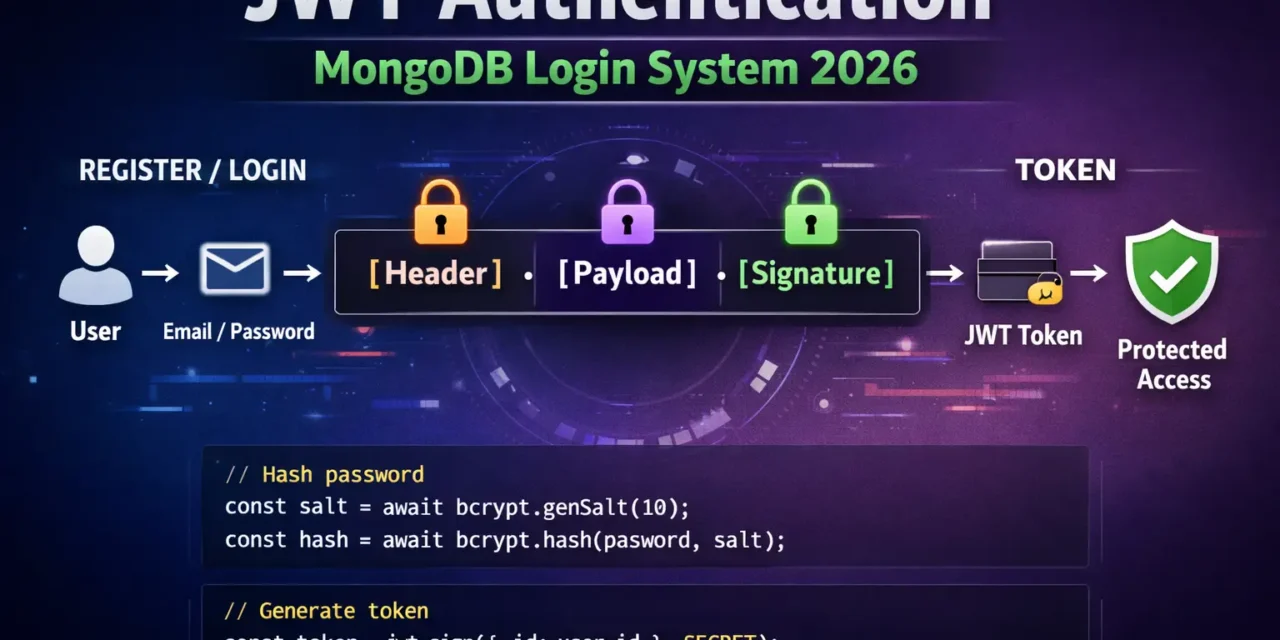
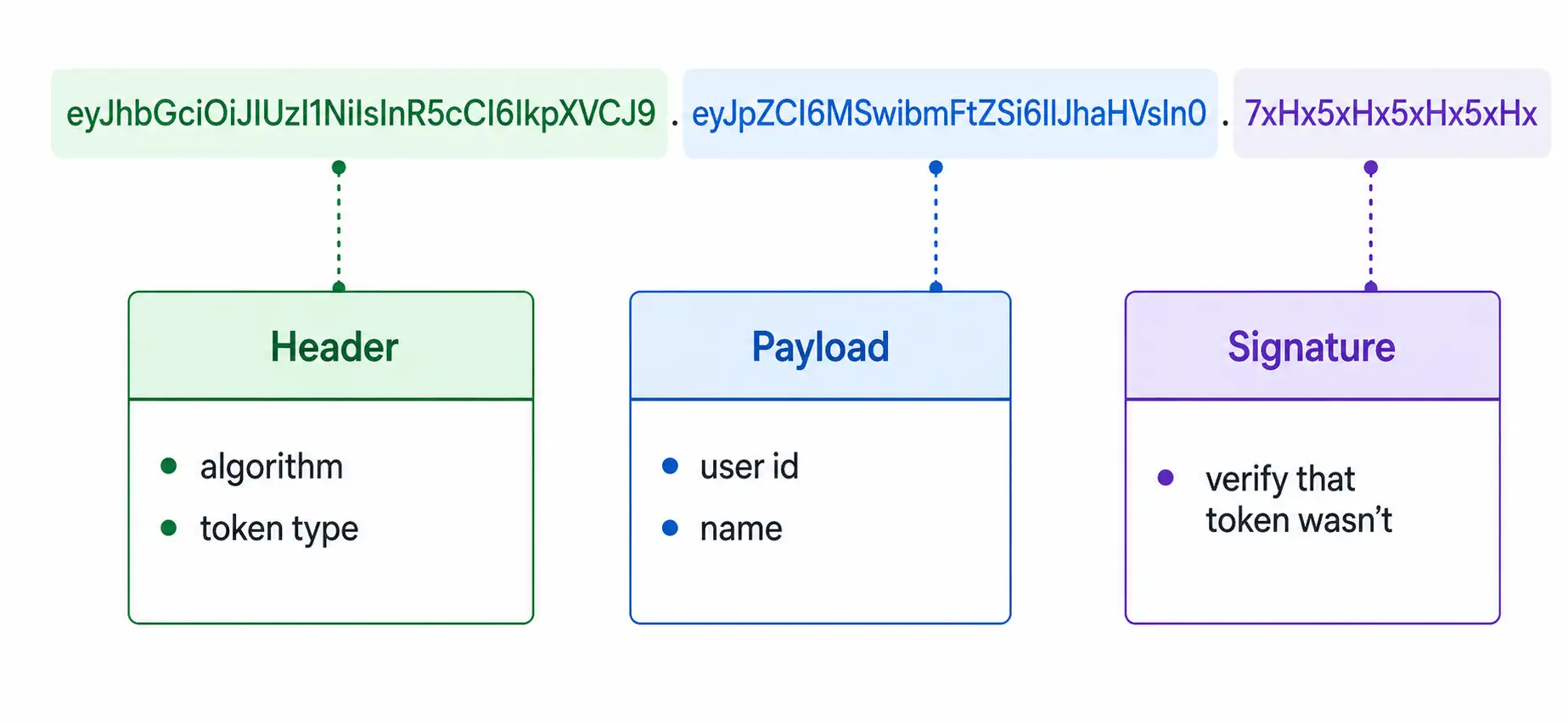
JWT token ke 3 parts hote हैं – Header, Payload, Signature – dots (.) से separated .
तो चलिए शुरू करते हैं – JWT authentication MongoDB Hindi सीखने का सफर! 🚀
Table of Contents
1. JWT Authentication Kya Hai? – Introduction
JWT (JSON Web Token) ek open standard (RFC 7519) है जो secure data transfer के लिए use होता है .
JWT Structure:
JWT Authentication Flow:
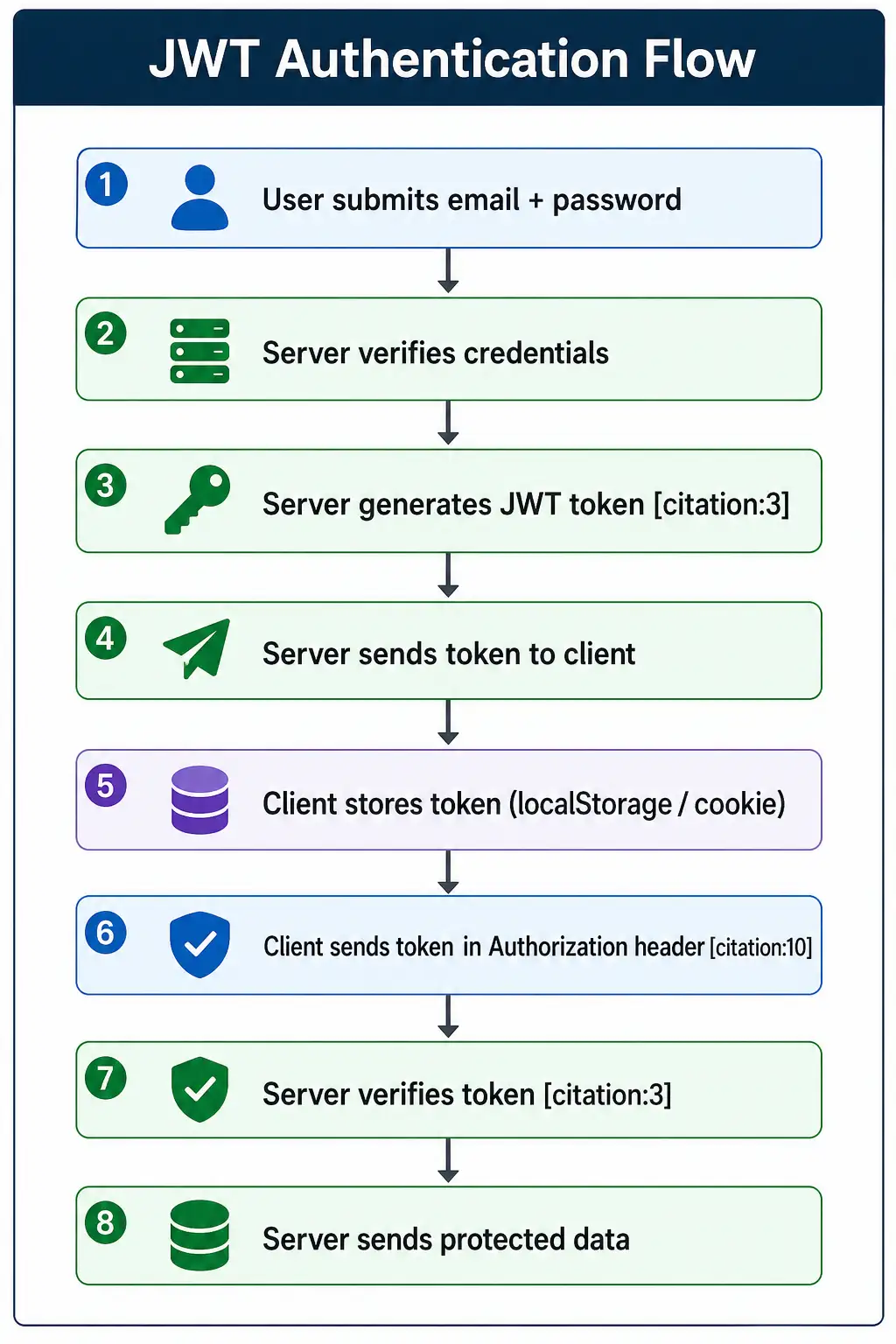
JWT authentication MongoDB Hindi में हम complete login system बनाएंगे।
2. Project Setup – Dependencies Install
Step 1: Create Project
mkdir jwt-auth-api
cd jwt-auth-api
npm init -y
Step 2: Install Dependencies
# Core dependencies
npm install express mongoose jsonwebtoken bcryptjs dotenv cors

# Development dependencies
npm install -D nodemon
Package explanations:
express– web frameworkmongoose– MongoDB ODMjsonwebtoken– JWT generate/verifybcryptjs– password hashingdotenv– environment variablescors– CORS enablenodemon– auto-restart server
Step 3: Project Structure
jwt-auth-api/
├── src/
│   ├── models/
│   │   └── User.js
│   ├── routes/
│   │   └── authRoutes.js
│   ├── controllers/
│   │   └── authController.js
│   ├── middleware/
│   │   └── authMiddleware.js
│   ├── config/
│   │   └── db.js
│   └── app.js
├── .env
├── .gitignore
└── server.js
Step 4: Environment Variables (.env)
# .env
PORT=5000
MONGO_URI=mongodb+srv://username:password@cluster.mongodb.net/authdb
JWT_SECRET=your_super_secret_key_change_this_in_production
JWT_EXPIRES_IN=7d
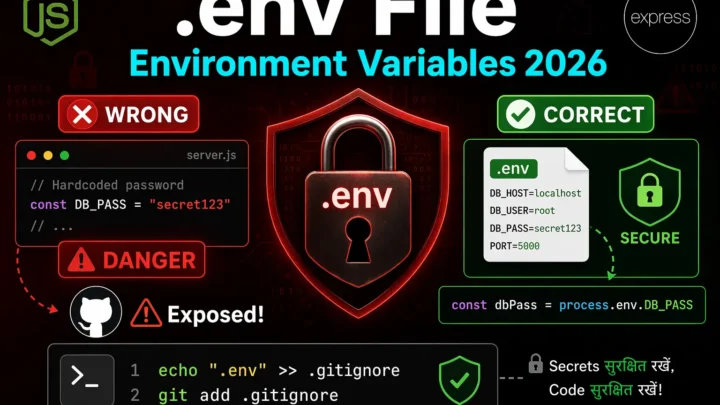
Important: JWT_SECRET strong रखो – openssl rand -hex 32 use कर सकते हो .
3. Database Connection – MongoDB Connect
// src/config/db.js
const mongoose = require('mongoose');

const connectDB = async () => {
  try {
    const conn = await mongoose.connect(process.env.MONGO_URI);
    console.log(`✅ MongoDB Connected: ${conn.connection.host}`);
  } catch (error) {
    console.error(`❌ Error: ${error.message}`);
    process.exit(1);
  }
};

module.exports = connectDB;
4. User Model – Mongoose Schema with bcrypt
// src/models/User.js
const mongoose = require('mongoose');
const bcrypt = require('bcryptjs');

const userSchema = new mongoose.Schema({
  name: {
    type: String,
    required: [true, 'Name is required'],
    trim: true,
    minlength: [2, 'Name must be at least 2 characters']
  },
  email: {
    type: String,
    required: [true, 'Email is required'],
    unique: true,
    trim: true,
    lowercase: true,
    match: [
      /^\w+([\.-]?\w+)*@\w+([\.-]?\w+)*(\.\w{2,3})+$/,
      'Please enter a valid email'
    ]
  },
  password: {
    type: String,
    required: [true, 'Password is required'],
    minlength: [6, 'Password must be at least 6 characters'],
    select: false  // Don't return password by default
  },
  role: {
    type: String,
    enum: ['user', 'admin'],
    default: 'user'
  },
  isActive: {
    type: Boolean,
    default: true
  }
}, {
  timestamps: true
});

// 🔐 Hash password before saving [citation:9]
userSchema.pre('save', async function(next) {
  // Only hash if password is modified
  if (!this.isModified('password')) return next();

  try {
    const salt = await bcrypt.genSalt(10);
    this.password = await bcrypt.hash(this.password, salt);
    next();
  } catch (error) {
    next(error);
  }
});

// 🔐 Method to compare password [citation:9]
userSchema.methods.comparePassword = async function(candidatePassword) {
  return await bcrypt.compare(candidatePassword, this.password);
};

module.exports = mongoose.model('User', userSchema);
5. Register API – User Signup
JWT Token Generator:
// src/utils/generateToken.js
const jwt = require('jsonwebtoken');

const generateToken = (userId, role) => {
  return jwt.sign(
    { id: userId, role: role },
    process.env.JWT_SECRET,
    { expiresIn: process.env.JWT_EXPIRES_IN || '7d' }
  );
};

module.exports = generateToken;
Auth Controller:
// src/controllers/authController.js
const User = require('../models/User');
const generateToken = require('../utils/generateToken');

// @desc    Register user
// @route   POST /api/auth/register
// @access  Public
const registerUser = async (req, res) => {
  try {
    const { name, email, password } = req.body;

    // Check if user already exists
    const existingUser = await User.findOne({ email });
    if (existingUser) {
      return res.status(400).json({
        success: false,
        error: 'User already exists with this email'
      });
    }

    // Create user
    const user = await User.create({
      name,
      email,
      password
    });

    // Generate token
    const token = generateToken(user._id, user.role);

    res.status(201).json({
      success: true,
      message: 'User registered successfully',
      data: {
        id: user._id,
        name: user.name,
        email: user.email,
        role: user.role,
        token
      }
    });
  } catch (error) {
    res.status(500).json({
      success: false,
      error: error.message
    });
  }
};

module.exports = { registerUser };
Auth Routes:
// src/routes/authRoutes.js
const express = require('express');
const router = express.Router();
const { registerUser } = require('../controllers/authController');

// POST /api/auth/register
router.post('/register', registerUser);

module.exports = router;
6. Login API – JWT Token Generate
Login Controller:
// src/controllers/authController.js (continued)

// @desc    Login user
// @route   POST /api/auth/login
// @access  Public
const loginUser = async (req, res) => {
  try {
    const { email, password } = req.body;

    // Find user with password field
    const user = await User.findOne({ email }).select('+password');

    if (!user) {
      return res.status(401).json({
        success: false,
        error: 'Invalid email or password'
      });
    }

    // Check password [citation:9]
    const isPasswordMatch = await user.comparePassword(password);

    if (!isPasswordMatch) {
      return res.status(401).json({
        success: false,
        error: 'Invalid email or password'
      });
    }

    // Generate token [citation:3]
    const token = generateToken(user._id, user.role);

    res.json({
      success: true,
      message: 'Login successful',
      data: {
        id: user._id,
        name: user.name,
        email: user.email,
        role: user.role,
        token
      }
    });
  } catch (error) {
    res.status(500).json({
      success: false,
      error: error.message
    });
  }
};

module.exports = { registerUser, loginUser };
Update Routes:
// src/routes/authRoutes.js
const express = require('express');
const router = express.Router();
const { registerUser, loginUser } = require('../controllers/authController');

router.post('/register', registerUser);
router.post('/login', loginUser);

module.exports = router;
7. JWT Middleware – Token Verify
Auth Middleware:
// src/middleware/authMiddleware.js
const jwt = require('jsonwebtoken');

const protect = async (req, res, next) => {
  try {
    let token;

    // Get token from Authorization header [citation:10]
    const authHeader = req.headers.authorization;

    if (authHeader && authHeader.startsWith('Bearer')) {
      token = authHeader.split(' ')[1];
    }

    if (!token) {
      return res.status(401).json({
        success: false,
        error: 'Not authorized. No token provided.'
      });
    }

    // Verify token [citation:3]
    const decoded = jwt.verify(token, process.env.JWT_SECRET);

    // Attach user to request
    req.user = {
      id: decoded.id,
      role: decoded.role
    };

    next();
  } catch (error) {
    if (error.name === 'JsonWebTokenError') {
      return res.status(401).json({
        success: false,
        error: 'Invalid token'
      });
    }

    if (error.name === 'TokenExpiredError') {
      return res.status(401).json({
        success: false,
        error: 'Token expired'
      });
    }

    res.status(500).json({
      success: false,
      error: error.message
    });
  }
};

// Role-based authorization [citation:10]
const authorize = (...roles) => {
  return (req, res, next) => {
    if (!roles.includes(req.user.role)) {
      return res.status(403).json({
        success: false,
        error: `Forbidden. ${req.user.role} role cannot access this resource`
      });
    }
    next();
  };
};

module.exports = { protect, authorize };
8. Protected Routes – Authenticated Access
User Controller:
// src/controllers/userController.js
const User = require('../models/User');

// @desc    Get current user profile
// @route   GET /api/users/me
// @access  Private
const getMe = async (req, res) => {
  try {
    const user = await User.findById(req.user.id).select('-password');

    if (!user) {
      return res.status(404).json({
        success: false,
        error: 'User not found'
      });
    }

    res.json({
      success: true,
      data: user
    });
  } catch (error) {
    res.status(500).json({
      success: false,
      error: error.message
    });
  }
};

// @desc    Get all users (admin only)
// @route   GET /api/users
// @access  Private/Admin
const getAllUsers = async (req, res) => {
  try {
    const users = await User.find().select('-password');

    res.json({
      success: true,
      count: users.length,
      data: users
    });
  } catch (error) {
    res.status(500).json({
      success: false,
      error: error.message
    });
  }
};

module.exports = { getMe, getAllUsers };
User Routes:
// src/routes/userRoutes.js
const express = require('express');
const router = express.Router();
const { protect, authorize } = require('../middleware/authMiddleware');
const { getMe, getAllUsers } = require('../controllers/userController');

// All routes require authentication
router.use(protect);

router.get('/me', getMe);
router.get('/', authorize('admin'), getAllUsers);  // Admin only

module.exports = router;
9. Logout API – Token Invalidate
JWT stateless है – server-side session store नहीं होता। Logout के लिए client-side token delete करना पड़ता है।
Logout Controller:
// src/controllers/authController.js (continued)

// @desc    Logout user
// @route   POST /api/auth/logout
// @access  Private
const logoutUser = async (req, res) => {
  // JWT is stateless - client needs to delete the token
  // For production: implement token blacklist with Redis

  res.json({
    success: true,
    message: 'Logged out successfully. Please delete the token from client side.'
  });
};

module.exports = { registerUser, loginUser, logoutUser };
Update Auth Routes:
// src/routes/authRoutes.js
const express = require('express');
const router = express.Router();
const { registerUser, loginUser, logoutUser } = require('../controllers/authController');
const { protect } = require('../middleware/authMiddleware');

router.post('/register', registerUser);
router.post('/login', loginUser);
router.post('/logout', protect, logoutUser);

module.exports = router;
10. Complete Auth API Code
Main App File:
// src/app.js
const express = require('express');
const cors = require('cors');
const dotenv = require('dotenv');

dotenv.config();

const app = express();

// Middleware
app.use(cors());
app.use(express.json());
app.use(express.urlencoded({ extended: true }));

// Routes
app.use('/api/auth', require('./routes/authRoutes'));
app.use('/api/users', require('./routes/userRoutes'));

// Health check
app.get('/health', (req, res) => {
  res.json({ status: 'OK', timestamp: new Date().toISOString() });
});

// 404 handler
app.use('*', (req, res) => {
  res.status(404).json({
    success: false,
    error: `Cannot ${req.method} ${req.originalUrl}`
  });
});

// Global error handler
app.use((err, req, res, next) => {
  console.error(err.stack);
  res.status(err.status || 500).json({
    success: false,
    error: err.message || 'Internal server error'
  });
});

module.exports = app;
Server File:
// server.js
const app = require('./src/app');
const connectDB = require('./src/config/db');

const PORT = process.env.PORT || 5000;

// Connect to MongoDB
connectDB();

app.listen(PORT, () => {
  console.log(`🚀 Server running on http://localhost:${PORT}`);
  console.log(`📝 Environment: ${process.env.NODE_ENV || 'development'}`);
});
11. Testing with Postman
API Endpoints:
| Method | Endpoint | Description | Auth |
|---|---|---|---|
| POST | /api/auth/register | Register user | ❌ |
| POST | /api/auth/login | Login user | ❌ |
| POST | /api/auth/logout | Logout user | ✅ |
| GET | /api/users/me | Get profile | ✅ |
| GET | /api/users | Get all users | ✅ (Admin) |
Test Examples:
# 1. Register
curl -X POST http://localhost:5000/api/auth/register \
  -H "Content-Type: application/json" \
  -d '{
    "name": "Vivek Sharma",
    "email": "vivek@example.com",
    "password": "123456"
  }'

# 2. Login
curl -X POST http://localhost:5000/api/auth/login \
  -H "Content-Type: application/json" \
  -d '{
    "email": "vivek@example.com",
    "password": "123456"
  }'

# 3. Get Profile (with token)
curl -X GET http://localhost:5000/api/users/me \
  -H "Authorization: Bearer YOUR_TOKEN_HERE"

# 4. Get All Users (admin only)
curl -X GET http://localhost:5000/api/users \
  -H "Authorization: Bearer YOUR_ADMIN_TOKEN_HERE"

# 5. Logout
curl -X POST http://localhost:5000/api/auth/logout \
  -H "Authorization: Bearer YOUR_TOKEN_HERE"
12. Common Mistakes + Solutions
Mistake 1: Password not hashed before saving
// ❌ Plain text password saved
const user = await User.create(req.body);

// ✅ Schema pre-save hook hashes password [citation:9]
userSchema.pre('save', async function(next) {
  if (this.isModified('password')) {
    this.password = await bcrypt.hash(this.password, 10);
  }
  next();
});
Mistake 2: Not selecting password field for login
// ❌ Password not returned (select: false)
const user = await User.findOne({ email });

// ✅ Select password explicitly
const user = await User.findOne({ email }).select('+password');
Mistake 3: Missing JWT_SECRET in .env
// ❌ Error: secretOrPrivateKey must be provided

// ✅ Add to .env
JWT_SECRET=your_super_secret_key
Mistake 4: Token not sent in correct format
// ❌ Wrong header format
Authorization: YOUR_TOKEN

// ✅ Correct format [citation:10]
Authorization: Bearer YOUR_TOKEN
13. Quick Cheat Sheet
Installation:
npm install express mongoose jsonwebtoken bcryptjs dotenv cors
npm install -D nodemon
JWT Functions:
// Generate token [citation:3]
const token = jwt.sign({ id: user.id }, SECRET, { expiresIn: '7d' });

// Verify token [citation:3]
const decoded = jwt.verify(token, SECRET);
bcrypt Functions:
// Hash password [citation:9]
const salt = await bcrypt.genSalt(10);
const hash = await bcrypt.hash(password, salt);

// Compare password [citation:9]
const isMatch = await bcrypt.compare(password, hash);
API Response Format:
{
  "success": true,
  "data": { ... },
  "message": "Optional message"
}
14. FAQ
Q1: JWT authentication MongoDB Hindi में सबसे important kya hai?
Password hashing (bcrypt) + JWT token generation – ye do core components हैं .
Q2: JWT vs Session – kya use karein?
JWT – stateless, scalable, microservices के लिए . Session – stateful, traditional monolith के लिए।
Q3: bcrypt kyun use karein?
Password hash karne के लिए – same password ka different hash, brute force attacks mushkil .
Q4: JWT token kahan store karein?
localStorage (easy but XSS risk) या httpOnly cookie (more secure) .
Q5: Token expiry kaise set karein?{ expiresIn: '7d' } – 7 days, '1h' – 1 hour, '15m' – 15 minutes .
Q6: Role-based access control kaise implement karein?authorize() middleware – authorize('admin') .
Q7: Token refresh kyun chahiye?
Access token short lived hota hai (security). Refresh token se naya access token milta hai bina login kare .
Q8: Logout kaise implement karein?
Client-side token delete करो। Production में token blacklist (Redis) use करो।
Q9: select: false kya karta hai?
Password field को by default queries से exclude करता है .
Q10: JWT_SECRET kaise generate karein?openssl rand -hex 32 या crypto.randomBytes(32).toString('hex') .
15. Conclusion
बहुत बढ़िया दोस्तों! आज हमने JWT authentication MongoDB Hindi को पूरी detail में समझा।
Quick Recap:
| Component | Purpose |
|---|---|
| bcrypt | Password hashing |
| JWT | Token generation & verification |
| Mongoose | User model with pre-save hook |
| Middleware | protect() for routes |
| Authorization | role-based access |
Mera personal experience:
JWT authentication seekhne के बाद maine apni sari APIs secure karni shuru kar di। bcrypt se passwords hash, JWT से stateless auth – production apps ke liye perfect combination है।
Tum bhi ye steps follow karo:
- ✅ Dependencies install करो
- ✅ User model with bcrypt pre-save hook बनाओ
- ✅ Register API implement करो
- ✅ Login API with JWT implement करो
- ✅ protect middleware से routes secure करो
अब तुम्हारी बारी है!
नीचे comment में बताओ:
- तुमने कभी JWT authentication implement kiya है?
- कौन सा part सबसे easy लगा?
- अगला topic क्या चाहिए? (Refresh Tokens? OAuth? Role-Based Access Control?)
The Easy Master पर बने रहो। Happy Secure Coding! 🔐🚀
Resources
Additional Resources
- Express.js Setup – पहला Server कैसे बनाएं (Step-by-Step) 2026
- Express.js Routing – GET POST PUT DELETE Complete Guide
- Express Middleware समझे – Application, Router, Error Middleware
- Express req and res Objects – Query, Params, Body, Headers Explained
- Express Static Files और Templating – EJS से Dynamic HTML Banaye
- Express Router – API Routes को Organize करें (Modular Code)
- Express.js में Environment Variables – .env File कैसे Use करें
- Express File Upload Multer Tutorial | Image PDF Hindi 2026
- Express Security – Helmet, CORS, Rate Limiting, Validation (2026)
- Express + TypeScript – Type-Safe API कैसे बनाएं 2026
- Express MongoDB CRUD – Complete REST API Example 2026
- Express Logging – Morgan और Winston से Debug करें
- Express API Testing – Supertest से Routes Test करें
- MongoDB Setup – CRUD Operations समझे (Beginner Guide) 2026
- MongoDB Compass से GUI Database Manage करने का आसान तरीका | Beginner Tutorial 2026
- Node.js MongoDB Connection – Mongoose Setup समझे 2026
- MongoDB Data Modeling – Embedded Documents vs References 2026
- MongoDB Indexing – Query Speed बढ़ने करने का आसान तरीका
- MongoDB Aggregation Pipeline – Stages समझे | Practical Examples
- Express MongoDB CRUD – Complete REST API Example
- Mongoose ODM – Schema, Model, and Validation समझे 2026
- MongoDB Atlas – Cloud Database Free में Deploy करें 2026