नमस्ते दोस्तों! 🙏
स्वागत है The Easy Master पर!
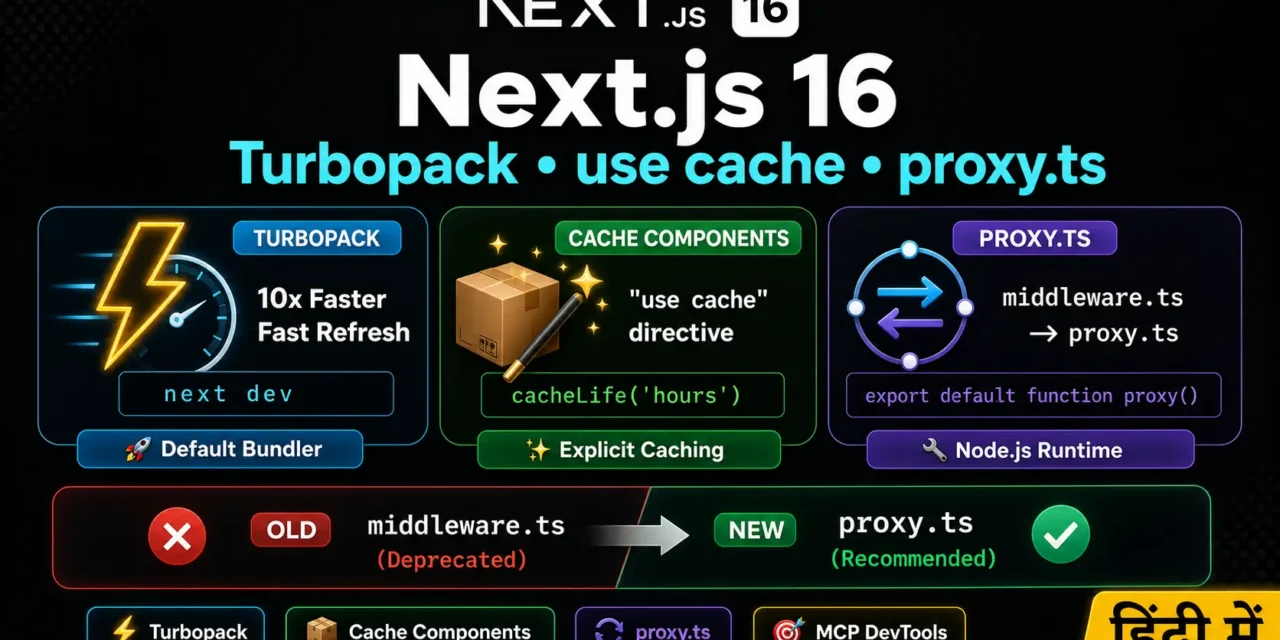
क्या तुमने कभी सोचा है – Next.js 16 में क्या नया है? Turbopack stable हो गया, caching का नया model आया, और middleware.ts अब proxy.ts बन गया.
Next.js 16 एक मेजर रिलीज़ है जो performance, caching, और developer experience में बड़े बदलाव लेकर आई है .
Next.js 16 new features Hindi में समझना बहुत जरूरी है क्योंकि:
- Turbopack अब default है – 5-10x faster Fast Refresh
- Cache Components – explicit, flexible caching
- proxy.ts – middleware का replacement
- Next.js DevTools MCP – AI-assisted debugging
- 2026 में यह standard practice है
Aaj kya seekhoge?
| Topic | Kya Seekhega? |
|---|---|
| Turbopack | Default bundler – 5-10x faster |
| Cache Components | "use cache" directive |
| proxy.ts | middleware.ts का replacement |
| Next.js DevTools MCP | AI-assisted debugging |
| Breaking Changes | क्या बदला, क्या deprecated |
| Migration Guide | Next.js 15 से 16 में upgrade |
Kya tumhe pata hai?
Turbopack अब 50% से ज्यादा development sessions में use हो रहा है, और Next.js 16 में यह default bundler है !
तो चलिए शुरू करते हैं – Next.js 16 new features Hindi सीखने का सफर! 🚀
Table of Contents
1. Next.js 16 Overview – क्या बदला है?
Next.js 16 October 2025 में release हुई, और यह React 19 generation के लिए built है .
Key Highlights:
Three Major Themes:
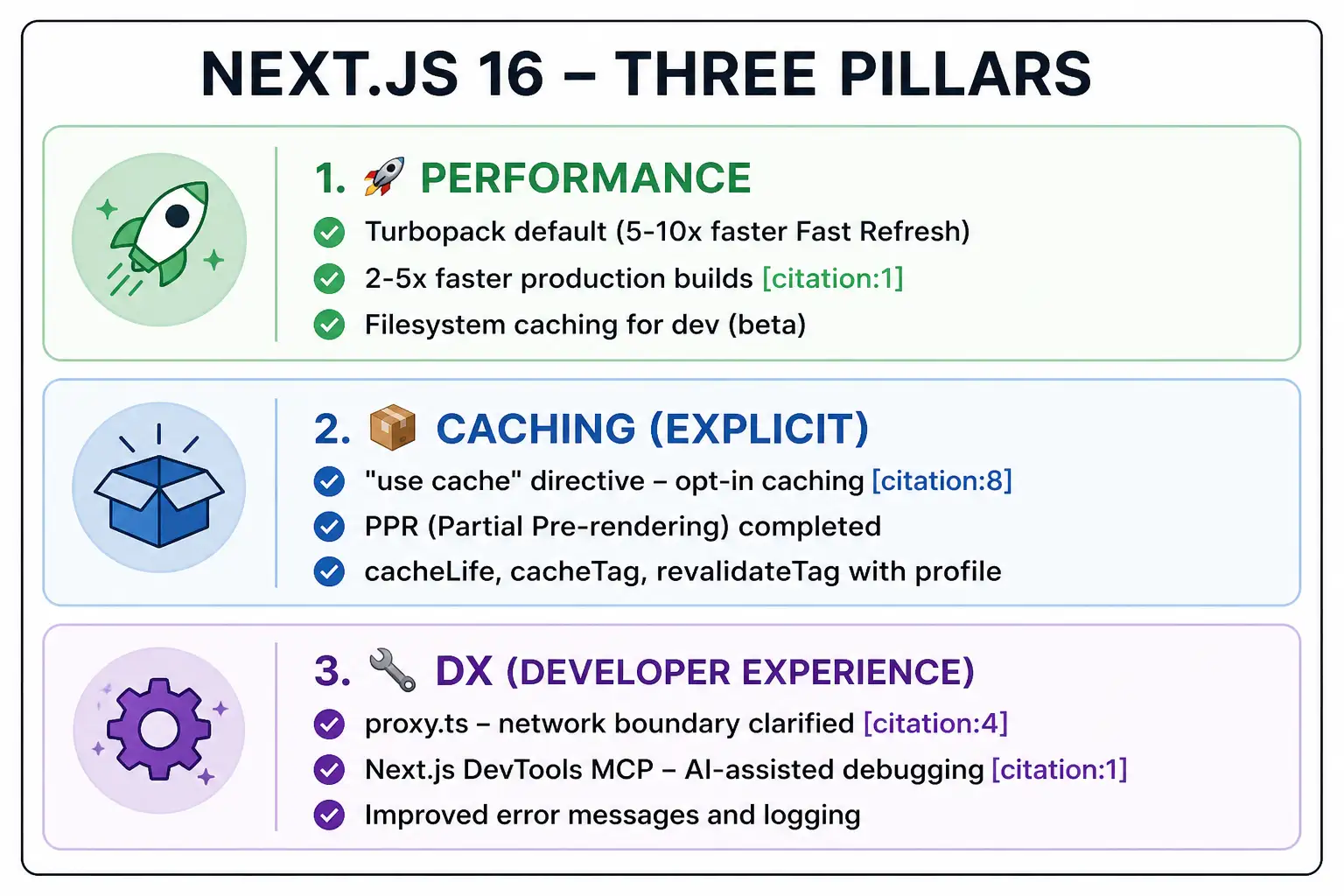
Next.js 16 new features Hindi में हम इन तीन pillars को detail में समझेंगे.
2. Turbopack – Default Bundler (5-10x Faster)
Turbopack अब default bundler है – no configuration needed!
Performance Numbers:
| Metric | Webpack | Turbopack | Improvement |
|---|---|---|---|
| Fast Refresh | 2.5s | 0.25s | 10x faster |
| Production Build | 180s | 45s | 4x faster |
| Dev Startup | Baseline | -87% | ~400% faster |
| Server Refresh | 59ms | 12.4ms | 375% faster |
Why Turbopack is Faster?
- Rust-based – compiled language, not interpreted
- Incremental computation – only changed modules rebuild
- Better caching – filesystem caching between runs
Server Fast Refresh (New in 16.2):
Turbopack 16.2 में server-side hot reloading improved हुआ है – 67-100% faster application refresh .
# Turbopack is now default – no flags needed!
next dev    # automatically uses Turbopack
next build  # automatically uses Turbopack

# Opt out to webpack (if needed)
next dev --webpack
next build --webpack
File System Caching (Beta):
Large projects के लिए Turbopack now supports filesystem caching :
// next.config.ts
const nextConfig = {
  experimental: {
    turbopackFileSystemCacheForDev: true,
  },
};

export default nextConfig;
Impact: Large project startup time 120s → 12s (90% faster!)
3. Cache Components – "use cache" Directive
Cache Components सबसे important feature है Next.js 16 में .
Before (Next.js 15 – Implicit Caching):
Next.js 15 में caching implicit थी – यह guess करता था कि क्या cache करना है. Complex rules थे – dynamic functions, route segments, rendering strategies – सब याद रखना पड़ता था.
After (Next.js 16 – Explicit Caching):
अब caching opt-in है – तुम्हें explicitly बताना होगा कि क्या cache करना है .
Enabling Cache Components:
// next.config.ts
const nextConfig = {
  cacheComponents: true,  // Enable Cache Components
};

export default nextConfig;
Note: पुराना experimental.ppr flag हटा दिया गया है – Cache Components ने उसे replace कर दिया है .
The "use cache" Directive:
"use cache" तीन levels पर use हो सकता है :
Level 1: Page-Level Caching
// app/blog/page.tsx
"use cache";

export default async function BlogPage() {
  const posts = await fetchPosts();

  return (
    <div>
      {posts.map(post => <Article key={post.id} {...post} />)}
    </div>
  );
}
Level 2: Component-Level Caching
// components/UserProfile.tsx
"use cache";

async function UserProfile({ userId }: { userId: string }) {
  const user = await fetchUser(userId);

  return (
    <div>
      <h2>{user.name}</h2>
      <p>{user.bio}</p>
    </div>
  );
}
Level 3: Function-Level Caching
// lib/data.ts
"use cache";

export async function getProductRecommendations(userId: string) {
  const userPreferences = await fetchPreferences(userId);
  const recommendations = await fetchRecommendations(userPreferences);
  return recommendations;
}
Cache Components + PPR (Partial Pre-rendering):
PPR अब Cache Components के साथ complete हो गया है – अब तुम static और dynamic content को same page पर mix कर सकते हो .
// app/product/[id]/page.tsx
import { Suspense } from 'react';

// ✅ Static product info – cached
"use cache";
async function ProductInfo({ id }: { id: string }) {
  const product = await fetchProduct(id);
  return (
    <div>
      <h1>{product.name}</h1>
      <p>{product.description}</p>
      <p>${product.price}</p>
    </div>
  );
}

// ✅ Dynamic user recommendations – not cached
async function UserRecommendations({ userId }: { userId: string }) {
  const recommendations = await fetchPersonalizedRecs(userId);
  return <RecommendationGrid items={recommendations} />;
}

export default function ProductPage({ params }: { params: { id: string } }) {
  return (
    <div>
      {/* Static part – loads instantly from cache */}
      <ProductInfo id={params.id} />

      {/* Dynamic part – streams in */}
      <Suspense fallback={<LoadingSkeleton />}>
        <UserRecommendations userId={getCurrentUser().id} />
      </Suspense>
    </div>
  );
}
Result: Product info instant (sub-100ms TTFB), personalized recommendations stream in without blocking initial render .
Cache Lifecycle APIs:
// lib/data.ts
"use cache";
import { cacheLife, cacheTag } from 'next/cache';

// Set cache profile
cacheLife('hours');  // 'minutes', 'hours', 'days', 'weeks', 'max'

// Set cache tags for revalidation
cacheTag('products', 'featured');

export async function getProducts() {
  const products = await db.product.findMany();
  return products;
}
4. proxy.ts – middleware.ts का Replacement
proxy.ts middleware.ts का replacement है – यह network boundary को clarify करता है .
Why the Change?
middleware.ts नाम ambiguous था – इसका मतलब server middleware भी हो सकता था, edge middleware भी, application-level middleware भी. proxy.ts स्पष्ट करता है: यह code network boundary पर runs है .
Additionally, proxy.ts Node.js runtime पर runs है (Edge पर नहीं), जो full Node.js API और better debugging access देता है .
Migration Steps:
Before (Next.js 15):
// middleware.ts
import { NextResponse } from 'next/server';
import type { NextRequest } from 'next/server';

export function middleware(request: NextRequest) {
  // Auth check
  if (!request.cookies.has('token')) {
    return NextResponse.redirect(new URL('/login', request.url));
  }

  return NextResponse.next();
}

export const config = {
  matcher: '/dashboard/:path*',
};
After (Next.js 16):
// proxy.ts – rename file
import { NextResponse } from 'next/server';
import type { NextRequest } from 'next/server';

// Rename function to "proxy" (default export)
export default function proxy(request: NextRequest) {
  // Same logic – no changes needed!
  if (!request.cookies.has('token')) {
    return NextResponse.redirect(new URL('/login', request.url));
  }

  return NextResponse.next();
}

export const config = {
  matcher: '/dashboard/:path*',
};
What Changed:
| Before | After |
|---|---|
middleware.ts file | proxy.ts file |
export function middleware() | export default function proxy() |
| Edge runtime (by default) | Node.js runtime |
| Config same | Config same |
Deprecation Notice:
middleware.ts still works for Edge runtime use cases, but deprecated है और future version में remove हो जाएगा . अभी migrate कर लो.
API Gateway Pattern with proxy.ts:
// app/proxy.ts
import { NextRequest } from "next/server";

export async function GET(req: NextRequest) {
  const url = new URL(req.url);
  const target = "https://api.example.com" + url.pathname.replace("/proxy", "");

  const res = await fetch(target, {
    headers: {
      "x-trace-id": crypto.randomUUID(),     // Logging
      "authorization": req.headers.get("authorization") ?? ""
    },
    cache: "no-store"
  });

  return new Response(res.body, {
    status: res.status,
    headers: res.headers
  });
}
यह pattern external API को सीधे browser से expose नहीं करता – CORS और key management एक जगह control होती है .
5. Next.js DevTools MCP – AI-Assisted Debugging
Next.js DevTools MCP एक Model Context Protocol integration है – AI-assisted debugging के लिए .
What it Provides:
AI agents को ये access मिलता है :
- Next.js knowledge – routing, caching, rendering behavior
- Unified logs – browser और server logs एक साथ
- Automatic error access – detailed stack traces without manual copying
- Page awareness – contextual understanding of the active route
Benefits:
यह AI agents को diagnose issues, explain behavior, and suggest fixes directly within your development workflow करने देता है .
6. Other New Features
Next.js 16.2 Highlights (March 2026) :
Faster Rendering – React:
Next.js ने React में change contribute किया है जो Server Components payload deserialization को 25-60% faster बनाता है :
| Scenario | Before | After | Improvement |
|---|---|---|---|
| Simple table | 19ms | 15ms | 26% faster |
| Nested Suspense | 80ms | 60ms | 33% faster |
| Rich text content | 52ms | 33ms | 60% faster |
Faster Time-to-URL:
next dev startup time ~87% faster compared to Next.js 16.1 .
7. Breaking Changes – Deprecated APIs
Removed Features :
| Removed | Replacement |
|---|---|
| AMP support | All AMP APIs removed |
next lint command | Use Biome or ESLint directly |
serverRuntimeConfig, publicRuntimeConfig | Use environment variables |
experimental.ppr flag | Cache Components configuration |
export const experimental_ppr | Evolving into Cache Components |
images.domains config | Use images.remotePatterns |
next/legacy/image | Use next/image |
Changed Behavior :
| Change | Details |
|---|---|
| Node.js minimum version | Now 20.9+ (Node.js 18 no longer supported) |
| TypeScript minimum version | Now 5.1+ |
| async params, searchParams | Must use await params, await searchParams |
| async cookies(), headers() | Must use await cookies(), await headers() |
| Turbopack default | Opt out with --webpack flag |
| Parallel routes default.js | All parallel route slots require explicit default.js files |
Deprecated :
| Deprecated | Migration |
|---|---|
middleware.ts filename | Rename to proxy.ts |
next/legacy/image | Use next/image |
images.domains | Use images.remotePatterns |
revalidateTag() single argument | Use revalidateTag(tag, profile) |
8. Migration Guide – Next.js 15 से 16 में Upgrade
Step 1: Update Dependencies
npm install next@latest react@latest react-dom@latestStep 2: Update next.config.ts
// next.config.ts
const nextConfig = {
  // Enable Cache Components
  cacheComponents: true,

  // Remove deprecated options
  // experimental: { ppr: true } → REMOVE
};

export default nextConfig;
Step 3: Migrate middleware.ts to proxy.ts
# Rename file
mv middleware.ts proxy.ts

# Update export (inside file)
# export function middleware → export default function proxy
Step 4: Update params and searchParams
// Before (Next.js 15)
export default function Page({ params, searchParams }) {
  const { id } = params;  // Sync
  const { page } = searchParams;
}

// After (Next.js 16)
export default async function Page({ params, searchParams }) {
  const { id } = await params;      // Async!
  const { page } = await searchParams;  // Async!
}
Step 5: Update cookies() and headers()
// Before
import { cookies } from 'next/headers';
const cookieStore = cookies();

// After
import { cookies } from 'next/headers';
const cookieStore = await cookies();
Step 6: Add default.js for Parallel Routes
// app/@modal/default.tsx
export default function Default() {
  return null;  // or notFound()
}
Step 7: Run Build and Fix Warnings
npm run build
# Fix any deprecation warnings
9. Quick Cheat Sheet
Next.js 16 Commands:
# Create new project (Turbopack default)
npx create-next-app@latest my-app

# Development (Turbopack default)
next dev

# Build (Turbopack default)
next build

# Opt out to webpack
next dev --webpack
next build --webpack
Configuration:
// next.config.ts
const nextConfig = {
  cacheComponents: true,  // Enable new caching

  turbopack: {
    // Turbopack-specific config (replaces experimental.turbopack)
  },
};

export default nextConfig;
Migration Checklist:
- Update to Next.js 16
- Enable
cacheComponentsin config - Rename
middleware.ts→proxy.ts - Update
params/searchParamsto async - Update
cookies()/headers()to async - Add
default.jsfor parallel routes - Remove deprecated AMP/configs
- Test build and fix warnings
10. FAQ
Q1: Next.js 16 new features Hindi में सबसे important kya hai?
Cache Components with "use cache" – यह caching को explicit बनाता है, और Turbopack default है जो 10x faster Fast Refresh देता है .
Q2: Turbopack ab default है, kya mujhe kuch change karna hoga?
Nahi! New projects automatically Turbopack use करेंगे. Existing projects upgrade करने पर भी Turbopack default होगा. अगर webpack चाहिए तो --webpack flag use करो .
Q3: middleware.ts का क्या करूँ?
Rename to proxy.ts and update function name to proxy . middleware.ts deprecated है और future में remove हो जाएगा.
Q4: Cache Components enable कैसे करूँ?next.config.ts में cacheComponents: true add करो . पुराना experimental.ppr flag remove करो.
Q5: "use cache" directive कहाँ use करूँ?
Three levels – page-level (app/page.tsx), component-level, function-level – जहाँ performance boost चाहिए .
Q6: params और searchParams async kyun ho gaye?
Rendering performance और consistency के लिए – Next.js 16 requires await .
Q7: PPR क्या है और कैसे use करूँ?
Partial Pre-rendering – static + dynamic content same page पर mix करता है. Cache Components with Suspense boundaries use करो .
Q8: Next.js DevTools MCP क्या है?
AI-assisted debugging tool – routing, caching, errors – AI को context देता है. Next.js 16 में नया feature है .
Q9: Next.js 16 में क्या breaking changes हैं?
Node.js 20.9+ required, async params/cookies/headers, AMP removed, next lint removed, images.domains deprecated .
Q10: Migrate कैसे करूँ from Next.js 15?
Update packages, enable cacheComponents, rename middleware.ts to proxy.ts, update async APIs, add default.js for parallel routes, build and fix warnings .
11. Conclusion
बहुत बढ़िया दोस्तों! आज हमने Next.js 16 new features Hindi को पूरी detail में समझा.
Quick Recap:
Mera personal experience:
Next.js 16 में Turbopack default होने से development speed 10x हो गई है – Fast Refresh almost instant लगता है. Cache Components ने caching को predictable बना दिया है, और proxy.ts ने request interception को clearer बना दिया है. Upgrade करने में थोड़ा काम है, लेकिन benefits इसके worth हैं.
Tum bhi ye steps follow karo:
- ✅ Next.js 16 upgrade करो
- ✅
cacheComponents: trueenable करो - ✅
middleware.ts→proxy.tsrename करो - ✅ async params और APIs update करो
- ✅
"use cache"से performance improve करो
अब तुम्हारी बारी है!
नीचे comment में बताओ:
- क्या तुमने Next.js 16 upgrade किया है?
- तुम्हें कौन सा feature सबसे useful लगा?
- अगला topic क्या चाहिए? (Next.js Caching Deep Dive? Server Actions? Middleware vs Proxy?)
The Easy Master पर बने रहो। Happy Coding with Next.js 16! 🚀⚛️
Resources
- Next.js 16 Official Release Blog
- Next.js 16.2 Release Blog
- Cache Components Documentation
- proxy.ts Documentation
Additional Resources
- Express.js Setup – पहला Server कैसे बनाएं (Step-by-Step) 2026
- Express.js Routing – GET POST PUT DELETE Complete Guide
- Express Middleware समझे – Application, Router, Error Middleware
- Express req and res Objects – Query, Params, Body, Headers Explained
- Express Static Files और Templating – EJS से Dynamic HTML Banaye
- Express Router – API Routes को Organize करें (Modular Code)
- Express.js में Environment Variables – .env File कैसे Use करें
- Express File Upload Multer Tutorial | Image PDF Hindi 2026
- Express Security – Helmet, CORS, Rate Limiting, Validation (2026)
- Express + TypeScript – Type-Safe API कैसे बनाएं 2026
- Express MongoDB CRUD – Complete REST API Example 2026
- Express Logging – Morgan और Winston से Debug करें
- Express API Testing – Supertest से Routes Test करें
- MongoDB Setup – CRUD Operations समझे (Beginner Guide) 2026
- MongoDB Compass से GUI Database Manage करने का आसान तरीका | Beginner Tutorial 2026
- Node.js MongoDB Connection – Mongoose Setup समझे 2026
- MongoDB Data Modeling – Embedded Documents vs References 2026
- MongoDB Indexing – Query Speed बढ़ने करने का आसान तरीका
- MongoDB Aggregation Pipeline – Stages समझे | Practical Examples
- Express MongoDB CRUD – Complete REST API Example
- Mongoose ODM – Schema, Model, and Validation समझे 2026
- MongoDB Atlas – Cloud Database Free में Deploy करें 2026
- JWT Authentication MongoDB – User Login System कैसे बनाएं 2026
- Next.js App Router – Pages Router से क्या बदला? Complete Guide 2026
- Next.js Server Components – ‘use client’ कब और कहां Use करें
- Next.js Routing – Layouts, Dynamic Routes and Nested Routes 2026