नमस्ते दोस्तों!
स्वागत है The Easy Master पर!
आपने GraphQL queries aur mutations likhna seekh liya. Ab aapke queries kaam toh kar rahe hain, lekin kya woh reusable, dynamic, aur maintainable hain? Agar aap same fields baar-baar likh rahe ho, alag-alag queries mein copy-paste kar rahe ho, toh aap GraphQL ki poori power use nahi kar rahe.
Jab maine pehli baar medium-scale project mein GraphQL use kiya, toh mujhe realise hua ki mere queries bohot repetitive ho rahe hain. Har query mein same fields (id, name, email, createdAt) likhna pad raha tha. Phir maine fragments seekhe – aur boilerplate 70% kam ho gaya. Aliases ne ek hi query mein multiple same-type requests bhejne mein help ki. Aur variables ne queries ko dynamic aur secure bana diya.
Is GraphQL advanced features Hindi article mein main aapko ye teen powerful concepts sikhata hoon:
✅ Fragments – reusable field sets, fragment spread operator, use cases
✅ Fragments with arguments – $deviceType jaise use cases
✅ Aliases – ek hi query mein ek field ko multiple baar different names ke saath
✅ Variables – dynamic queries, input validation, security (prevent injection)
✅ Default variables – optional variables ke liye default values
✅ Practical examples – real API queries mein implementation
✅ Best practices aur common mistakes
Chaliye GraphQL queries ko reusable, dynamic aur maintainable banate hain! 🚀
Table of Contents
1. Reusable Queries Ki Zaroorat – Why Advanced Features?
GraphQL ki power flexibility hai, lekin agar aap queries likhte waqt repetitive kaam kar rahe ho, toh aapka code maintain karna mushkil ho jata hai.
Problem Statements:
| Problem | Without Fragments/Aliases/Variables | With Advanced Features |
|---|---|---|
| Same fields multiple queries mein repeat | Boilerplate code, change ek field mein karna hai toh saari queries mein change karo | Fragment define karo, ek jagah change karo |
| Ek hi query mein same field alag arguments ke saath | Name conflict (you can’t have two user fields) | Aliases use karo – user1: user(id:1), user2: user(id:2) |
| Dynamic values (search term, page number) | String concatenation – insecure, hard to read | Variables – type-safe, secure, reusable |
GraphQL advanced features queries ko professional banate hain – maintainable, type-safe, aur efficient.
2. Fragments – Field Sets Reuse Karein
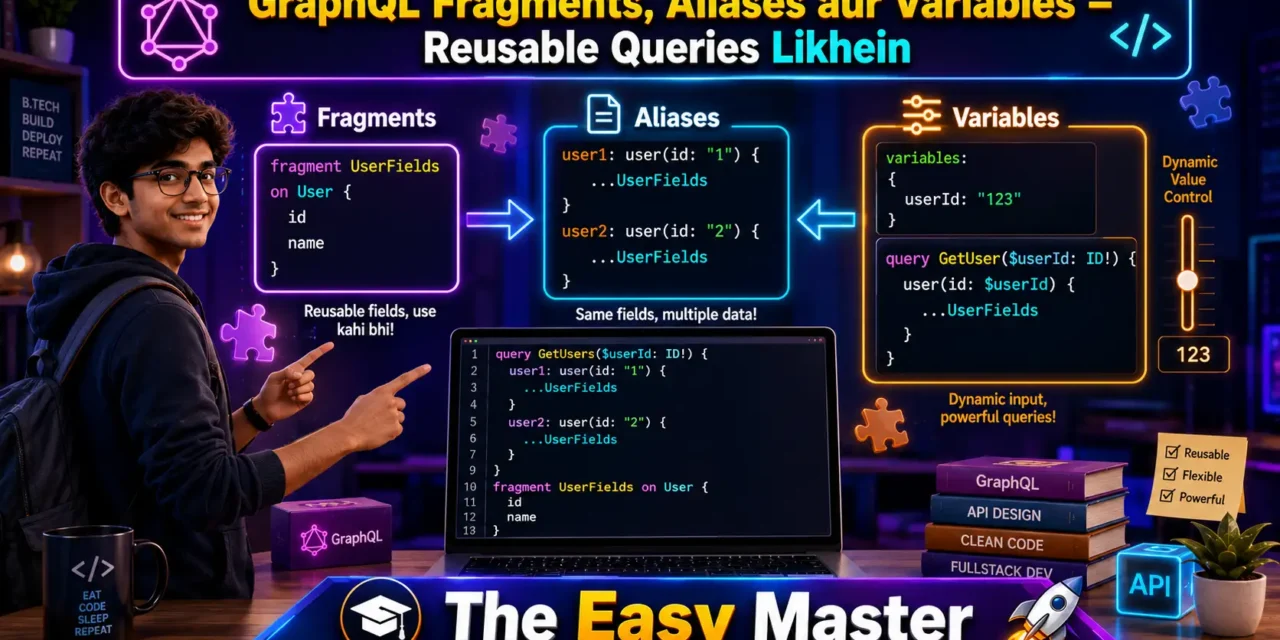
Fragment ek reusable unit hai jo fields ke set ko define karta hai. Aap fragment ko multiple queries aur mutations mein include kar sakte ho using spread operator (...).
2.1 Fragment Syntax aur Definition
graphql
fragment UserFields on User {
  id
  name
  email
  profilePicture
  createdAt
}
Rules:
- Fragment ka naam unique hona chahiye
onkeyword ke baad type name (e.g.,User,Post)- Fragment mein nested fields aur sub-fragments bhi ho sakte hain
2.2 Spread Operator (...FragmentName)
Fragment ko query mein include karna:
graphql
query GetUserProfile {
  user(id: "123") {
    ...UserFields
    bio
    postsCount
  }
}
Fully expanded query jaisa behave karega – fields id, name, email, profilePicture, createdAt, plus bio and postsCount.
2.3 Fragments with Arguments
Kai baar fragment ke fields arguments accept karna chahte ho (e.g., posts(limit: 5)). Fragments themselves don’t take arguments, but you can use variables inside fragments.
Alternatively, use fragment arguments via directives (GraphQL spec doesn’t have native fragment arguments, but some tools support @include/@skip directives).
2.4 Inline Fragments
Inline fragments use hoti hain jab aap interface ya union type ke specific fields access kar rahe ho.
graphql
query Search {
  search(term: "graphql") {
    __typename
    ... on Article {
      title
      body
    }
    ... on Video {
      url
      duration
    }
  }
}
2.5 Fragment Collocation
Best practice: fragments ko un components ke saath define karo jo unhe use karte hain (React components mein).
// UserCard.js
export const USER_CARD_FRAGMENT = gql`
  fragment UserCard on User {
    id
    name
    avatar
  }
`;
Isse fields aur components tightly coupled hote hain – change tracking easy ho jata hai.
3. Aliases – Conflict Solve Karein
Alias aapko ek hi query mein same field ko alag-alag arguments ke saath multiple baar request karne ki facility deta hai.
3.1 Ek Query Mein Multiple Same Type Requests
Without Aliases (Not possible):
graphql
query {
  user(id: "1") { name }
  user(id: "2") { name }   # Error: field "user" conflict
}
With Aliases:
graphql
query {
  user1: user(id: "1") {
    name
    email
  }
  user2: user(id: "2") {
    name
    email
  }
}
3.2 Real Use Case – Dashboard
graphql
query DashboardData {
  totalUsers: usersCount
  activeUsers: usersCount(status: ACTIVE)
  recentPosts: posts(limit: 5) {
    id
    title
  }
  popularPosts: posts(sortBy: VIEWS, limit: 5) {
    id
    title
    viewCount
  }
}
Aliases se response mein totalUsers, activeUsers, recentPosts, popularPosts fields milega – clean aur predictable.
3.3 Aliases with Fragments
graphql
query {
  user1: user(id: "1") {
    ...UserFields
  }
  user2: user(id: "2") {
    ...UserFields
  }
}
Same fragment dono aliases ke liye reuse hoga – dry code.
4. Variables – Dynamic Queries Banayein
Variables queries ko dynamic banate hain – aap query string mein hardcoded values ki jagah placeholders use karte ho, aur values alag se JSON map mein bhejte ho.
4.1 Variable Definition Syntax
graphql
query GetUser($userId: ID!) {
  user(id: $userId) {
    name
    email
  }
}
Rules:
$userId– variable name (always starts with$)ID!– variable type with non-null- Variables query string ke top par define hote hain
4.2 Variable Use in Queries/Mutations
Query mein variable ka use:
graphql
query GetPost($postId: ID!, $withComments: Boolean!) {
  post(id: $postId) {
    title
    content
    comments @include(if: $withComments) {
      text
    }
  }
}
Client side (Apollo):
const { data } = useQuery(GET_POST, {
  variables: { postId: "123", withComments: true },
});
4.3 Default Values
Default values provide fallback when variable not provided:
graphql
query GetProducts($limit: Int = 10, $offset: Int = 0) {
  products(limit: $limit, offset: $offset) {
    id
    name
  }
}
4.4 Variable Types
Variables scalar types (String, Int, Float, Boolean, ID) ke alawa input object types bhi accept kar sakte hain.
graphql
query Search($input: SearchInput!) {
  search(input: $input) {
    results {
      id
      title
    }
  }
}
Where SearchInput is defined in schema.
4.5 Security Benefits
Variables queries ko injection-proof banate hain. Agar aap variables ki jagah string concatenation use karo:
// ❌ Bad: GraphQL injection risk
`query { user(id: "${userId}") { name } }`
Variables use karo – GraphQL parsers variables and query separately handle karte hain, isliye injection possible nahi hai.
5. Fragments + Variables + Aliases – Combine Karna
Teeno features ko combine karke powerful queries likhi ja sakti hain.
Example: Compare two users with posts
graphql
fragment UserWithPosts on User {
  id
  name
  email
  posts(limit: $postsLimit) {
    id
    title
    createdAt
  }
}

query CompareUsers($userId1: ID!, $userId2: ID!, $postsLimit: Int = 5) {
  user1: user(id: $userId1) {
    ...UserWithPosts
    accountType
  }
  user2: user(id: $userId2) {
    ...UserWithPosts
    accountType
  }
}
Variables:
{
  "userId1": "123",
  "userId2": "456",
  "postsLimit": 10
}- Fragment –
UserWithPostsreusable - Variables –
$userId1,$userId2,$postsLimitdynamic - Aliases –
user1anduser2to differentiate
6. Hands-On – Real Examples
Example 1: User Profile Dashboard (Fragments)
Fragment definition:
graphql
fragment ProfileFields on User {
  id
  name
  email
  avatar
  joinDate
}
Query using fragment:
graphql
query UserProfile($userId: ID!) {
  user(id: $userId) {
    ...ProfileFields
    bio
    followersCount
    followingCount
    posts(limit: 10) {
      id
      title
      likeCount
    }
  }
}
Example 2: Compare Two Products (Aliases)
graphql
query CompareProducts($id1: ID!, $id2: ID!) {
  productA: product(id: $id1) {
    id
    name
    price
    rating
    inStock
  }
  productB: product(id: $id2) {
    id
    name
    price
    rating
    inStock
  }
}
Variables:
{ "id1": "prod-100", "id2": "prod-200" }Response structure:
{
  "data": {
    "productA": { "id": "prod-100", "name": "Laptop", ... },
    "productB": { "id": "prod-200", "name": "Mouse", ... }
  }
}
Example 3: Search with Pagination (Variables)
graphql
query SearchProducts($searchTerm: String!, $limit: Int = 20, $offset: Int = 0) {
  products(search: $searchTerm, limit: $limit, offset: $offset) {
    id
    name
    price
    category
  }
  totalCount: productsCount(search: $searchTerm)
}
Variables:
{
  "searchTerm": "laptop",
  "limit": 10,
  "offset": 0
}
Frontend mein pagination ke liye offset update karte raho.
7. Best Practices – Production-Level Tips
✅ Always use variables – Never concatenate strings to build queries. Variables prevent injection and make queries reusable.
✅ Use fragments for field consistency – If a set of fields appears in multiple queries, create a fragment.
✅ Name fragments meaningfully – UserProfileFields, PostPreview, not Fragment1.
✅ Collocate fragments with components – Keep fragment definition near component that uses it.
✅ Use default values for optional variables – Makes queries self-documenting.
✅ Use __typename in inline fragments – Helps client-side cache normalization.
✅ Limit fragment nesting depth – Too many nested fragments hurt readability.
✅ Lint fragment usage – Tools like graphql-eslint can detect unused fragments.
✅ Use variables for environment-specific values – API endpoint, feature flags, etc.
✅ Keep query variable names consistent across client and server – Ease of debugging.
💡 Personal Experience: Maine ek project mein fragments use nahi kiye the – queries mein fields repeated the. Jab schema mein ek field rename karna pada, toh mujhe 15 queries update karni padi. Uske baad maine har component ke saath fragment collocate karna start kar diya. Ab agar field rename ho, toh sirf fragment change karna hota hai.
8. Common Mistakes (aur Unka Solution!)
| Mistake | Why it’s wrong | Solution |
|---|---|---|
| Hardcoding values in query instead of variables | Security risk (injection), not reusable | Use $variableName and pass variables separately |
Forgetting ! for required variables | Client might not send required value, leading to weird errors | Use $id: ID! when field is non-nullable |
| Fragment name conflict | Same fragment name defined twice leads to error | Use meaningful namespaced names (e.g., UserProfileFields) |
Not using ... before fragment name | Fragment won’t be included | Always use spread syntax ...FragmentName |
| Aliases without meaningful names | user1, user2 fine, but data1, data2 unclear | Use descriptive aliases (activeUsers, archivedUsers) |
| Overusing fragments for one-time use | Adds complexity | Create fragments only when field set reused at least twice |
| Variable type mismatch | Passing Int when String expected | Check schema and use correct GraphQL variable type |
| Default values not matching type | $limit: Int = "10" (string) invalid | Use correct type: $limit: Int = 10 |
GraphQL injection: Variables are the only safe way to send dynamic values. String concatenation can allow malicious queries (e.g.,
"1; mutation { ... }"). Variables are typed and escaped automatically.
9. Resources – Cheat Sheet & Practice Prompts
📋 Fragment Cheat Sheet
graphql
# Define fragment
fragment BookDetails on Book {
  id
  title
  author
  publishedYear
}

# Use fragment
query GetBooks {
  books {
    ...BookDetails
    genre
  }
}

# Fragment with sub-fragment
fragment AuthorDetails on Author {
  id
  name
  books {
    ...BookDetails
  }
}
📋 Alias Cheat Sheet
graphql
query {
  oldData: posts(status: OLD) { id title }
  newData: posts(status: NEW) { id title }
}
📋 Variable Cheat Sheet
graphql
# Query definition
query GetPaginatedPosts($page: Int!, $limit: Int = 10) {
  posts(page: $page, limit: $limit) { id title }
}

# Variables JSON
{
  "page": 2,
  "limit": 20
}
📋 Combine All
graphql
fragment PostFragment on Post {
  id
  title
  author { name }
}

query GetDashboard($userId: ID!, $includeDrafts: Boolean = false) {
  recentPosts: posts(limit: 5) { ...PostFragment }
  userPosts: posts(authorId: $userId, includeDrafts: $includeDrafts) {
    ...PostFragment
    isDraft
  }
}
🧠 Practice Prompts
Beginner:
- User fragment banao with fields
id,name,email,avatar. Query meinuser(id: $userId)fragment use karo. - Search query likho with variables
$searchTermand$limit. Pagination implement karo with$offset.
Intermediate:
- Dashboard query likho –
topProducts,newProducts,saleProducts– using aliases. Saare aliases same fragment use karein. - Fragment with arguments simulate karo using variables inside fragment – e.g.,
posts(limit: $postsLimit). Query mein$postsLimitvariable pass karo.
Advanced:
- Inline fragments use karo with union type
SearchResult. Fragment... on Article { title body }and... on Video { title url }. Variables ke saath search term dynamic banao. - Nested fragments implement karo –
PostFragmentincludesAuthorFragment. Query mein...PostFragmentspread karo.
10. FAQ
Q1: Fragments aur Inline fragments mein kya antar hai?
Named fragments reusable hoti hain – defined once and used many times with ...FragmentName. Inline fragments specific interface/union type fields access karne ke liye use hoti hain, aur woh query ke andar hi defined hoti hain.
Q2: Kya fragment arguments accept kar sakta hai?
GraphQL specification mein fragment arguments nahi hain. Lekin aap fragment ke andar variables use kar sakte ho – variables query level par define hote hain. Alternative: use @include/@skip directives.
Q3: Alias kyun use karein jab client side rename kar sakte ho?
Aliases server side rename karte hain – means response mein field name change ho jata hai. Client side rename sirf variable assignment hota hai. Aliases avoid name conflicts at the root level.
Q4: Variables mandatory kyun hai security ke liye?
Variables type-safe hoti hain – GraphQL automatically escapes and validates types. String concatenation injection vulnerabilities create kar sakti hai (e.g., user input containing " or } breaking the query).
Q5: Kya ek query mein multiple fragments ho sakte hain?
Haan – aap jitne chahe fragments define kar sakte ho. Each fragment must have a unique name and be defined on the correct type.
Q6: Fragments recursion support karte hain (e.g., Category with subcategories)?
Haan – fragment recursively use kar sakte ho (e.g., CategoryFragment { children { ...CategoryFragment } }). Lekin depth limit rakho to avoid infinite recursion.
Q7: Variables ki default value kaise set karein?
$limit: Int = 10 – default value 10. Agar variable pass nahi hua toh default use hoga.
Q8: Kya variable list type ho sakta hai?
Haan – $ids: [ID!]! is valid. Query mein where: { id: { in: $ids } } use kar sakte ho.
Q9: Fragment ko ek hi query mein multiple baar use kar sakte hain?
Haan – jaise fragment UserFields on User ko user1 { ...UserFields } and user2 { ...UserFields } dono jagah use kar sakte ho.
Q10: Aliases aur fragments combination ka real example?
Dashboard query: popular: products(limit: 5) { ...ProductFields }, recent: products(sortBy: DATE, limit: 5) { ...ProductFields }. Fragment ProductFields reused for both aliases – powerful combination.
11. Conclusion – Ab Aapki Baari!
Bahut badhiya! Aapne aaj GraphQL ke teen advanced features master kar liye:
✅ Fragments – reusable field sets, fragment spread, inline fragments
✅ Aliases – ek query mein same field multiple baar alag names ke saath
✅ Variables – dynamic, type-safe, secure queries
✅ Combining all three – professional-grade GraphQL queries
✅ Real examples – user dashboard, product comparison, pagination
✅ Best practices aur common mistakes – injection safety, fragment collocation
Ab aapki GraphQL queries pehle se zyada clean, maintainable aur dynamic ho jayengi. Fragments se boilerplate kam, aliases se conflicts resolve, variables se injection-free dynamic queries.
Aapki challenge: Apne existing query (e.g., user profile) ko fragments mein refactor karo, add variables for dynamic userId, aur agar same user type ke alag alag requests ho toh aliases use karo. Apna code comment mein share karo!
Next topic kya chahiye?
- GraphQL Subscriptions – Real-time data?
- GraphQL Federation (multiple GraphQL services)?
- GraphQL Security (persisted queries, depth limiting)?
Comment mein batao!
The Easy Master ke saath GraphQL advanced features seekhte raho। Happy querying! 🚀
Resources
- GraphQL Fragments Documentation
- GraphQL Variables Documentation
- GraphQL Aliases Documentation
- Apollo Client – Fragments Guide
- GraphQL Code Generator – Fragments
Additional Resources
- MongoDB Setup – CRUD Operations समझे (Beginner Guide) 2026
- MongoDB Compass से GUI Database Manage करने का आसान तरीका | Beginner Tutorial 2026
- Node.js MongoDB Connection – Mongoose Setup समझे 2026
- MongoDB Data Modeling – Embedded Documents vs References 2026
- MongoDB Indexing – Query Speed बढ़ने करने का आसान तरीका
- MongoDB Aggregation Pipeline – Stages समझे | Practical Examples
- Express MongoDB CRUD – Complete REST API Example
- Mongoose ODM – Schema, Model, and Validation समझे 2026
- MongoDB Atlas – Cloud Database Free में Deploy करें 2026
- JWT Authentication MongoDB – User Login System कैसे बनाएं 2026
- Next.js App Router – Pages Router से क्या बदला? Complete Guide 2026
- Next.js Server Components – ‘use client’ कब और कहां Use करें
- Next.js Routing – Layouts, Dynamic Routes and Nested Routes 2026
- Next.js 16 New Features – Turbopack, Cache Components and proxy.ts
- Next.js Partial Prerendering – Static and Dynamic Content साथ में
- Next.js Authentication – JWT Session Management (App Router) 2026
- Next.js SEO – Metadata API and Image Optimization समझे 2026
- Next.js TypeScript – Full-Stack Type-Safe App कैसे बनाएं
- FastAPI Kya Hai? FastAPI Python Setup Aur Pehla API Hindi 2026
- FastAPI Path Parameters Hindi – शून्य से हीरो तक गाइड 2026
- Pydantic v2 Tutorial Hindi – Data Validation Master 2026
- FastAPI dependency injection Hindi – Code Reuse Ka Magic
- FastAPI Async Await Hindi – Non-Blocking Code 2026
- FastAPI PostgreSQL SQLModel Hindi – Async Guide 2026
- FastAPI JWT Authentication Hindi – Secure API Login
- FastAPI OpenAI Integration Hindi – AI Chatbot API 2026
- FastAPI Multi-Agent AI Hindi – LangGraph Zero to Hero
- FastAPI Deployment Hindi – Railway Zero to Hero 2026
- Docker Introduction in Hindi? Containers vs Virtual Machines
- Docker Images and Containers Hindi – Pehla Container
- Docker Compose Tutorial Hindi – Node.js + MongoDB
- Docker Volumes Networking Hindi – Data Persist कैसे करें
- Kubernetes Architecture Hindi – Pods, Nodes, Cluster
- Minikube Tutorial Hindi – Local Cluster कैसे बनाए
- Kubernetes Deployments Services Hindi – App Expose Karein
- K8s Ingress Tutorial Hindi – Domain se App Access
- Helm Kya Hai? – Kubernetes Charts Se App Deploy
- GraphQL Introduction in Hindi – REST vs GraphQL Comparison
- GraphQL Schema Tutorial Hindi – Types Queries Resolvers
- GraphQL Queries Mutations Hindi – Frontend Integration
Views: 441