नमस्ते दोस्तों!
स्वागत है The Easy Master पर!
आपने GraphQL ke core concepts seekh liye – schema, types, queries, mutations, fragments, variables. Ab aap soch rahe honge: “Inhe Node.js + TypeScript mein production-ready API mein kaise convert karein? Apollo Server kaise setup karein? Resolvers mein type-safety kaise maintain karein?”
Bilkul sahi sawaal hai. Jab maine pehli baar Apollo Server use kiya, toh mujhe lagta tha ki GraphQL schema aur resolvers alag-alag files mein rakhna, TypeScript interfaces banana – sab bohot boilerplate lagta hai. Lekin jaise jaise project bada hota gaya, mujhe ehsaas hua ki proper setup se code maintain karna kitna easy ho jata hai.
Is Apollo server Node.js TypeScript Hindi article mein main aapko sikhata hoon:
✅ Apollo Server kya hai – architecture, features, GraphOS integration
✅ Project initialization – ESM + TypeScript setup in 2026
✅ Schema-first approach – SDL aur resolvers alag rakho
✅ Type-safe resolvers – TypeScript interfaces se schema enforce karo
✅ Context function – database connections, auth data inject karo
✅ Error handling – built-in error codes, custom errors
✅ Integration testing – executeOperation se unit tests
✅ Pagination – limit/offset implementation
✅ Custom directives – schema-level logic abstraction
✅ Production deployment – best practices, environment variables, plugins
✅ Apollo Server vs GraphQL Yoga – comparison kab kya choose karein
Chaliye production-grade GraphQL API banana shuru karte hain! 🚀
Table of Contents
1. Apollo Server Kya Hai? – Features aur Architecture
Apollo Server production-ready, open-source GraphQL server hai jo Node.js mein GraphQL APIs banane ke liye built-in features provide karta hai – schema definition, resolver mapping, error handling, caching, subscription, aur Apollo Studio integration.
Key Features of Apollo Server 4:
| Feature | Description |
|---|---|
| Schema-first development | SDL में schema define karo, TypeScript ensure karega ki resolvers match karein |
| Built-in GraphQL Playground | Apollo Studio Explorer – auto-documentation, query testing |
| Context injection | Database clients, auth data – har request mein context object |
| Error handling | ApolloServerErrorCode, custom GraphQLError extensions |
| Federation support | Multiple GraphQL services ek supergraph mein combine |
| Subscriptions | Real-time data over WebSockets |
| Caching | Built-in response caching, integration with CDN |
| Plugins | Custom logic for request lifecycle (logging, metrics) |
In 2026, Apollo Server has moved toward a GraphOS‑native approach, focusing on extreme performance, native TypeScript ESM support, and a streamlined middleware system. @apollo/server remains the most popular GraphQL server library, powering over 45% of all GraphQL implementations in the Node.js ecosystem.
Architecture Overview:
text
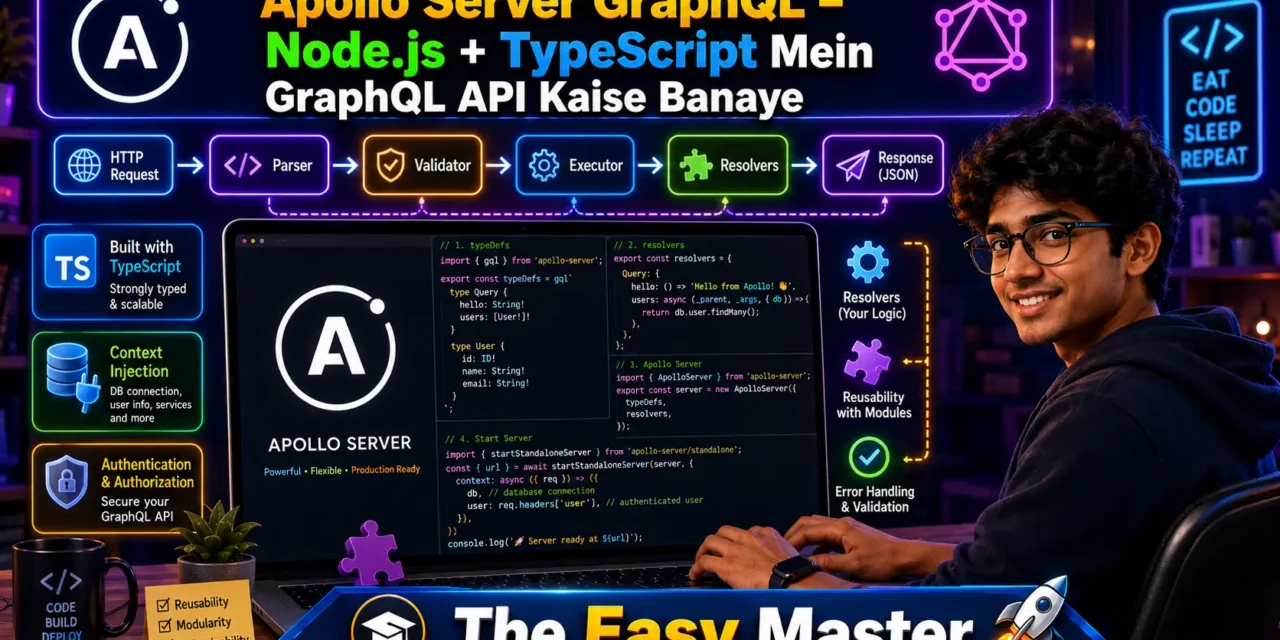
Client → HTTP Request → startStandaloneServer/expressMiddleware →
→ parse → validate → execute → resolvers → response- Apollo Server parses incoming GraphQL query
- Validates against schema
- Executes resolvers (with context, dataloaders)
- Returns formatted JSON response
2. Apollo Server vs GraphQL Yoga vs express-graphql – Comparison
2026 mein Node.js ecosystem mein GraphQL server ke liye kai options available hain. Let’s compare:
express-graphql is deprecated and not safe to use long-term. It doesn‘t support newer GraphQL specifications or modern HTTP standards, and the maintainers have officially archived the project.
Recommendation:
- Apollo Server – jab aapko production-ready, full-featured GraphQL API chahiye, aur aap Apollo ecosystem (Apollo Client, Apollo Studio, Federation) use kar rahe ho.
- GraphQL Yoga – jab aapko lightweight, serverless-first, multi-runtime solution chahiye, ya apko low latency high request rate important hai.
- express-graphql – kisi bी हालत में मत use karo (deprecated).
Is article mein hum Apollo Server use karenge – beginners ke liye most accessible aur type-safe.
3. Project Initialization – TypeScript + ESM Setup (2026)
2026 mein Node.js strictly follows ECMAScript Modules (ESM). Top-level await aur native TypeScript execution leverage karenge.
Step 1: Create project directory
mkdir apollo-ts-api
cd apollo-ts-api
npm init -y
Step 2: Set type: "module" in package.json
{
  "name": "apollo-ts-api",
  "version": "1.0.0",
  "type": "module",
  "main": "dist/index.js",
  "scripts": {
    "start": "node dist/index.js",
    "dev": "tsx watch src/index.ts",
    "build": "tsc"
  }
}
Step 3: Install dependencies
npm install @apollo/server graphql

# Dev dependencies
npm install -D typescript tsx @types/node
Step 4: Initialize TypeScript config
npx tsc --initModify tsconfig.json:
{
  "compilerOptions": {
    "target": "ES2022",
    "module": "NodeNext",
    "moduleResolution": "NodeNext",
    "outDir": "./dist",
    "rootDir": "./src",
    "strict": true,
    "esModuleInterop": true,
    "skipLibCheck": true,
    "forceConsistentCasingInFileNames": true
  },
  "include": ["src/**/*"],
  "exclude": ["node_modules", "dist"]
}
Step 5: Create source directory
mkdir src4. Defining the Schema – Schema-First Approach
Modern Apollo development emphasizes a Schema-First workflow – you define the shape of your data in GraphQL SDL, and Apollo ensures your resolvers match that shape.
Create src/schema.ts:
import { gql } from 'graphql-tag';

export const typeDefs = gql`
  scalar DateTime

  type User {
    id: ID!
    name: String!
    email: String!
    createdAt: DateTime!
    posts: [Post!]!
  }

  type Post {
    id: ID!
    title: String!
    content: String!
    author: User!
    createdAt: DateTime!
  }

  input CreatePostInput {
    title: String!
    content: String!
    authorId: ID!
  }

  input UpdatePostInput {
    title: String
    content: String
  }

  type Query {
    users: [User!]!
    user(id: ID!): User
    posts(limit: Int = 10, offset: Int = 0): [Post!]!
    post(id: ID!): Post
  }

  type Mutation {
    createPost(input: CreatePostInput!): Post!
    updatePost(id: ID!, input: UpdatePostInput!): Post!
    deletePost(id: ID!): Boolean!
  }
`;
Notes:
gqltag GraphQL queries को JavaScript strings में convert karta haiscalar DateTime– built-in GraphQL scalar nahi hai, custom implementation chahiye- Input types (
CreatePostInput,UpdatePostInput) – mutation arguments ko clean rakhte hain
5. Writing Type-Safe Resolvers
Resolvers functions hain jo actually data fetch karte hain. TypeScript se hum ensure kar sakte hain ki schema aur resolvers match karein.
Create src/resolvers.ts:
import { GraphQLError } from 'graphql';

// In-memory data store (replace with database in production)
interface User {
  id: string;
  name: string;
  email: string;
  createdAt: Date;
}

interface Post {
  id: string;
  title: string;
  content: string;
  authorId: string;
  createdAt: Date;
}

const users: User[] = [
  { id: '1', name: 'Rahul Kumar', email: 'rahul@example.com', createdAt: new Date() },
  { id: '2', name: 'Priya Sharma', email: 'priya@example.com', createdAt: new Date() },
];

const posts: Post[] = [
  { id: '1', title: 'GraphQL Basics', content: 'Learn GraphQL', authorId: '1', createdAt: new Date() },
  { id: '2', title: 'Apollo Server Guide', content: 'Setup tutorial', authorId: '1', createdAt: new Date() },
];

let nextPostId = 3;

export const resolvers = {
  // Custom scalar implementation
  DateTime: {
    serialize: (value: Date) => value.toISOString(),
    parseValue: (value: string) => new Date(value),
    parseLiteral: (ast: any) => {
      if (ast.kind === 'StringValue') return new Date(ast.value);
      return null;
    },
  },

  Query: {
    users: () => users,
    user: (_: any, { id }: { id: string }) => {
      const user = users.find(u => u.id === id);
      if (!user) {
        throw new GraphQLError('User not found', {
          extensions: { code: 'USER_NOT_FOUND' }
        });
      }
      return user;
    },
    posts: (_: any, { limit, offset }: { limit: number; offset: number }) => {
      return posts.slice(offset, offset + limit);
    },
    post: (_: any, { id }: { id: string }) => {
      return posts.find(p => p.id === id);
    },
  },

  Mutation: {
    createPost: (_: any, { input }: { input: { title: string; content: string; authorId: string } }) => {
      const { title, content, authorId } = input;
      const authorExists = users.some(u => u.id === authorId);
      if (!authorExists) {
        throw new GraphQLError('Author not found', {
          extensions: { code: 'AUTHOR_NOT_FOUND' }
        });
      }
      const newPost: Post = {
        id: String(nextPostId++),
        title,
        content,
        authorId,
        createdAt: new Date(),
      };
      posts.push(newPost);
      return newPost;
    },
    updatePost: (_: any, { id, input }: { id: string; input: { title?: string; content?: string } }) => {
      const postIndex = posts.findIndex(p => p.id === id);
      if (postIndex === -1) {
        throw new GraphQLError('Post not found', {
          extensions: { code: 'POST_NOT_FOUND' }
        });
      }
      posts[postIndex] = { ...posts[postIndex], ...input };
      return posts[postIndex];
    },
    deletePost: (_: any, { id }: { id: string }) => {
      const postIndex = posts.findIndex(p => p.id === id);
      if (postIndex === -1) return false;
      posts.splice(postIndex, 1);
      return true;
    },
  },

  User: {
    posts: (parent: User) => {
      return posts.filter(p => p.authorId === parent.id);
    },
  },

  Post: {
    author: (parent: Post) => {
      const author = users.find(u => u.id === parent.authorId);
      if (!author) {
        throw new GraphQLError('Author not found for post', {
          extensions: { code: 'AUTHOR_NOT_FOUND' }
        });
      }
      return author;
    },
  },
};
Key points:
- TypeScript interfaces (
User,Post) ensure data consistency - Custom scalar
DateTimek अंदरserialize,parseValue,parseLiteralmethods define hain GraphQLErrorcustom extensions ke saath throw karte hain- Nested resolvers (
User.posts,Post.author) resolve related data
6. Launching the Server – Standalone vs Express Middleware
Apollo Server 4 provide karta hai startStandaloneServer – fastest way to get a production-ready endpoint with built-in CORS and body parsing.
Create src/index.ts:
import { ApolloServer } from '@apollo/server';
import { startStandaloneServer } from '@apollo/server/standalone';
import { typeDefs } from './schema.js';
import { resolvers } from './resolvers.js';

interface MyContext {
  token?: string;
  dataSources: {
    // Add data source interfaces here
  };
}

const server = new ApolloServer<MyContext>({
  typeDefs,
  resolvers,
});

const { url } = await startStandaloneServer(server, {
  listen: { port: 4000 },
  context: async ({ req }) => ({
    token: req.headers.authorization,
    dataSources: {
      // Initialize data sources
    },
  }),
});

console.log(`🚀 Server ready at ${url}`);
Why startStandaloneServer?
- Automatically creates Express app
- Built-in body parsing and CORS
- No additional dependencies needed
- Perfect for most use cases
7. Context Function – Database & Authentication Injection
Context function har request ke liye async object return karta hai jo sabhi resolvers mein available hota hai – authentication, database connections, data loaders.
7.1 Authentication in Context
import jwt from 'jsonwebtoken';

interface AuthUser {
  id: string;
  email: string;
  role: 'USER' | 'ADMIN';
}

interface MyContext {
  user?: AuthUser;
  dataSources: {
    db: any;
  };
}

const server = new ApolloServer<MyContext>({
  typeDefs,
  resolvers,
});

const { url } = await startStandaloneServer(server, {
  listen: { port: 4000 },
  context: async ({ req }) => {
    // Extract token from Authorization header
    const token = req.headers.authorization?.replace('Bearer ', '');

    let user: AuthUser | undefined;

    if (token) {
      try {
        user = jwt.verify(token, process.env.JWT_SECRET!) as AuthUser;
      } catch {
        // Invalid token – user remains undefined
      }
    }

    return {
      user,
      dataSources: {
        db: databaseClient,
      },
    };
  },
});
7.2 Resolver mein Context Ka Use
const resolvers = {
  Mutation: {
    createPost: (_: any, args: any, context: MyContext) => {
      if (!context.user) {
        throw new GraphQLError('Not authenticated', {
          extensions: { code: 'UNAUTHENTICATED' }
        });
      }
      // Create post with context.user.id as author
    },
  },
};
Note: The
contextfunction is called once per request, and its result is passed to every resolver for that request. If using TypeScript, you must provide a namedcontextfunction if you type your context by passing a type parameter to ApolloServer.
8. Error Handling – Built-in Codes aur Custom Errors
Apollo Server provides built-in error codes and allows custom error creation. By default, client errors return HTTP 400 and server errors return HTTP 500.
8.1 Built-in Error Codes
8.2 Checking Error Code
import { ApolloServerErrorCode } from '@apollo/server/errors';

// In your resolver or error handler
if (error.extensions?.code === ApolloServerErrorCode.BAD_USER_INPUT) {
  // Handle validation error
}
8.3 Custom Errors with GraphQLError
import { GraphQLError } from 'graphql';

// Authentication error
throw new GraphQLError('You are not authorized', {
  extensions: { code: 'FORBIDDEN' }
});

// Custom error with additional context
throw new GraphQLError('Database connection failed', {
  extensions: {
    code: 'DB_CONNECTION_ERROR',
    retryable: true,
    timestamp: Date.now()
  }
});
Apollo Server‘s variety of error codes enables requesting clients to respond differently to different error types.
9. Integration Testing – executeOperation Method
Testing Apollo Server ke liye executeOperation method use karte hain – ye HTTP request bheje bina operation run karta hai.
Setup test environment
Install Jest:
npm install -D jest @types/jest ts-jestConfigure jest.config.js:
export default {
  preset: 'ts-jest/presets/default-esm',
  testEnvironment: 'node',
  extensionsToTreatAsEsm: ['.ts'],
  transform: {
    '^.+\\.tsx?$': [
      'ts-jest',
      {
        useESM: true,
      },
    ],
  },
};
Integration test example
Create src/__tests__/integration.test.ts:
import { ApolloServer } from '@apollo/server';
import { typeDefs } from '../schema.js';
import { resolvers } from '../resolvers.js';

describe('GraphQL API Integration Tests', () => {
  let testServer: ApolloServer;

  beforeAll(() => {
    testServer = new ApolloServer({
      typeDefs,
      resolvers,
    });
  });

  it('fetches all users', async () => {
    const response = await testServer.executeOperation({
      query: `
        query GetUsers {
          users {
            id
            name
            email
          }
        }
      `,
    });

    expect(response.body.kind).toBe('single');
    expect(response.body.singleResult.errors).toBeUndefined();
    expect(response.body.singleResult.data?.users).toHaveLength(2);
  });

  it('creates a new post', async () => {
    const response = await testServer.executeOperation({
      query: `
        mutation CreatePost($input: CreatePostInput!) {
          createPost(input: $input) {
            id
            title
            content
          }
        }
      `,
      variables: {
        input: {
          title: 'Test Post',
          content: 'Integration testing',
          authorId: '1',
        },
      },
    });

    expect(response.body.kind).toBe('single');
    expect(response.body.singleResult.errors).toBeUndefined();
    expect(response.body.singleResult.data?.createPost.title).toBe('Test Post');
  });
});
The executeOperation method runs operations through the request pipeline without sending an HTTP request, which works for both queries and mutations.
10. Pagination – Limit/Offset Implementation
Pagination large datasets efficiently handle karne ke liye essential hai.
Schema Definition (already in schema.ts)
graphql
type Query {
  posts(limit: Int = 10, offset: Int = 0): [Post!]!
}
Resolver Implementation (already in resolvers.ts)
posts: (_: any, { limit, offset }: { limit: number; offset: number }) => {
  return posts.slice(offset, offset + limit);
}
Client-Side Query Example
graphql
query GetPaginatedPosts($limit: Int, $offset: Int) {
  posts(limit: $limit, offset: $offset) {
    id
    title
    author {
      name
    }
  }
}
Variables:
{
  "limit": 5,
  "offset": 10
}
This returns posts 11 through 15. Alternative pagination patterns include cursor-based pagination (Relay Connection spec) for large, frequently changing datasets.
11. Custom Directives – Schema-Level Logic
Directives GraphQL schema mein reusable logic inject karne ka powerful tarika hain – jaise transformation, authentication, authorization, logging.
Defining a Custom Directive (@upper)
In src/schema.ts:
graphql
directive @upper on FIELD_DEFINITION

type Query {
  hello: String @upper
}
Implementing Directive Logic
import { SchemaDirectiveVisitor } from '@apollo/server';
import { defaultFieldResolver } from 'graphql';

class UpperCaseDirective extends SchemaDirectiveVisitor {
  visitFieldDefinition(field: any) {
    const { resolve = defaultFieldResolver } = field;
    field.resolve = async function (...args: any[]) {
      const result = await resolve.apply(this, args);
      if (typeof result === 'string') {
        return result.toUpperCase();
      }
      return result;
    };
  }
}
Applying Directive to Apollo Server
const server = new ApolloServer({
  typeDefs,
  resolvers,
  schemaDirectives: {
    upper: UpperCaseDirective,
  },
});
To activate your custom directive in Apollo Server, include it in the schemaDirectives option when initializing the server.
12. Production Best Practices – Environment, Logging, Plugins
12.1 Environment Variables
Use dotenv for configuration:
npm install dotenvCreate .env:
env
PORT=4000
NODE_ENV=production
JWT_SECRET=your-secret-key
DATABASE_URL=postgresql://...
Load in index.ts:
import 'dotenv/config';

const PORT = process.env.PORT || 4000;
12.2 Logging Plugin
const loggerPlugin = {
  async requestDidStart(requestContext: any) {
    console.log(`Request started: ${requestContext.request.query}`);
    return {
      async willSendResponse(responseContext: any) {
        console.log(`Request completed with errors: ${!!responseContext.response.errors}`);
      },
    };
  },
};

const server = new ApolloServer({
  typeDefs,
  resolvers,
  plugins: [loggerPlugin],
});
12.3 Disable Introspection in Production
const server = new ApolloServer({
  typeDefs,
  resolvers,
  introspection: process.env.NODE_ENV !== 'production',
});
12.4 Production Readiness Checklist
✅ Security: Never log sensitive information (API keys)
✅ Context isolation: context function async return, no shared state between requests
✅ DataLoaders: Prevent N+1 problem for nested data
✅ Monitoring: Integrate Apollo Studio or GraphOS for metrics
✅ Caching: Use responseCachePlugin for repeated queries
✅ Error masking: Sanitize internal errors before sending to client
Apollo Server 4 integrates well with Apollo GraphOS for production monitoring.
13. Hands-On – Complete Task Management API
Let‘s combine everything into a complete task management API with authentication, pagination, and error handling.
Project Structure
text
apollo-ts-api/
├── src/
│   ├── schema.ts
│   ├── resolvers.ts
│   ├── index.ts
│   ├── context.ts
│   ├── directives/
│   │   └── upperDirective.ts
│   └── __tests__/
│       └── integration.test.ts
├── .env
├── package.json
├── tsconfig.json
└── jest.config.js
Full src/context.ts
import jwt from 'jsonwebtoken';

export interface AuthUser {
  id: string;
  email: string;
  role: 'USER' | 'ADMIN';
}

export interface MyContext {
  user?: AuthUser;
  dataSources: {
    db: any;
  };
}

export const buildContext = async ({ req }: { req: any }): Promise<MyContext> => {
  const token = req.headers.authorization?.replace('Bearer ', '');

  let user: AuthUser | undefined;
  if (token) {
    try {
      user = jwt.verify(token, process.env.JWT_SECRET!) as AuthUser;
    } catch (err) {
      // Invalid token – user remains undefined
    }
  }

  return {
    user,
    dataSources: {
      db: {}, // Database client injected here
    },
  };
};
Full src/index.ts
import 'dotenv/config';
import { ApolloServer } from '@apollo/server';
import { startStandaloneServer } from '@apollo/server/standalone';
import { typeDefs } from './schema.js';
import { resolvers } from './resolvers.js';
import { buildContext } from './context.js';

const server = new ApolloServer({
  typeDefs,
  resolvers,
  introspection: process.env.NODE_ENV !== 'production',
  plugins: [
    {
      async requestDidStart() {
        console.log('Request received');
        return {
          async willSendResponse() {
            console.log('Response sent');
          },
        };
      },
    },
  ],
});

const { url } = await startStandaloneServer(server, {
  listen: { port: parseInt(process.env.PORT || '4000') },
  context: buildContext,
});

console.log(`🚀 Apollo Server ready at ${url}`);
Run the server:
npm run devVisit http://localhost:4000 – Apollo Studio Explorer खुलेगा। Test queries and mutations there.
14. Resources – Cheat Sheet & Practice Prompts
📋 Apollo Server Commands Cheat Sheet
| Task | Command |
|---|---|
| Create new project | mkdir my-api && cd my-api && npm init -y |
| Set ESM module | npm pkg set type="module" |
| Install Apollo Server | npm install @apollo/server graphql |
| Install TypeScript | npm install -D typescript tsx @types/node |
| Initialize tsconfig | npx tsc --init |
| Build TypeScript | npm run build |
| Run dev server | npm run dev |
| Run tests | npm test |
📋 Apollo Server Code Skeleton
// schema.ts
export const typeDefs = gql`
  type Query {
    hello: String!
  }
`;

// resolvers.ts
export const resolvers = {
  Query: {
    hello: () => 'world',
  },
};

// index.ts
import { ApolloServer } from '@apollo/server';
import { startStandaloneServer } from '@apollo/server/standalone';

const server = new ApolloServer({ typeDefs, resolvers });
const { url } = await startStandaloneServer(server, { listen: { port: 4000 } });
🧠 Practice Prompts
Beginner:
- ESM TypeScript project setup karo,
helloquery wala Apollo Server run karo। GraphQL Playground mein query test karo।
Intermediate:
Tasktype (id, title, completed, userId) ke saath schema banao। Mutations:createTask,toggleTask,deleteTask। In-memory data store use karo। Integration tests likho usingexecuteOperation।
Advanced:
- JWT authentication implement karo –
contextfunction mein user extract karo। Directive@authbanao jo sirf authenticated users ko access de। DataLoader implement karo to batch user fetching in nested resolvers।
15. FAQ
Q1: apollo-server-express aur @apollo/server mein kya antar hai?
apollo-server-express deprecated hai. Apollo Server 4 use karta hai @apollo/server package, jo framework-agnostic hai. Express ke saath use karna hai toh @apollo/server + expressMiddleware use karein。V3 reached end-of-life in 2024, isliye always use Apollo Server 4.
Q2: TypeScript aur Apollo Server mein type-safe resolvers kaise likhein?
ApolloServer constructor mein type parameter pass karo (ApolloServer<MyContext>). Resolver signatures mein context type explicitly define karo। Codegen tools (@graphql-codegen) auto-generate types from schema।
Q3: Apollo Server mein context function kyun zaroori hai?
Context function har request mein shareable object create karta hai – authentication data, database connections, data loaders inject kar sakte ho। Isse resolvers mein global variables ki zaroorat nahi hoti。
Q4: Apollo Server mein error handling ka best practice kya hai?
Use GraphQLError with extensions.code for custom errors。Built-in ApolloServerErrorCode for common cases। Production mein formatError function use karke internal stack traces mask करो। By default Apollo Server returns 400 for client errors and 500 for server errors。
Q5: Apollo Server mein pagination kaise implement karein?
Two common patterns: offset-based (limit, offset) for simpler cases, and cursor-based (first, after) for Relay spec। Apollo Client cache normalized pagination support karta hai。
Q6: Apollo Server ko production mein deploy kaise karein?
Use environment variables for secrets (PORT, JWT_SECRET। Disable introspection in production। Add logging plugin。Use DataLoaders to prevent N+1。Monitor with Apollo Studio। Railway, Render, or AWS ECS पर Node.js app की तरह deploy कर सकते हो。
16. Conclusion – Ab Aapki Baari!
Bahut badhiya! Aapne aaj seekh liya:
✅ Apollo Server 4 with Node.js + TypeScript – setup to production
✅ Schema-first development – SDL + type‑safe resolvers
✅ Context function – authentication, database injection
✅ Error handling – built‑in codes, custom GraphQLError
✅ Integration testing – executeOperation method
✅ Pagination – limit/offset implementation
✅ Custom directives – schema‑level abstraction
✅ Production best practices – environment vars, logging, plugins
Apollo Server production-ready GraphQL API banane ka industry standard hai – with strong ecosystem, TypeScript support, and scalability.
Aapki challenge: Complete task management API implement karo with JWT authentication, pagination, and integration tests। Apollo Studio Explorer mein queries and mutations test karo। Apna experience comment mein share karo!
Next topic kya chahiye?
- GraphQL Subscriptions (Real-time chat with WebSockets)?
- GraphQL Federation (Multiple GraphQL services)?
- Apollo Client + React (Frontend integration)?
Comment mein batao!
The Easy Master ke saath Apollo Server seekhte raho। Happy building! 🚀🔷
Resources
- Apollo Server Official Documentation
- Apollo Server API Reference
- GraphQL Documentation
- TypeScript with GraphQL Guide
- Apollo Server Testing Guide
Additional Resources
- MongoDB Setup – CRUD Operations समझे (Beginner Guide) 2026
- MongoDB Compass से GUI Database Manage करने का आसान तरीका | Beginner Tutorial 2026
- Node.js MongoDB Connection – Mongoose Setup समझे 2026
- MongoDB Data Modeling – Embedded Documents vs References 2026
- MongoDB Indexing – Query Speed बढ़ने करने का आसान तरीका
- MongoDB Aggregation Pipeline – Stages समझे | Practical Examples
- Express MongoDB CRUD – Complete REST API Example
- Mongoose ODM – Schema, Model, and Validation समझे 2026
- MongoDB Atlas – Cloud Database Free में Deploy करें 2026
- JWT Authentication MongoDB – User Login System कैसे बनाएं 2026
- Next.js App Router – Pages Router से क्या बदला? Complete Guide 2026
- Next.js Server Components – ‘use client’ कब और कहां Use करें
- Next.js Routing – Layouts, Dynamic Routes and Nested Routes 2026
- Next.js 16 New Features – Turbopack, Cache Components and proxy.ts
- Next.js Partial Prerendering – Static and Dynamic Content साथ में
- Next.js Authentication – JWT Session Management (App Router) 2026
- Next.js SEO – Metadata API and Image Optimization समझे 2026
- Next.js TypeScript – Full-Stack Type-Safe App कैसे बनाएं
- FastAPI Kya Hai? FastAPI Python Setup Aur Pehla API Hindi 2026
- FastAPI Path Parameters Hindi – शून्य से हीरो तक गाइड 2026
- Pydantic v2 Tutorial Hindi – Data Validation Master 2026
- FastAPI dependency injection Hindi – Code Reuse Ka Magic
- FastAPI Async Await Hindi – Non-Blocking Code 2026
- FastAPI PostgreSQL SQLModel Hindi – Async Guide 2026
- FastAPI JWT Authentication Hindi – Secure API Login
- FastAPI OpenAI Integration Hindi – AI Chatbot API 2026
- FastAPI Multi-Agent AI Hindi – LangGraph Zero to Hero
- FastAPI Deployment Hindi – Railway Zero to Hero 2026
- Docker Introduction in Hindi? Containers vs Virtual Machines
- Docker Images and Containers Hindi – Pehla Container
- Docker Compose Tutorial Hindi – Node.js + MongoDB
- Docker Volumes Networking Hindi – Data Persist कैसे करें
- Kubernetes Architecture Hindi – Pods, Nodes, Cluster
- Minikube Tutorial Hindi – Local Cluster कैसे बनाए
- Kubernetes Deployments Services Hindi – App Expose Karein
- K8s Ingress Tutorial Hindi – Domain se App Access
- Helm Kya Hai? – Kubernetes Charts Se App Deploy
- GraphQL Introduction in Hindi – REST vs GraphQL Comparison
- GraphQL Schema Tutorial Hindi – Types Queries Resolvers
- GraphQL Queries Mutations Hindi – Frontend Integration
- GraphQL Advanced Features Hindi – Fragments Aliases Variables
Views: 252