नमस्ते दोस्तों! 🙏
स्वागत है The Easy Master पर!
क्या तुमने कभी सोचा है – Node.js app mein MongoDB database connect karne ka modern tarika kya hai?
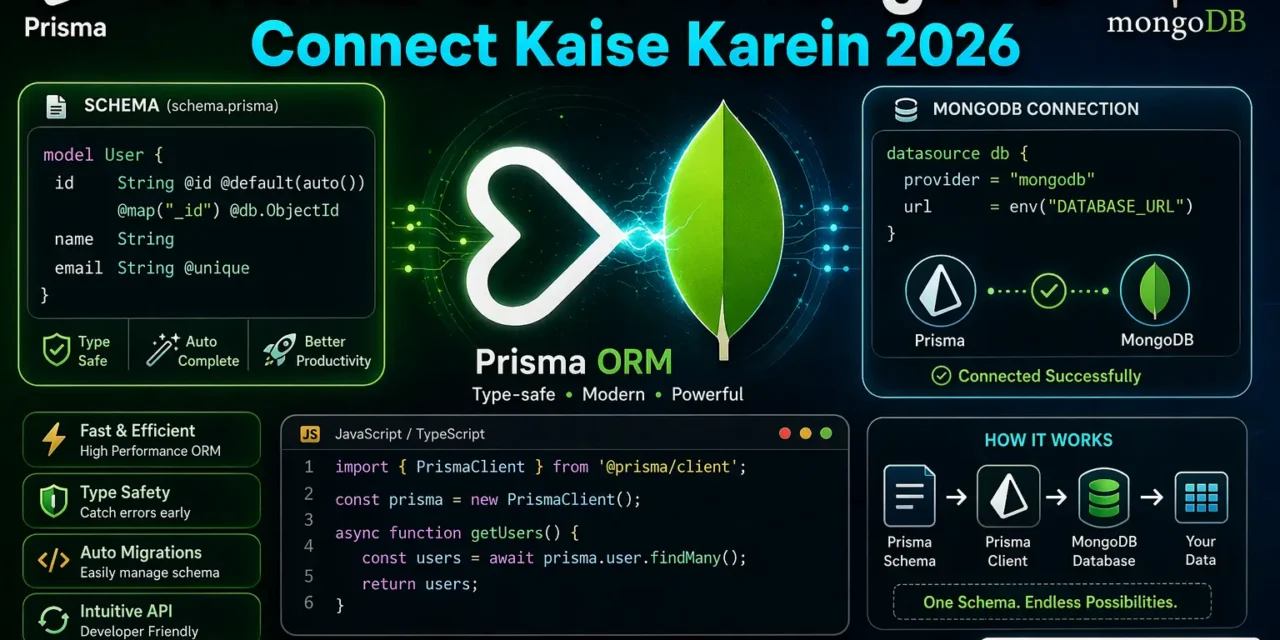
Pehle hum Mongoose use karte the – jo MongoDB ke liye ODM (Object Data Modeling) library hai. Lekin ab ek new player aaya hai – Prisma ORM!
Prisma kya hai? Ye ek next-generation ORM hai jo Node.js aur TypeScript ke liye type-safe database access provide karta hai.
Aaj kya seekhoge?
| Topic | Kya Seekhega? |
|---|---|
| Prisma Kya Hai? | Introduction aur benefits |
| Installation | Prisma setup kaise karein |
| MongoDB Setup | Atlas account aur connection string |
| Schema Design | Models kaise banayein |
| Prisma Client | Database operations |
| CRUD Operations | Create, Read, Update, Delete |
| Best Practices | Professional tips |
Kya tumhe pata hai?
Prisma v6.19+ MongoDB ko support karta hai, lekin v7 abhi support nahi karta!
तो चलिए शुरू करते हैं – Prisma ORM MongoDB connect करने का सफर! 🚀
Table of Contents
1. Prisma ORM Kya Hai? – Introduction
Prisma ek next-generation ORM hai jo database access ko type-safe aur developer-friendly banata hai.
Prisma ke 3 Main Parts:
┌─────────────────────────────────────────────────────────┐
│                    PRISMA ORM                           │
├─────────────────────────────────────────────────────────┤
│  1. Prisma Client – Type-safe query builder            │
│  2. Prisma Migrate – Declarative data modeling         │
│  3. Prisma Studio – GUI to view/edit data              │
└─────────────────────────────────────────────────────────┘
Prisma MongoDB Support:
| Database | Support Level |
|---|---|
| PostgreSQL | ✅ Full |
| MySQL | ✅ Full |
| SQLite | ✅ Full |
| MongoDB | ✅ Supported (v6.19+) |
| CockroachDB | ⚠️ Preview |
Note: Prisma v7 does not support MongoDB yet. Use v6.19 for MongoDB projects.
2. Prisma vs Mongoose – Comparison
| Feature | Mongoose (ODM) | Prisma (ORM) |
|---|---|---|
| Type Safety | Limited | ✅ Full TypeScript |
| Schema Definition | In-code | Declarative (schema.prisma) |
| Multi-Database | ❌ MongoDB only | ✅ Multiple databases |
| Migrations | ❌ Manual | ✅ Automatic |
| Developer Experience | Good | Excellent |
| Performance | Good | Better (type-safe) |
| Learning Curve | Easy | Medium |
Mongoose (Old Way):
// Mongoose schema
const userSchema = new mongoose.Schema({
  name: String,
  email: { type: String, unique: true }
});

const User = mongoose.model('User', userSchema);

// Query
const user = await User.findById(id);
Prisma (Modern Way):
// schema.prisma
model User {
  id    String @id @default(auto()) @map("_id") @db.ObjectId
  name  String
  email String @unique
}

// Query - Type-safe!
const user = await prisma.user.findUnique({
  where: { id: userId }
});
3. Project Setup and Installation
Step 1: Create Project
mkdir prisma-mongo-demo
cd prisma-mongo-demo
npm init -y
Step 2: Install Dependencies
# Prisma v6.19 (MongoDB support)
npm install prisma@6.19 --save-dev

# Prisma Client
npm install @prisma/client@6.19

# dotenv for environment variables
npm install dotenv
⚠️ Important: Prisma v7 MongoDB support nahi karta! v6.19 use karein.
Step 3: Initialize Prisma
npx prisma init --datasource-provider mongodbYe command create karegi:
prisma/schema.prisma– Database schemaprisma.config.ts– Configuration file.env– Environment variables
4. MongoDB Connection String
MongoDB Atlas Setup:
- Sign up at mongodb.com/atlas
- Create Cluster (free tier available)
- Get Connection String from “Connect” button
Connection String Format:
mongodb+srv://<username>:<password>@<cluster>.mongodb.net/<database>?retryWrites=true&w=majority.env File:
# .env
DATABASE_URL="mongodb+srv://rahul:password123@cluster0.abcde.mongodb.net/prisma_demo?retryWrites=true&w=majority"
Connection String Parts:
| Part | Meaning |
|---|---|
mongodb+srv:// | Protocol (SRV) |
rahul:password123 | Username:Password |
cluster0.abcde.mongodb.net | Cluster host |
prisma_demo | Database name |
retryWrites=true | Additional params |
5. Prisma Schema – Models Define Karna
Basic Schema Setup:
// prisma/schema.prisma

// Data source configuration
datasource db {
  provider = "mongodb"
  url      = env("DATABASE_URL")
}

// Generator configuration
generator client {
  provider = "prisma-client"
  output   = "../generated/prisma"  // Output location
  moduleFormat = "cjs"               // CommonJS format
}
User Model:
model User {
  id        String   @id @default(auto()) @map("_id") @db.ObjectId
  name      String
  email     String   @unique
  password  String
  age       Int?
  isActive  Boolean  @default(true)
  createdAt DateTime @default(now()) @db.Timestamp()
  updatedAt DateTime @updatedAt @db.Timestamp()

  // Relations
  posts     Post[]
}
MongoDB Model Annotations Explained:
| Annotation | Meaning |
|---|---|
@id | Primary key |
@default(auto()) | Auto-generate value |
@map("_id") | Map to MongoDB’s _id field |
@db.ObjectId | Use MongoDB ObjectId type |
@unique | Unique constraint |
@default(now()) | Default to current time |
@updatedAt | Auto-update on change |
Post Model (with Relation):
model Post {
  id        String   @id @default(auto()) @map("_id") @db.ObjectId
  title     String
  content   String?
  published Boolean  @default(false)
  createdAt DateTime @default(now()) @db.Timestamp()

  // Relation to User
  author    User?    @relation(fields: [authorId], references: [id])
  authorId  String?  @db.ObjectId
}
Complete Schema Example:
// prisma/schema.prisma
datasource db {
  provider = "mongodb"
  url      = env("DATABASE_URL")
}

generator client {
  provider = "prisma-client"
  output   = "../generated/prisma"
  moduleFormat = "cjs"
}

model User {
  id        String   @id @default(auto()) @map("_id") @db.ObjectId
  name      String
  email     String   @unique
  password  String
  age       Int?
  isActive  Boolean  @default(true)
  createdAt DateTime @default(now()) @db.Timestamp()
  updatedAt DateTime @updatedAt @db.Timestamp()

  posts     Post[]
}

model Post {
  id        String   @id @default(auto()) @map("_id") @db.ObjectId
  title     String
  content   String?
  published Boolean  @default(false)
  createdAt DateTime @default(now()) @db.Timestamp()

  author    User?    @relation(fields: [authorId], references: [id])
  authorId  String?  @db.ObjectId
}
6. Prisma Client Generate Karna
⚠️ Important Note: MongoDB ke liye
prisma migratecommand kaam nahi karta!
❌ Don’t use (SQL databases only):
# Ye command MongoDB ke liye error dega!
npx prisma migrate dev --name init
✅ Use this for MongoDB:
# Generate Prisma Client only
npx prisma generate
Why migrate doesn’t work with MongoDB?
MongoDB is a document database (NoSQL) – it doesn’t have rigid table structures like SQL databases. The prisma migrate command is specifically designed for relational databases (PostgreSQL, MySQL, etc.).
Error Message (if you try migrate):
Error: The "mongodb" provider is not supported with this command.Setup Script (package.json):
{
  "scripts": {
    "prisma:generate": "prisma generate",
    "prisma:studio": "prisma studio",
    "start": "node server.js",
    "dev": "nodemon server.js"
  }
}
7. CRUD Operations with Prisma
Basic Server Setup (Express.js):
// server.js
const express = require('express');
const dotenv = require('dotenv');
const { PrismaClient } = require('./generated/prisma');

dotenv.config();

const app = express();
app.use(express.json());

// Initialize Prisma Client
const prisma = new PrismaClient();

// ============ CREATE Operations ============

// Create a new user
app.post('/api/users', async (req, res) => {
  try {
    const { name, email, password, age } = req.body;

    const user = await prisma.user.create({
      data: {
        name,
        email,
        password,
        age
      }
    });

    // Don't send password back
    const { password: _, ...userWithoutPassword } = user;
    res.status(201).json({ success: true, data: userWithoutPassword });
  } catch (error) {
    console.error(error);
    res.status(400).json({ success: false, error: error.message });
  }
});

// Create post for a user
app.post('/api/users/:userId/posts', async (req, res) => {
  try {
    const { userId } = req.params;
    const { title, content } = req.body;

    const post = await prisma.post.create({
      data: {
        title,
        content,
        author: {
          connect: { id: userId }
        }
      }
    });

    res.status(201).json({ success: true, data: post });
  } catch (error) {
    res.status(400).json({ success: false, error: error.message });
  }
});

// ============ READ Operations ============

// Get all users (with pagination)
app.get('/api/users', async (req, res) => {
  try {
    const { page = 1, limit = 10, search } = req.query;
    const skip = (parseInt(page) - 1) * parseInt(limit);

    const where = search ? {
      OR: [
        { name: { contains: search, mode: 'insensitive' } },
        { email: { contains: search, mode: 'insensitive' } }
      ]
    } : {};

    const [users, total] = await Promise.all([
      prisma.user.findMany({
        where,
        skip,
        take: parseInt(limit),
        select: {
          id: true,
          name: true,
          email: true,
          age: true,
          isActive: true,
          createdAt: true
        }
      }),
      prisma.user.count({ where })
    ]);

    res.json({
      success: true,
      data: users,
      pagination: {
        page: parseInt(page),
        limit: parseInt(limit),
        total,
        totalPages: Math.ceil(total / parseInt(limit))
      }
    });
  } catch (error) {
    res.status(500).json({ success: false, error: error.message });
  }
});

// Get user by ID
app.get('/api/users/:id', async (req, res) => {
  try {
    const { id } = req.params;

    const user = await prisma.user.findUnique({
      where: { id },
      include: {
        posts: true  // Include related posts
      }
    });

    if (!user) {
      return res.status(404).json({ success: false, error: 'User not found' });
    }

    const { password, ...userWithoutPassword } = user;
    res.json({ success: true, data: userWithoutPassword });
  } catch (error) {
    res.status(500).json({ success: false, error: error.message });
  }
});

// Get all posts (with author info)
app.get('/api/posts', async (req, res) => {
  try {
    const { published, page = 1, limit = 10 } = req.query;

    const where = {};
    if (published !== undefined) {
      where.published = published === 'true';
    }

    const posts = await prisma.post.findMany({
      where,
      skip: (parseInt(page) - 1) * parseInt(limit),
      take: parseInt(limit),
      include: {
        author: {
          select: {
            id: true,
            name: true,
            email: true
          }
        }
      },
      orderBy: { createdAt: 'desc' }
    });

    res.json({ success: true, data: posts });
  } catch (error) {
    res.status(500).json({ success: false, error: error.message });
  }
});

// ============ UPDATE Operations ============

// Update user
app.put('/api/users/:id', async (req, res) => {
  try {
    const { id } = req.params;
    const { name, email, age, isActive } = req.body;

    // Check if user exists
    const existingUser = await prisma.user.findUnique({ where: { id } });
    if (!existingUser) {
      return res.status(404).json({ success: false, error: 'User not found' });
    }

    const user = await prisma.user.update({
      where: { id },
      data: {
        name: name || undefined,
        email: email || undefined,
        age: age !== undefined ? age : undefined,
        isActive: isActive !== undefined ? isActive : undefined
      }
    });

    const { password, ...userWithoutPassword } = user;
    res.json({ success: true, data: userWithoutPassword });
  } catch (error) {
    res.status(400).json({ success: false, error: error.message });
  }
});

// ============ DELETE Operations ============

// Delete user (and their posts)
app.delete('/api/users/:id', async (req, res) => {
  try {
    const { id } = req.params;

    // Check if user exists
    const user = await prisma.user.findUnique({ where: { id } });
    if (!user) {
      return res.status(404).json({ success: false, error: 'User not found' });
    }

    // Delete user (posts will be deleted automatically if relation is set)
    await prisma.user.delete({ where: { id } });

    res.json({ success: true, message: 'User deleted successfully' });
  } catch (error) {
    res.status(500).json({ success: false, error: error.message });
  }
});

// Start server
const PORT = process.env.PORT || 3000;
app.listen(PORT, () => {
  console.log(`🚀 Server running on http://localhost:${PORT}`);
  console.log(`📝 Prisma Studio: npx prisma studio`);
});
8. MongoDB Specific Features
Working with ObjectId:
const { ObjectId } = require('mongodb');

// Convert string to ObjectId if needed
const userId = new ObjectId(req.params.id);
Complex Queries:
// Find users with conditions
const activeUsers = await prisma.user.findMany({
  where: {
    AND: [
      { isActive: true },
      { age: { gte: 18 } }  // age >= 18
    ]
  }
});

// Find posts with filters
const searchPosts = await prisma.post.findMany({
  where: {
    OR: [
      { title: { contains: 'prisma', mode: 'insensitive' } },
      { content: { contains: 'prisma', mode: 'insensitive' } }
    ]
  }
});
Aggregation (using raw query):
// Raw MongoDB aggregation
const result = await prisma.$runCommandRaw({
  aggregate: 'User',
  pipeline: [
    { $match: { isActive: true } },
    { $group: { _id: null, avgAge: { $avg: '$age' } } }
  ]
});
9. Prisma Studio – Database GUI
Prisma Studio ek GUI tool hai jisse tum database ko visually dekh aur edit kar sakte ho.
Run Prisma Studio:
npx prisma studioFeatures:
- View all tables/collections
- Add/edit/delete records
- Filter and search data
- Relation viewer
- Export data
10. Common Errors aur Solutions
Error 1: “mongodb provider is not supported with this command”
❌ Error: The "mongodb" provider is not supported with this command.# ❌ Don't use
npx prisma migrate dev
# ✅ Use this instead
npx prisma generateError 2: Prisma Client not generated
❌ Error: @prisma/client did not initialize yetSolution:
npx prisma generateError 3: Connection timeout
Solution:
- Check MongoDB Atlas IP whitelist
- Add
0.0.0.0/0for development - Check username/password in connection string
Error 4: Prisma version issue
# Use v6.19 for MongoDB
npm install prisma@6.19 --save-dev
npm install @prisma/client@6.19
11. Best Practices
1. Single Prisma Client Instance
// lib/prisma.js
const { PrismaClient } = require('../generated/prisma');

const globalForPrisma = global;
const prisma = globalForPrisma.prisma || new PrismaClient();

if (process.env.NODE_ENV !== 'production') {
  globalForPrisma.prisma = prisma;
}

module.exports = prisma;
2. Error Handling
try {
  const user = await prisma.user.findUnique({ where: { id } });
  if (!user) {
    throw new Error('User not found');
  }
} catch (error) {
  // Handle error appropriately
  console.error(error);
}
3. Don’t Return Sensitive Data
const { password, ...safeUser } = user;
return safeUser;
4. Use Transactions for Related Operations
const result = await prisma.$transaction([
  prisma.user.create({ data: userData }),
  prisma.post.create({ data: postData })
]);
12. FAQ
Q1: Prisma ORM MongoDB se connect karne ke liye kya version use karein?
Prisma v6.19 use karein. v7 abhi MongoDB support nahi karta.
Q2: prisma migrate MongoDB mein kyun kaam nahi karta?
MongoDB ek document database hai (NoSQL) – isme SQL jaisi rigid table structure nahi hoti। migrate sirf SQL databases ke liye hai।
Q3: Prisma vs Mongoose – kya use karein?
MongoDB-only project mein Mongoose simple hai। Multi-database support ya type-safety chahiye toh Prisma better hai।
Q4: Prisma Client generate kaise karein?npx prisma generate command use karein। Ye schema ke hisaab se type-safe client banayega।
Q5: MongoDB connection string kaise banayein?
MongoDB Atlas dashboard se connection string copy karein aur .env mein DATABASE_URL set karein।
Q6: Prisma Studio kya hai?
GUI tool hai database dekhne aur edit karne ke liye। npx prisma studio se run hota hai।
Q7: Prisma ke saath TypeScript use kar sakte hain?
Haan! Prisma TypeScript ke saath perfect kaam karta hai – full type safety milti hai।
Q8: Prisma performance kaise hai compared to Mongoose?
Prisma type-safe queries provide karta hai, lekin complex populated queries mein Mongoose thoda faster ho sakta hai।
13. Conclusion
बहुत बढ़िया दोस्तों! आज हमने Prisma ORM MongoDB connect karna seekha।
Quick Recap:
| Step | Command |
|---|---|
| Install | npm install prisma@6.19 |
| Initialize | npx prisma init --datasource-provider mongodb |
| Generate Client | npx prisma generate |
| Start Studio | npx prisma studio |
Mera personal experience:
Prisma seekhne ke baad maine Mongoose use karna almost band kar diya। TypeScript support, type-safety, aur developer experience ka level Prisma mein bohot better hai। Bas yaad rakho – v6.19 use karo MongoDB ke liye, v7 abhi support nahi karta!
Tum bhi ye steps follow karo:
- ✅ MongoDB Atlas account banao
- ✅ Prisma v6.19 install karo
- ✅ Schema define karo
- ✅ Prisma Client generate karo
- ✅ CRUD API banao
अब तुम्हारी बारी है!
नीचे comment में बताओ:
- तुम Prisma use karoge ya Mongoose? क्यों?
- क्या
prisma migrateerror aaya tha tumhe? - अगला topic क्या चाहिए? (JWT Authentication? Docker with Prisma? Deployment?)
The Easy Master पर बने रहो। Happy Coding with Prisma! 🚀💻
Resources
Additional Resources
- Master ES6: A Complete Feature Guide with Examples
- Top 10 React Libraries and Tools Every Developer Must Know in 2025
- Top 10 Free APIs for Practice in 2026
- JavaScript Deep Dive 2026: Closures, Promises & Event Loop
- TypeScript Modules Export Import Best Practices – समझे आसान भाषा में 2026
- React.js Kya Hai? JSX aur Components Samjhe – Beginner Guide 2026
- React Props and State Data Flow Hindi – समझे आसान भाषा में 2026
- React Router v6 – Multi-Page App Banaye (Routing Guide) 2026
- Advanced React Hooks – useContext and useReducer Samjhe 2026
- Redux Toolkit Simplified – State Management Aasaan Tarika 2026
- React API Integration Made Easy with Fetch and Axios
- React Performance Optimization – App Ko Fast कैसे बनाएं 2026
- React 19 New Features – AI Integration with React (2026)
- Node.js क्या है? 2026 में अपना पहला Backend Server बनाएँ
- NPM Packages कैसे इंस्टॉल करें? Modules (ESM vs CommonJS) 2026
- Express.js Tutorial – REST API Routing और Middleware समझे 2026