नमस्ते दोस्तों! 🙏
स्वागत है The Easy Master पर!
क्या तुमने कभी सोचा है – Netflix, Amazon, Uber jaise बड़े apps ek hi server पर चलते हैं क्या? नहीं! वो microservices use karte hain।
Microservices architecture बड़े apps को छोटे-छोटे independent services में तोड़ देता है।
Microservices Architecture Node.js Hindi में समझना बहुत जरूरी है क्योंकि:
- Netflix, Uber, Amazon, Google – सब microservices use karte hain
- Scalability – हर service अलग scale हो सकती है
- Team productivity – अलग-अलग teams अलग services पर काम कर सकती हैं
- Fault isolation – एक service down हो तो बाकी काम करती रहती हैं
Aaj kya seekhoge?
| Topic | Kya Seekhega? |
|---|---|
| Microservices Kya Hai? | Monolith vs Microservices |
| Architecture | Service discovery, API Gateway |
| Communication | HTTP, gRPC, Message Queues |
| Node.js Implementation | Services banayenge |
| API Gateway | Express Gateway setup |
| Docker Setup | Services containerize karna |
| Real-world Example | E-commerce microservices |
Kya tumhe pata hai?
Netflix 700+ microservices use karta hai! अगर एक service down हो भी जाए, तो बाकी app चलती रहती है।
तो चलिए शुरू करते हैं – Microservices Architecture Node.js Hindi सीखने का सफर! 🚀
Table of Contents
1. Microservices Kya Hai? – Introduction
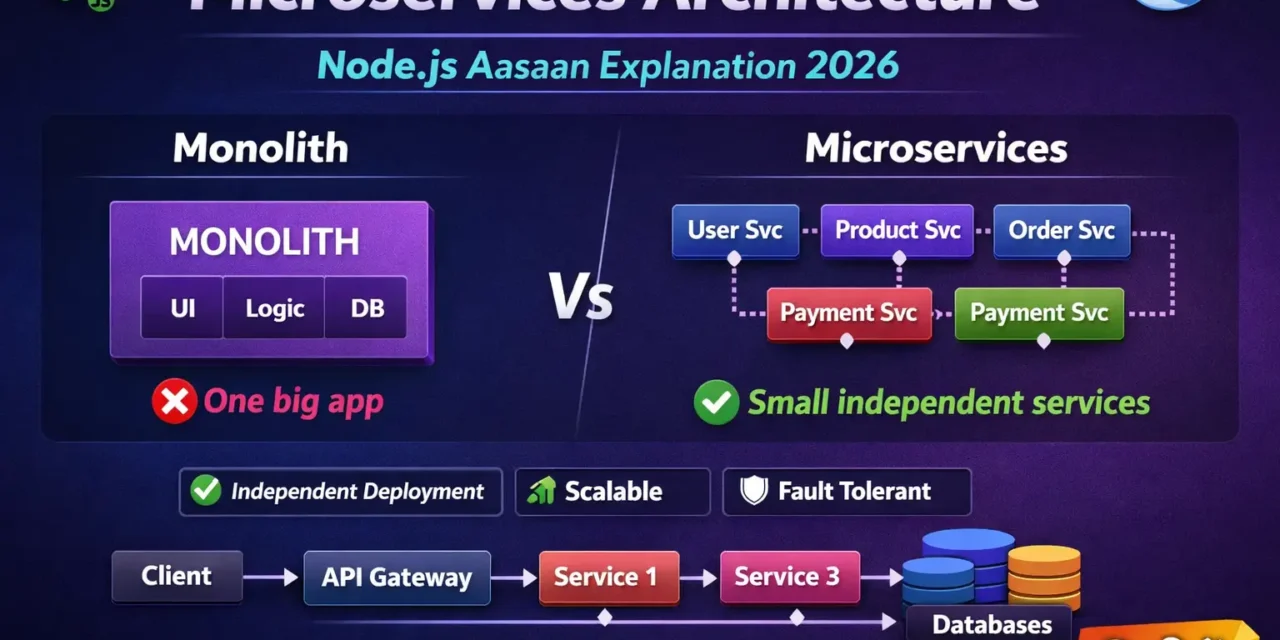
Microservices architecture एक architectural style है जहाँ एक बड़ा एप्लिकेशन छोटे, independent services में बंटा होता है।
Real-world Analogy:
🏢 Monolith (एक बड़ा रेस्तरां):
- एक ही किचन, एक ही शेफ
- सब कुछ एक साथ
- बंद हुआ तो सब बंद

🏘️ Microservices (फूड कोर्ट):
- अलग-अलग stalls (पिज़्ज़ा, बर्गर, इडली)
- हर stall independent
- एक बंद हुआ तो बाकी चलते हैं
Microservices Visual:
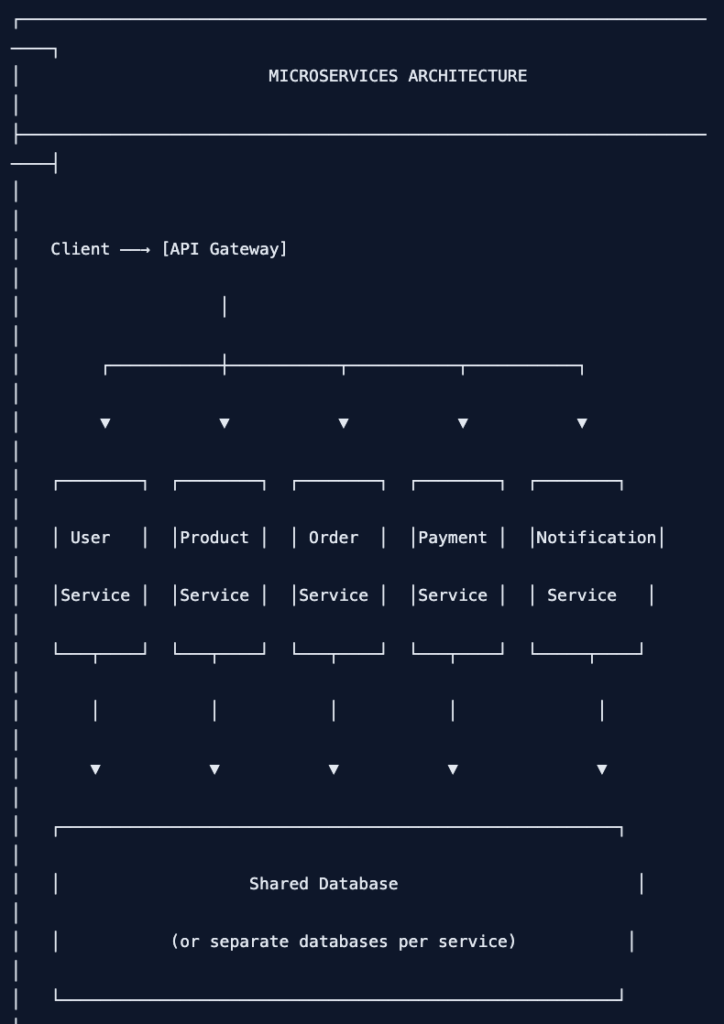
Microservices Architecture Node.js Hindi में हम इन्हीं concepts को detail में समझेंगे।
2. Monolith vs Microservices – Comparison
Monolithic Architecture:
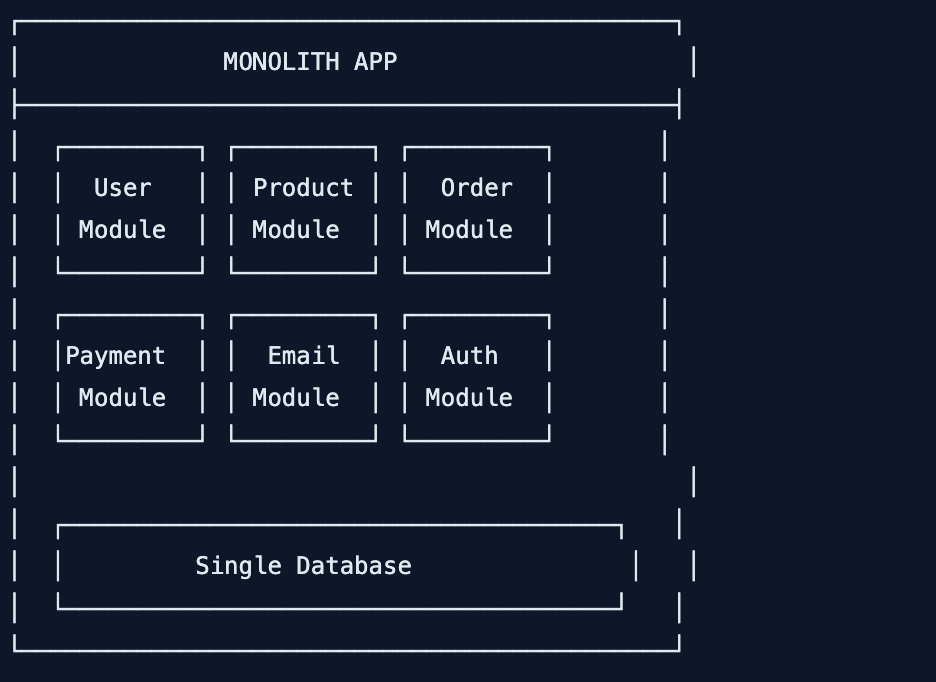
Microservices Architecture:
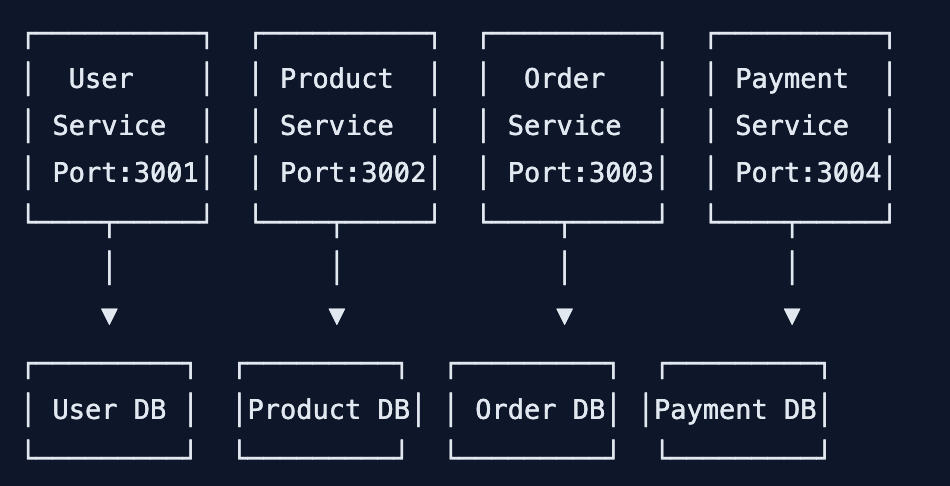
Comparison Table:
| Aspect | Monolith | Microservices |
|---|---|---|
| Deployment | एक साथ deploy | Independent deploy |
| Scaling | पूरा app scale | Service-wise scale |
| Technology | एक language | Different languages |
| Team Structure | एक team | Multiple teams |
| Database | Single DB | Per service DB |
| Communication | In-memory calls | Network calls (HTTP/gRPC) |
| Development | Simple initially | Complex |
| Testing | Easier | Harder |
| Debugging | Easier | Harder |
| Best for | Small apps | Large, complex apps |
3. Microservices Architecture – Components
Main Components:
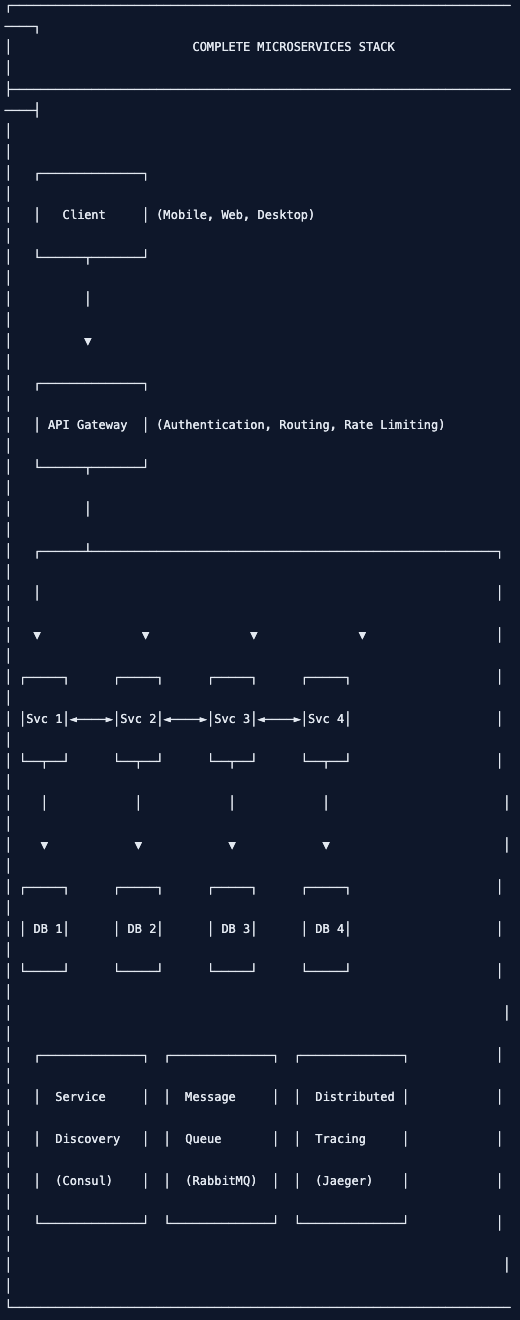
Component Responsibilities:
| Component | Responsibility |
|---|---|
| API Gateway | Single entry point, auth, rate limiting, routing |
| Service Discovery | Services register/dhundein |
| Config Server | Centralized configuration |
| Message Queue | Async communication |
| Distributed Tracing | Request tracking across services |
4. Communication Patterns – HTTP, gRPC, Message Queue
1. HTTP/REST (Synchronous):
// Product Service calling User Service via HTTP
// product-service/server.js
const express = require('express');
const axios = require('axios');

const app = express();

app.get('/api/products/:id/owner', async (req, res) => {
  try {
    const product = await Product.findById(req.params.id);

    // Call User Service via HTTP
    const userResponse = await axios.get(`http://user-service:3001/api/users/${product.userId}`);

    res.json({
      product,
      owner: userResponse.data
    });
  } catch (error) {
    res.status(500).json({ error: error.message });
  }
});
2. gRPC (High Performance):
// user.proto
syntax = "proto3";

service UserService {
  rpc GetUser (UserRequest) returns (UserResponse);
  rpc GetUsers (Empty) returns (UserListResponse);
}

message UserRequest {
  string id = 1;
}

message UserResponse {
  string id = 1;
  string name = 2;
  string email = 3;
}// User Service (gRPC Server)
const grpc = require('@grpc/grpc-js');
const protoLoader = require('@grpc/proto-loader');
const packageDefinition = protoLoader.loadSync('user.proto');
const userProto = grpc.loadPackageDefinition(packageDefinition);
function getUser(call, callback) {
const user = users.find(u => u.id === call.request.id);
callback(null, user);
}
const server = new grpc.Server();
server.addService(userProto.UserService.service, { getUser });
server.bindAsync('0.0.0.0:50051', grpc.ServerCredentials.createInsecure());3. Message Queue (Async – RabbitMQ):
// Order Service - Publishing event
// order-service/publisher.js
const amqp = require('amqplib');

async function publishOrderCreated(order) {
  const connection = await amqp.connect('amqp://rabbitmq:5672');
  const channel = await connection.createChannel();

  const queue = 'order.created';
  await channel.assertQueue(queue, { durable: true });

  channel.sendToQueue(queue, Buffer.from(JSON.stringify(order)), {
    persistent: true
  });

  console.log('Order event published:', order.id);
  await channel.close();
  await connection.close();
}

// Inventory Service - Subscribing
// inventory-service/subscriber.js
async function subscribeToOrders() {
  const connection = await amqp.connect('amqp://rabbitmq:5672');
  const channel = await connection.createChannel();

  const queue = 'order.created';
  await channel.assertQueue(queue, { durable: true });

  channel.consume(queue, (msg) => {
    if (msg !== null) {
      const order = JSON.parse(msg.content.toString());
      console.log('Received order:', order.id);

      // Update inventory based on order
      updateInventory(order.items);

      channel.ack(msg);
    }
  });
}
Communication Patterns Comparison:
| Pattern | Speed | Use Case | Complexity |
|---|---|---|---|
| HTTP/REST | Medium | Simple CRUD, public APIs | Low |
| gRPC | Very High | Internal services, high performance | Medium |
| Message Queue | High (async) | Event-driven, decoupled systems | High |
| GraphQL | Medium | Complex data fetching | Medium |
5. API Gateway – Single Entry Point
What is API Gateway?
API Gateway client और microservices के बीच single entry point है।
API Gateway Responsibilities:
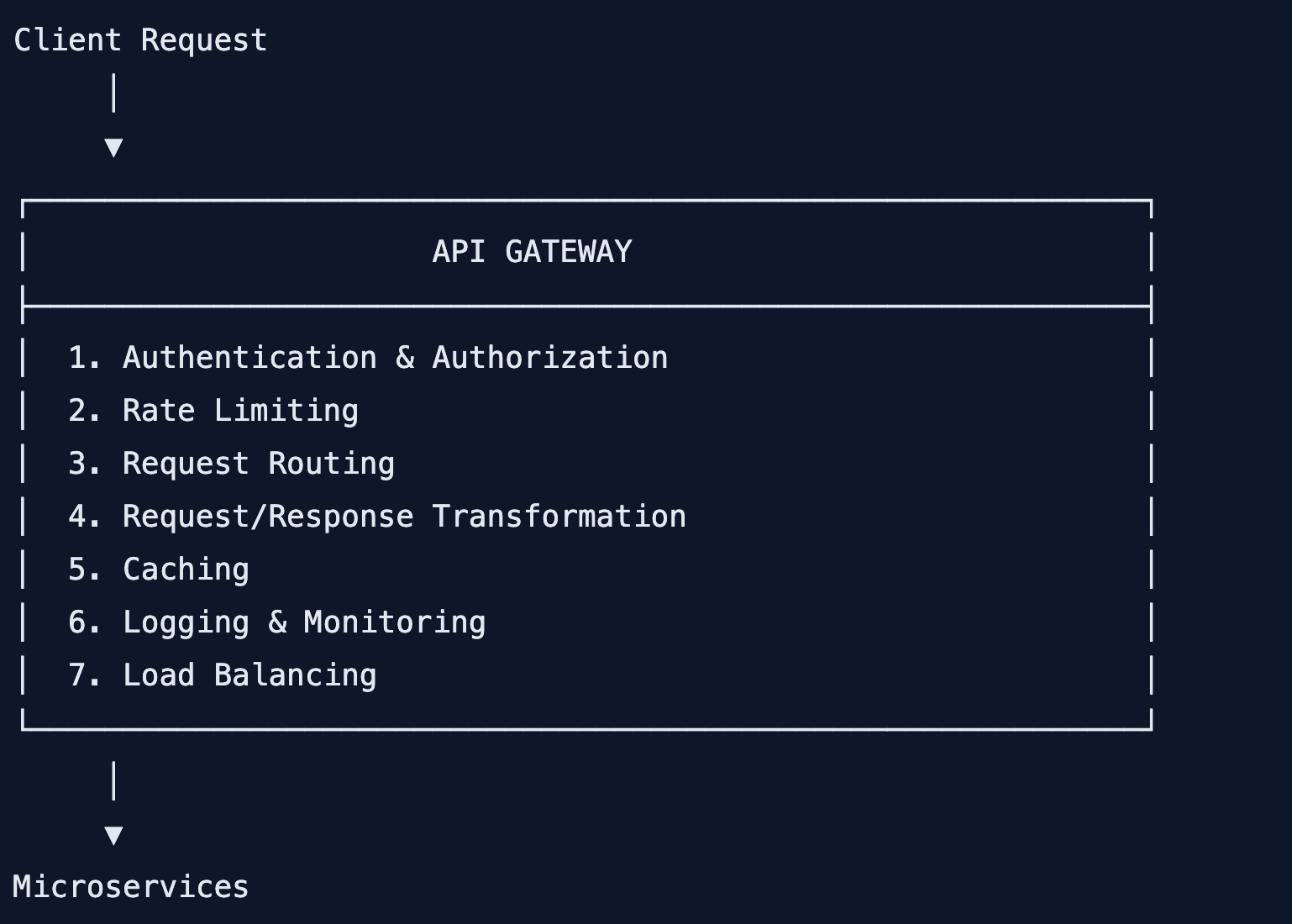
Express Gateway Setup:
# Install Express Gateway
npm install -g express-gateway
eg gateway create my-gateway
cd my-gateway// gateway.config.yml
http:
port: 8080
admin:
port: 9876
host: localhost
apiEndpoints:
api:
host: localhost
paths: '/api/*'
serviceEndpoints:
userService:
url: 'http://localhost:3001'
productService:
url: 'http://localhost:3002'
orderService:
url: 'http://localhost:3003'
policies:
- basic-auth
- cors
- expression
- key-auth
- log
- oauth2
- proxy
- rate-limit
pipelines:
default:
apiEndpoints:
- api
policies:
- cors:
- rate-limit:
action:
max: 100
windowMs: 60000
- proxy:
- condition:
name: 'path'
expression: 'req.originalUrl.startsWith("/api/users")'
action:
serviceEndpoint: userService
changeOrigin: true
- condition:
name: 'path'
expression: 'req.originalUrl.startsWith("/api/products")'
action:
serviceEndpoint: productService
changeOrigin: trueCustom API Gateway with Express:
// api-gateway/server.js
const express = require('express');
const httpProxy = require('http-proxy-middleware');
const rateLimit = require('express-rate-limit');
const jwt = require('jsonwebtoken');

const app = express();

// Rate limiting
const limiter = rateLimit({
  windowMs: 15 * 60 * 1000,
  max: 100,
  message: 'Too many requests, please try again later.'
});

app.use('/api', limiter);

// Authentication middleware
function authenticate(req, res, next) {
  const authHeader = req.headers.authorization;

  if (!authHeader) {
    return res.status(401).json({ error: 'No token provided' });
  }

  const token = authHeader.split(' ')[1];

  try {
    const decoded = jwt.verify(token, process.env.JWT_SECRET);
    req.user = decoded;
    next();
  } catch (error) {
    return res.status(401).json({ error: 'Invalid token' });
  }
}

// Proxy configurations
const proxyOptions = {
  changeOrigin: true,
  onProxyReq: (proxyReq, req, res) => {
    // Add user info to headers
    if (req.user) {
      proxyReq.setHeader('X-User-Id', req.user.id);
      proxyReq.setHeader('X-User-Role', req.user.role);
    }
  }
};

// Routes
app.use('/api/users', authenticate, httpProxy.createProxyMiddleware({
  target: 'http://localhost:3001',
  ...proxyOptions
}));

app.use('/api/products', httpProxy.createProxyMiddleware({
  target: 'http://localhost:3002',
  ...proxyOptions
}));

app.use('/api/orders', authenticate, httpProxy.createProxyMiddleware({
  target: 'http://localhost:3003',
  ...proxyOptions
}));

app.use('/api/payments', authenticate, httpProxy.createProxyMiddleware({
  target: 'http://localhost:3004',
  ...proxyOptions
}));

// Health check
app.get('/health', (req, res) => {
  res.json({ status: 'OK', timestamp: new Date() });
});

app.listen(8080, () => {
  console.log('API Gateway running on port 8080');
});
6. Service Discovery – Services कैसे ढूंढें
Service Discovery microservices को dynamically find करने देता है।
Why Service Discovery?
Problem (Without Service Discovery):
Product Service → "User Service kahan hai?"
Answer: Hardcoded URL (http://localhost:3001)

Solution (With Service Discovery):
Product Service → Service Registry → "User Service yahan hai" → http://user-service:3001
Consul Service Discovery Setup:
# Run Consul
docker run -d --name consul -p 8500:8500 consul// Service Registration (every service does this)
// user-service/consul.js
const consul = require('consul')();
const serviceId = 'user-service-' + process.pid;
// Register service
consul.agent.service.register({
id: serviceId,
name: 'user-service',
address: 'user-service',
port: 3001,
check: {
http: 'http://user-service:3001/health',
interval: '10s',
timeout: '5s'
}
}, (err) => {
if (err) throw err;
console.log('Service registered with Consul');
});
// Deregister on shutdown
process.on('SIGINT', () => {
consul.agent.service.deregister(serviceId, () => {
process.exit();
});
});// Service Discovery (calling another service)
// product-service/discovery.js
const consul = require('consul')();
async function getUserServiceUrl() {
const services = await consul.catalog.service.nodes('user-service');
if (services && services.length > 0) {
const service = services[0];
return `http://${service.ServiceAddress}:${service.ServicePort}`;
}
throw new Error('User service not found');
}
// Usage
app.get('/api/products/:id/owner', async (req, res) => {
const userServiceUrl = await getUserServiceUrl();
const userResponse = await axios.get(`${userServiceUrl}/api/users/${product.userId}`);
res.json(userResponse.data);
});7. Node.js Microservices – Implementation
Project Structure:
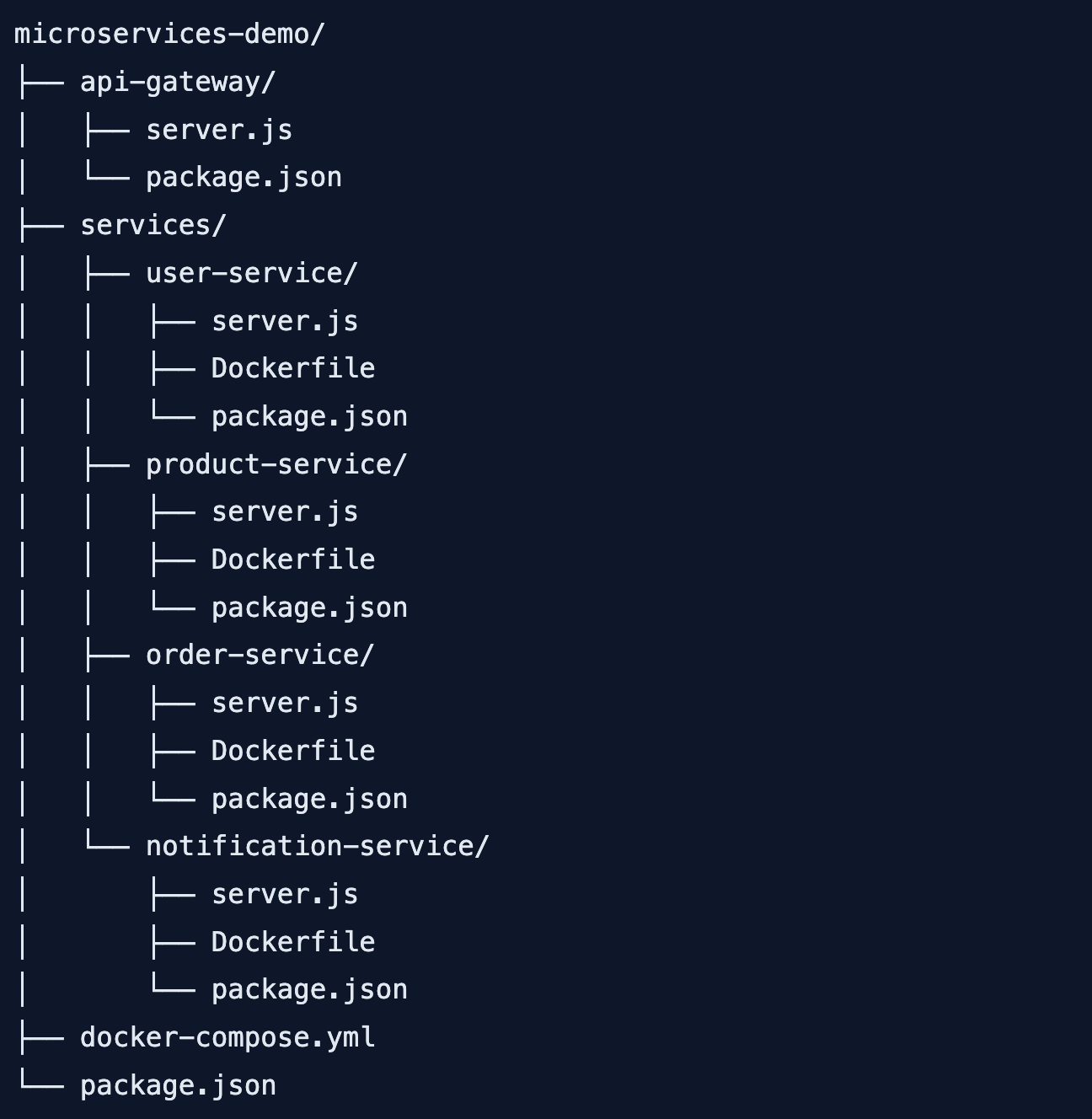
User Service:
// services/user-service/server.js
const express = require('express');
const mongoose = require('mongoose');
const jwt = require('jsonwebtoken');
const bcrypt = require('bcrypt');

const app = express();
app.use(express.json());

// MongoDB connection
mongoose.connect(process.env.MONGODB_URI || 'mongodb://mongodb:27017/users');

// User Schema
const userSchema = new mongoose.Schema({
  name: String,
  email: { type: String, unique: true },
  password: String,
  role: { type: String, default: 'user' },
  createdAt: { type: Date, default: Date.now }
});

const User = mongoose.model('User', userSchema);

// Routes
app.post('/api/users/register', async (req, res) => {
  try {
    const { name, email, password } = req.body;

    const hashedPassword = await bcrypt.hash(password, 10);
    const user = new User({ name, email, password: hashedPassword });
    await user.save();

    res.status(201).json({
      id: user.id,
      name: user.name,
      email: user.email
    });
  } catch (error) {
    res.status(400).json({ error: error.message });
  }
});

app.post('/api/users/login', async (req, res) => {
  try {
    const { email, password } = req.body;
    const user = await User.findOne({ email });

    if (!user || !(await bcrypt.compare(password, user.password))) {
      return res.status(401).json({ error: 'Invalid credentials' });
    }

    const token = jwt.sign(
      { id: user.id, email: user.email, role: user.role },
      process.env.JWT_SECRET,
      { expiresIn: '1h' }
    );

    res.json({ token, user: { id: user.id, name: user.name, email: user.email } });
  } catch (error) {
    res.status(500).json({ error: error.message });
  }
});

app.get('/api/users/:id', async (req, res) => {
  try {
    const user = await User.findById(req.params.id).select('-password');
    if (!user) return res.status(404).json({ error: 'User not found' });
    res.json(user);
  } catch (error) {
    res.status(500).json({ error: error.message });
  }
});

app.get('/health', (req, res) => {
  res.json({ status: 'OK', service: 'user-service' });
});

const PORT = process.env.PORT || 3001;
app.listen(PORT, () => {
  console.log(`User Service running on port ${PORT}`);
});
Product Service:
// services/product-service/server.js
const express = require('express');
const mongoose = require('mongoose');
const axios = require('axios');

const app = express();
app.use(express.json());

mongoose.connect(process.env.MONGODB_URI || 'mongodb://mongodb:27017/products');

const productSchema = new mongoose.Schema({
  name: String,
  description: String,
  price: Number,
  stock: Number,
  userId: String, // Owner ID
  createdAt: { type: Date, default: Date.now }
});

const Product = mongoose.model('Product', productSchema);

// Get user info from User Service
async function getUserInfo(userId) {
  try {
    const response = await axios.get(`http://user-service:3001/api/users/${userId}`);
    return response.data;
  } catch (error) {
    console.error('User service call failed:', error.message);
    return null;
  }
}

app.post('/api/products', async (req, res) => {
  try {
    const { name, description, price, stock, userId } = req.body;

    // Verify user exists
    const user = await getUserInfo(userId);
    if (!user) {
      return res.status(400).json({ error: 'Invalid user' });
    }

    const product = new Product({ name, description, price, stock, userId });
    await product.save();

    res.status(201).json(product);
  } catch (error) {
    res.status(400).json({ error: error.message });
  }
});

app.get('/api/products', async (req, res) => {
  const products = await Product.find();
  res.json(products);
});

app.get('/api/products/:id', async (req, res) => {
  const product = await Product.findById(req.params.id);
  if (!product) return res.status(404).json({ error: 'Product not found' });

  // Get owner info
  const owner = await getUserInfo(product.userId);

  res.json({ ...product.toObject(), owner });
});

app.get('/health', (req, res) => {
  res.json({ status: 'OK', service: 'product-service' });
});

const PORT = process.env.PORT || 3002;
app.listen(PORT, () => {
  console.log(`Product Service running on port ${PORT}`);
});
Order Service:
// services/order-service/server.js
const express = require('express');
const mongoose = require('mongoose');
const axios = require('axios');
const amqp = require('amqplib');

const app = express();
app.use(express.json());

mongoose.connect(process.env.MONGODB_URI || 'mongodb://mongodb:27017/orders');

const orderSchema = new mongoose.Schema({
  userId: String,
  items: [{
    productId: String,
    name: String,
    price: Number,
    quantity: Number
  }],
  total: Number,
  status: { type: String, default: 'pending' },
  createdAt: { type: Date, default: Date.now }
});

const Order = mongoose.model('Order', orderSchema);

// RabbitMQ connection
let channel;
async function connectRabbitMQ() {
  const connection = await amqp.connect('amqp://rabbitmq:5672');
  channel = await connection.createChannel();
  await channel.assertQueue('order.created', { durable: true });
  await channel.assertQueue('order.shipped', { durable: true });
  console.log('Connected to RabbitMQ');
}

// Publish event
async function publishEvent(queue, order) {
  channel.sendToQueue(queue, Buffer.from(JSON.stringify(order)), {
    persistent: true
  });
}

app.post('/api/orders', async (req, res) => {
  try {
    const { userId, items } = req.body;

    // Calculate total
    let total = 0;
    for (const item of items) {
      // Get product details from Product Service
      const productRes = await axios.get(`http://product-service:3002/api/products/${item.productId}`);
      const product = productRes.data;

      item.name = product.name;
      item.price = product.price;
      total += product.price * item.quantity;
    }

    const order = new Order({ userId, items, total });
    await order.save();

    // Publish order created event
    await publishEvent('order.created', order);

    res.status(201).json(order);
  } catch (error) {
    res.status(400).json({ error: error.message });
  }
});

app.get('/api/orders/user/:userId', async (req, res) => {
  const orders = await Order.find({ userId: req.params.userId });
  res.json(orders);
});

app.get('/health', (req, res) => {
  res.json({ status: 'OK', service: 'order-service' });
});

connectRabbitMQ();
const PORT = process.env.PORT || 3003;
app.listen(PORT, () => {
  console.log(`Order Service running on port ${PORT}`);
});
Notification Service (Event Consumer):
// services/notification-service/server.js
const express = require('express');
const amqp = require('amqplib');

const app = express();

let channel;
async function connectRabbitMQ() {
  const connection = await amqp.connect('amqp://rabbitmq:5672');
  channel = await connection.createChannel();

  await channel.assertQueue('order.created', { durable: true });
  await channel.assertQueue('order.shipped', { durable: true });

  // Consume order.created events
  channel.consume('order.created', (msg) => {
    if (msg !== null) {
      const order = JSON.parse(msg.content.toString());
      console.log(`[NOTIFICATION] New order created: ${order.id}`);
      console.log(`[NOTIFICATION] Send email to user ${order.userId}`);

      // Here you would actually send email/SMS
      sendEmail(order.userId, `Your order ${order.id} has been created!`);

      channel.ack(msg);
    }
  });

  console.log('Notification service listening for events');
}

function sendEmail(userId, message) {
  console.log(`📧 Email sent to user ${userId}: ${message}`);
}

app.get('/health', (req, res) => {
  res.json({ status: 'OK', service: 'notification-service' });
});

connectRabbitMQ();
const PORT = process.env.PORT || 3004;
app.listen(PORT, () => {
  console.log(`Notification Service running on port ${PORT}`);
});
8. Docker Containerization
Dockerfile for a Service:
# services/user-service/Dockerfile
FROM node:18-alpine

WORKDIR /app

COPY package*.json ./
RUN npm ci --only=production

COPY . .

EXPOSE 3001

CMD ["node", "server.js"]
Docker Compose:
# docker-compose.yml
version: '3.8'

services:
  # MongoDB for User Service
  user-db:
    image: mongo:6
    container_name: user-db
    volumes:
      - user-data:/data/db
    networks:
      - microservices-network

  # MongoDB for Product Service
  product-db:
    image: mongo:6
    container_name: product-db
    volumes:
      - product-data:/data/db
    networks:
      - microservices-network

  # MongoDB for Order Service
  order-db:
    image: mongo:6
    container_name: order-db
    volumes:
      - order-data:/data/db
    networks:
      - microservices-network

  # RabbitMQ
  rabbitmq:
    image: rabbitmq:3-management
    container_name: rabbitmq
    ports:
      - "5672:5672"
      - "15672:15672"
    networks:
      - microservices-network

  # User Service
  user-service:
    build: ./services/user-service
    container_name: user-service
    ports:
      - "3001:3001"
    environment:
      - PORT=3001
      - MONGODB_URI=mongodb://user-db:27017/users
      - JWT_SECRET=your_jwt_secret
    depends_on:
      - user-db
    networks:
      - microservices-network

  # Product Service
  product-service:
    build: ./services/product-service
    container_name: product-service
    ports:
      - "3002:3002"
    environment:
      - PORT=3002
      - MONGODB_URI=mongodb://product-db:27017/products
    depends_on:
      - product-db
    networks:
      - microservices-network

  # Order Service
  order-service:
    build: ./services/order-service
    container_name: order-service
    ports:
      - "3003:3003"
    environment:
      - PORT=3003
      - MONGODB_URI=mongodb://order-db:27017/orders
    depends_on:
      - order-db
      - rabbitmq
    networks:
      - microservices-network

  # Notification Service
  notification-service:
    build: ./services/notification-service
    container_name: notification-service
    ports:
      - "3004:3004"
    environment:
      - PORT=3004
    depends_on:
      - rabbitmq
    networks:
      - microservices-network

  # API Gateway
  api-gateway:
    build: ./api-gateway
    container_name: api-gateway
    ports:
      - "8080:8080"
    environment:
      - PORT=8080
      - JWT_SECRET=your_jwt_secret
    depends_on:
      - user-service
      - product-service
      - order-service
    networks:
      - microservices-network

networks:
  microservices-network:
    driver: bridge

volumes:
  user-data:
  product-data:
  order-data:
Run Everything:
# Build and run all services
docker-compose up --build

# Run in background
docker-compose up -d

# Stop all services
docker-compose down

# View logs
docker-compose logs -f

# Scale a service
docker-compose up -d --scale user-service=3
9. Real-world E-commerce Example
Complete Flow:
1. User registers/login
   ↓
2. User browses products
   ↓
3. User adds to cart
   ↓
4. User places order
   ↓
5. Order Service → Inventory update (async)
   ↓
6. Payment Service → Process payment
   ↓
7. Notification Service → Send email/SMS
   ↓
8. Shipping Service → Create shipment
API Gateway Routes:
// api-gateway/routes.js
const routes = {
  // Auth routes
  'POST /api/auth/register': 'http://user-service:3001/api/users/register',
  'POST /api/auth/login': 'http://user-service:3001/api/users/login',

  // User routes
  'GET /api/users/profile': 'http://user-service:3001/api/users/profile',
  'PUT /api/users/profile': 'http://user-service:3001/api/users/profile',

  // Product routes
  'GET /api/products': 'http://product-service:3002/api/products',
  'GET /api/products/:id': 'http://product-service:3002/api/products/:id',
  'POST /api/products': 'http://product-service:3002/api/products',

  // Order routes
  'GET /api/orders': 'http://order-service:3003/api/orders',
  'POST /api/orders': 'http://order-service:3003/api/orders',
  'GET /api/orders/:id': 'http://order-service:3003/api/orders/:id',

  // Cart routes
  'GET /api/cart': 'http://cart-service:3005/api/cart',
  'POST /api/cart': 'http://cart-service:3005/api/cart',
  'DELETE /api/cart/:id': 'http://cart-service:3005/api/cart/:id',

  // Payment routes
  'POST /api/payments': 'http://payment-service:3006/api/payments',
};
10. Pros and Cons
Pros (Benefits):
| Benefit | Explanation |
|---|---|
| Independent Deployment | एक service deploy करो, बाकी unaffected |
| Technology Flexibility | हर service अलग tech stack use कर सकती है |
| Scalability | जिस service पर load ज्यादा, उसे अलग scale करो |
| Fault Isolation | एक service down तो बाकी काम करती हैं |
| Team Autonomy | अलग-अलग teams अलग-अलग services पर काम कर सकती हैं |
| Reusability | Services को multiple apps reuse कर सकते हो |
Cons (Challenges):
| Challenge | Solution |
|---|---|
| Complexity | Good documentation, monitoring tools |
| Network Latency | gRPC, caching, async communication |
| Data Consistency | Eventual consistency, Saga pattern |
| Debugging | Distributed tracing (Jaeger, Zipkin) |
| Testing | Contract testing, integration tests |
| DevOps Overhead | Docker, Kubernetes, CI/CD pipelines |
11. Common Challenges + Solutions
Challenge 1: Distributed Transactions
// Problem: Order creation needs inventory update and payment
// Solution: Saga Pattern

async function createOrderSaga(orderData) {
  let createdOrder, paymentProcessed = false;

  try {
    // Step 1: Create order
    createdOrder = await createOrder(orderData);

    // Step 2: Process payment
    await processPayment(createdOrder);
    paymentProcessed = true;

    // Step 3: Update inventory
    await updateInventory(orderData.items);

    // Step 4: Send notification
    await sendNotification(createdOrder);

    return createdOrder;
  } catch (error) {
    // Compensating transactions (rollback)
    if (paymentProcessed) {
      await refundPayment(createdOrder);
    }
    if (createdOrder) {
      await cancelOrder(createdOrder.id);
    }
    throw error;
  }
}
Challenge 2: Service Discovery Failure
// Circuit Breaker Pattern
const CircuitBreaker = require('opossum');

const options = {
  timeout: 3000,
  errorThresholdPercentage: 50,
  resetTimeout: 30000
};

async function callUserService(userId) {
  const response = await axios.get(`http://user-service:3001/api/users/${userId}`);
  return response.data;
}

const breaker = new CircuitBreaker(callUserService, options);

breaker.fallback((userId) => {
  return { id: userId, name: 'Unknown User', error: 'Service unavailable' };
});

breaker.on('open', () => console.log('Circuit breaker OPEN'));
breaker.on('halfOpen', () => console.log('Circuit breaker HALF-OPEN'));
breaker.on('close', () => console.log('Circuit breaker CLOSED'));

// Usage
app.get('/api/products/:id', async (req, res) => {
  const product = await Product.findById(req.params.id);
  const owner = await breaker.fire(product.userId);
  res.json({ product, owner });
});
Challenge 3: Distributed Tracing
// OpenTelemetry setup
const { NodeTracerProvider } = require('@opentelemetry/node');
const { JaegerExporter } = require('@opentelemetry/exporter-jaeger');
const { SimpleSpanProcessor } = require('@opentelemetry/tracing');

const provider = new NodeTracerProvider();
const exporter = new JaegerExporter({ serviceName: 'product-service' });
provider.addSpanProcessor(new SimpleSpanProcessor(exporter));
provider.register();

const tracer = provider.getTracer('product-service');

app.use((req, res, next) => {
  const span = tracer.startSpan(`${req.method} ${req.url}`);
  span.setAttribute('http.method', req.method);
  span.setAttribute('http.url', req.url);

  res.on('finish', () => {
    span.setAttribute('http.status_code', res.statusCode);
    span.end();
  });

  next();
});
12. Quick Cheat Sheet
Microservices Commands:
# Docker
docker-compose up -d
docker-compose down
docker-compose logs -f service-name

# Service Discovery (Consul)
consul agent -dev
consul catalog services
consul catalog service service-name

# Message Queue (RabbitMQ)
rabbitmq-plugins enable rabbitmq_management
# Access UI: http://localhost:15672
Architecture Patterns:
| Pattern | Purpose |
|---|---|
| API Gateway | Single entry point |
| Service Discovery | Find services dynamically |
| Circuit Breaker | Handle service failures |
| Saga | Distributed transactions |
| CQRS | Separate read/write models |
| Event Sourcing | Store state as events |
Communication Patterns:
| Pattern | When to Use |
|---|---|
| Synchronous (HTTP/gRPC) | Real-time response needed |
| Asynchronous (Message Queue) | Background processing, decoupling |
| Event-driven | Multiple services react to events |
13. FAQ
Q1: Microservices Architecture Node.js Hindi में सबसे important concept kya hai?
Service Independence – हर service अपनी database, अपनी business logic, अपने deployment के साथ independent होती है।
Q2: Monolith से Microservices में कब migrate karein?
Team बड़ी हो जाए (20+ developers), scaling issues aane lage, deployment conflicts हों – तब migrate करो।
Q3: API Gateway kyun chahiye?
Client को multiple service URLs पता नहीं होने चाहिए। API Gateway auth, rate limiting, routing सब handle करता है।
Q4: Service Discovery kya hai?**
Services dynamically find करने का mechanism – Consul, etcd, Zookeeper। नई service आए या कोई service down हो, automatically detect हो जाता है।
Q5: Synchronous vs Asynchronous communication – kab kya use karein?
Synchronous (HTTP/gRPC) – immediate response chahiye (e.g., user profile)। Asynchronous (Message Queue) – background processing (e.g., email sending)।
Q6: Database per service kyun?
Decoupling के लिए। अगर सभी services एक DB share करेंगी, तो independence khatam हो जाएगी।
Q7: Distributed transactions kaise handle karein?**
Saga pattern – transaction को छोटे-छोटे steps में तोड़ो, हर step का compensating transaction होना चाहिए।
Q8: Debugging कैसे करें microservices में?
Distributed tracing – Jaeger, Zipkin। Request को unique ID दो और सभी services में pass करो।
Q9: Testing kaise karein?
Unit tests (per service), Integration tests (service-to-service), Contract tests (API contracts), End-to-end tests (full flow)।
Q10: Microservices ke liye Node.js kyun accha hai?
Lightweight, fast, good async support, large ecosystem, easy to containerize।
14. Conclusion
बहुत बढ़िया दोस्तों! आज हमने Microservices Architecture Node.js Hindi को पूरी detail में समझा।
Quick Recap:
| Concept | Key Takeaway |
|---|---|
| Microservices | Independent, small services |
| Monolith | Single, large application |
| API Gateway | Single entry point |
| Service Discovery | Find services dynamically |
| Communication | HTTP, gRPC, Message Queue |
| Docker | Containerize services |
Mera personal experience:
Microservices pehle complex lagte the, lekin ek baar architecture samajh aaya toh bohot powerful feel hota है। Netflix जैसी companies इसी architecture पर चलती हैं। शुरुआत monolith से करो, फिर microservices में migrate करो।
Tum bhi ye steps follow karo:
- ✅ Monolith vs Microservices समझो
- ✅ API Gateway implement करो
- ✅ 2-3 services banao
- ✅ Docker compose use करो
- ✅ Message Queue add करो
अब तुम्हारी बारी है!
नीचे comment में बताओ:
- तुम microservices use karoge ya monolith?
- कौन सा communication pattern use karoge?
- अगला topic क्या चाहिए? (Kubernetes? GraphQL? Redis?)
The Easy Master पर बने रहो। Happy Microservices Coding! 🚀🔧
Resources
- Microservices.io – Pattern Language
- Docker Documentation
- Consul Service Discovery
- RabbitMQ Documentation
- OpenTelemetry
Additional Resources
- React.js Kya Hai? JSX aur Components Samjhe – Beginner Guide 2026
- React Props and State Data Flow Hindi – समझे आसान भाषा में 2026
- React Router v6 – Multi-Page App Banaye (Routing Guide) 2026
- Advanced React Hooks – useContext and useReducer Samjhe 2026
- Redux Toolkit Simplified – State Management Aasaan Tarika 2026
- React API Integration Made Easy with Fetch and Axios
- React Performance Optimization – App Ko Fast कैसे बनाएं 2026
- React 19 New Features – AI Integration with React (2026)
- Node.js क्या है? 2026 में अपना पहला Backend Server बनाएँ
- NPM Packages कैसे इंस्टॉल करें? Modules (ESM vs CommonJS) 2026
- Express.js Tutorial – REST API Routing और Middleware समझे 2026
- Prisma ORM MongoDB से Database Connect कैसे करें – Easy Tutorial Hindi
- JWT Authentication Node.js – Secure Login System बनाए 2026
- WebSockets Node.js – Live Chat App कैसे बनाएं (Socket.io)
- Async Await vs Promises – Node.js में Async Code कैसे सीखें?