नमस्ते दोस्तों! 🙏
स्वागत है The Easy Master पर!
क्या तुमने कभी सोचा है – Express.js routing kaise kaam karta hai? Aur middleware kya hota hai?
Jab tum backend API banate ho, toh tumko:
- Different URLs handle karne hote hain (routing)
- Request/response modify karne hote hain (middleware)
- Errors handle karne hote hain
- Authentication, logging, validation lagani hoti hai
Express.js routing middleware REST API Hindi में समझना बहुत जरूरी है क्योंकि:
- Express.js Node.js ka #1 framework hai (15M+ weekly downloads)
- Har API mein routing aur middleware use hota hai
- Interview questions mein pakka puchega
- Real-world projects mein 80% code routing + middleware hota hai
Aaj kya seekhoge?
| Topic | Kya Seekhega? |
|---|---|
| Express.js Setup | Server create karna |
| Routing Basics | GET, POST, PUT, DELETE |
| Route Parameters | URL se data extract karna |
| Query Parameters | ?search=term handle karna |
| Middleware | Request/response modify karna |
| Custom Middleware | Apna middleware likhna |
| Error Handling | Global error handler |
| Router Module | Routes organize karna |
Kya tumhe pata hai?
Middleware chain mein run hota hai – ek ke baad ek। Tum next() call karte ho toh agla middleware run hota है!
तो चलिए शुरू करते हैं – Express.js routing middleware REST API Hindi सीखने का सफर! 🚀
Table of Contents
1. Express.js क्या Hai?
Express.js ek minimal aur flexible Node.js web framework hai jo:
- Routing handle karta hai
- Middleware support karta hai
- REST APIs banane ke liye perfect hai
Why Express.js?
| Feature | Benefit |
|---|---|
| Minimal | Simple, less boilerplate |
| Fast | Unopinionated, lightweight |
| Flexible | Any database, any template engine |
| Middleware | Request/response pipeline |
| Ecosystem | 1000+ middleware packages |
| Popular | 15M+ weekly downloads |
Basic Express Server:
const express = require('express');
const app = express();
const PORT = 3000;

// Route
app.get('/', (req, res) => {
  res.json({ message: 'Hello Express!' });
});

app.listen(PORT, () => {
  console.log(`Server running on port ${PORT}`);
});
Express.js routing middleware REST API Hindi mein aaj hum inhi concepts ko detail mein samjhenge।
2. Setup and Installation
Step 1: Create Project
mkdir express-tutorial
cd express-tutorial
npm init -y
Step 2: Install Express
npm install express
npm install -D nodemon
Step 3: Basic Server
// server.js
const express = require('express');

const app = express();
const PORT = process.env.PORT || 3000;

// Middleware to parse JSON
app.use(express.json());

// Routes
app.get('/', (req, res) => {
  res.json({ message: 'Welcome to Express.js!' });
});

app.listen(PORT, () => {
  console.log(`🚀 Server running on http://localhost:${PORT}`);
});
package.json Scripts:
{
  "scripts": {
    "start": "node server.js",
    "dev": "nodemon server.js"
  }
}
Run:
npm run dev3. Basic Routing – GET, POST, PUT, DELETE
Routing ka matlab hai – different URLs ke liye different responses।
Complete CRUD API:
// server.js
const express = require('express');
const app = express();

app.use(express.json());

// In-memory database
let users = [
  { id: 1, name: 'Rahul', email: 'rahul@example.com' },
  { id: 2, name: 'Priya', email: 'priya@example.com' }
];

let nextId = 3;

// GET - Read all users
app.get('/api/users', (req, res) => {
  res.json({
    success: true,
    count: users.length,
    data: users
  });
});

// GET - Read single user
app.get('/api/users/:id', (req, res) => {
  const id = parseInt(req.params.id);
  const user = users.find(u => u.id === id);

  if (!user) {
    return res.status(404).json({
      success: false,
      message: 'User not found'
    });
  }

  res.json({
    success: true,
    data: user
  });
});

// POST - Create new user
app.post('/api/users', (req, res) => {
  const { name, email } = req.body;

  // Validation
  if (!name || !email) {
    return res.status(400).json({
      success: false,
      message: 'Name and email are required'
    });
  }

  const newUser = {
    id: nextId++,
    name,
    email
  };

  users.push(newUser);

  res.status(201).json({
    success: true,
    data: newUser
  });
});

// PUT - Update user
app.put('/api/users/:id', (req, res) => {
  const id = parseInt(req.params.id);
  const { name, email } = req.body;

  const userIndex = users.findIndex(u => u.id === id);

  if (userIndex === -1) {
    return res.status(404).json({
      success: false,
      message: 'User not found'
    });
  }

  users[userIndex] = {
    ...users[userIndex],
    name: name || users[userIndex].name,
    email: email || users[userIndex].email
  };

  res.json({
    success: true,
    data: users[userIndex]
  });
});

// DELETE - Delete user
app.delete('/api/users/:id', (req, res) => {
  const id = parseInt(req.params.id);
  const userIndex = users.findIndex(u => u.id === id);

  if (userIndex === -1) {
    return res.status(404).json({
      success: false,
      message: 'User not found'
    });
  }

  users.splice(userIndex, 1);

  res.json({
    success: true,
    message: 'User deleted successfully'
  });
});

// Start server
app.listen(3000, () => {
  console.log('Server running on port 3000');
});
Testing with curl:
# GET all users
curl http://localhost:3000/api/users

# GET single user
curl http://localhost:3000/api/users/1

# POST create user
curl -X POST http://localhost:3000/api/users \
  -H "Content-Type: application/json" \
  -d '{"name":"Amit","email":"amit@example.com"}'

# PUT update user
curl -X PUT http://localhost:3000/api/users/1 \
  -H "Content-Type: application/json" \
  -d '{"name":"Rahul Sharma"}'

# DELETE user
curl -X DELETE http://localhost:3000/api/users/2
4. Route Parameters – Dynamic URLs
Route parameters dynamic URLs ke liye – jaise /users/123, /products/laptop
Basic Route Parameters:
// Single parameter
app.get('/users/:userId', (req, res) => {
  const userId = req.params.userId;
  res.json({ userId });
});

// Multiple parameters
app.get('/users/:userId/posts/:postId', (req, res) => {
  const { userId, postId } = req.params;
  res.json({ userId, postId });
});

// Optional parameter (with ?)
app.get('/products/:category?', (req, res) => {
  const category = req.params.category || 'all';
  res.json({ category });
});
Real Example:
// E-commerce API with route params
app.get('/api/products/:category/:productId', (req, res) => {
  const { category, productId } = req.params;

  // Fetch product from database
  const product = products.find(p =>
    p.category === category && p.id === parseInt(productId)
  );

  if (!product) {
    return res.status(404).json({ error: 'Product not found' });
  }

  res.json(product);
});
Regular Expressions in Routes:
// Only numbers
app.get('/users/:userId(\\d+)', (req, res) => {
  // userId will only match numbers
  res.json({ userId: req.params.userId });
});

// Only alphabets
app.get('/:name([a-zA-Z]+)', (req, res) => {
  res.json({ name: req.params.name });
});
5. Query Parameters – URL Search Params
Query parameters filtering, pagination, searching ke liye – jaise /users?page=2&limit=10
Basic Query Parameters:
// /api/users?page=2&limit=10&sort=name
app.get('/api/users', (req, res) => {
  const { page = 1, limit = 10, sort, search } = req.query;

  console.log('Page:', page);
  console.log('Limit:', limit);
  console.log('Sort:', sort);
  console.log('Search:', search);

  res.json({
    page: parseInt(page),
    limit: parseInt(limit),
    sort,
    search
  });
});
Real Example – Pagination + Filtering:
// Complete filtering example
let products = [
  { id: 1, name: 'Laptop', category: 'electronics', price: 50000, inStock: true },
  { id: 2, name: 'Mouse', category: 'electronics', price: 500, inStock: true },
  { id: 3, name: 'Shirt', category: 'clothing', price: 1000, inStock: false },
  { id: 4, name: 'Jeans', category: 'clothing', price: 2000, inStock: true }
];

app.get('/api/products', (req, res) => {
  let { category, minPrice, maxPrice, inStock, page = 1, limit = 10, sortBy = 'id', order = 'asc' } = req.query;

  let filteredProducts = [...products];

  // Filter by category
  if (category) {
    filteredProducts = filteredProducts.filter(p => p.category === category);
  }

  // Filter by price range
  if (minPrice) {
    filteredProducts = filteredProducts.filter(p => p.price >= parseInt(minPrice));
  }
  if (maxPrice) {
    filteredProducts = filteredProducts.filter(p => p.price <= parseInt(maxPrice));
  }

  // Filter by stock status
  if (inStock !== undefined) {
    const inStockBool = inStock === 'true';
    filteredProducts = filteredProducts.filter(p => p.inStock === inStockBool);
  }

  // Sorting
  filteredProducts.sort((a, b) => {
    if (order === 'asc') {
      return a[sortBy] > b[sortBy] ? 1 : -1;
    } else {
      return a[sortBy] < b[sortBy] ? 1 : -1;
    }
  });

  // Pagination
  const startIndex = (parseInt(page) - 1) * parseInt(limit);
  const endIndex = startIndex + parseInt(limit);
  const paginatedProducts = filteredProducts.slice(startIndex, endIndex);

  res.json({
    success: true,
    total: filteredProducts.length,
    page: parseInt(page),
    limit: parseInt(limit),
    totalPages: Math.ceil(filteredProducts.length / parseInt(limit)),
    data: paginatedProducts
  });
});
Test URLs:
GET /api/products
GET /api/products?category=electronics
GET /api/products?minPrice=1000&maxPrice=50000
GET /api/products?inStock=true&sortBy=price&order=desc
GET /api/products?page=1&limit=5
6. Middleware Kya Hai?
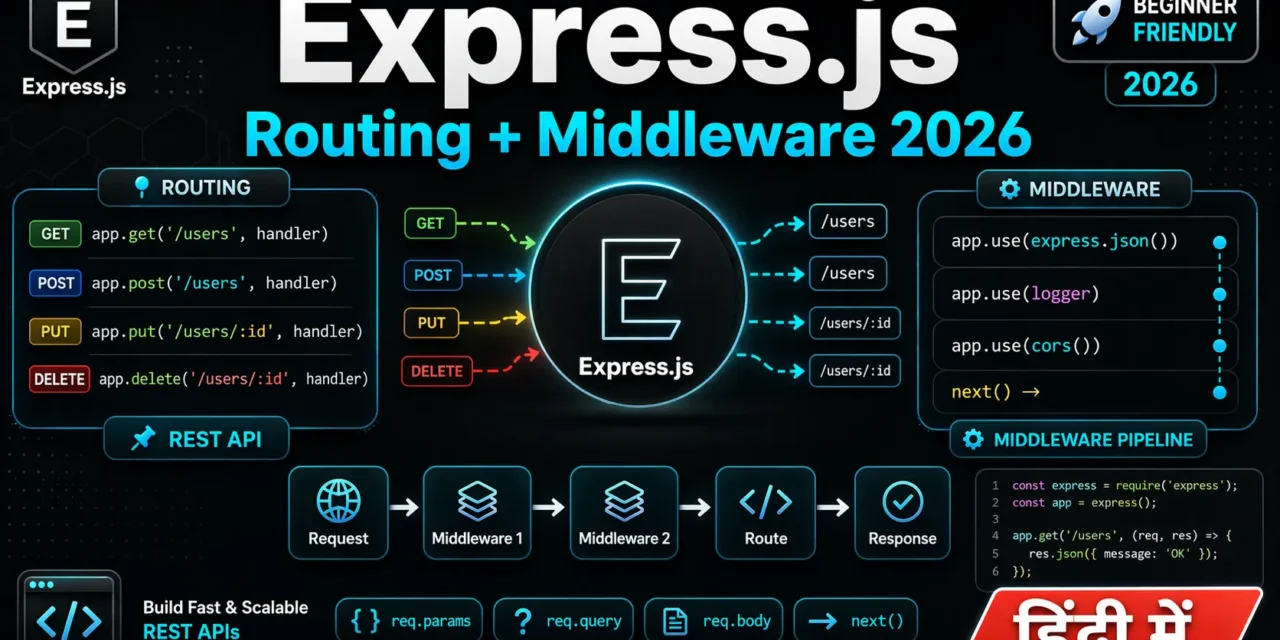
Middleware ek function hai jo request aur response ke beech mein execute hota hai।
Middleware Flow:
Request → Middleware 1 → Middleware 2 → Route → Response
              ↓              ↓
          next()         next()
Basic Middleware Structure:
// Middleware function
function myMiddleware(req, res, next) {
  console.log('Middleware executed!');

  // Modify request
  req.customProperty = 'Hello from middleware';

  // Call next middleware
  next();
}

// Apply middleware to all routes
app.use(myMiddleware);

// Apply to specific route
app.get('/special', myMiddleware, (req, res) => {
  res.json({ message: req.customProperty });
});
Middleware Chain Example:
// Logger middleware
app.use((req, res, next) => {
  console.log(`[${new Date().toISOString()}] ${req.method} ${req.url}`);
  next();
});

// Authentication middleware
app.use((req, res, next) => {
  const token = req.headers.authorization;

  if (!token && req.url !== '/api/login') {
    return res.status(401).json({ error: 'Unauthorized' });
  }

  next();
});

// Request timer middleware
app.use((req, res, next) => {
  req.startTime = Date.now();

  // Capture response finish event
  res.on('finish', () => {
    const duration = Date.now() - req.startTime;
    console.log(`Request took ${duration}ms`);
  });

  next();
});
7. Built-in Middleware – express.json, express.static
Express.js ke paas built-in middleware hain:
1. express.json() – Parse JSON Body
// Parse JSON request body
app.use(express.json());

// Limit payload size
app.use(express.json({ limit: '10mb' }));

// Now req.body contains JSON data
app.post('/api/data', (req, res) => {
  console.log(req.body); // { name: "Rahul", age: 25 }
  res.json({ received: req.body });
});
2. express.urlencoded() – Parse Form Data
// Parse URL-encoded form data
app.use(express.urlencoded({ extended: true }));

// HTML form submit handle karna
app.post('/api/contact', (req, res) => {
  console.log(req.body); // { name: "Rahul", email: "rahul@example.com" }
  res.json({ message: 'Form received' });
});
3. express.static() – Serve Static Files
// Serve static files from 'public' folder
app.use(express.static('public'));

// Now http://localhost:3000/style.css will serve public/style.css
// http://localhost:3000/script.js will serve public/script.js

// Multiple folders
app.use(express.static('public'));
app.use(express.static('uploads'));

// Custom path prefix
app.use('/static', express.static('public'));
// Now http://localhost:3000/static/style.css
4. express.raw() – Parse Raw Body
// Parse raw text/JSON
app.use(express.raw({ type: 'application/json' }));
5. express.text() – Parse Text Body
// Parse plain text
app.use(express.text());
8. Custom Middleware – Apna Middleware Likho
Authentication Middleware:
// authMiddleware.js
const jwt = require('jsonwebtoken');

function authenticateToken(req, res, next) {
  const authHeader = req.headers['authorization'];
  const token = authHeader && authHeader.split(' ')[1]; // Bearer TOKEN

  if (!token) {
    return res.status(401).json({ error: 'Access token required' });
  }

  jwt.verify(token, process.env.JWT_SECRET, (err, user) => {
    if (err) {
      return res.status(403).json({ error: 'Invalid or expired token' });
    }

    req.user = user; // Attach user to request
    next();
  });
}

module.exports = authenticateToken;
Logger Middleware:
// loggerMiddleware.js
function logger(req, res, next) {
  const start = Date.now();

  console.log(`[${new Date().toISOString()}] ${req.method} ${req.url}`);

  // Log response time
  res.on('finish', () => {
    const duration = Date.now() - start;
    console.log(`[${req.method}] ${req.url} - ${res.statusCode} - ${duration}ms`);
  });

  next();
}

module.exports = logger;
Validation Middleware:
// validationMiddleware.js
function validateUser(req, res, next) {
  const { name, email, age } = req.body;
  const errors = [];

  if (!name || name.length < 2) {
    errors.push('Name must be at least 2 characters');
  }

  if (!email || !email.includes('@')) {
    errors.push('Valid email is required');
  }

  if (age && (age < 18 || age > 100)) {
    errors.push('Age must be between 18 and 100');
  }

  if (errors.length > 0) {
    return res.status(400).json({ errors });
  }

  next();
}

module.exports = validateUser;
Rate Limiting Middleware:
// rateLimitMiddleware.js
const rateLimitMap = new Map();

function rateLimit(req, res, next) {
  const ip = req.ip;
  const now = Date.now();
  const windowMs = 60 * 1000; // 1 minute
  const maxRequests = 10;

  if (!rateLimitMap.has(ip)) {
    rateLimitMap.set(ip, {
      count: 1,
      firstRequest: now
    });
    return next();
  }

  const userData = rateLimitMap.get(ip);

  if (now - userData.firstRequest < windowMs) {
    if (userData.count >= maxRequests) {
      return res.status(429).json({
        error: 'Too many requests. Please try again later.'
      });
    }
    userData.count++;
  } else {
    userData.count = 1;
    userData.firstRequest = now;
  }

  next();
}

module.exports = rateLimit;
Using Custom Middleware:
// server.js
const express = require('express');
const authenticateToken = require('./middleware/authMiddleware');
const logger = require('./middleware/loggerMiddleware');
const validateUser = require('./middleware/validationMiddleware');
const rateLimit = require('./middleware/rateLimitMiddleware');

const app = express();

app.use(express.json());
app.use(logger); // Global logger
app.use(rateLimit); // Global rate limit

// Public routes (no auth)
app.post('/api/login', (req, res) => {
  // Login logic
});

// Protected routes (require auth)
app.use('/api/users', authenticateToken);

app.get('/api/users/profile', (req, res) => {
  res.json({ user: req.user });
});

app.post('/api/users', validateUser, (req, res) => {
  // Create user with validated data
  res.json({ message: 'User created' });
});
9. Third-party Middleware – Morgan, CORS, Helmet
Morgan – HTTP Request Logger:
npm install morganconst morgan = require('morgan');
// Development logging
app.use(morgan('dev'));
// Output: GET /api/users 200 5.123 ms - 234
// Combined format (production)
app.use(morgan('combined'));
// Output: ::1 - - [14/Apr/2026:10:30:00 +0000] "GET / HTTP/1.1" 200 12
// Custom format
app.use(morgan(':method :url :status :response-time ms'));CORS – Cross-Origin Resource Sharing:
npm install corsconst cors = require('cors');
// Allow all origins (development only)
app.use(cors());
// Specific origin
app.use(cors({
origin: 'https://myfrontend.com',
methods: ['GET', 'POST', 'PUT', 'DELETE'],
allowedHeaders: ['Content-Type', 'Authorization'],
credentials: true
}));
// Dynamic origin
const allowedOrigins = ['https://app1.com', 'https://app2.com'];
app.use(cors({
origin: (origin, callback) => {
if (!origin || allowedOrigins.includes(origin)) {
callback(null, true);
} else {
callback(new Error('Not allowed by CORS'));
}
}
}));Helmet – Security Headers:
npm install helmetconst helmet = require('helmet');
// Basic security headers
app.use(helmet());
// Custom configuration
app.use(helmet({
contentSecurityPolicy: {
directives: {
defaultSrc: ["'self'"],
styleSrc: ["'self'", "'unsafe-inline'"],
scriptSrc: ["'self'"]
}
}
}));Compression – Response Compression:
npm install compressionconst compression = require('compression');
// Compress responses
app.use(compression());
// For large responses
app.use(compression({
level: 6, // Compression level (0-9)
threshold: 1024 // Only compress > 1KB
}));10. Error Handling Middleware
Error handling middleware has 4 parameters (err, req, res, next):
// Basic error handler
app.use((err, req, res, next) => {
  console.error(err.stack);
  res.status(500).json({
    error: 'Something went wrong!'
  });
});

// Advanced error handler
class AppError extends Error {
  constructor(message, statusCode) {
    super(message);
    this.statusCode = statusCode;
    this.isOperational = true;
  }
}

// Global error handler
app.use((err, req, res, next) => {
  const { statusCode = 500, message, isOperational } = err;

  // Log error for debugging
  console.error(`[ERROR] ${statusCode}: ${message}`);
  console.error(err.stack);

  // Send response
  res.status(statusCode).json({
    success: false,
    error: {
      message: isOperational ? message : 'Internal server error',
      statusCode,
      ...(process.env.NODE_ENV === 'development' && { stack: err.stack })
    }
  });
});

// 404 handler (must be before error handler)
app.use('*', (req, res) => {
  res.status(404).json({
    success: false,
    error: {
      message: `Cannot ${req.method} ${req.url}`,
      statusCode: 404
    }
  });
});
Async Error Handling:
// Wrapper for async routes
const asyncHandler = (fn) => (req, res, next) => {
  Promise.resolve(fn(req, res, next)).catch(next);
};

// Use it
app.get('/api/users/:id', asyncHandler(async (req, res) => {
  const user = await db.users.findById(req.params.id);

  if (!user) {
    throw new AppError('User not found', 404);
  }

  res.json(user);
}));
11. Router Module – Routes Organize Karna
Router routes ko modular banata hai – alag-alag files mein organize karne ke liye।
Project Structure:
express-app/
├── server.js
├── routes/
│   ├── users.js
│   ├── products.js
│   └── auth.js
├── controllers/
│   ├── userController.js
│   └── productController.js
├── middleware/
│   ├── auth.js
│   └── validation.js
└── models/
    ├── User.js
    └── Product.js
Route File Example:
// routes/users.js
const express = require('express');
const router = express.Router();
const userController = require('../controllers/userController');
const authMiddleware = require('../middleware/auth');
const validationMiddleware = require('../middleware/validation');

// Public routes
router.post('/register', validationMiddleware.validateUser, userController.register);
router.post('/login', userController.login);

// Protected routes (require auth)
router.use(authMiddleware.authenticate);

router.get('/profile', userController.getProfile);
router.put('/profile', validationMiddleware.validateUpdate, userController.updateProfile);
router.delete('/profile', userController.deleteProfile);

module.exports = router;
Controller File:
// controllers/userController.js
const User = require('../models/User');

exports.register = async (req, res, next) => {
  try {
    const { name, email, password } = req.body;

    const existingUser = await User.findOne({ email });
    if (existingUser) {
      return res.status(400).json({ error: 'Email already exists' });
    }

    const user = await User.create({ name, email, password });

    res.status(201).json({
      success: true,
      data: { id: user.id, name: user.name, email: user.email }
    });
  } catch (error) {
    next(error);
  }
};

exports.getProfile = async (req, res, next) => {
  try {
    const user = await User.findById(req.user.id).select('-password');
    res.json({ success: true, data: user });
  } catch (error) {
    next(error);
  }
};
Main Server File:
// server.js
const express = require('express');
const userRoutes = require('./routes/users');
const productRoutes = require('./routes/products');
const authRoutes = require('./routes/auth');

const app = express();

app.use(express.json());

// Routes
app.use('/api/users', userRoutes);
app.use('/api/products', productRoutes);
app.use('/api/auth', authRoutes);

// 404 handler
app.use('*', (req, res) => {
  res.status(404).json({ error: 'Route not found' });
});

// Error handler
app.use((err, req, res, next) => {
  console.error(err);
  res.status(err.statusCode || 500).json({
    error: err.message || 'Internal server error'
  });
});

app.listen(3000, () => {
  console.log('Server running on port 3000');
});
12. Real-world API Example
Complete REST API for a Blog Platform:
// server.js
const express = require('express');
const morgan = require('morgan');
const cors = require('cors');
const helmet = require('helmet');

const app = express();

// Middleware
app.use(helmet());
app.use(cors());
app.use(morgan('dev'));
app.use(express.json());

// In-memory database
let posts = [
  { id: 1, title: 'First Post', content: 'Hello World', author: 'Rahul', createdAt: new Date() }
];
let nextId = 2;

// Routes
app.get('/api/posts', (req, res) => {
  const { page = 1, limit = 10, author } = req.query;

  let filteredPosts = [...posts];

  if (author) {
    filteredPosts = filteredPosts.filter(p => p.author === author);
  }

  const start = (page - 1) * limit;
  const paginatedPosts = filteredPosts.slice(start, start + limit);

  res.json({
    success: true,
    total: filteredPosts.length,
    page: parseInt(page),
    limit: parseInt(limit),
    data: paginatedPosts
  });
});

app.get('/api/posts/:id', (req, res) => {
  const post = posts.find(p => p.id === parseInt(req.params.id));

  if (!post) {
    return res.status(404).json({ error: 'Post not found' });
  }

  res.json({ success: true, data: post });
});

app.post('/api/posts', (req, res) => {
  const { title, content, author } = req.body;

  if (!title || !content || !author) {
    return res.status(400).json({ error: 'Title, content, and author are required' });
  }

  const newPost = {
    id: nextId++,
    title,
    content,
    author,
    createdAt: new Date()
  };

  posts.push(newPost);
  res.status(201).json({ success: true, data: newPost });
});

app.put('/api/posts/:id', (req, res) => {
  const id = parseInt(req.params.id);
  const { title, content } = req.body;

  const postIndex = posts.findIndex(p => p.id === id);

  if (postIndex === -1) {
    return res.status(404).json({ error: 'Post not found' });
  }

  posts[postIndex] = {
    ...posts[postIndex],
    title: title || posts[postIndex].title,
    content: content || posts[postIndex].content,
    updatedAt: new Date()
  };

  res.json({ success: true, data: posts[postIndex] });
});

app.delete('/api/posts/:id', (req, res) => {
  const id = parseInt(req.params.id);
  const postIndex = posts.findIndex(p => p.id === id);

  if (postIndex === -1) {
    return res.status(404).json({ error: 'Post not found' });
  }

  posts.splice(postIndex, 1);
  res.json({ success: true, message: 'Post deleted' });
});

// Error handling
app.use('*', (req, res) => {
  res.status(404).json({ error: 'Route not found' });
});

app.use((err, req, res, next) => {
  console.error(err);
  res.status(500).json({ error: 'Internal server error' });
});

const PORT = process.env.PORT || 3000;
app.listen(PORT, () => {
  console.log(`🚀 Blog API running on http://localhost:${PORT}`);
});
13. Common Mistakes + Solutions
Mistake 1: Forgetting next() in middleware
// ❌ Request hangs
app.use((req, res, next) => {
  console.log('Middleware');
  // Missing next()!
});

// ✅ Call next()
app.use((req, res, next) => {
  console.log('Middleware');
  next();
});
Mistake 2: Sending multiple responses
// ❌ Error: Cannot set headers after they are sent
app.get('/users/:id', (req, res) => {
  res.json({ message: 'First' });
  res.json({ message: 'Second' }); // Error!
});

// ✅ Send once
app.get('/users/:id', (req, res) => {
  res.json({ message: 'Only once' });
});
Mistake 3: Middleware order matters
// ❌ Wrong order – json middleware after routes
app.get('/api/users', handler);
app.use(express.json()); // Body parser after route!

// ✅ Correct order – middleware before routes
app.use(express.json());
app.get('/api/users', handler);
Mistake 4: Not handling async errors
// ❌ Async error not caught
app.get('/users/:id', async (req, res) => {
  const user = await db.users.findById(req.params.id); // If error, server crashes!
  res.json(user);
});

// ✅ Use try-catch
app.get('/users/:id', async (req, res, next) => {
  try {
    const user = await db.users.findById(req.params.id);
    res.json(user);
  } catch (err) {
    next(err);
  }
});
14. Quick Cheat Sheet
Route Methods:
| Method | Purpose | Example |
|---|---|---|
app.get() | Read data | app.get('/users', handler) |
app.post() | Create data | app.post('/users', handler) |
app.put() | Update full | app.put('/users/:id', handler) |
app.patch() | Update partial | app.patch('/users/:id', handler) |
app.delete() | Delete data | app.delete('/users/:id', handler) |
Request Object:
| Property | Purpose |
|---|---|
req.params | URL parameters (/users/:id) |
req.query | Query string (?page=2) |
req.body | Request body (needs express.json()) |
req.headers | HTTP headers |
req.ip | Client IP address |
Response Object:
| Method | Purpose |
|---|---|
res.json(data) | Send JSON response |
res.status(code) | Set HTTP status code |
res.send(data) | Send response (auto detects type) |
res.sendFile(path) | Send file |
res.redirect(url) | Redirect to URL |
Middleware Types:
| Type | Example |
|---|---|
| Application-level | app.use(middleware) |
| Router-level | router.use(middleware) |
| Error-handling | app.use((err, req, res, next) => {}) |
| Built-in | express.json(), express.static() |
| Third-party | cors(), helmet(), morgan() |
15. FAQ
Q1: Express.js routing middleware REST API Hindi में सबसे important concept kya hai?
Middleware pipeline – request kaise flow karta hai middleware se route tak, aur error handling – ye samajhna sabse zaroori hai।
Q2: app.use() aur app.get() mein kya antar hai?app.use() har HTTP method (GET, POST, PUT, DELETE) ke liye middleware apply karta hai। app.get() sirf GET requests ke liye route define karta hai।
Q3: Middleware order kyun important hai?
Middleware execute hote hain jis order mein likhe hain। Authentication middleware pehle hona chahiye before routes, 404 handler last mein।
Q4: next() kyun call karna zaroori hai?next() agla middleware call karta है। Agar tum next() call nahi karoge, toh request wahi ruk jayegi aur response kabhi nahi bhej paoge।
Q5: req.params vs req.query – kya antar hai?req.params URL ke dynamic parts ke liye (/users/:id → req.params.id)। req.query query string ke liye (?page=2 → req.query.page)।
Q6: Error handling middleware kyun alag hai?
Error middleware mein 4 parameters (err, req, res, next) hote hain। Express automatically pehchaan leta hai aur error handling pipeline mein bhej deta hai।
Q7: express.Router() kyun use karein?
Routes ko modular banane के लिए। Alag-alag files mein routes organize kar sakte ho, code maintainable rehta hai।
Q8: Production mein kaunse middleware zaroori hain?helmet() (security), cors() (cross-origin), compression() (performance), express.json() (body parsing), aur custom error handler।
Q9: Async routes mein error kaise handle karein?
Try-catch use karo aur error next(err) pass karo। Ya asyncHandler wrapper use karo jo automatic catch kare।
Q10: Express.js 2026 mein relevant hai?
Bilkul! 15M+ weekly downloads, #1 Node.js framework, aur 2026 mein bhi naye features aa rahe hain।
16. Conclusion
बहुत बढ़िया दोस्तों! आज हमने Express.js routing middleware REST API Hindi को पूरी detail में समझा।
Quick Recap:
| Concept | Key Takeaway |
|---|---|
| Routing | GET, POST, PUT, DELETE endpoints |
| Route Parameters | Dynamic URLs (/users/:id) |
| Query Parameters | Filtering, pagination (?page=2) |
| Middleware | Request/response pipeline |
| Error Handling | Global error handler with 4 params |
| Router Module | Routes organize karne ke liye |
Mera personal experience:
जब मैंने पहली बार Express.js seekha, toh middleware order se bohot confuse tha। next() call karna bhool jata tha, aur error handling middleware galat jagah laga deta tha। Practice ke 2-3 projects ke baad sab clear ho gaya।
Tum bhi ye steps follow karo:
- ✅ Basic Express server banao
- ✅ CRUD API banao (GET, POST, PUT, DELETE)
- ✅ Custom middleware likho (logger, auth)
- ✅ Error handling implement karo
- ✅ Router module se routes organize karo
अब तुम्हारी बारी है!
नीचे comment में बताओ:
- तुम्हें middleware samajh aaya?
- तुमने कौन सा middleware sabse pehle use kiya?
- अगला topic क्या चाहिए? (MongoDB with Mongoose? JWT Authentication? WebSockets?)
The Easy Master पर बने रहो। Happy Coding with Express! 🚀💻
Resources
- Express.js Official Documentation
- Express.js Routing Guide
- Express.js Middleware Guide
- Express.js Error Handling
Additional Resources
- Master ES6: A Complete Feature Guide with Examples
- Top 10 React Libraries and Tools Every Developer Must Know in 2025
- Top 10 Free APIs for Practice in 2026
- JavaScript Deep Dive 2026: Closures, Promises & Event Loop
- TypeScript Modules Export Import Best Practices – समझे आसान भाषा में 2026
- React.js Kya Hai? JSX aur Components Samjhe – Beginner Guide 2026
- React Props and State Data Flow Hindi – समझे आसान भाषा में 2026
- React Router v6 – Multi-Page App Banaye (Routing Guide) 2026
- Advanced React Hooks – useContext and useReducer Samjhe 2026
- Redux Toolkit Simplified – State Management Aasaan Tarika 2026
- React API Integration Made Easy with Fetch and Axios
- React Performance Optimization – App Ko Fast कैसे बनाएं 2026
- React 19 New Features – AI Integration with React (2026)
- Node.js क्या है? 2026 में अपना पहला Backend Server बनाएँ
- NPM Packages कैसे इंस्टॉल करें? Modules (ESM vs CommonJS) 2026