नमस्ते दोस्तों!
स्वागत है The Easy Master पर!
क्या आप FastAPI सीख रहे हैं? और URL में data pass करने से थोड़ा confuse हो रहे हैं? Path parameters, query parameters, request body – ये तीनो सुनके दिमाग घूम रहा है? क्या आप सोच रहे हैं: “कौन सा parameter कब use करना है?”
देखो, ये बहुत common problem है।
मैंने खुद जब पहली बार FastAPI सीखा था, तो मुझे भी यही लगता था: “इतने सारे parameters, कैसे याद रखूं?” पर धीरे-धीरे जब मैंने real APIs बनाई, तब मुझे समझ आया कि ये तीनो बहुत simple हैं। बस थोड़ा सा practice चाहिए।
इस article में मैं आपको FastAPI path parameters Hindi में बिलकुल simple language में समझाऊंगा। हम cover करेंगे:
✅ Path parameters क्या हैं और कैसे use करें
✅ Query parameters का magic
✅ Request body – Pydantic model का use क्यों जरूरी है
✅ तीनो को एक साथ mix करने का तरीका
✅ Real-world examples और project ideas
✅ Best practices और common mistakes से बचने के tips
और हाँ, end में एक cheat sheet भी मिलेगा जो आप bookmark कर सकते हो।
चलिए शुरू करते हैं!
Table of Contents
1. FastAPI Setup – 2 Minute में Ready
Article में examples run करने के लिए पहले FastAPI setup करते हैं। बहुत easy है।
Step 1: FastAPI और Uvicorn install करो (Uvicorn server है FastAPI चलाने के लिए):
pip install fastapi uvicornStep 2: main.py file बनाओ और FastAPI instance create करो:
from fastapi import FastAPI

app = FastAPI()

@app.get("/")
def root():
    return {"message": "Namaste The Easy Master!"}
Step 3: Server run करो:
uvicorn main:app --reloadअब http://localhost:8000 पर जाओ। “Namaste The Easy Master!” दिखना चाहिए।
Pro Tip: --reload से code change होते ही server auto-restart हो जाता है। Development में बहुत useful है।
2. Path Parameters – URL के Hero
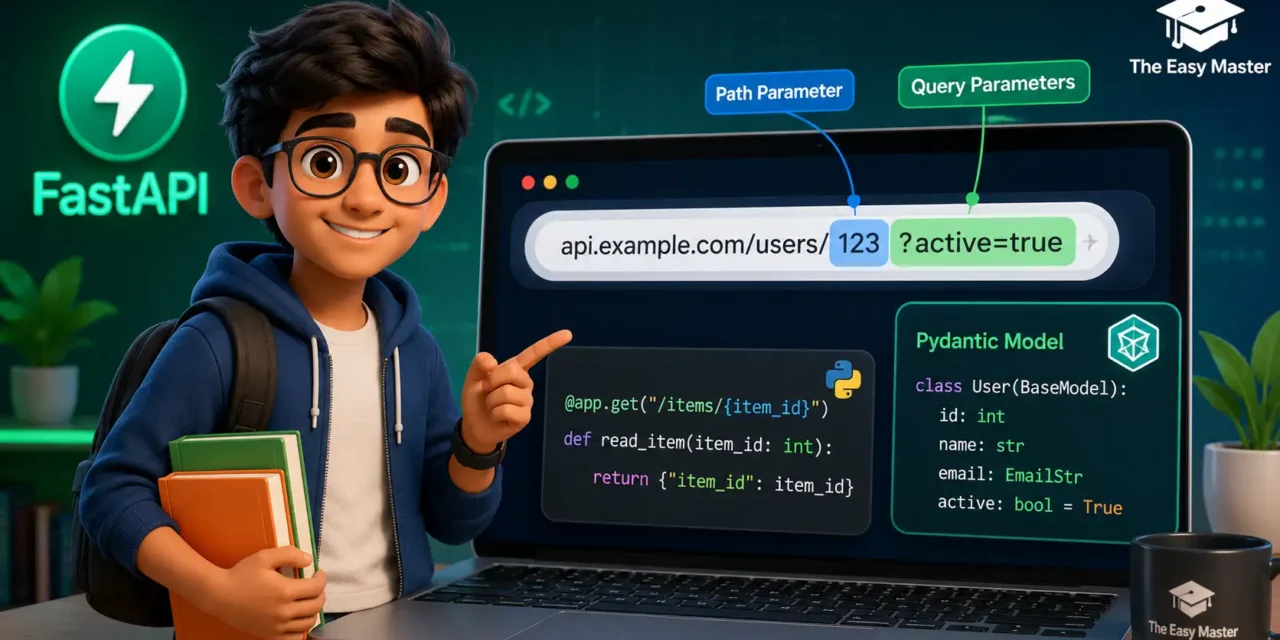
FastAPI path parameters Hindi में सबसे पहले ये समझते हैं: Path parameters वो parts होते हैं जो URL path का हिस्सा होते हैं। जैसे:
https://api.example.com/users/123यहाँ 123 एक path parameter है जो specific user की ID represent कर रहा है।
2.1 Basic Syntax
Path parameter बनाने के लिए route में curly braces {} use करते हैं:
from fastapi import FastAPI

app = FastAPI()

# Path parameter – {user_id}
@app.get("/users/{user_id}")
def get_user(user_id: str):
    return {"user_id": user_id}
अगर आप visit करें http://localhost:8000/users/rahul, तो response होगा:
{"user_id": "vipin"}2.2 Type Conversion और Validation
सबसे अच्छी बात – FastAPI automatically data type convert और validate कर देता है।
Example – Integer Path Parameter:
@app.get("/items/{item_id}")
def get_item(item_id: int):
    return {"item_id": item_id, "price": item_id * 100}
क्या होगा अगर आप abc भेजेंगे?
GET /items/abc
Response:
{
  "detail": [
    {
      "type": "int_parsing",
      "loc": ["path", "item_id"],
      "msg": "Input should be a valid integer, unable to parse string as an integer",
      "input": "abc"
    }
  ]
}
FastAPI automatically error देगा – आपको manual validation नहीं लिखनी पड़ेगी। बहुत powerful feature है।
2.3 Multiple Path Parameters
आप एक route में multiple path parameters भी use कर सकते हो:
@app.get("/users/{user_id}/orders/{order_id}")
def get_order(user_id: int, order_id: int):
    return {
        "user_id": user_id,
        "order_id": order_id,
        "message": f"User {user_id} का order {order_id}"
    }
Visit: http://localhost:8000/users/42/orders/101
Response:
{"user_id": 42, "order_id": 101, "message": "User 42 का order 101"}2.4 Path Parameters Best Practices
| Practice | क्यों? | Example |
|---|---|---|
| Meaningful names use करो | Code readable रहता है | {user_id} instead of {id} |
| Type hints देना मत भूलो | Validation automatic होती है | item_id: int |
| Special characters avoid करो | URL safe रहता है | {name} – only letters/numbers |
| Path parameters को optional मत बनाओ | Path parameter always required होता है – agar optional चाहिए तो query parameter use करो | – |
🧠 Personal Experience: मैंने एक बार path parameter को optional बनाने की कोशिश की (जैसे
/items/{item_id?}) – लेकिन FastAPI उसे allow नहीं करता। तब मुझे समझ आया कि path parameters हमेशा required होते हैं। Optional values के लिए हमेशा query parameters use करो।
3. Query Parameters – Search और Filter के Master
Query parameters URL में ? के बाद आते हैं। ये optional होते हैं और इनका use filtering, searching, pagination में होता है।
Example URL:
/items?skip=0&limit=10&category=booksयहाँ skip, limit, category query parameters हैं।
3.1 Basic Syntax
Query parameters को function arguments की तरह define करो। FastAPI automatically URL से read कर लेगा:
@app.get("/items/")
def list_items(skip: int = 0, limit: int = 10):
    # ये skip और limit query parameters से आएंगे
    return {"skip": skip, "limit": limit}
Visit: http://localhost:8000/items/?skip=5&limit=20
Response:
{"skip": 5, "limit": 20}3.2 Optional vs Required Parameters
Query parameters default value देकर optional बनाए जाते हैं:
@app.get("/search/")
def search_items(q: str = None, max_price: float = 1000.0):
return {"query": q, "max_price": max_price}qoptional है – agar URL में?q=laptopनहीं होगा तोNoneआएगाmax_priceoptional है – default 1000.0
Multiple ways to call:
/search/→{"query": null, "max_price": 1000.0}/search/?q=mobile→{"query": "mobile", "max_price": 1000.0}/search/?max_price=500→{"query": null, "max_price": 500.0}
3.3 Required Query Parameters
अगर आपको query parameter mandatory चाहिए, तो default value मत दो:
@app.get("/validate/")
def validate_user(email: str):  # कोई default नहीं
    return {"email": email}
/validate/ call करोगे तो error आएगा – FastAPI बोलेगा “email required”.
3.4 Multiple Values (List Query Parameters)
एक ही query parameter के multiple values लेने के लिए List type use करो:
from typing import List

@app.get("/filter/")
def filter_items(tags: List[str] = []):
    return {"tags": tags}
Visit: /filter/?tags=python&tags=fastapi&tags=api
Response:
{"tags": ["python", "fastapi", "api"]}3.5 Boolean Query Parameters
Booleans ke liye FastAPI true, 1, on, yes को True समझता है:
@app.get("/products/")
def get_products(is_available: bool = False):
    return {"is_available": is_available}
/products/?is_available=true → True/products/?is_available=1 → True/products/?is_available=no → False
4. Request Body – Data Send करने का सही तरीका
Request body का use POST, PUT, PATCH requests में होता है – जब आपको server पर data create या update करना हो। Body JSON format में भेजी जाती है।
4.1 Pydantic Model क्या है?
Pydantic FastAPI का heart है। आप एक class define करते हो jo batati hai ki body में कौन-कौन से fields होंगे, किस type के होंगे, और क्या optional हैं।
Example:
from pydantic import BaseModel

class Item(BaseModel):
    name: str
    price: float
    is_offer: bool = False  # default value, optional
4.2 POST Request में Body कैसे Use करें
from fastapi import FastAPI
from pydantic import BaseModel

app = FastAPI()

class BlogPost(BaseModel):
    title: str
    content: str
    author: str
    published: bool = False

@app.post("/posts/")
def create_post(post: BlogPost):  # FastAPI automatically body parse करेगा
    # post ek object hai jisme title, content, author, published hai
    return {
        "message": f"Post '{post.title}' created successfully",
        "data": post
    }
Request (POST /posts/ with JSON body):
{
  "title": "FastAPI Path Parameters Hindi",
  "content": "Is article mein hum sab kuch cover karenge...",
  "author": "TheEasyMaster",
  "published": true
}
Response:
{
  "message": "Post 'FastAPI Path Parameters Hindi' created successfully",
  "data": {
    "title": "FastAPI Path Parameters Hindi",
    "content": "Is article mein hum sab kuch cover karenge...",
    "author": "TheEasyMaster",
    "published": true
  }
}
4.3 Validation Magic
Pydantic automatically type validation करता है। Agar आप price: float के बदले string भेजोगे:
{"name": "Laptop", "price": "not a number"}FastAPI देगा:
{
  "detail": [
    {
      "loc": ["body", "price"],
      "msg": "value is not a valid float",
      "type": "type_error.float"
    }
  ]
}
4.4 Nested Models
आप models ke andar models bhi nest कर सकते हो:
from typing import List

class Address(BaseModel):
    city: str
    pin_code: int

class User(BaseModel):
    name: str
    age: int
    addresses: List[Address]  # List of Address objects

@app.post("/users/")
def create_user(user: User):
    return user
5. Path, Query और Request Body – सबको Mix करना
Real-world APIs में तीनो types के parameters एक साथ use होते हैं। FastAPI unko automatically differentiate कर लेता है:
- Path parameters – URL path में
{}से define - Query parameters – function arguments जिनकी value URL के
?से आती है - Request body – Pydantic model type के arguments
Complete Example:
from fastapi import FastAPI
from pydantic import BaseModel
from typing import Optional

app = FastAPI()

class UpdateData(BaseModel):
    title: str
    description: Optional[str] = None

@app.put("/items/{item_id}")
def update_item(
    item_id: int,                     # Path parameter
    q: Optional[str] = None,         # Query parameter
    update_data: UpdateData = None    # Request body (Pydantic model)
):
    return {
        "item_id": item_id,
        "query": q,
        "update": update_data
    }
Call this API:PUT /items/123?q=discount with JSON body:
{
  "title": "New Title",
  "description": "Updated description"
}
Response:
{
  "item_id": 123,
  "query": "discount",
  "update": {
    "title": "New Title",
    "description": "Updated description"
  }
}
💡 Rule of thumb:
- Path parameters – Resource identification (e.g.,
user_id,product_id)- Query parameters – Filtering, sorting, pagination, optional inputs
- Request body – Creating/updating complex data (POST, PUT, PATCH)
6. Practical Examples – Real API बनाएंगे
Example 1: Blog API
from fastapi import FastAPI, HTTPException
from pydantic import BaseModel
from typing import List, Optional

app = FastAPI()

# In-memory database (list of dicts)
blogs_db = []
counter = 1

class Blog(BaseModel):
    title: str
    content: str
    tags: List[str] = []

@app.post("/blogs/")
def create_blog(blog: Blog):
    global counter
    new_blog = {"id": counter, **blog.dict()}
    blogs_db.append(new_blog)
    counter += 1
    return {"message": "Blog created", "blog": new_blog}

@app.get("/blogs/")
def list_blogs(skip: int = 0, limit: int = 10, tag: Optional[str] = None):
    result = blogs_db[skip: skip+limit]
    if tag:
        result = [b for b in result if tag in b["tags"]]
    return {"total": len(blogs_db), "blogs": result}

@app.get("/blogs/{blog_id}")
def get_blog(blog_id: int):
    for blog in blogs_db:
        if blog["id"] == blog_id:
            return blog
    raise HTTPException(status_code=404, detail="Blog not found")
Example 2: E-commerce Product API
from pydantic import BaseModel
from typing import Optional, List
from fastapi import FastAPI, Query

app = FastAPI()

class Product(BaseModel):
    name: str
    price: float
    category: str
    in_stock: bool = True

products_db = []

@app.post("/products/")
def add_product(product: Product):
    product_id = len(products_db) + 1
    product_dict = product.dict()
    product_dict["id"] = product_id
    products_db.append(product_dict)
    return product_dict

@app.get("/products/")
def search_products(
    category: Optional[str] = None,
    min_price: float = Query(0, ge=0),  # ge = greater than or equal
    max_price: float = Query(1_000_000, le=1_000_000),
    in_stock_only: bool = False
):
    results = products_db
    if category:
        results = [p for p in results if p["category"].lower() == category.lower()]
    results = [p for p in results if min_price <= p["price"] <= max_price]
    if in_stock_only:
        results = [p for p in results if p["in_stock"]]
    return results
7. Common Mistakes (और उनका Solution!)
| Mistake | Why it happens? | Solution |
|---|---|---|
| Path parameter और query parameter में confusion | दोनों URL में दिखते हैं | Path = /{id}, Query = ?key=value |
| Body में default value भूल जाना | Pydantic model में = None नहीं लगाया | Optional[str] = None use करो |
List query params का सही use न करना | Multiple values capture नहीं होते | from typing import List; tags: List[str] = [] |
| Path parameters को optional बनाने की कोशिश | FastAPI allow नहीं करता | Query parameter use करो या multiple routes बनाओ |
| Type hints ignore करना | Validation miss हो जाती है | Always add type hints: item_id: int, name: str |
Body में dict use करना | Validation नहीं होती | हमेशा Pydantic model बनाओ |
Personal Mistake: मैंने एक बार
/user/{user_id}route मेंuser_id: strलिखा, लेकिन ID integer थी। FastAPI ne automatically string accept कर ली, लेकिन बाद में database query fail हुई। तब से मैं हमेशा सही type hintuser_id: intलगाता हूँ।
8. Best Practices – Professional की तरह Code लिखो
Path Parameters:
- हमेशा meaningful names (
user_id,product_slug) - Snake_case use करो (
{order_item_id}not{orderItemId}) - Enum validations use करो (limited values ke liye)
Query Parameters:
- Default values दो – API को call करना easy बनाओ
- Pagination के लिए
skipऔरlimitstandard names Query()function का use करो extra validation के लिए:pythonfrom fastapi import Query limit: int = Query(10, ge=1, le=100)
Request Body:
- Pydantic models को अलग
schemas.pyfile में रखो (large projects में) Field()use करो description और validation के लिए:pythonfrom pydantic import Field name: str = Field(…, min_length=1, max_length=50)- Models को
orm_mode = Truefor database objects
Response Models:
response_modelparameter use करो – sensitive data hide करने के लिएpython@app.post(“/users/”, response_model=UserOut) # password excluded
9. Resources – Cheat Sheet और Practice Prompts
Cheat Sheet (Copy-Paste Ready)
# 1. Path Parameter
@app.get("/items/{item_id}")
def get_item(item_id: int):
    return {"id": item_id}

# 2. Query Parameters
@app.get("/search/")
def search(q: str = None, page: int = 1):
    return {"query": q, "page": page}

# 3. Request Body
from pydantic import BaseModel
class Item(BaseModel):
    name: str
    price: float

@app.post("/items/")
def create_item(item: Item):
    return item

# 4. Mix all three
@app.put("/users/{user_id}")
def update_user(
    user_id: int,
    name: str = None,        # query param
    data: UserUpdate = None  # body
):
    pass
Practice Prompts (खुद try करो)
- Beginner: Ek API बनाओ जो path parameter
product_idले और product का name return करे (static data use करो – ek dict banake). - Intermediate: Ek blog API बनाओ जिसमें query parameters
authorऔरpublished_after(date) ho. - Advanced: Nested Pydantic model banake order API बनाओ – Order में user details + list of products (each product has name, quantity, price).
10. FAQ
Q1: Path parameter और query parameter में मुख्य अंतर क्या है?
Path parameter URL path का mandatory part होता है (/users/{id}), जबकि query parameter optional होता है और ?key=value के रूप में आता है। Path parameter resource को identify करता है, query parameter filter/sort के लिए।
Q2: क्या मैं एक ही route में multiple body parameters use कर सकता हूँ?
Nahi – FastAPI only एक body parameter allow करता है per endpoint. Agar multiple चाहिए तो एक Pydantic model बनाओ जिसमें सब fields हो।
Q3: Body में binary data (image) कैसे send करूँ?
Files के लिए File और UploadFile use करो:from fastapi import File, UploadFile@app.post("/upload/") def upload(file: UploadFile = File(...))
Q4: Query parameters में default value के तौर पर list कैसे दूँ?
tags: List[str] = Query([]) – isse empty list default होगी।
Q5: Path parameter में validation कैसे add करूँ (e.g., only positive numbers)?
from fastapi import Pathitem_id: int = Path(..., gt=0) – gt means greater than 0.
Q6: क्या FastAPI automatically query parameter को int में convert करता है?
Haan, agar type hint int दी है तो FastAPI convert करेगा। Agar convert नहीं हो सकता तो validation error देगा।
Q7: Request body में से कुछ fields optional कैसे बनाऊँ?
Pydantic model में Optional[type] = None use करो:description: Optional[str] = None
Q8: PUT और POST में body का use अलग कैसे होता है?
PUT में body complete resource update के लिए (सब fields required), POST में partial data create के लिए। FastAPI dono में same body syntax use करता है – difference business logic में है।
11. Conclusion – अब आपकी बारी!
बहुत बधाई! आपने आज सीख लिया:
✅ FastAPI path parameters Hindi में – कैसे URL में data capture करें
✅ Query parameters – filtering और pagination के लिए
✅ Request body – Pydantic models के साथ complex data create/update
✅ तीनो को एक साथ mix करना
✅ Real-world examples और common mistakes से बचने के tips
अब आप professional FastAPI APIs लिख सकते हो।
आपकी चुनौती: ऊपर दिए गए practice prompts में से कोई एक implement करो। अपना code comment में share करो – मैं personally review करूंगा।
अगला article कौन सा चाहिए?
- FastAPI Dependency Injection?
- Database Integration (SQLAlchemy + FastAPI)?
- JWT Authentication in FastAPI?
नीचे comment में बताओ!
तो देर किस बात की? अब अपना IDE खोलो और API बनाना शुरू करो। Happy Coding! 🚀
– The Easy Master Team
Resources
- FastAPI Official Documentation – Path Parameters
- FastAPI Query Parameters Guide
- Pydantic Models Documentation
- Uvicorn Server Docs
- Python Type Hints Cheat Sheet
Additional Resources
- MongoDB Setup – CRUD Operations समझे (Beginner Guide) 2026
- MongoDB Compass से GUI Database Manage करने का आसान तरीका | Beginner Tutorial 2026
- Node.js MongoDB Connection – Mongoose Setup समझे 2026
- MongoDB Data Modeling – Embedded Documents vs References 2026
- MongoDB Indexing – Query Speed बढ़ने करने का आसान तरीका
- MongoDB Aggregation Pipeline – Stages समझे | Practical Examples
- Express MongoDB CRUD – Complete REST API Example
- Mongoose ODM – Schema, Model, and Validation समझे 2026
- MongoDB Atlas – Cloud Database Free में Deploy करें 2026
- JWT Authentication MongoDB – User Login System कैसे बनाएं 2026
- Next.js App Router – Pages Router से क्या बदला? Complete Guide 2026
- Next.js Server Components – ‘use client’ कब और कहां Use करें
- Next.js Routing – Layouts, Dynamic Routes and Nested Routes 2026
- Next.js 16 New Features – Turbopack, Cache Components and proxy.ts
- Next.js Partial Prerendering – Static and Dynamic Content साथ में
- Next.js Authentication – JWT Session Management (App Router) 2026
- Next.js SEO – Metadata API and Image Optimization समझे 2026
- Next.js TypeScript – Full-Stack Type-Safe App कैसे बनाएं
- FastAPI Kya Hai? FastAPI Python Setup Aur Pehla API Hindi 2026