नमस्ते दोस्तों! 🙏
स्वागत है The Easy Master पर!
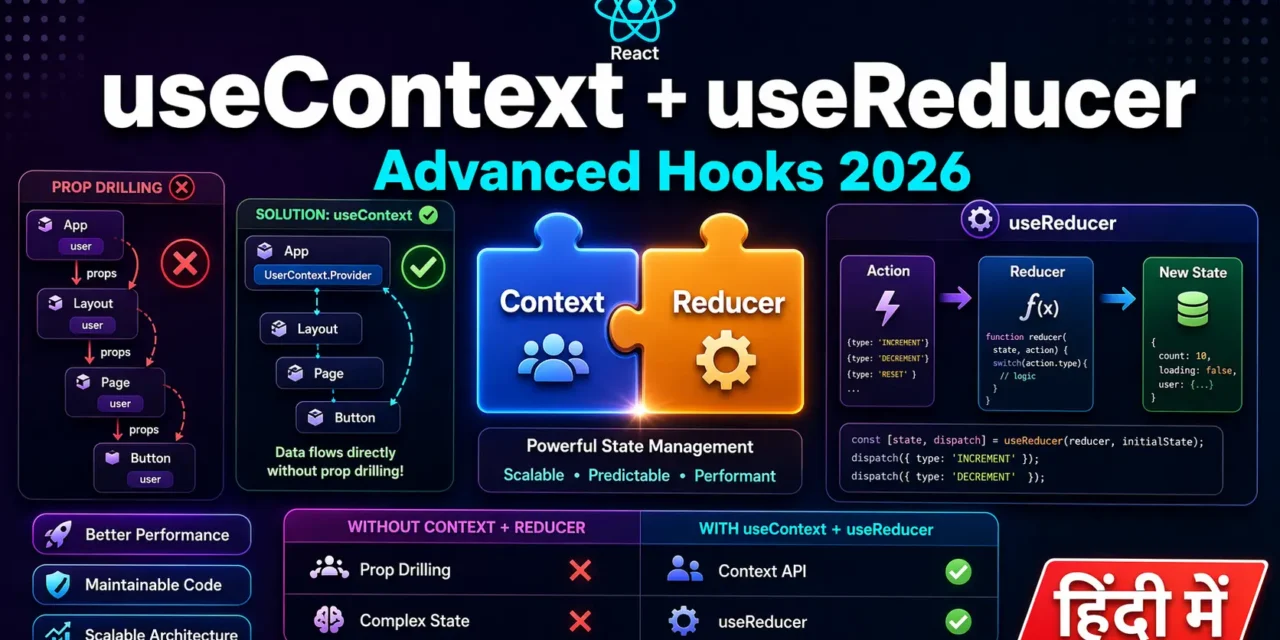
क्या तुमने कभी सोचा है – React app mein state management kaise karein jab app bada ho jaye?
Basic useState chhoti apps ke liye perfect है। लेकिन जब app बड़ा होता है – multiple components, deep nesting, complex state updates – तो useState अकेले enough nahi होता।
Advanced React Hooks useContext and useReducer Hindi में समझना बहुत जरूरी है क्योंकि:
- Prop Drilling se bachna hai –
useContextसे directly data access - Complex state logic –
useReducerse predictable updates - Redux alternative – Chhoti/mid-size apps mein Context + Reducer combo
- Interview में 100% advanced hooks questions पूछे जाते हैं
Aaj kya seekhoge?
| Hook | Kya Karta Hai? |
|---|---|
| useContext | Prop drilling के बिना global data access |
| useReducer | Complex state logic handle karna |
| Context + Reducer | Complete state management solution |
| Real Projects | Theme Switcher, Shopping Cart, Todo App |
Kya tumhe pata hai?useReducer Redux jaisa pattern follow karta hai – action और reducer function के साथ। लेकिन Redux से simple है और React mein built-in है!
तो चलिए शुरू करते हैं – React useContext and useReducer Hindi सीखने का सफर! 🚀
Table of Contents
1. Advanced React Hooks – Introduction
Advanced React Hooks useContext and useReducer Hindi mein hum 2 hooks cover karenge:
Problem Statement:
// ❌ Prop Drilling Problem – Data ko multiple levels se pass karna
function App() {
  const [user, setUser] = useState({ name: "Rahul", theme: "dark" });

  return (
    <div>
      <Header user={user} />           // Level 1
      <Main user={user} />             // Level 1
      <Footer user={user} />           // Level 1
    </div>
  );
}

function Header({ user }) {            // Level 2 – doesn't need user
  return (
    <div>
      <Logo />
      <UserMenu user={user} />         // Level 3 – actually needs user
    </div>
  );
}

function UserMenu({ user }) {          // Level 4 – finally uses user
  return <span>{user.name}</span>;
}
Solution: useContext – directly data access without passing through intermediate components!
useState vs useReducer:
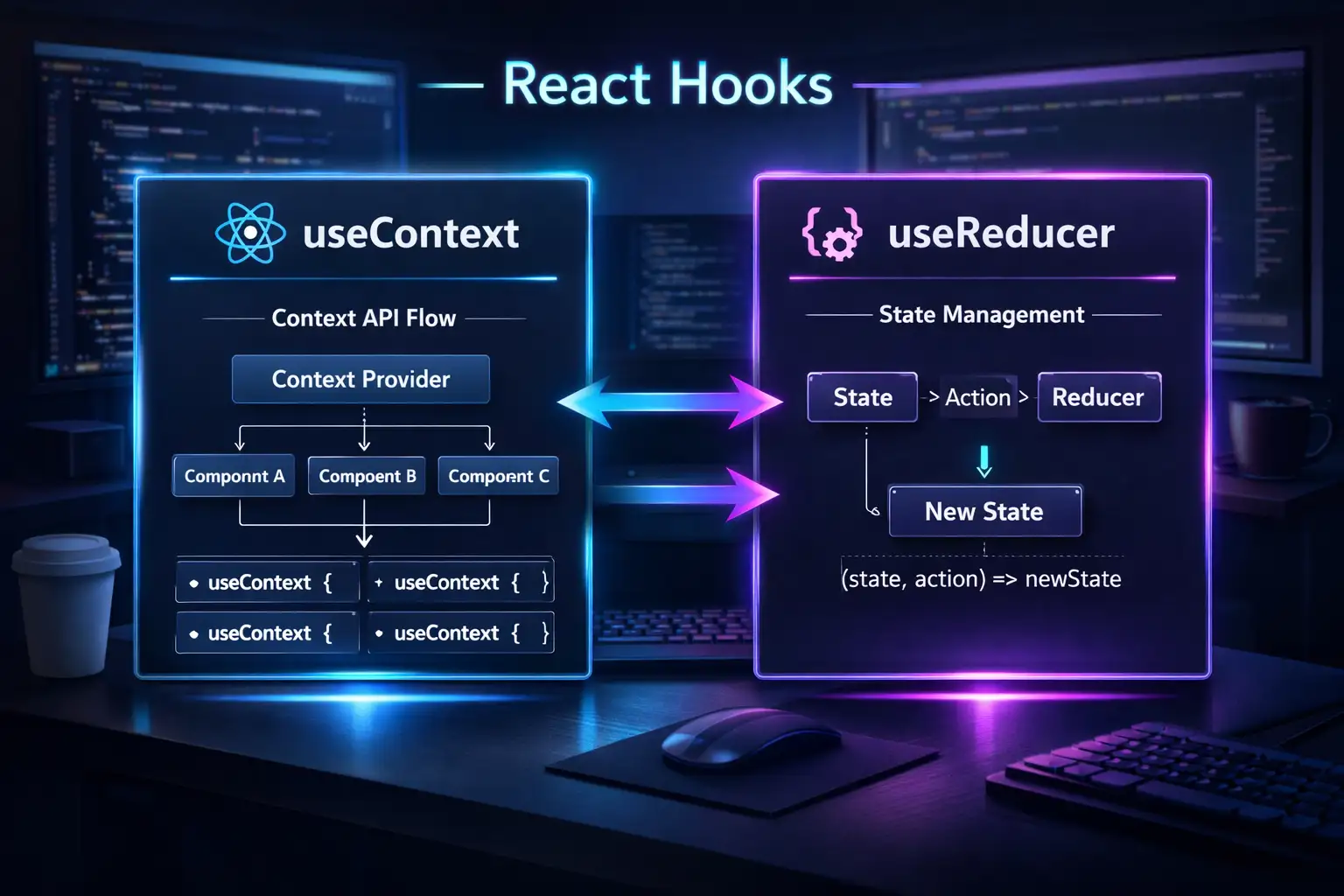
| Feature | useState | useReducer |
|---|---|---|
| Complexity | Simple state | Complex state logic |
| State type | String, number, boolean, object | Object (multiple values) |
| Update logic | Direct setter | Dispatch actions |
| Predictability | Less | More (action based) |
| Best for | 1-2 related values | Multiple related values |
2. Prop Drilling Problem – Kyun Context Chahiye?
Problem Visual:
App (has user state)
  │
  ├── Header (doesn't need user, but passes down)
  │     │
  │     └── UserMenu (needs user) ← Props passed through 2 levels!
  │
  ├── Sidebar (doesn't need user, but passes down)
  │     │
  │     └── UserAvatar (needs user) ← Props passed through 2 levels!
  │
  └── Main (doesn't need user)
Context Solution:
// ✅ With Context – Direct access!
const UserContext = createContext();

function App() {
  const [user, setUser] = useState({ name: "Rahul" });

  return (
    <UserContext.Provider value={user}>
      <Header />     {/* No props needed */}
      <Sidebar />    {/* No props needed */}
      <Main />       {/* No props needed */}
    </UserContext.Provider>
  );
}

function UserMenu() {
  const user = useContext(UserContext); // Direct access!
  return <span>{user.name}</span>;
}
3. useContext – Global State Management
useContext – React component tree mein direct data access के लिए, bina props pass kiye।
Step 1: Context Create Karna
// src/contexts/ThemeContext.jsx
import { createContext, useContext, useState } from 'react';

// 1. Create Context
const ThemeContext = createContext();

// 2. Create Provider Component
export function ThemeProvider({ children }) {
  const [theme, setTheme] = useState('light');

  const toggleTheme = () => {
    setTheme(prev => prev === 'light' ? 'dark' : 'light');
  };

  return (
    <ThemeContext.Provider value={{ theme, toggleTheme }}>
      {children}
    </ThemeContext.Provider>
  );
}

// 3. Create Custom Hook for easy access
export function useTheme() {
  const context = useContext(ThemeContext);
  if (!context) {
    throw new Error('useTheme must be used within ThemeProvider');
  }
  return context;
}
Step 2: App ko Provider se Wrap Karna
// src/main.jsx
import { ThemeProvider } from './contexts/ThemeContext';
import App from './App';

ReactDOM.createRoot(document.getElementById('root')).render(
  <ThemeProvider>
    <App />
  </ThemeProvider>
);
Step 3: Any Component Mein Context Use Karna
// src/components/Navbar.jsx
import { useTheme } from '../contexts/ThemeContext';

function Navbar() {
  const { theme, toggleTheme } = useTheme(); // Direct access!

  return (
    <nav className={`navbar ${theme}`}>
      <h1>My App</h1>
      <button onClick={toggleTheme}>
        Switch to {theme === 'light' ? 'dark' : 'light'} mode
      </button>
    </nav>
  );
}
Multiple Contexts Example:
// src/contexts/AppContexts.jsx
import { createContext, useContext, useState } from 'react';

// User Context
const UserContext = createContext();
export function useUser() {
  return useContext(UserContext);
}

// Cart Context
const CartContext = createContext();
export function useCart() {
  return useContext(CartContext);
}

// Combined Provider
export function AppProvider({ children }) {
  const [user, setUser] = useState(null);
  const [cart, setCart] = useState([]);

  return (
    <UserContext.Provider value={{ user, setUser }}>
      <CartContext.Provider value={{ cart, setCart }}>
        {children}
      </CartContext.Provider>
    </UserContext.Provider>
  );
}
4. useReducer – Complex State Logic
useReducer – complex state logic handle karne के लिए, Redux-style pattern के साथ।
useReducer ka Structure:
// Reducer function – decides how state changes
function reducer(state, action) {
  switch (action.type) {
    case 'INCREMENT':
      return { count: state.count + 1 };
    case 'DECREMENT':
      return { count: state.count - 1 };
    case 'RESET':
      return { count: 0 };
    default:
      return state;
  }
}

// Component mein useReducer
function Counter() {
  const [state, dispatch] = useReducer(reducer, { count: 0 });

  return (
    <div>
      <p>Count: {state.count}</p>
      <button onClick={() => dispatch({ type: 'INCREMENT' })}>+</button>
      <button onClick={() => dispatch({ type: 'DECREMENT' })}>-</button>
      <button onClick={() => dispatch({ type: 'RESET' })}>Reset</button>
    </div>
  );
}
Real Example: Todo App with useReducer
// src/reducers/todoReducer.js
export const todoReducer = (state, action) => {
  switch (action.type) {
    case 'ADD_TODO':
      return [...state, { id: Date.now(), text: action.payload, completed: false }];

    case 'TOGGLE_TODO':
      return state.map(todo =>
        todo.id === action.payload
          ? { ...todo, completed: !todo.completed }
          : todo
      );

    case 'DELETE_TODO':
      return state.filter(todo => todo.id !== action.payload);

    case 'UPDATE_TODO':
      return state.map(todo =>
        todo.id === action.payload.id
          ? { ...todo, text: action.payload.text }
          : todo
      );

    case 'CLEAR_COMPLETED':
      return state.filter(todo => !todo.completed);

    default:
      return state;
  }
};

// Action creators (optional – better organization)
export const addTodo = (text) => ({ type: 'ADD_TODO', payload: text });
export const toggleTodo = (id) => ({ type: 'TOGGLE_TODO', payload: id });
export const deleteTodo = (id) => ({ type: 'DELETE_TODO', payload: id });
export const updateTodo = (id, text) => ({ type: 'UPDATE_TODO', payload: { id, text } });
export const clearCompleted = () => ({ type: 'CLEAR_COMPLETED' });// src/components/TodoApp.jsx
import { useReducer, useState } from 'react';
import { todoReducer, addTodo, toggleTodo, deleteTodo, clearCompleted } from '../reducers/todoReducer';
function TodoApp() {
const [todos, dispatch] = useReducer(todoReducer, []);
const [input, setInput] = useState('');
const handleSubmit = (e) => {
e.preventDefault();
if (input.trim()) {
dispatch(addTodo(input));
setInput('');
}
};
const completedCount = todos.filter(t => t.completed).length;
const pendingCount = todos.length - completedCount;
return (
<div>
<h1>Todo App with useReducer</h1>
<form onSubmit={handleSubmit}>
<input
value={input}
onChange={(e) => setInput(e.target.value)}
placeholder="Add a task..."
/>
<button type="submit">Add</button>
</form>
<ul>
{todos.map(todo => (
<li key={todo.id}>
<input
type="checkbox"
checked={todo.completed}
onChange={() => dispatch(toggleTodo(todo.id))}
/>
<span style={{ textDecoration: todo.completed ? 'line-through' : 'none' }}>
{todo.text}
</span>
<button onClick={() => dispatch(deleteTodo(todo.id))}>❌</button>
</li>
))}
</ul>
<div>
<p>Pending: {pendingCount} | Completed: {completedCount}</p>
{completedCount > 0 && (
<button onClick={() => dispatch(clearCompleted())}>
Clear Completed
</button>
)}
</div>
</div>
);
}Complex State Example: Shopping Cart
// src/reducers/cartReducer.js
export const cartReducer = (state, action) => {
  switch (action.type) {
    case 'ADD_TO_CART': {
      const existingItem = state.items.find(item => item.id === action.payload.id);

      if (existingItem) {
        return {
          ...state,
          items: state.items.map(item =>
            item.id === action.payload.id
              ? { ...item, quantity: item.quantity + 1 }
              : item
          )
        };
      }

      return {
        ...state,
        items: [...state.items, { ...action.payload, quantity: 1 }]
      };
    }

    case 'REMOVE_FROM_CART':
      return {
        ...state,
        items: state.items.filter(item => item.id !== action.payload)
      };

    case 'UPDATE_QUANTITY':
      if (action.payload.quantity === 0) {
        return {
          ...state,
          items: state.items.filter(item => item.id !== action.payload.id)
        };
      }

      return {
        ...state,
        items: state.items.map(item =>
          item.id === action.payload.id
            ? { ...item, quantity: action.payload.quantity }
            : item
        )
      };

    case 'CLEAR_CART':
      return { ...state, items: [] };

    case 'APPLY_DISCOUNT':
      return {
        ...state,
        discount: action.payload,
        total: calculateTotal(state.items, action.payload)
      };

    default:
      return state;
  }
};

function calculateTotal(items, discount = 0) {
  const subtotal = items.reduce((sum, item) => sum + (item.price * item.quantity), 0);
  return subtotal - (subtotal * discount / 100);
}
5. Context + useReducer – Complete Solution
Context + useReducer combo Redux का lightweight alternative है – bina external library ke!
Complete State Management Setup:
// src/contexts/AppContext.jsx
import { createContext, useContext, useReducer } from 'react';

// 1. Initial State
const initialState = {
  user: null,
  cart: [],
  theme: 'light',
  notifications: []
};

// 2. Reducer
function appReducer(state, action) {
  switch (action.type) {
    case 'LOGIN':
      return { ...state, user: action.payload };

    case 'LOGOUT':
      return { ...state, user: null, cart: [] };

    case 'ADD_TO_CART':
      return { ...state, cart: [...state.cart, action.payload] };

    case 'REMOVE_FROM_CART':
      return { ...state, cart: state.cart.filter(item => item.id !== action.payload) };

    case 'TOGGLE_THEME':
      return { ...state, theme: state.theme === 'light' ? 'dark' : 'light' };

    case 'ADD_NOTIFICATION':
      return { ...state, notifications: [...state.notifications, action.payload] };

    case 'CLEAR_NOTIFICATIONS':
      return { ...state, notifications: [] };

    default:
      return state;
  }
}

// 3. Create Context
const AppContext = createContext();

// 4. Provider Component
export function AppProvider({ children }) {
  const [state, dispatch] = useReducer(appReducer, initialState);

  return (
    <AppContext.Provider value={{ state, dispatch }}>
      {children}
    </AppContext.Provider>
  );
}

// 5. Custom Hook
export function useApp() {
  const context = useContext(AppContext);
  if (!context) {
    throw new Error('useApp must be used within AppProvider');
  }
  return context;
}

// 6. Action Creators (optional but recommended)
export const actions = {
  login: (user) => ({ type: 'LOGIN', payload: user }),
  logout: () => ({ type: 'LOGOUT' }),
  addToCart: (item) => ({ type: 'ADD_TO_CART', payload: item }),
  removeFromCart: (id) => ({ type: 'REMOVE_FROM_CART', payload: id }),
  toggleTheme: () => ({ type: 'TOGGLE_THEME' }),
  addNotification: (msg) => ({ type: 'ADD_NOTIFICATION', payload: msg }),
  clearNotifications: () => ({ type: 'CLEAR_NOTIFICATIONS' })
};
Using the Context + Reducer:
// src/App.jsx
import { AppProvider, useApp, actions } from './contexts/AppContext';

// Component that uses global state
function Navbar() {
  const { state, dispatch } = useApp();

  return (
    <nav>
      <span>Theme: {state.theme}</span>
      <button onClick={() => dispatch(actions.toggleTheme())}>
        Toggle Theme
      </button>
      {state.user ? (
        <span>Welcome, {state.user.name}</span>
      ) : (
        <button onClick={() => dispatch(actions.login({ name: 'Rahul' }))}>
          Login
        </button>
      )}
    </nav>
  );
}

function ShoppingCart() {
  const { state, dispatch } = useApp();

  return (
    <div>
      <h3>Cart ({state.cart.length} items)</h3>
      {state.cart.map(item => (
        <div key={item.id}>
          {item.name} - ${item.price}
          <button onClick={() => dispatch(actions.removeFromCart(item.id))}>
            Remove
          </button>
        </div>
      ))}
    </div>
  );
}

// Main App
function App() {
  return (
    <AppProvider>
      <div className="app">
        <Navbar />
        <ShoppingCart />
      </div>
    </AppProvider>
  );
}
6. Real-world Project Examples
Project 1: Shopping Cart with Context + Reducer
// src/contexts/CartContext.jsx
import { createContext, useContext, useReducer } from 'react';

const CartContext = createContext();

const cartReducer = (state, action) => {
  switch (action.type) {
    case 'ADD_ITEM': {
      const existing = state.items.find(item => item.id === action.payload.id);
      if (existing) {
        return {
          ...state,
          items: state.items.map(item =>
            item.id === action.payload.id
              ? { ...item, quantity: item.quantity + 1 }
              : item
          )
        };
      }
      return {
        ...state,
        items: [...state.items, { ...action.payload, quantity: 1 }]
      };
    }

    case 'REMOVE_ITEM':
      return {
        ...state,
        items: state.items.filter(item => item.id !== action.payload)
      };

    case 'UPDATE_QUANTITY':
      return {
        ...state,
        items: state.items.map(item =>
          item.id === action.payload.id
            ? { ...item, quantity: action.payload.quantity }
            : item
        )
      };

    case 'CLEAR_CART':
      return { ...state, items: [] };

    default:
      return state;
  }
};

export function CartProvider({ children }) {
  const [state, dispatch] = useReducer(cartReducer, { items: [] });

  const addItem = (item) => dispatch({ type: 'ADD_ITEM', payload: item });
  const removeItem = (id) => dispatch({ type: 'REMOVE_ITEM', payload: id });
  const updateQuantity = (id, quantity) => dispatch({ type: 'UPDATE_QUANTITY', payload: { id, quantity } });
  const clearCart = () => dispatch({ type: 'CLEAR_CART' });

  const totalItems = state.items.reduce((sum, item) => sum + item.quantity, 0);
  const totalPrice = state.items.reduce((sum, item) => sum + (item.price * item.quantity), 0);

  return (
    <CartContext.Provider value={{
      cart: state.items,
      addItem,
      removeItem,
      updateQuantity,
      clearCart,
      totalItems,
      totalPrice
    }}>
      {children}
    </CartContext.Provider>
  );
}

export function useCart() {
  const context = useContext(CartContext);
  if (!context) throw new Error('useCart must be used within CartProvider');
  return context;
}// src/components/ProductCard.jsx
import { useCart } from '../contexts/CartContext';
function ProductCard({ product }) {
const { addItem } = useCart();
return (
<div className="product-card">
<h3>{product.name}</h3>
<p>₹{product.price}</p>
<button onClick={() => addItem(product)}>
Add to Cart
</button>
</div>
);
}
// src/components/Cart.jsx
import { useCart } from '../contexts/CartContext';
function Cart() {
const { cart, removeItem, updateQuantity, totalItems, totalPrice } = useCart();
if (cart.length === 0) {
return <p>Your cart is empty</p>;
}
return (
<div className="cart">
<h2>Your Cart ({totalItems} items)</h2>
{cart.map(item => (
<div key={item.id} className="cart-item">
<span>{item.name}</span>
<div>
<button onClick={() => updateQuantity(item.id, item.quantity - 1)}>-</button>
<span>{item.quantity}</span>
<button onClick={() => updateQuantity(item.id, item.quantity + 1)}>+</button>
</div>
<span>₹{item.price * item.quantity}</span>
<button onClick={() => removeItem(item.id)}>Remove</button>
</div>
))}
<h3>Total: ₹{totalPrice}</h3>
</div>
);
}Project 2: Authentication System
// src/contexts/AuthContext.jsx
import { createContext, useContext, useReducer, useEffect } from 'react';

const AuthContext = createContext();

const authReducer = (state, action) => {
  switch (action.type) {
    case 'LOGIN_START':
      return { ...state, loading: true, error: null };

    case 'LOGIN_SUCCESS':
      return {
        ...state,
        user: action.payload,
        isAuthenticated: true,
        loading: false,
        error: null
      };

    case 'LOGIN_FAILURE':
      return {
        ...state,
        user: null,
        isAuthenticated: false,
        loading: false,
        error: action.payload
      };

    case 'LOGOUT':
      return {
        ...state,
        user: null,
        isAuthenticated: false,
        loading: false,
        error: null
      };

    case 'UPDATE_USER':
      return { ...state, user: { ...state.user, ...action.payload } };

    default:
      return state;
  }
};

export function AuthProvider({ children }) {
  const [state, dispatch] = useReducer(authReducer, {
    user: null,
    isAuthenticated: false,
    loading: false,
    error: null
  });

  // Check for existing token on mount
  useEffect(() => {
    const token = localStorage.getItem('token');
    const user = localStorage.getItem('user');

    if (token && user) {
      dispatch({ type: 'LOGIN_SUCCESS', payload: JSON.parse(user) });
    }
  }, []);

  const login = async (email, password) => {
    dispatch({ type: 'LOGIN_START' });

    try {
      const response = await fetch('/api/login', {
        method: 'POST',
        headers: { 'Content-Type': 'application/json' },
        body: JSON.stringify({ email, password })
      });

      if (!response.ok) throw new Error('Login failed');

      const data = await response.json();

      localStorage.setItem('token', data.token);
      localStorage.setItem('user', JSON.stringify(data.user));

      dispatch({ type: 'LOGIN_SUCCESS', payload: data.user });
    } catch (error) {
      dispatch({ type: 'LOGIN_FAILURE', payload: error.message });
    }
  };

  const logout = () => {
    localStorage.removeItem('token');
    localStorage.removeItem('user');
    dispatch({ type: 'LOGOUT' });
  };

  return (
    <AuthContext.Provider value={{ ...state, login, logout }}>
      {children}
    </AuthContext.Provider>
  );
}

export function useAuth() {
  const context = useContext(AuthContext);
  if (!context) throw new Error('useAuth must be used within AuthProvider');
  return context;
}
7. Context vs Redux vs useState – Comparison
| Feature | useState | useReducer + Context | Redux |
|---|---|---|---|
| Complexity | Low | Medium | High |
| Boilerplate | Minimal | Moderate | High |
| Learning curve | Easy | Medium | Steep |
| Global state | ❌ Local only | ✅ Yes | ✅ Yes |
| DevTools | Basic | Basic | Powerful |
| Middleware | ❌ No | ❌ No | ✅ Yes |
| Performance | Good | Good (with memo) | Great |
| Bundle size | 0 (built-in) | 0 (built-in) | ~10KB |
| Best for | Simple components | Mid-size apps | Large apps |
When to Use What:
// 1. useState – Local component state
function ToggleButton() {
  const [isOpen, setIsOpen] = useState(false);
  return <button onClick={() => setIsOpen(!isOpen)}>{isOpen ? 'Close' : 'Open'}</button>;
}

// 2. useContext – Theme, Language, Auth (read-only global)
function ThemeToggle() {
  const { theme, setTheme } = useContext(ThemeContext);
  return <button onClick={() => setTheme(theme === 'light' ? 'dark' : 'light')}>Toggle</button>;
}

// 3. useReducer – Complex state logic (shopping cart, form state)
function ShoppingCart() {
  const [cart, dispatch] = useReducer(cartReducer, []);
  // ... dispatch actions
}

// 4. Context + Reducer – Complete global state management
function App() {
  return (
    <AppProvider>  {/* Context + Reducer inside */}
      <Dashboard />
    </AppProvider>
  );
}
8. Common Mistakes + Solutions
Mistake 1: Context Provider missing
// ❌ Error: useTheme must be used within ThemeProvider
function Navbar() {
  const { theme } = useTheme(); // Error!
}

// ✅ Solution – Wrap with Provider
<ThemeProvider>
  <Navbar />
</ThemeProvider>
Mistake 2: Direct object mutation in reducer
// ❌ Wrong – mutating state directly
function reducer(state, action) {
  state.count++; // ❌ NO!
  return state;
}

// ✅ Correct – return new object
function reducer(state, action) {
  return { ...state, count: state.count + 1 };
}
Mistake 3: Creating new context for every value
// ❌ Too many contexts
<UserContext>
  <ThemeContext>
    <CartContext>
      <LanguageContext>
        <App />
      </LanguageContext>
    </CartContext>
  </ThemeContext>
</UserContext>

// ✅ Better – combine related values
<AppContext>
  <App />
</AppContext>
Mistake 4: Using context for everything
// ❌ Overkill – simple state should stay local
function Button() {
  const { buttonColor } = useContext(AppContext); // Too much!
  return <button style={{ color: buttonColor }}>Click</button>;
}

// ✅ Better – local state for simple things
function Button() {
  const [isHovered, setIsHovered] = useState(false);
  return <button>Click</button>;
}
9. Quick Cheat Sheet
| Concept | Syntax | Purpose |
|---|---|---|
| createContext | const Ctx = createContext() | Create context |
| Provider | <Ctx.Provider value={val}> | Provide value |
| useContext | const val = useContext(Ctx) | Consume value |
| useReducer | const [state, dispatch] = useReducer(reducer, init) | Complex state |
| Reducer function | (state, action) => newState | State update logic |
| Dispatch | dispatch({ type: 'ACTION', payload }) | Send action |
| Custom Hook | function useApp() { return useContext(AppContext) } | Encapsulate context |
10. FAQ
Q1: React useContext useReducer Hindi में सबसे important concept kya hai?
Context prop drilling solve karta hai, Reducer complex state logic handle karta hai – dono milke Redux alternative बनते हैं।
Q2: useContext vs props – kab kya use karein?
Props – for direct parent-child communication (1-2 levels)। Context – for deep nesting (3+ levels) ya global data (theme, auth)।
Q3: useReducer vs useState – kab kya use karein?
useState – simple state (counter, toggle, input)। useReducer – complex state with multiple sub-values or related transitions (cart, form)।
Q4: Kya Context performance issue create karta hai?
Haan – context change hone par सभी consumers re-render होते हैं। Solution – multiple contexts या useMemo।
Q5: Context + useReducer Redux ki jagah use kar sakte hain?
Mid-size apps के लिए हाँ। Large apps, complex middleware (logging, async), ya time-travel debugging चाहिए तो Redux better है।
Q6: Custom hook kyun banayein context ke liye?
Cleaner code, better error handling (check if provider exists), और IDE autocomplete।
Q7: Reducer mein async operations kaise handle karein?
Reducer sync होता है। Async operations component में करो, phir dispatch करो: fetch().then(data => dispatch({ type: 'SUCCESS', payload: data }))
Q8: Multiple contexts kaise combine karein?
Wrap them: <UserProvider><ThemeProvider><CartProvider><App /></CartProvider></ThemeProvider></UserProvider>
Q9: Kya context value memoize karna chahiye?
Haan – useMemo use करो infinite re-renders से बचने के लिए: <Provider value={useMemo(() => ({ user, setUser }), [user])}>
Q10: TypeScript ke saath context kaise use karein?
Create context with type: createContext<UserContextType | null>(null) और custom hook में type guard।
11. Conclusion
बहुत बढ़िया दोस्तों! आज हमने Advanced React Hooks useContext and useReducer Hindi को पूरी detail में समझा।
Quick Recap:
| Hook | Key Takeaway |
|---|---|
| useContext | Prop drilling solution – global data access |
| useReducer | Complex state logic – action based updates |
| Context + Reducer | Complete state management – Redux alternative |
Mera personal experience:
जब मैंने पहली बार Context + Reducer combo सीखा, तो मुझे Redux की complexity nahi jhelni padi। Chhoti projects के लिए ये perfect है। बड़े projects में भी Redux migrate करना easy रहता है क्योंकि pattern similar है।
Tum bhi ye projects zaroor karo:
- ✅ Theme Switcher (Context only)
- ✅ Todo App (useReducer only)
- ✅ Shopping Cart (Context + Reducer)
- ✅ Auth System (Context + Reducer + API)
अब तुम्हारी बारी है!
नीचे comment में बताओ:
- तुम्हें useContext easy laga ya useReducer?
- क्या तुम Redux use karoge ya Context + Reducer combo?
- अगला topic क्या चाहिए? (Custom Hooks? Performance Optimization? React 19 Features?)
The Easy Master पर बने रहो। Happy Coding! ⚛️🚀
Resources
- React Official Docs – useContext
- React Official Docs – useReducer
- React Context vs Redux – Guide
- useReducer Pattern – useReducer + useContext
Additional Resources
- Master ES6: A Complete Feature Guide with Examples
- Top 10 React Libraries and Tools Every Developer Must Know in 2025
- Top 10 Free APIs for Practice in 2026
- JavaScript Deep Dive 2026: Closures, Promises & Event Loop
- TypeScript Modules Export Import Best Practices – समझे आसान भाषा में 2026
- React.js Kya Hai? JSX aur Components Samjhe – Beginner Guide 2026
- React Props and State Data Flow Hindi – समझे आसान भाषा में 2026
- React Router v6 – Multi-Page App Banaye (Routing Guide) 2026