नमस्ते दोस्तों!
स्वागत है The Easy Master पर!
आपने FastAPI, Docker, Kubernetes, system design – sab kuch seekh liya। Ab ek important topic – Security. Kyunki aap kitna bhi powerful app bana lo, agar security weak hai toh sab bekar hai।
Lekin security mein ek बड़ी problem hoti hai: traditionally security ko development cycle के end mein add kiya जाता है। Code complete, deployment ready – tab security team आती है vulnerabilities ढूंढने। Result? Deadline miss, scope creep, security team aur developers ke beech tension।
Maine bhi ye experience kiya hai। Ek project launch से 2 din pehle security team ne critical vulnerabilities find ki। 3 din mein fix करना पड़ा – sleepless nights, unhappy team, delayed release।
Tab maine Shift Left Security seekha – security को development cycle के start (left) mein move करना। Phir security issues early detect हुए, fixes cheap rahe, aur tension kam hui।
इस Shift Left security in Hindi article mein main aapko sikhata hoon:
✅ Shift Left Security kya hai – concept, SDLC mein integration
✅ Kyun zaroori hai – costs, collaboration, speed
✅ Security SDLC (SSDLC) – secure software development lifecycle
✅ Shift Left ke pillars – Secure by Design, CI/CD Automation, Collaboration
✅ Key testing techniques – SAST, DAST, SCA, IAST, RASP
✅ DevSecOps tools – GitHub Actions, Semgrep, Trivy, Snyk
✅ Hands-on practice – CI pipeline security automation
✅ Common mistakes aur unka solution
Chaliye security ko left shift karte hain aur proactive banate hain! 🛡️🚀
Table of Contents
1. Shift Left Security Kya Hai? – Simple Definition
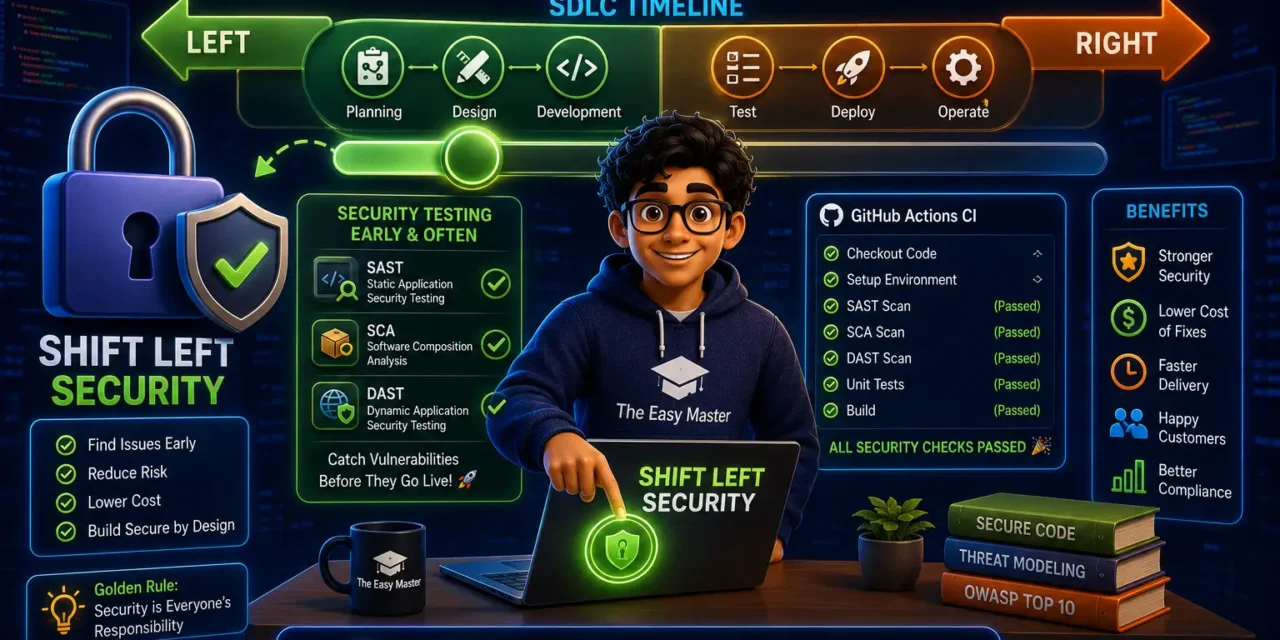
Shift Left Security security practices को software development lifecycle (SDLC) ke earliest stages mein integrate करने का approach है – “left” side of the SDLC timeline, जहाँ development होता है, “right” side par production hota है ।
Term kahan se aaya?
SDLC timeline visualize करो: Planning → Design → Development → Testing → Deployment → Operations
- Left side: Planning, Design, Development (early stages)
- Right side: Testing, Deployment, Operations (late stages)
Traditionally, security sirf “right side” mein (testing/deployment phase) add kiya जाता था – security team last moment mein vulnerabilities ढूंढती थी, fixes expensive the। Shift left ka matlab hai in security practices को left side – planning, design, development – mein move करना ।
Simple example:
| Traditional (Right Shift) | Shift Left Security |
|---|---|
| Code complete → security testing → vulnerabilities find → delay → expensive fix | Planning mein security requirements, design mein threat modeling, coding mein SAST – vulnerabilities early detect → cheap fix, no delay |
Shift Left Security एक philosophy है – security ek final checkpoint nahi hai, balki continuous process hai software development के हर phase mein ।
2. Traditional Security vs Shift Left Security – Difference
| Aspect | Traditional (Right Shift) | Shift Left Security |
|---|---|---|
| Timing | End of SDLC (testing/deployment phase) | Throughout SDLC (planning to operations) |
| Who owns security | Dedicated security team | Shared responsibility (developers + security + ops) |
| When vulnerabilities found | Late – after code complete | Early – during coding, even during design |
| Fix cost | High – 30-50× more expensive (post-release fixes cost 30–50× more than design-phase fixes) | Low – caught early |
| Release speed | Delayed by last-minute security issues | Smooth, predictable |
| Team friction | High – security team seen as blocker | Low – collaboration |
Traditional approach mein security team को development के बाद bolt-on करना पड़ता था – like building inspector skyscraper complete hone ke baad aake foundation flaws point out kare । Shift left approach mein security “baked in” होती है, “bolted on” nahi।
3. Shift Left Security क्यों ज़रूरी है? – Benefits
3.1 Cost Savings – The Most Important Reason
Research shows ki post-release security fixes cost 30–50× more than catching the same issue during the design phase。
Why?
- Production mein issue fix करने के लिए: emergency deployment, regression testing, possible downtime
- Design phase mein issue fix: just update document or rethink approach
3.2 Faster Time-to-Market
Security issues late stage mein find होते हैं तो releases delay होती हैं, rework hota है। Shift left ensures ki security surprises last minute mein nahi aati – automated security checks continuous chalti hain, manual bottlenecks remove होते हैं।
3.3 Enhanced Collaboration (No More Silos)
Traditional model mein security team vs developers ki “us vs them” mentality hoti थी。Shift left mein shared responsibility होती है – security team provides guidelines aur tools, developers actively contribute to security।
Shift Left Security “integrates security practices and considerations earlier in the SDLC” – security concerns integrated into development process, not bolted on at the end।
3.4 Improved Developer Awareness
Developers secure coding practices सीखते हैं – OWASP Top 10, input validation, authentication, proper error handling। Har developer security champion बनता है।
3.5 Reduced Risk of Breaches
Early detection means vulnerabilities production mein nahi पहुंचती। Supply chain attacks, zero-days, misconfigurations – sab early capture होते हैं।
3.6 Compliance and Regulatory Requirements
GDPR, HIPAA, PCI DSS – security and compliance requirements SDLC में early integrated होती हैं, last minute scramble avoid होता है。
4. Secure Software Development Lifecycle (SSDLC) – 7 Phases
Shift Left Security को implement करने के लिए Secure SDLC (SSDLC) framework use karte hain。Traditional SDLC security-specific activities add karo:
Phase 1: Planning & Requirements
- Security requirements define करो: authentication, authorization, data encryption, audit logging, regulatory compliance (GDPR, HIPAA, PCI DSS)
- Risk assessment – data sensitivity के according classification
- Security stories – backlog mein security-related user stories add करो
Phase 2: Design
- Threat modeling – STRIDE, PASTA, Attack Trees – anticipate potential threats
- Secure design principles – least privilege, defense in depth, zero trust architecture
- Architecture review – security patterns and anti-patterns identify
Phase 3: Development (Coding)
- Secure coding standards – OWASP ASVS (Application Security Verification Standard)
- Static Application Security Testing (SAST) – source code scanning while you code
- Pre-commit hooks – secrets detection (hardcoded API keys, passwords)
- Peer code reviews – with security checklist
Phase 4: Build & CI
- CI pipeline security checks – SAST, SCA, secrets scanning, container scanning
- Software Bill of Materials (SBOM) generation – track dependencies
- Dependency vulnerability scanning – check for known CVEs in third-party libraries
Phase 5: Testing (QA)
- Dynamic Application Security Testing (DAST) – running application attacks
- Penetration testing – ethical hacking
- Fuzz testing – invalid/unexpected inputs
Phase 6: Deployment
- Security gates – failed security checks block deployment
- Infrastructure as Code (IaC) scanning – Terraform, CloudFormation, Kubernetes manifests misconfigurations prevent
- Container image scanning – docker images scan before push
Phase 7: Operations & Monitoring
- Runtime Application Self-Protection (RASP) – real-time threat detection
- SIEM (Security Information Event Management) – log analysis
- Vulnerability management – ongoing monitoring and patching
5. Shift Left ke 4 Pillars – Strategy Breakdown
Effective Shift Left Security implementation के 4 pillars होते हैं:
Pillar 1: Secure by Design
Security end mein nahी जोड़ते, beginning mein design करते हैं। Before writing any code, think like an attacker:
- Threat modeling – “What could go wrong?”
- Attack surface reduction – unnecessary services disable, minimal privileges
- Default secure – secure defaults over convenient defaults
- Security requirements – define acceptance criteria with security
Pillar 2: Continuous Code Analysis
Automated security checks continuously as code is written:
- SAST (Static Analysis) – semantic grep for vulnerability patterns
- SCA (Software Composition Analysis) – dependency vulnerabilities
- Secrets scanning – hardcoded keys, passwords, tokens detection
- IaC scanning – Terraform/Kubernetes configs misconfigurations
Pillar 3: Infrastructure as Code Security
Cloud infrastructure misconfigurations major cause of breaches (like publicly exposed S3 buckets, open security groups)। Detect these before apply:
- Terraform plan scanning – before apply, check if any resource would be misconfigured
- Kubernetes admission controllers – enforce security policies
- Policy as Code – Open Policy Agent (OPA) – declarative policies for infrastructure
Pillar 4: Shift Right ≠ Abandon Left
Shift left का मतलब ye nahi ki right side security abandon कर दो। Production monitoring bhi important hai:
- RASP (Runtime Application Self-Protection) – detect attacks in real-time
- WAF (Web Application Firewall) – protect from common exploits
- SIEM – security log aggregation and analysis
- Vulnerability disclosure programs – responsible disclosure
6. Key Security Testing Techniques – SAST, DAST, SCA, IAST, RASP
| Technique | Full form | When | What it does | Example tools |
|---|---|---|---|---|
| SAST | Static Application Security Testing | Development phase | Source code scans for SQL injection, XSS, hardcoded credentials | Semgrep, SonarQube, Checkmarx |
| DAST | Dynamic Application Security Testing | Testing phase | Running application attacks, simulates real-world attacks | OWASP ZAP, Burp Suite, Acunetix |
| SCA | Software Composition Analysis | Build phase | Third-party libraries (npm, pip, Maven) scan for known vulnerabilities | Snyk, Trivy, OWASP Dependency-Check |
| IAST | Interactive Application Security Testing | Testing phase | SAST + DAST combination, analyzes code during tests | Contrast Security, Seeker |
| RASP | Runtime Application Self-Protection | Production | Real-time attack detection and blocking | Waratek, Sqreen |
Which to use?
- SAST and SCA minimal starting point (covers code + dependencies)
- DAST staging environment – dynamic testing required
- RASP for production protection
7. Shift Left Security Tools – GitHub Actions, Semgrep, Trivy, Snyk
7.1 SAST – Semgrep
Semgrep rule-based SAST tool, custom rules likh sakte ho। Pre-commit hook लगा सकते हो ki commit message से पहले scan。
# Semgrep install
pip install semgrep

# Run scan
semgrep scan --config p/owasp-top-10 --config p/security-audit .
7.2 Secrets Detection – Gitleaks
Gitleaks scans code for hardcoded credentials, API keys, tokens, passwords। Pre-commit hook use karo “block on secret” and never let secrets enter git history。
# Gitleaks install
brew install gitleaks

# Scan repo
gitleaks detect --source .
7.3 SCA – Trivy + Snyk
Trivy – Docker images, filesystems, Git repos vulnerabilities scanner。
Snyk – developer-first SCA tool, IDE plugins for real-time vulnerability feedback।
GitHub Actions SCA scanning:
- name: Run Trivy vulnerability scanner
  uses: aquasecurity/trivy-action@master
  with:
    scan-type: 'fs'
    scan-ref: '.'
    format: 'sarif'
    exit-code: '1'
    ignore-unfixed: true
    severity: 'CRITICAL,HIGH'
7.4 DAST – OWASP ZAP
ZAP Proxy staging environment automated scan – spider crawls and active scans。
7.5 CI Pipeline Security Blocks
GitHub Action example – security checks mandatory before PR merge:
name: Security Checks

on: [pull_request]

jobs:
  security:
    runs-on: ubuntu-latest
    steps:
      - uses: actions/checkout@v4
      - name: Gitleaks Check
        uses: gitleaks/gitleaks-action@v2
      - name: Trivy FS Scan
        uses: aquasecurity/trivy-action@master
        with:
          scan-type: 'fs'
          scan-ref: '.'
          exit-code: '1'
          severity: 'CRITICAL,HIGH'
8. Hands-On – Security ko CI Pipeline Mein Kaise Add Karein
Let me show you how to add security checks to GitHub Actions CI:
Step 1: Create .github/workflows/security.yml
name: Shift Left Security Checks

on:
  pull_request:
    branches: [ main ]
  push:
    branches: [ main ]

jobs:
  scan:
    runs-on: ubuntu-latest
    steps:
      - name: Checkout code
        uses: actions/checkout@v4

      - name: Run Trivy (SAST + SCA)
        uses: aquasecurity/trivy-action@master
        with:
          scan-type: 'fs'
          scan-ref: '.'
          format: 'table'
          exit-code: '1'
          severity: 'CRITICAL,HIGH'

      - name: Run Gitleaks (Secrets Detection)
        uses: gitleaks/gitleaks-action@v2
        env:
          GITHUB_TOKEN: ${{ secrets.GITHUB_TOKEN }}

      - name: Run Semgrep (Custom Rules)
        run: |
          pip install semgrep
          semgrep scan --config p/owasp-top-10 --error .
Step 2: Configure Branch Protection
GitHub repo settings → Branches → add branch protection rule:
- Require status checks to pass before merging
- Require “security-checks” to pass
- Require pull request reviews
Step 3: Test
Commit intentionally vulnerable code or hardcoded secret → CI pipeline block the PR。
9. Shift Left Security Best Practices (2026)
Here are the top practices from recent sources:
9.1 Foundation Practices (Start Here)
9.2 Context-Dependent Practices
9.3 People, Process, Culture
- Break down silos – Developers, operations, security – shared ownership
- Secure SDLC framework – standardize security activities
- Automation culture – manual security reviews slow, automate everything possible
- Learn from failures safely – blameless post-mortems, learning
10. Common Challenges (aur Unka Solution!)
11. Real-World Examples – Shift Left in Action
Example 1: GitHub’s CodeQL SAST
GitHub CodeQL merges PR automatically scans for vulnerabilities, alerts in pull request। Critical issues block merge, low severity just informative。Scan time <5 min per PR。
Example 2: Google’s gVisor + Bazel
Google internally SAST/SCA automated, engineer code 작성 시 feedback। Secrets detection pre-commit prevents credential leaks。
Example 3: Startup Example – E-commerce
Startup implement:
- Pre-commit secrets detection – Gitleaks – never commit AWS keys
- PR SAST checks – Semgrep + GitHub Actions – block SQL injection, XSS
- Weekly SCA scans – Trivy – dependency CVEs, fix within 7 days
- IaC scanning – Checkov for Terraform – exposed RDS prevent
Result: 90% reduction in post-launch critical vulnerabilities。
12. Resources – Cheat Sheet & Practice Prompts
📋 Shift Left Security Checklist
Phase 1: Planning:
- Security requirements defined
- Risk assessment done
Phase 2: Design:
- Threat modeling performed
- Secure design review
Phase 3: Development:
- Pre-commit hooks for secrets
- SAST integrated into IDE
- Code reviews security checklist
Phase 4: Build:
- SAST in CI (PR blocking)
- SCA dependency scanning
- Container image scanning
- IaC scanning
Phase 5: Test:
- DAST in staging
- Penetration testing (frequent)
Phase 6: Deploy:
- Security gates
- SBOM generation
Phase 7: Operate:
- RASP / WAF
- SIEM monitoring
- Vulnerability management
📋 Quick Command Reference
# Run Semgrep
semgrep scan --config p/owasp-top-10 --json -o results.json

# Run Gitleaks
gitleaks detect --source . --verbose

# Run Trivy FS scan
trivy fs . --severity CRITICAL,HIGH --exit-code 1

# Run Trivy image scan
trivy image myapp:latest

# OWASP ZAP baseline scan
zap-full-scan.py -t https://staging.example.com -g gen.conf
🧠 Practice Prompts
Beginner:
- GitHub Actions CI pipeline add security scanning。 Fork a simple Node.js/Python app, add SAST (Semgrep) secrets scan (Gitleaks) to CI。 Push vulnerable intentionally, verify block。
Intermediate:
- OWASP Top 10 vulnerability deliberately introduced, e.g., SQL injection or debug endpoint left open。 Use SAST to detect, then fix and verify pass。 Practice remediation documentation。
Advanced:
- Complete DevSecOps pipeline for sample microservice (Node.js/Express)。 Include:
- GitHub Actions security workflow (SAST, SCA, secrets, container scan)
- Terraform IaC scanning with Checkov before
terraform apply - Staging environment DAST with OWASP ZAP via GitHub Actions
- Build security dashboard integrating alerts
13. FAQ
Q1: Shift Left Security ka matlab kya hai?
Security practices को software development lifecycle (SDLC) के earliest stages (planning, design, development) mein integrate करना – “left” side of the timeline, “right” side production processing se pehle。
Q2: Shift Left aur DevSecOps mein kya antar hai?
DevSecOps is a cultural and technical movement bringing security into DevOps – including processes and tooling। Shift left is one key practice within DevSecOps(focus on early-stage integration)। DevSecOps encompasses shift left。
Q3: Kya SAST hi kaafi hai shift left ke liye?
Not at all – security comprehensive approach chahiye: SAST (code), SCA (dependencies), DAST (runtime), secrets scanning, IaC scanning, and RASP for production。
Q4: Shift left adopt karne mein kitna time lagta hai?
Phased approach: start with foundation practices (SAST + SCA + secrets scanning) – one month। Gradually add: DAST + container scanning + IaC scanning – a few months。 Shift left is mindset transformation, not one-time switch。
Q5: Security scanning slow kyun hota hai aur kaise speed up karein?
Full scans minutes to hours take。 Strategies: incremental scanning (scan only changed files), scope reduction (scan only critical paths, not dependencies separately), run full scans nightly,PR time quickly only applicable SAST。
Q6: Shift left adopt karne ke liye security team chahiye?
Budget constraints solo founder/startup में, open source aur cloud-hosted security tools use karo। GitHub Actions security scanning, free SAST (Semgrep), free SCA (Trivy) – no upfront cost। Good documentation resources available。
14. Conclusion – Ab Aapki Baari!
Bahut badhiya! Aapne aaj seekh liya:
✅ Shift Left security in Hindi – complete beginner’s guide
✅ Traditional vs Shift Left approach – key differences
✅ SSDLC – secure software development lifecycle 7 phases
✅ 4 pillars – Secure by Design, CI/CD Automation, Collaboration, Tooling
✅ Testing techniques – SAST, DAST, SCA, IAST, RASP
✅ Hands-on tools – Semgrep, Trivy, Gitleaks, GitHub Actions
✅ Best practices – start foundation, risk mapping, threat modeling
✅ Common challenges – false positives, slow scans, developer resistance
✅ Real examples – CI pipeline integration
Shift Left Security एक mindset है – security ko end mein bolt-on nahi karte, beginning mein design karte हैं। You can’t avoid security, so why not do it early when it’s cheap and easy?
Aapki challenge: GitHub Actions mein security scanning CI pipeline setup करो। Dummy app mein SQL injection vulnerability create करो, SAST tool detect करे। Then fix and verify pass। Apna GitHub action YAML share karo!
Next topic kya chahiye?
- Supply Chain Security – SBOM, Sigstore, Software Signing?
- Kubernetes Security – Pod Security Policies, Network Policies, Admission Controllers?
- API Security – OWASP API Top 10, Rate Limiting, JWT Best Practices?
Comment mein batao!
The Easy Master ke saath shift left security seekhte raho। Happy securing! 🛡️🚀
Resources
- OWASP Top 10 – Most Critical Security Risks
- Semgrep Rules Registry
- Trivy Official Documentation
- GitLab Security Scanning Documentation
- Shift Left Security – ISACA 2026 Guide
- 13 Shift Left Security Best Practices for 2026 – Abstracta
Additional Resources
- FastAPI Kya Hai? FastAPI Python Setup Aur Pehla API Hindi 2026
- FastAPI Path Parameters Hindi – शून्य से हीरो तक गाइड 2026
- Pydantic v2 Tutorial Hindi – Data Validation Master 2026
- FastAPI dependency injection Hindi – Code Reuse Ka Magic
- FastAPI Async Await Hindi – Non-Blocking Code 2026
- FastAPI PostgreSQL SQLModel Hindi – Async Guide 2026
- FastAPI JWT Authentication Hindi – Secure API Login
- FastAPI OpenAI Integration Hindi – AI Chatbot API 2026
- FastAPI Multi-Agent AI Hindi – LangGraph Zero to Hero
- FastAPI Deployment Hindi – Railway Zero to Hero 2026
- Docker Introduction in Hindi? Containers vs Virtual Machines
- Docker Images and Containers Hindi – Pehla Container
- Docker Compose Tutorial Hindi – Node.js + MongoDB
- Docker Volumes Networking Hindi – Data Persist कैसे करें
- Kubernetes Architecture Hindi – Pods, Nodes, Cluster
- Minikube Tutorial Hindi – Local Cluster कैसे बनाए
- Kubernetes Deployments Services Hindi – App Expose Karein
- K8s Ingress Tutorial Hindi – Domain se App Access
- Helm Kya Hai? – Kubernetes Charts Se App Deploy
- GraphQL Introduction in Hindi – REST vs GraphQL Comparison
- GraphQL Schema Tutorial Hindi – Types Queries Resolvers
- GraphQL Queries Mutations Hindi – Frontend Integration
- GraphQL Advanced Features Hindi – Fragments Aliases Variables
- Apollo Server GraphQL Node.js TypeScript Hindi – API Kaise Banaye
- Apollo Client React Hindi – GraphQL Queries Use Kaise Karein
- GraphQL Testing Supertest Hindi – Queries Mutations Test
- Integration Testing Node.js – Mock DB aur APIs Hindi
- E2E Testing Playwright – GraphQL Frontend Testing & CI/CD Hindi
- System Design Kya Hai? System Design Introduction in Hindi
- Vertical Horizontal Scaling Hindi – कब क्या Use करें
- Load Balancing Tutorial Hindi: Round Robin and Hashing
- Microservices vs Monolith Hindi – Modular Monolith se Safar
- Message Queues (RabbitMQ, Kafka) – EDA Samjhe Hindi
- Consistent Hashing Hindi – Distributed Caching & Sharding
- System Design Case Study Hindi – TinyURL WhatsApp Instagram
Views: 375