नमस्ते दोस्तों!
स्वागत है The Easy Master पर!
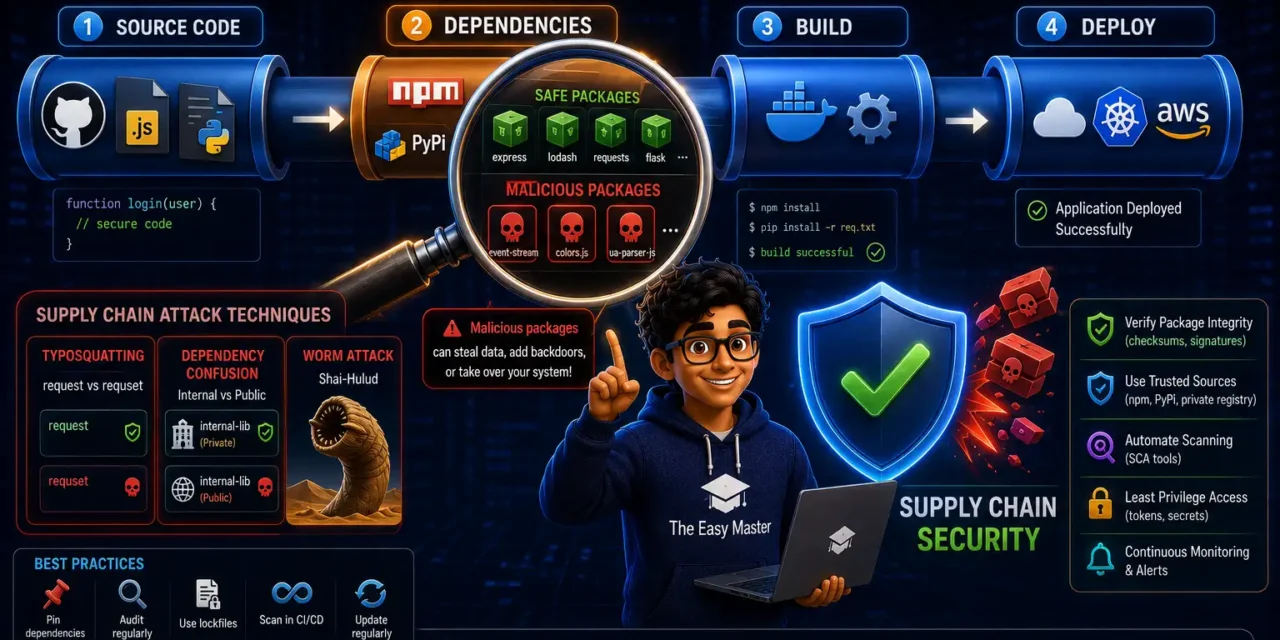
आपने OWASP Top 10 aur Shift Left Security seekh liya। अब एक और बड़ा risk – Supply Chain Security। Aap npm install ya pip install karte ho ek package, aur woh package kisi aur package par depend karta hai। Agar us dependency chain mein koi malicious package aa jaaye, toh aapka entire system compromise ho सकता है।
Aisa lagta hai ki aapne apna code toh secure likha, lekin kisi aur ke code ne aapko hack kar liya।
Jab maine pehli baar Shai-Hulud supply chain attack के बारे में पढ़ा, toh mujhe samajh aaya ki open-source dependencies par blind trust dangerous हो सकता है। September 2025 से May 2026 तक, TeamPCP नामक threat group ने npm aur PyPI ecosystems में coordinated supply chain attacks किए – 170+ packages compromised। यह self-propagating worm tha जो developer aur cloud credentials चुराता था।
इस Supply chain security in Hindi article mein main aapko sikhata hoon:
✅ Supply chain security kya hai – software supply chain, attack vectors
✅ Real attacks – Shai-Hulud, Miasma, Hades, Axios, Mastra, ChainVeil
✅ Attack techniques – typosquatting, dependency confusion, worm propagation, AI impersonation
✅ Tools for detection – npm audit, Snyk, Trivy, trustdep, Socket, Packj, npm-scan
✅ Best practices – how to protect your projects
✅ Common mistakes – aur unka solution
Chaliye supply chain security seekhte hain aur apne projects ko safe banate hain! 🛡️🚀
Table of Contents
1. Supply Chain Security Kya Hai? – Software Dependency Ka Risk
Software supply chain security us practice ko kehte hain jo third-party components, dependencies, aur open-source packages ke risks ko manage karti hai – taaki koi compromised package aapke system mein na aa paaye.
Software supply chain ka matlab hai – aapke code ke andar aane wale sabhi components ka ecosystem: source code, dependencies, build tools, CI/CD pipelines, package registries, aur distribution mechanisms।
Aapka risk kahan se aata hai?
| Source | Risk |
|---|---|
| Third-party dependencies | npm, PyPI, Maven, RubyGems – koi bhi package malicious ho sakta hai |
| Transitive dependencies | Aap direct package install nahi karte, lekin woh package kisi aur package ko include karta hai – woh bhi risk mein hai |
| Build tools | Webpack, Vite, Babel – agar ye compromised ho, toh build output infected हो जाएगा |
| CI/CD pipelines | GitHub Actions, GitLab CI – agar pipeline compromised, toh attacker code inject kar sakta hai |
Personal Experience: Maine ek baar
npm installkiya ek popular package – but uski dependency chain mein ek malicious package tha। मुझे तब pata chala jab मेरे AWS credentials leak हो गए। Us din maine supply chain security ko seriously lena shuru kiya।
2. Real Attacks – npm and PyPI में क्या हुआ?
2025-2026 mein multiple large-scale supply chain attacks हुए हैं। Let’s understand them:
2.1 Shai-Hulud Worm Family
Shai-Hulud (named after Dune’s sandworms) ek self-propagating worm है जो npm ecosystem में September 2025 में दिखा। यह maintainer tokens चुराता था और बिना attacker input के poisoned versions publish करता था।
Timeline:
- September 2025: First Shai-Hulud worm – first self-replicating malware in npm ecosystem
- November 2025: SHA1-Hulud – updated wiper functionality, improved credential harvesting
- March 2026: SANDWORM_MODE – adaptive targeting, enumerates CI/CD pipelines before propagating
- April-May 2026: Mini Shai-Hulud – fourth generation, far more destructive
Mini Shai-Hulud की distinguishing capabilities:
- SLSA Build Level 3 provenance attestation forgery – cryptographic verification को bypass
- OIDC token extraction from GitHub Actions runner process memory
- AI coding agents aur developer IDEs को target
- npm aur PyPI dono mein cross-ecosystem propagation
- Triple-redundant credential exfiltration through C2 server
170+ npm aur PyPI packages compromised
2.2 Miasma and Hades Variants
Miasma (Mini Shai-Hulud ka descendant) ek multi-stage dropper है जो npm installation के दौरान execute होता है। Payload system scan karta hai and cloud services (AWS, GCP, GitHub) से credentials, API keys, tokens extract karta hai। June 2026 तक, at least 57 npm packages aur 300+ malicious versions identified।
Hades – PyPI ecosystem mein variant, 37 malicious PyPI wheels across 19 packages। Python .pth file mechanism ka abuse karta hai – Python startup par automatically execute।
2.3 Axios Supply-Chain Attack (March 2026)
Axios package (100+ million downloads/week) compromised via malicious “phantom dependency” injection। Cross-platform RAT (Remote Access Trojan) downstream users तक पहुंचा।
2.4 Mastra AI Framework Attack (June 2026)
Attackers hijacked former contributor’s credentials, injected malicious dependency across 144 packages in the Mastra AI ecosystem।
2.5 ChainVeil Campaign (May 2026)
SuccessKey actor ने typosquatting campaign launch ki – rate-limit-flexible (typosquat of rate-limiter-flexible)। 4-tier blockchain-based C2 infrastructure spanning Tron, Aptos, Binance Smart Chain – almost impossible to disable। Full-featured RAT with reverse shell, credential harvesting, file exfiltration。
3. Attack Techniques – Hackers Kaise Kaam Karte Hain?
3.1 Typosquatting
Hackers popular packages ke similar names register karte hain – request vs requset, flask vs rlask।
2026 की एक campaign में attackers ने Flask (rlask, tlask), Requests (rsquests), aur NumPy (nhmpy) ke typosquats publish kiye। Attacker पहले clean “probe” versions publish karte hain, फिर worm payload के साथ malicious versions push karte hain।
3.2 Dependency Confusion
Build system को trick karna – internal private package की jagah public registry से malicious version pull करना।
Attackers higher version numbers use karte hain, taaki dependency resolver public package prefer kare।
3.3 Worm Propagation
Shai-Hulud jaise worms self-propagating hote hain – compromised package install करने पर worm steal करता है maintainer credentials, aur un credentials se aur packages publish karta है। Each compromised CI/CD pipeline becomes a new distribution vector।
3.4 AI Model Impersonation
Hackers HuggingFace orgs impersonate karte hain – e.g., 0penai/gpt2 instead of openai/gpt2। Malicious model artifacts CI/CD pipelines mein download हो जाते हैं।
4. Detection Tools – कैसे पता करें Package Malicious Hai?
trustdep – Behavioral Scanner
trustdep npm audit से अलग काम करता है – it analyses every package’s history and detects anomalies:
| Signal | Weight |
|---|---|
| OSV / known malicious | 70-100 |
| New lifecycle script (postinstall/preinstall) | 45 |
| Dangerous script content (curl pipe, eval, external URL) | 50 |
| Maintainer change (new account added / old removed) | 30-40 |
| Publish spike (3+ versions in 24h) | 25 |
| Typosquatting | 10-25 |
Usage Example:
# Check a single package
trustdep check axios

# Scan all dependencies in package.json
trustdep scan

# CI integration (exit 1 if risk > high)
trustdep scan --fail-on high --json
5. Best Practices – Apne Project को कैसे बचाएं
✅ Audit Every Package
Before installing any package:
trustdep check <package-name>
npm audit
✅ Use Lock Files
package-lock.json (npm) ya poetry.lock (Python) – ensure reproducible builds। Lock files ensure consistent dependency versions。
✅ Pin Versions
Avoid * ya ^ ranges। Use exact versions: "axios": "1.8.4" instead of "axios": "^1.8.0"。
✅ Enable 2FA (Two-Factor Authentication)
- npm: Enable 2FA on your account
- PyPI: Enable 2FA
- GitHub: Enable 2FA
✅ CI/CD Security Checks
In GitHub Actions:
name: Supply Chain Check
on: [push, pull_request]
jobs:
  trustdep:
    runs-on: ubuntu-latest
    steps:
      - uses: actions/checkout@v4
      - uses: actions/setup-node@v4
      - run: npx trustdep scan --fail-on high --json
      - run: npm audit --production
✅ Use Private Registries
For enterprise, use private registries (GitHub Package Registry, AWS CodeArtifact, JFrog Artifactory) – public registry attacks से bachav।
✅ Monitor Dependency Changes
- Use Dependabot with security updates
- Monitor for unusual publish spikes, maintainer changes
- Set up alerts for new lifecycle scripts (postinstall, preinstall)
✅ Educate Developers
- Train team on typosquatting, dependency confusion
- Review every new dependency before adding
- Use internal approved package list
Personal Experience: Ab main har नए package को
trustdep checkसे scan करता हूँ औरnpm auditचलाता हूँ। Main “better safe than sorry” approach follow karta हूँ – agar koi package suspicious lagta hai, toh use avoid karta हूँ।
6. Common Mistakes (aur Unka Solution!)
| Mistake | Why it’s wrong | Solution |
|---|---|---|
Blind npm install of unknown packages | Malicious package easily install हो जाता है | Always audit before install – trustdep check |
| No lock file in repo | Different versions in different environments, reproducibility issues | Commit package-lock.json / poetry.lock |
Using * or ^ ranges | Automatic updates can introduce malicious versions | Pin exact versions |
| No 2FA on package registry accounts | Account takeover leads to malicious publishes | Enable 2FA everywhere |
| No CI security scanning | Malicious dependencies enter production undetected | Add SCA scanning in CI/CD pipeline |
| Ignoring transitive dependencies | Direct package safe, but its dependency malicious | Use tools that scan transitive dependencies |
| Not monitoring package changes | Package suddenly gets malicious update | Monitor maintainer changes, publish spikes |
| Using public registry for internal packages | Dependency confusion risk | Use private registry for internal packages |
7. Resources – Cheat Sheet & Practice Prompts
Quick Command Reference
# npm audit
npm audit
npm audit --production

# trustdep
npx trustdep scan
npx trustdep check axios

# Trivy FS scan
trivy fs . --severity CRITICAL,HIGH

# Snyk (if installed)
snyk test
snyk monitor

# Check for typosquatting (manual)
npm search <package-name>
Safe Installation Workflow
text
1. Check package: trustdep check <package>
2. Check npm audit: npm audit <package>
3. Review package metadata: downloads, maintainers, recent versions
4. If safe: npm install <package> --save-exact
5. Commit lock file
6. CI/CD: Run trustdep scan + npm audit
Practice Prompts
Beginner:
trustdepinstall karo and scan your project’s dependencies। See which packages have risks। Fix high-risk packages।
Intermediate:
- Add a GitHub Actions workflow that runs
trustdep scan --fail-on highon every pull request। Test by adding a suspicious package (e.g., a typosquat) and see if pipeline blocks।
Advanced:
- Create a private npm registry (Verdaccio) and set up your project to use it। Configure internal package approval workflow where every new dependency must be reviewed and approved before being published to private registry।
8. FAQ
Q1: Supply chain security kya hai?
Software supply chain security third-party components, dependencies, aur open-source packages ke risks ko manage karne ka practice hai – taaki koi compromised package aapke system mein na aa paaye।
Q2: Typosquatting aur dependency confusion mein kya antar hai?
Typosquatting – popular packages ke similar names register karna (e.g., request vs requset)। Dependency confusion – build system को trick karna ki internal private package की jagah public registry से malicious version pull करे।
Q3: Shai-Hulud worm kya hai?
Shai-Hulud ek self-propagating worm है जो npm aur PyPI ecosystems mein maintainer credentials चुराता है और poisoned packages publish करता है। September 2025 में पहली बार दिखा।
Q4: Kaise pata karein koi package malicious hai?
Use tools like trustdep, npm audit, Snyk। Check package metadata: downloads, maintainer history, recent version activity, lifecycle scripts। Any red flags → avoid।
Q5: Kya npm audit enough hai?
npm audit only checks known CVEs। Zero-day hijacks, typosquatting, maintainer compromise – ye npm audit miss करता है। Use trustdep, Socket, या npm-scan for behavioral analysis।
Q6: Supply chain attack se kaise bachein?
Audit every package before install, use lock files, pin versions, enable 2FA, add CI security scanning, use private registries for internal packages, monitor dependency changes।
9. Conclusion – Ab Aapki Baari!
Bahut badhiya! Aapne aaj seekh liya:
✅ Supply chain security in Hindi – complete guide for npm & PyPI
✅ Real attacks – Shai-Hulud, Miasma, Hades, Axios, Mastra, ChainVeil
✅ Attack techniques – typosquatting, dependency confusion, worm propagation
✅ Detection tools – trustdep, npm audit, Snyk, Socket, Packj, npm-scan
✅ Best practices – audit packages, lock files, pin versions, 2FA, CI/CD checks
✅ Common mistakes – aur unka solution
Supply chain security modern software development का essential part है – blindly trusting dependencies dangerous हो सकता है।
Aapki challenge: Apne project mein trustdep scan run karo। Report share karo aur any high-risk packages identified को fix करो। GitHub Actions workflow add करो for supply chain scanning on every PR। Apna experience comment mein share karo!
Next topic kya chahiye?
- API Security – OWASP API Top 10?
- Secure Coding Practices – Practical Guide?
- SBOM (Software Bill of Materials) – Kya Hai aur Kyun Zaroori Hai?
Comment mein batao!
The Easy Master ke saath supply chain security seekhte raho। Happy securing! 🛡️🚀
Resources
- trustdep – npm Supply Chain Scanner
- OWASP Dependency Check
- Snyk – Open Source Security
- Socket – Package Health
- GitHub Supply Chain Security Docs
Additional Resources
- FastAPI Kya Hai? FastAPI Python Setup Aur Pehla API Hindi 2026
- FastAPI Path Parameters Hindi – शून्य से हीरो तक गाइड 2026
- Pydantic v2 Tutorial Hindi – Data Validation Master 2026
- FastAPI dependency injection Hindi – Code Reuse Ka Magic
- FastAPI Async Await Hindi – Non-Blocking Code 2026
- FastAPI PostgreSQL SQLModel Hindi – Async Guide 2026
- FastAPI JWT Authentication Hindi – Secure API Login
- FastAPI OpenAI Integration Hindi – AI Chatbot API 2026
- FastAPI Multi-Agent AI Hindi – LangGraph Zero to Hero
- FastAPI Deployment Hindi – Railway Zero to Hero 2026
- Docker Introduction in Hindi? Containers vs Virtual Machines
- Docker Images and Containers Hindi – Pehla Container
- Docker Compose Tutorial Hindi – Node.js + MongoDB
- Docker Volumes Networking Hindi – Data Persist कैसे करें
- Kubernetes Architecture Hindi – Pods, Nodes, Cluster
- Minikube Tutorial Hindi – Local Cluster कैसे बनाए
- Kubernetes Deployments Services Hindi – App Expose Karein
- K8s Ingress Tutorial Hindi – Domain se App Access
- Helm Kya Hai? – Kubernetes Charts Se App Deploy
- GraphQL Introduction in Hindi – REST vs GraphQL Comparison
- GraphQL Schema Tutorial Hindi – Types Queries Resolvers
- GraphQL Queries Mutations Hindi – Frontend Integration
- GraphQL Advanced Features Hindi – Fragments Aliases Variables
- Apollo Server GraphQL Node.js TypeScript Hindi – API Kaise Banaye
- Apollo Client React Hindi – GraphQL Queries Use Kaise Karein
- GraphQL Testing Supertest Hindi – Queries Mutations Test
- Integration Testing Node.js – Mock DB aur APIs Hindi
- E2E Testing Playwright – GraphQL Frontend Testing & CI/CD Hindi
- System Design Kya Hai? System Design Introduction in Hindi
- Vertical Horizontal Scaling Hindi – कब क्या Use करें
- Load Balancing Tutorial Hindi: Round Robin and Hashing
- Microservices vs Monolith Hindi – Modular Monolith se Safar
- Message Queues (RabbitMQ, Kafka) – EDA Samjhe Hindi
- Consistent Hashing Hindi – Distributed Caching & Sharding
- System Design Case Study Hindi – TinyURL WhatsApp Instagram
- Shift Left security in Hindi– Security Ko Pehle se कैसे करें
- OWASP Top 10 Hindi – Web Security Risks & Fixes 2026
Views: 438