नमस्ते दोस्तों!
स्वागत है The Easy Master पर!
आपने Docker sikha. Containers bana liye. Docker Compose se multiple containers chalane lage. Ab aage kya? Aapka app to chal raha hai, lekin agar us app ko ek server se alag server pe shift karna hai, ya usse automatically scale karna hai, ya agar koi container crash ho jaye to use apne aap restart karna hai – to kaise hoga?
Yahi problem hoti hai jab aap Docker se aage badhte ho.
Docker ek container ko efficiently run karta hai, lekin jab aapke paas 100s ya 1000s containers ho, to unhe manually manage karna impossible hai. Yahan Container Orchestration ka concept aata hai. Aur Container Orchestration ka king hai – Kubernetes!
Maine jab pehli baar Kubernetes seekha, to mere dimaag mein ghoom raha tha – “Itna kuch, kaise yaad rakhu?” Par jaise jaise maine iske architecture ko samjha – Control Plane, Worker Nodes, Pods, Services – toh picture clear hoti gayi. Aur maine realize kiya ki Kubernetes is basically a brain that manages your containers automatically.
Is Kubernetes architecture in Hindi article mein main aapko sab kuch simple words mein samjhaunga:
✅ Kubernetes kya hai? – Orchestration ka superhero
✅ Docker vs Kubernetes – Container Run vs Container Orchestra
✅ Architecture Overview – Control Plane vs Worker Nodes
✅ Control Plane Components – API Server, Scheduler, Controller Manager, etcd
✅ Worker Node Components – Kubelet, Kube-proxy, Container Runtime
✅ Pods, Nodes, Cluster – Samjhe Hierarchy
✅ Kubectl – Captain ka Communicator
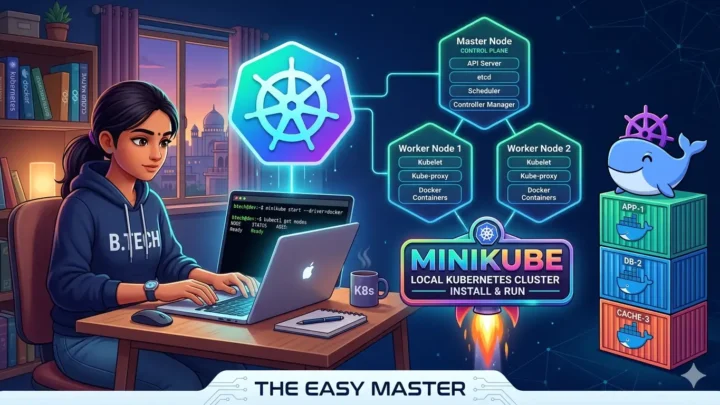
✅ Hands-On – Minikube se Local Cluster Set Karein
✅ Real Projects use cases – Microservices, DevOps, AI/ML
Chaliye Kubernetes ki duniya mein step rakhate hain! 🚀
Table of Contents
1. Kubernetes Kya Hai? – Ek Simple Example Se Samjhe
Kubernetes (जिसे K8s भी कहते हैं – K se start, 8 letters, s end) ek open-source container orchestration platform hai.
Simple words mein:
Maan lo aapke paas 100 containers chal rahe hain alag alag servers par. Koi container crash ho jata hai, kisi server ki memory khatam ho rahi hai, kisi container ko zyada traffic aa raha hai – Kubernetes in sab problems ko automatically handle karta hai without manual intervention. Kubernetes containers को deploy करता है, scale करता है, aur manage करता है – सब automatically.
Kubernetes, which is often abbreviated as K8s, is an open source container orchestrator. It acts as a “datacenter operating system” to manage the lifecycle of containerized applications across modern infrastructure.
Kaam kaise karta hai – Example:
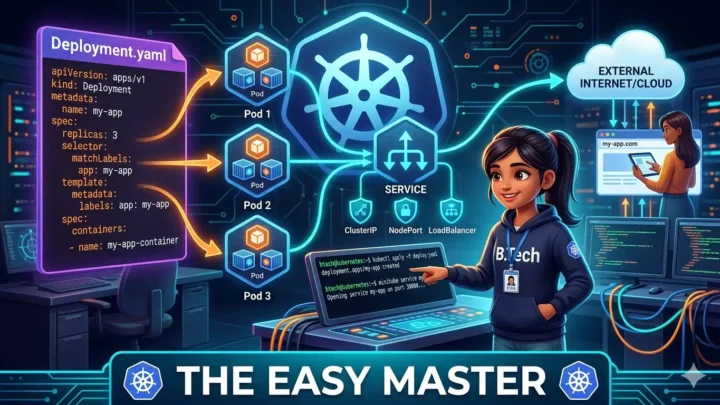
Aapne ek Node.js app ka Docker image banaya hai. Is app ko aap run karna chahte ho production mein. Kubernetes ko aap ek “specification” dete ho ki – “Mere app ke 3 replicas (copies) chalne chahiye, har replica 500MB RAM aur 0.5 CPU core use karega”. Kubernetes yeh specification read karta hai aur automatically 3 containers create karta hai. Agar ek container crash ho jata hai, to Kubernetes turant ek naya container create kar deta hai. Agar traffic badh jata hai, to Kubernetes replicas ki count badha sakta hai. Aur jab traffic kam ho jaye, to replicas ki count ghati ja sakti hai.
Yeh sab manual intervention ke bina – automatically!
Kubernetes Ke Fayde:
| Feature | Kya Karta Hai? |
|---|---|
| Self-healing | Agar koi container fail ho jaye, to automatically restart kar deta hai |
| Auto-scaling | Traffic ke hisab se containers ki count automatically adjust karta hai |
| Load balancing | Traffic ko saare containers mein distribute karta hai |
| Rolling updates | Bina downtime ke app update kar sakte ho |
| Secret management | Passwords, API keys safely manage karta hai |
Kubernetes ensures that containerized applications run where and how you want them to, scaling automatically, recovering from failures, and enabling zero-downtime updates.
💡 Kyun naam “Kubernetes”? Greek word hai jiska matlab “helmsman” ya “pilot” – jo ship ko guide karta hai. Waise hi Kubernetes containers ko guide karta hai.
2. Docker vs Kubernetes – Difference kya hai?
Yeh doubt bohot common hai – Docker aur Kubernetes mein kya relation hai? Kyun dono seekhna hai?
Simple Answer:
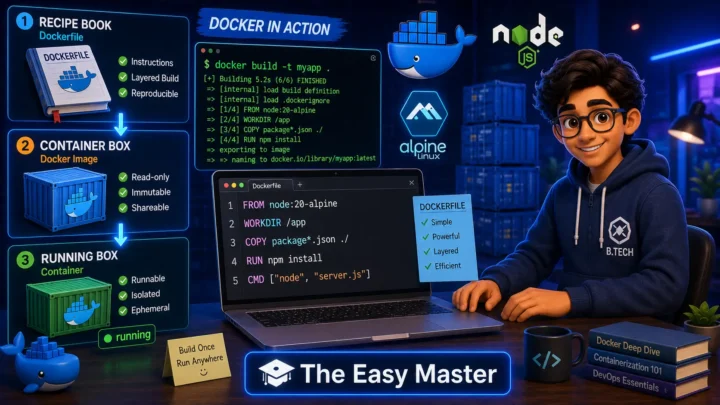
Docker individual containers build aur run karta hai (on a single machine).
Kubernetes 100s/1000s of containers ko orchestrate karta hai (across many machines).
Docker is designed for building and running containers on a single machine, while Kubernetes coordinates those containers across multiple machines.
Detailed Difference:
| Aspect | Docker | Kubernetes |
|---|---|---|
| Primary Focus | Build, ship, and run containers | Orchestrate containers at scale |
| Scope | Single host (one machine) | Cluster of multiple hosts |
| Scaling | Manual (docker compose scale) | Automatic (Horizontal Pod Autoscaler) |
| Self-healing | ❌ No | ✅ Yes – restart failed containers |
| Load Balancing | Basic (port mapping) | Advanced (Service & Ingress) |
| Rolling Updates | Limited | ✅ Yes – zero downtime |
| Use Case | Development, single-container apps | Production-grade microservices |
Docker allows each microservice to be packaged in its own container, while Kubernetes ensures that these containers can be efficiently managed, scaled, and orchestrated.
Important: Docker and Kubernetes are complementary, not competitors. Docker builds the containers, Kubernetes orchestrates them. You need both in a cloud-native stack.
Analogy:
- Docker = एक ट्रक (ek container ko ek machine pe le ja sakta hai)
- Kubernetes = एक complete transport/logistics company (100s of trucks ko manage karta hai – unhe route assign karna, breakdown handle karna, traffic ke hisab se trucks increase karna)
3. Kubernetes Architecture – 2 Minute Overview
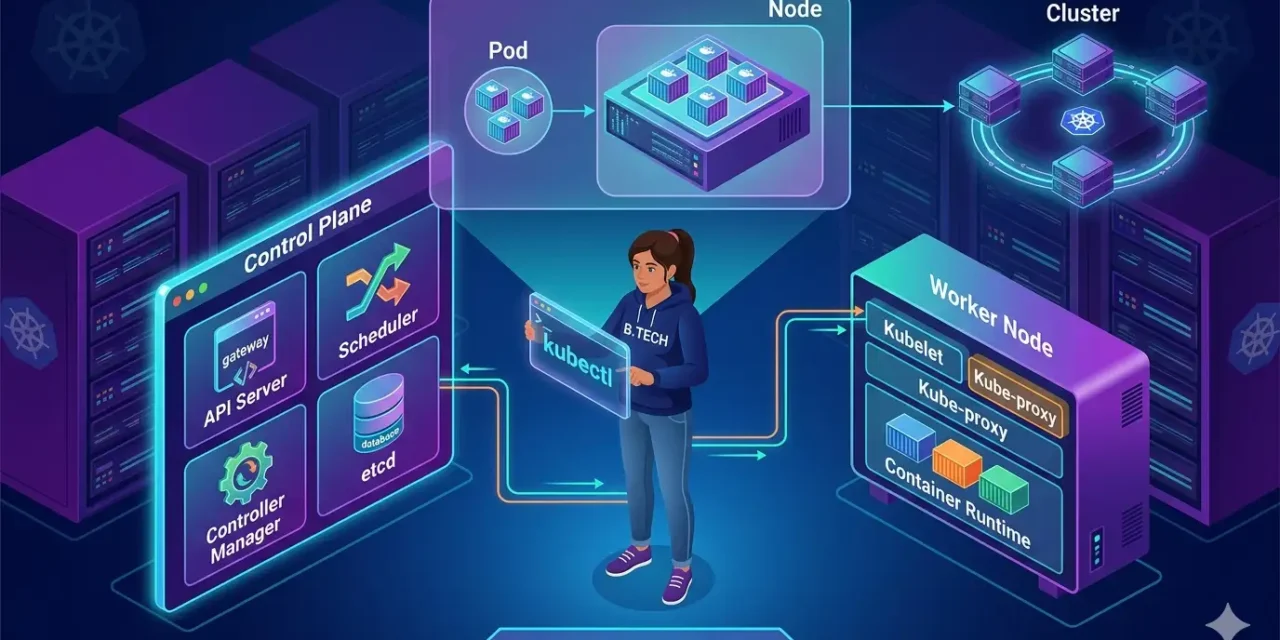
Kubernetes follows a client–server architecture consisting of a control plane (मास्टर) and worker nodes.
Architecture Diagram (words mein):
                    +----------------------------------+
                    |          CONTROL PLANE           |
                    |  (Master Node – Cluster ka Brain) |
                    |                                  |
                    |  +----------------------------+  |
                    |  |  API Server  |   Scheduler  |  |
                    |  +----------------------------+  |
                    |  | Controller Manager | etcd   |  |
                    |  +----------------------------+  |
                    +----------------------------------+
                                      │
                                      │ (kubelet communication)
                                      ▼
                    +----------------------------------+
                    |           WORKER NODES            |
                    |  (Jahan actual applications run)  |
                    |                                  |
                    |  +----------------------------+  |
                    |  | Kubelet | Kube-proxy | CR  |  |
                    |  +----------------------------+  |
                    |                                  |
                    |  +-----+     +-----+     +-----+ |
                    |  | Pod |     | Pod |     | Pod | |
                    |  +-----+     +-----+     +-----+ |
                    +----------------------------------+
Two Main Parts:
| Component | Role | What it does |
|---|---|---|
| Control Plane (Master) | Cluster ka brain | Manages worker nodes and Pods. Makes global decisions (scheduling, scaling, etc.) |
| Worker Nodes | Jahan actual apps run | Host the Pods that run your application containers |
The worker node(s) host the Pods that are the components of the application workload. The control plane manages the worker nodes and the Pods in the cluster.
💡 Production Note: For high availability, the control plane usually runs across multiple computers and a cluster usually runs multiple nodes, providing fault-tolerance and high availability.
4. The Control Plane (Master) – Kubernetes Ka Brain
Control plane woh jagah hai jahan cluster ke baare mein sab important decisions liye jaate hain. Isme 4 main components hote hain:
4.1 API Server – The Gateway Keeper
Kubernetes mein kuch bhi karne ke liye aapko API server se baat karni padti hai. Ye cluster ka front door hai.
kubectlCLI tool API server se communicate karta hai- Saare requests (create pod, delete pod, scale deployment) API server ke through jaate hain
- Ye requests validate karta hai aur phir unhe forward karta hai
Kube-API server is the initial gateway to the cluster that listens to updates or queries via CLI like Kubectl. It validates requests received and then forwards them to other processes. No request can be directly passed to the cluster; it has to go through the API Server.
4.2 Scheduler – The Work Distributor
Scheduler decide karta hai ki kaun sa pod kaun se node par run karega.
- Naye Pods ko dekhta hai jinka koi assigned node nahi hai
- Resource requirements, policies, aur constraints ke hisab se best Worker Node select karta hai
Kube-Scheduler watches for newly created Pods with no assigned node and selects the best Worker Node based on resource requirements and policy constraints.
4.3 Controller Manager – The Desired State Maintainer
Controller Manager ensure karta hai ki cluster ki desired state maintain rahe.
- Node Controller: Monitors node health
- Replication Controller: Ensures correct number of Pod replicas are running
- Agar desired state se actual state mismatch hota hai, to Controller Manager action leta hai
Kube-Controller-Manager runs controller processes that maintain the “desired state” of the cluster.
4.4 etcd – The Cluster’s Memory
etcd ek key-value store hai jo saara cluster data store karta hai – “Source of Truth”.
- Cluster ka complete configuration yahan store hota hai
- Agar yeh data nahi hai, to Kubernetes mein woh exist hi nahi karta
etcd is a consistent, high-availability key-value store that stores all cluster data. If it isn’t in etcd, it doesn’t exist in Kubernetes.
Analogy: ek school ki main office ki tarah – yahan saare records (students, teachers, classes) stored hote hain aur decisions yahan se lete hain.
5. Worker Nodes – Jahan Kaam Hota Hai
Worker nodes woh machines hain jahan actually aapke containers run hote hain. Har worker node mein 3 main components hote hain:
5.1 Kubelet – Node Ka Supervisor
Kubelet ek agent hai jo har worker node par run karta hai.
- Control plane se instructions (PodSpecs) leta hai
- Ensure karta hai ki containers Pod mein run ho rahe hain
- Node ki health aur status API server ko report karta hai
5.2 Kube-proxy – The Network Manager
Kube-proxy networking rules maintain karta hai.
- Pods ko cluster ke andar aur bahar se communication allow karta hai
- Service discovery aur load balancing handle karta hai
Kube-proxy maintains network rules on nodes, allowing network communication to Pods from inside or outside the cluster, handling service discovery and load balancing.
5.3 Container Runtime – Actually Containers Ko Chalana
Container runtime software jo actually containers run karne ke liye responsible hai.
- Common container runtimes: containerd, CRI-O, Docker
- Registry se images pull karta hai aur containers start/stop karta hai
Container runtime pulls images from a registry and starts/stops the containers.
Analogy: Worker node ek factory ki tarah hai – Kubelet supervisor hai, Kube-proxy logistics manager hai, Container runtime machine operator hai, aur Pods actual products hain.
6. Pods, Nodes, Cluster – Hierarchy Samjhe
Yeh Kubernetes ke teen levels hain. Level upar ki taraf jaao – scope badhta jata hai.
Level 1: Pod – Smallest Unit 🥚
A Pod is the smallest deployable unit in Kubernetes.
Pod kya hai?
Pod ek logical host hai – ek ya ek se zyada containers ka group jo ek saath schedule hote hain aur resources share karte hain.
Kyun Pod introduce kiya?
- Managability: Related containers ko ek unit mein group karna
- Communication & Resource Sharing: Pod ke andar ke containers localhost se ek doosre se baat kar sakte hain aur volumes share kar sakte hain
Pod is the smallest unit you can deploy in a Kubernetes environment. A pod groups one or more containers. A container runs application code. A pod groups one or more containers. A node is the machine that runs pods.
Relationship: Multiple containers → One Pod → One Node → One Cluster
Level 2: Node – The Machine
Node ek machine hai (physical ya virtual) jo resources (CPU, memory, storage) provide karti hai aur pods run karti hai.
- Har node mein kubelet aur kube-proxy hota hai
- A node can run multiple pods
Level 3: Cluster – The Data Center
Cluster nodes ka ek group hai jo resources pool karta hai aur applications ko run karne ke liye ek saath kaam karta hai.
- Cluster में resources का pool hota hai – CPU, memory, storage, network
- Kubernetes cluster is what makes applications resilient (agar ek node fail ho jaye to doosra node handle kar lega)
Hierarchy Summary:
| Unit | What it is | Analogy |
|---|---|---|
| Container | A packaged application | एक मजदूर |
| Pod | Group of related containers | एक कमरा (मजदूरों का समूह) |
| Node | A machine (VM or physical) | एक पूरा फर्श (कई कमरे) |
| Cluster | Group of nodes | पूरी इमारत |
💡 Pod vs Container: आप एक pod mein multiple containers rakh sakte ho, lekin generally one pod = one main container recommended hai – ek pod mein sidecar containers (logging, monitoring) bhi rakh sakte ho.
Multiple nodes → Form a cluster. Multiple containers → Form a pod. Multiple pods → Run on a node.
7. Addons – Cluster Ko Power Dena
Kubernetes add-ons plug-ins hain jo cluster ki functionality enhance karte hain. Ye typically kube-system namespace mein deploy hote hain.
Common add-ons:
| Add-on | Purpose |
|---|---|
| CoreDNS | Provides DNS service discovery within the cluster |
| Calico | Network policy enforcement for security |
| Ingress Controller | HTTP/HTTPS routing to services |
Kubernetes add-ons are typically deployed within the kube-system namespace, providing cluster-level capabilities and extending the native features of Kubernetes.
8. Kubectl – Captain’s Communicator
kubectl command-line tool hai jo Kubernetes API server se communicate karta hai.
kubectl commands की basic structure:
kubectl [command] [TYPE] [NAME] [flags]
Important kubectl commands:
| Command | What it does |
|---|---|
kubectl get nodes | List all nodes in cluster |
kubectl get pods | List all pods in current namespace |
kubectl create deployment NAME --image=IMAGE | Create a deployment |
kubectl apply -f FILE.yaml | Apply configuration from YAML file |
kubectl logs POD_NAME | View pod logs |
kubectl delete pod POD_NAME | Delete a pod |
Kubectl controls the Kubernetes cluster manager. It does this by authenticating with the Master Node of your cluster and making API calls to do a variety of management actions.
9. Hands-On – Minikube Se Local Cluster Set Karein
Kubernetes ko practically experiment karne ke liye local cluster set up karte hain – Minikube se.
Step 1: Install Minikube
For Windows (using Chocolatey):choco install minikube
For macOS (using Homebrew):brew install minikube
For Linux (using curl):curl -LO https://storage.googleapis.com/minikube/releases/latest/minikube-linux-amd64
Step 2: Start Minikube Cluster
minikube startStep 3: Verify Cluster is Running
kubectl cluster-info
kubectl get nodes
Step 4: Deploy Your First Application
kubectl create deployment hello-node --image=registry.k8s.io/e2e-test-images/agnhost:2.39 -- /agnhost serve-hostnameStep 5: Expose the Deployment as a Service
kubectl expose deployment hello-node --type=LoadBalancer --port=8080Step 6: View Pods, Deployments, and Services
kubectl get pods
kubectl get deployments
kubectl get services
Step 7: Access the Application
minikube service hello-nodeStep 8: Clean Up
kubectl delete service hello-node
kubectl delete deployment hello-node
minikube stop
💡 Practice Challenge: Agar time mile, to ek simple FastAPI app ka Docker image banao aur usse Kubernetes cluster mein deploy karo with 3 replicas.
kubectl scalecommand use karke replicas 5 kar ke dekho – traffic distribute kaise hota hai.
10. Real-World Use Cases – Kyun Seekhna Zaroori Hai?
Kubernetes aaj kal industry mein har jagah use ho raha hai. Isse students ke liye bohot opportunities hain.
Use Case 1: Microservices Deployment
Kubernetes makes microservices deployment easier. Companies use Kubernetes to manage large-scale applications efficiently.
Ek e-commerce platform ke 15 microservices hain – User service, Order service, Payment service, Product service, etc. Kubernetes in saare services ko independently deploy karta hai, scale karta hai, aur manage karta hai.
Use Case 2: DevOps & CI/CD Integration
Kubernetes CI/CD pipelines ke saath integrate hota hai. Git push → Build container image → Push to registry → Deploy to Kubernetes – sab automatically!
Use Case 3: AI/ML Workloads
Kubernetes ML models ko train aur serve karne ke liye use hota hai. Kubeflow (Kubernetes + ML) ML pipelines automate karta hai.
Use Case 4: High-Performance Computing (HPC)
Kubernetes data processing, scientific simulations, aur fintech models handle kar sakta hai.
Use Case 5: Cloud-Native Application Migration ☁️
Traditional applications ko containerize kar ke Kubernetes par shift karna – kyunki Kubernetes provides auto-scaling, self-healing, aur portability across cloud providers.
💡 Placement Perspective: Agar aap B.Tech student ho aur resume mein Kubernetes likha hai, to recruiters ko definitely pata chalega ki aap industry-ready ho. Kubernetes bohot sought-after skill hai in today’s cloud-native world.
11. Common Mistakes (aur Unka Solution!)
| Mistake | Why it’s wrong | Solution |
|---|---|---|
| Control plane aur worker node confuse karna | Dono different roles play karte hain | Control plane manages, worker nodes execute |
| Pod vs container mein antar bhoolna | Directly container deploy karna Kubernetes mein possible nahi hai | Always remember: Kubernetes ke andar pods run karte hain, containers nahi |
| etcd backup ignore karna | etcd cluster state store karta hai – agar data corrupt hua to cluster recover nahi hoga | Implement regular etcd backups |
| Resource limits na lgana | Pods cluster ki saari resources consume kar sakte hain | Always set resources: requests and limits |
| Readiness/Liveness probes na lgana | Kubernetes ko nahi pata ki pod ready hai ya alive hai | Use liveness and readiness probes |
kubectl commands bina proper context ke run karna | Wrong cluster ya namespace mein operations ho sakte hain | Always check current context: kubectl config get-contexts |
| Pod-to-pod communication assume karna | Pods ephemeral hote hain – IP address change hota rehta hai | Use Services for reliable communication |
💡 Personal Experience: Maine ek baar local cluster mein deployment create kiya bina resource limits set kiye. Ek pod ne cluster ki saari memory consume kar li, aur cluster crash ho gaya. Tab se mai hamesha resource limits set karta hoon.
12. Best Practices – Production-Ready Tips
✅ Use Namespaces to organize resources – Different teams/environments ka logic alag rakho (e.g., dev, staging, prod)
✅ Set resource requests and limits – Cluster stability ke liye zaroori
✅ Use liveness and readiness probes – Control plane ko pod status batane ke liye
✅ Tag your container images properly – Use semantic versioning (app:v1.0.0), avoid :latest in production
✅ Implement RBAC (Role-Based Access Control) – Use least-privilege principle
✅ Backup etcd regularly – Cluster state restore karne ke liye
✅ Use infrastructure as code (IaC) – Store Kubernetes manifests in Git (GitOps)
✅ Monitor cluster health – Tools like Prometheus + Grafana use karo
✅ Upgrade control plane before worker nodes – Breaking changes se bachne ke liye
13. Resources – Cheat Sheet & Practice Prompts
kubectl Commands Cheat Sheet
| Task | Command |
|---|---|
| Get all nodes in cluster | kubectl get nodes |
| Get all pods (current namespace) | kubectl get pods |
| Get all pods (all namespaces) | kubectl get pods --all-namespaces |
| Create deployment | kubectl create deployment NAME --image=IMAGE |
| Apply YAML configuration | kubectl apply -f FILE.yaml |
| Delete deployment | kubectl delete deployment NAME |
| View pod logs | kubectl logs POD_NAME |
| Execute command in pod | kubectl exec -it POD_NAME -- /bin/bash |
| Port forward to pod | kubectl port-forward POD_NAME LOCAL_PORT:CONTAINER_PORT |
| Scale replicas | kubectl scale deployment NAME --replicas=5 |
Practice Prompts
Beginner:
- Minikube install karo aur single-node cluster start karo।
kubectl get nodesrun karke verify karo ki node ready hai। - Nginx deployment create karo with 2 replicas।
kubectl get podsse verify karo ki 2 pods running hain।
Intermediate:
- Node.js app ka Docker image banao, load karo local registry mein। Kubernete YAML manifest likho (Deployment + Service)।
kubectl applyse deploy karo aur LoadBalancer type se app expose karo।
Advanced:
- Namespace use karke environment separation implement karo। Horizontal Pod Autoscaler (HPA) set karo jo CPU usage ke hisab se pods scale kare। Rolling update perform karo
kubectl rolloutse aur troubleshoot karokubectl rollout undose agar update fail ho jaye।
14. FAQ – 6 Most Asked Questions
Q1: Pod aur container mein kya antar hai?
Pod ek group of containers hai jo resources share karte hain – storage, network namespace, etc. Pod Kubernetes ka smallest deployable unit hai. Direct container deploy nahi kar sakte.
Q2: Kubectl kya hai aur kyun use karte hain?
Kubectl command-line tool hai jo Kubernetes API server se communicate karta hai – resources create, update, delete, inspect, aur troubleshoot karne ke liye.
Q3: etcd backup kyun important hai?
etcd cluster ki “source of truth” hai – saari configuration yahan store hai. Agar etcd data corrupt ho jaye, to cluster recover nahi ho sakta.
Q4: Kya Kubernetes Docker ki jagah le sakta hai?
Nahi – Docker containers build aur run karta hai (on single machine). Kubernetes containers ko orchestrate karta hai across multiple machines. Dono complementary hain. Kubernetes Docker containers ko run kar sakta hai through container runtime (containerd, CRI-O), lekin image build nahi kar sakta.
Q5: Pods ka scaling automatically kaise hota hai?
Horizontal Pod Autoscaler (HPA) use karo. HPA CPU/memory utilization metrics monitor karta hai aur pods ki replica count automatically adjust karta hai. YAML configuration mein HPA define karo.
Q6: Control plane high availability (HA) kaise configure karein?
Multiple control plane nodes run karo – API server, scheduler, aur controller manager, etcd cluster को replicate karo।
💡 Personal Advice: Kubernetes seekhne ka best tarika hai – hands-on practice. Minikube install karo, simple apps deploy karo, pods scale karo, aur
kubectl deletese kuch bhi delete karke phir se create karo. Fear mat rakho – seekhne ka yahi tarika hai.
15. Conclusion – Ab Aapki Baari!
Bahut badhiya! Aapne aaj seekh liya:
✅ Kubernetes architecture in Hindi – complete beginner’s guide
✅ Docker vs Kubernetes – difference aur complementing roles
✅ Control Plane vs Worker Nodes – 4 control plane components + 3 worker node components
✅ Pods, Nodes, Cluster – hierarchy samjhe
✅ Kubectl – important commands aur usage
✅ Minikube – hands-on local cluster setup
✅ Real-world use cases – microservices, DevOps, AI/ML
✅ Best practices aur common mistakes
Kubernetes ek powerful skill hai – seekhne mein time lagta hai, lekin industry mein demand bohot high hai.
Aapki challenge: Minikube install karo aur apna pehla deployment create karo – even simple nginx deployment. Fir kubectl get pods se verify karo ki pods running hain. Apna experience comment mein share karo.
Next topic kya chahiye?
- Kubernetes Pods & Deployments in Depth?
- Kubernetes Services & Networking?
- Kubernetes + FastAPI Deployment on Cloud (EKS/GKE)?
Comment mein batao!
The Easy Master ke saath Kubernetes seekhte raho. Happy orchestrating! 🐳🚀
Resources
- Kubernetes Components – Official Documentation
- Pods – Kubernetes Official Docs
- kubectl Cheat Sheet – Kubernetes.io
- Minikube – Local Kubernetes Cluster
- Kubernetes GitHub Repository
Additional Resources
- MongoDB Setup – CRUD Operations समझे (Beginner Guide) 2026
- MongoDB Compass से GUI Database Manage करने का आसान तरीका | Beginner Tutorial 2026
- Node.js MongoDB Connection – Mongoose Setup समझे 2026
- MongoDB Data Modeling – Embedded Documents vs References 2026
- MongoDB Indexing – Query Speed बढ़ने करने का आसान तरीका
- MongoDB Aggregation Pipeline – Stages समझे | Practical Examples
- Express MongoDB CRUD – Complete REST API Example
- Mongoose ODM – Schema, Model, and Validation समझे 2026
- MongoDB Atlas – Cloud Database Free में Deploy करें 2026
- JWT Authentication MongoDB – User Login System कैसे बनाएं 2026
- Next.js App Router – Pages Router से क्या बदला? Complete Guide 2026
- Next.js Server Components – ‘use client’ कब और कहां Use करें
- Next.js Routing – Layouts, Dynamic Routes and Nested Routes 2026
- Next.js 16 New Features – Turbopack, Cache Components and proxy.ts
- Next.js Partial Prerendering – Static and Dynamic Content साथ में
- Next.js Authentication – JWT Session Management (App Router) 2026
- Next.js SEO – Metadata API and Image Optimization समझे 2026
- Next.js TypeScript – Full-Stack Type-Safe App कैसे बनाएं
- FastAPI Kya Hai? FastAPI Python Setup Aur Pehla API Hindi 2026
- FastAPI Path Parameters Hindi – शून्य से हीरो तक गाइड 2026
- Pydantic v2 Tutorial Hindi – Data Validation Master 2026
- FastAPI dependency injection Hindi – Code Reuse Ka Magic
- FastAPI Async Await Hindi – Non-Blocking Code 2026
- FastAPI PostgreSQL SQLModel Hindi – Async Guide 2026
- FastAPI JWT Authentication Hindi – Secure API Login
- FastAPI OpenAI Integration Hindi – AI Chatbot API 2026
- FastAPI Multi-Agent AI Hindi – LangGraph Zero to Hero
- FastAPI Deployment Hindi – Railway Zero to Hero 2026
- Docker Introduction in Hindi? Containers vs Virtual Machines
- Docker Images and Containers Hindi – Pehla Container
- Docker Compose Tutorial Hindi – Node.js + MongoDB
- Docker Volumes Networking Hindi – Data Persist कैसे करें
Views: 320