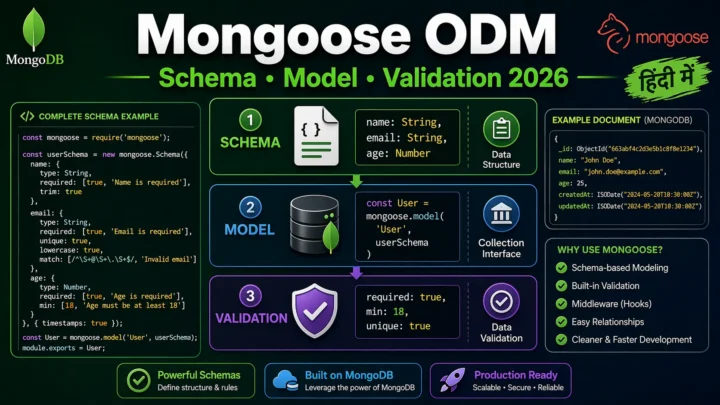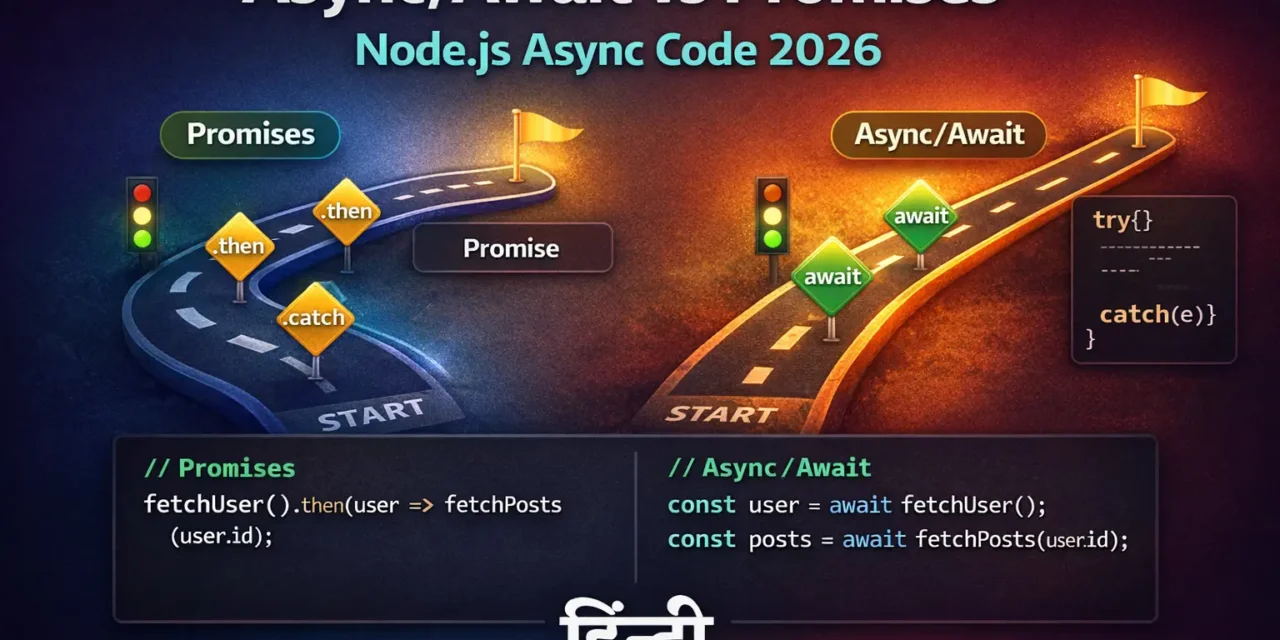
नमस्ते दोस्तों! 🙏
स्वागत है The Easy Master पर!
क्या तुमने कभी सोचा है – Node.js async code कैसे काम करता है? Callback hell, Promises, Async/Await – ये सब क्या है?
Jab tum database se data laate ho, API call karte ho, ya file read karte ho – ye sab asynchronous (एसिङ्क्रनस्) operations hain. Matlab ye turant complete nahi hote, time lagta hai.
Async Await vs Promises Hindi में समझना बहुत जरूरी है क्योंकि:
- Node.js asynchronous nature par built hai
- Interview mein pakka async/await questions puche jayenge
- Callback hell se bachna hai
- Clean, readable code likhna hai
Aaj kya seekhoge?
| Topic | Kya Seekhega? |
|---|---|
| Async Kya Hai? | Synchronous vs Asynchronous |
| Callbacks | Old way (callback hell) |
| Promises | .then() .catch() |
| Async/Await | Modern, cleaner syntax |
| Error Handling | try-catch vs .catch() |
| Promise APIs | Promise.all, Promise.race, etc. |
| Best Practices | Professional async code |
Kya tumhe pata hai?
Node.js single-threaded hai lekin non-blocking I/O operations handle kar sakta hai – ye possible hai event loop ki wajah se!
तो चलिए शुरू करते हैं – Async Await vs Promises Hindi सीखने का सफर! 🚀
Table of Contents
1. Synchronous vs Asynchronous – Introduction
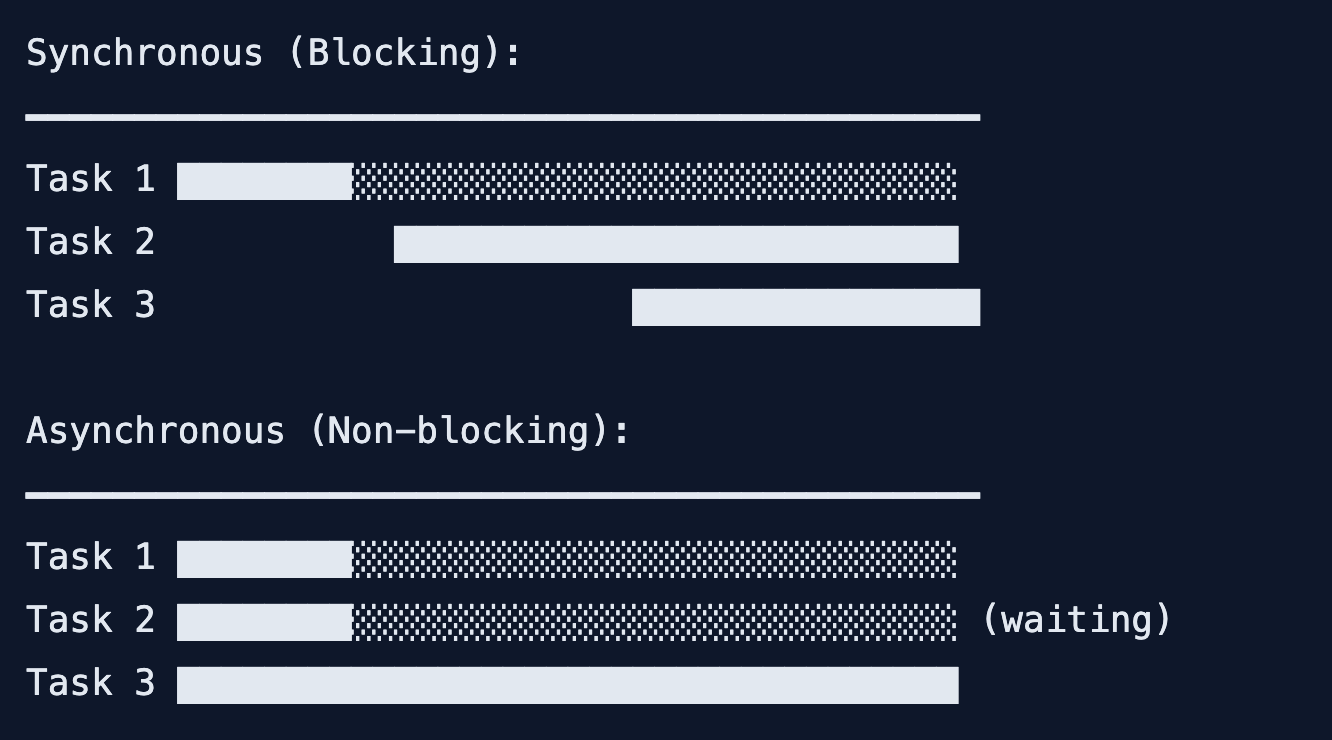
Synchronous (Blocking):
// Synchronous code – line by line execution
console.log('1. Start');

const result = fs.readFileSync('file.txt', 'utf8'); // ❌ Blocks here!
console.log('2. File content:', result);

console.log('3. End');

// Output:
// 1. Start
// (waits for file to read)
// 2. File content: Hello World
// 3. End
Asynchronous (Non-blocking):
// Asynchronous code – doesn't block
console.log('1. Start');

fs.readFile('file.txt', 'utf8', (err, result) => {
  console.log('2. File content:', result);
});

console.log('3. End');

// Output:
// 1. Start
// 3. End
// (later) 2. File content: Hello World
Visual Comparison:
2. Callbacks – The Old Way (Callback Hell)
Callback ek function hai jo async operation complete hone par call hota hai।
Basic Callback Example:
// Simple callback
function fetchUser(id, callback) {
  setTimeout(() => {
    const user = { id, name: 'Rahul', email: 'rahul@example.com' };
    callback(null, user);
  }, 1000);
}

fetchUser(1, (err, user) => {
  if (err) {
    console.error(err);
  } else {
    console.log(user);
  }
});
Callback Hell (Pyramid of Doom):
// ❌ Callback Hell – nested callbacks
getUser(1, (err, user) => {
  if (err) throw err;

  getPosts(user.id, (err, posts) => {
    if (err) throw err;

    getComments(posts[0].id, (err, comments) => {
      if (err) throw err;

      getLikes(comments[0].id, (err, likes) => {
        if (err) throw err;

        console.log(likes);
      });
    });
  });
});

// This looks like a pyramid! 👇
//     }
//   }
// }
// }
Problem with Callbacks:
| Problem | Explanation |
|---|---|
| Callback Hell | Nested callbacks, unreadable code |
| Error Handling | Har level par error check karna padta hai |
| Inversion of Control | Callback kab call hoga, pata nahi |
| Hard to Debug | Stack trace difficult |
3. Promises – The Better Way
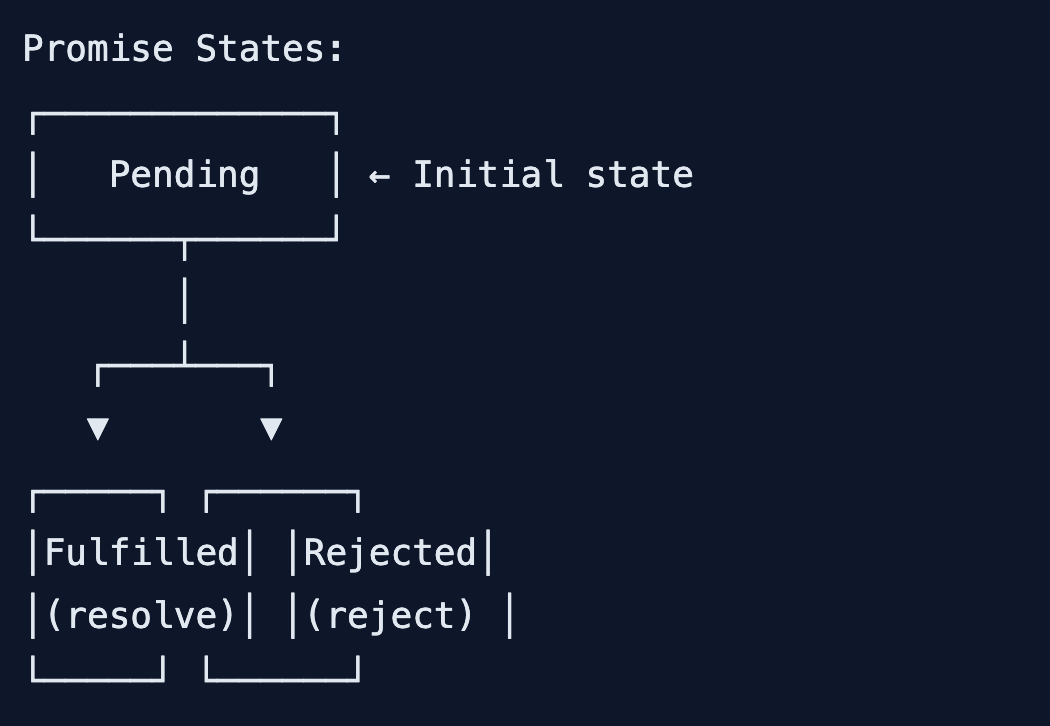
Promise ek object hai jo future value represent karta hai।
Promise States:
Creating a Promise:
// Create a promise
const myPromise = new Promise((resolve, reject) => {
  // Async operation
  setTimeout(() => {
    const success = true;

    if (success) {
      resolve({ message: 'Operation successful!' });
    } else {
      reject(new Error('Operation failed!'));
    }
  }, 1000);
});

// Using the promise
myPromise
  .then(result => console.log(result))
  .catch(error => console.error(error));
Real Promise Example:
// Function that returns a promise
function fetchUser(id) {
  return new Promise((resolve, reject) => {
    setTimeout(() => {
      const user = { id, name: 'Rahul', email: 'rahul@example.com' };

      if (user) {
        resolve(user);
      } else {
        reject(new Error('User not found'));
      }
    }, 1000);
  });
}

function fetchPosts(userId) {
  return new Promise((resolve, reject) => {
    setTimeout(() => {
      const posts = [
        { id: 1, title: 'Post 1', userId },
        { id: 2, title: 'Post 2', userId }
      ];
      resolve(posts);
    }, 1000);
  });
}

function fetchComments(postId) {
  return new Promise((resolve) => {
    setTimeout(() => {
      resolve(['Comment 1', 'Comment 2']);
    }, 1000);
  });
}

// Chaining promises (no callback hell!)
fetchUser(1)
  .then(user => {
    console.log('User:', user);
    return fetchPosts(user.id);
  })
  .then(posts => {
    console.log('Posts:', posts);
    return fetchComments(posts[0].id);
  })
  .then(comments => {
    console.log('Comments:', comments);
  })
  .catch(error => {
    console.error('Error:', error);
  });
Promise Methods:
// Promise.resolve() – immediate resolved promise
const resolvedPromise = Promise.resolve({ data: 'success' });

// Promise.reject() – immediate rejected promise
const rejectedPromise = Promise.reject(new Error('failure'));

// .finally() – runs always (success or error)
fetchUser(1)
  .then(user => console.log(user))
  .catch(err => console.error(err))
  .finally(() => console.log('Operation completed'));
4. Async/Await – The Modern Way
Async/Await promises par syntactic sugar hai – code synchronous jaisa dikhta hai, lekin async kaam karta hai।
Basic Async/Await:
// Declare async function
async function getUserData() {
  try {
    const user = await fetchUser(1);
    const posts = await fetchPosts(user.id);
    const comments = await fetchComments(posts[0].id);

    console.log('User:', user);
    console.log('Posts:', posts);
    console.log('Comments:', comments);

    return { user, posts, comments };
  } catch (error) {
    console.error('Error:', error);
  }
}

// Call async function
getUserData();
Async Function Rules:
// 1. Async function always returns a Promise
async function getNumber() {
  return 42; // Same as Promise.resolve(42)
}

getNumber().then(num => console.log(num)); // 42

// 2. Await only works inside async function
async function correct() {
  const data = await fetchData(); // ✅ Works
}

function wrong() {
  const data = await fetchData(); // ❌ Syntax error!
}

// 3. Top-level await (Node.js 14.8+ / ESM modules)
// In .mjs file or with "type": "module"
const data = await fetchData();
console.log(data);
Real Database Example:
// Without async/await (promise chains)
function getUserWithOrders(userId) {
  return db.findUser(userId)
    .then(user => {
      return db.findOrders(user.id)
        .then(orders => {
          user.orders = orders;
          return user;
        });
    })
    .catch(error => {
      console.error(error);
      throw error;
    });
}

// With async/await (cleaner!)
async function getUserWithOrders(userId) {
  try {
    const user = await db.findUser(userId);
    const orders = await db.findOrders(user.id);

    return { ...user, orders };
  } catch (error) {
    console.error('Error fetching user:', error);
    throw error;
  }
}
5. Error Handling – try-catch vs .catch()
Promise Error Handling:
// Using .catch()
fetchUser(1)
  .then(user => {
    console.log(user);
    return fetchPosts(user.id);
  })
  .then(posts => {
    console.log(posts);
  })
  .catch(error => {
    console.error('Something went wrong:', error.message);
  });
Async/Await Error Handling:
// Using try-catch
async function getData() {
  try {
    const user = await fetchUser(1);
    const posts = await fetchPosts(user.id);
    const comments = await fetchComments(posts[0].id);

    return { user, posts, comments };
  } catch (error) {
    console.error('Error:', error.message);
    // Handle error or re-throw
    throw error;
  }
}

// Specific error handling
async function getDataWithSpecificErrors() {
  try {
    const user = await fetchUser(1);
    const posts = await fetchPosts(user.id);
  } catch (error) {
    if (error.code === 'USER_NOT_FOUND') {
      console.log('User not found, redirecting to signup...');
    } else if (error.code === 'DB_CONNECTION_FAILED') {
      console.log('Database issue, try again later...');
    } else {
      console.log('Unknown error:', error);
    }
  }
}
Multiple Promise Error Handling:
// Promise.all – if any fails, all fail
async function fetchMultiple() {
  try {
    const [user, posts, comments] = await Promise.all([
      fetchUser(1),
      fetchPosts(1),
      fetchComments(1)
    ]);
    return { user, posts, comments };
  } catch (error) {
    // If ANY promise fails, this runs
    console.error('One of the requests failed:', error);
  }
}

// Promise.allSettled – wait for all, even if some fail
async function fetchMultipleSettled() {
  const results = await Promise.allSettled([
    fetchUser(1),
    fetchPosts(1),
    fetchComments(1)
  ]);

  results.forEach(result => {
    if (result.status === 'fulfilled') {
      console.log('Success:', result.value);
    } else {
      console.log('Failed:', result.reason);
    }
  });
}
6. Promise APIs – Promise.all, Promise.race, etc.
1. Promise.all – Parallel Execution
// Execute multiple promises in parallel
// Waits for ALL to complete
// If ANY fails, whole thing fails

async function parallelExample() {
  const [user, posts, comments] = await Promise.all([
    fetchUser(1),
    fetchPosts(1),
    fetchComments(1)
  ]);

  console.log('User:', user);
  console.log('Posts:', posts);
  console.log('Comments:', comments);
}

// Use case: Dashboard data
async function getDashboardData(userId) {
  const [profile, stats, notifications] = await Promise.all([
    db.getUserProfile(userId),
    db.getUserStats(userId),
    db.getUserNotifications(userId)
  ]);

  return { profile, stats, notifications };
}
2. Promise.allSettled – Don’t Fail Fast
// Waits for ALL promises to complete
// Never rejects – always resolves with status
// Good for independent operations

async function settledExample() {
  const results = await Promise.allSettled([
    fetchUser(1),
    fetchPosts(1),
    fetchThatWillFail(1) // This will fail
  ]);

  results.forEach(result => {
    if (result.status === 'fulfilled') {
      console.log('✅ Success:', result.value);
    } else {
      console.log('❌ Failed:', result.reason);
    }
  });
}
3. Promise.race – First One Wins
// Returns first promise that completes (resolves or rejects)
// Use case: Timeout implementation

function fetchWithTimeout(promise, timeoutMs) {
  const timeoutPromise = new Promise((_, reject) => {
    setTimeout(() => reject(new Error('Timeout!')), timeoutMs);
  });

  return Promise.race([promise, timeoutPromise]);
}

async function raceExample() {
  try {
    const result = await fetchWithTimeout(fetchUser(1), 5000);
    console.log('Result within timeout:', result);
  } catch (error) {
    console.log('Operation timed out or failed:', error.message);
  }
}
4. Promise.any – First Success Wins
// Returns first promise that RESOLVES (not rejects)
// Ignores rejections until all reject

async function anyExample() {
  const result = await Promise.any([
    fetchFromServer1(),
    fetchFromServer2(),
    fetchFromServer3()
  ]);

  console.log('First successful response:', result);
}

// Use case: Multiple API endpoints, use fastest one
async function getFastestPrice(productId) {
  const prices = await Promise.any([
    fetchPriceFromAmazon(productId),
    fetchPriceFromFlipkart(productId),
    fetchPriceFromMeesho(productId)
  ]);

  return prices;
}
Comparison Table:
| API | Behavior | Use Case |
|---|---|---|
Promise.all | All must succeed, fail fast | Related operations, all needed |
Promise.allSettled | All complete, never fails | Independent operations, logging |
Promise.race | First to complete (resolve/reject) | Timeout, fastest response |
Promise.any | First to resolve | Multiple sources, any will do |
7. Real-world Examples – Database, API, File Operations
Example 1: File Operations with fs.promises
const fs = require('fs').promises;
const path = require('path');

// ❌ Old way – callbacks
fs.readFile('file.txt', 'utf8', (err, data) => {
  if (err) throw err;
  console.log(data);
});

// ✅ Modern way – async/await with fs.promises
async function fileOperations() {
  try {
    // Read file
    const data = await fs.readFile('input.txt', 'utf8');
    console.log('Read:', data);

    // Write file
    await fs.writeFile('output.txt', data.toUpperCase());
    console.log('Written to output.txt');

    // Append to file
    await fs.appendFile('output.txt', '\nAppended line');
    console.log('Appended');

    // Check if file exists
    const exists = await fs.access('output.txt')
      .then(() => true)
      .catch(() => false);
    console.log('File exists:', exists);

    // Get file stats
    const stats = await fs.stat('output.txt');
    console.log('File size:', stats.size, 'bytes');

    // Read directory
    const files = await fs.readdir('./');
    console.log('Files in directory:', files);

  } catch (error) {
    console.error('File operation failed:', error.message);
  }
}

fileOperations();
Example 2: API Calls with Fetch/Axios
const axios = require('axios');

// API service class
class ApiService {
  async fetchUser(id) {
    const response = await axios.get(`https://jsonplaceholder.typicode.com/users/${id}`);
    return response.data;
  }

  async fetchPosts(userId) {
    const response = await axios.get(`https://jsonplaceholder.typicode.com/posts?userId=${userId}`);
    return response.data;
  }

  async fetchComments(postId) {
    const response = await axios.get(`https://jsonplaceholder.typicode.com/comments?postId=${postId}`);
    return response.data;
  }

  // Get all user data in parallel
  async getUserCompleteData(userId) {
    const [user, posts] = await Promise.all([
      this.fetchUser(userId),
      this.fetchPosts(userId)
    ]);

    // Get comments for first 3 posts
    const topPosts = posts.slice(0, 3);
    const commentsPromises = topPosts.map(post => this.fetchComments(post.id));
    const allComments = await Promise.all(commentsPromises);

    return {
      user,
      posts: topPosts.map((post, index) => ({
        ...post,
        comments: allComments[index]
      }))
    };
  }
}

// Usage
async function main() {
  const api = new ApiService();
  const data = await api.getUserCompleteData(1);
  console.log(JSON.stringify(data, null, 2));
}
Example 3: Database Operations (MongoDB with Mongoose)
const mongoose = require('mongoose');

// Schema
const userSchema = new mongoose.Schema({
  name: String,
  email: String,
  age: Number
});

const User = mongoose.model('User', userSchema);

// Database service
class UserService {
  async connect() {
    await mongoose.connect('mongodb://localhost:27017/test');
    console.log('Connected to database');
  }

  async createUser(userData) {
    try {
      const user = new User(userData);
      const savedUser = await user.save();
      console.log('User created:', savedUser);
      return savedUser;
    } catch (error) {
      console.error('Create failed:', error.message);
      throw error;
    }
  }

  async getUsers(filters = {}) {
    try {
      const users = await User.find(filters);
      return users;
    } catch (error) {
      console.error('Fetch failed:', error.message);
      throw error;
    }
  }

  async updateUser(id, updateData) {
    try {
      const user = await User.findByIdAndUpdate(id, updateData, { new: true });
      return user;
    } catch (error) {
      console.error('Update failed:', error.message);
      throw error;
    }
  }

  async deleteUser(id) {
    try {
      await User.findByIdAndDelete(id);
      console.log('User deleted');
    } catch (error) {
      console.error('Delete failed:', error.message);
      throw error;
    }
  }

  async transactionExample() {
    const session = await mongoose.startSession();
    session.startTransaction();

    try {
      const user1 = await User.create([{ name: 'User1' }], { session });
      const user2 = await User.create([{ name: 'User2' }], { session });

      await session.commitTransaction();
      console.log('Transaction committed');
    } catch (error) {
      await session.abortTransaction();
      console.error('Transaction aborted:', error);
    } finally {
      session.endSession();
    }
  }
}

// Usage
async function main() {
  const service = new UserService();
  await service.connect();

  await service.createUser({ name: 'Rahul', email: 'rahul@example.com', age: 25 });
  const users = await service.getUsers({ age: { $gt: 18 } });
  console.log('Adult users:', users);
}
Example 4: Combining Multiple Async Operations
// E-commerce order processing
class OrderProcessor {
  async processOrder(orderId) {
    try {
      // Step 1: Get order
      const order = await this.getOrder(orderId);

      // Step 2: Get user details
      const user = await this.getUser(order.userId);

      // Step 3: Get product details (parallel)
      const products = await Promise.all(
        order.items.map(item => this.getProduct(item.productId))
      );

      // Step 4: Check inventory (parallel)
      const inventoryChecks = await Promise.all(
        order.items.map(item => this.checkInventory(item.productId, item.quantity))
      );

      const allInStock = inventoryChecks.every(check => check.inStock);

      if (!allInStock) {
        throw new Error('Some items are out of stock');
      }

      // Step 5: Process payment
      const payment = await this.processPayment({
        userId: user.id,
        amount: order.totalAmount,
        method: order.paymentMethod
      });

      // Step 6: Update inventory (parallel)
      await Promise.all(
        order.items.map(item => this.updateInventory(item.productId, item.quantity))
      );

      // Step 7: Send notifications (parallel, don't fail)
      await Promise.allSettled([
        this.sendEmailConfirmation(user.email, order),
        this.sendSMSNotification(user.phone, order),
        this.pushNotification(user.deviceToken, order)
      ]);

      // Step 8: Update order status
      const updatedOrder = await this.updateOrderStatus(orderId, 'completed');

      return {
        success: true,
        order: updatedOrder,
        payment,
        message: 'Order processed successfully!'
      };

    } catch (error) {
      console.error('Order processing failed:', error);
      await this.updateOrderStatus(orderId, 'failed');
      throw error;
    }
  }

  // Helper methods (simulated)
  async getOrder(id) { /* fetch from DB */ }
  async getUser(id) { /* fetch from DB */ }
  async getProduct(id) { /* fetch from DB */ }
  async checkInventory(productId, quantity) { /* check stock */ }
  async processPayment(details) { /* payment gateway */ }
  async updateInventory(productId, quantity) { /* update stock */ }
  async sendEmailConfirmation(email, order) { /* email service */ }
  async sendSMSNotification(phone, order) { /* SMS service */ }
  async pushNotification(token, order) { /* push notification */ }
  async updateOrderStatus(id, status) { /* update DB */ }
}
8. Async/Await vs Promises – Comparison
| Feature | Promises (.then/.catch) | Async/Await |
|---|---|---|
| Syntax | Chain methods | Synchronous-like |
| Readability | Good for simple chains | Excellent for complex flows |
| Error Handling | .catch() at end | try-catch blocks |
| Debugging | Harder (stack traces) | Easier (like sync code) |
| Multiple awaits | Needs Promise.all | Clean with await |
| Conditional logic | Messy | Clean (if/else) |
| Learning curve | Moderate | Easy (if you know try-catch) |
Code Comparison:
// PROMISES
function getData() {
  return fetchUser(1)
    .then(user => {
      if (user.isActive) {
        return fetchPosts(user.id)
          .then(posts => {
            const topPost = posts[0];
            return fetchComments(topPost.id)
              .then(comments => ({ user, posts, comments }));
          });
      } else {
        return { user, posts: [], comments: [] };
      }
    })
    .catch(error => {
      console.error(error);
      return { error: error.message };
    });
}

// ASYNC/AWAIT
async function getData() {
  try {
    const user = await fetchUser(1);

    if (!user.isActive) {
      return { user, posts: [], comments: [] };
    }

    const posts = await fetchPosts(user.id);
    const comments = await fetchComments(posts[0].id);

    return { user, posts, comments };
  } catch (error) {
    console.error(error);
    return { error: error.message };
  }
}
When to Use What:
| Use Promises When… | Use Async/Await When… |
|---|---|
| Simple chains (2-3 promises) | Complex flows with many steps |
| Need Promise.all/race | Need try-catch error handling |
| Working with Promise APIs | Need conditional async logic |
| Legacy codebase | New projects (2024+) |
9. Common Mistakes + Solutions
Mistake 1: Forgetting await
// ❌ Missing await – returns promise, not value
async function getUser() {
  const user = fetchUser(1); // Promise, not user!
  console.log(user); // Promise { <pending> }
}

// ✅ Add await
async function getUser() {
  const user = await fetchUser(1);
  console.log(user); // Actual user object
}
Mistake 2: Not using try-catch in async functions
// ❌ No error handling
async function getData() {
  const user = await fetchUser(1); // If fails, app crashes!
  return user;
}

// ✅ With error handling
async function getData() {
  try {
    const user = await fetchUser(1);
    return user;
  } catch (error) {
    console.error('Failed:', error);
    return null;
  }
}
Mistake 3: Sequential instead of parallel
// ❌ Sequential – slow (3 seconds)
async function getData() {
  const user = await fetchUser(1);     // 1 sec
  const posts = await fetchPosts(1);   // 1 sec
  const comments = await fetchComments(1); // 1 sec
  // Total: 3 seconds
}

// ✅ Parallel – fast (1 second)
async function getData() {
  const [user, posts, comments] = await Promise.all([
    fetchUser(1),
    fetchPosts(1),
    fetchComments(1)
  ]);
  // Total: 1 second
}
Mistake 4: Async function returning value directly
// ❌ Returning value, not promise
async function getNumber() {
  return 42;
}

const result = getNumber(); // Promise, not 42!

// ✅ Await or .then
const result = await getNumber(); // 42
// OR
getNumber().then(num => console.log(num));
Mistake 5: Forgetting to handle Promise.all rejection
// ❌ If any fails, whole thing fails
const [user, posts] = await Promise.all([
  fetchUser(1),
  fetchThatMayFail() // If this fails, everything fails
]);

// ✅ Use allSettled for independent operations
const results = await Promise.allSettled([
  fetchUser(1),
  fetchThatMayFail()
]);

const user = results[0].status === 'fulfilled' ? results[0].value : null;
10. Quick Cheat Sheet
Promise Creation:
// Resolve
Promise.resolve(value);

// Reject
Promise.reject(error);

// New promise
new Promise((resolve, reject) => {
  // async work
  resolve(value);
  // or
  reject(error);
});
Promise Methods:
Promise.all([p1, p2])      // All must succeed
Promise.allSettled([p1, p2]) // All complete, never fails
Promise.race([p1, p2])     // First to complete
Promise.any([p1, p2])      // First to resolve
Async/Await Patterns:
// Basic
async function fn() {
  const result = await promise;
  return result;
}

// Error handling
async function fn() {
  try {
    const result = await promise;
    return result;
  } catch (error) {
    console.error(error);
    throw error;
  }
}

// Parallel
async function fn() {
  const [a, b] = await Promise.all([promise1, promise2]);
  return { a, b };
}
11. FAQ
Q1: Async Await vs Promises Hindi में सबसे important concept kya hai?
Async function hamesha Promise return karta hai, aur await sirf async function ke andar use hota hai – ye golden rule yaad rakho!
Q2: Callback hell kya hota hai?
Nested callbacks ki chain – code pyramid jaisa dikhta hai, difficult to read and maintain.
Q3: Promise vs Callback – kya better hai?
Promise better hai – chaining, error handling, readability – sab better hai.
Q4: Async/Await promise se kya better hai?
Code synchronous jaisa dikhta hai – try-catch error handling, conditional logic easy।
Q5: Promise.all vs Promise.allSettled – kya antar hai?all – ek fail to sab fail (fail fast)। allSettled – sab complete hone tak wait karega, kabhi fail nahi hoga।
Q6: Kya async function mein await bina bhi use kar sakte hain?
Haan, lekin phir function immediately promise return karega aur async code background mein chalega।
Q7: Top-level await kya hai?
Module level par await use kar sakte ho (ESM modules mein)। Node.js mein .mjs file ya “type”: “module” se kaam karta hai।
Q8: Promise chain mein error kaise handle karein?.catch() at the end – ek catch multiple .then ke errors handle karega।
Q9: Async function ko call karne par kya return hota hai?
Promise return hota hai – actual value ke liye await ya .then use karo।
Q10: Node.js mein async code kyun important hai?
Node.js single-threaded hai – blocking operations se server slow हो जाता है। Async code non-blocking रहता है।
12. Conclusion
बहुत बढ़िया दोस्तों! आज हमने Async Await vs Promises Hindi को पूरी detail में समझा।
Quick Recap:
| Concept | Key Takeaway |
|---|---|
| Callbacks | Old way, callback hell problem |
| Promises | .then(), .catch(), chaining |
| Async/Await | Modern, synchronous-like syntax |
| Promise APIs | all, race, allSettled, any |
| Error Handling | try-catch vs .catch() |
Mera personal experience:
Callback hell se bohot frustration hoti thi – nested callbacks debug karna mushkil। Promises ne thoda better kiya, lekin async/await ne code likhna aur padhna bohot easy kar diya। Ab toh sirf async/await use karta hoon!
Tum bhi ye steps follow karo:
- ✅ Callback se promise mein migrate karo
- ✅ Promise chaining practice karo
- ✅ Async/await seekho
- ✅ Promise.all se parallel calls karo
- ✅ Error handling proper karo
अब तुम्हारी बारी है!
नीचे comment में बताओ:
- तुम async/await use karoge ya promises?
- क्या तुमने कभी callback hell experience kiya hai?
- अगला topic क्या चाहिए? (Docker? GraphQL? Microservices?)
The Easy Master पर बने रहो। Happy Async Coding! 🚀💻
Resources
Additional Resources
- React.js Kya Hai? JSX aur Components Samjhe – Beginner Guide 2026
- React Props and State Data Flow Hindi – समझे आसान भाषा में 2026
- React Router v6 – Multi-Page App Banaye (Routing Guide) 2026
- Advanced React Hooks – useContext and useReducer Samjhe 2026
- Redux Toolkit Simplified – State Management Aasaan Tarika 2026
- React API Integration Made Easy with Fetch and Axios
- React Performance Optimization – App Ko Fast कैसे बनाएं 2026
- React 19 New Features – AI Integration with React (2026)
- Node.js क्या है? 2026 में अपना पहला Backend Server बनाएँ
- NPM Packages कैसे इंस्टॉल करें? Modules (ESM vs CommonJS) 2026
- Express.js Tutorial – REST API Routing और Middleware समझे 2026
- Prisma ORM MongoDB से Database Connect कैसे करें – Easy Tutorial Hindi
- JWT Authentication Node.js – Secure Login System बनाए 2026
- WebSockets Node.js – Live Chat App कैसे बनाएं (Socket.io)