नमस्ते दोस्तों! 🙏
स्वागत है The Easy Master पर!
क्या तुमने कभी सोचा है – Node.js mein packages install kaise karte hain? Aur require vs import – kya antar hai?
Jab tum Node.js project banate ho, toh tum kuch bhi scratch se nahi likhte – tum packages use karte ho:
- Express.js (server banane ke liye)
- Mongoose (database ke liye)
- Bcrypt (password hash karne ke liye)
- JSON Web Token (authentication ke liye)
NPM packages install modules Hindi में समझना बहुत जरूरी है क्योंकि:
- 2M+ packages available hai NPM par
- Har Node.js project packages use karta hai
- ESM vs CommonJS – modern vs old module system
- Interview questions mein pakka puchega!
Aaj kya seekhoge?
| Topic | Kya Seekhega? |
|---|---|
| NPM Kya Hai? | Node Package Manager introduction |
| NPM Commands | Install, uninstall, update, audit |
| package.json | Dependencies manage karna |
| node_modules | Folder structure samjhena |
| CommonJS | require() module system |
| ESM (ES Modules) | import/export modern system |
| ESM vs CommonJS | Comparison aur kab kya use karein |
| TypeScript Modules | TS mein module config |
Kya tumhe pata hai?
NPM par 2 million+ packages available hain – aur har din 1000+ naye packages add hote hain! 😮
तो चलिए शुरू करते हैं – NPM packages install modules Hindi सीखने का सफर! 🚀
Table of Contents
1. NPM क्या है? Node.js Package Manager Introduction
NPM ka full form hai Node Package Manager – ye Node.js ka official package manager hai।
NPM Kya Karta Hai?
| Feature | Explanation |
|---|---|
| Packages Install | Express, Mongoose, React – sab NPM se install |
| Version Management | Package ka specific version install karna |
| Dependencies Tracking | package.json mein sab track rehta hai |
| Sharing Code | Apna package publish kar sakte ho |
| Scripts Run | npm start, npm test jaise scripts |
NPM ke 3 Main Parts:
┌─────────────────────────────────────────────┐
│                  NPM                        │
├─────────────────────────────────────────────┤
│  1. Website – packages search karne ke liye  │
│     (https://www.npmjs.com)                  │
│                                              │
│  2. CLI – command line tool                  │
│     (npm install, npm start)                 │
│                                              │
│  3. Registry – packages ka database           │
│     (2M+ packages stored here)               │
└─────────────────────────────────────────────┘
NPM packages install modules Hindi mein aaj hum NPM commands aur modules (CommonJS vs ESM) dono cover karenge।
2. NPM Installation and Setup
Step 1: Node.js Install Karna
NPM Node.js ke saath automatically install ho jata hai।
# Check if Node.js is installed
node --version
# Output: v24.0.0

# Check if NPM is installed
npm --version
# Output: 10.x.x
Step 2: Pehla Project Setup
# Create project folder
mkdir my-npm-project
cd my-npm-project

# Initialize NPM project
npm init

# OR quick init (skip questions)
npm init -y
Step 3: package.json Created
npm init -y run karne se ye file banti hai:
{
  "name": "my-npm-project",
  "version": "1.0.0",
  "description": "",
  "main": "index.js",
  "scripts": {
    "test": "echo \"Error: no test specified\" && exit 1"
  },
  "keywords": [],
  "author": "",
  "license": "ISC"
}
3. Pehla Package Install Karna
Install a Package:
# Install express (production dependency)
npm install express

# Install nodemon (development dependency)
npm install -D nodemon

# Install globally
npm install -g npm-check-updates
After Installation:
# package.json now has dependencies
{
  "dependencies": {
    "express": "^4.18.2"
  },
  "devDependencies": {
    "nodemon": "^3.0.0"
  }
}
Using Installed Package:
// index.js
const express = require('express');

const app = express();
const PORT = 3000;

app.get('/', (req, res) => {
  res.json({ message: 'Hello from Express!' });
});

app.listen(PORT, () => {
  console.log(`Server running on port ${PORT}`);
});
Important NPM Commands:
| Command | Karta Kya Hai? |
|---|---|
npm install | package.json ke sab packages install |
npm install express | Express install aur package.json mein add |
npm install -D nodemon | Dev dependency install |
npm install -g nodemon | Globally install (system level) |
npm uninstall express | Package remove karna |
npm update | Sab packages update |
npm outdated | Outdated packages dikhana |
npm audit | Security vulnerabilities check |
npm audit fix | Vulnerabilities auto fix |
4. package.json – Project Ka Heart
package.json project ki identity card hai – ye batata hai ki project mein kya-kya hai।
Complete package.json Example:
{
  "name": "ecommerce-api",
  "version": "1.0.0",
  "description": "E-commerce API built with Node.js and Express",
  "main": "server.js",
  "type": "module",
  "scripts": {
    "start": "node server.js",
    "dev": "nodemon server.js",
    "test": "jest",
    "build": "npm run lint && npm run test",
    "lint": "eslint ."
  },
  "dependencies": {
    "express": "^4.18.2",
    "mongoose": "^8.0.0",
    "dotenv": "^16.3.1",
    "bcrypt": "^5.1.1",
    "jsonwebtoken": "^9.0.2"
  },
  "devDependencies": {
    "nodemon": "^3.0.0",
    "jest": "^29.7.0",
    "eslint": "^8.56.0"
  },
  "keywords": ["api", "ecommerce", "nodejs", "express"],
  "author": "Rahul Sharma",
  "license": "MIT",
  "engines": {
    "node": ">=18.0.0",
    "npm": ">=9.0.0"
  }
}
Version Numbers Explained:
| Symbol | Meaning | Example |
|---|---|---|
^4.18.2 | Compatible version (4.x.x) | ^4.18.2 means 4.18.2, 4.19.0, 4.20.0 |
~4.18.2 | Approximately equivalent (4.18.x) | ~4.18.2 means 4.18.2, 4.18.3, 4.18.9 |
4.18.2 | Exact version | Sirf 4.18.2 install hoga |
* | Latest version | Always latest (risky!) |
>=4.0.0 | Greater than or equal | 4.0.0, 5.0.0, 6.0.0 |
5. node_modules – Packages Store Hain Yahan
node_modules Folder Structure:
my-project/
├── node_modules/          # 📦 Sab packages yahan install hote hain
│   ├── express/           # Express package
│   │   ├── index.js
│   │   ├── package.json
│   │   └── lib/
│   ├── mongoose/          # Mongoose package
│   ├── dotenv/            # Dotenv package
│   └── ... (hundreds of files)
├── package.json
├── package-lock.json
└── index.js
package-lock.json Kya Hai?
- Exact versions track karta hai
- Dependency tree store karta hai
- Auto-generated – manually edit mat karo
- Git commit karo (taaki exact versions sabko mile)
// package-lock.json (auto-generated)
{
  "name": "my-project",
  "lockfileVersion": 3,
  "requires": true,
  "packages": {
    "node_modules/express": {
      "version": "4.18.2",
      "resolved": "https://registry.npmjs.org/express/-/express-4.18.2.tgz",
      "integrity": "sha512-...",
      "dependencies": {
        "accepts": "~1.3.8",
        "body-parser": "1.20.1"
      }
    }
  }
}
node_modules ko Git Ignore Karo:
# .gitignore
node_modules/
.env
.DS_Store
6. CommonJS Modules: require() का पुराना जमाना
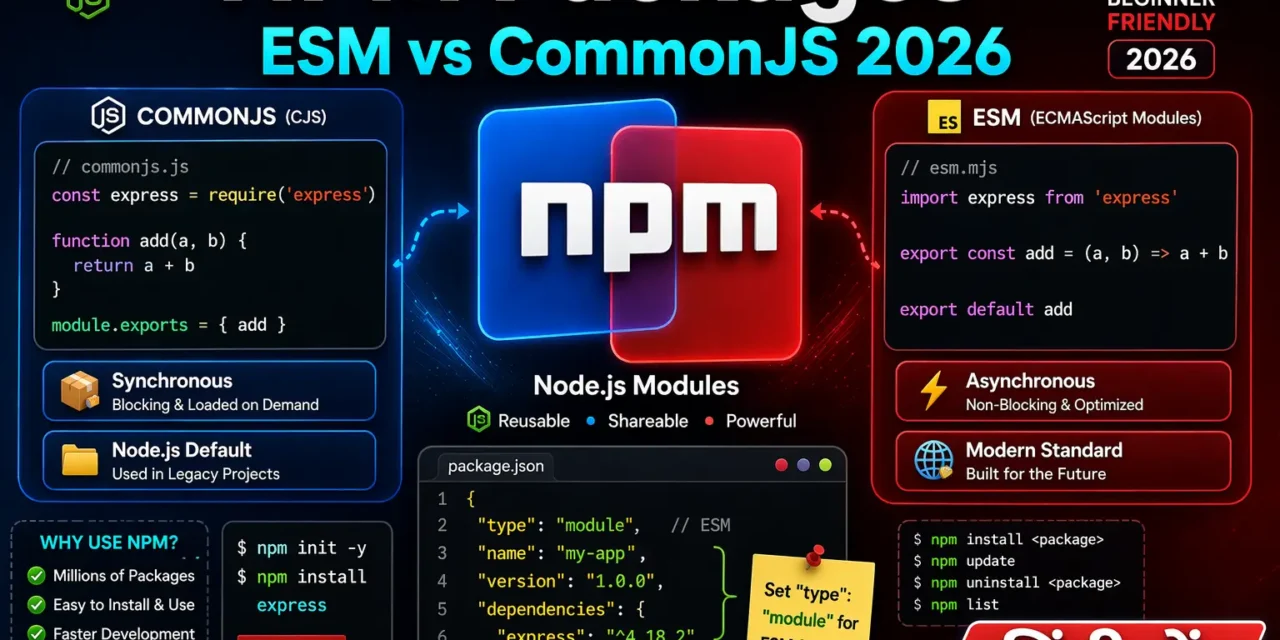
CommonJS Node.js ka default module system hai – require() aur module.exports use karta hai।
Exporting in CommonJS:
// math.js (CommonJS)
function add(a, b) {
  return a + b;
}

function subtract(a, b) {
  return a - b;
}

const PI = 3.14159;

// Export multiple things
module.exports = {
  add,
  subtract,
  PI
};

// OR export one by one
// exports.add = add;
// exports.subtract = subtract;
Importing in CommonJS:
// app.js (CommonJS)
const math = require('./math.js');

console.log(math.add(5, 3));     // 8
console.log(math.subtract(5, 3)); // 2
console.log(math.PI);             // 3.14159

// Destructuring
const { add, subtract, PI } = require('./math.js');
console.log(add(10, 5)); // 15
Built-in Modules:
// Node.js built-in modules – no install needed!
const fs = require('fs');        // File system
const path = require('path');    // Path utilities
const http = require('http');    // HTTP server
const crypto = require('crypto'); // Cryptography
const os = require('os');        // Operating system

console.log(os.platform());      // 'win32' or 'linux'
console.log(path.join('folder', 'file.txt')); // 'folder/file.txt'
Third-party Modules (Installed via NPM):
// Third-party modules – need npm install first!
const express = require('express');
const mongoose = require('mongoose');
const jwt = require('jsonwebtoken');

// Use them
const app = express();
7. ESM (ES Modules) – Modern Tarika
ESM (ECMAScript Modules) JavaScript ka official module system hai – import/export use karta hai।
Enabling ESM in Node.js:
Method 1: "type": "module" in package.json
// package.json
{
  "name": "my-project",
  "type": "module",  // ✅ Enable ESM
  "dependencies": {
    "express": "^4.18.2"
  }
}
Method 2: .mjs file extension
// math.mjs – ESM file
export function add(a, b) {
  return a + b;
}

export const PI = 3.14159;
Exporting in ESM:
// math.js (ESM)
// Named exports
export function add(a, b) {
  return a + b;
}

export function subtract(a, b) {
  return a - b;
}

export const PI = 3.14159;

// Default export (only one per module)
export default function multiply(a, b) {
  return a * b;
}
Importing in ESM:
// app.js (ESM)
// Named imports
import { add, subtract, PI } from './math.js';

// Default import
import multiply from './math.js';

// Import everything as object
import * as math from './math.js';

console.log(add(5, 3));        // 8
console.log(multiply(5, 3));   // 15
console.log(math.PI);           // 3.14159
Dynamic Imports (Lazy Loading):
// ESM – dynamic import (lazy loading)
const module = await import('./math.js');
console.log(module.add(5, 3));

// Conditional import
if (condition) {
  const { encrypt } = await import('./crypto.js');
  encrypt(data);
}
Importing JSON in ESM:
// ESM – need import assertion
import data from './config.json' assert { type: 'json' };

console.log(data.apiUrl);
8. ESM vs CommonJS – Comparison
| Feature | CommonJS (require) | ESM (import/export) |
|---|---|---|
| Syntax | const x = require('x') | import x from 'x' |
| Default | Node.js default | Need "type": "module" |
| Loading | Synchronous | Asynchronous |
| Tree Shaking | ❌ No | ✅ Yes |
| Top-level await | ❌ No | ✅ Yes |
| Browser support | ❌ No | ✅ Yes |
| Dynamic imports | require() | import() |
| __dirname | ✅ Available | ❌ Need import.meta.url |
| File extension | .js | .js with "type": "module" or .mjs |
Code Comparison:
// ========== CommonJS ==========
// math.cjs
function add(a, b) { return a + b; }
module.exports = { add };

// app.cjs
const { add } = require('./math.cjs');
console.log(add(2, 3));

// ========== ESM ==========
// math.mjs
export function add(a, b) { return a + b; }

// app.mjs
import { add } from './math.mjs';
console.log(add(2, 3));
__dirname in ESM:
// CommonJS – __dirname available
console.log(__dirname); // /home/user/project

// ESM – need to create __dirname
import { fileURLToPath } from 'url';
import { dirname } from 'path';

const __filename = fileURLToPath(import.meta.url);
const __dirname = dirname(__filename);

console.log(__dirname); // /home/user/project
When to Use What:
| Use CommonJS If… | Use ESM If… |
|---|---|
| Old Node.js project | New project (2024+) |
Need __dirname easily | Browser + Node.js same code |
| Many legacy packages | Need tree shaking |
| Simpler setup | Need top-level await |
9. TypeScript Modules – tsconfig.json Setup
Installing TypeScript:
npm install -D typescript @types/node
npx tsc --init
tsconfig.json for CommonJS:
{
  "compilerOptions": {
    "target": "ES2020",
    "module": "CommonJS",      // Output CommonJS
    "moduleResolution": "node",
    "outDir": "./dist",
    "rootDir": "./src",
    "strict": true,
    "esModuleInterop": true
  }
}
tsconfig.json for ESM:
{
  "compilerOptions": {
    "target": "ES2020",
    "module": "ESNext",         // Output ESM
    "moduleResolution": "bundler",
    "outDir": "./dist",
    "rootDir": "./src",
    "strict": true,
    "esModuleInterop": true,
    "resolveJsonModule": true
  }
}
TypeScript Code Example:
// src/math.ts (TypeScript)
export function add(a: number, b: number): number {
  return a + b;
}

export const PI = 3.14159;

// src/app.ts
import { add, PI } from './math.js'; // Note: .js extension in import!

console.log(add(5, 3));
console.log(PI);
package.json scripts for TypeScript:
{
  "scripts": {
    "build": "tsc",
    "start": "node dist/app.js",
    "dev": "tsx watch src/app.ts"
  },
  "devDependencies": {
    "typescript": "^5.3.0",
    "tsx": "^4.6.0",
    "@types/node": "^20.10.0"
  }
}
10. Popular NPM Packages 2026
Must-Have Packages for Backend:
| Package | Purpose | Install Command |
|---|---|---|
| express | Web framework | npm install express |
| mongoose | MongoDB ODM | npm install mongoose |
| dotenv | Environment variables | npm install dotenv |
| bcrypt | Password hashing | npm install bcrypt |
| jsonwebtoken | JWT authentication | npm install jsonwebtoken |
| cors | Cross-origin requests | npm install cors |
| helmet | Security headers | npm install helmet |
| morgan | HTTP logging | npm install morgan |
| joi | Validation | npm install joi |
| nodemailer | Email sending | npm install nodemailer |
Must-Have Dev Dependencies:
| Package | Purpose | Install Command |
|---|---|---|
| nodemon | Auto-restart server | npm install -D nodemon |
| jest | Testing framework | npm install -D jest |
| eslint | Code linting | npm install -D eslint |
| prettier | Code formatting | npm install -D prettier |
| typescript | TypeScript support | npm install -D typescript |
Complete Example with Multiple Packages:
# Create project
mkdir my-api
cd my-api
npm init -y

# Install all dependencies
npm install express mongoose dotenv bcrypt jsonwebtoken cors helmet morgan joi

# Install dev dependencies
npm install -D nodemon jest eslint prettier// server.js (ESM style)
import express from 'express';
import mongoose from 'mongoose';
import dotenv from 'dotenv';
import cors from 'cors';
import helmet from 'helmet';
import morgan from 'morgan';
import bcrypt from 'bcrypt';
import jwt from 'jsonwebtoken';
dotenv.config();
const app = express();
// Middleware
app.use(express.json());
app.use(cors());
app.use(helmet());
app.use(morgan('dev'));
const PORT = process.env.PORT || 3000;
app.get('/', (req, res) => {
res.json({ message: 'API is running!' });
});
app.listen(PORT, () => {
console.log(`Server running on port ${PORT}`);
});11. Common Mistakes + Solutions
Mistake 1: import in CommonJS project
// ❌ Error: Cannot use import statement outside a module
import express from 'express';

// ✅ Solution – use require
const express = require('express');

// OR set "type": "module" in package.json
Mistake 2: Forgetting ./ for local files
// ❌ Error – Node.js thinks it's a core module
const math = require('math.js');

// ✅ Correct – local file needs ./
const math = require('./math.js');
Mistake 3: Missing file extension in ESM
// ❌ Error – ESM needs file extension
import { add } from './math';

// ✅ Correct
import { add } from './math.js';
Mistake 4: Not adding "type": "module" for ESM
// ❌ ESM code but package.json has no "type": "module"
import express from 'express'; // Error!

// ✅ Add to package.json
{
  "type": "module"
}
Mistake 5: Installing wrong package
# ❌ Wrong – no such package
npm install bcryptjs-instead

# ✅ Check exact name on npmjs.com first
npm install bcrypt
Mistake 6: Not saving to package.json
# ❌ Package installs but not saved
npm install express

# ✅ Save to dependencies
npm install express --save

# ✅ Save to devDependencies
npm install nodemon --save-dev
12. Quick Cheat Sheet
NPM Commands:
| Command | Purpose |
|---|---|
npm init -y | Create package.json |
npm install | Install all dependencies |
npm install express | Install package |
npm install -D nodemon | Install dev dependency |
npm install -g npm | Install globally |
npm uninstall express | Remove package |
npm update | Update all packages |
npm outdated | Check outdated packages |
npm audit | Check vulnerabilities |
npm run dev | Run custom script |
CommonJS vs ESM:
| CommonJS | ESM |
|---|---|
const x = require('x') | import x from 'x' |
module.exports = {} | export default {} |
exports.fn = () => {} | export const fn = () => {} |
require('./file') | import './file.js' |
| Synchronous | Asynchronous |
| No top-level await | Top-level await ✅ |
package.json Scripts:
{
  "scripts": {
    "start": "node server.js",
    "dev": "nodemon server.js",
    "test": "jest",
    "build": "tsc",
    "lint": "eslint .",
    "format": "prettier --write ."
  }
}
13. FAQ
Q1: NPM packages install modules Hindi में सबसे important command kya hai?npm init -y (project start) aur npm install express (package install) – ye do commands sabse zyada use hoti hain।
Q2: npm install aur npm ci mein kya antar hai?npm install package.json ke hisaab se latest compatible versions install karta hai। npm ci package-lock.json ke exact versions install karta hai – CI/CD pipelines ke liye।
Q3: dependencies vs devDependencies – kya antar hai?dependencies – production mein bhi chahiye (express, mongoose)। devDependencies – sirf development mein (nodemon, jest, eslint)。
Q4: CommonJS vs ESM – 2026 mein kya use karein?
New projects mein ESM use karo – ye future hai। Old projects maintain kar rahe ho toh CommonJS bhi chalega।
Q5: node_modules folder ko git mein commit karna chahiye?
Nahi! .gitignore mein daalo – bahut bada folder hai (100MB+), aur packages reinstalled ho sakte hain।
Q6: package-lock.json commit karna chahiye?
Haan! Isse sab developers ko exact same versions milte hain – production mein surprise bugs nahi aate।
Q7: Global packages kyun avoid karein?
Global packages project-specific nahi hote – team members ke paas same version nahi ho sakta। Project-specific install karo।
Q8: NPM vs Yarn vs pnpm – kya use karein?
NPM default hai (Node.js ke saath aata hai)। Yarn fast tha pehle, ab NPM bhi fast hai। pnpm disk space save karta hai। NPM 2026 mein recommended hai।
Q9: Security vulnerabilities kaise check karein?npm audit – vulnerabilities dikhata hai। npm audit fix – auto fix karta hai। Always run before production deploy!
Q10: Kya ESM mein __dirname available hai?
Nahi, but create kar sakte ho:
import { fileURLToPath } from 'url';
import { dirname } from 'path';
const __dirname = dirname(fileURLToPath(import.meta.url));
14. Conclusion
बहुत बढ़िया दोस्तों! आज हमने NPM packages install modules Hindi को पूरी detail में समझा।
Quick Recap:
| Concept | Key Takeaway |
|---|---|
| NPM | Node.js package manager – 2M+ packages |
| package.json | Project ki identity card |
| CommonJS | require() – old but still used |
| ESM | import/export – modern, future |
| node_modules | Packages store hota hai yahan |
Mera personal experience:
जब मैंने पहली बार NPM seekha, toh require vs import se bohot confuse tha। Ek project mein CommonJS tha, dusre mein ESM – error aate the। Ab samajh aa gaya hai – dono ka use case alag hai।
Tum bhi ye steps follow karo:
- ✅
npm init -yse project start karo - ✅ Kuch packages install karo (express, nodemon)
- ✅ CommonJS mein module export/import karo
- ✅
"type": "module"se ESM try karo - ✅
npm auditsecurity check karo
अब तुम्हारी बारी है!
नीचे comment में बताओ:
- तुम CommonJS use karoge ya ESM? क्यों?
- तुम्हें कौन सा NPM command sabse useful laga?
- अगला topic क्या चाहिए? (Express.js Deep Dive? MongoDB? JWT Authentication?)
The Easy Master पर बने रहो। Happy NPM-ing! 📦🚀
Resources
Additional Resources
- Master ES6: A Complete Feature Guide with Examples
- Top 10 React Libraries and Tools Every Developer Must Know in 2025
- Top 10 Free APIs for Practice in 2026
- JavaScript Deep Dive 2026: Closures, Promises & Event Loop
- TypeScript Modules Export Import Best Practices – समझे आसान भाषा में 2026
- React.js Kya Hai? JSX aur Components Samjhe – Beginner Guide 2026
- React Props and State Data Flow Hindi – समझे आसान भाषा में 2026
- React Router v6 – Multi-Page App Banaye (Routing Guide) 2026
- Advanced React Hooks – useContext and useReducer Samjhe 2026
- Redux Toolkit Simplified – State Management Aasaan Tarika 2026
- React API Integration Made Easy with Fetch and Axios
- React Performance Optimization – App Ko Fast कैसे बनाएं 2026
- React 19 New Features – AI Integration with React (2026)
- Node.js क्या है? 2026 में अपना पहला Backend Server बनाएँ