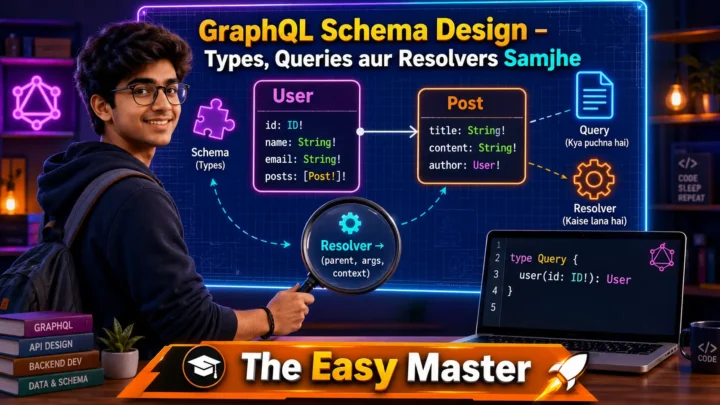
नमस्ते दोस्तों!
स्वागत है The Easy Master पर!
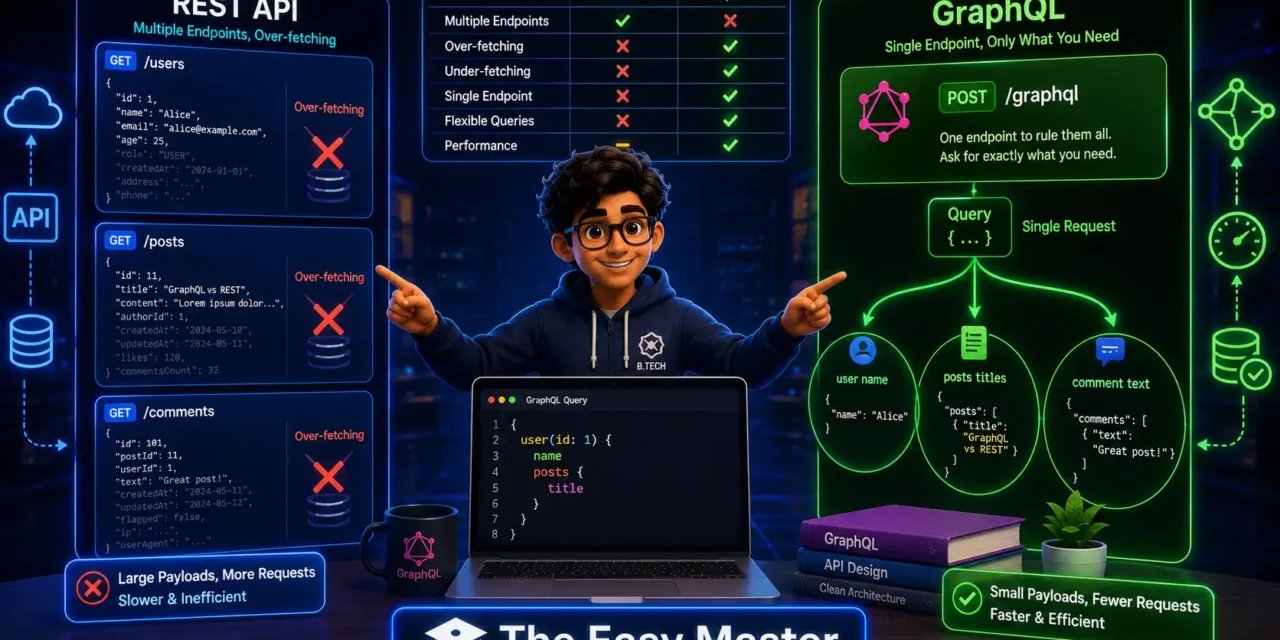
आपने REST APIs बनाई होंगी – FastAPI, Node.js Express, ya Django REST framework से। REST API ka structure simple hota hai – alag-alag endpoints for different resources (/users, /posts, /comments). Lekin kya kabhi aapne mehsoos kiya ki REST API mein over-fetching aur under-fetching ki problem hoti hai?
Jaise mobile app ke liye sirf user ka naam aur email chahiye, par REST API pure user object (including password hash, created_at, etc.) bhej deti hai – ye over-fetching hai. Ya phir ek page ke liye 3-4 alag API calls karne padhte hain – ye under-fetching aur network chattiness hai.
Yahan par GraphQL aata hai. GraphQL ek query language aur runtime hai jo clients ko exactly wahi data lene ki power deta hai jo unhe chahiye – na zyada, na kam. Aap ek hi query mein related data (user + unke posts + posts ke comments) le sakte ho, sirf ek endpoint se.
Is GraphQL introduction in Hindi article mein main aapko sikhata hoon:
✅ GraphQL kya hai – simple definition aur history
✅ REST API vs GraphQL – real differences (tables, examples)
✅ Core concepts – Schema, Types, Queries, Mutations, Subscriptions
✅ GraphQL over HTTP – ek hi endpoint /graphql
✅ Resolvers – data kaise fetch hota hai
✅ Hands-on – FastAPI + Strawberry se simple GraphQL API banayein
✅ GraphQL advantages and disadvantages
✅ Real-world use cases – kab GraphQL choose karein, kab REST
✅ Common mistakes aur best practices
Chaliye REST vs GraphQL ki ladai samajhte hain aur dekhte hain ki aapke next project ke liye kaunsa better hai! 🚀
Table of Contents
1. GraphQL Kya Hai? – A New Way to API
GraphQL एक query language aur server-side runtime hai for APIs. Ye Facebook (now Meta) ne 2012 mein internally develop kiya aur 2015 mein open-source kar diya.
Simple definition:
GraphQL aapko ek single endpoint (/graphql) provide karta hai. Client us endpoint par query bhejta hai – exactly specifying ki usse kaunsa data chahiye. Server wahi data return karta hai, kuch zyada nahi. One endpoint, one request, one response – exactly as needed.
REST mindset:
Multiple endpoints (/users/1, /users/1/posts, /posts/1/comments). Client ko multiple requests bhejni padti hai ya ek “fat” response bhejna padta hai jisme se kuch fields waste ho jati hain.
GraphQL mindset:
One endpoint /graphql. Client ek query likhta hai:
graphql
query {
  user(id: 1) {
    name
    email
    posts {
      title
      comments {
        text
      }
    }
  }
}
Server exactly wahi data return karega – nested structure mein, sirf requested fields ke saath.
Why GraphQL was born?
Facebook ke mobile app mein REST API ke saath performance issues the. Over-fetching (zyada data bhejna) aur under-fetching (bar bar request bhejna) se user experience kharab ho raha tha. Isliye unhone GraphQL banaya – jisse client exact data maang sake aur server sirf wahi bheje.
2. REST API – Recap aur Problems
Before GraphQL, let’s recall how REST APIs work and what problems they have.
REST API typical structure:
| Resource | Endpoint | Method | Response |
|---|---|---|---|
| List users | /users | GET | Array of user objects |
| Single user | /users/1 | GET | One user object |
| User’s posts | /users/1/posts | GET | Array of posts |
| Create post | /posts | POST | Created post object |
Problems with REST (especially for complex frontends):
| Problem | Explanation | Example |
|---|---|---|
| Over-fetching | Server bhejta hai zyada fields than needed | Mobile app sirf name aur email chahta hai, par server id, password_hash, created_at, updated_at, is_active sab bhejta hai |
| Under-fetching | Ek request mein required data nahi aata, multiple requests chahiye | Ek page mein user ka naam, uske posts, aur posts ke comments chahiye → 3 alag API calls (/user/1, /user/1/posts, /posts/1/comments) |
| Versioning mess | REST APIs often use /v1/, /v2/ endpoints. Multiple versions maintain karna mushkil | /v1/users, /v2/users – code duplication |
| Endpoint explosion | Har naye view/client ke liye naya endpoint banana padta hai | Mobile app, desktop app, third-party integrator – sabke liye alag endpoints |
GraphQL is a solution to these problems – it lets clients define the shape of the response.
3. GraphQL vs REST – Side by Side Comparison
Let’s compare REST and GraphQL across multiple dimensions.
| Aspect | REST API | GraphQL API |
|---|---|---|
| Endpoint(s) | Multiple endpoints (/users, /posts, /comments) | Single endpoint (/graphql) |
| Data fetching | Server decides which fields to send | Client decides exactly which fields it needs |
| Over-fetching | Common – server may send unnecessary fields | No – client asks only for needed fields |
| Under-fetching | Common – multiple round trips for related data | No – client can fetch nested resources in one query |
| Versioning | Usually via URL (/v1/users, /v2/users) | No versioning needed – fields can be added/deprecated |
| Caching | HTTP caching works natively (GET requests) | Requires additional tools (Apollo Client, Relay) |
| File upload | Native support via multipart/form-data | Requires custom implementation (GraphQL multipart request spec) |
| Complexity | Simple for basic CRUD | Steeper learning curve (schemas, resolvers, types) |
| Strong typing | Not built-in (OpenAPI/Swagger can add) | Native – GraphQL has a type system |
| Documentation | Via tools like Swagger UI | Built-in – GraphiQL/Playground auto-generates docs from schema |
| Real-time | Not natively (WebSockets separate) | Subscriptions provide real-time data out of the box |
| Tooling | Mature (Postman, Insomnia, cURL) | Growing (GraphiQL, Apollo Studio, Hasura) |
| Best for | Simple CRUD, public APIs, caching-heavy apps | Complex UIs, mobile apps, real-time dashboards, data aggregation |
Key takeaway: GraphQL is not a replacement for REST in all scenarios. REST is simple and leverages HTTP caching. GraphQL gives flexibility to clients but with added complexity.
4. Core GraphQL Concepts
Let’s understand the building blocks of GraphQL.
4.1 Schema & Types
GraphQL has its own type system. You define a schema that describes what data can be queried.
Scalar types: Int, Float, String, Boolean, ID (special unique identifier)
Object types:
graphql
type User {
  id: ID!
  name: String!
  email: String!
  age: Int
  posts: [Post!]!
}

type Post {
  id: ID!
  title: String!
  content: String!
  author: User!
  comments: [Comment!]!
}
! means non-nullable (field will always return a value).
4.2 Queries (Read)
Query is how clients ask for data. It’s analogous to REST GET.
graphql
type Query {
  user(id: ID!): User
  users(limit: Int): [User!]!
  post(id: ID!): Post
}
Example client query:
graphql
query GetUserWithPosts {
  user(id: "1") {
    name
    email
    posts {
      title
      content
    }
  }
}
4.3 Mutations (Write)
Mutations are used to create, update, or delete data – analogous to POST, PUT, DELETE.
graphql
type Mutation {
  createUser(name: String!, email: String!): User!
  updateUser(id: ID!, name: String): User!
  deleteUser(id: ID!): Boolean!
}
Example mutation:
graphql
mutation {
  createUser(name: "Rahul", email: "rahul@example.com") {
    id
    name
  }
}
4.4 Subscriptions (Real-time)
Subscriptions allow clients to receive real-time data over WebSockets.
graphql
type Subscription {
  userCreated: User!
  postAdded(postId: ID!): Post
}
4.5 Resolvers
A resolver is a function that tells GraphQL how to fetch the data for a particular field. In the server, you write resolver functions for each field.
Example resolvers (pseudo):
Query: {
  user: (parent, args, context, info) => db.users.findById(args.id),
  posts: () => db.posts.findAll()
},
User: {
  posts: (parent) => db.posts.findByAuthorId(parent.id)
}
When a client queries user { name posts { title } }, GraphQL:
- Calls
Query.userresolver – gets user object. - Then calls
User.postsresolver – gets posts for that user. - Returns only the requested fields (
name,title).
5. GraphQL over HTTP – Ek Endpoint, Many Requests
Unlike REST, GraphQL typically uses a single endpoint (e.g., /graphql). All queries, mutations, and subscriptions go to the same URL.
How it works over HTTP:
- Query / Mutation: Sent as
POSTrequest with JSON body containingqueryfield. - Response: JSON object with
datafield (and optionallyerrorsif something failed).
Example request:
POST /graphql HTTP/1.1
Content-Type: application/json

{
  "query": "query { user(id: \"1\") { name email } }"
}
Example response:
{
  "data": {
    "user": {
      "name": "Rahul",
      "email": "rahul@example.com"
    }
  }
}
You can also send GET requests with query parameter ?query=..., but POST is more common for mutations.
GraphQL endpoint vs REST endpoints:
| REST | GraphQL | |
|---|---|---|
| Number of endpoints | Many (/users, /posts, etc.) | One (/graphql) |
| HTTP methods | GET, POST, PUT, PATCH, DELETE | POST (or GET for queries) |
| Caching | Browser/HTTP caching works naturally with GET | Client-side caching tools (Apollo) are recommended |
💡 Note: GraphQL does not force you to use a single endpoint – you can have multiple if needed, but conventional wisdom says one.
6. Hands-On #1 – FastAPI + Strawberry GraphQL Setup
Let’s build a simple GraphQL API using FastAPI and Strawberry – a modern Python GraphQL library.
Step 1: Install packages
pip install fastapi uvicorn strawberry-graphqlStep 2: Create a basic GraphQL schema
Create graphql_app.py:
import strawberry
from fastapi import FastAPI
from strawberry.fastapi import GraphQLRouter

# Define GraphQL types
@strawberry.type
class User:
    id: strawberry.ID
    name: str
    email: str

# Define Query type
@strawberry.type
class Query:
    @strawberry.field
    def user(self, id: strawberry.ID) -> User:
        # In real app, fetch from database
        return User(id=id, name="Rahul Kumar", email="rahul@example.com")

    @strawberry.field
    def users(self) -> list[User]:
        return [
            User(id="1", name="Rahul", email="rahul@example.com"),
            User(id="2", name="Priya", email="priya@example.com"),
        ]

# Define Mutation type
@strawberry.type
class Mutation:
    @strawberry.mutation
    def create_user(self, name: str, email: str) -> User:
        # In real app, save to database
        new_id = "3"  # generate new ID
        return User(id=strawberry.ID(new_id), name=name, email=email)

# Create schema
schema = strawberry.Schema(query=Query, mutation=Mutation)

# FastAPI app
app = FastAPI()
graphql_app = GraphQLRouter(schema)
app.include_router(graphql_app, prefix="/graphql")
Step 3: Run the server
uvicorn graphql_app:app --reloadStep 4: Test using GraphiQL (built-in)
Open browser at http://localhost:8000/graphql. Strawberry automatically provides GraphiQL interface.
Try this query:
graphql
query {
  user(id: "1") {
    name
    email
  }
  users {
    id
    name
  }
}
And mutation:
graphql
mutation {
  createUser(name: "Amit", email: "amit@example.com") {
    id
    name
  }
}
You’ll see the responses exactly as requested – no extra fields!
7. Hands-On #2 – Pehli Query Likhein aur Test Karein
We’ll use curl to test from command line.
Query:
curl -X POST http://localhost:8000/graphql \
  -H "Content-Type: application/json" \
  -d '{"query": "{ user(id: \"1\") { name email } }"}'
Response:
{"data":{"user":{"name":"Rahul Kumar","email":"rahul@example.com"}}}Mutation:
curl -X POST http://localhost:8000/graphql \
  -H "Content-Type: application/json" \
  -d '{"query": "mutation { createUser(name: \"Sneha\", email: \"sneha@example.com\") { id name } }"}'
Response:
{"data":{"createUser":{"id":"3","name":"Sneha"}}}You’ll see that only requested fields (id, name) are returned, not email although the resolver returns full user object. GraphQL automatically filters fields based on the selection set.
💡 This is the magic of GraphQL: The server resolver returns a full object, but GraphQL engine only sends back the fields requested by the client. No over-fetching!
8. GraphQL Playground / GraphiQL – Built-in IDE
Both Apollo Server and Strawberry provide a built-in interactive IDE.
Features:
- Auto-completion based on schema
- Documentation explorer – click on types and fields
- Query history
- Variables support
When you visit /graphql in the browser, you get an interface where you can write and test queries. This is a huge productivity booster compared to REST where you need separate tools like Postman.
Tip: In production, you may want to disable GraphiQL or protect it with authentication.
9. REST vs GraphQL – Performance, Caching, Complexity
Let’s dive deeper into the technical differences that affect production decisions.
Performance
| Aspect | REST | GraphQL |
|---|---|---|
| Latency | Multiple round trips for related data (higher latency) | Single round trip for complex data (lower latency) |
| Payload size | May over-fetch, wasting bandwidth; or under-fetch, causing more requests | Minimal payload – exactly what client needs |
| Server compute | Resolvers can be optimized individually | Complex queries may trigger many resolver calls (N+1 problem) |
N+1 problem in GraphQL: If you query users { posts { title } }, GraphQL may call posts resolver for each user separately, leading to many database queries. Solution: DataLoaders (batching and caching).
Caching
REST leverages HTTP caching (ETag, Cache-Control, CDN). GraphQL’s single endpoint makes HTTP caching harder – you need client-side caching (Apollo Client, Relay) or use persisted queries with CDN.
Complexity
REST is conceptually simpler for basic CRUD. GraphQL requires understanding schema design, resolver mapping, and handling edge cases like depth limiting, query complexity analysis, etc. For large teams, GraphQL’s type safety is a big win.
10. Real-World Use Cases – Kab GraphQL Use Karein?
✅ Good fit for GraphQL:
- Complex frontends with many views (e.g., dashboard displaying data from multiple resources)
- Mobile applications where network bandwidth and battery are concerns
- Data aggregation layers (e.g., GraphQL gateway over microservices)
- Rapid prototyping when frontend requirements change frequently
- Real-time applications (subscriptions for chat, live scores)
✅ Good fit for REST:
- Public APIs where caching at CDN level is critical
- Simple CRUD apps with few entities and no complex relations
- Applications that primarily upload files (file uploads are simpler in REST)
- When your team already has deep REST tooling and expertise
- When you need HTTP cache invalidation semantics
GraphQL is not a silver bullet – choose the tool that fits your problem.
Companies using GraphQL in production: GitHub, Shopify, Twitter, PayPal, Airbnb, and many more.
11. GraphQL Advantages & Disadvantages
Advantages of GraphQL
| Advantage | Explanation |
|---|---|
| No over-fetching/under-fetching | Client specifies exact fields, server returns only those. |
| Strongly typed schema | Provides clear contract between frontend and backend, enables tooling. |
| Single round trip | Related data fetched in one request, reducing network latency. |
| Built-in documentation | GraphiQL/Playground auto-generates docs from schema. |
| Evolution without versioning | Add new fields and types without breaking existing queries; deprecate fields gently. |
| Type-safe client code | Code generation tools (Apollo, Relay) create type-safe queries. |
| Real-time with subscriptions | Built-in support for live data over WebSockets. |
Disadvantages of GraphQL
| Disadvantage | Explanation |
|---|---|
| Complexity | Steeper learning curve compared to REST. |
| HTTP caching is hard | Cannot leverage browser/HTTP cache easily; need client-side cache. |
| N+1 problem | Naive resolver implementation leads to performance issues; needs DataLoader. |
| File uploads | Not natively supported (requires multipart request spec or separate REST endpoint). |
| Over-fetching on server | Complex queries may strain database if not analyzed/limited. |
| Tooling maturity | REST has decades of tooling; GraphQL ecosystem is younger but growing fast. |
Mitigations: DataLoader solves N+1, persisted queries and CDN help caching, depth limiting protects server.
12. Common Mistakes (aur Unka Solution!)
| Mistake | Why it’s wrong | Solution |
|---|---|---|
| Exposing GraphQL directly to public without security | Anyone can send complex queries that may DoS your server | Implement query depth limiting, cost analysis, authentication |
| Not using DataLoader | Causes N+1 query problem, killing performance | Use DataLoader for batching and caching database calls |
| Returning database entities directly from resolvers without filtering | May expose internal fields | Map to a GraphQL-specific type that only includes allowed fields |
| Treating GraphQL as a replacement for all REST | File uploads, simple CRUD may be better in REST | Use GraphQL where flexibility matters; use REST where simple caching is paramount |
| Ignoring query complexity analysis | A deeply nested query can overload your database | Use graphql-depth-limit or similar tools |
| Not using persisted queries in production | Large query strings waste bandwidth | Store queries on server, clients send only query ID |
| Leaking errors to clients | Stack traces or internal details exposed | Use error masking, log internal errors, send safe messages to client |
| Not providing a default resolver for trivial fields | Writing boilerplate resolvers for simple field returns | GraphQL automatically resolves if field name matches property on parent object |
13. Best Practices – Production GraphQL
✅ Design schema first – Plan your types and relationships before implementing resolvers.
✅ Use DataLoader – Prevents N+1 queries; batch and cache database calls.
✅ Implement query depth and complexity limiting – Protect your server from malicious queries.
✅ Enable persisted queries – Clients send query hash instead of full query string; improves performance and security.
✅ Mask errors – Never expose internal error details to clients. Use custom error formatting.
✅ Use GraphQL-specific logging and monitoring – Track slow resolvers, error rates.
✅ Version your schema – Add fields with deprecation reason; avoid breaking changes.
✅ Consider using GraphQL federation if you have multiple GraphQL services (Apollo Federation).
✅ Use code generation – Generate TypeScript or Swift/Kotlin types from schema for type safety.
✅ Set up CI/CD to validate schema changes – Ensure that changes don’t break existing client queries using graphql-inspector.
✅ Secure your endpoint – Use authentication (JWT) and authorization (resolver-level checks).
14. Resources – Cheat Sheet & Practice Prompts
GraphQL Cheat Sheet (Syntax)
graphql
# Query
query GetUser($id: ID!) {
  user(id: $id) {
    name
    email
    posts {
      title
    }
  }
}

# Mutation
mutation CreatePost($input: PostInput!) {
  createPost(input: $input) {
    id
    title
  }
}

# Subscription
subscription OnPostAdded {
  postAdded {
    id
    title
  }
}
GraphQL Schema Cheat Sheet
graphql
type User {
  id: ID!
  name: String!
  email: String!
  age: Int
}

type Query {
  user(id: ID!): User
  users: [User!]!
}

type Mutation {
  createUser(name: String!, email: String!): User!
}

input PostInput {
  title: String!
  content: String!
}

type Subscription {
  userCreated: User!
}
Python (Strawberry) – Resolver Cheat Sheet
@strawberry.type
class Query:
    @strawberry.field
    def user(self, id: strawberry.ID) -> User:
        # resolver logic
        return fetch_user(id)

    @strawberry.field
    def users(self, info) -> list[User]:
        # context can be accessed
        db = info.context["db"]
        return db.get_all_users()
Practice Prompts
Beginner:
- Strawberry se GraphQL server banao with
Booktype (id, title, author). Queries:books,book(id: ID!). Mutations:addBook(title: String!, author: String!). Test in GraphiQL.
Intermediate:
- Users and posts schema banao:
User { id name posts: [Post] },Post { id title author: User }. Resolvers implement karo with in-memory data. Write a query that fetches user and all their posts in one go.
Advanced:
- DataLoader implement karo to avoid N+1 problem for
User.posts. Write a subscriptionpostAdded(userId: ID!)that notifies when a new post is created. Use WebSocket transport.
15. FAQ
Q1: Kya GraphQL REST API ki jagah le sakta hai?
Nahi – both have different strengths. GraphQL is excellent for complex data fetching, while REST shines in caching and simplicity. Many companies use both – REST for public APIs, GraphQL for internal frontend APIs.
Q2: GraphQL mein file upload kaise karein?
GraphQL specification does not natively support file uploads. You can use a separate REST endpoint for uploads, or use the graphql-upload package which implements multipart request spec. Alternatively, encode files as base64 strings (not recommended for large files).
Q3: GraphQL caching kaise work karta hai?
Unlike REST, you cannot rely on HTTP caching easily. Instead use client-side caching (Apollo Client’s normalized cache) or persisted queries with CDN. For server-side caching, you can use response caching plugins (e.g., GraphQL Cache Control).
Q4: N+1 problem kya hai aur kaise solve karein?
When requesting list of users and each user’s posts, GraphQL may call posts resolver for each user individually, leading to many database queries. Solution: DataLoader batches multiple requests into one database query.
Q5: Kya GraphQL mein authentication aur authorization possible hai?
Yes – you can implement auth in resolvers using context. Typically you put user object into context via middleware (e.g., JWT validation), then each resolver checks permissions. You can also use directives for declarative authorization.
Q6: GraphQL Subscriptions ke liye WebSocket kyun chahiye?
Subscriptions require persistent connection to push real-time data. HTTP is request-response, so WebSocket (or SSE) is used. Libraries like Apollo Server support subscriptions over WebSocket.
16. Conclusion – Ab Aapki Baari!
Bahut badhiya! Aapne aaj seekh liya:
✅ GraphQL introduction in Hindi – complete beginner’s guide
✅ REST API vs GraphQL – differences, pros, cons
✅ Core concepts – Schema, Types, Queries, Mutations, Subscriptions, Resolvers
✅ Hands-on with FastAPI + Strawberry – actual GraphQL server
✅ N+1 problem and DataLoader
✅ Production best practices, caching, security
✅ When to use GraphQL vs REST – decision guide
GraphQL ek powerful tool hai, lekin silver bullet nahi. Ab aap apne next project mein informed decision le sakte ho ki REST use karna hai ya GraphQL.
Aapki challenge: Strawberry se ek simple “Product” GraphQL API banao. Queries: products, product(id). Mutations: addProduct, updateProduct. Practice with GraphiQL. Fir REST version banao compare karne ke liye. Apna experience comment mein share karo!
Next topic kya chahiye?
- GraphQL with Apollo Server & React?
- GraphQL Federation (multiple GraphQL services)?
- GraphQL Security (depth limiting, cost analysis)?
Comment mein batao!
The Easy Master ke saath GraphQL seekhte raho। Happy querying! 🚀
Resources
- GraphQL Official Website
- Strawberry GraphQL (Python) Documentation
- Apollo GraphQL (Full-stack) Guide
- GraphQL vs REST – GraphQL Official Comparison
- DataLoader – Batching and Caching
Additional Resources
- MongoDB Setup – CRUD Operations समझे (Beginner Guide) 2026
- MongoDB Compass से GUI Database Manage करने का आसान तरीका | Beginner Tutorial 2026
- Node.js MongoDB Connection – Mongoose Setup समझे 2026
- MongoDB Data Modeling – Embedded Documents vs References 2026
- MongoDB Indexing – Query Speed बढ़ने करने का आसान तरीका
- MongoDB Aggregation Pipeline – Stages समझे | Practical Examples
- Express MongoDB CRUD – Complete REST API Example
- Mongoose ODM – Schema, Model, and Validation समझे 2026
- MongoDB Atlas – Cloud Database Free में Deploy करें 2026
- JWT Authentication MongoDB – User Login System कैसे बनाएं 2026
- Next.js App Router – Pages Router से क्या बदला? Complete Guide 2026
- Next.js Server Components – ‘use client’ कब और कहां Use करें
- Next.js Routing – Layouts, Dynamic Routes and Nested Routes 2026
- Next.js 16 New Features – Turbopack, Cache Components and proxy.ts
- Next.js Partial Prerendering – Static and Dynamic Content साथ में
- Next.js Authentication – JWT Session Management (App Router) 2026
- Next.js SEO – Metadata API and Image Optimization समझे 2026
- Next.js TypeScript – Full-Stack Type-Safe App कैसे बनाएं
- FastAPI Kya Hai? FastAPI Python Setup Aur Pehla API Hindi 2026
- FastAPI Path Parameters Hindi – शून्य से हीरो तक गाइड 2026
- Pydantic v2 Tutorial Hindi – Data Validation Master 2026
- FastAPI dependency injection Hindi – Code Reuse Ka Magic
- FastAPI Async Await Hindi – Non-Blocking Code 2026
- FastAPI PostgreSQL SQLModel Hindi – Async Guide 2026
- FastAPI JWT Authentication Hindi – Secure API Login
- FastAPI OpenAI Integration Hindi – AI Chatbot API 2026
- FastAPI Multi-Agent AI Hindi – LangGraph Zero to Hero
- FastAPI Deployment Hindi – Railway Zero to Hero 2026
- Docker Introduction in Hindi? Containers vs Virtual Machines
- Docker Images and Containers Hindi – Pehla Container
- Docker Compose Tutorial Hindi – Node.js + MongoDB
- Docker Volumes Networking Hindi – Data Persist कैसे करें
- Kubernetes Architecture Hindi – Pods, Nodes, Cluster
- Minikube Tutorial Hindi – Local Cluster कैसे बनाए
- Kubernetes Deployments Services Hindi – App Expose Karein
- K8s Ingress Tutorial Hindi – Domain se App Access
- Helm Kya Hai? – Kubernetes Charts Se App Deploy
Views: 310