नमस्ते दोस्तों!
स्वागत है The Easy Master पर!
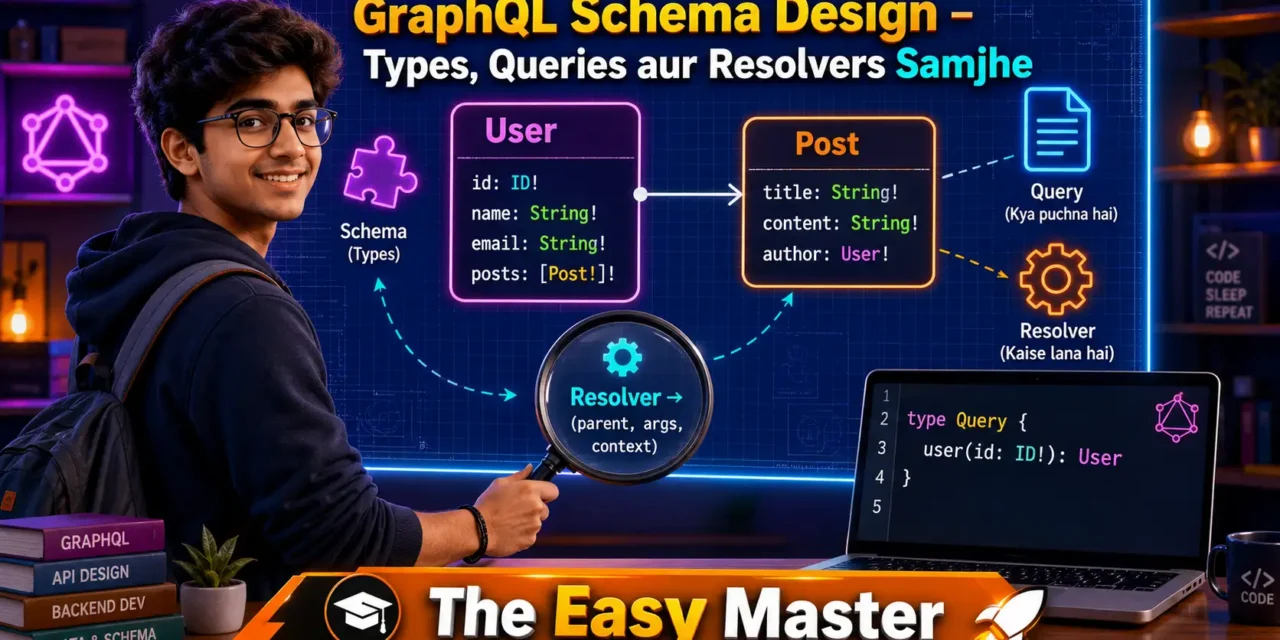
आपने GraphQL के basics समझ लिए – REST vs GraphQL, queries, mutations। Ab agla step hai – GraphQL schema design. Agar GraphQL API ki body hai, to schema uski aatma hai। Schema define karta hai ki aapki API mein kya-kya data available hai, kaun kaun se operations possible hain, aur data ka shape kya hai।
Jab maine pehli baar GraphQL schema likhna seekha, to mujhe laga – “Bus types bana do, kaam ho jayega.” Lekin jaise jaise maine complex applications banaye, mujhe realise hua ki schema design API ki user experience aur maintainability dono ko deeply affect karta hai. Acchi schema = happy frontend developers, buri schema = constant confusion.
Is GraphQL schema tutorial Hindi mein main aapko sikhata hoon:
✅ GraphQL schema kya hai – language-agnostic contract
✅ Object types – sabse important building block
✅ Scalar types – Int, String, Boolean, Float, ID, aur custom scalars
✅ Enum types – limited options ke liye
✅ Input types – mutations mein complex arguments
✅ Interfaces aur Unions – polymorphism in GraphQL
✅ Queries aur Mutations – schema mein root operations define karna
✅ Resolvers – schema ko actual data se kaise connect karein
✅ Hands-on with Apollo Server – Node.js mein practical example
✅ Schema design best practices – common patterns & pitfalls
Chaliye GraphQL schema design ki duniya mein depth mein jaate hain! 📐
Table of Contents
1. GraphQL Schema Kya Hai? – API Ka Blueprint
GraphQL schema ek blueprint hai jo define karta hai ki aapki API mein kaun-kaun se data types available hain, unke beech kya relationships hain, aur clients kaun-kaun se operations (queries, mutations, subscriptions) perform kar sakte hain।
Schema language-agnostic hota hai – ek baar likhne ke baad aap isse kisi bhi backend language (Python, Node.js, Go, etc.) mein implement kar sakte ho।
Schema ki 2 main responsibilities:
| Responsibility | Explanation |
|---|---|
| Define data shapes | Batata hai ki object types mein kaun-kaun se fields hote hain aur unke types kya hain |
| Define entry points | Batata hai ki kaun-kaun se queries, mutations, aur subscriptions available hain |
Schema ke bina GraphQL server incomplete hai. Schema hi hai jo clients ko batata hai ki unhe kya query karna allowed hai.
Simple analogy:
Schema = Restaurant ka menu card. Menu card batata hai ki restaurant mein kaun-kaun se dishes (data types) available hain aur unke ingredients (fields) kya hain. Waise hi schema batata hai ki API mein kaun-kaun se queries aur mutations available hain aur unka structure kya hai. Type = dish, field = ingredient, Query = appetizer section, Mutation = main course section.
Aur ek aur baat – GraphQL apne schema ke through self-documenting hai. Tools jaise GraphiQL aur Apollo Studio automatically schema ko read karke documentation generate kar dete hain।
2. SDL (Schema Definition Language) – Syntax Samjhein
GraphQL schema likhne ke liye hum SDL (Schema Definition Language) use karte hain। Ye ek human-readable syntax hai jo type, query, mutation jaise keywords use karta hai।
Basic syntax rules:
typekeyword se naya object type define karte hain!means non-nullable (field hamesha value return karega)[Type]means list of Type#se comments likhte hain
Example:
graphql
# A simple object type
type User {
  id: ID!
  name: String!
  email: String!
  age: Int
  posts: [Post!]!
}

type Post {
  id: ID!
  title: String!
  content: String!
  author: User!
}

# Root Query type – entry point for reading data
type Query {
  user(id: ID!): User
  users: [User!]!
  post(id: ID!): Post
}

# Root Mutation type – entry point for writing data
type Mutation {
  createUser(name: String!, email: String!): User!
  updateUser(id: ID!, name: String): User!
  deleteUser(id: ID!): Boolean!
}
Is schema mein teen object types hain (User, Post), ek Query type, aur ek Mutation type। Ye schema clients ko batata hai ki woh users aur posts ko query kar sakte hain, aur users create/update/delete kar sakte hain।
Note:
Query,Mutation, aurSubscriptionroot types special hain – inke fields define karte hain ki API ke entry points kya hain। Inke alawa aap koi bhi custom type bana sakte ho।
3. Object Types – Main Building Blocks
Object type GraphQL schema ka sabse important building block hai। Ye ek real-world entity (jaise User, Product, Order) represent karta hai aur uske fields define karta hai।
Syntax:
graphql
type Product {
  id: ID!
  name: String!
  price: Float!
  inStock: Boolean!
  categories: [String!]!
}
Fields ke liye rules:
| Rule | Explanation |
|---|---|
| Har field ka ek type hota hai (scalar ya object) | name: String |
! means non-nullable – field hamesha value return karega | id: ID! |
[Type] means list of that type | tags: [String!]! (list non-nullable strings, list itself non-null) |
| Fields arguments le sakte hain | posts(limit: Int): [Post!]! |
Fields with arguments example:
graphql
type User {
  id: ID!
  name: String!
  posts(limit: Int, sortBy: String): [Post!]!
}
Yahan posts field arguments leta hai – clients pagination aur sorting control kar sakte hain per-query basis par।
Object type relationships:
- One-to-many:
User→posts: [Post!]! - Many-to-one:
Post→author: User! - Many-to-many:
Post↔Category(through a list on both sides)
💡 Pro Tip: Nested object types GraphQL ki superpower hain – aap ek hi query mein related objects fetch kar sakte ho bina multiple round trips ke।
4. Scalar Types – Built-in aur Custom
Scalar types leaf nodes hote hain – inke aage aur fields nahi hote। Ye actual data values represent karte hain।
Built-in Scalars
| Scalar | Represents | Example |
|---|---|---|
Int | 32-bit integer | 42 |
Float | Double-precision floating point | 3.14 |
String | UTF-8 character sequence | "Hello" |
Boolean | true or false | true |
ID | Unique identifier (serialized as string) | "user-123" |
Custom Scalars
Aap apne custom scalars bhi define kar sakte ho – jaise Date, Email, PhoneNumber, JSON। Custom scalar ko implement karne ke liye aapko define karna hota hai ki use kaise serialize, parse, aur parse literal karna hai।
Custom scalar definition in SDL:
graphql
scalar Date
scalar Email
scalar JSON
Type definition mein use karna:
graphql
type Event {
  id: ID!
  name: String!
  startDate: Date!
  metadata: JSON
}
Implementation example (Apollo Server):
const { GraphQLScalarType, Kind } = require('graphql');

const DateScalar = new GraphQLScalarType({
  name: 'Date',
  description: 'Custom Date scalar type (ISO string)',
  serialize(value) {
    return value.toISOString(); // sent to client
  },
  parseValue(value) {
    return new Date(value); // from client variable
  },
  parseLiteral(ast) {
    if (ast.kind === Kind.STRING) {
      return new Date(ast.value);
    }
    return null;
  }
});
💡 Note: Popular libraries like
graphql-scalarsprovide many ready-to-use custom scalars (DateTime, Email, URL, etc.)।
5. Enum Types – Limited Options Ke Liye
Enum ek special scalar hai jo only predefined set of values mein se ek value leta hai। Ye tab useful hota hai jab kisi field ke limited hi possible values hon।
Enum definition:
graphql
enum Role {
  ADMIN
  MODERATOR
  USER
  GUEST
}

enum OrderStatus {
  PENDING
  PROCESSING
  SHIPPED
  DELIVERED
  CANCELLED
}
Enum ka use type definition mein:
graphql
type User {
  id: ID!
  name: String!
  role: Role!
}

type Order {
  id: ID!
  status: OrderStatus!
  items: [OrderItem!]!
}
Enum ke fayde:
- Type safety – client mistakenly
"admin"(lowercase) bhejega to error aayega - Self-documenting – possible values schema se clear hain
- GraphiQL mein auto-completion works
Mutation mein enum argument:
graphql
type Mutation {
  updateOrderStatus(id: ID!, status: OrderStatus!): Order!
}
6. Input Types – Complex Mutation Arguments
Jab mutation mein ek se zyada arguments ho, ya arguments complex structure hon (jaise nested object), tab Input Object Type use karte hain।
Input type definition:
graphql
input CreateUserInput {
  name: String!
  email: String!
  age: Int
  address: AddressInput
}

input AddressInput {
  street: String!
  city: String!
  zipCode: String!
}

input UpdateUserInput {
  name: String
  email: String
  age: Int
}
Mutation mein input type ka use:
graphql
type Mutation {
  createUser(input: CreateUserInput!): User!
  updateUser(id: ID!, input: UpdateUserInput!): User!
}
Client query:
graphql
mutation {
  createUser(input: {
    name: "Rahul"
    email: "rahul@example.com"
    age: 25
    address: {
      street: "MG Road"
      city: "Mumbai"
      zipCode: "400001"
    }
  }) {
    id
    name
  }
}
Important difference between type and input:
| Object Type | Input Type |
|---|---|
type keyword se define hota hai | input keyword se define hota hai |
| Output (query responses) mein use hota hai | Input (mutation arguments) mein use hota hai |
| Fields arguments le sakte hain | Fields arguments nahi le sakte |
| Interfaces implement kar sakta hai | Interfaces implement nahi kar sakta |
7. Interfaces aur Unions – Polymorphism
Jab aapko alag-alag types ke objects ko ek common type ki tarah treat karna ho, tab Interfaces aur Unions use karte hain।
Interfaces
Interface ek contract hai – jo bhi type interface implement karta hai, uske saare fields provide karne chahiye।
Interface definition:
graphql
interface Content {
  id: ID!
  title: String!
  createdAt: String!
}

type Article implements Content {
  id: ID!
  title: String!
  createdAt: String!
  body: String!
  author: String!
}

type Video implements Content {
  id: ID!
  title: String!
  createdAt: String!
  url: String!
  duration: Int!
}
Query mein interface ka use:
graphql
type Query {
  search(term: String!): [Content!]!
}
Client query mein ... on syntax se specific type ke fields access kar sakte hain:
graphql
query {
  search(term: "graphql") {
    id
    title
    ... on Article {
      body
      author
    }
    ... on Video {
      url
      duration
    }
  }
}
Unions
Union bhi multiple types ko ek saath group karta hai, lekin interface ki tarah common fields mandatory nahi hote। Union simply “is type A OR type B OR type C” batata hai।
Union definition:
graphql
union SearchResult = Article | Video | UserQuery:
graphql
type Query {
  search(term: String!): [SearchResult!]!
}
Client ko fir inline fragments se specific type ke fields access karne padte hain:
graphql
query {
  search(term: "graphql") {
    ... on Article {
      title
      body
    }
    ... on Video {
      title
      url
    }
    ... on User {
      name
      email
    }
  }
}
Interface vs Union – kab kya use karein?
| Use Interface when… | Use Union when… |
|---|---|
Common fields exist (like id, title) | No common fields (completely different types) |
| You want to enforce a contract | You just need “any of these types” |
| You expect new types implementing same interface | Types are fixed and unrelated |
8. Root Operations – Query, Mutation, Subscription
Root types GraphQL API ke entry points hote hain. Inke fields define karte hain ki client kya request kar sakta hai।
Query (Read operations)
graphql
type Query {
  # Single resource fetchers
  user(id: ID!): User
  post(id: ID!): Post

  # List fetchers with filters, pagination
  users(limit: Int, offset: Int): [User!]!
  postsByAuthor(authorId: ID!): [Post!]!

  # Search
  search(query: String!): [SearchResult!]!
}
Mutation (Write operations)
Naming convention: create, update, delete, add, remove, etc.
graphql
type Mutation {
  createUser(input: CreateUserInput!): User!
  updateUser(id: ID!, input: UpdateUserInput!): User!
  deleteUser(id: ID!): Boolean!

  addPost(input: AddPostInput!): Post!
  publishPost(id: ID!): Post!
}
Subscription (Real-time)
graphql
type Subscription {
  userCreated: User!
  postAdded(channelId: ID!): Post!
  commentAdded(postId: ID!): Comment!
}
Best practice: Root types mein fields limit rakho। Business logic ko specific object types mein rakho, root types mein sirf orchestration।
9. Resolvers – Schema Ko Data Se Connect Karna
Schema sirf blueprint hai. Actual data kaise fetch hota hai – ye resolvers define karte hain। Resolver ek function hai jo field ke corresponding value return karta hai।
Resolver ka structure:
fieldName: (parent, args, context, info) => {
  // return data
}| Parameter | Description |
|---|---|
parent | Parent object ka result (for nested fields) |
args | Query mein diye gaye arguments |
context | Shared context (database, user info, etc.) |
info | Metadata about current query (rarely used) |
Example resolvers for User and Post schema:
const resolvers = {
  Query: {
    user: (parent, args, context) => {
      return context.db.findUserById(args.id);
    },
    users: (parent, args) => {
      return db.users.slice(args.offset, args.offset + args.limit);
    }
  },

  Mutation: {
    createUser: (parent, args, context) => {
      const newUser = { id: generateId(), ...args.input };
      context.db.saveUser(newUser);
      return newUser;
    }
  },

  User: {
    posts: (parent, args) => {
      // parent is the user object returned from Query.user
      return db.posts.filter(post => post.authorId === parent.id);
    }
  },

  Post: {
    author: (parent) => {
      return db.users.find(user => user.id === parent.authorId);
    }
  }
};
Important: GraphQL automatically resolves scalar fields if the parent object has a property with the same name. Aapko sirf custom logic wale fields ke liye resolver likhne hote hain (like User.posts)।
10. Hands-On #1 – Apollo Server Mein Pehla Schema
Chaliye Node.js mein Apollo Server use karke ek complete GraphQL server banate hain with schema and resolvers।
Step 1: Project setup
mkdir graphql-schema-demo
cd graphql-schema-demo
npm init -y
npm install @apollo/server graphql
Step 2: Create index.js
import { ApolloServer } from '@apollo/server';
import { startStandaloneServer } from '@apollo/server/standalone';

// 1. Define schema (SDL)
const typeDefs = `#graphql
  type Book {
    id: ID!
    title: String!
    author: String!
    publishedYear: Int
  }

  type Query {
    books: [Book!]!
    book(id: ID!): Book
  }

  type Mutation {
    addBook(title: String!, author: String!): Book!
  }
`;

// 2. Mock data
const books = [
  { id: '1', title: 'The Great Gatsby', author: 'F. Scott Fitzgerald', publishedYear: 1925 },
  { id: '2', title: 'To Kill a Mockingbird', author: 'Harper Lee', publishedYear: 1960 },
];

// 3. Resolvers
const resolvers = {
  Query: {
    books: () => books,
    book: (parent, args) => books.find(book => book.id === args.id),
  },
  Mutation: {
    addBook: (parent, args) => {
      const newBook = {
        id: String(books.length + 1),
        title: args.title,
        author: args.author,
      };
      books.push(newBook);
      return newBook;
    },
  },
};

// 4. Create server
const server = new ApolloServer({ typeDefs, resolvers });

// 5. Start server
const { url } = await startStandaloneServer(server, { listen: { port: 4000 } });
console.log(`🚀 Server ready at ${url}`);
Step 3: Run server
node index.jsOpen http://localhost:4000 – Apollo Sandbox खुलेगा।
Try queries:
graphql
query {
  books {
    title
    author
  }
}
graphql
mutation {
  addBook(title: "1984", author: "George Orwell") {
    id
    title
  }
}
💡 Personal Experience: Jab maine pehli baar Apollo Server chalaya, mujhe laga ki schema aur resolvers alag-alag rakhna unnecessary boilerplate hai। Lekin bad mein realise hua ki separation of concerns hai – schema contract define karta hai, resolvers implementation। Isse team alag-alag kaam kar sakti hai।
11. Hands-On #2 – Resolvers Implement Karein (Nested Data)
Ab hum nested resolvers implement karte hain – User aur Posts ke saath।
Schema:
graphql
type User {
  id: ID!
  name: String!
  email: String!
  posts: [Post!]!
}

type Post {
  id: ID!
  title: String!
  content: String!
  author: User!
}

type Query {
  user(id: ID!): User
  users: [User!]!
}

type Mutation {
  createUser(name: String!, email: String!): User!
  createPost(title: String!, content: String!, authorId: ID!): Post!
}
Data (in-memory):
const users = [
  { id: '1', name: 'Rahul', email: 'rahul@example.com' },
  { id: '2', name: 'Priya', email: 'priya@example.com' },
];

const posts = [
  { id: '1', title: 'GraphQL Basics', content: '...', authorId: '1' },
  { id: '2', title: 'Schema Design', content: '...', authorId: '1' },
  { id: '3', title: 'Resolvers Deep Dive', content: '...', authorId: '2' },
];
Resolvers:
const resolvers = {
  Query: {
    user: (_, { id }) => users.find(u => u.id === id),
    users: () => users,
  },
  Mutation: {
    createUser: (_, { name, email }) => {
      const newUser = { id: String(users.length + 1), name, email };
      users.push(newUser);
      return newUser;
    },
    createPost: (_, { title, content, authorId }) => {
      const newPost = { id: String(posts.length + 1), title, content, authorId };
      posts.push(newPost);
      return newPost;
    },
  },
  User: {
    posts: (parent) => posts.filter(p => p.authorId === parent.id),
  },
  Post: {
    author: (parent) => users.find(u => u.id === parent.authorId),
  },
};
Test query with nested data:
graphql
query {
  user(id: "1") {
    name
    posts {
      title
      author {
        name
      }
    }
  }
}
Output mein user ke saath saare posts aur unke author ka name bhi aayega – exactly as requested।
12. Schema Design Best Practices
✅ Use meaningful type and field names – firstName not fName, email not e
✅ Always use ID scalar for unique identifiers – Not String or Int
✅ Use non-null (!) by default, except for optional fields – Most fields should be non-null unless there’s a reason they can be null।
✅ Prefer explicit input types for mutations – Especially for mutations with 3+ arguments। Makes evolution easier।
✅ Use descriptive comments – Document fields that may be ambiguous:
graphql
"Returns active posts only (status != DELETED)"
posts(status: PostStatus): [Post!]!
✅ Version schema by adding fields, never removing – Deprecate fields with @deprecated directive:
graphql
oldField: String @deprecated(reason: "Use newField instead")✅ Use enums for fields with fixed set of values – status, role, category, etc.
✅ Implement pagination for list fields – Use first/after (cursor-based) or limit/offset:
graphql
type Query {
  users(limit: Int = 10, offset: Int = 0): [User!]!
}
✅ Design for client needs, not database structure – Schema should reflect what clients want to query, not how data is stored।
✅ Use interfaces for shared fields – Reduces duplication, enables polymorphism。
✅ Keep schema in a single file for small projects – For larger projects, split into multiple files (modular schema)。
✅ Use schema-first approach – Write schema first, then implement resolvers। This ensures contract-driven development。
13. Common Mistakes (aur Unka Solution!)
| Mistake | Why it’s wrong | Solution |
|---|---|---|
Using Int or String for IDs | Semantically unclear, may cause type safety issues | Use ID scalar – client knows it’s an identifier |
Not using non-null (!) enough | Clients have to handle null checks unnecessarily | Mark fields non-null unless null is meaningful |
Using type instead of input for mutation arguments | Mutation fields can’t accept complex objects | Always use input for mutation arguments |
| Directly exposing database models as GraphQL types | Tight coupling, can’t evolve independently | Create separate GraphQL types that map to but are not identical to DB models |
| Skipping pagination on list fields | As data grows, queries become slow, huge payload | Always implement pagination (limit/offset or cursor) |
Missing author resolver for Post | Client can’t fetch related data in one query | Provide resolvers for all relationships (bidirectional if needed) |
| Using null to represent empty lists | Inconsistent; client has to handle both null and empty array | Return empty list [] instead of null for lists |
No @deprecated before removing field | Breaking change without warning | Add @deprecated directive, keep field for 1-2 versions |
| Creating too deep nesting (more than 5-6 levels) | Complex queries, performance issues | Limit nesting depth via validation, or redesign schema |
| Not using DataLoader for nested resolvers | N+1 problem kills performance | Use DataLoader to batch and cache database calls |
14. Resources – Cheat Sheet & Practice Prompts
GraphQL Schema Cheat Sheet
graphql
# Object Type
type User {
  id: ID!
  name: String!
  email: String!
  age: Int
}

# Enum
enum Role {
  ADMIN
  USER
}

# Input Type
input CreateUserInput {
  name: String!
  email: String!
  role: Role
}

# Interface
interface Node {
  id: ID!
}

type Post implements Node {
  id: ID!
  title: String!
}

# Union
union SearchResult = User | Post

# Query
type Query {
  user(id: ID!): User
  users(limit: Int): [User!]!
}

# Mutation
type Mutation {
  createUser(input: CreateUserInput!): User!
}

# Subscription
type Subscription {
  userCreated: User!
}
Resolver Cheat Sheet (JavaScript)
const resolvers = {
  Query: {
    user: (_, { id }, context) => context.db.findUser(id),
  },
  Mutation: {
    createUser: (_, { input }, context) => context.db.createUser(input),
  },
  User: {
    posts: (parent, _, context) => context.db.findPostsByAuthor(parent.id),
  },
  Post: {
    author: (parent, _, context) => context.db.findUser(parent.authorId),
  },
};
Practice Prompts
Beginner:
- Ek Library schema banao – types:
Book,Author. Query:books,book(id),authors,author(id). Mutation:addBook,addAuthor. Resolvers implement karo with in-memory data.
Intermediate:
- E-commerce schema banao – types:
Product,Category,Order,User. Queries: product filtering by category, price range। Mutations:createOrderwith order items input type।
Advanced:
- Implement pagination using
first/aftercursor in schema। Write resolver that uses database cursor। Add DataLoader to batch resolve nestedauthorfields for list of posts.
15. FAQ
Q1: Schema mein type aur input mein kya antar hai?
type query responses ke liye use hota hai (output), input mutation arguments ke liye (input)। type fields mein arguments ho sakte hain, input mein nahi। input interface implement nahi kar sakta।
Q2: Kya mein ek schema mein multiple Query types define kar sakta hoon?
Nahi – sirf ek Query type allowed hai। Lekin aap Query ke andar fields group kar sakte ho (e.g., userQueries, productQueries nested objects)।
Q3: Nullable aur non-nullable fields mein kya difference hai?
String! means field hamesha value return karega, kabhi null nahi। String means null allowed (maybe field missing)। By default, use non-null unless there’s a reason field can be missing।
Q4: Schema versioning kaise handle karein?
GraphQL mein versioning nahi hoti – aap fields add karte ho, purane fields ko @deprecated mark karte ho, aur remove nahi karte। Clients migration ke liye time milta hai।
Q5: Circular references in schema (User → Post → User) allowed hai?
Haan, fully allowed। GraphQL handle kar leta hai। Bas resolver mein circular infinite loop se bachna (e.g., User.posts resolver should not call back to User).
Q6: Complex schema ko multiple files mein kaise split karein?
Apollo Server mein typeDefs array mein multiple strings pass kar sakte ho। GraphQL tools like mergeTypeDefs and mergeResolvers help। Modular schema approach – each feature has its own typeDefs and resolvers।
16. Conclusion – Ab Aapki Baari!
Bahut badhiya! Aapne aaj seekh liya:
✅ GraphQL schema tutorial Hindi – complete practical guide
✅ SDL syntax – type, input, enum, interface, union
✅ Root operations – Query, Mutation, Subscription
✅ Scalar types – built-in aur custom scalars
✅ Input types for complex mutations
✅ Resolvers – schema ko real data se connect karna
✅ Hands-on with Apollo Server – full working example
✅ Best practices aur common mistakes
GraphQL schema design aise skill hai jo practice se aati hai। Jitna zyada schemas design karoge, utna better samajh ayega ki kya kaam karta hai aur kya nahi।
Aapki challenge: Apne favourite project (blog, e-commerce, library) ke liye ek complete GraphQL schema likho without implementation। Use all concepts: object types, enums, input types, interface/union if needed। Phir Apollo Server mein implement karo।
Next topic kya chahiye?
- GraphQL with MongoDB (database integration)?
- GraphQL Authentication & Authorization?
- GraphQL Subscriptions (real-time chat)?
Comment mein batao!
The Easy Master ke saath GraphQL schema design seekhte raho। Happy scheming! 🚀📐
Resources
- GraphQL Schema Documentation (Official)
- Apollo Server Schema Documentation
- GraphQL Scalars Library
- GraphQL Best Practices Guide
- DataLoader Documentation
Additional Resources
- MongoDB Setup – CRUD Operations समझे (Beginner Guide) 2026
- MongoDB Compass से GUI Database Manage करने का आसान तरीका | Beginner Tutorial 2026
- Node.js MongoDB Connection – Mongoose Setup समझे 2026
- MongoDB Data Modeling – Embedded Documents vs References 2026
- MongoDB Indexing – Query Speed बढ़ने करने का आसान तरीका
- MongoDB Aggregation Pipeline – Stages समझे | Practical Examples
- Express MongoDB CRUD – Complete REST API Example
- Mongoose ODM – Schema, Model, and Validation समझे 2026
- MongoDB Atlas – Cloud Database Free में Deploy करें 2026
- JWT Authentication MongoDB – User Login System कैसे बनाएं 2026
- Next.js App Router – Pages Router से क्या बदला? Complete Guide 2026
- Next.js Server Components – ‘use client’ कब और कहां Use करें
- Next.js Routing – Layouts, Dynamic Routes and Nested Routes 2026
- Next.js 16 New Features – Turbopack, Cache Components and proxy.ts
- Next.js Partial Prerendering – Static and Dynamic Content साथ में
- Next.js Authentication – JWT Session Management (App Router) 2026
- Next.js SEO – Metadata API and Image Optimization समझे 2026
- Next.js TypeScript – Full-Stack Type-Safe App कैसे बनाएं
- FastAPI Kya Hai? FastAPI Python Setup Aur Pehla API Hindi 2026
- FastAPI Path Parameters Hindi – शून्य से हीरो तक गाइड 2026
- Pydantic v2 Tutorial Hindi – Data Validation Master 2026
- FastAPI dependency injection Hindi – Code Reuse Ka Magic
- FastAPI Async Await Hindi – Non-Blocking Code 2026
- FastAPI PostgreSQL SQLModel Hindi – Async Guide 2026
- FastAPI JWT Authentication Hindi – Secure API Login
- FastAPI OpenAI Integration Hindi – AI Chatbot API 2026
- FastAPI Multi-Agent AI Hindi – LangGraph Zero to Hero
- FastAPI Deployment Hindi – Railway Zero to Hero 2026
- Docker Introduction in Hindi? Containers vs Virtual Machines
- Docker Images and Containers Hindi – Pehla Container
- Docker Compose Tutorial Hindi – Node.js + MongoDB
- Docker Volumes Networking Hindi – Data Persist कैसे करें
- Kubernetes Architecture Hindi – Pods, Nodes, Cluster
- Minikube Tutorial Hindi – Local Cluster कैसे बनाए
- Kubernetes Deployments Services Hindi – App Expose Karein
- K8s Ingress Tutorial Hindi – Domain se App Access
- Helm Kya Hai? – Kubernetes Charts Se App Deploy
- GraphQL Introduction in Hindi – REST vs GraphQL Comparison
Views: 330