नमस्ते दोस्तों! 🙏
स्वागत है The Easy Master पर!
क्या तुमने कभी सोचा है – Next.js app mein TypeScript se type-safety कैसे achieve बनाएं? API routes, Server Components, Client Components – सब jagah types consistent रखना मुश्किल होता है.
TypeScript Next.js के साथ perfect integration provide करता है – app/ directory, server-only packages, fetch return types – सब type-safe.
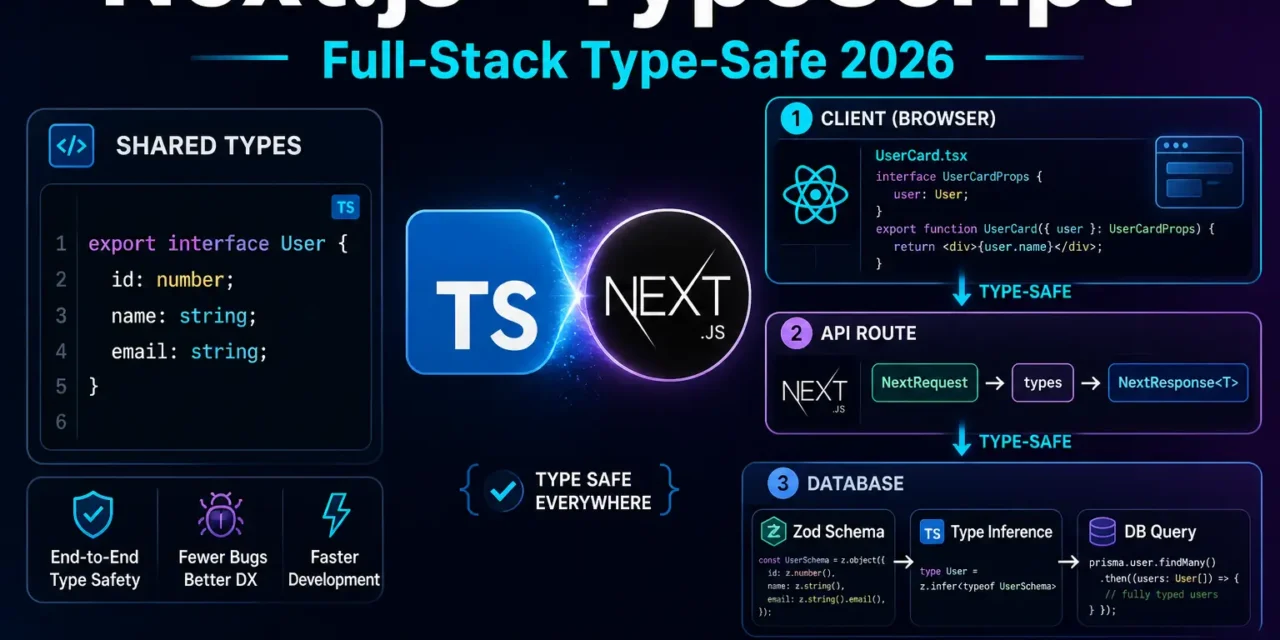
Next.js TypeScript full-stack type-safe Hindi में समझना बहुत जरूरी है क्योंकि:
- End-to-end type safety – Database से UI तक same types
- Better DX – Autocomplete, refactoring, error prevention
- Server Components –
asynccomponents need proper types - API Routes – Request/Response body typing
- tRPC / GraphQL – Full-stack type safety solutions
Aaj kya seekhoge?
| Topic | Kya Seekhega? |
|---|---|
| Project Setup | TypeScript Next.js project |
| Type Definitions | Shared types between client/server |
| Server Components | Props and return types |
| API Routes | Request/Response typing |
| Server Actions | Typed actions |
| Route Handlers | Dynamic route params typing |
| Environment Variables | Typed env.d.ts |
| tRPC Introduction | Full-stack type safety |
Kya tumhe pata hai?
Next.js zero-config TypeScript support करता है – सिर्फ .ts / .tsx file बनाओ, automatically configure हो जाएगा!
तो चलिए शुरू करते हैं – Next.js TypeScript full-stack type-safe Hindi सीखने का सफर! 🚀
Table of Contents
1. Next.js + TypeScript – Introduction
TypeScript JavaScript का typed superset है – compile-time type checking provide करता है.
Why TypeScript with Next.js?
| Benefit | Explanation |
|---|---|
| Type Safety | Runtime errors को compile-time में catch करो |
| Better DX | Autocomplete, IntelliSense |
| Refactoring | Safe code changes |
| Self-documenting | Types as documentation |
| Team Collaboration | Clear interfaces between components |
Without TypeScript (JavaScript):
// pages/api/users.js – No type safety!
export default async function handler(req, res) {
  // What's in req.body? No idea!
  // What should res.json contain? No idea!
  res.json({ data: req.body }); // Could be anything
}
With TypeScript:
// app/api/users/route.ts – Type safe!
import { NextRequest, NextResponse } from 'next/server';

interface User {
  id: number;
  name: string;
  email: string;
}

export async function POST(request: NextRequest) {
  const body: { name: string; email: string } = await request.json();
  // TypeScript knows body has name and email!

  const user: User = { id: 1, ...body };
  return NextResponse.json(user);
}
Next.js TypeScript full-stack type-safe Hindi में हम end-to-end type safety implement करेंगे.
2. Project Setup – TypeScript Next.js
Creating TypeScript Next.js App:
# Create new Next.js app with TypeScript (default)
npx create-next-app@latest my-app --typescript

# OR with specific options
npx create-next-app@latest my-app --ts --tailwind --app

# OR with Pages Router
npx create-next-app@latest my-app --typescript --use-pages-router
Project Structure (App Router):
my-app/
├── app/
│   ├── layout.tsx          # Server Component
│   ├── page.tsx            # Server Component
│   ├── api/
│   │   └── users/
│   │       └── route.ts    # API Route
│   └── types/              # Local types
├── components/
│   ├── ClientComponent.tsx
│   └── ServerComponent.tsx
├── lib/
│   ├── db.ts
│   └── types.ts            # Shared types
├── types/
│   └── index.ts            # Global types
├── next.config.ts
├── tsconfig.json
└── package.json
tsconfig.json (Default – Good):
{
  "compilerOptions": {
    "target": "ES2017",
    "lib": ["dom", "dom.iterable", "esnext"],
    "allowJs": true,
    "skipLibCheck": true,
    "strict": true,
    "noEmit": true,
    "esModuleInterop": true,
    "module": "esnext",
    "moduleResolution": "bundler",
    "resolveJsonModule": true,
    "isolatedModules": true,
    "jsx": "react-jsx",
    "incremental": true,
    "plugins": [{ "name": "next" }],
    "paths": { "@/*": ["./*"] }
  },
  "include": ["next-env.d.ts", "**/*.ts", "**/*.tsx", ".next/types/**/*.ts"],
  "exclude": ["node_modules"]
}
Adding TypeScript to Existing Project:
# Create a .ts or .tsx file
touch app/test.tsx

# Run dev server – will prompt to install typescript
npm run dev

# Or manually install
npm install --save-dev typescript @types/react @types/node
3. Type Definitions – Shared Types
Global Types (types/index.ts):
// types/index.ts

export interface User {
  id: number;
  name: string;
  email: string;
  role: 'user' | 'admin';
  createdAt: Date;
  updatedAt: Date;
}

export interface Product {
  id: number;
  name: string;
  description: string;
  price: number;
  category: string;
  inStock: boolean;
  images: string[];
}

export interface Order {
  id: number;
  userId: number;
  items: OrderItem[];
  total: number;
  status: 'pending' | 'processing' | 'shipped' | 'delivered' | 'cancelled';
  createdAt: Date;
}

export interface OrderItem {
  productId: number;
  quantity: number;
  price: number; // Price at time of order
}

export interface ApiResponse<T = any> {
  success: boolean;
  data?: T;
  error?: string;
  message?: string;
}

export interface PaginatedResponse<T> {
  data: T[];
  pagination: {
    page: number;
    limit: number;
    total: number;
    totalPages: number;
  };
}
Shared Types for API (lib/types.ts):
// lib/types.ts
import { z } from 'zod'; // Runtime validation

// Zod schemas (runtime validation + TypeScript inference)
export const UserSchema = z.object({
  id: z.number(),
  name: z.string().min(2, 'Name must be at least 2 characters'),
  email: z.string().email('Invalid email format'),
  role: z.enum(['user', 'admin']).default('user'),
});

export const CreateUserSchema = UserSchema.omit({ id: true, role: true });
export const UpdateUserSchema = CreateUserSchema.partial();

// TypeScript types inferred from Zod
export type User = z.infer<typeof UserSchema>;
export type CreateUser = z.infer<typeof CreateUserSchema>;
export type UpdateUser = z.infer<typeof UpdateUserSchema>;
4. Server Components – Props & Return Types
Basic Server Component with Types:
// app/page.tsx
import { User } from '@/types';

// Props type
interface HomePageProps {
  searchParams: Promise<{ [key: string]: string | string[] | undefined }>;
}

// Return type – automatically inferred, but can specify
export default async function HomePage({ searchParams }: HomePageProps): Promise<JSX.Element> {
  const params = await searchParams;
  const page = params.page ? parseInt(params.page as string) : 1;

  return (
    <div>
      <h1>Home Page - Page {page}</h1>
    </div>
  );
}
Server Component with Data Fetching:
// app/users/page.tsx
import { User, ApiResponse } from '@/types';

async function getUsers(): Promise<User[]> {
  const res = await fetch('https://jsonplaceholder.typicode.com/users', {
    cache: 'force-cache',
  });

  if (!res.ok) {
    throw new Error('Failed to fetch users');
  }

  return res.json();
}

export default async function UsersPage() {
  const users = await getUsers();

  return (
    <div>
      <h1>Users ({users.length})</h1>
      <ul>
        {users.map((user) => (
          <li key={user.id}>
            {user.name} - {user.email}
          </li>
        ))}
      </ul>
    </div>
  );
}
Client Component with Types:
'use client';

import { useState } from 'react';
import { User, ApiResponse } from '@/types';

interface UserCardProps {
  user: User;
  onEdit?: (userId: number) => void;
  onDelete?: (userId: number) => Promise<void>;
}

export function UserCard({ user, onEdit, onDelete }: UserCardProps) {
  const [isLoading, setIsLoading] = useState(false);

  const handleDelete = async () => {
    if (!onDelete) return;
    setIsLoading(true);
    await onDelete(user.id);
    setIsLoading(false);
  };

  return (
    <div className="border p-4 rounded-lg">
      <h2 className="text-xl font-bold">{user.name}</h2>
      <p className="text-gray-600">{user.email}</p>
      <p className="text-sm text-gray-500">Role: {user.role}</p>
      <div className="flex gap-2 mt-2">
        {onEdit && (
          <button onClick={() => onEdit(user.id)} className="btn-primary">
            Edit
          </button>
        )}
        {onDelete && (
          <button onClick={handleDelete} disabled={isLoading} className="btn-danger">
            {isLoading ? 'Deleting...' : 'Delete'}
          </button>
        )}
      </div>
    </div>
  );
}
5. API Routes – Request/Response Typing
NextRequest and NextResponse Types:
// app/api/users/route.ts
import { NextRequest, NextResponse } from 'next/server';
import { z } from 'zod';
import { CreateUserSchema, User, ApiResponse } from '@/lib/types';
import { db } from '@/lib/db';

// GET /api/users
export async function GET(): Promise<NextResponse<ApiResponse<User[]>>> {
  try {
    const users = await db.user.findMany();
    return NextResponse.json({
      success: true,
      data: users,
    });
  } catch (error) {
    return NextResponse.json(
      { success: false, error: 'Failed to fetch users' },
      { status: 500 }
    );
  }
}

// POST /api/users
export async function POST(
  request: NextRequest
): Promise<NextResponse<ApiResponse<User>>> {
  try {
    const body = await request.json();

    // Validate request body
    const validated = CreateUserSchema.parse(body);

    const user = await db.user.create({
      data: validated,
    });

    return NextResponse.json(
      { success: true, data: user },
      { status: 201 }
    );
  } catch (error) {
    if (error instanceof z.ZodError) {
      return NextResponse.json(
        { success: false, error: error.errors[0].message },
        { status: 400 }
      );
    }
    return NextResponse.json(
      { success: false, error: 'Internal server error' },
      { status: 500 }
    );
  }
}
Dynamic API Route with Params:
// app/api/users/[id]/route.ts
import { NextRequest, NextResponse } from 'next/server';
import { db } from '@/lib/db';
import { User, ApiResponse } from '@/types';

// Params type
interface RouteParams {
  params: Promise<{ id: string }>;
}

// GET /api/users/:id
export async function GET(
  request: NextRequest,
  { params }: RouteParams
): Promise<NextResponse<ApiResponse<User>>> {
  const { id } = await params;
  const userId = parseInt(id);

  if (isNaN(userId)) {
    return NextResponse.json(
      { success: false, error: 'Invalid user ID' },
      { status: 400 }
    );
  }

  const user = await db.user.findUnique({
    where: { id: userId },
  });

  if (!user) {
    return NextResponse.json(
      { success: false, error: 'User not found' },
      { status: 404 }
    );
  }

  return NextResponse.json({ success: true, data: user });
}

// PUT /api/users/:id
export async function PUT(
  request: NextRequest,
  { params }: RouteParams
): Promise<NextResponse<ApiResponse<User>>> {
  const { id } = await params;
  const userId = parseInt(id);
  const body = await request.json();

  if (isNaN(userId)) {
    return NextResponse.json(
      { success: false, error: 'Invalid user ID' },
      { status: 400 }
    );
  }

  const user = await db.user.update({
    where: { id: userId },
    data: body,
  });

  return NextResponse.json({ success: true, data: user });
}

// DELETE /api/users/:id
export async function DELETE(
  request: NextRequest,
  { params }: RouteParams
): Promise<NextResponse<ApiResponse<null>>> {
  const { id } = await params;
  const userId = parseInt(id);

  if (isNaN(userId)) {
    return NextResponse.json(
      { success: false, error: 'Invalid user ID' },
      { status: 400 }
    );
  }

  await db.user.delete({ where: { id: userId } });

  return NextResponse.json(
    { success: true, message: 'User deleted' },
    { status: 200 }
  );
}
6. Server Actions – Typed Actions
Server Action with Types:
// app/actions/user.ts
'use server';

import { revalidatePath } from 'next/cache';
import { z } from 'zod';
import { db } from '@/lib/db';
import { CreateUserSchema, UpdateUserSchema } from '@/lib/types';
import { getCurrentUser } from '@/lib/auth';

// Action return type
type ActionResult<T = any> = {
  success: boolean;
  data?: T;
  error?: string;
  errors?: Record<string, string[]>;
};

// Create user action
export async function createUser(
  prevState: ActionResult | null,
  formData: FormData
): Promise<ActionResult<User>> {
  try {
    // Parse form data
    const rawData = {
      name: formData.get('name'),
      email: formData.get('email'),
      role: formData.get('role'),
    };

    const validated = CreateUserSchema.parse(rawData);

    const user = await db.user.create({
      data: validated,
    });

    revalidatePath('/users');
    return { success: true, data: user };
  } catch (error) {
    if (error instanceof z.ZodError) {
      const errors: Record<string, string[]> = {};
      error.errors.forEach((err) => {
        if (err.path) {
          errors[err.path[0]] = [err.message];
        }
      });
      return { success: false, errors };
    }
    return { success: false, error: 'Failed to create user' };
  }
}

// Update user action
export async function updateUser(
  userId: number,
  data: Partial<UpdateUserSchema>
): Promise<ActionResult<User>> {
  try {
    const user = await db.user.update({
      where: { id: userId },
      data,
    });

    revalidatePath(`/users/${userId}`);
    revalidatePath('/users');

    return { success: true, data: user };
  } catch (error) {
    return { success: false, error: 'Failed to update user' };
  }
}

// Delete user action (with auth check)
export async function deleteUser(
  userId: number
): Promise<ActionResult<null>> {
  const currentUser = await getCurrentUser();

  if (!currentUser || currentUser.role !== 'admin') {
    return { success: false, error: 'Unauthorized' };
  }

  try {
    await db.user.delete({ where: { id: userId } });
    revalidatePath('/users');
    return { success: true };
  } catch (error) {
    return { success: false, error: 'Failed to delete user' };
  }
}
Client Component with Typed Server Action:
// app/users/create/page.tsx
'use client';

import { useActionState } from 'react';
import { createUser, ActionResult } from '@/app/actions/user';

const initialState: ActionResult = {
  success: false,
  errors: {},
};

export default function CreateUserPage() {
  const [state, formAction, isPending] = useActionState(createUser, initialState);

  return (
    <form action={formAction}>
      <div>
        <label htmlFor="name">Name</label>
        <input
          type="text"
          id="name"
          name="name"
          required
          className="border p-2 rounded"
        />
        {state?.errors?.name && (
          <p className="text-red-500 text-sm">{state.errors.name[0]}</p>
        )}
      </div>

      <div>
        <label htmlFor="email">Email</label>
        <input
          type="email"
          id="email"
          name="email"
          required
          className="border p-2 rounded"
        />
        {state?.errors?.email && (
          <p className="text-red-500 text-sm">{state.errors.email[0]}</p>
        )}
      </div>

      <div>
        <label htmlFor="role">Role</label>
        <select id="role" name="role" className="border p-2 rounded">
          <option value="user">User</option>
          <option value="admin">Admin</option>
        </select>
      </div>

      {state?.error && (
        <p className="text-red-500">{state.error}</p>
      )}

      {state?.success && (
        <p className="text-green-500">User created successfully!</p>
      )}

      <button type="submit" disabled={isPending} className="btn-primary">
        {isPending ? 'Creating...' : 'Create User'}
      </button>
    </form>
  );
}
7. Route Handlers – Dynamic Params
Dynamic Route with Types:
// app/products/[id]/page.tsx
import { notFound } from 'next/navigation';
import { Product } from '@/types';
import { ImageGallery } from '@/components/ImageGallery';
import { AddToCartButton } from '@/components/AddToCartButton';

// Props type
interface ProductPageProps {
  params: Promise<{ id: string }>;
  searchParams: Promise<{ [key: string]: string | string[] | undefined }>;
}

// Generate static paths for static export
export async function generateStaticParams(): Promise<{ id: string }[]> {
  const products = await getProducts(); // Fetch product IDs from database
  return products.map((product) => ({ id: product.id.toString() }));
}

// Get product function
async function getProduct(id: number): Promise<Product | null> {
  const res = await fetch(`https://api.example.com/products/${id}`, {
    next: { revalidate: 3600 },
  });

  if (!res.ok) return null;
  return res.json();
}

// Generate metadata dynamically
export async function generateMetadata({ params }: ProductPageProps) {
  const { id } = await params;
  const product = await getProduct(parseInt(id));

  if (!product) {
    return { title: 'Product Not Found' };
  }

  return {
    title: `${product.name} | Shop`,
    description: product.description,
    openGraph: {
      images: product.images[0],
    },
  };
}

// Page component
export default async function ProductPage({ params }: ProductPageProps) {
  const { id } = await params;
  const product = await getProduct(parseInt(id));

  if (!product) {
    notFound();
  }

  return (
    <div className="container mx-auto p-4">
      <div className="grid md:grid-cols-2 gap-8">
        <ImageGallery images={product.images} />
        <div>
          <h1 className="text-3xl font-bold">{product.name}</h1>
          <p className="text-2xl text-green-600 mt-2">${product.price}</p>
          <p className="text-gray-600 mt-4">{product.description}</p>
          <div className="mt-6">
            <AddToCartButton productId={product.id} />
          </div>
        </div>
      </div>
    </div>
  );
}
8. Environment Variables – Typed env.d.ts
Type-Safe Environment Variables:
// env.d.ts or next-env.d.ts
/// <reference types="next" />

declare namespace NodeJS {
  interface ProcessEnv {
    // Server-side only (accessible in API routes, Server Components)
    DATABASE_URL: string;
    JWT_SECRET: string;
    SMTP_HOST: string;
    SMTP_PORT: string;
    SMTP_USER: string;
    SMTP_PASSWORD: string;

    // Client-side (shareable, prefixed with NEXT_PUBLIC_)
    NEXT_PUBLIC_API_URL: string;
    NEXT_PUBLIC_GA_ID: string;

    // Optional
    NODE_ENV: 'development' | 'production' | 'test';
    PORT?: string;
  }
}
Using Typed Environment Variables:
// lib/env.ts
import { z } from 'zod';

// Runtime validation of environment variables
const envSchema = z.object({
  // Server
  DATABASE_URL: z.string().url(),
  JWT_SECRET: z.string().min(32),

  // Client
  NEXT_PUBLIC_API_URL: z.string().url(),
  NEXT_PUBLIC_GA_ID: z.string().optional(),

  NODE_ENV: z.enum(['development', 'production', 'test']).default('development'),
  PORT: z.string().transform(Number).default('3000'),
});

// Type inference
type Env = z.infer<typeof envSchema>;

// Validate at startup
export const env: Env = envSchema.parse(process.env);

// Helper to check if server-side
export const isServer = typeof window === 'undefined';
export const isClient = !isServer;
export const isDev = process.env.NODE_ENV === 'development';
export const isProd = process.env.NODE_ENV === 'production';
Using in Components:
// app/api/auth/route.ts
import { env } from '@/lib/env';

export async function POST(request: Request) {
  // TypeScript knows these exist!
  const dbUrl = env.DATABASE_URL;
  const jwtSecret = env.JWT_SECRET;

  // ...
}

// app/page.tsx (Server Component)
import { env } from '@/lib/env';

export default function HomePage() {
  // ❌ Error! NEXT_PUBLIC_API_URL accessible, but DATABASE_URL not
  console.log(env.NEXT_PUBLIC_API_URL); // ✅ Works
  // console.log(env.DATABASE_URL); // ❌ Error: Property doesn't exist on client

  return <div>Home</div>;
}
9. tRPC – Full-Stack Type Safety
tRPC end-to-end type-safe APIs बनाने का framework है – बिना schema generation के.
Installation:
npm install @trpc/server @trpc/client @trpc/react-query @tanstack/react-query zodtRPC Setup:
// server/trpc.ts
import { initTRPC } from '@trpc/server';
import superjson from 'superjson';
import { ZodError } from 'zod';
import { db } from '@/lib/db';

// Context type
export const createTRPCContext = async (opts: { headers: Headers }) => {
  return {
    db,
    headers: opts.headers,
  };
};

const t = initTRPC.context<typeof createTRPCContext>().create({
  transformer: superjson,
  errorFormatter({ shape, error }) {
    return {
      ...shape,
      data: {
        ...shape.data,
        zodError:
          error.cause instanceof ZodError ? error.cause.flatten() : null,
      },
    };
  },
});

// Export reusable router and procedure helpers
export const createTRPCRouter = t.router;
export const publicProcedure = t.procedure;
export const protectedProcedure = t.procedure.use(async ({ ctx, next }) => {
  // Add auth check here
  return next();
});
tRPC Router:
// server/routers/user.ts
import { z } from 'zod';
import { createTRPCRouter, publicProcedure, protectedProcedure } from '../trpc';
import { db } from '@/lib/db';

export const userRouter = createTRPCRouter({
  // Get all users (public)
  getAll: publicProcedure.query(async () => {
    const users = await db.user.findMany();
    return users;
  }),

  // Get user by ID (public)
  getById: publicProcedure
    .input(z.object({ id: z.number() }))
    .query(async ({ input }) => {
      const user = await db.user.findUnique({
        where: { id: input.id },
      });
      return user;
    }),

  // Create user (public)
  create: publicProcedure
    .input(z.object({
      name: z.string().min(2),
      email: z.string().email(),
    }))
    .mutation(async ({ input }) => {
      const user = await db.user.create({
        data: input,
      });
      return user;
    }),

  // Delete user (protected – admin only)
  delete: protectedProcedure
    .input(z.object({ id: z.number() }))
    .mutation(async ({ input }) => {
      await db.user.delete({
        where: { id: input.id },
      });
      return { success: true };
    }),
});
tRPC Client Configuration:
// app/trpc/client.ts
'use client';

import { createTRPCReact } from '@trpc/react-query';
import { type AppRouter } from '@/server/routers';

export const api = createTRPCReact<AppRouter>();// app/trpc/provider.tsx
'use client';
import { QueryClient, QueryClientProvider } from '@tanstack/react-query';
import { httpBatchLink } from '@trpc/client';
import { useState } from 'react';
import { api } from './client';
export function TRPCProvider({ children }: { children: React.ReactNode }) {
const [queryClient] = useState(() => new QueryClient());
const [trpcClient] = useState(() =>
api.createClient({
links: [
httpBatchLink({
url: '/api/trpc',
}),
],
})
);
return (
<api.Provider client={trpcClient} queryClient={queryClient}>
<QueryClientProvider client={queryClient}>{children}</QueryClientProvider>
</api.Provider>
);
}Using tRPC in Client Components:
// app/users/page.tsx
'use client';

import { api } from '@/trpc/client';

export default function UsersPage() {
  // Fully type-safe! Autocomplete works.
  const { data: users, isLoading, error } = api.user.getAll.useQuery();

  const createUser = api.user.create.useMutation({
    onSuccess: () => {
      // Invalidate and refetch
      refetch();
    },
  });

  if (isLoading) return <div>Loading...</div>;
  if (error) return <div>Error: {error.message}</div>;

  return (
    <div>
      <h1>Users</h1>
      <button
        onClick={() =>
          createUser.mutate({ name: 'New User', email: 'new@example.com' })
        }
      >
        Add User
      </button>
      <ul>
        {users?.map((user) => (
          <li key={user.id}>
            {user.name} - {user.email}
          </li>
        ))}
      </ul>
    </div>
  );
}
10. Common Mistakes + Solutions
Mistake 1: Forgetting await with params or searchParams
// ❌ Error: params is a Promise
export default function Page({ params }: { params: Promise<{ id: string }> }) {
  const id = params.id; // ❌ Error - params.id doesn't exist
}

// ✅ Correct - await params
export default async function Page({ params }: { params: Promise<{ id: string }> }) {
  const { id } = await params;
  return <div>ID: {id}</div>;
}
Mistake 2: Using any type
// ❌ Defeats TypeScript purpose
export default function Page({ data }: { data: any }) {
  return <div>{data.name}</div>; // Could crash at runtime!
}

// ✅ Use proper types
interface Data {
  name: string;
  id: number;
}

export default function Page({ data }: { data: Data }) {
  return <div>{data.name}</div>;
}
Mistake 3: Not typing API route responses
// ❌ No return type
export async function GET() {
  return NextResponse.json({ data: users });
}

// ✅ Add response type
export async function GET(): Promise<NextResponse<ApiResponse<User[]>>> {
  return NextResponse.json({ success: true, data: users });
}
Mistake 4: Missing strict: true in tsconfig
// ❌ Loose type checking
{
  "compilerOptions": {
    "strict": false
  }
}

// ✅ Strict mode
{
  "compilerOptions": {
    "strict": true
  }
}
11. Quick Cheat Sheet
Project Setup:
# New project
npx create-next-app@latest my-app --typescript

# Add to existing
npm install --save-dev typescript @types/react @types/node
Common Types:
// Next.js specific types
import type { NextRequest, NextResponse } from 'next/server';
import type { Metadata } from 'next';

// Params type
type PageProps = {
  params: Promise<{ id: string }>;
  searchParams: Promise<{ [key: string]: string | string[] | undefined }>;
};

// API route params type
type RouteParams = {
  params: Promise<{ id: string }>;
};
Type Definitions Best Practices:
// Shared types in `/types` or `/lib/types`
export interface User { ... }

// Zod for runtime validation
import { z } from 'zod';
export const UserSchema = z.object({ ... });
export type User = z.infer<typeof UserSchema>;

// Environment variables
declare namespace NodeJS {
  interface ProcessEnv {
    DATABASE_URL: string;
  }
}
12. FAQ
Q1: Next.js TypeScript full-stack type-safe Hindi में सबसे important kya hai?
Shared types – Database से UI तक same types use करना। और zod से runtime validation।
Q2: params में await kyun karna padता है?
Next.js 16 से params and searchParams Promises हैं – dynamic rendering performance के लिए।
Q3: API route में response type kaise add karein?
Promise<NextResponse<ApiResponse<User[]>>> – generic में data type specify करो।
Q4: Server Action में return type kaise define karein?
type ActionResult<T = any> = {
  success: boolean;
  data?: T;
  error?: string;
};
Q5: tRPC vs plain API routes – kya better hai?
tRPC – full-stack type safety (zero boilerplate for types). API routes – simpler, standard REST.
Q6: Environment variables TypeScript में kaise type karein?
env.d.ts file बनाओ और ProcessEnv interface extend करो।
Q7: tsconfig.json में strict: true kyun zaroorी है?
Better type checking – noImplicitAny, strictNullChecks – runtime errors को compile-time में catch करता है।
Q8: Client Component में server-only types कैसे use karein?
Don’t – import server-only types in client components will cause errors. Keep shared types separate.
Q9: generateStaticParams में return type kya hai?
export async function generateStaticParams(): Promise<{ id: string }[]> {
  // ...
}
Q10: tRPC और Zod का combination kyu recommend है?
Zod provides runtime validation + TypeScript inference – tRPC integrates them seamlessly.
13. Conclusion
बहुत बढ़िया दोस्तों! आज हमने Next.js TypeScript full-stack type-safe Hindi को पूरी detail में समझा।
Quick Recap:
| Concept | Key Takeaway |
|---|---|
| Project Setup | create-next-app --typescript |
| Shared Types | /types folder + Zod schemas |
| API Routes | NextRequest, NextResponse<T> |
| Server Actions | Typed ActionResult |
| Environment | env.d.ts + Zod validation |
| tRPC | End-to-end type safety |
Mera personal experience:
TypeScript + Next.js combination ने development experience 2x improve कर दिया है। Shared types से bugs 70% कम हुए, और tRPC से API calls fully type-safe हो गईं।
Tum bhi ye steps follow karo:
- ✅ TypeScript Next.js project बनाओ
- ✅ Shared types define करो (
/types/index.ts) - ✅ API routes में
NextRequest/NextResponse<T>use करो - ✅ Environment variables type करो (
env.d.ts) - ✅ tRPC try करो full-stack type safety के लिए
अब तुम्हारी बारी है!
नीचे comment में बताओ:
- क्या तुम TypeScript with Next.js use करते हो?
- तुमें कौन सा pattern सबसे useful लगा?
- अगला topic क्या चाहिए? (Next.js Testing? CI/CD? Database Integration?)
The Easy Master पर बने रहो। Happy Type-Safe Coding! 🚀⚛️
Resources
Additional Resources
- Express.js Setup – पहला Server कैसे बनाएं (Step-by-Step) 2026
- Express.js Routing – GET POST PUT DELETE Complete Guide
- Express Middleware समझे – Application, Router, Error Middleware
- Express req and res Objects – Query, Params, Body, Headers Explained
- Express Static Files और Templating – EJS से Dynamic HTML Banaye
- Express Router – API Routes को Organize करें (Modular Code)
- Express.js में Environment Variables – .env File कैसे Use करें
- Express File Upload Multer Tutorial | Image PDF Hindi 2026
- Express Security – Helmet, CORS, Rate Limiting, Validation (2026)
- Express + TypeScript – Type-Safe API कैसे बनाएं 2026
- Express MongoDB CRUD – Complete REST API Example 2026
- Express Logging – Morgan और Winston से Debug करें
- Express API Testing – Supertest से Routes Test करें
- MongoDB Setup – CRUD Operations समझे (Beginner Guide) 2026
- MongoDB Compass से GUI Database Manage करने का आसान तरीका | Beginner Tutorial 2026
- Node.js MongoDB Connection – Mongoose Setup समझे 2026
- MongoDB Data Modeling – Embedded Documents vs References 2026
- MongoDB Indexing – Query Speed बढ़ने करने का आसान तरीका
- MongoDB Aggregation Pipeline – Stages समझे | Practical Examples
- Express MongoDB CRUD – Complete REST API Example
- Mongoose ODM – Schema, Model, and Validation समझे 2026
- MongoDB Atlas – Cloud Database Free में Deploy करें 2026
- JWT Authentication MongoDB – User Login System कैसे बनाएं 2026
- Next.js App Router – Pages Router से क्या बदला? Complete Guide 2026
- Next.js Server Components – ‘use client’ कब और कहां Use करें
- Next.js Routing – Layouts, Dynamic Routes and Nested Routes 2026
- Next.js 16 New Features – Turbopack, Cache Components and proxy.ts
- Next.js Partial Prerendering – Static and Dynamic Content साथ में
- Next.js Authentication – JWT Session Management (App Router) 2026
- Next.js SEO – Metadata API and Image Optimization समझे 2026