
नमस्ते दोस्तों! 🙏
स्वागत है The Easy Master पर!
क्या तुमने कभी सोचा है – Next.js app slow kyun ho jati है? Bundle size बड़ा हो जाता है, caching sahi se configure नहीं है, images optimize नहीं हैं.
Performance user experience और SEO दोनों के लिए critical है – Google Core Web Vitals use करता है ranking के लिए।
Next.js performance bundle size caching Hindi में समझना बहुत जरूरी है क्योंकि:
- Bundle size – 1MB extra JS = 1 second slower First Paint
- Caching – Proper caching = 90% faster repeat visits
- Images – 70% of page weight = images
- Turbopack – 10x faster Fast Refresh in development
- Core Web Vitals – Google ranking factor
Aaj kya seekhoge?
| Topic | Kya Seekhega? |
|---|---|
| Bundle Analysis | @next/bundle-analyzer |
| Code Splitting | dynamic() imports |
| Image Optimization | next/image best practices |
| Font Optimization | next/font zero layout shift |
| Caching Strategies | SSG, SSR, ISR, PPR |
| Cache Headers | Cache-Control configuration |
| Turbopack | Fast development builds |
| Core Web Vitals | LCP, INP, CLS optimization |
Kya tumhe pata hai?
Next.js 16 में Turbopack default है – development Fast Refresh 10x faster है webpack से!
तो चलिए शुरू करते हैं – Next.js performance bundle size caching Hindi सीखने का सफर! 🚀
Table of Contents
1. Next.js Performance – Introduction
Web performance directly impacts user engagement and SEO rankings.
Why Performance Matters:
| Metric | Impact |
|---|---|
| 1s delay | 20% drop in conversions |
| 3s load time | 53% bounce rate |
| Core Web Vitals | Google ranking factor |
| Bundle size | Directly correlates with load time |
Performance Metrics Overview:
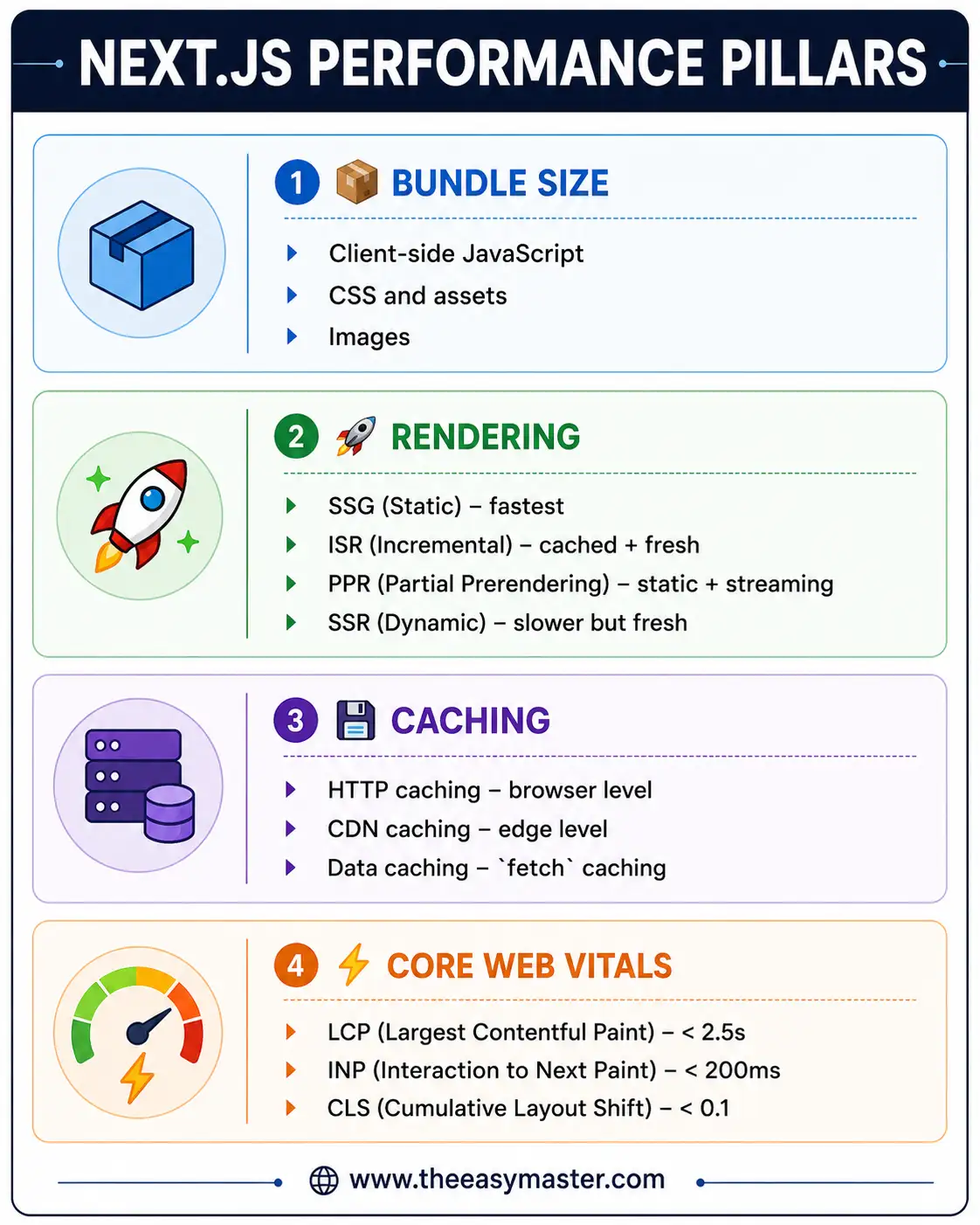
Next.js performance bundle size caching Hindi में हम सब optimize करना सीखेंगे।
2. Bundle Analysis – @next/bundle-analyzer
Pehle step है – bundle में क्या है, यह देखना।
Installation:
npm install @next/bundle-analyzer --save-devConfiguration:
// next.config.js
const withBundleAnalyzer = require('@next/bundle-analyzer')({
  enabled: process.env.ANALYZE === 'true',
});

/** @type {import('next').NextConfig} */
const nextConfig = {
  // your config here
};

module.exports = withBundleAnalyzer(nextConfig);
Run Bundle Analysis:
# Run analysis
ANALYZE=true npm run build

# Or with yarn
ANALYZE=true yarn build
What to Look For:
| Red Flag | What It Means |
|---|---|
Large node_modules chunk | Heavy dependency |
| Duplicated libraries | Same library imported multiple ways |
| Large images | Images should be optimized |
moment.js or lodash | Can be replaced with smaller alternatives |
Bundle Size Targets:
| Type | Target Size |
|---|---|
| First load JS | < 100 KB |
| Page JS | < 50 KB |
| Total page weight | < 500 KB |
| Images | < 100 KB per image |
3. Code Splitting – dynamic() Imports
dynamic() imports components only when needed.
Basic Dynamic Import:
// ❌ Bad – always included in initial bundle
import HeavyChart from '@/components/HeavyChart';

export default function Dashboard() {
  return <HeavyChart />;
}

// ✅ Good – loads only when needed
import dynamic from 'next/dynamic';

const HeavyChart = dynamic(() => import('@/components/HeavyChart'), {
  loading: () => <div className="h-64 animate-pulse bg-gray-200 rounded" />,
  ssr: false, // Disable SSR for client-only components
});

export default function Dashboard() {
  return <HeavyChart />;
}
Named Exports:
// Named export component
// components/Chart.tsx
export const LineChart = () => { ... };
export const BarChart = () => { ... };

// Dynamic import with named export
const LineChart = dynamic(() =>
  import('@/components/Chart').then((mod) => mod.LineChart)
);
Dynamic Import with Custom Loading:
import dynamic from 'next/dynamic';

const LazyComponent = dynamic(
  () => import('@/components/LazyComponent'),
  {
    loading: () => (
      <div className="flex justify-center p-8">
        <div className="spinner" />
      </div>
    ),
    ssr: false, // Skip SSR for better performance
  }
);
Route-based Code Splitting (Automatic):
Next.js automatically code-splits by routes – each route gets its own bundle.
app/
├── dashboard/
│   └── page.tsx     → dashboard bundle
├── settings/
│   └── page.tsx     → settings bundle
└── page.tsx         → home bundle
4. Image Optimization – next/image Best Practices
Basic Image Optimization:
import Image from 'next/image';
import heroImage from '@/public/hero.jpg'; // Static import

export default function Hero() {
  return (
    <Image
      src={heroImage}
      alt="Hero banner"
      priority // Critical for LCP image
      placeholder="blur"
      sizes="100vw"
      className="object-cover"
    />
  );
}
Remote Images Configuration:
// next.config.js
/** @type {import('next').NextConfig} */
const nextConfig = {
  images: {
    remotePatterns: [
      {
        protocol: 'https',
        hostname: 'images.unsplash.com',
      },
      {
        protocol: 'https',
        hostname: 'cdn.shopify.com',
      },
    ],
    // Modern formats
    formats: ['image/avif', 'image/webp'],
    // Device sizes for responsive images
    deviceSizes: [640, 750, 828, 1080, 1200, 1920, 2048, 3840],
    imageSizes: [16, 32, 48, 64, 96, 128, 256, 384],
  },
};

module.exports = nextConfig;
Advanced Image Patterns:
// Responsive image with sizes
<Image
  src="/product.jpg"
  alt="Product image"
  width={800}
  height={600}
  sizes="(max-width: 640px) 100vw, (max-width: 1024px) 50vw, 33vw"
  loading="lazy"
/>

// Fill layout (covers parent container)
<div className="relative h-96 w-full">
  <Image
    src="/background.jpg"
    alt="Background"
    fill
    className="object-cover"
    quality={75}
  />
</div>

// Priority with preload (LCP optimization)
<Image
  src="/hero.jpg"
  alt="Hero"
  priority
  width={1920}
  height={720}
/>
Image Optimization Checklist:
| Item | Action |
|---|---|
| LCP image | Add priority prop |
| Decorative images | Use empty alt="" |
| Image dimensions | Always specify width/height |
| Format | Use WebP/AVIF (automatic with next/image) |
| Quality | Use quality={75} (default) |
| Loading | Add loading="lazy" for below-fold images |
5. Font Optimization – next/font Zero Layout Shift
Google Fonts Optimization:
// app/layout.tsx
import { Inter, Roboto_Mono } from 'next/font/google';

// Optimized Google Font – zero layout shift
const inter = Inter({
  subsets: ['latin'],
  display: 'swap', // Fallback until font loads
  variable: '--font-inter', // CSS variable
});

const robotoMono = Roboto_Mono({
  subsets: ['latin'],
  variable: '--font-roboto-mono',
});

export default function RootLayout({
  children,
}: {
  children: React.ReactNode;
}) {
  return (
    <html lang="en" className={`${inter.variable} ${robotoMono.variable}`}>
      <body>{children}</body>
    </html>
  );
}
Local Fonts:
// app/fonts.ts
import localFont from 'next/font/local';

const myFont = localFont({
  src: './my-font.woff2',
  display: 'swap',
  variable: '--font-my-font',
});

export { myFont };
Benefits of next/font:
| Benefit | Explanation |
|---|---|
| Zero layout shift | No CLS from font loading |
| Self-hosted | No external requests |
| Automatic fallback | display: swap |
| Cacheable | Static assets |
6. Script Optimization – next/script
Script Loading Strategies:
import Script from 'next/script';

export default function Layout() {
  return (
    <>
      {/* After page becomes interactive (default) */}
      <Script src="https://example.com/analytics.js" />

      {/* Load before page becomes interactive */}
      <Script src="https://example.com/critical.js" strategy="beforeInteractive" />

      {/* Load after page loads, any time */}
      <Script src="https://example.com/lazy.js" strategy="lazyOnload" />

      {/* Load after page idle */}
      <Script src="https://example.com/worker.js" strategy="afterInteractive" />
    </>
  );
}
Third-party Script Optimization:
// Google Analytics optimized
import Script from 'next/script';

export function GoogleAnalytics({ gaId }: { gaId: string }) {
  return (
    <>
      <Script
        src={`https://www.googletagmanager.com/gtag/js?id=${gaId}`}
        strategy="afterInteractive"
      />
      <Script id="google-analytics" strategy="afterInteractive">
        {`
          window.dataLayer = window.dataLayer || [];
          function gtag(){dataLayer.push(arguments);}
          gtag('js', new Date());
          gtag('config', '${gaId}');
        `}
      </Script>
    </>
  );
}
7. Caching Strategies – SSG, SSR, ISR, PPR
SSG (Static Site Generation) – Fastest:
// app/blog/page.tsx
// Static – builds once, serves same HTML
export default async function BlogPage() {
  const posts = await fetch('https://api.example.com/posts', {
    cache: 'force-cache', // Default
  });

  return <div>{/* posts */}</div>;
}
SSR (Server-Side Rendering) – Fresh but Slower:
// app/dashboard/page.tsx
// Dynamic – renders on every request
export default async function DashboardPage() {
  const data = await fetch('https://api.example.com/live-data', {
    cache: 'no-store', // Fresh every request
  });

  return <div>{/* live data */}</div>;
}
ISR (Incremental Static Regeneration) – Best of Both:
// app/products/page.tsx
// ISR – static + background revalidation
export default async function ProductsPage() {
  const products = await fetch('https://api.example.com/products', {
    next: { revalidate: 60 }, // Revalidate every 60 seconds
  });

  return <div>{/* products */}</div>;
}
PPR (Partial Prerendering) – Static + Streaming:
// app/product/[id]/page.tsx
import { Suspense } from 'react';

export default function ProductPage({ params }: { params: { id: string } }) {
  return (
    <div>
      {/* Static – immediate */}
      <ProductInfo id={params.id} />

      {/* Dynamic – streams */}
      <Suspense fallback={<RecommendationSkeleton />}>
        <PersonalizedRecommendations userId={getUserId()} />
      </Suspense>
    </div>
  );
}
Caching Strategy Comparison:
| Strategy | Speed | Freshness | Use Case |
|---|---|---|---|
| SSG | ⚡ Fastest | Stale | Blog, docs |
| ISR | ⚡ Fast | Revalidates | Products, news |
| PPR | ⚡ Fast static + streaming dynamic | Mixed | E-commerce |
| SSR | 🐌 Slower | Always fresh | Dashboards |
8. Cache Headers – Cache-Control Configuration
Static Assets Caching:
// next.config.js
/** @type {import('next').NextConfig} */
const nextConfig = {
  async headers() {
    return [
      {
        source: '/static/:path*',
        headers: [
          {
            key: 'Cache-Control',
            value: 'public, max-age=31536000, immutable',
          },
        ],
      },
      {
        source: '/_next/static/:path*',
        headers: [
          {
            key: 'Cache-Control',
            value: 'public, max-age=31536000, immutable',
          },
        ],
      },
      {
        source: '/images/:path*',
        headers: [
          {
            key: 'Cache-Control',
            value: 'public, max-age=86400, stale-while-revalidate=86400',
          },
        ],
      },
    ];
  },
};

module.exports = nextConfig;
Middleware for Dynamic Caching:
// proxy.ts (Next.js 16)
import { NextRequest, NextResponse } from 'next/server';

export function proxy(request: NextRequest) {
  const response = NextResponse.next();

  // Cache successful responses
  if (response.status === 200) {
    response.headers.set(
      'Cache-Control',
      'public, max-age=60, stale-while-revalidate=300'
    );
  }

  return response;
}
CDN Caching Headers:
| Header | Value | Meaning |
|---|---|---|
max-age=3600 | Cache for 1 hour | |
stale-while-revalidate=86400 | Serve stale while fetching new | |
stale-if-error=86400 | Serve stale if backend fails | |
immutable | Never revalidate |
9. Turbopack – Fast Development Builds
Enable Turbopack (Default in Next.js 16+):
# Development with Turbopack (default)
next dev

# Build with Turbopack (default)
next build

# Opt-out to webpack
next dev --webpack
next build --webpack
Benefits:
| Metric | Improvement |
|---|---|
| Fast Refresh | 10x faster |
| Production Build | 4x faster (from 180s to 45s) |
| Dev Startup | 87% faster |
| Server Refresh | 375% faster |
Turbopack Configuration:
// next.config.js
/** @type {import('next').NextConfig} */
const nextConfig = {
  turbopack: {
    // Custom resolve aliases
    resolveAlias: {
      '@': './',
    },
    // Custom loaders
    rules: {},
  },
};

module.exports = nextConfig;
10. Core Web Vitals – LCP, INP, CLS
LCP (Largest Contentful Paint) Optimization:
// 1. Priority image
import Image from 'next/image';

export default function Hero() {
  return (
    <Image
      src="/hero.jpg"
      alt="Hero"
      priority // Preloads LCP image
      width={1920}
      height={720}
    />
  );
}

// 2. Preload critical resources
export default function RootLayout({ children }) {
  return (
    <html>
      <head>
        <link
          rel="preload"
          href="/hero.jpg"
          as="image"
        />
      </head>
      <body>{children}</body>
    </html>
  );
}
INP (Interaction to Next Paint) Optimization:
// 1. Defer non-critical JS
import Script from 'next/script';

export default function Layout() {
  return (
    <>
      <Script src="/heavy.js" strategy="lazyOnload" />
    </>
  );
}

// 2. Use `useTransition` for heavy updates
'use client';
import { useTransition } from 'react';

export function SearchBar() {
  const [isPending, startTransition] = useTransition();

  const handleSearch = (query: string) => {
    startTransition(() => {
      // Heavy search operation
      performSearch(query);
    });
  };

  return (
    <input
      onChange={(e) => handleSearch(e.target.value)}
      disabled={isPending}
    />
  );
}
CLS (Cumulative Layout Shift) Optimization:
// 1. Always specify image dimensions
<Image
  src="/image.jpg"
  width={800}  // Required for CLS
  height={600} // Required for CLS
  alt="Description"
/>

// 2. Reserve space for dynamic content
<div className="min-h-[200px]">
  <Suspense fallback={<div className="h-[200px] animate-pulse" />}>
    <DynamicContent />
  </Suspense>
</div>

// 3. Use `next/font` (automatic CLS prevention)
import { Inter } from 'next/font/google';
const inter = Inter({ subsets: ['latin'] }); // No layout shift!
11. Common Mistakes + Solutions
Mistake 1: Missing priority on LCP image
// ❌ LCP image loads late
<Image src="/hero.jpg" alt="Hero" width={1920} height={720} />

// ✅ Add priority
<Image src="/hero.jpg" alt="Hero" width={1920} height={720} priority />
Mistake 2: Importing heavy components directly
// ❌ 200KB chart always in bundle
import HeavyChart from '@/components/HeavyChart';

// ✅ Dynamic import
const HeavyChart = dynamic(() => import('@/components/HeavyChart'));
Mistake 3: No cache headers for static assets
// ❌ No caching – slow repeat visits
// ✅ Add cache headers
async headers() {
  return [
    {
      source: '/_next/static/:path*',
      headers: [
        { key: 'Cache-Control', value: 'public, max-age=31536000, immutable' },
      ],
    },
  ];
}
Mistake 4: Missing image dimensions
// ❌ Layout shift on image load
<Image src="/image.jpg" alt="Image" />

// ✅ No layout shift
<Image src="/image.jpg" alt="Image" width={800} height={600} />
12. Quick Cheat Sheet
Bundle Analysis:
npm install @next/bundle-analyzer --save-dev
ANALYZE=true npm run build
Dynamic Imports:
const Component = dynamic(() => import('@/components/Heavy'), {
  loading: () => <Skeleton />,
  ssr: false,
});
Image Component:
<Image
  src="/image.jpg"
  alt="Description"
  width={800}
  height={600}
  priority // LCP images
  loading="lazy" // Default for below-fold
/>
Caching Strategies:
| Strategy | fetch option | Use Case |
|---|---|---|
| SSG | cache: 'force-cache' | Static content |
| ISR | next: { revalidate: 60 } | Semi-dynamic |
| SSR | cache: 'no-store' | Real-time |
Cache Headers:
// Static assets – 1 year
'public, max-age=31536000, immutable'

// Images – 1 day
'public, max-age=86400, stale-while-revalidate=86400'

// Dynamic pages – 1 minute
'public, max-age=60, stale-while-revalidate=300'
13. FAQ
Q1: Next.js performance bundle size caching Hindi में सबसे important kya hai?
Bundle analysis – पहले जानो क्या bundle में है, फिर optimize करो।
Q2: Bundle size कैसे reduce करें?
dynamic() imports, remove unused dependencies, use next/image, use next/font.
Q3: priority prop कब use karein?
सिर्फ LCP (Largest Contentful Paint) image के लिए – usually hero image above fold.
Q4: ISR vs PPR – kya antar hai?
ISR – पूरा page revalidate होता है। PPR – static part immediate, dynamic part streams.
Q5: cache: 'force-cache' vs cache: 'no-store' – kya antar hai?
force-cache – SSG (build time), no-store – SSR (every request).
Q6: next/font kya benefit provide karta hai?
Zero layout shift (NO CLS), self-hosted, automatic fallback, no external requests.
Q7: CLS kaise fix karein?
Always specify image width/height, use next/font, reserve space for dynamic content.
Q8: Turbopack kya hai?
Rust-based bundler – 10x faster Fast Refresh, 4x faster builds. Default in Next.js 16+.
Q9: Cache headers kyun important हैं?
Repeat visits 90% faster होते हैं – browser/CDN se cached content serve होता है।
Q10: Core Web Vitals Google ranking mein kitna important है?
Very important – Google uses LCP, INP, CLS as ranking signals.
14. Conclusion
बहुत बढ़िया दोस्तों! आज हमने Next.js performance bundle size caching Hindi को पूरी detail में समझा।
Quick Recap:
| Area | Key Actions |
|---|---|
| Bundle Size | Analyze with bundle analyzer, use dynamic() imports |
| Images | Use next/image, add priority for LCP, WebP/AVIF |
| Fonts | Use next/font (zero CLS) |
| Caching | ISR for semi-dynamic, PPR for mixed content |
| Cache Headers | Add Cache-Control for static assets |
| Core Web Vitals | Monitor LCP, INP, CLS |
Mera personal experience:
Bundle analyzer use करने के बाद मुझे पता चला कि moment.js bundle का 30% था – date-fns replace किया, bundle 200KB कम हुआ। next/image और next/font use करने के बाद LCP 3.2s से 1.4s पर आ गया।
Tum bhi ye steps follow karo:
- ✅ Bundle analyzer run करो
- ✅ Heavy components ko
dynamic()import करो - ✅
next/imageuse करो (सब images के लिए) - ✅ ISR enable करो जहाँ possible हो
- ✅ Cache headers add करो
अब तुम्हारी बारी है!
नीचे comment में बताओ:
- तुम्हारा bundle size कितना है?
- LCP score क्या है?
- अगला topic क्या चाहिए? (Next.js Deployment? Monitoring? Error Tracking?)
The Easy Master पर बने रहो। Happy Optimizing! 🚀⚛️
Resources
Additional Resources
- Express.js Setup – पहला Server कैसे बनाएं (Step-by-Step) 2026
- Express.js Routing – GET POST PUT DELETE Complete Guide
- Express Middleware समझे – Application, Router, Error Middleware
- Express req and res Objects – Query, Params, Body, Headers Explained
- Express Static Files और Templating – EJS से Dynamic HTML Banaye
- Express Router – API Routes को Organize करें (Modular Code)
- Express.js में Environment Variables – .env File कैसे Use करें
- Express File Upload Multer Tutorial | Image PDF Hindi 2026
- Express Security – Helmet, CORS, Rate Limiting, Validation (2026)
- Express + TypeScript – Type-Safe API कैसे बनाएं 2026
- Express MongoDB CRUD – Complete REST API Example 2026
- Express Logging – Morgan और Winston से Debug करें
- Express API Testing – Supertest से Routes Test करें
- MongoDB Setup – CRUD Operations समझे (Beginner Guide) 2026
- MongoDB Compass से GUI Database Manage करने का आसान तरीका | Beginner Tutorial 2026
- Node.js MongoDB Connection – Mongoose Setup समझे 2026
- MongoDB Data Modeling – Embedded Documents vs References 2026
- MongoDB Indexing – Query Speed बढ़ने करने का आसान तरीका
- MongoDB Aggregation Pipeline – Stages समझे | Practical Examples
- Express MongoDB CRUD – Complete REST API Example
- Mongoose ODM – Schema, Model, and Validation समझे 2026
- MongoDB Atlas – Cloud Database Free में Deploy करें 2026
- JWT Authentication MongoDB – User Login System कैसे बनाएं 2026
- Next.js App Router – Pages Router से क्या बदला? Complete Guide 2026
- Next.js Server Components – ‘use client’ कब और कहां Use करें
- Next.js Routing – Layouts, Dynamic Routes and Nested Routes 2026
- Next.js 16 New Features – Turbopack, Cache Components and proxy.ts
- Next.js Partial Prerendering – Static and Dynamic Content साथ में
- Next.js Authentication – JWT Session Management (App Router) 2026
- Next.js SEO – Metadata API and Image Optimization समझे 2026
- Next.js TypeScript – Full-Stack Type-Safe App कैसे बनाएं