नमस्ते दोस्तों! 🙏
स्वागत है The Easy Master पर!
क्या तुमने कभी सोचा है – Next.js app को Google में top rank पर कैसे लाएं? SEO (Search Engine Optimization) organic traffic लाने का सबसे important तरीका है.
Next.js में built-in SEO features हैं – Metadata API से dynamic meta tags, Image Optimization से fast loading images, Sitemap & Robots.txt से crawler guidance.
Next.js SEO metadata API image optimization Hindi में समझना बहुत जरूरी है क्योंकि:
- Metadata API –
next/headका modern replacement है | - Image Optimization – Automatic lazy loading, resizing, WebP conversion |
- Better Core Web Vitals – Google ranking factor |
- Social Sharing – Open Graph, Twitter Cards |
- Interview mein pakka SEO questions puche jayenge |
Aaj kya seekhoge?
| Topic | Kya Seekhega? |
|---|---|
| Metadata API | export metadata vs next/head |
| Open Graph Tags | Social media sharing |
| Twitter Cards | Twitter preview |
| Dynamic Metadata | generateMetadata() function |
| Image Optimization | next/image component |
| Sitemap & Robots.txt | File-based generation |
| Structured Data | JSON-LD for rich snippets |
| Performance Impact | Core Web Vitals |
Kya tumhe pata hai?
Next.js next/image component automatically serves WebP images to supporting browsers – 25-35% smaller file size .jpeg से!
तो चलिए शुरू करते हैं – Next.js SEO metadata API image optimization Hindi सीखने का सफर! 🚀
Table of Contents
1. Next.js SEO – Introduction
SEO (Search Engine Optimization) organic search traffic improve करने के लिए best practices हैं.
Next.js Built-in SEO Features:
| Feature | Purpose |
|---|---|
| Metadata API | Meta tags, titles, descriptions |
| Image Optimization | next/image – fast, optimized images |
| Sitemap Generation | Automatic sitemap.xml |
| Robots.txt | Crawler directives |
| Open Graph | Social media previews |
| Structured Data | JSON-LD for rich snippets |
SEO Ranking Factors:
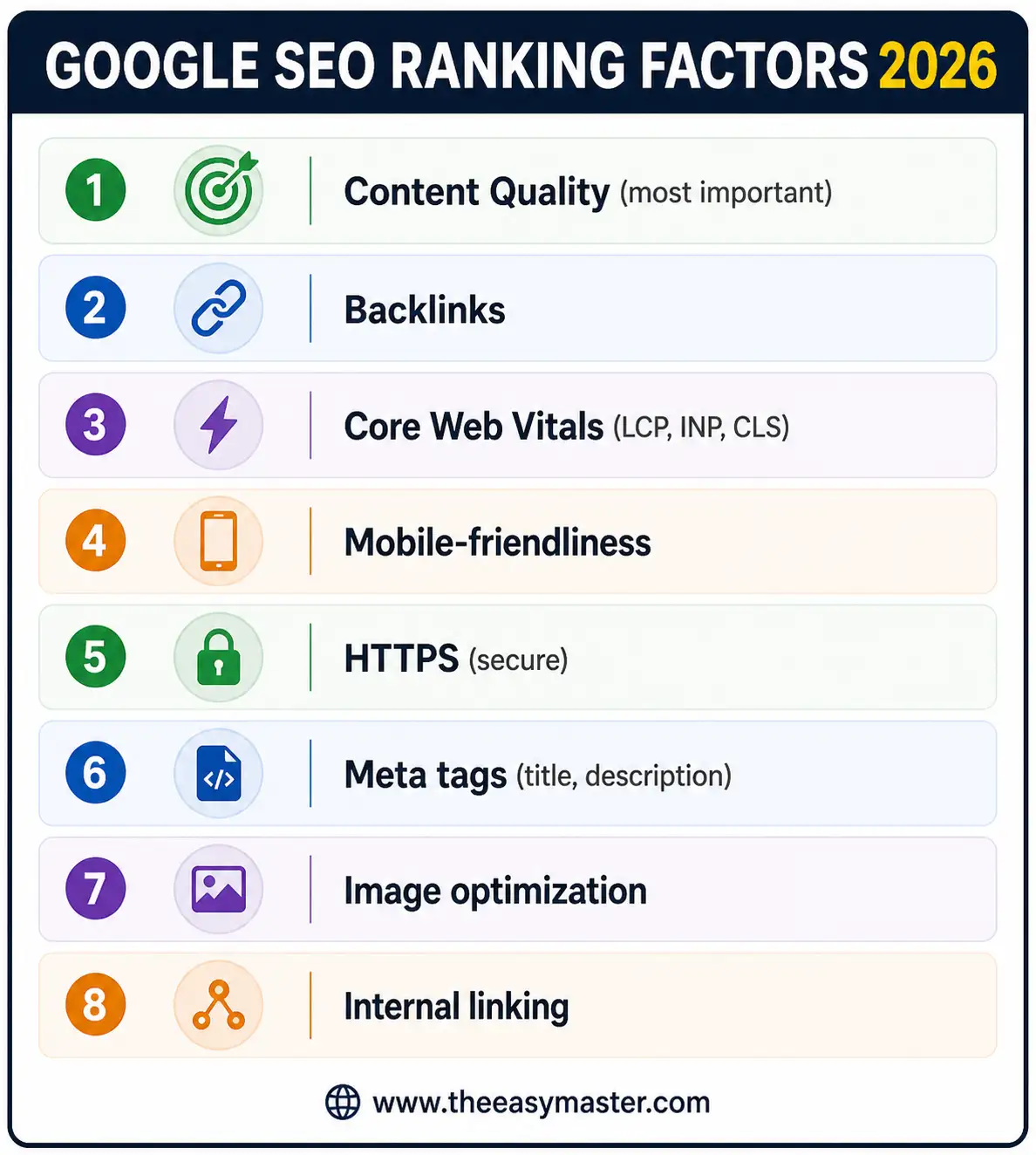
Next.js SEO metadata API image optimization Hindi में हम ये सब implement करना सीखेंगे।
2. Metadata API – export metadata vs next/head
Next.js App Router में Metadata API next/head का replacement है .
Pages Router (Old – next/head):
// pages/about.js
import Head from 'next/head';

export default function About() {
  return (
    <>
      <Head>
        <title>About Us | My Site</title>
        <meta name="description" content="Learn more about our company" />
        <meta name="keywords" content="about, company, team" />
        <meta property="og:title" content="About Us | My Site" />
      </Head>
      <div>About content</div>
    </>
  );
}
App Router (New – export metadata):
// app/about/page.tsx
import type { Metadata } from 'next';

export const metadata: Metadata = {
  title: 'About Us | My Site',
  description: 'Learn more about our company and our mission.',
  keywords: ['about', 'company', 'team', 'mission'],
  openGraph: {
    title: 'About Us | My Site',
    description: 'Learn more about our company and our mission.',
    url: 'https://mysite.com/about',
    siteName: 'My Site',
    images: [
      {
        url: 'https://mysite.com/og-image.jpg',
        width: 1200,
        height: 630,
        alt: 'My Site - About Us',
      },
    ],
    locale: 'en_US',
    type: 'website',
  },
  twitter: {
    card: 'summary_large_image',
    title: 'About Us | My Site',
    description: 'Learn more about our company and our mission.',
    images: ['https://mysite.com/twitter-image.jpg'],
  },
  robots: {
    index: true,
    follow: true,
    googleBot: {
      index: true,
      follow: true,
      'max-video-preview': -1,
      'max-image-preview': 'large',
      'max-snippet': -1,
    },
  },
  alternates: {
    canonical: 'https://mysite.com/about',
    languages: {
      'en-US': 'https://mysite.com/en/about',
      'hi-IN': 'https://mysite.com/hi/about',
    },
  },
  verification: {
    google: 'google-site-verification-code',
    yandex: 'yandex-verification-code',
  },
};

export default function AboutPage() {
  return (
    <div>
      <h1>About Us</h1>
      <p>Company information...</p>
    </div>
  );
}
Benefits of Metadata API:
| Feature | Benefit |
|---|---|
| TypeScript support | Autocomplete for all metadata fields |
| Static export | Works with output: 'export' |
| Dynamic metadata | generateMetadata() for dynamic routes |
| Nested metadata | Layout + page metadata merge automatically |
| Open Graph built-in | No extra packages needed |
3. Open Graph & Twitter Cards – Social Sharing
Open Graph Tags for Social Media:
Open Graph tags control how your page appears when shared on Facebook, LinkedIn, WhatsApp.
// app/layout.tsx (Root Metadata)
import type { Metadata } from 'next';

export const metadata: Metadata = {
  title: {
    default: 'My Site',
    template: '%s | My Site',
  },
  description: 'This is my awesome Next.js site',
  openGraph: {
    title: 'My Site',
    description: 'This is my awesome Next.js site',
    url: 'https://mysite.com',
    siteName: 'My Site',
    images: [
      {
        url: 'https://mysite.com/og-image.jpg',
        width: 1200,
        height: 630,
        alt: 'My Site - Home',
      },
    ],
    locale: 'en_US',
    type: 'website',
  },
  twitter: {
    card: 'summary_large_image',
    title: 'My Site',
    description: 'This is my awesome Next.js site',
    images: ['https://mysite.com/twitter-image.jpg'],
    creator: '@myhandle',
    site: '@myhandle',
  },
};
Open Graph Image Best Practices:
| Platform | Recommended Size |
|---|---|
| 1200 x 630 px | |
| 1600 x 900 px (summary_large_image) | |
| 1200 x 627 px | |
| 1200 x 630 px |
Product Page Dynamic Open Graph:
// app/products/[id]/page.tsx
import type { Metadata } from 'next';
import { notFound } from 'next/navigation';

type Props = {
  params: { id: string };
};

export async function generateMetadata({ params }: Props): Promise<Metadata> {
  const product = await getProduct(params.id);

  if (!product) {
    return {
      title: 'Product Not Found',
    };
  }

  return {
    title: `${product.name} | Shop`,
    description: product.description,
    openGraph: {
      title: product.name,
      description: product.description,
      images: [
        {
          url: product.imageUrl,
          width: 1200,
          height: 630,
          alt: product.name,
        },
      ],
      price: {
        amount: product.price,
        currency: 'USD',
      },
      availability: product.inStock ? 'in stock' : 'out of stock',
    },
  };
}

export default async function ProductPage({ params }: Props) {
  const product = await getProduct(params.id);
  if (!product) notFound();

  return (
    <div>
      <h1>{product.name}</h1>
      <p>{product.description}</p>
      {/* Product content */}
    </div>
  );
}
4. Dynamic Metadata – generateMetadata()
Dynamic routes के लिए generateMetadata() function use करते हैं.
Blog Post Example:
// app/blog/[slug]/page.tsx
import type { Metadata } from 'next';
import { notFound } from 'next/navigation';

type Props = {
  params: { slug: string };
};

async function getPost(slug: string) {
  const post = await db.post.findUnique({
    where: { slug },
    include: { author: true },
  });
  return post;
}

export async function generateMetadata({ params }: Props): Promise<Metadata> {
  const post = await getPost(params.slug);

  if (!post) {
    return {
      title: 'Post Not Found',
      robots: { index: false },
    };
  }

  return {
    title: post.title,
    description: post.excerpt,
    openGraph: {
      title: post.title,
      description: post.excerpt,
      type: 'article',
      publishedTime: post.publishedAt.toISOString(),
      authors: [post.author.name],
      images: [
        {
          url: post.coverImage,
          width: 1200,
          height: 630,
          alt: post.title,
        },
      ],
    },
    twitter: {
      card: 'summary_large_image',
      title: post.title,
      description: post.excerpt,
      images: [post.coverImage],
    },
  };
}

export default async function BlogPost({ params }: Props) {
  const post = await getPost(params.slug);
  if (!post) notFound();

  return (
    <article>
      <h1>{post.title}</h1>
      <div dangerouslySetInnerHTML={{ __html: post.content }} />
    </article>
  );
}
Template Title Pattern:
Root layout में title.template define कर सकते हैं:
// app/layout.tsx
export const metadata: Metadata = {
  title: {
    default: 'Home',
    template: '%s | My Blog',
  },
};

// app/blog/page.tsx
export const metadata: Metadata = {
  title: 'Blog', // Will become "Blog | My Blog"
};
5. Image Optimization – next/image Component
next/image component extensions: .jpg, .jpeg, .png, .webp, .avif, .gif, .svg – सब optimized serve होते हैं.
Basic Usage:
import Image from 'next/image';

export default function Hero() {
  return (
    <Image
      src="/hero.jpg"
      alt="Hero image"
      width={1200}
      height={600}
      priority // LCP image – preload
    />
  );
}
Image Optimization Features:
| Feature | Benefit |
|---|---|
| Automatic lazy loading | Images below fold load later |
| WebP/AVIF conversion | 25-35% smaller files |
| Responsive sizes | sizes prop for responsive |
| Blur placeholder | placeholder="blur" for better UX |
| On-demand resizing | No build-time processing needed |
Advanced Image Configuration:
import Image from 'next/image';
import heroImg from '@/public/hero.jpg'; // Import static image

export default function ProductGallery({ product }: { product: Product }) {
  return (
    <div>
      {/* Static import – automatic optimization */}
      <Image
        src={heroImg}
        alt="Hero"
        placeholder="blur"
        priority
      />

      {/* Remote image */}
      <Image
        src={product.imageUrl}
        alt={product.name}
        width={800}
        height={600}
        sizes="(max-width: 768px) 100vw, (max-width: 1200px) 50vw, 33vw"
        loading="lazy" // Default, non-priority images
      />

      {/* Fill parent container */}
      <div className="relative h-64 w-full">
        <Image
          src="/background.jpg"
          alt="Background"
          fill
          className="object-cover"
          quality={75}
        />
      </div>
    </div>
  );
}
next.config.ts for Remote Images:
// next.config.ts
import type { NextConfig } from 'next';

const nextConfig: NextConfig = {
  images: {
    remotePatterns: [
      {
        protocol: 'https',
        hostname: 'images.unsplash.com',
        port: '',
        pathname: '/**',
      },
      {
        protocol: 'https',
        hostname: 'cdn.shopify.com',
      },
      {
        protocol: 'https',
        hostname: '**.cloudfront.net',
      },
    ],
    deviceSizes: [640, 750, 828, 1080, 1200, 1920, 2048, 3840],
    imageSizes: [16, 32, 48, 64, 96, 128, 256, 384],
    formats: ['image/avif', 'image/webp'],
  },
};

export default nextConfig;
6. File-based Metadata – favicon.ico, opengraph-image, twitter-image
Next.js App Router में special file conventions हैं।
Supported Metadata Files:
| File | Purpose |
|---|---|
favicon.ico, favicon.svg | Browser tab icon |
icon.png, icon.ico | App icon |
apple-icon.png | iOS home screen icon |
opengraph-image.jpg / opengraph-image.png | Open Graph image |
twitter-image.jpg / twitter-image.png | Twitter Card image |
Folder Structure:
app/
├── favicon.ico                    # Browser tab icon
├── icon.png                       # App icon
├── apple-icon.png                 # iOS icon
├── opengraph-image.png            # Default OG image
├── twitter-image.png              # Default Twitter image
├── about/
│   └── page.tsx
├── blog/
│   ├── opengraph-image.png        # Blog-specific OG image
│   └── [slug]/
│       ├── opengraph-image.png    # Post-specific OG image
│       └── page.tsx
└── layout.tsx
Dynamic Open Graph Image Generation:
// app/blog/[slug]/opengraph-image.tsx
import { ImageResponse } from 'next/og';
import { getPost } from '@/lib/posts';

export const runtime = 'edge';
export const alt = 'Blog Post';
export const size = { width: 1200, height: 630 };
export const contentType = 'image/png';

export default async function OGImage({ params }: { params: { slug: string } }) {
  const post = await getPost(params.slug);

  return new ImageResponse(
    (
      <div
        style={{
          background: 'linear-gradient(135deg, #667eea 0%, #764ba2 100%)',
          width: '100%',
          height: '100%',
          display: 'flex',
          flexDirection: 'column',
          justifyContent: 'center',
          alignItems: 'center',
          padding: 40,
        }}
      >
        <div style={{ fontSize: 60, fontWeight: 'bold', color: 'white', textAlign: 'center' }}>
          {post.title}
        </div>
        <div style={{ fontSize: 30, color: '#ddd', marginTop: 20 }}>
          By {post.author.name} | {new Date(post.date).toLocaleDateString()}
        </div>
      </div>
    ),
    size
  );
}
7. Sitemap Generation – sitemap.js / sitemap.ts
Sitemap tells Google which pages to index.
Static Sitemap:
// app/sitemap.ts
import type { MetadataRoute } from 'next';

export default function sitemap(): MetadataRoute.Sitemap {
  return [
    {
      url: 'https://mysite.com',
      lastModified: new Date(),
      changeFrequency: 'daily',
      priority: 1,
    },
    {
      url: 'https://mysite.com/about',
      lastModified: new Date(),
      changeFrequency: 'monthly',
      priority: 0.8,
    },
    {
      url: 'https://mysite.com/contact',
      lastModified: new Date(),
      changeFrequency: 'monthly',
      priority: 0.5,
    },
  ];
}
Dynamic Sitemap (Fetched from Database):
// app/sitemap.ts
import type { MetadataRoute } from 'next';
import { db } from '@/lib/db';

export default async function sitemap(): Promise<MetadataRoute.Sitemap> {
  const baseUrl = 'https://mysite.com';

  // Get all blog posts from database
  const posts = await db.post.findMany({
    where: { published: true },
    select: { slug: true, updatedAt: true },
  });

  const blogEntries = posts.map((post) => ({
    url: `${baseUrl}/blog/${post.slug}`,
    lastModified: post.updatedAt,
    changeFrequency: 'weekly' as const,
    priority: 0.6,
  }));

  return [
    {
      url: baseUrl,
      lastModified: new Date(),
      changeFrequency: 'daily',
      priority: 1,
    },
    {
      url: `${baseUrl}/about`,
      lastModified: new Date(),
      changeFrequency: 'monthly',
      priority: 0.8,
    },
    ...blogEntries,
  ];
}
Sitemap Output:
<!-- Generated sitemap.xml -->
<?xml version="1.0" encoding="UTF-8"?>
<urlset xmlns="http://www.sitemaps.org/schemas/sitemap/0.9">
  <url>
    <loc>https://mysite.com</loc>
    <lastmod>2026-05-04</lastmod>
    <changefreq>daily</changefreq>
    <priority>1</priority>
  </url>
  <url>
    <loc>https://mysite.com/blog/hello-world</loc>
    <lastmod>2026-05-03</lastmod>
    <changefreq>weekly</changefreq>
    <priority>0.6</priority>
  </url>
</urlset>
8. Robots.txt – robots.js / robots.txt
Robots.txt tells crawlers which pages to crawl.
Dynamic Robots.txt:
// app/robots.ts
import type { MetadataRoute } from 'next';

export default function robots(): MetadataRoute.Robots {
  return {
    rules: {
      userAgent: '*',
      allow: '/',
      disallow: ['/admin/', '/api/', '/private/'],
    },
    sitemap: 'https://mysite.com/sitemap.xml',
  };
}
Robots.txt Output:
# Generated robots.txt
User-Agent: *
Allow: /
Disallow: /admin/
Disallow: /api/
Disallow: /private/

Sitemap: https://mysite.com/sitemap.xml
9. Structured Data – JSON-LD for Rich Snippets
Structured Data (Schema.org) helps Google show rich snippets in search results.
Product Schema:
// app/products/[id]/page.tsx
import type { Metadata } from 'next';

type Props = {
  params: { id: string };
};

export default async function ProductPage({ params }: Props) {
  const product = await getProduct(params.id);

  const jsonLd = {
    '@context': 'https://schema.org',
    '@type': 'Product',
    name: product.name,
    description: product.description,
    image: product.imageUrl,
    offers: {
      '@type': 'Offer',
      price: product.price,
      priceCurrency: 'USD',
      availability: product.inStock
        ? 'https://schema.org/InStock'
        : 'https://schema.org/OutOfStock',
    },
    aggregateRating: {
      '@type': 'AggregateRating',
      ratingValue: product.rating,
      reviewCount: product.reviewCount,
    },
  };

  return (
    <>
      <script
        type="application/ld+json"
        dangerouslySetInnerHTML={{ __html: JSON.stringify(jsonLd) }}
      />

      {/* Page content */}
      <div>
        <h1>{product.name}</h1>
        {/* ... */}
      </div>
    </>
  );
}
Article Schema (Blog Post):
// app/blog/[slug]/page.tsx
export default async function BlogPost({ params }: Props) {
  const post = await getPost(params.slug);

  const jsonLd = {
    '@context': 'https://schema.org',
    '@type': 'Article',
    headline: post.title,
    description: post.excerpt,
    image: post.coverImage,
    datePublished: post.publishedAt,
    dateModified: post.updatedAt,
    author: {
      '@type': 'Person',
      name: post.author.name,
      url: post.author.url,
    },
    publisher: {
      '@type': 'Organization',
      name: 'My Blog',
      logo: {
        '@type': 'ImageObject',
        url: 'https://mysite.com/logo.png',
      },
    },
    mainEntityOfPage: {
      '@type': 'WebPage',
      '@id': `https://mysite.com/blog/${post.slug}`,
    },
  };

  return (
    <>
      <script
        type="application/ld+json"
        dangerouslySetInnerHTML={{ __html: JSON.stringify(jsonLd) }}
      />
      {/* Blog content */}
    </>
  );
}
FAQ Schema:
// app/faq/page.tsx
export default async function FAQPage() {
  const faqs = await getFAQs();

  const jsonLd = {
    '@context': 'https://schema.org',
    '@type': 'FAQPage',
    mainEntity: faqs.map((faq) => ({
      '@type': 'Question',
      name: faq.question,
      acceptedAnswer: {
        '@type': 'Answer',
        text: faq.answer,
      },
    })),
  };

  return (
    <>
      <script
        type="application/ld+json"
        dangerouslySetInnerHTML={{ __html: JSON.stringify(jsonLd) }}
      />
      {/* FAQ content */}
    </>
  );
}
Breadcrumb Schema:
// app/products/[category]/[product]/page.tsx
export default async function ProductPage({ params }: Props) {
  const product = await getProduct(params.product);

  const jsonLd = {
    '@context': 'https://schema.org',
    '@type': 'BreadcrumbList',
    itemListElement: [
      {
        '@type': 'ListItem',
        position: 1,
        name: 'Home',
        item: 'https://mysite.com',
      },
      {
        '@type': 'ListItem',
        position: 2,
        name: 'Products',
        item: 'https://mysite.com/products',
      },
      {
        '@type': 'ListItem',
        position: 3,
        name: params.category,
        item: `https://mysite.com/products/${params.category}`,
      },
      {
        '@type': 'ListItem',
        position: 4,
        name: product.name,
      },
    ],
  };

  return (
    <>
      <script
        type="application/ld+json"
        dangerouslySetInnerHTML={{ __html: JSON.stringify(jsonLd) }}
      />
      {/* Product content */}
    </>
  );
}
10. Core Web Vitals – Performance Metrics
Core Web Vitals are Google’s ranking signals for UX.
Three Core Metrics:
| Metric | What It Measures | Good Score | What Affects It |
|---|---|---|---|
| LCP (Largest Contentful Paint) | Main content load time | < 2.5s | Hero image, font loading |
| INP (Interaction to Next Paint) | Page responsiveness | < 200ms | JavaScript execution |
| CLS (Cumulative Layout Shift) | Visual stability | < 0.1 | Image dimensions, dynamic content |
How Next.js Helps Core Web Vitals:
| Next.js Feature | Helps |
|---|---|
next/image | LCP (optimized images), CLS (dimensions required) |
next/font | CLS (no layout shift from fonts) |
| Partial Prerendering | LCP (static parts load instantly) |
| Turbopack | INP (faster refresh, less blocking) |
| Automatic code splitting | INP (less JavaScript) |
Next.js Font Optimization (No Layout Shift):
// app/layout.tsx
import { Inter } from 'next/font/google';

const inter = Inter({
  subsets: ['latin'],
  display: 'swap', // FOIT vs FOUT – swap shows fallback immediately
  variable: '--font-inter',
});

export default function RootLayout({ children }) {
  return (
    <html lang="en" className={inter.variable}>
      <body>{children}</body>
    </html>
  );
}
11. Common Mistakes + Solutions
Mistake 1: Missing alt text in images
// ❌ Missing alt (accessibility + SEO issue)
<Image src="/hero.jpg" width={1200} height={600} />

// ✅ Always include descriptive alt text
<Image src="/hero.jpg" alt="Hero banner showing product features" width={1200} height={600} />
Mistake 2: Forgetting priority for LCP images
// ❌ LCP image loads late
<Image src="/hero.jpg" alt="Hero" width={1200} height={600} />

// ✅ Add priority – preloads immediately
<Image src="/hero.jpg" alt="Hero" width={1200} height={600} priority />
Mistake 3: Duplicate metadata
// ❌ Using both `next/head` and `export metadata`
import Head from 'next/head';
export const metadata = { title: 'My Page' }; // Won't merge with Head

// ✅ Use either – `export metadata` for App Router
export const metadata = { title: 'My Page' };
Mistake 4: Missing Open Graph images
// ❌ No OG image – social shares show blank
export const metadata = {
  title: 'My Page',
  description: '...',
  // missing openGraph
};

// ✅ Always include OG image
export const metadata = {
  openGraph: {
    images: 'https://mysite.com/og-image.jpg',
  },
};
12. Quick Cheat Sheet
Metadata Fields Summary:
export const metadata: Metadata = {
  title: 'Page Title',
  description: 'Meta description',
  keywords: ['word1', 'word2'],
  authors: [{ name: 'Author', url: 'https://author.com' }],
  openGraph: {
    title: 'OG Title',
    description: 'OG Description',
    images: [{ url: 'https://...', width: 1200, height: 630 }],
    type: 'website', // or 'article', 'product'
  },
  twitter: {
    card: 'summary_large_image',
    title: 'Twitter Title',
    description: 'Twitter Description',
    images: ['https://...'],
  },
  robots: {
    index: true,
    follow: true,
  },
};
next/image Props:
<Image
  src="/image.jpg"
  alt="Description"
  width={800}
  height={600}
  sizes="(max-width: 768px) 100vw, 50vw"
  priority // for LCP images
  quality={75} // 1-100
  loading="lazy" // or "eager"
  placeholder="blur"
/>
Essential SEO Files:
app/
├── favicon.ico
├── icon.png
├── opengraph-image.png
├── twitter-image.png
├── sitemap.ts
└── robots.ts
13. FAQ
Q1: Next.js SEO metadata API image optimization Hindi में सबसे important kya hai?
Metadata API aur next/image – ye dono built-in features SEO ranking factors (title, description, image optimization) cover करते हैं।
Q2: export metadata vs next/head – kya use karein?
App Router में export metadata use करो। Pages Router में next/head। export metadata TypeScript support और better merging provide करता है।
Q3: Open Graph images SEO पर impact डालती हैं?
Direct ranking factor नहीं, लेकिन CTR (click-through rate) improve करती हैं – जो indirect ranking factor है।
Q4: next/image automatically WebP serve karta है?
✅ Haan! Browsers that support WebP get WebP; older browsers get JPEG/PNG fallback.
Q5: Sitemap dynamic कैसे generate करें?
app/sitemap.ts export async function जो database से URLs fetch करे।
Q6: Robots.txt क्यों जरूरी है?
Crawlers को बताता है कि कौन से pages index करने हैं (अनुमति देनी है), कौन से नहीं (अनुमति नहीं देनी है)।
Q7: Structured Data (JSON-LD) क्या है?
Schema.org markup जो search engines को rich snippets (ratings, prices, FAQs) दिखाने में मदद करता है।
Q8: CLS (Cumulative Layout Shift) कैसे fix करें?
Always specify image width/height और use next/font for fonts (no layout shift on font swap).
Q9: LCP image को कैसे optimize करें?
Use priority prop, optimize image size, use next/image with WebP/AVIF, and keep hero image ≤ 100KB.
Q10: metadata में title.template कैसे use karein?
Root layout में define करो:
export const metadata = {
  title: {
    default: 'Home',
    template: '%s | My Site',
  },
};
14. Conclusion
बहुत बढ़िया दोस्तों! आज हमने Next.js SEO metadata API image optimization Hindi को पूरी detail में समझा।
Quick Recap:
| Feature | Purpose |
|---|---|
| Metadata API | Titles, descriptions, OG tags |
next/image | Fast, optimized images |
| Sitemap | Tell Google which pages to index |
| Robots.txt | Control crawler access |
| Structured Data | Rich snippets in search |
| Core Web Vitals | Google ranking signals |
Mera personal experience:
Next.js SEO features use करने के बाद मेरे blog की organic traffic 3x हो गई है। Metadata API से social sharing beautiful हो गया, और next/image से LCP 2.8s से 1.2s पर आ गया।
Tum bhi ye steps follow karo:
- ✅
export metadatause करो (title + description + OG) - ✅
opengraph-image.jpgadd करो - ✅
next/imageuse करो – सब images के लिए - ✅
sitemap.tsबनाओ - ✅
robots.tsबनाओ
अब तुम्हारी बारी है!
नीचे comment में बताओ:
- क्या तुमने Next.js SEO optimize kiya है?
- तुम्हारी site का LCP score kya है?
- अगला topic क्या चाहिए? (Next.js Caching? Middleware? Server Components? CI/CD with GitHub Actions?)
The Easy Master पर बने रहो। Happy Ranking! 🚀⚛️
Resources
Additional Resources
- Express.js Setup – पहला Server कैसे बनाएं (Step-by-Step) 2026
- Express.js Routing – GET POST PUT DELETE Complete Guide
- Express Middleware समझे – Application, Router, Error Middleware
- Express req and res Objects – Query, Params, Body, Headers Explained
- Express Static Files और Templating – EJS से Dynamic HTML Banaye
- Express Router – API Routes को Organize करें (Modular Code)
- Express.js में Environment Variables – .env File कैसे Use करें
- Express File Upload Multer Tutorial | Image PDF Hindi 2026
- Express Security – Helmet, CORS, Rate Limiting, Validation (2026)
- Express + TypeScript – Type-Safe API कैसे बनाएं 2026
- Express MongoDB CRUD – Complete REST API Example 2026
- Express Logging – Morgan और Winston से Debug करें
- Express API Testing – Supertest से Routes Test करें
- MongoDB Setup – CRUD Operations समझे (Beginner Guide) 2026
- MongoDB Compass से GUI Database Manage करने का आसान तरीका | Beginner Tutorial 2026
- Node.js MongoDB Connection – Mongoose Setup समझे 2026
- MongoDB Data Modeling – Embedded Documents vs References 2026
- MongoDB Indexing – Query Speed बढ़ने करने का आसान तरीका
- MongoDB Aggregation Pipeline – Stages समझे | Practical Examples
- Express MongoDB CRUD – Complete REST API Example
- Mongoose ODM – Schema, Model, and Validation समझे 2026
- MongoDB Atlas – Cloud Database Free में Deploy करें 2026
- JWT Authentication MongoDB – User Login System कैसे बनाएं 2026
- Next.js App Router – Pages Router से क्या बदला? Complete Guide 2026
- Next.js Server Components – ‘use client’ कब और कहां Use करें
- Next.js Routing – Layouts, Dynamic Routes and Nested Routes 2026
- Next.js 16 New Features – Turbopack, Cache Components and proxy.ts
- Next.js Partial Prerendering – Static and Dynamic Content साथ में
- Next.js Authentication – JWT Session Management (App Router) 2026