नमस्ते दोस्तों!
स्वागत है The Easy Master पर!
आपने scaling aur load balancing के बारे में सीखा। अब सबसे important सवाल – “Database को कैसे scale karein?” Web servers को horizontal scale karna easy hai – bus aur instances add kar do load balancer ke peeche। Lekin database? Database stateful hota hai – data consistency, ACID transactions, complex queries। Yahan scaling thodi tricky है।
Jab meri team का product viral हुआ, toh traffic तो web servers handle kar rahe the, but database server bottleneck ban gaya। Reads slow the, writes pending ho rahi थी। Tab maine read replicas lagaye – reads तुरंत fast हो गए। Phir writes bhi बढ़े, तो sharding karna pada – complex था, but necessary।
इस Database scaling sharding Hindi article mein main aapko sikhata hoon:
✅ Read replicas kya hain – reads ko scale kaise karein
✅ Master-slave replication – consistency vs latency trade-off
✅ Sharding (horizontal partitioning) kya hai – writes ko scale kaise karein
✅ Sharding strategies – range, hash, directory-based, consistent hashing
✅ Read replicas vs sharding – kab kya use karein
✅ Scaling journey – single DB → read replicas → sharding
✅ Real-world examples – Instagram, Uber, Twitter की scaling journey
✅ Common mistakes aur best practices
Chaliye database scaling ki practical journey seekhte hain! 🗄️🚀
Table of Contents
1. Database Scaling Kya Hai? – क्यों मुश्किल है?
Web servers (stateless) scaling easy hai – bus instances copy करो, load balancer के पीछे लगाओ। Database stateful है – data consistency, ACID properties, complex joins, foreign keys, indexes। Isliye database scaling thoda complex है।
Database scaling ke do main challenges:
- Read scaling – जब read queries zyada ho (e.g., news site, social media feed)
- Write scaling – जब write operations zyada ho (e.g., orders, messages, likes)
Solutions:
- Read replicas – reads ko scale karte hain (add more read-only copies)
- Sharding (horizontal partitioning) – writes ko scale karte hain (split data across many databases)
Database scaling is a journey – aap ek single server se start karte ho, phir read replicas add karte ho, phir sharding karte ho (if needed)। Most applications never need sharding।
2. Read Replicas – Reads Ko Scale करें
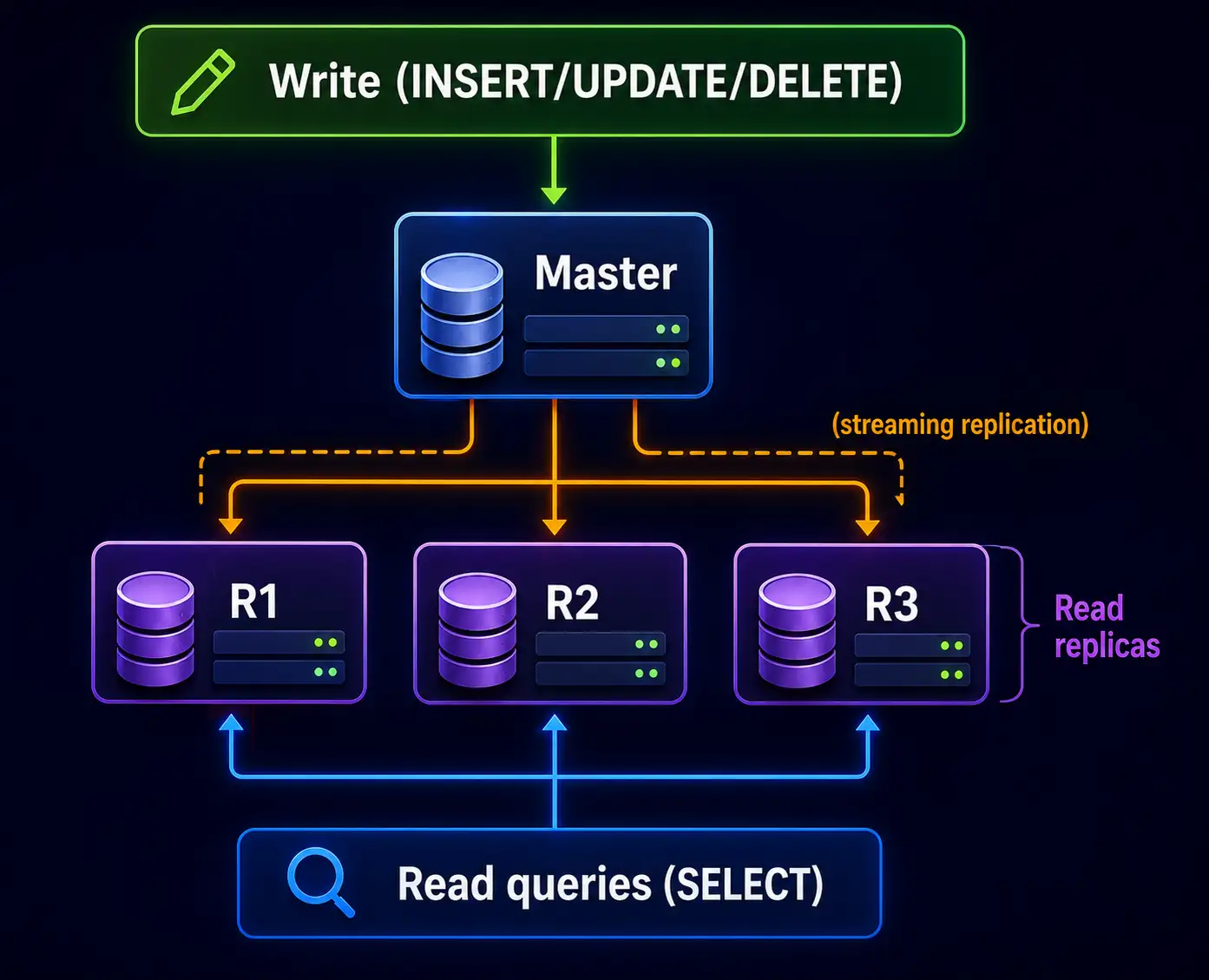
Read replicas – read-only copies of your main database (master)। Writes sirf master par hote hain, reads replicas se serve kiye jaate hain।
Kaise kaam karta hai?
- Master database handles all writes (INSERT, UPDATE, DELETE)
- Master async (or sync) mein changes replicas par propagate karta hai
- Application reads को replicas pe bhejta hai (load balancer ya connection string)
Example (PostgreSQL streaming replication):
Popular databases with read replicas:
- PostgreSQL (physical/logical replication)
- MySQL (native replication, Group Replication)
- MongoDB (replica sets)
- Amazon Aurora (auto-scaling read replicas up to 15)
3. Master-Slave Replication – कैसे काम करता है
| Aspect | Synchronous replication | Asynchronous replication |
|---|---|---|
| How | Master waits for replica to acknowledge write | Master writes and continues, replica catches up later |
| Consistency | Strong (replica always up-to-date) | Eventual (replica lag possible) |
| Write latency | Higher (depends on replica network) | Low |
| Data loss risk | None | Small window (if master crashes before replica sync) |
| Use case | Financial, where no data loss tolerated | Most web apps (social media, e-commerce) |
Implementation example (PostgreSQL streaming replication – async by default)
Master config (postgresql.conf):
conf
wal_level = replica
max_wal_senders = 10
Replica config (recovery.conf):
conf
primary_conninfo = 'host=master_ip port=5432 user=replicator'Application logic:
// Write to master
await db.master.query('INSERT INTO users ...');
// Read from replica
const users = await db.replica.query('SELECT * FROM users');
4. Read Replicas ke Pros and Cons
Pros of read replicas:
| Benefit | Explanation |
|---|---|
| Read scalability | Reads horizontally scalable – jitne replicas utni read capacity |
| Master load reduced | Master sirf writes handle karega – better write performance |
| Simple to implement | Many cloud databases provide one-click read replicas |
| No application rewrite | Bus connection string change – reads to replica endpoint |
| Fault tolerance | Replicas can be promoted to master if master fails |
Cons of read replicas:
| Drawback | Explanation |
|---|---|
| Stale reads (eventual consistency) | Replication lag ke kaaran replica outdated हो सकता है (milliseconds to seconds) |
| Write bottleneck remains | Master single point of write – write scaling nahi hoti |
| Replication lag | Network latency ya replica slow हो तो lag बढ़ सकता है |
| Cost | Extra servers (replicas) – cost increases |
| Write conflicts | Not an issue because writes only on master |
💡 Recommendation: Read replicas first scaling step hai – implement before sharding। 80% applications, read replicas sufficient hoti hain।
5. Sharding (Horizontal Partitioning) – Writes Ko Scale Karein
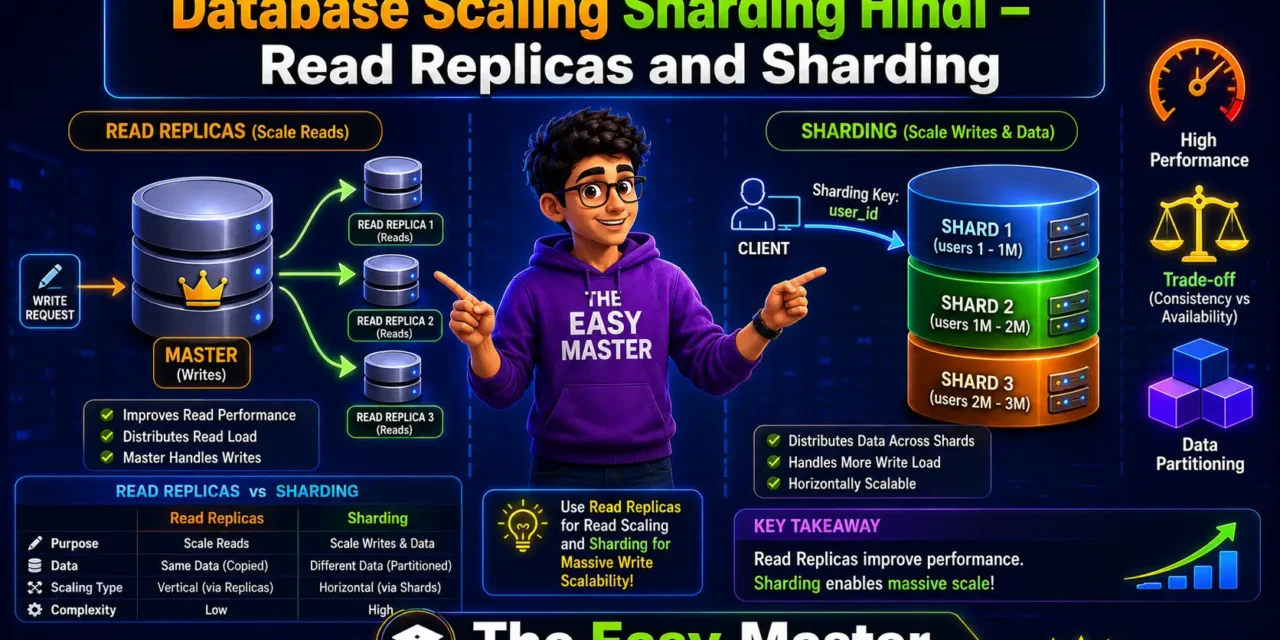
Sharding (horizontal partitioning) – large table को multiple smaller tables (shards) में split karna, each shard on different database server।
Goal: Write scalability + read scalability (if queries within shards)।
Sharding example: Users table को user_id ke base par shards में बांटा:
| Shard | user_id range | Server |
|---|---|---|
| Shard 1 | 1 – 1,000,000 | db1.example.com |
| Shard 2 | 1,000,001 – 2,000,000 | db2.example.com |
| Shard 3 | 2,000,001 – 3,000,000 | db3.example.com |
Kaise query karte hain?
- Shard key choose karo (e.g.,
user_id,customer_id) - Application ya middleware compute karta hai ki kaun sa shard
- Query sirf us shard par execute hoti hai
function getShardForUser(userId) {
  if (userId <= 1_000_000) return dbShard1;
  if (userId <= 2_000_000) return dbShard2;
  return dbShard3;
}
6. Sharding Strategies – Range, Hash, Directory, Consistent Hashing
6.1 Range-based Sharding
Data को value range ke hisaab से partition karte hain (e.g., dates, IDs)।
Example: Orders table order_date ke hisab se shard:
- Shard1: Jan-Mar 2025
- Shard2: Apr-Jun 2025
- Shard3: Jul-Sep 2025
Pros: Simple, range queries efficient (e.g., get orders between dates)।
Cons: Hotspots – recent data wala shard zyada active हो सकता है। Skew possible – uneven distribution।
6.2 Hash-based Sharding
Shard key ka hash function apply karte hain, then hash(key) % num_shards।
Pros: Uniform distribution, no hotspots।
Cons: Range queries inefficient (across shards), adding/removing shards changes mapping (resharding painful)。
6.3 Directory-based Sharding
Lookup table maintain karte hain jo key को shard ID map kare।
Pros: Flexible – shard key independent, easy to move shards。
Cons: Lookup table itself single point, performance overhead।
6.4 Consistent Hashing
Popular in distributed databases (Cassandra, DynamoDB)।
Pros: Adding/removing shards ke time sirf 1/n keys move hoti hain (not all)。
Cons: Implementation complex।
6.5 Recommendation
- Range sharding – time-series data, logs
- Hash sharding – most OLTP applications (user_id, customer_id)
- Directory sharding – small scale, custom needs
- Consistent hashing – large scale, dynamic clusters
7. Sharding ke Pros aur Cons
Pros of sharding:
| Benefit | Explanation |
|---|---|
| Write scalability | Writes distributed across shards – no single master bottleneck |
| Read scalability | Reads also distributed – if queries within single shard |
| Fault isolation | Ek shard down se baaki shards unaffected |
| Smaller indexes | Per shard indexes smaller – faster queries |
| Geo distribution | Shards different regions mein – low latency local data |
Cons of sharding:
| Drawback | Explanation |
|---|---|
| Complex application logic | Which shard to query? Joins across shards impossible or slow |
| Cross-shard transactions | ACID transactions across shards difficult (2PC, compensate) |
| Rebalancing / resharding | Shards add/remove karne par data move karna complex |
| No foreign key constraints | Across shards foreign keys not possible |
| Schema changes hard | Alter table on all shards |
💡 Sharding is a last resort – only when read replicas and vertical scaling are exhausted।
8. Read Replicas vs Sharding – Comparison Table
| Aspect | Read Replicas | Sharding |
|---|---|---|
| Scales | Reads | Writes + Reads |
| Complexity | Low | High |
| Data distribution | Full copy on each replica | Partitioned across shards |
| Write bottleneck | Still on master | Distributed (no single master) |
| Query across all data | Easy (any replica) | Hard (scatter-gather) |
| Consistency | Eventual (stale reads possible) | Strong within shard, weak across |
| Joins | Full support | Only within shard, cross-shard difficult |
| Cost | Linear (each replica full data) | Lower per GB (each shard holds fraction) |
| When to use | Read-heavy, write-light apps | High write throughput, huge data volume |
| Examples | News sites, blogs, social feeds | Instagram (user posts), Uber (trips), Twitter (tweets) |
Decision tree:
Is write throughput the bottleneck?
    │
    ├── No → Start with read replicas
    │
    └── Yes → Can you vertical scale master further?
                 │
                 ├── Yes → Upgrade master (vertical)
                 │
                 └── No → Need sharding
9. Scaling Journey – Single DB to Sharding (Roadmap)
Most applications follow this database scaling path:
Phase 1: Single database (vertical)
- One server (master) handles both reads and writes
- Good for < 10,000 writes/day, < 100,000 reads/day
- Cost low, simple
Phase 2: Add read replicas (horizontal for reads)
- Master handles writes, replicas handle reads
- Use load balancer to distribute reads
- Good for high read-to-write ratio (e.g., 10:1 or higher)
- Simple to implement, low risk
Phase 3: Scale master vertically
- When writes increase, upgrade master CPU/RAM
- Temporary solution until hardware limit
Phase 4: Sharding (horizontal for writes)
- When write master reaches limit (>50,000 writes/sec? depends)
- Split data across many shards
- Complex but necessary for hyper-growth
- Use consistent hashing or range sharding
Phase 5: Multi-region / geo-distribution
- Shards distributed globally
- Write in local region, replicate across
- For truly global apps (Facebook, Google)
Real data point: Most startups never need sharding. Instagram used single PostgreSQL instance for first 100 million users with read replicas। Later, they moved to sharded architecture。
10. Real-World Examples – Instagram, Uber, Twitter
10.1 Instagram – From Single DB to Sharding
- 2010-2012: Single PostgreSQL instance (user data, photos)
- 2012-2013: Read replicas for feeds
- 2014 onwards: Sharded by
user_idacross thousands of PostgreSQL shards using custom middleware (partitioned by user hash) - Key lesson: Optimize queries, use read replicas first, sharding when unavoidable।
10.2 Uber – Sharded MySQL (Schemaless)
- Early days: Single PostgreSQL
- Growth: Moved to MySQL with read replicas
- Hyper-growth: Built custom sharding layer – split data by city/region (range sharding)
- Trip data sharded by city ID – queries mostly within city।
10.3 Twitter – Sharded Tweets
- Tweets sharded by
tweet_id(hash sharding) - Timeline generation: Fan-out on write (write to all followers’ timeline lists)
- Complex sharding logic – many services have different shard keys。
Key takeaway: Sharding always comes with application complexity – design shard key carefully based on query patterns。
11. Common Mistakes (aur Unka Solution!)
| Mistake | Why it’s wrong | Solution |
|---|---|---|
| Premature sharding | Complexity without need, wasted engineering effort | Start with read replicas, vertical scaling; only shard when absolutely necessary |
| Choosing wrong shard key | Hotspots or cross-shard queries common | Choose key that evenly distributes and matches common queries (e.g., user_id) |
| Ignoring cross-shard queries | Queries that need data from multiple shards slow, complex | Design schema to avoid cross-shard joins; duplicate data if necessary |
| No plan for resharding | Adding shards later becomes nightmare | Use consistent hashing or leave slack (over-shard initially) |
| Not handling replication lag | Read replica stale data leads to user confusion | Use session stickiness or read-after-write consistency where needed |
| Synchronous replication for all replicas | Write latency high, availability reduced | Use async for most, sync only for critical shards |
| No monitoring of replica lag | Replicas may fall behind without alert | Monitor seconds_behind_master, alert when > threshold |
| Foreign keys across shards | Not supported; data integrity issues | Enforce integrity at application level; denormalize |
12. Best Practices – Production-Level Tips
✅ Start simple, scale as needed – Don’t start with sharding। Use read replicas first।
✅ Choose shard key that evenly distributes data – Avoid monotonically increasing keys (like auto-increment) with range sharding – causes hotspots।
✅ Make sharding transparent at application layer – Use a data access layer / ORM that handles shard resolution।
✅ Always monitor replication lag – Set alerts if lag > configured threshold (e.g., 5 seconds)।
✅ Use separate connection pools for writes vs reads – Master connection for writes, replicas for reads।
✅ Implement read-after-write consistency if needed – After critical write, read from master not replica।
✅ Test failover scenarios – What happens when master fails? Promote replica, application reconnect।
✅ For sharding, over-shard initially – Create more shards than needed (e.g., 256 logical shards) to leave room for growth।
✅ Consider cloud managed services – AWS Aurora (auto-scaling replicas), Google Spanner (automatic sharding), CockroachDB (distributed SQL)।
✅ Backup and restore across shards – Coordinate backups; restore must handle all shards consistently।
13. Resources – Cheat Sheet & Practice Prompts
Sharding vs Read Replicas Cheat Sheet
| Situation | Action |
|---|---|
| Reads high, writes low | Add read replicas |
| Writes high, master CPU 90% | First: upgrade master vertical, then consider sharding |
| Single server can’t hold all data | Sharding (horizontal) |
| Need strong consistency for reads (financial) | Read from master or synchronous replica |
| User data: ~100M users | Shard by user_id (consistent hash) |
| Time-series logs | Range sharding by date |
Sharding Key Selection Tips
| Good shard key | Bad shard key |
|---|---|
| user_id (high cardinality) | country (low cardinality) |
| customer_id (even distribution) | created_date (hotspot latest) |
| order_id (random enough) | status (only few values) |
Practice Prompts
Beginner:
- PostgreSQL master + two read replicas setup करो (using Docker Compose)। Write query master pe, read replicas pe queries bhejo। Lag monitor karo।
Intermediate:
- Range-based sharding simulate karo – users table को 3 shards में बाँटो (IDs 1-1000, 1001-2000, 2001-3000)। Shard resolution function likho। Query example: find user by ID – shard select karo and fetch।
Advanced:
- Hash-based sharding with consistent hashing implement karo (using virtual nodes)। Add/remove nodes simulate karo and track how many keys remap। Compare with simple modulo sharding।
14. FAQ
Q1: Read replicas aur caching mein kya antar hai?
Read replicas database level scaling – full query capability, but might have stale data। Caching (Redis) stores specific query results, extremely fast, but limited to pre-computed data। Often used together – cache before hitting replicas।
Q2: Sharding karne ke baad joins kaise handle karein?
Avoid cross-shard joins। Design such that related data resides in same shard (co-locate). Otherwise, application layer scatter-gather or duplicate data across shards (denormalize)।
Q3: Synchronous replication kab use karein?
When zero data loss critical (finance, payments) and network latency low। Otherwise, use async with monitoring।
Q4: Replication lag kam kaise karein?
- Use faster network / same AZ
- Optimize replica hardware
- Use parallel replication (MySQL)
- Shard writes – each shard master has less write load
Q5: Kya NoSQL databases automatically sharding provide karte hain?
Haan – MongoDB (auto-sharding), Cassandra (consistent hashing), DynamoDB (partition key)。SQL databases require manual sharding or middleware (Vitess, Citus)।
Q6: Sharding ke baad schema change kaise karein?
One shard at a time rolling update। Use online schema change tools (gh-ost, pt-online-schema-change) that support sharded environment। Or use maintainance window if acceptable downtime।
15. Conclusion – Ab Aapki Baari!
Bahut badhiya! Aapne aaj seekh liya:
✅ Database scaling sharding Hindi – read replicas aur sharding complete guide
✅ Read replicas – reads ko scale karte hain, simple, eventual consistency
✅ Master-slave replication – sync vs async
✅ Sharding (horizontal partitioning) – writes ko scale karte hain, complex
✅ Sharding strategies – range, hash, directory, consistent hashing
✅ Read replicas vs sharding – comparison, decision matrix
✅ Scaling journey – single DB → read replicas → vertical master → sharding
✅ Real-world examples – Instagram, Uber, Twitter
✅ Best practices aur common mistakes
Database scaling ek journey है – pehle simple solutions (read replicas) try karo, complexity tabhi introduce karo jab necessary ho। Most applications never need sharding!
Aapki challenge: Ek simple application design karo (e.g., user posts) जहाँ read traffic high है। पहले read replicas implement करो। Phir assume karo ki writes 100x बढ़ गए – ab sharding by user_id implement करो। Apni design explain karo comment mein।
Next topic kya chahiye?
- Caching Strategies – Redis, CDN, Application Caching?
- Message Queues – Kafka vs RabbitMQ?
- CAP Theorem Deep Dive with Real Systems?
Comment mein batao!
The Easy Master ke saath database scaling seekhte raho। Happy scaling! 🗄️🚀
Resources
- PostgreSQL Replication Guide (DigitalOcean)
- Sharding – MongoDB Official Docs
- Consistent Hashing – System Design Primer
- Scaling Instagram – Tech Blog (2022)
- Uber’s Move to Sharded MySQL (Uber Engineering)
Additional Resources
- Next.js App Router – Pages Router से क्या बदला? Complete Guide 2026
- Next.js Server Components – ‘use client’ कब और कहां Use करें
- Next.js Routing – Layouts, Dynamic Routes and Nested Routes 2026
- Next.js 16 New Features – Turbopack, Cache Components and proxy.ts
- Next.js Partial Prerendering – Static and Dynamic Content साथ में
- Next.js Authentication – JWT Session Management (App Router) 2026
- Next.js SEO – Metadata API and Image Optimization समझे 2026
- Next.js TypeScript – Full-Stack Type-Safe App कैसे बनाएं
- FastAPI Kya Hai? FastAPI Python Setup Aur Pehla API Hindi 2026
- FastAPI Path Parameters Hindi – शून्य से हीरो तक गाइड 2026
- Pydantic v2 Tutorial Hindi – Data Validation Master 2026
- FastAPI dependency injection Hindi – Code Reuse Ka Magic
- FastAPI Async Await Hindi – Non-Blocking Code 2026
- FastAPI PostgreSQL SQLModel Hindi – Async Guide 2026
- FastAPI JWT Authentication Hindi – Secure API Login
- FastAPI OpenAI Integration Hindi – AI Chatbot API 2026
- FastAPI Multi-Agent AI Hindi – LangGraph Zero to Hero
- FastAPI Deployment Hindi – Railway Zero to Hero 2026
- Docker Introduction in Hindi? Containers vs Virtual Machines
- Docker Images and Containers Hindi – Pehla Container
- Docker Compose Tutorial Hindi – Node.js + MongoDB
- Docker Volumes Networking Hindi – Data Persist कैसे करें
- Kubernetes Architecture Hindi – Pods, Nodes, Cluster
- Minikube Tutorial Hindi – Local Cluster कैसे बनाए
- Kubernetes Deployments Services Hindi – App Expose Karein
- K8s Ingress Tutorial Hindi – Domain se App Access
- Helm Kya Hai? – Kubernetes Charts Se App Deploy
- GraphQL Introduction in Hindi – REST vs GraphQL Comparison
- GraphQL Schema Tutorial Hindi – Types Queries Resolvers
- GraphQL Queries Mutations Hindi – Frontend Integration
- GraphQL Advanced Features Hindi – Fragments Aliases Variables
- Apollo Server GraphQL Node.js TypeScript Hindi – API Kaise Banaye
- Apollo Client React Hindi – GraphQL Queries Use Kaise Karein
- GraphQL Testing Supertest Hindi – Queries Mutations Test
- Integration Testing Node.js – Mock DB aur APIs Hindi
- E2E Testing Playwright – GraphQL Frontend Testing & CI/CD Hindi
- System Design Kya Hai? System Design Introduction in Hindi
- Vertical Horizontal Scaling Hindi – कब क्या Use करें
- Load Balancing Tutorial Hindi: Round Robin and Hashing
Views: 241