नमस्ते दोस्तों!
स्वागत है The Easy Master पर!
आपने REST API, GraphQL, Docker, Kubernetes, testing – sab seekh liya। अब आपकी app सही से काम कर रही है। Lekin एक सवाल – “Kya yeh app 1 million users handle kar sakti hai?” अगर एक साथ हजारों request aayein, toh kya server crash nahi hoga? Data consistent rahega? App ka response time slow toh nahi ho jayega?
Yahi वो problems हैं जो System Design solve karta hai।
Jab maine pehli baar system design सीखा, toh mujhe laga ki yah sirf big tech companies (Google, Amazon, Microsoft) ke interviews ke liye hai। Lekin जल्द ही realize hua ki har developer ko system design aana chahiye – chaah aap freelance kar rahe ho, startup mein kaam kar rahe ho, ya apna khud ka product bana rahe ho।
Is system design introduction in Hindi article mein main aapko sikhata hoon:
✅ System design kya hai? – Simple definition aur kyun zaroori hai
✅ Scalability – Vertical vs Horizontal scaling
✅ Availability – High availability, SLA, redundancy
✅ Reliability & Durability – Data loss se bachav
✅ CAP Theorem – Consistency, Availability, Partition tolerance
✅ Load Balancers – Traffic distribute kaise karein
✅ Caching – Redis, CDN, application caching
✅ Databases – SQL vs NoSQL, sharding, replication
✅ Microservices vs Monolith – Pros and cons
✅ Message Queues – Async communication (Kafka, RabbitMQ)
✅ Real-world examples – Design a URL shortener like bit.ly, WhatsApp, Netflix
✅ Common mistakes aur best practices
Chaliye system design ki duniya mein pehla kadam rakhte hain! 🚀🏗️
Table of Contents
1. System Design Kya Hai? – क्यों ज़रूरी है?
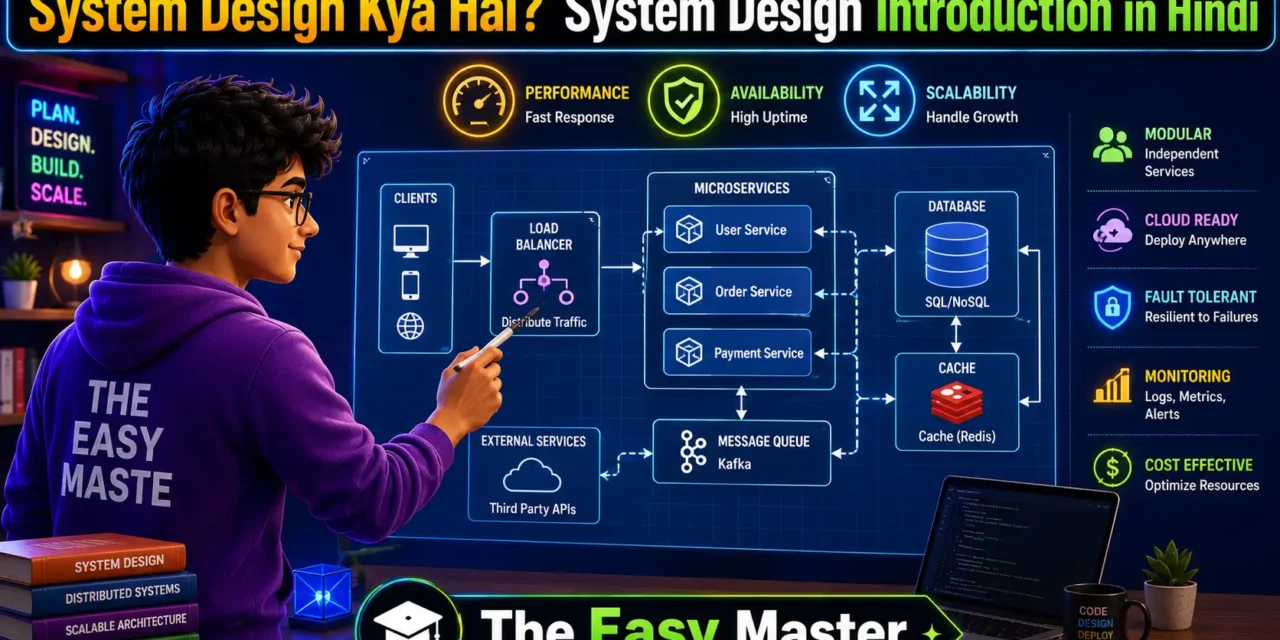
System design ek large-scale software system ke components (servers, databases, caches, load balancers, message queues, etc.) ko plan karne ki process hai jo requirements (traffic, data storage, availability, latency) को satisfy kare।
Simple definition:
System design batata hai ki aapka application कैसे बनेगा – kaun-kaun se components honge, unka aapas mein relation kya hoga, aur kaise woh load handle karenge jab users लाखों में हों।
Kyun seekhna zaroori hai?
| Reason | Explanation |
|---|---|
| Placements | FAANG (Facebook, Amazon, Apple, Netflix, Google) aur sabhi product-based companies mein system design round hota hai |
| Scalability | Aap aisi app design karna seekhoge jo 10 users se 10 million users tak scale kar sake |
| Reliability | App 24×7 available rahe, data loss na ho |
| Performance | Users को fast experience mile (low latency) |
| Cost efficiency | Zyada servers na lagao unnecessarily – optimize karo |
System design is the process of defining the architecture, components, modules, interfaces, and data for a system to satisfy specified requirements। It bridges the gap between business problems and technical solutions।
💡 Personal Experience: Maine ek baar ek blog platform banaya था। 100 users tak sab sahi था। Lekin jab 5000 users aaye, server crash हो गया। Tab maine system design seekhna shuru kiya aur samjha ki load balancer, caching, and database indexing kyun zaroori hai।
2. Scalability – App को कैसे बड़ा करें
Scalability system ki capacity hai to handle growing amount of traffic by adding more resources।
2.1 Vertical Scaling (Scaling Up)
Ek machine ko zyada powerful banana (more CPU, more RAM, faster disk).
| Pros | Cons |
|---|---|
| Simple – code change ki zaroorat nahi | Limit hoti है – ek machine infinite nahi bana sakte |
| No distributed system complexity | Single point of failure – agar machine down hui toh sab down |
2.2 Horizontal Scaling (Scaling Out)
Zyada machines (nodes) add karna, traffic को उनमें distribute karna।
| Pros | Cons |
|---|---|
| Virtually unlimited – jitne chाहे utne machines add kar sakte ho | Complex – distributed system challenges (data consistency, session management) |
| Fault tolerant – एक machine down ho toh bhi app chalta rahega | Load balancer ki zaroorat hoti hai |
Real example:
- Vertical scaling: Apne laptop ki RAM 8GB से 32GB upgrade karna
- Horizontal scaling: 10 लैपटॉप लगाकar एक network mein unpe app चलाना
Most modern systems (Google, Amazon, Netflix) use horizontal scaling।
3. Availability – App कभी Down Na Ho
Availability system ke operational रहने की probability है – matlab user request करे तो response mile।
High Availability (HA) ensure karti hai ki system downtime minimize ho। Availability को percentage (number of 9s) में measure karte hain:
| Availability % | Downtime per year | Downtime per month | Downtime per week |
|---|---|---|---|
| 99% | 3.65 days | 7.2 hours | 1.68 hours |
| 99.9% (three 9s) | 8.76 hours | 43.8 minutes | 10.1 minutes |
| 99.99% (four 9s) | 52.56 minutes | 4.38 minutes | 1.01 minutes |
| 99.999% (five 9s) | 5.26 minutes | 26.3 seconds | 6.05 seconds |
Kaise achieve karein high availability?
- Redundancy: Multiple servers (active-passive or active-active)
- Load balancer: Failover – एक server down ho toh traffic doosre server ko bhejo
- Database replication: Master-slave ya multi-master setup
- Geographic distribution: Multiple data centers (regions)
4. Reliability and Durability – Data Safe रखो
Reliability: System consistently sahi output produce kare without errors.
Durability: Data once stored रहेगा permanently – nahi delete hoga aur corrupt nahi hoga।
Examples:
- Reliable system: Har request का response आए, कोई data corrupt न हो।
- Durable system: Agar server crash ho जाए तो bhi database में सारा data safe रहे।
Techniques for reliability & durability:
- Replication: Data की copies multiple servers पर store करो
- Backups: Regular snapshots, offsite storage
- Checksums: Data corruption detect karna
- Transactions: ACID properties (Atomicity, Consistency, Isolation, Durability)
5. CAP Theorem – Consistency, Availability, Partition Tolerance
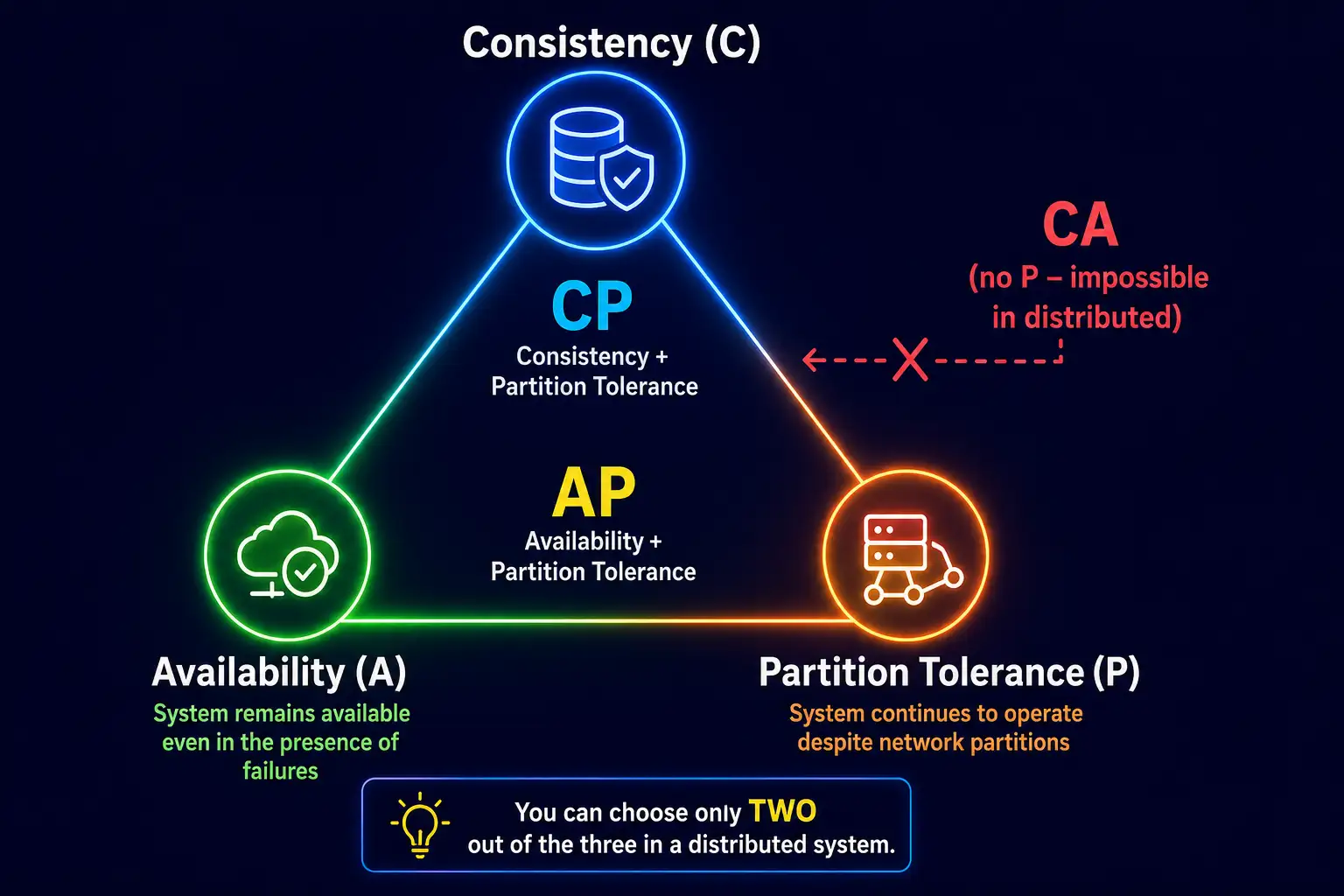
CAP theorem (Brewer’s theorem) batata hai ki distributed system में only two out of three guarantees simultaneously achieve kar sakte ho:
- Consistency (C) – Sabhi nodes same time par same data देखें (up-to-date)
- Availability (A) – Har request को (non-failing node से) response mile
- Partition Tolerance (P) – System kaam karta rahe despite network partition (nodes aapas mein baat nahi kar sakte)
CAP Theorem Diagram:
Real-world choices:
| System | Trades off | Explanation |
|---|---|---|
| CP (Consistency + Partition) | Availability | Banking systems – consistency important hai, thoda downtime acceptable |
| AP (Availability + Partition) | Consistency | Social media posts – availability important, eventually consistent |
| CA | Impossible in distributed systems | Partition tolerance mandatory है real world mein |
Example:
MongoDB default CP hai (strong consistency). Cassandra AP hai (eventual consistency)। Aapke use case के हिसाब से choose karo।
6. Load Balancers – Traffic Distribute Karna
Load balancer ek server hai jo incoming network traffic को multiple backend servers के बीच distribute karta है।
Types of load balancers:
| Type | Layer | How it works | Example |
|---|---|---|---|
| Layer 4 (Transport) | TCP/UDP | IP address aur port ke basis pe traffic route | HAProxy, NGINX (stream mode) |
| Layer 7 (Application) | HTTP/HTTPS | URL, headers, cookies ke basis pe route | NGINX, AWS ALB, Traefik |
Load balancing algorithms:
| Algorithm | How it works | Best for |
|---|---|---|
| Round robin | Requests को sequentially distribute | Equal capacity servers |
| Least connections | Connections कम हो उसे भेजो | Long-lived connections (WebSocket) |
| IP hash | Client IP ke hisaab से same server | Session persistence (sticky sessions) |
| Weighted | Different weights ke hisaab से distribute | Servers with different capacities |
Benefits:
- Scalability (add more servers)
- High availability (server fail ho तो traffic redirect)
- SSL termination
- Health checks (unhealthy servers ko remove)
7. Caching – Data Fast कैसे पहुंचे
Caching frequently accessed data को fast storage (like RAM) में store karta hai ताकि subsequent requests fast ho।
Levels of caching:
| Cache level | Where | Use case |
|---|---|---|
| Browser cache | Client side | Static assets (images, CSS, JS) |
| CDN (Content Delivery Network) | Edge locations | Geo-distributed static/content delivery |
| Reverse proxy cache | Server side (before app) | Response caching (Varnish, NGINX) |
| Application cache | Within app process | In-memory (Node.js memory, Python dictionary) |
| Distributed cache | Separate cache servers | Redis, Memcached (shared across app instances) |
Cache eviction policies (when cache full):
- LRU (Least Recently Used) – सबसे पुरानी access वाली item remove
- LFU (Least Frequently Used) – कम से कम बार access वाली remove
- TTL (Time to Live) – Fixed time ke baad expire
- FIFO (First In First Out) – Pehle aayi pehle gayi
Write strategies:
| Strategy | How it works | Pros | Cons |
|---|---|---|---|
| Cache-aside | App pehle cache check kare, miss ho तो DB से लेकर cache update | Simple, flexible | Cache miss pe slow |
| Write-through | Write DB and cache together | Strong consistency | Higher write latency |
| Write-behind (write-back) | Pehle cache write, then async DB | Very fast writes | Data loss risk |
Popular caching tools:
- Redis – In-memory data structure store (supports persistence)
- Memcached – Simple, distributed, no persistence
- CDN – CloudFront, Cloudflare, Fastly
8. Databases – SQL vs NoSQL, Sharding, Replication
8.1 SQL vs NoSQL
| Aspect | SQL (Relational) | NoSQL (Non-relational) |
|---|---|---|
| Schema | Fixed, predefined schema | Flexible, schema-less |
| Scaling | Vertical scaling (hard) | Horizontal scaling (easy – sharding) |
| ACID compliance | Strong ACID | BASE (Basically Available, Soft state, Eventually consistent) |
| Joins | Supported | Usually denormalized data |
| Examples | PostgreSQL, MySQL, Oracle | MongoDB, Cassandra, DynamoDB, Redis |
| Best for | Complex queries, transactions | High volume, rapid iteration, scalability |
When to use which?
- SQL: Banking, e-commerce orders, ERP – जहाँ consistency और transactions जरूरी
- NoSQL: Social media, IoT, real-time analytics, catalogs – जहाँ huge scale और flexible schema
8.2 Replication
Data की copies multiple servers पर store करना।
- Master-slave replication: Master writes, slaves reads। Read scalability।
- Multi-master replication: Multiple masters write। High write availability।
- Synchronous vs asynchronous replication: Consistency vs performance trade-off।
8.3 Sharding
Large database को smaller logical pieces (shards) में horizontally split karna – हर shard different server पर।
Sharding key choice critical: Agar poorly chosen (e.g., by user ID), toh hot spots create ho sakte hain।
Sharding strategies:
- Range-based: e.g., user_id 1-1000 on shard1, 1001-2000 on shard2
- Hash-based: Consistent hashing algorithm
- Directory-based: Lookup table
Challenge: Resharding – when you need to add more shards (data redistribution is complex)。
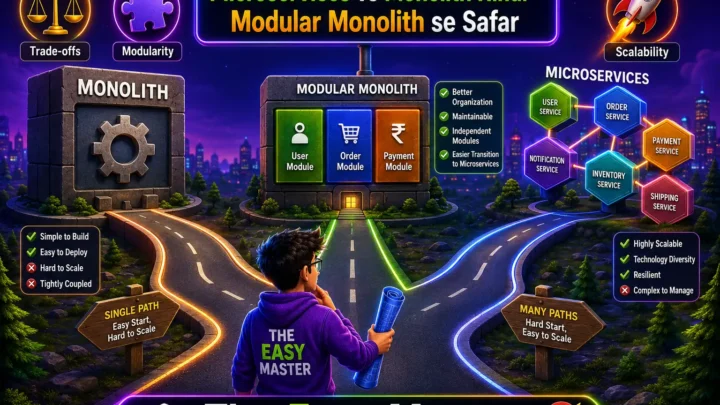
9. Microservices vs Monolith – कौनसा Better है?
| Aspect | Monolithic | Microservices |
|---|---|---|
| Definition | एक single deployable unit (one codebase) | Multiple small services, each independent |
| Scale | Scale entire app even if one component needs scale | Scale only required services independently |
| Development | Simple, faster startup | Complex, inter-service communication overhead |
| Deployment | One unit – risk: entire app fails if one bug | Independent – deploy only changed service |
| Technology stack | Single tech (e.g., Node.js) | Polyglot – each service can use different stack |
| Communication | In-memory function calls | HTTP/gRPC/message queues (network calls) |
| Testing | Easier (end-to-end) | Complex – each service + integration |
| Data management | Single database (often) | Database per service (decentralized) |
Monolith pros & cons:
| Pros | Cons |
|---|---|
| Simple to develop and deploy | Scaling inefficiency – scale everything even if one part needs |
| Low overhead (no network calls) | Codebase becomes huge, hard to maintain |
| Easier debugging and end-to-end testing | Single point of failure – any bug can crash entire app |
Microservices pros & cons:
| Pros | Cons |
|---|---|
| Independent scaling and deployment | Network latency, partial failures |
| Teams can work independently | Distributed transactions (hard) |
| Fault isolation – one service crash doesn’t kill all | DevOps complexity (monitoring, logging, tracing) |
Recommendation: Start with modular monolith – microservices ke benefits without complexity। Jab real scaling issues ho, tab break into microservices।
10. Message Queues – Async Communication
Message queue asynchronous communication mechanism hai जहाँ producers messages भेजते हैं and consumers receive them। This decouples components and improves reliability।
Use cases:
- Background processing (email sending, image processing)
- Event-driven architecture
- Load smoothing (spiky traffic को buffer karna)
- Decoupling services (producer/consumer dono independent)
Popular message brokers:
| Tool | Features | Use case |
|---|---|---|
| RabbitMQ | AMQP, flexible routing | Traditional messaging |
| Apache Kafka | High throughput, persistent log, replay | Streaming, event sourcing, data pipelines |
| Amazon SQS | Fully managed, simple queue | Serverless workloads |
| Redis pub/sub | Lightweight, fast | Real-time notifications |
Basic flow:
Producer → Queue → Consumer
           ↑
       (acknowledgment, retries, dead-letter)
11. Real-World System Design Examples
11.1 URL Shortener (like bit.ly / TinyURL)
Requirements:
- Shorten a long URL to short code (e.g.,
bit.ly/abc123) - Redirect short URL to original URL
- High write: millions of new URLs/day
- High read: billions of redirects/day
- Low latency (<100ms for redirect)
Key components:
- Web servers – handle incoming requests
- Key generation service – generate unique short code (base62 encoding, counter, or hash)
- Database – store mapping (short_code → long_url)
- Cache – Redis to cache popular URLs
- Redirect service – read from cache or DB and HTTP 301/302 redirect
Scale considerations:
- Database indexing on
short_codefor fast lookup - Use NoSQL (Cassandra / DynamoDB) for high write throughput
- CDN for static assets (none here)
- Rate limiting to prevent abuse
11.2 WhatsApp / Messenger
Requirements:
- One-to-one and group messaging
- Online/offline presence
- Message delivery/read receipts
- Store conversation history
- Billions of users, millions of concurrent connections
Key components:
- WebSocket servers – persistent connections for real-time delivery
- Message queue (Kafka) – buffer messages, ensure delivery
- User presence service – Redis for online status
- Blob storage – for media files (images, videos)
- Database – Cassandra or sharded MySQL for message history
Messages flow:
- User A sends message → WebSocket server → Message queue → Delivery service → user B (persistent connection)
- For offline user: push notification via APNS/FCM
11.3 Netflix / YouTube
Requirements:
- Store and stream videos
- Recommendations
- User history, likes, comments
- Global scale (billions of hours streamed daily)
Key components:
- CDN – Open Connect (Netflix) / Google Edge Network (YouTube) – videos cached close to users
- Video processing pipeline – transcode videos to multiple resolutions/bitrates
- Metadata service – details about videos
- Recommendation service – ML models
- User data service – watch history, likes
High-level architecture:
- Upload service → Video processing cluster → CDN
- Client requests video → DNS points to nearest CDN endpoint
- CDN serves video if cached; else fetch from origin (data center)
Key takeaways:
- Use CDN for static/large content
- Async processing for video encoding
- Data partitioning by geography and content popularity
12. Common Mistakes (aur Unka Solution!)
| Mistake | Why it’s wrong | Solution |
|---|---|---|
| Premature microservices | Microservices se complexity badhti hai – overhead of network calls, distributed transactions | Start with modular monolith, split only when necessary |
| Ignoring database indexing | Queries slow, timeouts happen | Analyze query patterns and add appropriate indexes |
| No caching strategy | Database hits unnecessary, slow response, higher cost | Cache hot data (CDN, Redis) with proper invalidation |
| Single point of failure | Load balancer, database, or cache server crashes → entire system down | Add redundancy, failover, and health checks |
| Not considering eventual consistency | Users see stale data, frustration | Choose right consistency model for your use case; document expectations |
| Over-engineering | Too many technologies before need arises | Start simple, measure, then evolve |
| Ignoring monitoring & observability | No idea system slow or failing | Add metrics, logs, traces (Prometheus, Grafana, OpenTelemetry) |
| No disaster recovery plan | Data loss or prolonged downtime | Regular backups, multi-region replication |
13. Best Practices – Production-Level Tips
✅ Start with a clean architecture: Separate layers – presentation (API), business logic (services), data access (repositories).
✅ Design for failure: Assume everything can fail – network, database, cache, service. Add retries, timeouts, circuit breakers, fallbacks।
✅ Think about horizontal scaling from day one: Even if you start small, ensure architecture can scale horizontally (avoid stateful servers where possible)।
✅ Use idempotency keys for mutations: Prevents duplicate processing (important for payments, orders)।
✅ Add observability: Metrics (Prometheus), logging (ELK/Loki), tracing (Jaeger/Zipkin) – essential for debugging distributed systems।
✅ Monitor and alert: Set up dashboards and alerts for key metrics (latency, error rate, throughput, saturation)।
✅ Plan for data partitioning strategy early: Sharding key choose carefully – changing later is painful।
✅ Avoid chatty APIs: Batch requests, use GraphQL or bulk endpoints to reduce network overhead।
✅ Always have a rollback plan: Feature flags, blue-green deployments, canary releases।
✅ Document architecture decisions: ADRs (Architecture Decision Records) help future maintainers understand “why”。
💡 Personal Experience: Main ek startup mein backend architect था – humne microservices adopt kar liye initially, lekin deployment aur debugging itni complex ho gayi ki productivity गिर गई। Baad mein humne modular monolith में switch kiya aur performance 10x better हुई। Tab se main hamesha caution के saath distributed architecture choose karta hoon।
14. Resources – Cheat Sheet & Practice Prompts
System Design Concepts Cheat Sheet
| Concept | Key points |
|---|---|
| Scalability | Vertical (up) vs Horizontal (out) – prefer horizontal |
| Availability | % uptime, redundancy, failover, SLAs |
| Consistency | Strong vs Eventual – CAP theorem trade-offs |
| Load balancer | Layer 4 (TCP) vs Layer 7 (HTTP), algorithms (round robin, least connections) |
| Caching | CDN, reverse proxy, distributed (Redis), eviction policies (LRU, TTL) |
| Database | SQL (ACID, joins) vs NoSQL (scale, flexible), sharding, replication |
| Message queue | Async, decoupling, Kafka for streaming, RabbitMQ for classic queue |
Practice Prompts
Beginner:
- Ek simple blog platform design karo – users, posts, comments। Initially monolith। How would you scale when traffic grows?
Intermediate:
- Design a URL shortener (like bit.ly) – discuss database schema, key generation, caching, redirect performance। What happens when you have billions of redirects per day?
Advanced:
- Design a real-time chat system (like WhatsApp) with 1 billion users। Include message delivery, read receipts, online/offline presence, and media sharing। Draw architecture diagram and explain trade-offs।
15. FAQ
Q1: System design aur software architecture mein kya antar hai?
System design low-level components (APIs, databases, caches) पर focus karta hai, जबकि software architecture high-level structure (modules, patterns, quality attributes) पर। Often terms used interchangeably, but system design tends to be more focused on scalability, reliability, and distributed systems।
Q2: Kya main system design bina real experience ke seekh sakta hoon?
Haan – case studies, open source projects, और mock interviews से seekh sakte ho। Learn by doing – try to design a small system (e.g., URL shortener) and write down architecture, then iterate।
Q3: FAANG interviews mein system design round mein kya puchte hain?
Design a system like Twitter, YouTube, Uber, WhatsApp, URL shortener, distributed key-value store, etc. Focus on trade-offs, not just components।
Q4: Microservices kab use karein aur kab avoid karein?
Use microservices when: (1) Team size large (2) Need independent deployments (3) Different technology stacks needed। Avoid when: (1) Small team (2) Simple app (3) No need for complex scaling।
Q5: CAP theorem mein partition tolerance mandatory kyun hai?
Distributed network mein partition (packet loss, node unavailability) inevitable hai। So you must choose CP or AP; CA is impossible in real distributed systems।
Q6: Caching invalidation problem kya hai?
Cache update karna mushkil hota hai jab underlying data change ho। Common strategies: TTL (time-based expiration), write-through, event-driven invalidation (pub/sub), or use cache versioning।
16. Conclusion – Ab Aapki Baari!
Bahut badhiya! Aapne aaj seekh liya:
✅ System design introduction in Hindi – complete beginner’s guide
✅ Scalability – vertical vs horizontal scaling
✅ Availability – 9’s, redundancy, failover
✅ Reliability & durability – data persistence, ACID/BASE
✅ CAP theorem – consistency, availability, partition tolerance trade-offs
✅ Load balancers – layer 4/7, algorithms, health checks
✅ Caching – CDN, Redis, eviction policies, write strategies
✅ Databases – SQL vs NoSQL, sharding, replication
✅ Microservices vs monolith – pros, cons, migration
✅ Message queues – async processing, Kafka, RabbitMQ
✅ Real-world examples – URL shortener, WhatsApp, Netflix
✅ Best practices and common mistakes
System design ek journey hai – jitna zyada real systems ka analysis karoge, utna better design karoge।
Aapki challenge: Ek URL shortener system design karo – draw architecture diagram, list components, discuss database schema, caching, and scalability concerns। Apna design comment mein share karo (text ya link)।
Next topic kya chahiye?
- Designing a Chat System (like WhatsApp)?
- Designing a Social Media Feed (like Twitter/Instagram)?
- Designing a Video Streaming Platform (like YouTube)?
Comment mein batao!
The Easy Master ke saath system design seekhte raho। Happy designing! 🚀🏗️
Resources
- System Design Primer – GitHub
- High Scalability – Real Case Studies
- CAP Theorem Explained (TutorialsPoint)
- How WhatsApp Scales – Facebook Engineering (2023)
- Netflix’s Content Delivery Architecture (2024)
Additional Resources
- Next.js App Router – Pages Router से क्या बदला? Complete Guide 2026
- Next.js Server Components – ‘use client’ कब और कहां Use करें
- Next.js Routing – Layouts, Dynamic Routes and Nested Routes 2026
- Next.js 16 New Features – Turbopack, Cache Components and proxy.ts
- Next.js Partial Prerendering – Static and Dynamic Content साथ में
- Next.js Authentication – JWT Session Management (App Router) 2026
- Next.js SEO – Metadata API and Image Optimization समझे 2026
- Next.js TypeScript – Full-Stack Type-Safe App कैसे बनाएं
- FastAPI Kya Hai? FastAPI Python Setup Aur Pehla API Hindi 2026
- FastAPI Path Parameters Hindi – शून्य से हीरो तक गाइड 2026
- Pydantic v2 Tutorial Hindi – Data Validation Master 2026
- FastAPI dependency injection Hindi – Code Reuse Ka Magic
- FastAPI Async Await Hindi – Non-Blocking Code 2026
- FastAPI PostgreSQL SQLModel Hindi – Async Guide 2026
- FastAPI JWT Authentication Hindi – Secure API Login
- FastAPI OpenAI Integration Hindi – AI Chatbot API 2026
- FastAPI Multi-Agent AI Hindi – LangGraph Zero to Hero
- FastAPI Deployment Hindi – Railway Zero to Hero 2026
- Docker Introduction in Hindi? Containers vs Virtual Machines
- Docker Images and Containers Hindi – Pehla Container
- Docker Compose Tutorial Hindi – Node.js + MongoDB
- Docker Volumes Networking Hindi – Data Persist कैसे करें
- Kubernetes Architecture Hindi – Pods, Nodes, Cluster
- Minikube Tutorial Hindi – Local Cluster कैसे बनाए
- Kubernetes Deployments Services Hindi – App Expose Karein
- K8s Ingress Tutorial Hindi – Domain se App Access
- Helm Kya Hai? – Kubernetes Charts Se App Deploy
- GraphQL Introduction in Hindi – REST vs GraphQL Comparison
- GraphQL Schema Tutorial Hindi – Types Queries Resolvers
- GraphQL Queries Mutations Hindi – Frontend Integration
- GraphQL Advanced Features Hindi – Fragments Aliases Variables
- Apollo Server GraphQL Node.js TypeScript Hindi – API Kaise Banaye
- Apollo Client React Hindi – GraphQL Queries Use Kaise Karein
- GraphQL Testing Supertest Hindi – Queries Mutations Test
- Integration Testing Node.js – Mock DB aur APIs Hindi
- E2E Testing Playwright – GraphQL Frontend Testing & CI/CD Hindi
Views: 264