नमस्ते दोस्तों!
स्वागत है The Easy Master पर!
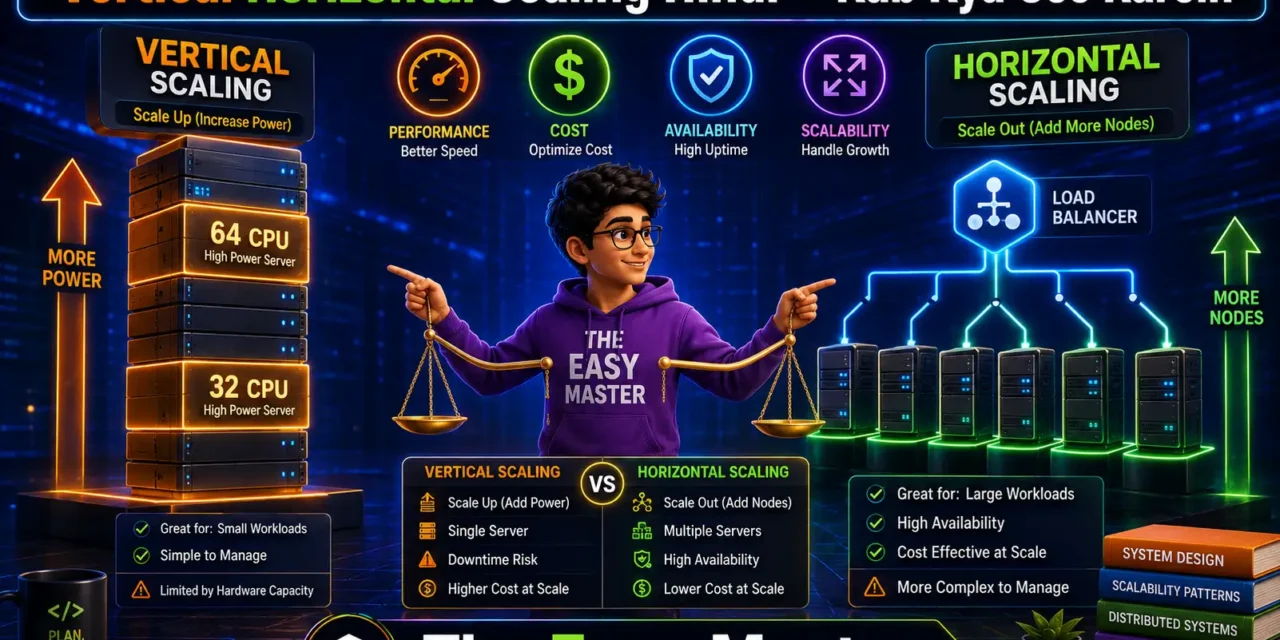
System design की दुनिया में सबसे पहला और सबसे important सवाल होता है – “Apni application ko kaise scale करें?” आपका app successful हो रहा है, users बढ़ रहे हैं, traffic बढ़ रहा है – लेकिन server धीमा हो रहा है, response time badh raha है, कभी कभी crash हो जाता है। अब क्या करें? Ek powerful server खरीदें? Ya multiple servers लगाएं?
यही Vertical vs Horizontal Scaling का dilemma है।
Jab maine pehli baar scaling सीखा, तो मुझे लगा कि बस एक बड़ा server ले लो – काम हो जाएगा। Lekin जब traffic और बढ़ा, तो उस एक server की भी सीमा आ गई। Tab maine horizontal scaling explore ki – aur समझ आया ki dono ke apne place हैं।
इस vertical horizontal scaling Hindi article में main aapko detail में समझाऊंगा:
✅ Vertical scaling (scaling up) kya hai – examples, pros, cons
✅ Horizontal scaling (scaling out) kya hai – examples, pros, cons
✅ Difference table – ek nज़र में सब clear
✅ Kab kya use karein? – Decision matrix, real scenarios
✅ Cost comparison – कब scaling up सस्ता, कब scaling out
✅ Database scaling – sharding, replication ke saath
✅ Real-world examples – e-commerce, social media, gaming
✅ Common mistakes aur best practices
Chaliye scaling ke do raste samajhte hain aur decide karte hain ki aapke app ke liye kaunsa sahi hai! 🚀📈
Table of Contents
1. Scaling Kya Hai? – Need for Scaling
Scaling system ki capacity increase karne ki process hai taaki woh increased load (more users, more data, more requests) को handle kar sake।
Kyun scaling zaroori hai?
| Reason | Explanation |
|---|---|
| Growing traffic | User base बढ़ता है, traffic बढ़ता है, server पहले जैसा perform नहीं कर पाता |
| High availability | Scaling se redundancy आती है – एक component fail हो तो दूसरा काम करे |
| Better performance | More resources → less latency, faster response |
| Cost efficiency | Right scaling strategy से zyada paisa nahi waste hota |
Scaling strategies do types ki hoti hain: Vertical और Horizontal। Ek server को “ऊपर” बढ़ाना, दूसरा “बाहर” फैलाना।
2. Vertical Scaling (Scaling Up) – Detail Mein
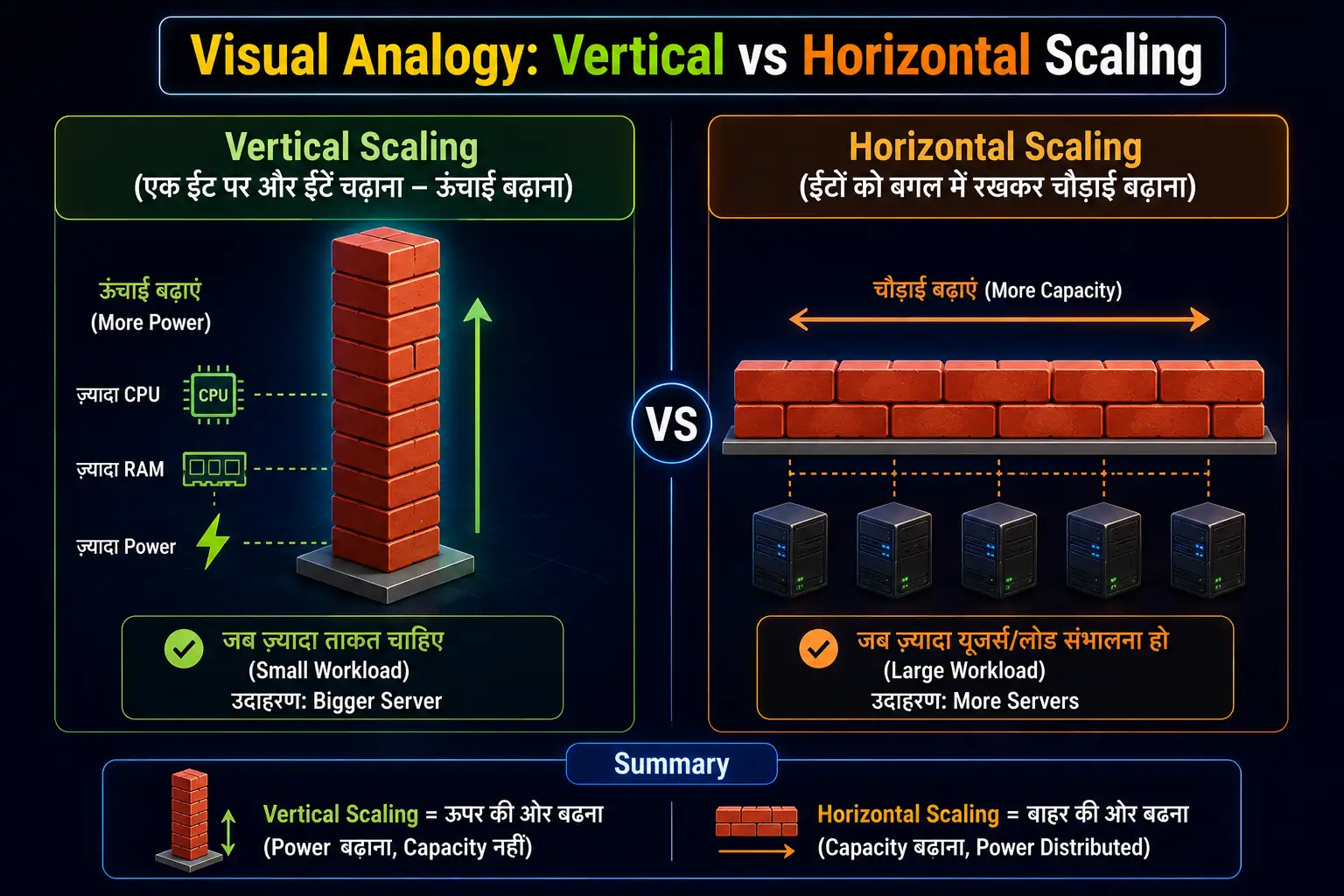
Vertical scaling ka matlab hai existing server/machine को more powerful banana – add more CPU, more RAM, faster storage, better network।
2.1 कैसे काम करता है?
Aap apne current server (say 4 vCPU, 8GB RAM) ko upgrade karte ho to 16 vCPU, 64GB RAM। Ek machine ki capacity increase कर देते हो।
2.2 Examples of Vertical Scaling
- Ek EC2 instance ko
t2.microसेt2.largeupgrade karna - Apne laptop ki RAM 8GB से 32GB upgrade karna
- Database server mein faster SSD lagana
- Redis cache server में zyada memory allocate karna
2.3 Pros of Vertical Scaling
| Pros | Explanation |
|---|---|
| Simple | No application code change required – bas server upgrade karo |
| No distributed system complexity | Single node – no network calls, no consistency issues |
| Better consistency | Single database – ACID transactions easy |
| Lower latency | No network hops – everything in-memory or local |
| Easier to manage | One server – less monitoring, less configuration |
2.4 Cons of Vertical Scaling
| Cons | Explanation |
|---|---|
| Physical limits | Ek machine infinite nahi ban sakti – max CPU/RAM limited (max 448 vCPU, 24TB RAM AWS) |
| Single point of failure | Server down → complete downtime |
| Downtime during upgrade | Upgrade ke liye server restart/pause karna padta hai |
| Cost grows exponentially | High-end hardware बहुत expensive होता है (non-linear pricing) |
| No geographic redundancy | Ek location – disaster recovery mushkil |
Real limit example: AWS Largest instance (u-24tb1.112xlarge) – 112 vCPU, 24TB RAM – cost ~$50/hour। Uske upar nahi जा सकते।
3. Horizontal Scaling (Scaling Out) – Detail Mein
Horizontal scaling ka matlab hai more machines add karna (multiple servers) and load को unke बीच distribute karna।
3.1 कैसे काम करता है?
Load balancer ke peeche aap 2 servers se 10 servers, 100 servers, 1000 servers add karte ho। Traffic distribute hota है।
3.2 Examples of Horizontal Scaling
- Web servers को auto-scaling group में add karna
- MongoDB sharding – data ko multiple nodes पर फैलाना
- Cassandra / DynamoDB – add nodes, data rebalances automatically
- Microservices – har service ke multiple instances
3.3 Pros of Horizontal Scaling
| Pros | Explanation |
|---|---|
| Virtually unlimited | Jitne chahe utne nodes add kar sakte ho (cloud elasticity) |
| High availability | Nodes fail ho तो traffic healthy nodes pe redirect |
| No downtime scaling | Add nodes while system is running – zero downtime |
| Cost-effective | Commodity hardware (many small servers) often cheaper than one giant server |
| Geographic distribution | Nodes alag regions mein – low latency for global users |
| Fault tolerance | Redundancy – ek node down se system down nahi |
3.4 Cons of Horizontal Scaling
| Cons | Explanation |
|---|---|
| Complex architecture | Load balancer, service discovery, distributed state management |
| Data consistency challenges | CAP theorem – choose between consistency vs availability |
| Network overhead | Calls between nodes → higher latency |
| Complex debugging | Distributed logs, tracing – issue track karna mushkil |
| State management | Sessions, caches – need external store (Redis) |
| Operational overhead | More servers → more monitoring, orchestration (Kubernetes) |
4. Vertical vs Horizontal – Comparison Table
| Aspect | Vertical Scaling (Up) | Horizontal Scaling (Out) |
|---|---|---|
| How | Upgrade existing machine | Add more machines |
| Limit | Finite (hardware limits) | Virtually infinite (cloud) |
| Downtime | Often required for upgrade | No downtime (add/remove nodes on the fly) |
| Complexity | Low | High (distributed systems) |
| Single point of failure | Yes | No (with redundancy) |
| Cost curve | Super-linear (expensive at high end) | Linear (pay for what you use) |
| Consistency | Easy (single node) | Hard (CAP trade-offs) |
| Data replication | Not needed (one node) | Required for HA |
| Geographic distribution | Not possible (single location) | Yes (multi-region) |
| Best for | Legacy apps, early-stage startups, stateful systems (single DB) | Modern cloud-native apps, high traffic, global user base |
Visual Analogy:
5. कब Vertical Scaling Use करें? – Scenarios
| Scenario | Why vertical is better |
|---|---|
| Early-stage startup | Simple, fast, no architectural changes. 1000-5000 users tak vertical scaling kaafi hai |
| Monolithic legacy app | Code rewrite expensive. Better to just upgrade server |
| Stateful databases (single master) | Many relational databases don’t easily support horizontal scaling. Vertical scaling easiest (e.g., PostgreSQL, MySQL with master-slave but writes still on master) |
| Low traffic / internal tools | Where HA not critical, occasional users |
| Temporary spike | Black Friday ke liye 1 day ke liye bigger instance |
| When code is not distributed-ready | No time to rewrite for statelessness, external sessions |
Example: Shopify initially vertical scaling use karta था single database server। Jab traffic बहुत बढ़ा, tab horizontal scale (sharding) par shift huye। But early years vertical was right choice।
6. कब Horizontal Scaling Use करें? – Scenarios
| Scenario | Why horizontal is better |
|---|---|
| High traffic web/mobile apps | Millions of concurrent users – one server impossible |
| Global user base | Multi-region deployment – users served from nearest location |
| Stateless services | Web servers, API gateways, microservices – easy to scale out |
| Read-heavy workloads | Add more replicas for reads (e.g., content delivery) |
| Seasonal/ unpredictable traffic | Auto-scaling – cloud में nodes add/remove automatically |
| High availability requirements | 99.99% uptime needs redundancy |
| Big data / analytics | Data distributed across clusters (Hadoop, Spark) |
| Microservices architecture | Naturally fits – each service scaled independently |
Example: Netflix uses horizontal scaling thousands of microservices across multiple AWS regions। Peak time पर 1000+ instances चलते हैं।
7. Hybrid Approach – Dono Ka Combination
Most real-world systems use both vertical and horizontal scaling at different layers।
Hybrid architecture example:
| Layer | Approach | Reason |
|---|---|---|
| Load balancer | Horizontal (add more LBs) | Redundancy, scale |
| Web servers (stateless) | Horizontal (auto-scaling groups) | Handle variable traffic |
| Cache (Redis) | Vertical (large memory) + Horizontal (cluster mode) | Memory bound, but also cluster |
| Database write (primary) | Vertical (powerful machine) | Consistency |
| Database read replicas | Horizontal (many slaves) | Scale reads |
| Static assets (CDN) | Horizontal (edge locations) | Geographic distribution |
Real example: E-commerce site
- Non-peak hours: 2 web servers (horizontal) + 1 DB server (vertical)
- Peak (sale day): Auto-scale web servers to 20 (horizontal), DB read replicas to 5 (horizontal), but write master still vertical (upgraded temporarily)
💡 Recommendation: Start with vertical scaling for simplicity. When you hit limits (or need HA), add horizontal scaling for stateless components. Scale databases vertically as long as possible; when write limit hits, consider sharding (horizontal) as last resort due to complexity।
8. Database Scaling – Vertical vs Horizontal
Databases often the hardest part to scale. Let’s analyze:
8.1 Vertical Database Scaling (Scaling Up)
Approach: Upgrade to a bigger server with more CPU, RAM, faster I/O.
Pros: Simple, full ACID transactions, complex queries still fast।
Cons: Expensive high-end machines, limited hardware ceiling, downtime for upgrade।
When to use: Early growth, moderate traffic (<50,000 writes/day), when complexity must be avoided।
8.2 Horizontal Database Scaling – Techniques
| Technique | How it works | Pros | Cons |
|---|---|---|---|
| Read replicas | Master handles writes, replicas handle reads | Improves read scalability easily | Stale reads (replication lag); writes still on single master |
| Sharding | Data partitioned across multiple database instances | Write scalable, virtually unlimited | Complex – cross-shard queries hard, rebalancing difficult |
| Multi-master replication | Multiple nodes can write | High write availability | Conflict resolution complex |
| Database as a service (e.g., Aurora, Cosmos DB) | Cloud manages horizontal scaling for you (automated) | Less operational burden | Vendor lock-in, cost |
8.3 Real-world database scaling journey
- Start: Single database server (vertical)
- Read traffic grows: Add read replicas (horizontal)
- Write traffic grows: Optimize queries, indexes, caching
- Write master hits limit: Scale master vertically (more CPU/RAM)
- Still need more: Sharding (complex, avoid until necessary)
Recommendation: Most applications never need sharding if designed well. Use caching, queueing, and efficient queries first। Sharding is the “nuclear option” for databases।
9. Real-World Examples – E-commerce, Social Media, Gaming
Example 1: E-commerce website (Amazon, Flipkart)
| Component | Scaling strategy |
|---|---|
| Product catalog | Horizontal – many web servers, CDN for static content |
| Search | Horizontal – Elasticsearch cluster |
| Shopping cart | Stateful? Usually stored in Redis cluster (horizontal scale) |
| Checkout (orders) | Vertical (single DB master) – because transactions critical, but with read replicas for order history |
| Inventory | Vertical + caching – to avoid overselling, but eventually sharded by product ID |
Example 2: Social media (Instagram, Twitter)
| Component | Scaling strategy |
|---|---|
| Feed generation | Horizontal – thousands of servers |
| User profiles | Sharded by user ID (horizontal) |
| Media storage | Horizontal – distributed file system / cloud storage |
| Notifications | Message queues (horizontal consumers) |
| Timeline ranking | Horizontal – compute clusters |
Example 3: Multiplayer game (backend)
| Component | Scaling strategy |
|---|---|
| Game server | Horizontal per match instance |
| Leaderboards | Redis sorted sets (vertical memory, but cluster mode) |
| Player profiles | Horizontal sharding |
| Auth service | Stateless horizontally scaled |
10. Cost Analysis – कब क्या सस्ता है?
Let’s compare cost for scaling a web application to handle 10x traffic (using AWS approximate pricing):
| Scale type | Initial setup | 10x traffic | Cost increase factor |
|---|---|---|---|
| Vertical | 1 large instance (~$1000/mo) | 1 extra-large instance (~$4000/mo) | 4x cost for 10x capacity (diminishing returns) |
| Horizontal | 2 medium instances (~$300/mo) | 20 medium instances (~$3000/mo) | 10x cost for 10x capacity (linear) |
However, horizontal gives HA, no downtime scaling, and better fault tolerance. For stateless web servers, horizontal is cheaper in long run because you use commodity instances (spot pricing).
For databases:
- Vertical: High-end machines expensive (e.g., RDS db.r5.24xlarge ~$15/hour)
- Horizontal (read replicas): Cheap to add read capacity (~$0.3/hour per replica)
Practical advice: Use vertical scaling as a quick fix for moderate growth. Use horizontal scaling for sustained growth beyond a single machine’s limits, especially for stateless components।
11. Common Mistakes (aur Unka Solution!)
| Mistake | Why it’s wrong | Solution |
|---|---|---|
| Only vertical scaling for long term | Hits hardware limit, no HA | Plan to move stateless components horizontal early |
| Horizontally scaling stateful services without careful design | Data inconsistency, split-brain problems | Use distributed consensus (Raft) or external state store (Redis) |
| Ignoring database connection limits | Horizontal web servers cause connection exhaustion on single DB | Use connection pooling, read replicas, or PgBouncer / ProxySQL |
| Not making web servers stateless before scaling out | Sessions broken, users randomly logged out | Move sessions to Redis / store cookies client-side |
| Premature horizontal scaling | Over-engineering, added complexity without need | Start vertical, monitor, scale out when needed |
| No auto-scaling for seasonal traffic | Pay for idle servers or crash during peaks | Implement auto-scaling based on metrics (CPU, memory, request count) |
| Not planning database sharding key early | Future sharding becomes nightmare | Choose shard key that distributes evenly and fits common queries |
12. Best Practices – Production-Level Tips
✅ Start with vertical scaling – 80% of applications never need horizontal scaling। Don’t overcomplicate early।
✅ Make your app stateless from day one – If possible, design APIs such that sessions stored outside (Redis, JWT) – then horizontal scaling effortless।
✅ Use a load balancer – Even with 2 servers, use a load balancer। Enables future scaling, health checks, SSL termination।
✅ Separate reads and writes – Use read replicas for databases; direct read queries to replicas, writes to master।
✅ Cache aggressively – Caching reduces load on both vertical and horizontal scaling – cheaper than adding servers।
✅ Monitor scaling triggers – Set up alerts for CPU, memory, request latency। Scale when metrics cross thresholds।
✅ Use cloud auto-scaling groups – AWS, GCP, Azure provide managed scaling – add/remove instances automatically based on demand।
✅ Plan for database sharding but avoid it – Sharding is complex। Only when you have exhausted vertical scaling (millions of writes/day)।
✅ Consider Kubernetes – K8s makes horizontal scaling of containers trivial (HPA – Horizontal Pod Autoscaler)।
✅ Test failure scenarios – Simulate node failures, see if system recovers।
13. Resources – Cheat Sheet & Practice Prompts
Scaling Decision Matrix
| Question | Answer → Action |
|---|---|
| Is traffic predictable? | No → horizontal (auto-scaling) |
| Is high availability required? | Yes → horizontal (redundancy) |
| Are you hitting hardware ceiling? | Yes → horizontal |
| Is your app stateful (database)? | Vertical first, then read replicas, then sharding |
| Is your app stateless (web)? | Horizontal recommended |
| Small budget? | Start vertical, then horizontal |
Key Numbers (Reference)
- Vertical limit (AWS) – Up to 448 vCPU, 24TB RAM
- Horizontal scaling sweet spot – 2 to hundreds of instances
- Database read replica limit – Typically up to 15 replicas (depending on DB)
- Sharding – Consider after 5-10 million writes/day (rule of thumb)
Practice Prompts
Beginner:
- Ek simple blog platform banaya hai – har day 5000 visitors। Initially vertical scaling। Jab traffic 50,000 visitors हो जाए, तो scale kaise karein? Write down plan.
Intermediate:
- E-commerce app design karo जहाँ cart, checkout, inventory, catalog components hain। Har component ke liye scaling strategy batao (vertical/horizontal) और justify करो।
Advanced:
- WhatsApp-like chat system design – presence, message delivery, media sharing। Horizontal scaling se N+1 problem kaise solve karoge? Sharding key for messages kya rakhein?
14. FAQ
Q1: Vertical aur horizontal scaling mein main difference kya hai?
Vertical – ek machine ko upgrade karo (CPU, RAM, disk) → simple but limited. Horizontal – multiple machines add karo, load balancer ke peeche → complex but unlimited scale and HA।
Q2: Kya vertical scaling permanent solution hai?
Nahi – eventually hardware limits aa जाएंगे। Long term के लिए horizontal scaling better hai, especially for stateless components।
Q3: Database scaling ke liye vertical better hai ya horizontal?
Start vertical (single master) क्योंकि ACID transactions और complex queries support easy। Jab write traffic limit hit हो, tab read replicas (horizontal) add करो। Zyada need हो तो sharding (horizontal) – but last resort।
Q4: Cloud mein horizontal scaling kaise implement karein?
Auto-scaling groups use karo (AWS EC2 Auto Scaling, Google Managed Instance Groups, Azure VM Scale Sets)। Stateless web servers को launch template से auto-scale करो based on CPU/memory metrics।
Q5: Stateful application (eg. multi-player game) horizontally kaise scale karein?
State ko external store (Redis, database) में move करो। Game server logic stateless बनाओ – player session data shared cache में। या virtual sharding – players को fixed game server instance से connect करो।
Q6: Scaling karne ke baad performance improve nahi hui – kya karein?
Check bottlenecks – maybe database connection limits, unoptimized queries, lack of indexes, or small network bandwidth। Profile application, find slowest component। Often, scaling alone not enough – need code optimization।
15. Conclusion – Ab Aapki Baari!
Bahut badhiya! Aapne aaj seekh liya:
✅ Vertical horizontal scaling Hindi – difference, pros, cons
✅ Vertical scaling (up) – simple, limited, single point of failure
✅ Horizontal scaling (out) – complex, unlimited, HA, fault-tolerant
✅ Comparison table – decision कब क्या use karein
✅ Hybrid approach – best of both worlds
✅ Database scaling journey – vertical → read replicas → sharding
✅ Real-world examples – e-commerce, social media, gaming
✅ Cost analysis – linear vs exponential
✅ Common mistakes and best practices
Ab aap confidently decide kar sakte ho ki aapke application ke liye kaunsa scaling approach sahi hai – vertical, horizontal, ya hybrid।
Aapki challenge: Apne current project (ya fictional) ke liye scaling plan likho। Mention components, expected traffic, and justification for choice। Apna plan comment mein share karo!
Next topic kya chahiye?
- CAP Theorem in Detail – Consistency, Availability, Partition Tolerance?
- Caching Strategies – Cache Aside, Write Through, Write Behind?
- Database Sharding – Deep Dive with Real Examples?
Comment mein batao!
The Easy Master ke saath scaling seekhte raho। Happy scaling! 🚀📊
Resources
- AWS EC2 Instance Types – Compare Vertical vs Horizontal
- Horizontal vs Vertical Scaling – MongoDB Architecture Guide
- Scalability – System Design Primer
- Read Replicas – AWS RDS Documentation
- Sharding vs Vertical Scaling (MongoDB Docs)
Additional Resources
- Next.js App Router – Pages Router से क्या बदला? Complete Guide 2026
- Next.js Server Components – ‘use client’ कब और कहां Use करें
- Next.js Routing – Layouts, Dynamic Routes and Nested Routes 2026
- Next.js 16 New Features – Turbopack, Cache Components and proxy.ts
- Next.js Partial Prerendering – Static and Dynamic Content साथ में
- Next.js Authentication – JWT Session Management (App Router) 2026
- Next.js SEO – Metadata API and Image Optimization समझे 2026
- Next.js TypeScript – Full-Stack Type-Safe App कैसे बनाएं
- FastAPI Kya Hai? FastAPI Python Setup Aur Pehla API Hindi 2026
- FastAPI Path Parameters Hindi – शून्य से हीरो तक गाइड 2026
- Pydantic v2 Tutorial Hindi – Data Validation Master 2026
- FastAPI dependency injection Hindi – Code Reuse Ka Magic
- FastAPI Async Await Hindi – Non-Blocking Code 2026
- FastAPI PostgreSQL SQLModel Hindi – Async Guide 2026
- FastAPI JWT Authentication Hindi – Secure API Login
- FastAPI OpenAI Integration Hindi – AI Chatbot API 2026
- FastAPI Multi-Agent AI Hindi – LangGraph Zero to Hero
- FastAPI Deployment Hindi – Railway Zero to Hero 2026
- Docker Introduction in Hindi? Containers vs Virtual Machines
- Docker Images and Containers Hindi – Pehla Container
- Docker Compose Tutorial Hindi – Node.js + MongoDB
- Docker Volumes Networking Hindi – Data Persist कैसे करें
- Kubernetes Architecture Hindi – Pods, Nodes, Cluster
- Minikube Tutorial Hindi – Local Cluster कैसे बनाए
- Kubernetes Deployments Services Hindi – App Expose Karein
- K8s Ingress Tutorial Hindi – Domain se App Access
- Helm Kya Hai? – Kubernetes Charts Se App Deploy
- GraphQL Introduction in Hindi – REST vs GraphQL Comparison
- GraphQL Schema Tutorial Hindi – Types Queries Resolvers
- GraphQL Queries Mutations Hindi – Frontend Integration
- GraphQL Advanced Features Hindi – Fragments Aliases Variables
- Apollo Server GraphQL Node.js TypeScript Hindi – API Kaise Banaye
- Apollo Client React Hindi – GraphQL Queries Use Kaise Karein
- GraphQL Testing Supertest Hindi – Queries Mutations Test
- Integration Testing Node.js – Mock DB aur APIs Hindi
- E2E Testing Playwright – GraphQL Frontend Testing & CI/CD Hindi
- System Design Kya Hai? System Design Introduction in Hindi
Views: 299