नमस्ते दोस्तों!
स्वागत है The Easy Master पर!
आपने system design ke concepts seekh liye – scaling, load balancers, caching, message queues, consistent hashing, microservices, sab kuch। अब समय है real-world system design case studies का – ताकि aap dekh सको ki ye concepts actually kaise use hote hain industry में।
Jab maine pehli baar system design interviews ki preparation shuru ki, toh mujhe lagta tha ki concepts to aate hain, but unhe real systems mein apply karna mushkil hai। Phir maine famous systems ke architecture padhe – TinyURL, WhatsApp, Instagram – aur sab kuch clear हो गया।
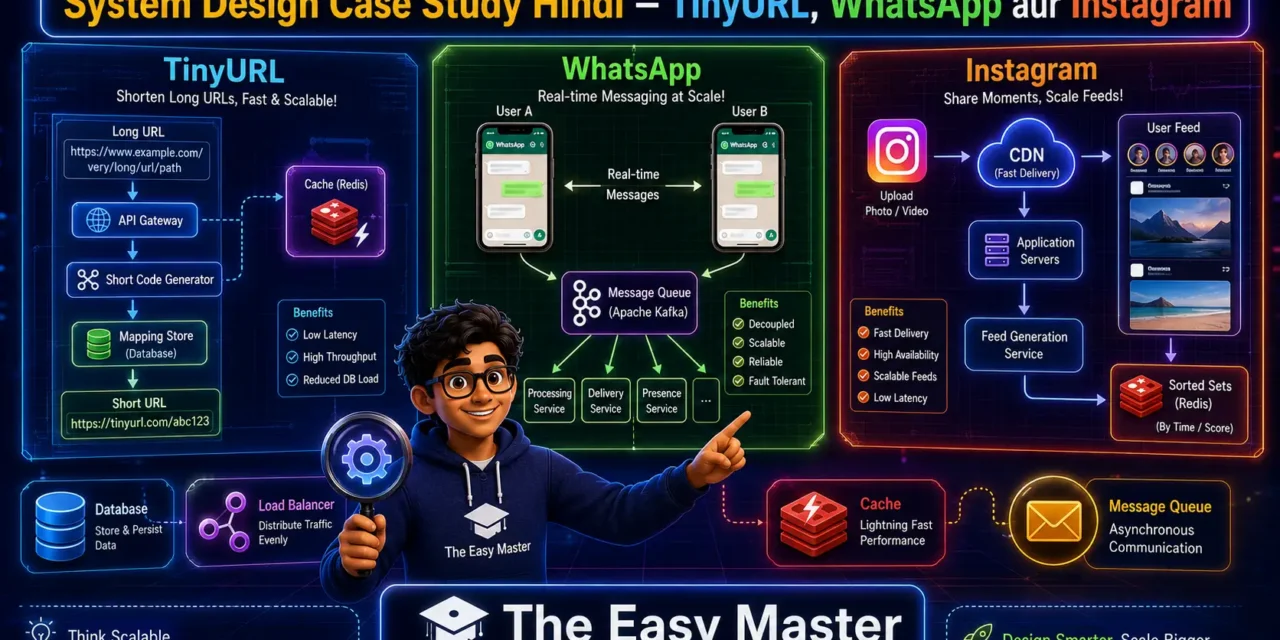
Is System design case study Hindi article mein main aapko teen important systems ke design samjhaunga:
✅ TinyURL (URL Shortener) – base62 encoding, caching, database design, redirection
✅ WhatsApp (Chat Messaging) – real-time messaging, WebSockets, message queue, offline storage
✅ Instagram (Social Media Feed) – feed generation, CDN, sharding, fanout, timeline
Har case study mein main cover karunga:
- Requirements (functional + non-functional)
- High-level architecture diagram (text description)
- Database schema
- Key design decisions with trade-offs
- Scaling strategies
Chaliye real-world system design ka safar shuru karte hain! 🚀🏗️
Table of Contents
Case Study 1: TinyURL (URL Shortener)
TinyURL, bit.ly, short.link जैसे services long URLs को short codes में convert karti hain।
Requirements
Functional requirements:
- User enters long URL → system returns short URL (e.g.,
short.ly/abc123) - Redirect short URL to original URL (HTTP 301/302)
- (Optional) Custom alias, analytics, expiry
Non-functional requirements:
- High availability (redirect should always work)
- Low latency (redirect < 50ms)
- Scalable to billions of URLs
- Read-heavy: redirects >> creation (1000:1 ratio)
Database Design
Two main approaches: Relational (SQL) or NoSQL. Let’s use SQL:
CREATE TABLE url_mapping (
    short_code VARCHAR(10) PRIMARY KEY,
    long_url TEXT NOT NULL,
    created_at TIMESTAMP DEFAULT CURRENT_TIMESTAMP,
    expiry_date TIMESTAMP,
    user_id INT (optional)
);
Indexes: short_code (PK), created_at for analytics.
Alternatively, use key-value store like Redis for hot URLs + persistent DB for all.
Key Generation Strategies
| Strategy | How it works | Pros | Cons |
|---|---|---|---|
| Base62 encoding | Counter incremental → encode to base62 (0-9a-zA-Z) | Simple, guaranteed unique | Sequence predictable, coordination needed |
| Random generation | Random string, check collision | Hard to guess | Collision risk, need retry |
| Hash (MD5/SHA) + truncate | Hash long URL, take first 6-8 chars | Deterministic (same URL → same code) | Collision possible, hash mismatch |
| Pre-generated keys | Precompute unique keys, assign on request | Fast, no collision | Wasted keys |
Recommended approach for scale: Use a distributed unique ID generator (Snowflake-like) then encode to base62। Coordination less, scalable।
High-Level Architecture
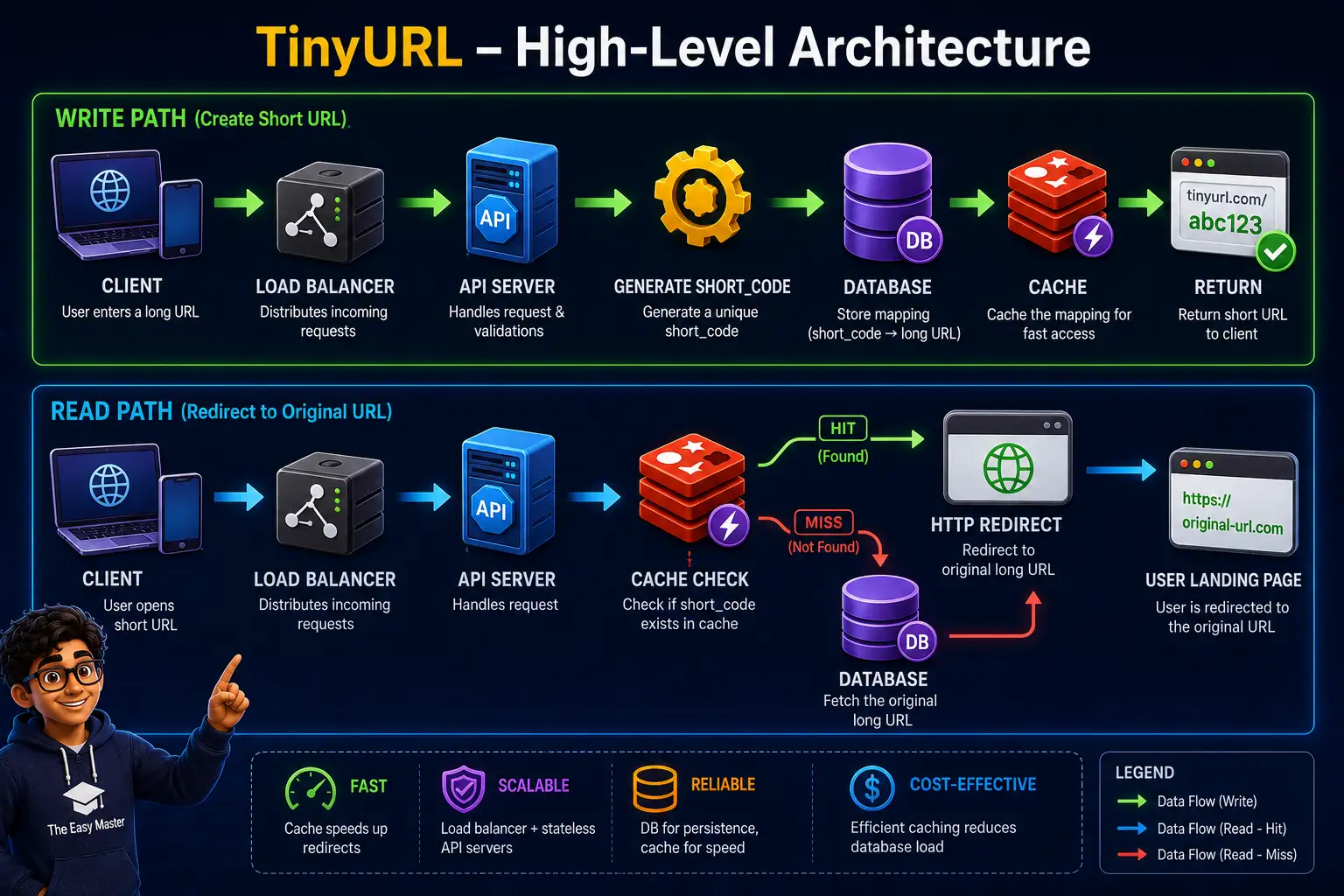
Components:
- Load balancer (NGINX/ALB) – distribute traffic
- API servers – stateless, horizontally scalable
- Cache – Redis for hot URLs (high read volume)
- Database – sharded by short_code (range or hash)
Redirect Flow with Caching
def redirect(short_code):
    # 1. Check cache
    long_url = redis.get(short_code)
    if long_url:
        return redirect(long_url, status=301)

    # 2. Cache miss - query DB
    row = db.query("SELECT long_url FROM url_mapping WHERE short_code = ?", short_code)
    if row:
        redis.setex(short_code, 3600, row.long_url)  # cache for 1 hour
        return redirect(row.long_url, status=301)
    else:
        return 404
Scaling Considerations
- Database sharding: By short_code (consistent hashing) – each shard handles range of codes।
- Cache cluster: Redis Cluster with consistent hashing – minimize cache miss storm on node change।
- Read replicas: For analytics queries (user stats).
- Rate limiting: Prevent abuse (same IP creating thousands URLs per second).
Key lesson: Redirect performance important है – use CDN for edge caching of popular short codes। TinyURL के redirects को CDN pe cache kiya जा सकता है (TTL = 1 day)।
Case Study 2: WhatsApp (Real-Time Chat)
WhatsApp एक real-time messaging platform hai जो WebSockets का use करता है।
Requirements
Functional requirements:
- One-to-one chat (text, media)
- Group chat (up to 1024 members)
- Online/offline presence
- Delivery receipts (single/double tick)
- Message history sync across devices
Non-functional requirements:
- Low latency (message delivery < 100ms)
- High availability (no downtime)
- Strong consistency for messages
- End-to-end encryption (optional, but assume for this case)
- Support billions of users
High-Level Architecture
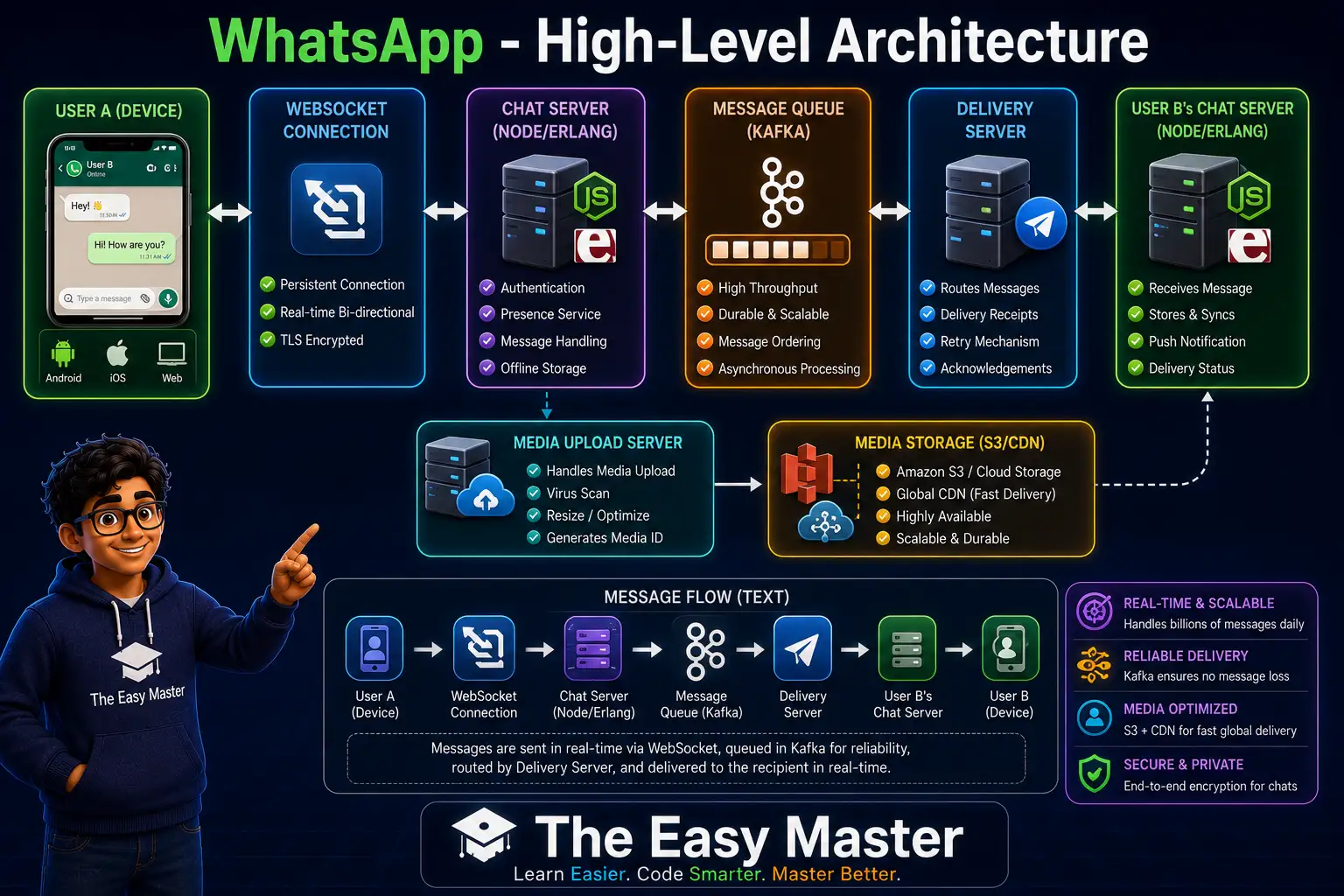
Components:
- Chat servers (stateless) – maintain WebSocket connections with online users. Use consistent hashing to map user to server for persistent connections।
- Message queue (Kafka) – decouple message ingestion from delivery, buffer during high load।
- Delivery servers – consume from queue, push to recipient’s chat server (if online) or store offline।
- Media storage – separate from messages (S3, CDN for images/videos/audio)。
- Presence service – Redis/etcd based, maintain online status per user।
Message Flow (Online User)
- User A sends message to User B via WebSocket to Chat Server A.
- Chat Server A writes message to Kafka (topic:
user_messages). - Delivery server consumes message, looks up User B’s online status (presence service).
- If User B online, Delivery server sends message to Chat Server B (via WebSocket if same server, or internal RPC if different).
- Chat Server B pushes message to User B’s device.
- Ack returns to User A.
Offline Storage
If User B offline, message stored in offline message database (Cassandra or sharded SQL). When User B comes online, fetch missed messages from offline storage and push.
Database Schema
User table:
User (user_id PK, phone_number, name, last_seen, profile_pic)Message table (sharded by user_id/date):
Messages (message_id PK, from_user_id, to_user_id, timestamp, content, media_url, delivered_flag, read_flag)For scalability, WhatsApp likely uses Cassandra or similar wide-column store with user_id as partition key, timestamp as clustering column।
Media Storage
- Images/videos stored in distributed file system / cloud storage (S3)。
- CDN for fast delivery across regions।
- Thumbnails generated and cached।
Scaling and Replication
- Chat servers – horizontally scalable, stateless, with consistent hashing for connection stickiness।
- Message queue – Kafka partitioned by user_id, ordered per user।
- Database – sharded by user_id, with replication for availability।
- Presence – Redis cluster with gossip protocol for eventual consistency।
WhatsApp tech stack (known): Erlang for chat servers (high concurrency), Ejabberd base, Mnesia database initially, now custom systems. 1 million concurrent WebSocket connections per server possible due to Erlang’s lightweight processes.
Key Design Decisions
| Decision | Reason |
|---|---|
| WebSockets over HTTP polling | Low latency, efficient for bidirectional messaging |
| Message queue (Kafka) | Decouple ingestion from delivery, buffer during spikes |
| Presence service (Redis) | Fast reads/writes, small data size |
| Media stored separately | Reduce message database size, serve via CDN |
| Offline storage in Cassandra | High write throughput, scalable |
Case Study 3: Instagram (Social Media Feed)
Instagram photo/video sharing platform। Key feature: feed (posts from followed users in reverse chronological order).
Requirements
Functional requirements:
- Post photos/videos with caption
- Follow/unfollow users
- Generate feed for each user (posts from followed accounts)
- Like, comment, search
- Direct messaging (similar to WhatsApp but less focus)
Non-functional requirements:
- High write throughput (post creates)
- High read throughput (scrolling feed)
- Low latency for feed load (< 200ms)
- Scalability to billions of posts
Feed Generation: Push vs Pull
Two strategies for generating user feed:
| Strategy | How it works | Pros | Cons |
|---|---|---|---|
| Push (Write fanout) | When user posts, push post to all followers’ inboxes (pre-computed feed) | Read fast (O(1) fetch) | Write amplification (celebrity post → millions of writes) |
| Pull (Read fanout) | When user loads feed, fetch posts from followed users on the fly (query + merge) | No write amplification | Read slow if many followed accounts |
| Hybrid | Push for normal users (< few thousand followers), Pull for celebrities | Best of both | Complexity |
Instagram uses hybrid (early days) then moved to more push with optimisation. Celebrity posts handled differently.
High-Level Architecture (Modern)
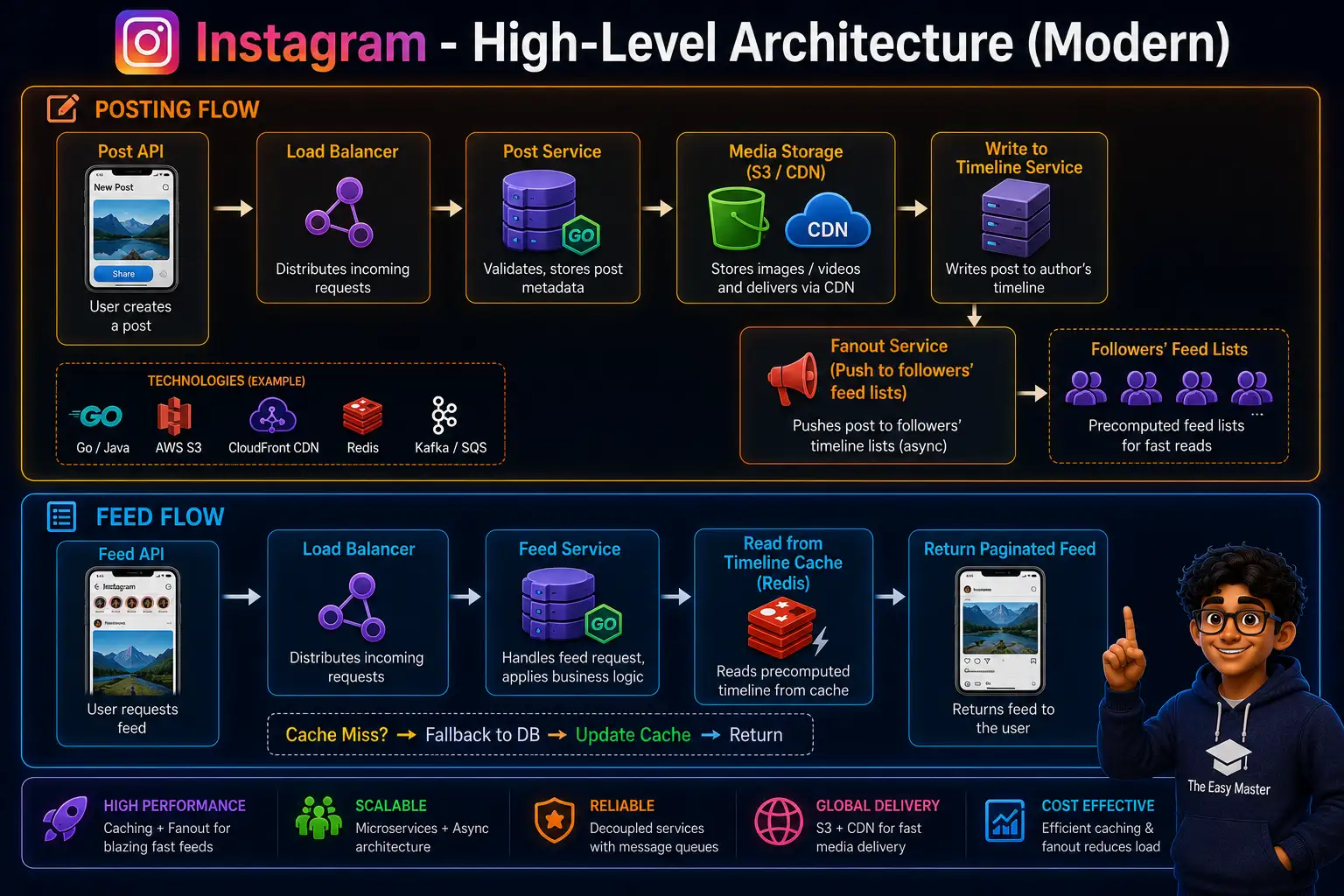
Components:
- Post Service – handles upload, stores metadata in sharded SQL.
- Media Storage – S3 + CDN for images/videos.
- Fanout Service – pushes post IDs to followers’ activity feeds (for non-celebrities).
- Timeline Cache – Redis sorted sets:
feed:{user_id}= sorted set of post IDs (by timestamp). - Feed Service – reads from timeline cache and optionally hydrates post details from object cache.
Database Sharding
Instagram sharded by user_id (hash-based). Each user’s posts, follows, likes stored in same shard.
Post table (sharded by user_id):
CREATE TABLE posts (
    post_id BIGINT PRIMARY KEY,
    user_id INT,
    image_url VARCHAR,
    caption TEXT,
    created_at TIMESTAMP,
    INDEX (user_id, created_at)
);
Follow table (sharded by follower_id):
CREATE TABLE follows (
    follower_id INT,
    followee_id INT,
    PRIMARY KEY (follower_id, followee_id)
);
Feed Generation Process (Push approach)
- User A posts a photo.
- Post Service inserts into
poststable. - Fanout Service fetches followers of User A.
- For each follower (except celebrities), Fanout Service adds
post_idtofeed:{follower_id}Redis sorted set with score = timestamp. - For followers with huge followee count (celebrities), fanout skipped; feed service will pull.
When user B loads feed:
- Feed Service reads
feed:{user_id}from Redis (sorted set, paginated by score). - Hydrates post details from object cache (Redis cache of posts) or DB misses.
- Returns JSON.
CDN for Media
- Images/videos uploaded to S3, distributed via CloudFront CDN.
- Thumbnails at multiple resolutions (precomputed).
- CDN caching headers with TTL long for media.
Scaling Lessons from Instagram
| Challenge | Solution |
|---|---|
| Write amplification | Hybrid fanout: push for normal users, pull for celebrities |
| Feed read latency | Precomputed feed in Redis sorted sets |
| Object storage | S3 + CDN |
| Database sharding | User_id based hash sharding |
| Photo upload spike | Async processing (queue) |
Comparisons and Key Takeaways
| System | Primary challenge | Key solution |
|---|---|---|
| TinyURL | Redirect speed, scalability | Base62 encoding, caching, CDN edge caching |
| Real-time, low latency | WebSockets, message queue, offline storage, consistent hashing for connection stickiness | |
| Feed generation, read/write ratio | Hybrid fanout, Redis timeline cache, CDN for media, sharding by user_id |
Common design patterns across all three:
- Horizontal scaling via stateless services + load balancers
- Caching (Redis) for hot data
- Sharding for databases (by short_code, user_id, etc.)
- CDN for static/media content
- Async processing with message queues for background tasks
- Consistent hashing for distributed caches (Redis Cluster)
Personal takeaway: Designing a scalable system is about trade-offs. TinyURL prioritizes read latency; WhatsApp prioritizes real-time messaging; Instagram balances write (post) and read (feed) using hybrid approach.
Resources – Cheat Sheet & Practice Prompts
System Design Interview Checklist
- Clarify requirements (functional & non-functional)
- Estimate scale (QPS, storage, bandwidth)
- Define data model (schemas)
- High-level design (components diagram)
- Detailed design (API, database, caching, load balancing)
- Identify bottlenecks and propose solutions
Common Components to Use
| Component | When |
|---|---|
| Load balancer | Distribute traffic across servers |
| API Gateway | Auth, rate limiting, routing |
| Cache (Redis) | Read-heavy data, session store |
| CDN | Static/media content, edge caching |
| Message queue (Kafka) | Async processing, decoupling |
| Database sharding | Scale writes, data size |
Practice Prompts
Beginner:
- TinyURL ka design draw karo on paper। Discuss database schema and key generation strategy। What if you need analytics per short URL?
Intermediate:
- WhatsApp design – explain message delivery when recipient is offline। How to implement “last seen” and typing indicators?
Advanced:
- Instagram feed – design celebrity (e.g., @cristiano) with 500M followers। How to avoid fanout explosion? Discuss pull-for-celebrity approach and caching strategies।
FAQ
Q1: TinyURL mein short code ka collision kaise handle karein?
Collision handle karne ke liye retry with new code या check before insert। Use pre-generated keys या distributed ID generator (Snowflake) + base62 ensures uniqueness।
Q2: WhatsApp mein message ordering kaise guarantee karein?
Each message gets a server-generated timestamp (or sequence number). Client uses this to order messages. For messages from same user, use a local sequence + server timestamp for ordering.
Q3: Instagram feed mein pagination kaise implement karein?
Redis sorted sets (ZREVRANGEBYSCORE) with timestamp as score। Client sends last fetched timestamp as cursor। Or use offset/limit but inefficient।
Q4: Celebrity posts ko fanout problem kaise solve karein?
For celebrities (millions followers), do NOT fanout. Instead, when user loads feed, fetch celebrity’s recent posts on demand and merge with non-celebrity precomputed feed। Cache celebrity posts aggressively।
Q5: TinyURL mein redirect ke liye 301 vs 302 status code?
301 (Moved Permanently) – browser caches redirect, good for performance, but hard to update analytics। 302 (Found) – not cached, good for tracking। Use 302 for tracking, 301 if you never need update।
Q6: WhatsApp group chat mein message broadcast kaise karein?
Group chat messages are delivered to all members. Instead of separate message per member, store one copy and fan-out pointers to each member’s inbox (or use a group feed like system). Consistent hashing to keep group messages together.
Conclusion – Ab Aapki Baari!
Bahut badhiya! Aapne aaj seekh liya:
✅ System design case study Hindi – TinyURL, WhatsApp, Instagram ke real architectures
✅ TinyURL – base62 encoding, caching, CDN, redirect flow
✅ WhatsApp – WebSockets, message queues, offline storage, presence service
✅ Instagram – feed generation (push vs pull), sharding by user_id, timeline cache (Redis sorted sets)
✅ Common patterns – load balancing, caching, sharding, async processing, CDN
In case studies se aapko idea ho gaya hoga ki real systems kaise design kiye jaate hain। Ab aap apni design interviews ke liye confident ho sakte ho।
Aapki challenge: Choose any one system (e.g., YouTube) and design it using the checklist. Draw architecture, database schema, and discuss trade-offs. Share in comments!
Next topic kya chahiye?
- Design YouTube/Netflix (Video Streaming)?
- Design Uber/Lyft (Ride Sharing)?
- Design Twitter (Social Feed with Search)?
Comment mein batao!
The Easy Master ke saath system design case studies seekhte raho। Happy designing! 🚀🏗️
Resources
- TinyURL System Design (GeeksforGeeks)
- WhatsApp System Design (InterviewBit)
- Instagram Feed System Design (High Scalability)
- Facebook Engineering Blog – Instagram Feed
- System Design Case Studies – GitHub Repo
Additional Resources
- Next.js App Router – Pages Router से क्या बदला? Complete Guide 2026
- Next.js Server Components – ‘use client’ कब और कहां Use करें
- Next.js Routing – Layouts, Dynamic Routes and Nested Routes 2026
- Next.js 16 New Features – Turbopack, Cache Components and proxy.ts
- Next.js Partial Prerendering – Static and Dynamic Content साथ में
- Next.js Authentication – JWT Session Management (App Router) 2026
- Next.js SEO – Metadata API and Image Optimization समझे 2026
- Next.js TypeScript – Full-Stack Type-Safe App कैसे बनाएं
- FastAPI Kya Hai? FastAPI Python Setup Aur Pehla API Hindi 2026
- FastAPI Path Parameters Hindi – शून्य से हीरो तक गाइड 2026
- Pydantic v2 Tutorial Hindi – Data Validation Master 2026
- FastAPI dependency injection Hindi – Code Reuse Ka Magic
- FastAPI Async Await Hindi – Non-Blocking Code 2026
- FastAPI PostgreSQL SQLModel Hindi – Async Guide 2026
- FastAPI JWT Authentication Hindi – Secure API Login
- FastAPI OpenAI Integration Hindi – AI Chatbot API 2026
- FastAPI Multi-Agent AI Hindi – LangGraph Zero to Hero
- FastAPI Deployment Hindi – Railway Zero to Hero 2026
- Docker Introduction in Hindi? Containers vs Virtual Machines
- Docker Images and Containers Hindi – Pehla Container
- Docker Compose Tutorial Hindi – Node.js + MongoDB
- Docker Volumes Networking Hindi – Data Persist कैसे करें
- Kubernetes Architecture Hindi – Pods, Nodes, Cluster
- Minikube Tutorial Hindi – Local Cluster कैसे बनाए
- Kubernetes Deployments Services Hindi – App Expose Karein
- K8s Ingress Tutorial Hindi – Domain se App Access
- Helm Kya Hai? – Kubernetes Charts Se App Deploy
- GraphQL Introduction in Hindi – REST vs GraphQL Comparison
- GraphQL Schema Tutorial Hindi – Types Queries Resolvers
- GraphQL Queries Mutations Hindi – Frontend Integration
- GraphQL Advanced Features Hindi – Fragments Aliases Variables
- Apollo Server GraphQL Node.js TypeScript Hindi – API Kaise Banaye
- Apollo Client React Hindi – GraphQL Queries Use Kaise Karein
- GraphQL Testing Supertest Hindi – Queries Mutations Test
- Integration Testing Node.js – Mock DB aur APIs Hindi
- E2E Testing Playwright – GraphQL Frontend Testing & CI/CD Hindi
- System Design Kya Hai? System Design Introduction in Hindi
- Vertical Horizontal Scaling Hindi – कब क्या Use करें
- Load Balancing Tutorial Hindi: Round Robin and Hashing
- Microservices vs Monolith Hindi – Modular Monolith se Safar
- Message Queues (RabbitMQ, Kafka) – EDA Samjhe Hindi
- Consistent Hashing Hindi – Distributed Caching & Sharding
Views: 485